FAQ
TL;DR: For weak LTE in “City of Rats,” the nearest LTE1800 BTS is ~6 km away; “You need an antenna at 800–900 MHz.” [Elektroda, matek451, post #16906565]
Why it matters: Picking the right band-focused MIMO antennas and aiming them correctly often multiplies LTE speeds in fringe areas.
This FAQ is for home users asking how to set an LTE antenna, what to buy, and how to aim it for faster, steadier internet.
Quick Facts
- Use LTE800-focused antennas (ATK‑10 or ATK‑20), not 1800–2600 MHz panels, for this location. [Elektroda, matek451, post #16906565]
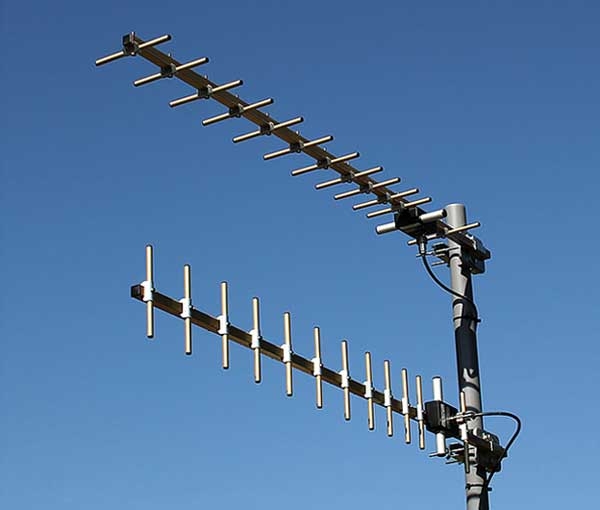
- Mount two antennas (MIMO 2×2): one horizontal, one vertical, stacked on the mast. [Elektroda, makosuu, post #16913523]
- Set your router/modem to “LTE only” (manual/rigid) before alignment. [Elektroda, Przemek52o, post #16906550]
- Aim and adjust both antennas together during tuning. [Elektroda, makosuu, post #16918046]
- Use mapa.gsm.poznan.pl to verify the serving BTS instead of generic maps. [Elektroda, matek451, post #16906565]
How do I choose the right LTE antenna band for my area?
Match the antenna to the band your BTS uses. In this thread’s location, Orange service comes from LTE800, so use 800–900 MHz antennas. Quoting the expert: “You need an antenna at 800–900 MHz.” Band‑mismatch is the top cause of low throughput despite good signal bars. [Elektroda, matek451, post #16906565]
Do I need one antenna or two for LTE MIMO?
Use two identical directional antennas for 2×2 MIMO. Mount one in horizontal polarization and the other vertical, spaced and aligned together. A single antenna limits speed and stability, especially on LTE800. “Antennas mount one above the other,” confirms the installer. [Elektroda, makosuu, post #16913523]
What specific antenna models worked for LTE800 here?
ATK‑10 and ATK‑20 are proven for LTE800 in this scenario. They deliver band‑appropriate gain without the trade‑offs of wideband panels. Pick a matched pair and proper cabling for MIMO. If you already bought 1800–2600 MHz panels, return or repurpose them. [Elektroda, makosuu, post #16913523]
How should I aim a dual‑antenna MIMO setup?
Mount both antennas on the mast and aim them together toward the serving BTS. Do not tune one at a time. Small angular changes can swing SINR and throughput. Lock the modem to LTE during alignment to prevent band/tech hopping. [Elektroda, makosuu, post #16918046]
Which tool can I use to tune and read LTE signal live?
Use TopNetInfo on a PC with your modem to monitor RSRP/RSRQ/SINR while you adjust. It helps you lock LTE and avoid fallbacks. Users in the thread aligned successfully with it after switching hardware. [Elektroda, dawid1346, post #16917360]
My phone shows LTE, but speed is stuck around 5 Mbps. What gives?
That often means wrong antenna band or poor MIMO setup. In the thread, HSDPA appeared instead of LTE with 5 Mb/s peak due to an 1800–2600 MHz antenna in an LTE800 area. Correcting antennas fixed it. [Elektroda, dawid1346, post #16906309]
Should I force the router to LTE only before testing?
Yes. Set preferred mode to “LTE only” (manual/rigid) to stop 3G/2G fallbacks during aiming and speed tests. Users reported immediate improvement once locked. If issues persist, ask your operator to refresh settings on your line. [Elektroda, Przemek52o, post #16906550]
How do I find the right BTS to point at?
Use mapa.gsm.poznan.pl to identify the LTE800 site covering your address, then aim accordingly. In the case discussed, LTE1800 was ~6 km away with a forest in the path, making LTE800 the practical target. [Elektroda, matek451, post #16906565]
What if I only have one ATK‑20 right now?
Order the second matching ATK‑20 for proper 2×2 MIMO. Mixing a single antenna with internal paddles reduces peak speed and reliability. “You need two, not three,” as the installer joked—just a matched pair. [Elektroda, makosuu, post #16915953]
How do I physically mount the two antennas for best results?
Stack them on the same mast, one element horizontal, the other vertical. Keep cables equal length. Tighten brackets after final peaking on SINR. This orthogonal polarization enables proper MIMO streams. [Elektroda, makosuu, post #16913523]
Quick 3‑step: how do I align my LTE antennas?
- Set router/modem to LTE‑only mode and connect TopNetInfo.
- Aim both antennas toward the chosen BTS; sweep slowly while watching SINR.
- Lock the best bearing, tighten mounts, and run speed tests to confirm. [Elektroda, Przemek52o, post #16906550]
I’m on T‑Mobile with an Archer MR600 near Jelcz‑Laskowice—what should I buy?
Choose a band‑focused LTE800 pair (e.g., ATK‑10/ATK‑20) if your serving site is LTE800. Wideband log sets work, but their gain on 800 MHz is lower. Verify the band first, then mount as a MIMO pair with H/V polarization. [Elektroda, makosuu, post #16913523]
What is MIMO in LTE, and why two antennas?
MIMO 2×2 uses two polarized streams to increase throughput and resilience. Two external antennas let the modem resolve multipath and raise spectral efficiency. Expect markedly better speeds than one antenna, especially on long‑range LTE800. [Elektroda, makosuu, post #16913523]
Any edge cases where even the right antenna underperforms?
Yes. Trees or a forest between you and an LTE1800 site can kill higher‑band links, making LTE800 the only viable option. Distance matters too; the cited LTE1800 site was ~6 km away with foliage blocking. [Elektroda, matek451, post #16906565]
How do I know the fix worked?
After switching to LTE800‑focused MIMO and aligning, users reported stable LTE and higher speeds. One user confirmed simply: “It works :) Thanks!” Always retest at peak hours to validate. [Elektroda, dawid1346, post #17184087]