
FAQ
TL;DR: If your Ideapad 320 lacks an optical-drive button, use a USB external DVD writer; many sell for "up to PLN 100." [Elektroda, KRY5PIN, post #16948809]
Why it matters: This FAQ helps Lenovo Ideapad 320 owners figure out whether a built-in DVD drive exists and what to do if it doesn’t.
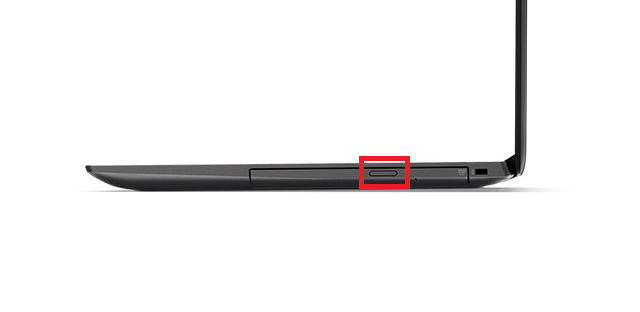
Quick Facts
- Many Ideapad 320 units ship without an internal DVD drive; the side bay can be a plastic plug. [Elektroda, Dziarski Hank, post #16948791]
- External USB DVD writers are a low-cost solution, often priced up to PLN 100. [Elektroda, KRY5PIN, post #16948809]
- If Device Manager shows only a disk under “Disk drives,” that’s your SSD/HDD, not a DVD drive. [Elektroda, KRY5PIN, post #16948801]
- Real optical drives have a physical eject button and a tiny emergency pinhole on the tray face. [Elektroda, kkknc, post #16948681]
- To check presence quickly, open “This PC/My Computer” and look for a DVD/CD icon. [Elektroda, KRY5PIN, post #16948661]
Where is the disk drive open button on a Lenovo Ideapad 320?
Most Ideapad 320 configurations don’t include an internal optical drive. The side “bay” you see is a non-functional plug, so there’s no eject button to find. If you need to use discs, connect a USB external DVD writer instead. “There is no drive, in its place you have a plug.” [Elektroda, Dziarski Hank, post #16948791]
How do I check in Windows if my laptop actually has a DVD drive?
Open This PC/My Computer and look for a DVD/CD drive icon. If you don’t see one, your system lacks a built-in optical drive. That quick check tells you whether Windows detects a drive without opening Device Manager or the chassis. [Elektroda, KRY5PIN, post #16948661]
Device Manager shows a “disk drive.” Is that my DVD drive?
No. In this context, “disk drive” refers to your storage drive (SSD/HDD). It does not indicate an optical DVD/CD device. The Ideapad 320 in the thread only had the SSD listed, which confused the user. “This disk drive in the device manager is the SSD.” [Elektroda, KRY5PIN, post #16948801]
What’s the simplest way to use DVDs with an Ideapad 320?
Buy a USB external DVD writer. It’s plug-and-play and avoids opening the laptop. Forum users note you can get one for up to PLN 100, which is a cost-effective fix compared to internal retrofits. [Elektroda, KRY5PIN, post #16948809]
Can I add an internal optical drive to the empty bay?
The thread recommends using an external USB DVD writer instead of attempting an internal retrofit. That route is simpler, cheaper (up to PLN 100), and avoids compatibility headaches. It solves disc playback and burning without modifying the chassis. [Elektroda, KRY5PIN, post #16948809]
What does the side “plug” on my Ideapad 320 actually do?
It’s a cosmetic blank that occupies the space where some laptops would have an optical drive. It has no eject mechanism and no electronics. That’s why you won’t find a button or emergency pinhole there. [Elektroda, Dziarski Hank, post #16948791]
How do I force-eject a stuck disc if my laptop has a drive?
Use the emergency pinhole on the drive face with a straightened paperclip.
- Power off the laptop.
- Insert the paperclip gently into the pinhole until the tray pops.
- Pull the tray to remove the disc.
Real drives include this pinhole and an eject button. [Elektroda, kkknc, post #16948681]
Why doesn’t Windows show a DVD drive on my Ideapad 320?
Because there isn’t one installed. The bay is a plastic plug, so Windows lists only storage like your SSD/HDD. As one expert put it, “There is no drive, in its place you have a plug.” [Elektroda, Dziarski Hank, post #16948791]
What should I buy to watch movies from discs on this laptop?
Choose a USB external DVD recorder/reader. It connects to a USB port and works for DVD playback and disc burning. Forum guidance highlights that suitable models cost up to PLN 100, making them a practical accessory. [Elektroda, KRY5PIN, post #16948809]
Why does Device Manager list a drive but I can’t find the eject button?
You’re seeing your storage drive in Device Manager. That entry does not confirm any optical hardware. If the side bay lacks a button and pinhole, it’s a plug, not a DVD drive. This confusion was clarified in the thread. [Elektroda, KRY5PIN, post #16948801]
Will not having a built-in DVD drive limit me for games or software installs?
Use downloadable installers or plug in an external USB DVD drive when a disc is required. That approach covers movie playback and legacy software without opening the laptop. It’s the recommended path in the thread due to low cost and simplicity. [Elektroda, KRY5PIN, post #16948809]
Does a real optical drive always have a physical button?
Yes. A laptop optical drive has an eject button on the faceplate and a tiny emergency release pinhole. If neither is present, the bay is a blank. “The drive usually has a button… and a keyhole for emergency opening.” [Elektroda, kkknc, post #16948681]
What did the original poster discover about their Ideapad 320?
They confirmed no built-in optical drive was present, only a side plug. They initially mistook the storage listing in Device Manager for an optical device, then accepted the external-drive solution. [Elektroda, skaaaaaaaa, post #16948804]
Is there a quick way to confirm without opening the chassis?
Yes. Check This PC/My Computer for a DVD/CD icon. Absence means no optical drive is installed. This check takes seconds and avoids any disassembly or risk. [Elektroda, KRY5PIN, post #16948661]

