How should I choose an external antenna for a Huawei B525 on T-Mobile when connection stability matters more than speed: LTE800 or an LTE1800 MIMO antenna?
Start with LTE800 for stability, because the thread reports the best signal parameters and good speeds on LTE800, while LTE1800NW is already clogged and LTE2600 is weaker but still usable [#16971264][#16971779] Force the B525 to LTE800 first and see whether the connection becomes stable enough without any external antenna [#16971812][#16971779] If you still want to buy an antenna, test LTE2600 in your exact direction first with a phone and Network Cell Info, so you can see the CID and signal parameters and decide whether an antenna for that band is worth it [#16971841] The advice also points out that band aggregation can help, especially LTE800 + 2600, but the main problem is likely overloaded T-Mobile BTSs rather than just weak signal [#16971688][#16971779]
AI summary based on the discussion. May contain errors.
T-Mobile Internet with Huawei B525 router. I need an external antenna because I have very big problems with link stability - it loses packets. This is the most important thing for me at the moment, speed is a secondary matter. The range inside the building jumps between 1 and 3 lines (out of 5).
Distance to BTS - 2.4 km.
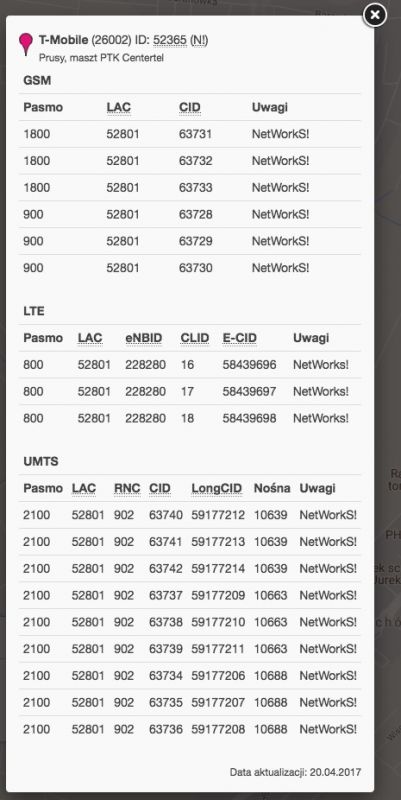
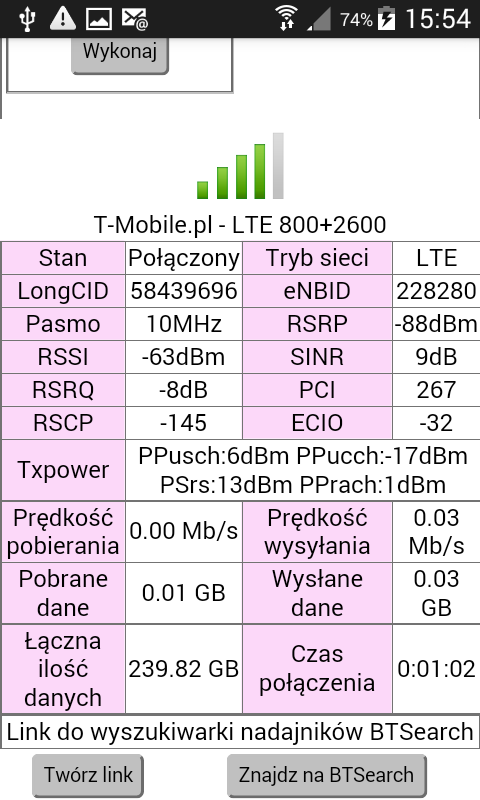
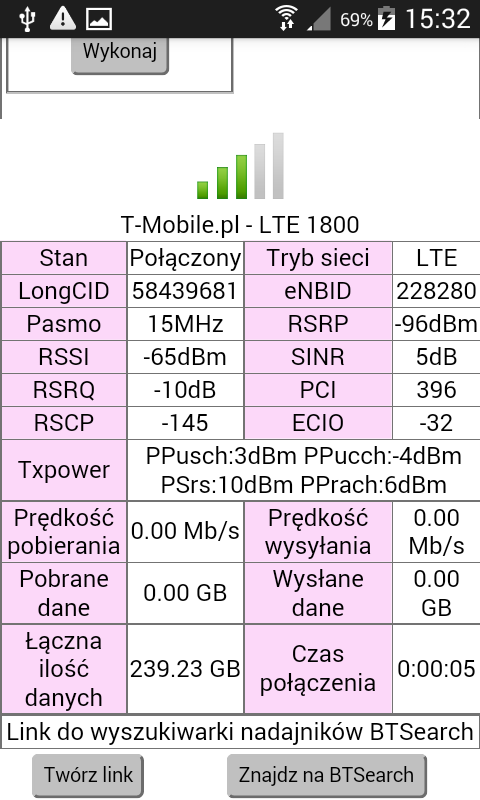
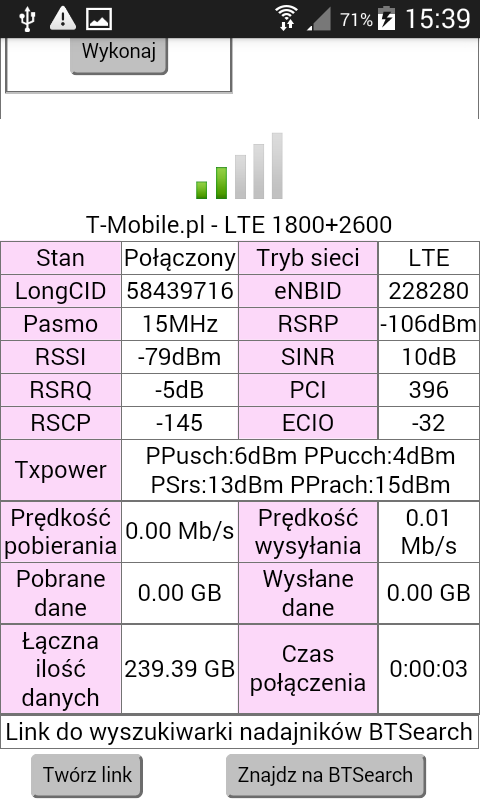
BTS parameters:
The question should I be guided by LTE 800 or buy a MIMO antenna for 1800?
The first application is LTE1800NW was already clogged. On LTE800 the best signal parameters and good speeds. On the LTE2600 the weakest but for them it's not bad speeds. Take the LTE2600 and LTE800 evening tests again. Tests at home or outside? How far to BTS Prussia? And at 2100MHz we check UMTS2100 and not LTE2100, T-Mobile does not use LTE2100. HSPA + DC operates on UMTS2100.
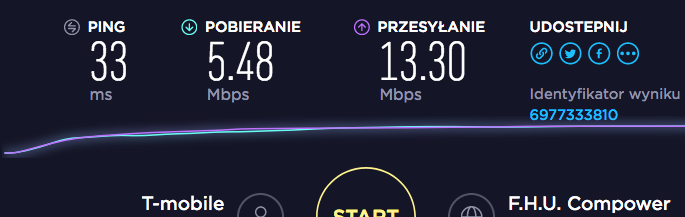
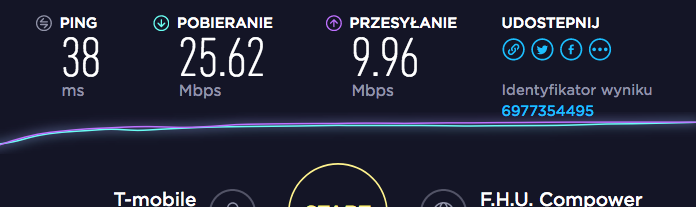
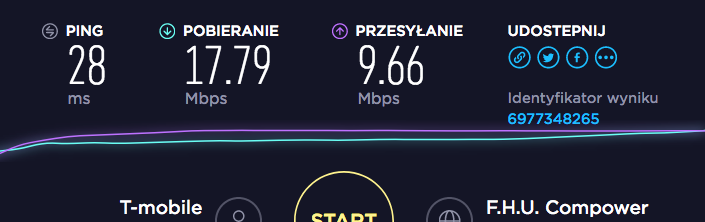
During the day, if the BTS is not overloaded, it can be pulled out 40-45 Mbps - in the evening it is about 10 Mbps. Unfortunately, there is still a problem with stability. Tests done at home, upstairs. It is exactly 2.4 km to BTS in Prussia.
Band locking and aggregation may improve stability
That's a nice lime, 3 LTE bands on BTS and 10Mbps in the evening. This bodes ill for the future. But that was to be expected, the T-mobile unlimited offer does its job. The network is starting to clog. From tomorrow http://gsmonline.pl/newsy/internet-domowy-tmobile-reklama-opinie and let it not be worse. Antenna stability and forcing a specific band, band aggregation will ensure. Common with Orange LTE1800NetWorks probably packed up to the max?
Well, if the campaign goes, I think it will be even worse. Let it be 10 in the evening, but at least stable. I definitely want an antenna - which in this case would be best suited (of course, MIMO)? How do you check this Orange LTE1800NetWorks? The last question - would you go to 800 or 800 + 2600?
I don't know, I'm not there. on LTE800 works well without an antenna. Signal parameters are good. On LTE2600 the signal is weak but this is normal. Aggregation LTE800 + 2600 with a basic 800MHz band because the network is configured in NetWorks. and LTE1800NW is a common band with Orange where operators share between their clients 15MHz in MIMO2x2 and DL up to 112.5Mbps. You've checked how it works by forcing LTE1800 on B525. In addition, they have BTS on their LTE2600z 15MHz in MIMO and LTE800 with 10MHz in MIMO2x2 and DL up to 75Mbps.
OK thanks! I will observe the behavior after switching rigidly to 800 and we will see. Who knows, maybe it will be stable enough to do without an antenna Thanks again!
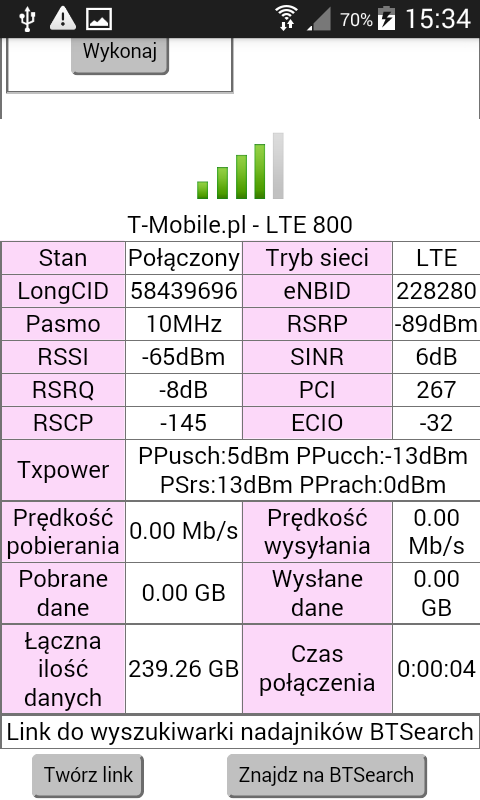
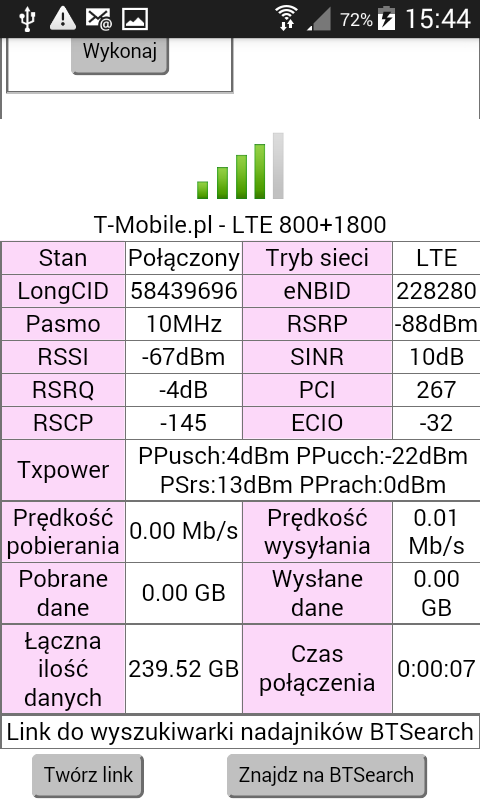
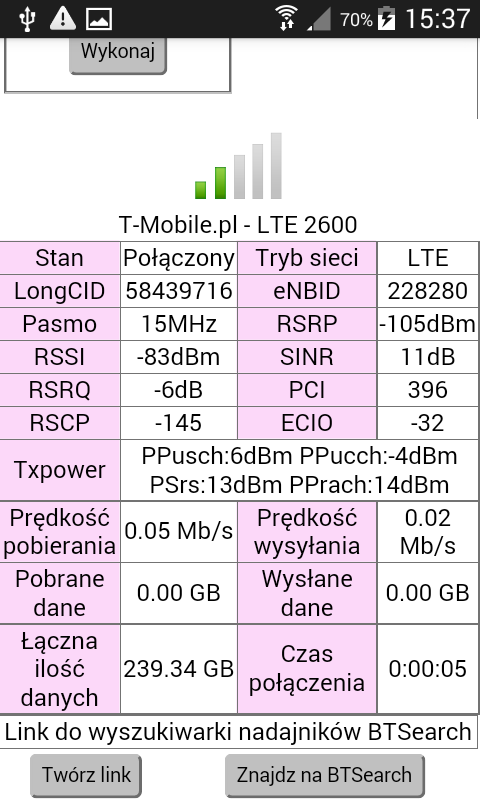
If you can check the speed under BTS in your direction on the LTE phone with Network cell Info. It will show CID and signal parameters. Under BTS you will connect to LTE2600 because it has priority. You can check how this band works with the optimal signal and whether it is worth buying an antenna for this band.
Could I have a working bandwidth change application? I have a b528 router and once I have 20mbps and once 0.40mbps, even when I take measurements at similar hours, there is a tragedy with the quality of connection with ping jumps not to mention.
And what effect does this application have on DL? Speed jumps are characteristic of the LTE T-mobile network based on overloaded BTSs, especially those only LTE800. The operator took a hoe out to the sun, i.e. for a few pennies he offered home internet (after LTE / 3G network) with no data limit. as a result, the BTS is overloaded and the LTE network is clogged. It is getting worse day by day. What is the location?
Village of Brzozówka, Kadzidło commune. Bts are actually only 800 but there are a few around. I wonder why having a router with their great home internet I can not use it at all and having a phone on the desk and sharing the internet (play network) with it on 2 range limits, I am able to play online games without problems on a fairly low ping . It's sick to me. And I'm curious whether the antenna will change something and if so how much.
Relax is not as bad as you think. Location is not easy, forests around and on the way to BTS-Lelis and Kadzidło so at home for a car range on LTE800, usually as a 10MHz range banded to the max. The signal on it at home probably also weak because 4-5km to BTS. To start with, a test on the B528 outside the window, to manage the bands on it and aggregate 2 LTE bands http://www.mediafire.com/file/79obbe81eufdt7t/Huawei_Manager_1.2_PL.apk/file on android, install on your phone. You connect it to Wifi with B528 and log in to it at 192.168.8.1. you force the LTe2600, LTE1800 and LTE800 bands in turn. I will show eNB, CID BTS and signal bandwidth. At every speedtest. In Kadzidle, T-mobile has LTE2600, LTE800 and LTE1800netWorks, Lelis works on LTe800 and LTE1800NW. Play has BTs in Łódź with LTE1800, LTE2100 and LTE1800, there are no forests on the road. In Kadzidle, besides these 3 LTE bands, bTS also has its LTE2600. In the case of T-Mobile, the unlimited data offer is for free, so the network is clogging up, you have to try with LTE1800 and LTE2600 both on 15MHz bandwidth. Unfortunately, the range is much smaller. with b528 on Windows runs https://www.lte-anbieter.info/ltewatch/count_huawei.php?Datei=ltewatch_h
well to be honest with extortion on 1800/2100 and I'm shocked at improving the connection and its quality, however 15Mhz works better. until I buy and mount the antenna, I should do something. +++
The discussion revolves around selecting the appropriate external antenna for a Huawei B525 router operating on the T-Mobile network, particularly to address issues with link stability and packet loss. The user experiences fluctuating signal strength (1 to 3 out of 5 bars) at a distance of 2.4 km from the base transceiver station (BTS). Various responses suggest testing different LTE bands, specifically LTE 800 and LTE 1800, with recommendations leaning towards MIMO antennas for better performance. Users report that LTE 800 provides better signal parameters and stability, while LTE 1800 shows signs of congestion. The conversation also highlights the impact of network overload due to T-Mobile's unlimited data plans, leading to reduced speeds during peak hours. Suggestions include conducting speed tests and forcing specific LTE bands to determine the best configuration before investing in an antenna. AI summary based on the discussion. May contain errors.
TL;DR: For Huawei B525 on T‑Mobile, prioritize stability: use LTE800 or aggregate LTE800+2600. Stat: DL up to 112.5 Mb/s; expert: "Aggregation LTE800 + 2600" works with LTE800 as primary. [Elektroda, matek451, post #16971779]
Why it matters: This FAQ helps B525/B528 owners fix packet loss and evening slowdowns by choosing the right bands and antenna.
What’s the best external antenna choice for a Huawei B525 on T‑Mobile?
Pick stability first. Use a dual‑polarized MIMO antenna tuned for 800 MHz, or a dual‑band model covering 800/2600 for aggregation. Keep LTE800 as the primary band and add LTE2600 when signal allows. This mirrors the network’s configuration and improves link stability. [Elektroda, matek451, post #16971779]
Should I target LTE800 or LTE1800/2600 for better stability?
Target LTE800 for the strongest signal and steadier performance. LTE1800 NetWorks showed congestion, while LTE2600 signals are weaker indoors but can add speed. Re‑test in the evening to match peak‑load conditions before deciding. [Elektroda, matek451, post #16971264]
How do I lock bands on a Huawei B525/B528 (quick 3‑step)?
Install Huawei Manager (Android) or LTEWatch H (Windows).
Connect to the router, log in at 192.168.8.1, and select band lock.
Congested BTS sites cause speed drops and jitter. T‑Mobile’s unlimited home‑internet offer increased load, so cells—especially LTE800‑only ones—get saturated at night. An antenna helps signal quality but cannot remove tower congestion. [Elektroda, matek451, post #17751534]
How far from the BTS can I expect usable indoor results?
At 2.4 km indoors, users saw 40–45 Mb/s by day and ~10 Mb/s evenings, with stability issues from packet loss. An external antenna and band control help keep a consistent link under variable load. [Elektroda, newkind, post #16971580]
What is MIMO 2×2 and why does it matter here?
MIMO 2×2 uses two spatial streams to increase throughput and resilience. On LTE1800 NetWorks (15 MHz), downlink peaks reach 112.5 Mb/s. "Aggregation LTE800 + 2600" with MIMO can add speed while LTE800 anchors stability. [Elektroda, matek451, post #16971779]
Does T‑Mobile use LTE2100 in this scenario?
No. If you try 2100 MHz and see no LTE, that’s expected. T‑Mobile uses UMTS2100 with HSPA+ DC at 2100 MHz, not LTE2100. For LTE, focus on 800/1800/2600 MHz. [Elektroda, matek451, post #16971264]
How can I check which band and cell I’m on with a phone?
Use the Network Cell Info app near the tower. It shows cell ID (CID) and signal. Under a BTS, your device will prefer LTE2600, which helps you gauge its potential before buying an antenna. [Elektroda, matek451, post #16971841]
Will an external antenna fix high ping and packet loss?
An antenna can stabilize weak or fluctuating signals, reducing retransmits. It will not fix congestion on an overloaded BTS, which drives latency spikes and throughput dips. Combine antenna use with band locking for best results. [Elektroda, matek451, post #17751534]
Which tests should I run before I commit to an antenna purchase?
Stand near the target BTS and test LTE2600 first, since it often has priority and higher capacity. Compare results with LTE800 back at home. If LTE2600 shines near the tower, a directional antenna for 2600 can pay off. [Elektroda, matek451, post #16971841]
Can band locking improve gaming stability on B528/B525?
Yes. One user forced 1800/2600 (15 MHz) and reported a clear improvement in connection quality before installing an antenna. Locking reduces band‑hopping and jitter during play. [Elektroda, CraCk94, post #17756372]
What’s the best aggregation combo for capacity and reach?
Use LTE800 as the primary band for reach, then add LTE2600 for extra capacity when signal allows. This setup aligns with site configs and balances stability and speed. [Elektroda, matek451, post #16971779]
Edge case: Why does LTE2600 feel worse indoors?
LTE2600 has shorter range and poorer indoor penetration, so signals read weaker inside. Use it mainly in aggregation or with a directional antenna if the outdoor line‑of‑sight is decent. [Elektroda, matek451, post #16971264]
If LTE1800 NetWorks is congested, should I avoid it entirely?
When LTE1800NW is packed, anchor on LTE800 for stability. Add LTE2600 if available. Re‑check during peak hours to confirm gains after locking or antenna changes. [Elektroda, matek451, post #16971264]
What app tools are recommended for ongoing monitoring?
Use Huawei Manager on Android for band control and telemetry, and LTEWatch H on Windows for detailed stats. Log eNB/CID, RSRP/RSRQ/SINR, and speeds during day and evening. [Elektroda, matek451, post #17755522]
What should I do if 2100 MHz reports “no coverage” on LTE?
That’s normal here. Switch to UMTS2100 if you must test 2100 MHz, or stick to LTE800/1800/2600 for LTE service and aggregation. [Elektroda, matek451, post #16971264]
AI summary based on the discussion. May contain errors.











 Thanks again!
