FAQ
TL;DR: The MW40V is a MiFi that idles off to protect its battery; it’s “not suitable for 24/7 work,” and its value is about 50 zlotys. [Elektroda, matek451, post #16974892]
Why it matters: If you want always‑on home internet, this model’s power‑saving and hardware limits make stability difficult.
For: Orange/LTE users asking how to keep an Alcatel Link Zone MW40V online, whether it’s fixable, and what to buy instead.
Quick Facts
- MiFi design prioritizes battery life; it disconnects when idle and isn’t for 24/7 use. [Elektroda, matek451, post #16974892]
- No external antenna ports and no LTE band aggregation on MW40V. [Elektroda, matek451, post #16974892]
- Reported home use result: 20 Mb/s down, 10 Mb/s up, 2–3 bars. [Elektroda, ruski444, post #16975782]
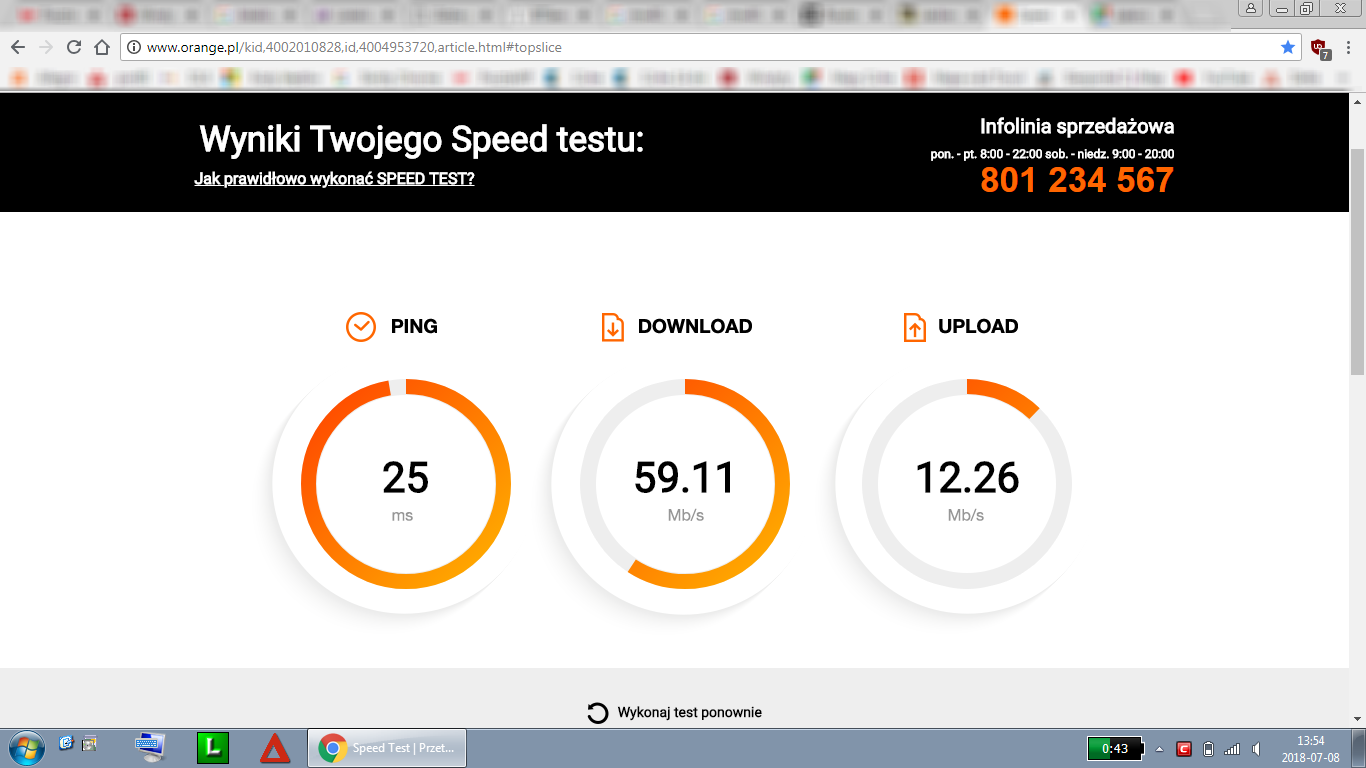
- Holiday-house test on charger (battery removed): 59.11/12.26 Mb/s, 25 ms ping. [Elektroda, marekelb1, post #17318145]
- Suggested Orange home option: ZTE MF286 (LTE‑A, LAN ports). [Elektroda, matek451, post #16975715]
How do I stop the Alcatel Link Zone MW40V from disconnecting when idle?
You can’t fully stop it. The MW40V is a battery‑first MiFi that powers down to protect the cell. Firmware lacks an “always‑on” setting for 24/7 uptime. Workarounds include using a different router meant for continuous operation or changing devices. Quote: “Avoid Alcatel products like fire.” [Elektroda, matek451, post #16974892]
Is the MW40V good for constant home internet?
No. It is not intended for 24/7 work and may drop the session after inactivity. Continuous charger use can also degrade batteries over time. A mains‑powered LTE router with LAN ports is recommended instead for home setups. “Not suitable for 24/7 work.” [Elektroda, matek451, post #16974892]
Can I attach an external antenna to the MW40V?
No. The MW40V lacks external antenna connectors. That limits range enhancement in weak‑signal locations and blocks typical rooftop or directional antenna fixes. Users needing distance or penetration improvements should choose hardware with proper antenna ports. [Elektroda, matek451, post #16974892]
What speeds have people actually seen on Orange with this device?
One user measured 59.11 Mb/s download, 12.26 Mb/s upload, with 25 ms ping while powered by charger and battery removed in a wooden house. Real speeds vary by band, congestion, and signal. That test showed stable connectivity during travel use, not fixed 24/7 service. [Elektroda, marekelb1, post #17318145]
Why do I need a computer to reconnect every time it shuts off?
Because the MW40V sleeps or disconnects to protect the battery. After power‑saving events, it may require manual reconnection through its interface or a host device. This is normal behavior for MiFi units prioritizing battery longevity over persistent sessions. [Elektroda, matek451, post #16974892]
What should I buy for stable Orange LTE at home?
Pick a mains‑powered LTE‑A router with LAN ports, such as ZTE MF286, which Orange offers. It is designed for continuous uptime and better throughput under load. This class of router handles multiple devices more reliably than a MiFi. [Elektroda, matek451, post #16975715]
How can I check which LTE band and tower my SIM is using?
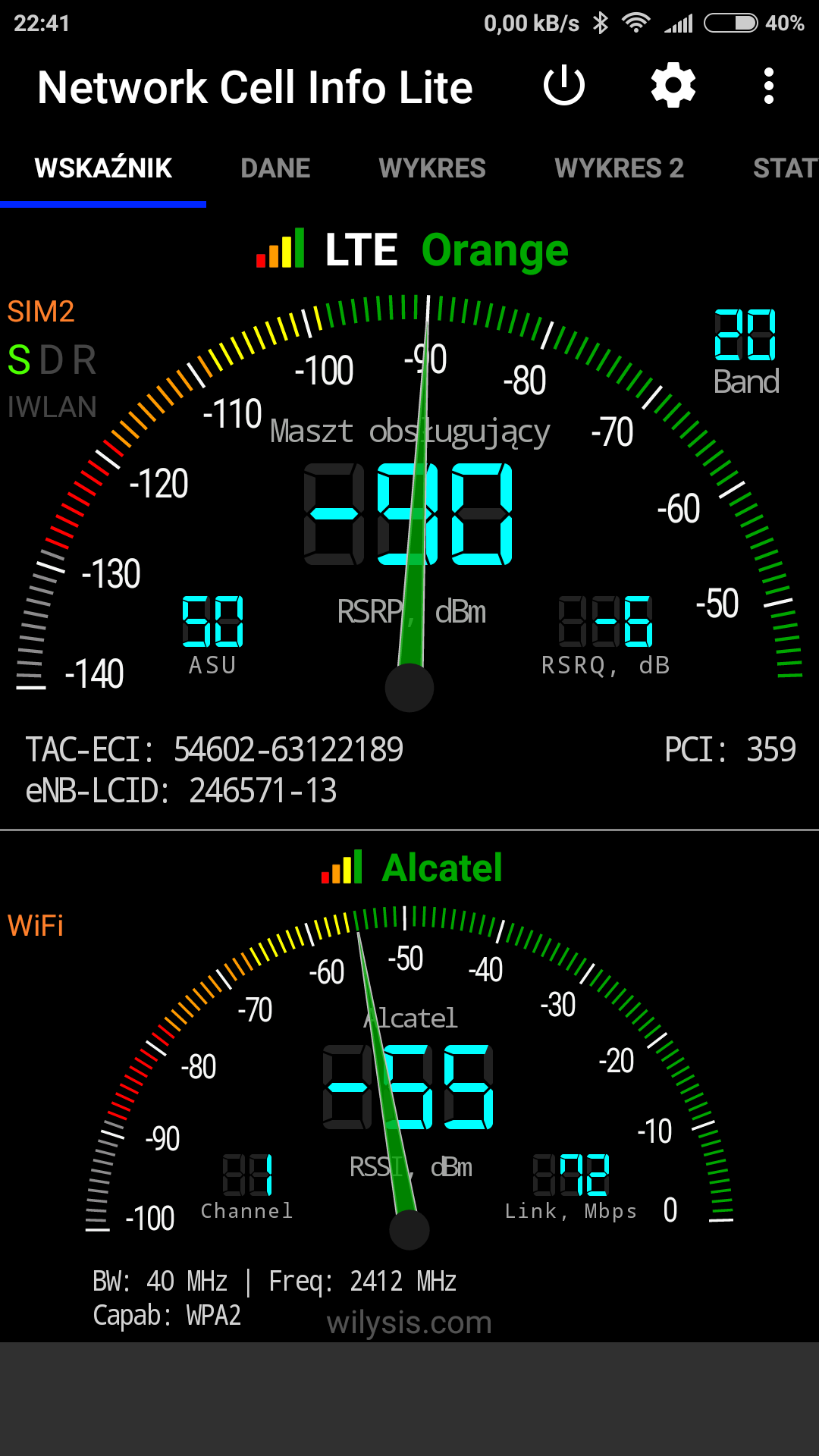
Put the Orange SIM in an LTE phone, install Network Cell Info, open the DATA tab, and capture screenshots with a speed test. This verifies serving cell, IDs, and performance. It helps decide on router placement or whether different hardware is needed. 1. Insert SIM into LTE phone. 2. Open NCI > DATA. 3. Run speed test and screenshot. [Elektroda, matek451, post #16975995]
What is a MiFi router?
A MiFi is a small, battery‑powered mobile hotspot made for portability, not as a 24/7 home gateway. The MW40V is a MiFi that disconnects in stillness to protect its battery and lacks features like band aggregation and antenna ports. [Elektroda, matek451, post #16974892]
Will removing the battery and powering from a charger help?
Some users report stable operation when the MW40V is on a charger with the battery removed. One field test delivered 59.11/12.26 Mb/s and stayed online continuously during a trip. This doesn’t add antenna ports or 24/7 guarantees. [Elektroda, marekelb1, post #17318145]
My signal shows only 2–3 bars. How can I improve it?
Bars reflect weak signal. Forests and walls attenuate LTE strongly, sometimes even on 800 MHz. The MW40V lacks external antenna connectors, so you cannot add a directional antenna. In such areas, use a router that supports external antennas for the needed band. [Elektroda, matek451, post #17319106]
Can I reach the advertised 100 Mb/s with this setup?
A user expected 100 Mb/s but measured about 20 Mb/s down and 10 Mb/s up with 2–3 bars. Throughput depends on signal quality, local load, and hardware limits. Performance like this is typical under weaker signal conditions. [Elektroda, ruski444, post #16975782]
Is the MW40V worth keeping or should I return/sell it?
Forum advice values it around 50 zlotys and warns against using it as a home router. If you need always‑on connectivity, exchange it for an LTE‑A home router. Keep the MW40V only for occasional portable use. [Elektroda, matek451, post #16974892]
What low‑cost alternatives beat the MW40V’s limitations?
Members suggest Huawei E5573 or E5577 around 70 PLN as better budget MiFi options. They avoid the MW40V’s key issues and offer more useful diagnostics. For home, still select an LTE‑A router with LAN and antenna support. [Elektroda, makosuu, post #17318964]
Edge case: will dense forests block my LTE even near a tower?
Yes. In forested areas, even 800–900 MHz can be heavily attenuated indoors. External antennas are typically required there, which the MW40V cannot accept. Users in such regions often need different hardware to maintain service. [Elektroda, matek451, post #17319106]