logo elektroda
logo elektroda
X
logo elektroda

[Solved] MFD Radio Ver. D - Connect 10-Pin AUX Mini Din Socket to MP3 Module: Compatibility & Guide

Michał844 9594 11
ADVERTISEMENT
Treść została przetłumaczona polish » english Zobacz oryginalną wersję tematu
  • #1 17004469
    Michał844
    Level 6  
    Posts: 80
    Rate: 43
    Board Language: polish
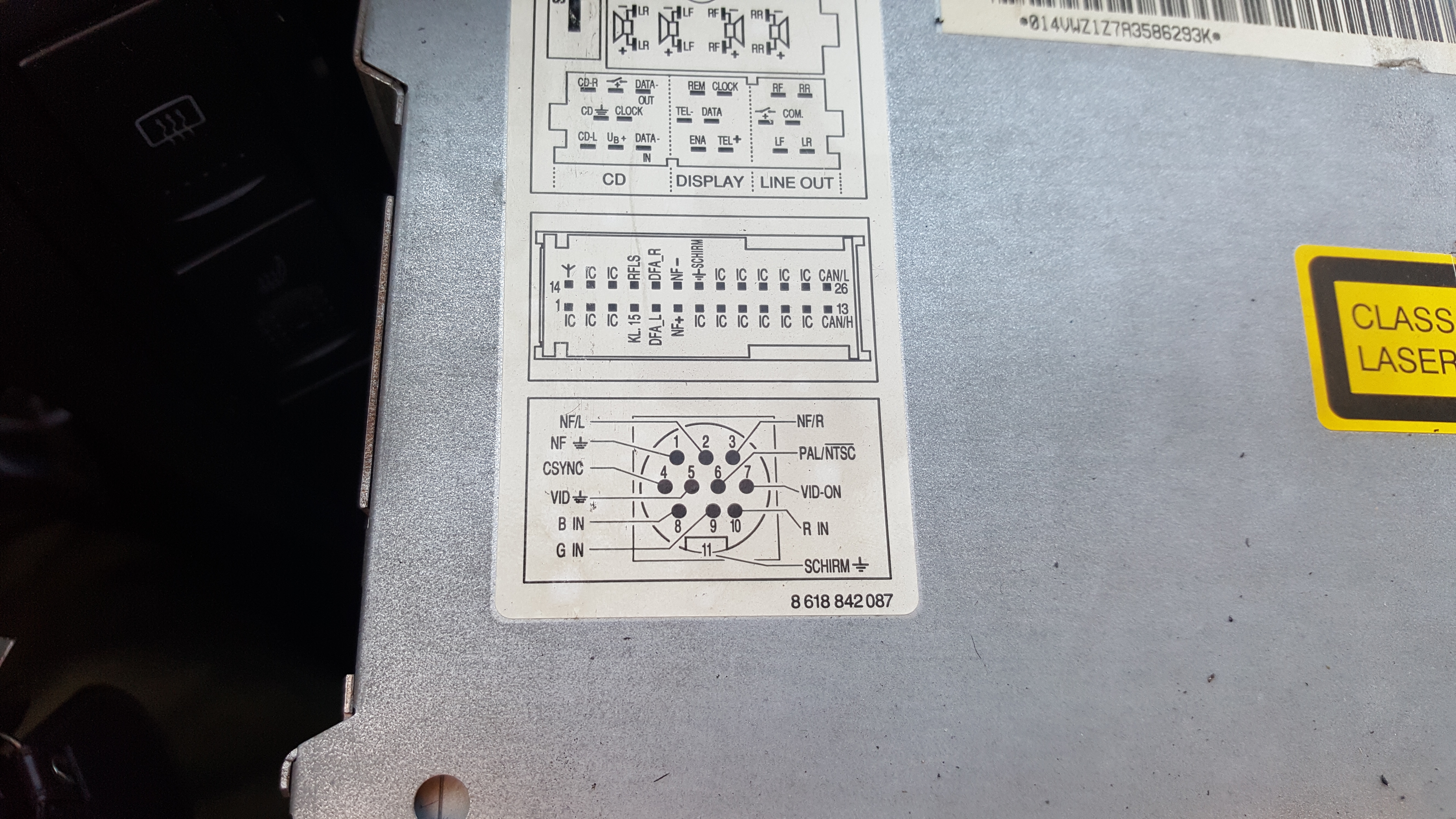
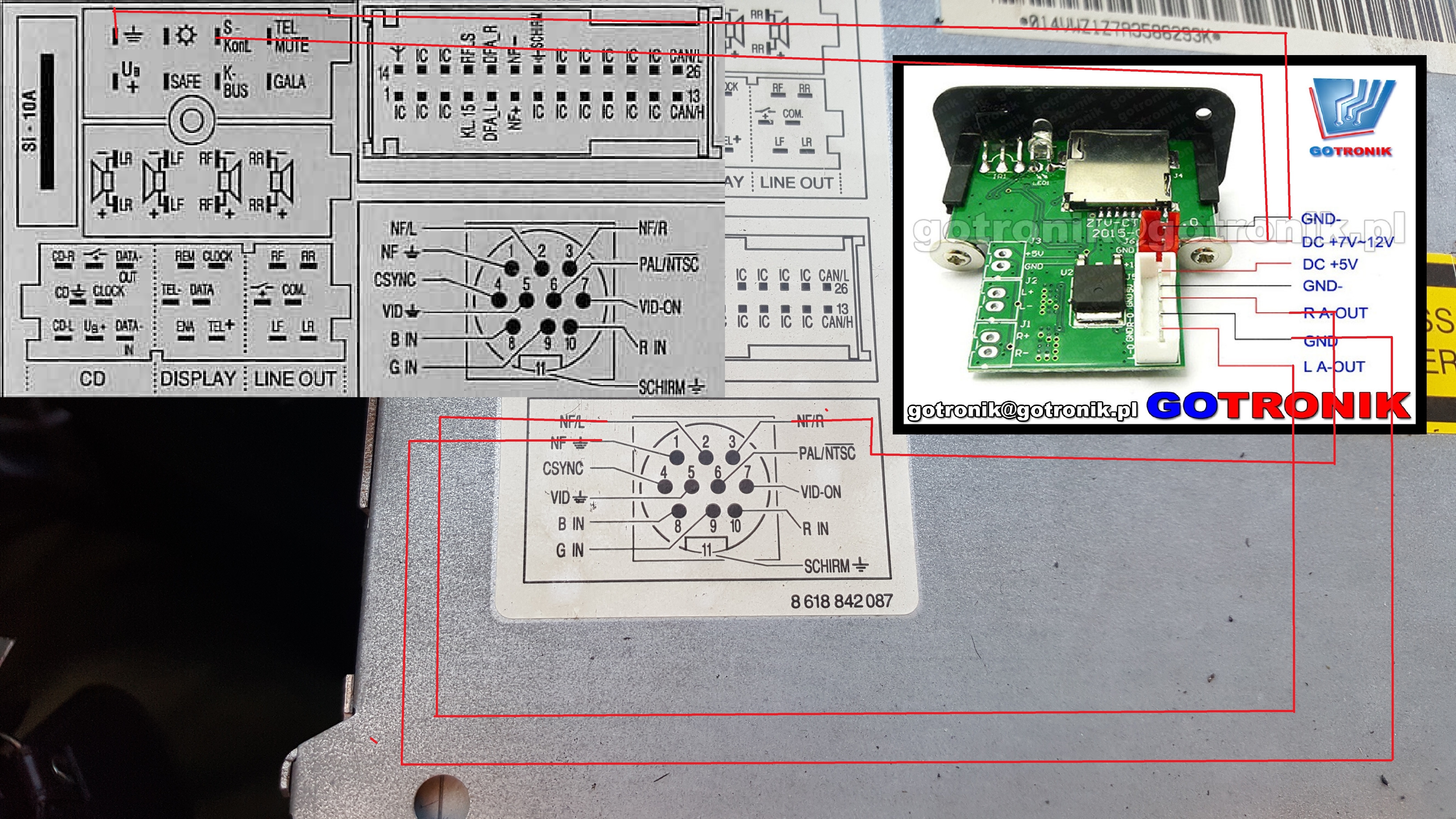
    Hello, as in the description I have MFD radio ver. D and there is an Aux 10 pin socket (active):
    MFD Radio Ver. D - Connect 10-Pin AUX Mini Din Socket to MP3 Module: Compatibility & Guide

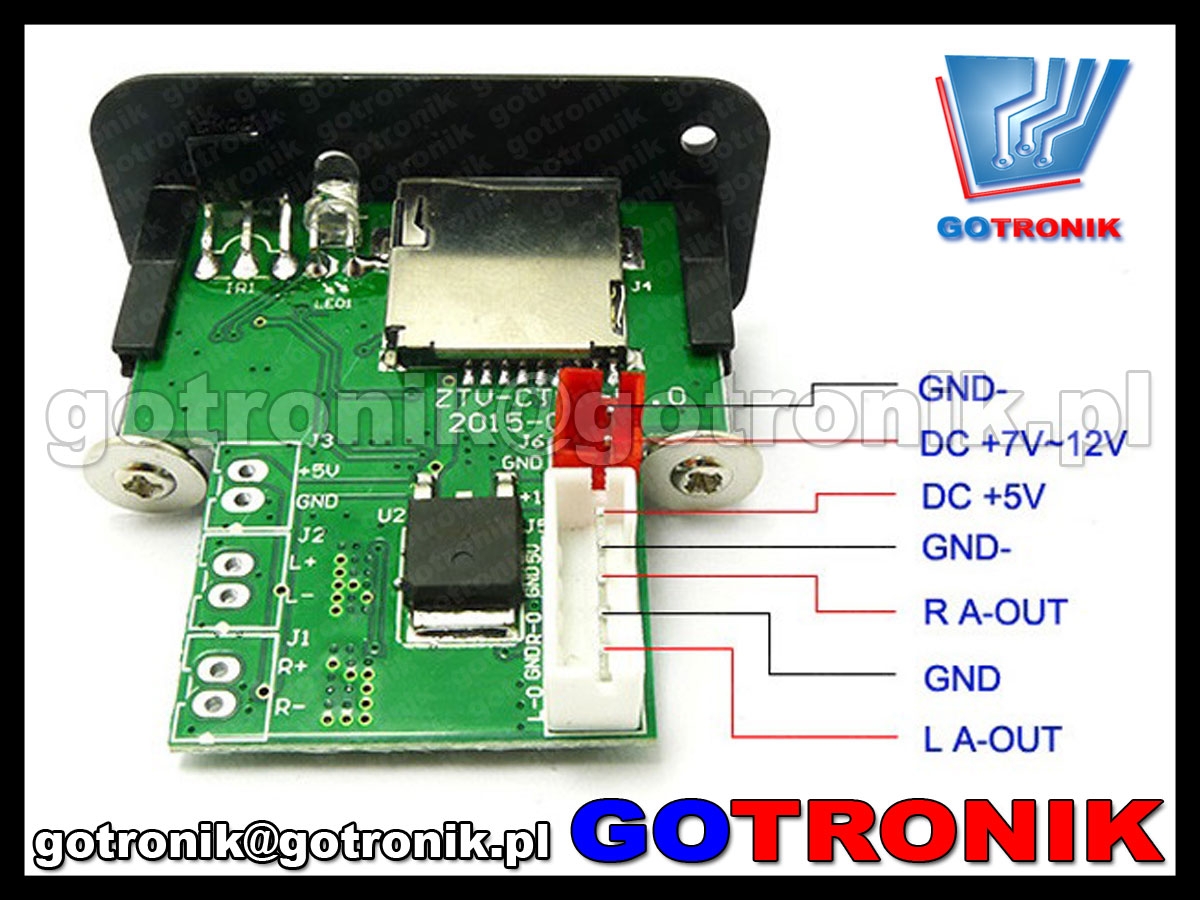
    You can connect something like this mp3 module to this socket:
    MFD Radio Ver. D - Connect 10-Pin AUX Mini Din Socket to MP3 Module: Compatibility & Guide
  • ADVERTISEMENT
  • Helpful post
    #2 17004566
    badyl00
    Level 30  
    Posts: 1531
    Help: 221
    Rate: 295
    Board Language: polish
    This should be ok. The mp3 player will start when you turn on the ignition.

    MFD Radio Ver. D - Connect 10-Pin AUX Mini Din Socket to MP3 Module: Compatibility & Guide
  • ADVERTISEMENT
  • #3 17004652
    Michał844
    Level 6  
    Posts: 80
    Rate: 43
    Board Language: polish
    and it would be advisable to connect it so that it is like a factory changer or not?
  • ADVERTISEMENT
  • #5 17004887
    Michał844
    Level 6  
    Posts: 80
    Rate: 43
    Board Language: polish
    I am looking and I can not find, and I will find somewhere a ready plate of this emulator changer for the vag group?
  • ADVERTISEMENT
  • #7 17005194
    Michał844
    Level 6  
    Posts: 80
    Rate: 43
    Board Language: polish
    badyl00 wrote:
    Enter aux vw adapter in Allegro.

    Please link:
    https://carhifi24.pl/rtv-i-agd/sprzet-car-aud...ta-gamma-delta-rns-mcd-mfd.html?search_query= adapter + mfd & results = 13


    well, but I will not use this as a changer emulator, after all, I mean a plate that will imitate a cd changer like the men from the links you gave to connect instead of the changer and control from the radio panel
  • #9 17005730
    Michał844
    Level 6  
    Posts: 80
    Rate: 43
    Board Language: polish
    I found something like that myself, but thanks for the help
  • #10 17005746
    badyl00
    Level 30  
    Posts: 1531
    Help: 221
    Rate: 295
    Board Language: polish
    Buddy, first you write that you want to connect the player you bought and then you want to control it from the radio panel. Unfortunately, without electronic knowledge and at the lowest cost, you will not turn this radio into a multimedia center.
  • #11 17006132
    Michał844
    Level 6  
    Posts: 80
    Rate: 43
    Board Language: polish
    I did not write that I only bought whether it is possible, as you answered that it is possible and you gave the diagram, I asked and for the rest I thought that the plates were ready to get to create it as she sent the links, but I see that there is no, and I knew about cash before I only thought that there is a patent for bypassing this booster because at its price, after a few zlotys, you can already get a normal multimedia station.
  • #12 17006147
    Michał844
    Level 6  
    Posts: 80
    Rate: 43
    Board Language: polish
    Thanks for the help

Topic summary

✨ The discussion revolves around connecting an MP3 module to the MFD Radio Version D via a 10-pin AUX Mini Din socket. Users confirm that the MP3 player will activate with the ignition. However, to achieve full functionality, including control from the radio panel, a VAG changer emulator is necessary. Suggestions for finding compatible emulators and adapters are provided, with links to products that can facilitate the connection. The conversation highlights the need for electronic knowledge to modify the radio effectively and discusses the cost considerations of upgrading to a multimedia station versus using the existing setup.
Generated by the language model.

FAQ

TL;DR: MFD ver. D uses a 10‑pin AUX mini‑DIN; "you also need a VAG changer emulator" for radio‑panel control. Connect a basic MP3 module and it powers with ignition. [Elektroda, badyl00, post #17004691]
Quick Facts

Can I connect a generic MP3 module to the MFD ver. D 10‑pin AUX?

Yes. The MFD ver. D exposes an active 10‑pin AUX mini‑DIN. Users have connected simple MP3 modules to it without replacing the head unit. Confirm pinout, provide ignition‑switched 12 V, and route audio to the AUX pins. [Elektroda, Michał844, post #17004469]

Will the MP3 module power on with the car’s ignition?

Yes. Wired per the shared diagram, the MP3 player turns on when you switch the ignition. This delivers a hassle‑free startup in daily use. Keep grounds common to avoid noise. [Elektroda, badyl00, post #17004566]

Do I need a CD changer emulator to control tracks from the radio panel?

Yes. For factory‑style control via the MFD buttons, a VAG CD changer emulator is required. As noted by an expert, “you also need a VAG changer emulator.” Without it, you only get passive AUX audio. [Elektroda, badyl00, post #17004691]

Is there a ready‑made AUX adapter I can just buy?

Yes. Search for an “AUX VW adapter” to find commercial plug‑and‑play units compatible with Volkswagen systems that include the MFD line. These provide line‑in without panel control. [Elektroda, badyl00, post #17005110]

I want SD/USB playback with button control—what should I get?

Choose an adapter that combines AUX/SD/USB and integrates with the MFD as a changer. These units expose storage and allow radio‑panel navigation of folders and tracks. [Elektroda, badyl00, post #17005216]

How do I wire the 10‑pin mini‑DIN to a basic MP3 module?

  1. Feed the module with ignition‑switched 12 V and ground.
  2. Connect left/right audio outputs and ground to the MFD AUX pins.
  3. Select the AUX or CD‑changer source on the radio to play. Expert tip: keep wiring short to reduce noise. [Elektroda, badyl00, post #17004566]

Can I buy a ready‑made emulator board for the VAG changer protocol?

DIY boards are not commonly available pre‑assembled in this thread’s context. Off‑the‑shelf adapters exist, but building a full emulator requires electronics know‑how and budget. “Without electronic knowledge...you will not turn this radio into a multimedia center.” [Elektroda, badyl00, post #17005746]

Will the setup behave exactly like a factory CD changer?

Only if you add a changer emulator or a compatible adapter that emulates one. Plain AUX wiring works for audio but offers no track or folder control from the panel. [Elektroda, badyl00, post #17004691]

What are the main downsides or risks with the low‑cost approach?

Without an emulator, you lose panel control and metadata. Building custom solutions also demands electronics skills and time. Expect integration limits compared to a full multimedia head unit. [Elektroda, badyl00, post #17005746]

Which source do I select on the MFD to hear the new input?

Use the radio’s CD‑changer or AUX source, depending on how your adapter presents itself. Emulating the changer enables button control; plain AUX provides audio only. [Elektroda, badyl00, post #17004691]

Is there a cost tipping point where a new head unit makes more sense?

Yes. The original poster noted that once you add parts, the price can approach a budget multimedia station. Evaluate goals before buying multiple adapters. [Elektroda, Michał844, post #17006132]

My module powers up but there’s no sound—what should I check?

Verify left/right and ground pins match the diagram, ensure the radio is on AUX or changer input, and confirm common ground. Poor grounds cause silence or noise. [Elektroda, badyl00, post #17004566]
Generated by the language model.
ADVERTISEMENT