logo elektroda
logo elektroda
X
logo elektroda

AMD FX-8320E 3.2GHz, GTX750, 8GB RAM: Need For Speed Payback Performance Issues?

satelliweb 4902 14
ADVERTISEMENT
Treść została przetłumaczona polish » english Zobacz oryginalną wersję tematu
  • #1 17022094
    satelliweb
    Level 11  
    Hello. I have such equipment:
    Processor: AMD FX-8320E 3.2GHz
    Motherboard: M5A 78L-M
    Graphics card: Gainward GeForce GTX750
    RAM memory: 8GB

    Need For Speed Payback does not work on it, although it seems to meet the minimum system requirements. Is the processor too weak?
  • ADVERTISEMENT
  • #2 17022126
    icosie
    Level 34  
    Hello

    It doesn't work, meaning?
    I don't want to install. I won't start. Is it cut during the game?

    If it does not turn on, then maybe some drivers for the card, game files or libraries (directX, Visual) are missing.

    greetings
  • ADVERTISEMENT
  • #3 17022135
    satelliweb
    Level 11  
    Cannot install at all. Is the processor too weak?
  • ADVERTISEMENT
  • #4 17022146
    icosie
    Level 34  
    Requirements , you get the minimum with graphics and the standard with processor and memory.

    System at least WIN 7 64 bit?
  • #5 17022207
    satelliweb
    Level 11  
    So it should install at least and possibly cut in the course, right? Yes, the system is like that.
  • #6 17022218
    daminek1234
    Level 25  
    If you do not want to install, do you get any feedback from error?
  • #7 17022259
    satelliweb
    Level 11  
    Yes, some mistake but I don't remember what. I have to try again and then write what
  • #8 17037143
    satelliweb
    Level 11  
    Only now I could check. The point is that already during the installation of Origin error 19: 0 pops up. I tried different methods from the internet and continue the same.
  • #9 17037223
    daminek1234
    Level 25  
    Have you tried to contact support? If something doesn't work, then first I hit support.
  • #10 17037226
    satelliweb
    Level 11  
    No, I haven't tried it yet
  • #11 17040489
    satelliweb
    Level 11  
    I contacted them but their advice did not help.
    I reinstalled the system and although it was not without problems, it was possible to start the game and the game was quite good. However, the processor fan is very loud. What to handle Change the paste on the prock?
  • ADVERTISEMENT
  • #12 17040572
    icosie
    Level 34  
    Hello

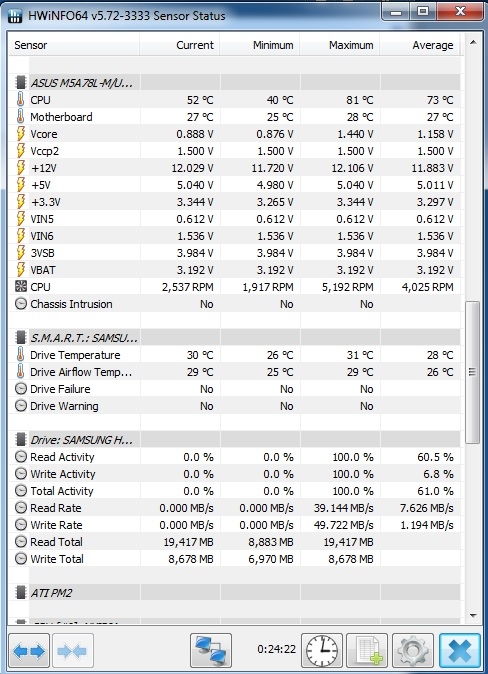
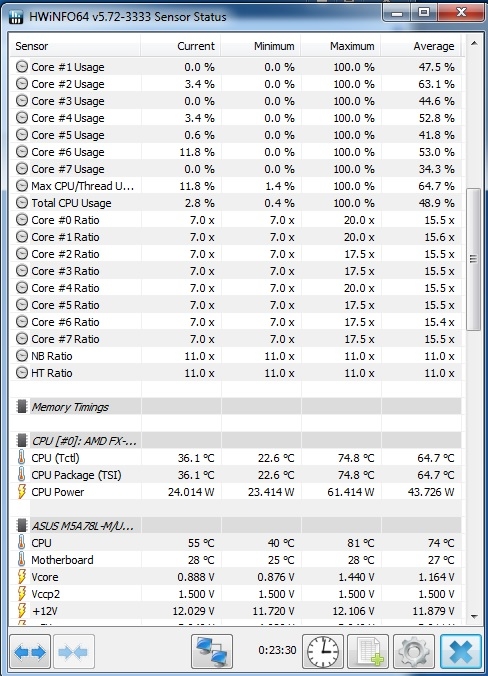
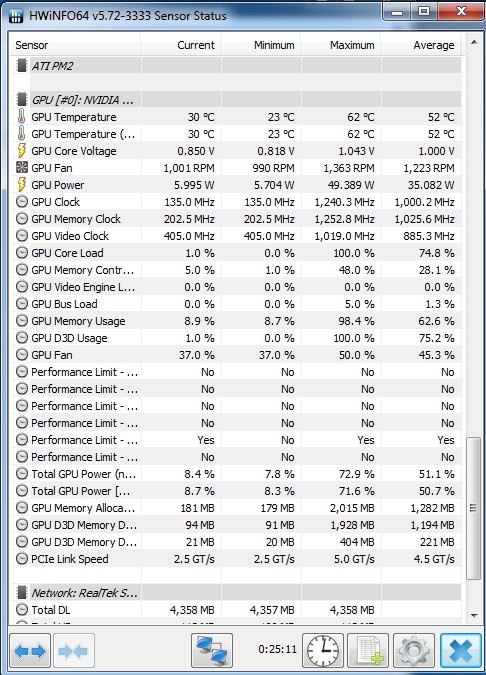
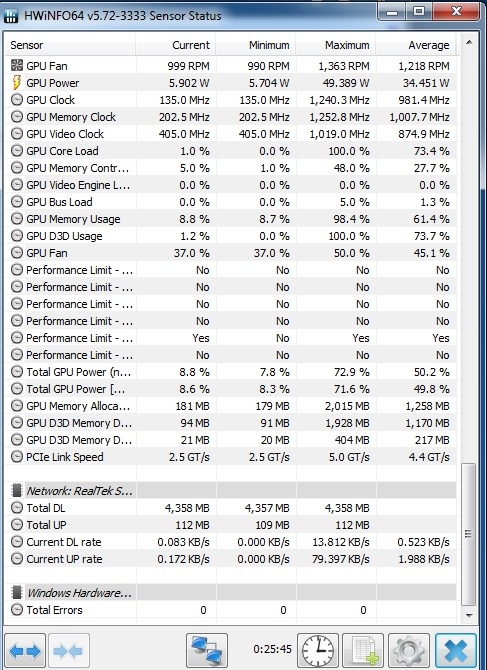
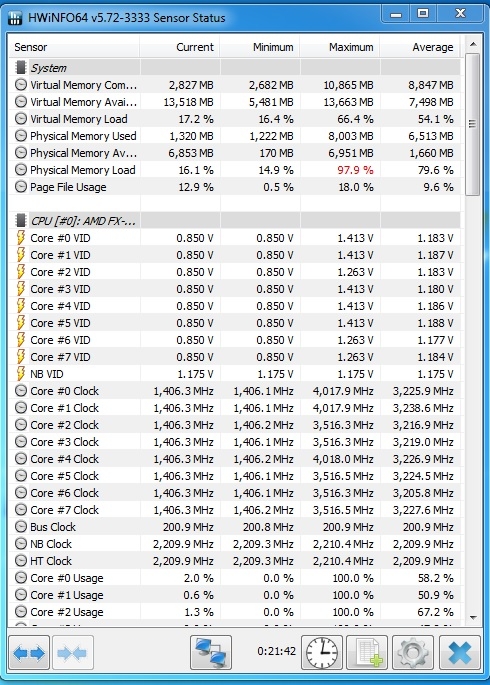
    Install and run HWiNFO in "sensors only" mode. Play a dozen or so minutes and send screenshots of all parameters. We'll see how much it heats, the paste can be replaced if it is old, if it doesn't make sense to move, unless someone has applied it too badly / too much.

    greetings
  • #13 17041123
    satelliweb
    Level 11  
    AMD FX-8320E 3.2GHz, GTX750, 8GB RAM: Need For Speed Payback Performance Issues? AMD FX-8320E 3.2GHz, GTX750, 8GB RAM: Need For Speed Payback Performance Issues? AMD FX-8320E 3.2GHz, GTX750, 8GB RAM: Need For Speed Payback Performance Issues? AMD FX-8320E 3.2GHz, GTX750, 8GB RAM: Need For Speed Payback Performance Issues? AMD FX-8320E 3.2GHz, GTX750, 8GB RAM: Need For Speed Payback Performance Issues?

    Now I could test it because yesterday a few hours downloaded the game update and I could not do anything.
  • #14 17041147
    icosie
    Level 34  
    Ram used 100%, you probably have traps in the game, see what programs use ram before launching the game and maybe get rid of them.

    As for the temperature, only the processor has over 70 ° C, so you can replace the paste as it is old. Although I would think about buying some better cooling.

    greetings
  • #15 17041160
    satelliweb
    Level 11  
    There are just no clipping, normally only a loud windmill is played. Maybe I will. There is also nothing like this that does not load the framework because the computer has a fresh format, only drivers, basic programs and origin + NFS.
    And when it comes to graphics card, what would be worth buying instead of this?

Topic summary

✨ The discussion revolves around performance issues with the game Need For Speed Payback on a system equipped with an AMD FX-8320E 3.2GHz processor, Gainward GeForce GTX750 graphics card, and 8GB RAM. The user reports installation problems, specifically an error during the installation of Origin, and questions whether the processor is too weak for the game. Responses suggest checking for missing drivers and libraries, and one user mentions successfully running the game after reinstalling the operating system, although they experienced high CPU temperatures and loud fan noise. Recommendations include monitoring system temperatures, replacing thermal paste, and considering an upgrade for better cooling and graphics performance.
Generated by the language model.

FAQ

TL;DR: On this FX‑8320E/GTX 750/8GB setup, RAM hit 100% and the CPU exceeded 70°C; "replace the paste... better cooling" was advised to reduce noise. [Elektroda, icosie, post #17041147]

Why it matters: If you run NFS Payback on older FX‑83xx PCs, this helps fix install issues and stabilize temps for smoother play.

Quick-Facts:

Quick Facts

Will an FX‑8320E + GTX 750 + 8GB run Need for Speed Payback?

Yes. After fixing install issues, the game launched and ran quite well on this setup. Expect low to medium settings for stability. Keep drivers current and monitor temps to avoid throttling or noise spikes. [Elektroda, satelliweb, post #17040489]

What does Origin error 19:0 mean and how do I fix it?

It indicates the Origin installer failed. Fix typical installer errors by clearing Origin’s cache, reinstalling required Microsoft runtimes, and running the installer as admin. If security software is active, disable it temporarily. Then reinstall Origin and launch the game again. ["EA Help – Fix Origin error 9:0"]

How do I clean‑reinstall Origin and the required libraries?

Do this:
  1. Uninstall Origin, then clear its cache folders.
  2. Install the latest Microsoft Visual C++ redistributables and .NET Framework.
  3. Right‑click the Origin installer, Run as administrator, then reboot and retry. ["EA Help – Fix Origin error 9:0"]

Do I need Windows 7 64‑bit, or will 32‑bit Windows work?

You need at least Windows 7 64‑bit. A 32‑bit system will block installation or prevent the game from running properly. Confirm your OS before troubleshooting other issues. [Elektroda, icosie, post #17022146]

Why is my CPU fan loud while playing, and what should I do?

Your CPU exceeded 70°C under load, which triggers high fan speeds. Replace old thermal paste and consider a stronger cooler for the FX‑8320E. As one expert noted, “you can replace the paste... I would think about buying some better cooling.” Ensure good case airflow. [Elektroda, icosie, post #17041147]

How do I monitor CPU/GPU temperatures and fan behavior correctly?

Use HWiNFO in “sensors only” mode. Play for 10–15 minutes and then capture screenshots of CPU package temp, GPU temp, and fan speeds. Share the full sensor list to spot spikes or throttling patterns. [Elektroda, icosie, post #17040572]

My RAM usage hits 100% in‑game. What should I close?

Close launchers, overlays, browsers, and updaters before starting the game. High background use pushed RAM to 100% in this case. Freeing memory can remove stutter and reduce drive paging. Keep only Origin and essential drivers running. [Elektroda, icosie, post #17041147]

Is the FX‑8320E too weak for Payback?

No. Peer guidance here shows it meets minimum expectations for CPU. Installation problems were unrelated to CPU performance. For higher frame rates, cooling and GPU tuning will help more. [Elektroda, icosie, post #17022146]

Which GPU upgrade should I choose for better performance?

Target EA’s recommended class for smoother play: GeForce GTX 1060 6GB or Radeon RX 480. That tier brings a major uplift over a GTX 750 and aligns with recommended settings. Confirm your power supply and case clearance first. ["EA Help – Need for Speed Payback PC system requirements"]

Is 8 GB RAM enough for Payback?

Yes, 8 GB is the listed minimum for PC. If you consistently hit 100% usage, close background apps or upgrade RAM to improve multitasking and reduce hitching. ["EA Help – Need for Speed Payback PC system requirements"]

What graphics settings should I tweak for a GTX 750?

Use low to medium presets, reduce shadows and post‑processing, and limit anti‑aliasing. Consider 1080p low or 900p to ease load and cut fan noise. This setup ran “quite good” after fixes, so conservative settings should stay smooth. [Elektroda, satelliweb, post #17040489]

Should I replace thermal paste, and what can go wrong?

Replace paste if temps are high or the paste is old. Clean surfaces and apply a thin, even layer. Edge case: too much paste or a bad application can worsen cooling and increase noise under load. [Elektroda, icosie, post #17040572]

Nothing helped and installs still fail—what’s the last resort?

If all standard fixes fail, a clean Windows reinstall can clear OS corruption blocking Origin. In this case, reinstalling Windows allowed the game to start and play normally. Back up data before proceeding. [Elektroda, satelliweb, post #17040489]
Generated by the language model.
ADVERTISEMENT