logo elektroda
logo elektroda
X
logo elektroda

Windows XP Home Edition: Internet Access Issue & System Activation Bluescreen Error

PanKoXeR 11790 13
ADVERTISEMENT
Treść została przetłumaczona polish » english Zobacz oryginalną wersję tematu
  • #1 17085902
    PanKoXeR
    Level 4  
    Posts: 57
    Rate: 9
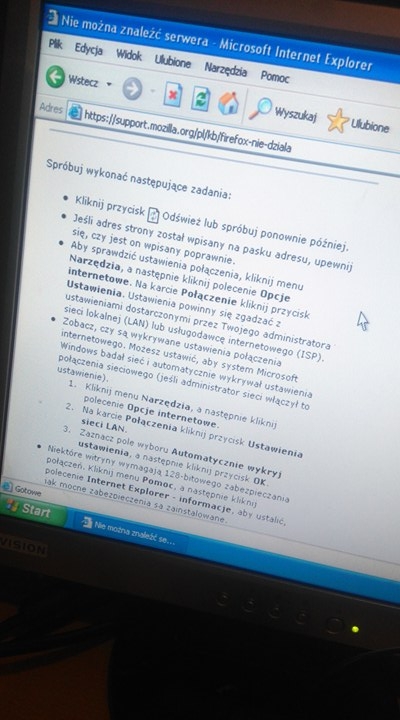
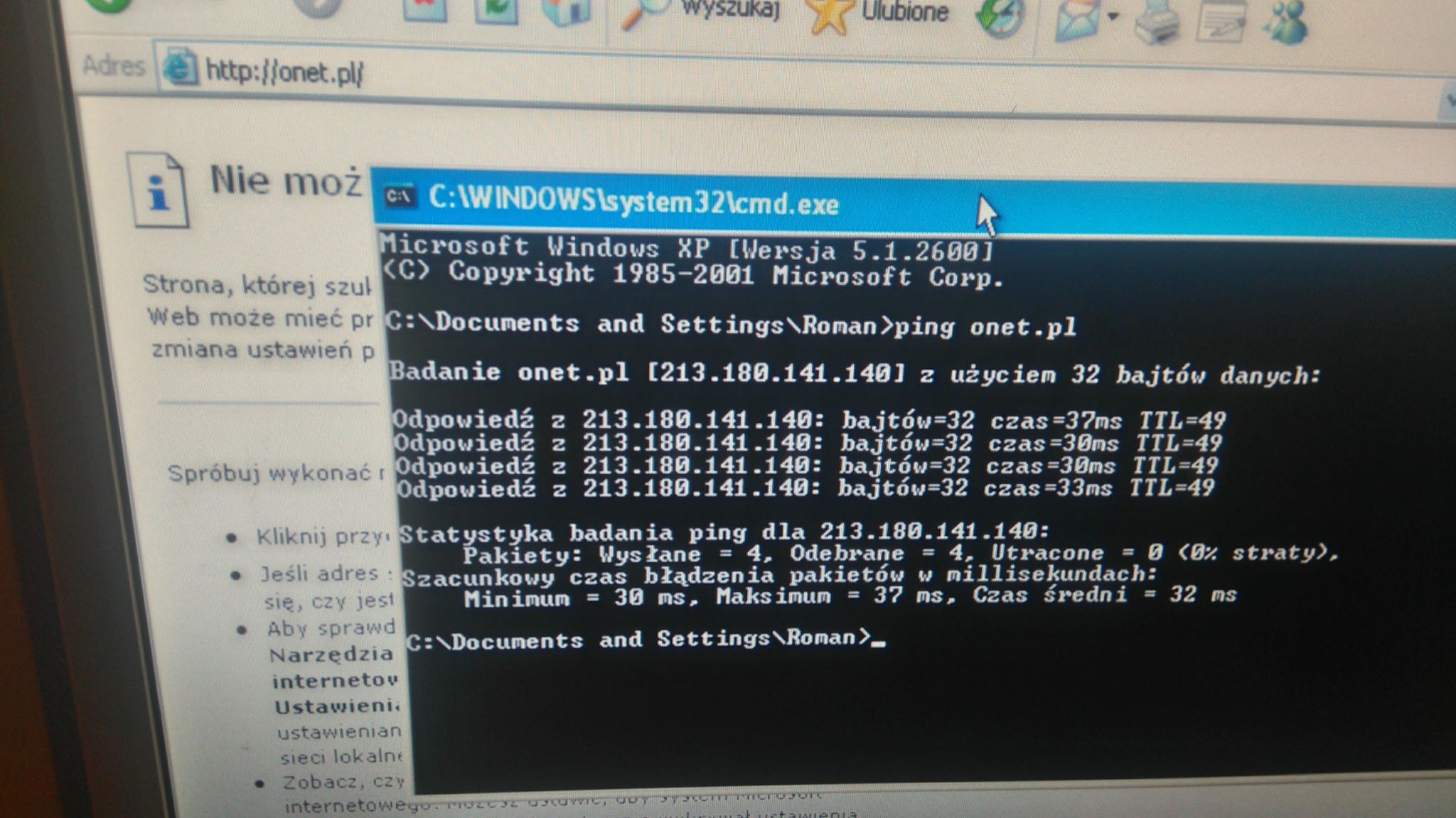
    Hello, I installed windows XP home edition yesterday from the original board. Everything was well installed, I installed internet drivers, etc. When the notification about system activation popped up, I gave it to activate online now, but as if there was no access to the internet, although as I entered the search engine, normally bing worked (explorer) but after clicking any link on the page dumped an error that can be seen on the screen. So I thought it was a hardware error so I translated it to another computer, but the same thing. So I called the microsoft to activate it by phone and everything was OK, but the internet was still down. For now, I wanted to let it go and put the disk back, but about 2 seconds after the loading started, the windows logo was blasting the second bluescreen and turning on again. I decided that I broke it because it is the OEM version and it is for this reason. So I did everything again, formatted the disk and installed the system, I haven't called the microsoft yet. And there is still no internet .... I did all the things they write there and nothing. I moved instalke chrome via a pendrive - it didn't want to be installed because there was no "internet". I pinged sample pages and all the answers are correct. I don't know what to do anymore, and since XP is not supported, MS won't help much with this activation.
  • ADVERTISEMENT
  • #2 17085913
    safbot1st
    Level 43  
    Posts: 21951
    Help: 2719
    Rate: 1583
    Set the correct date in the system and in the BIOS.
    Write what is this computer.
    PanKoXeR wrote:
    dumped an error that can be seen on the screen.

    No screen.
    The system does not transfer with the disk between computers, because you will have, e.g. as you wrote - BSOD on loading.
  • ADVERTISEMENT
  • #3 17085963
    PanKoXeR
    Level 4  
    Posts: 57
    Rate: 9
    Windows XP Home Edition: Internet Access Issue & System Activation Bluescreen Error Windows XP Home Edition: Internet Access Issue & System Activation Bluescreen Error
  • #4 17085974
    safbot1st
    Level 43  
    Posts: 21951
    Help: 2719
    Rate: 1583
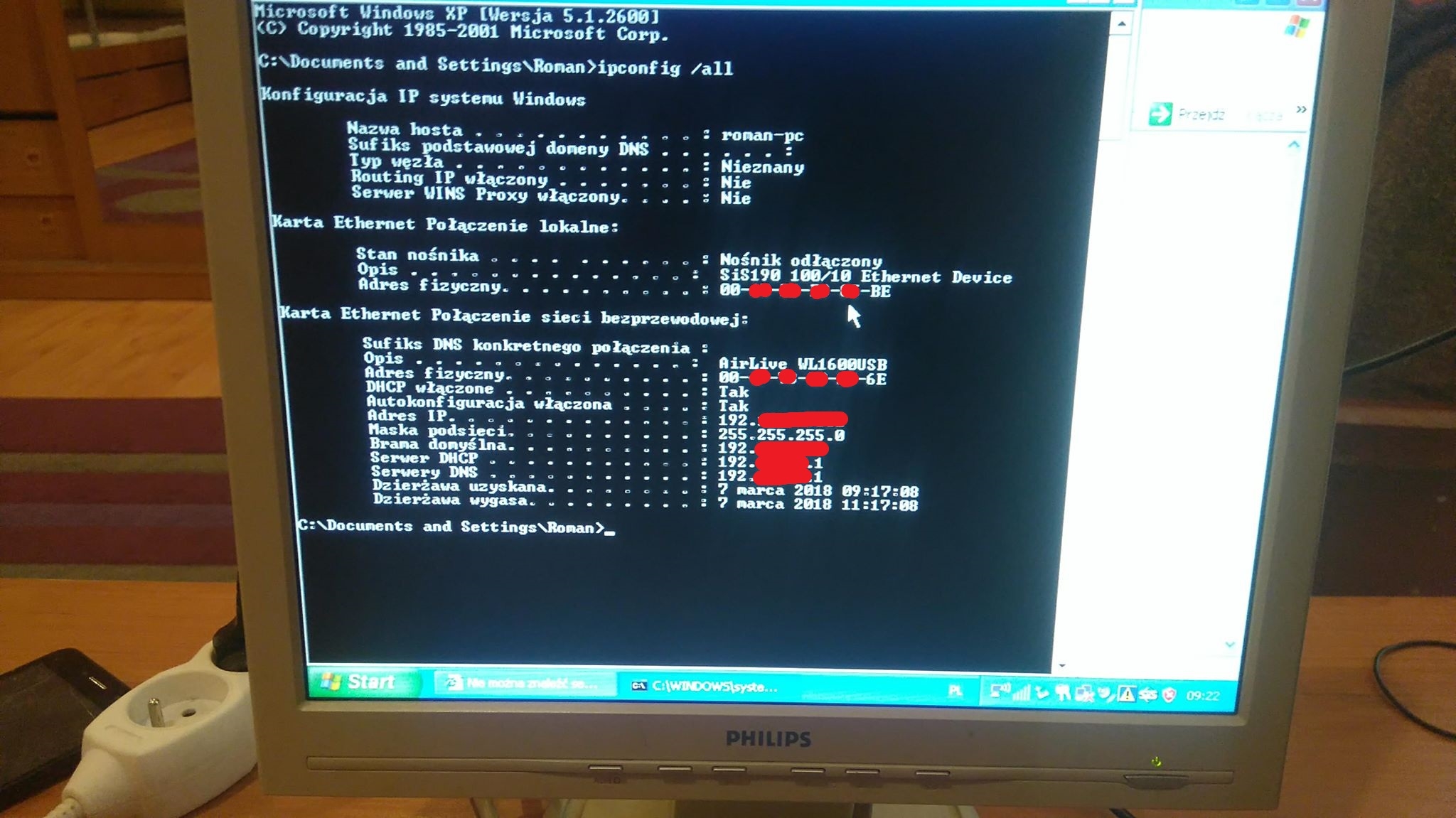
    Well according to internet ping is provided. By. IE is not there. Did you set the date?
    Post result:
    ipconfig / all
  • #5 17085990
    Kolobos
    IT specialist
    Posts: 85152
    Help: 17158
    Rate: 10418
    Do you have SP3 and other updates?

    Include in the attachment logs from FRST, from scanning (addition and frst.txt).
  • #6 17086029
    PanKoXeR
    Level 4  
    Posts: 57
    Rate: 9
    Windows XP Home Edition: Internet Access Issue & System Activation Bluescreen Error
    I don't have any updates because windows update doesn't work either.

    I can't download this program to FRST from the net or anything to scan. I do not think it was a virus because it is a system just installed from the MS disc
  • ADVERTISEMENT
  • ADVERTISEMENT
  • #8 17086055
    PanKoXeR
    Level 4  
    Posts: 57
    Rate: 9
    I wrote that I don't have any updates, it's pure XP Home Edition
  • #9 17086057
    Kolobos
    IT specialist
    Posts: 85152
    Help: 17158
    Rate: 10418
    Installing XP without integrated SP already on the board is a waste of time (not to write otherwise), that's why I'm asking. If your system does not even have SP2, I doubt it makes no sense at all to connect to the internet. Download SP and install.
    Read also the thread to which I gave the link.

    Plus, why did you blur your IP and mac address on the screen? After all, it will be of no use to anyone ...
  • #10 17086583
    PanKoXeR
    Level 4  
    Posts: 57
    Rate: 9
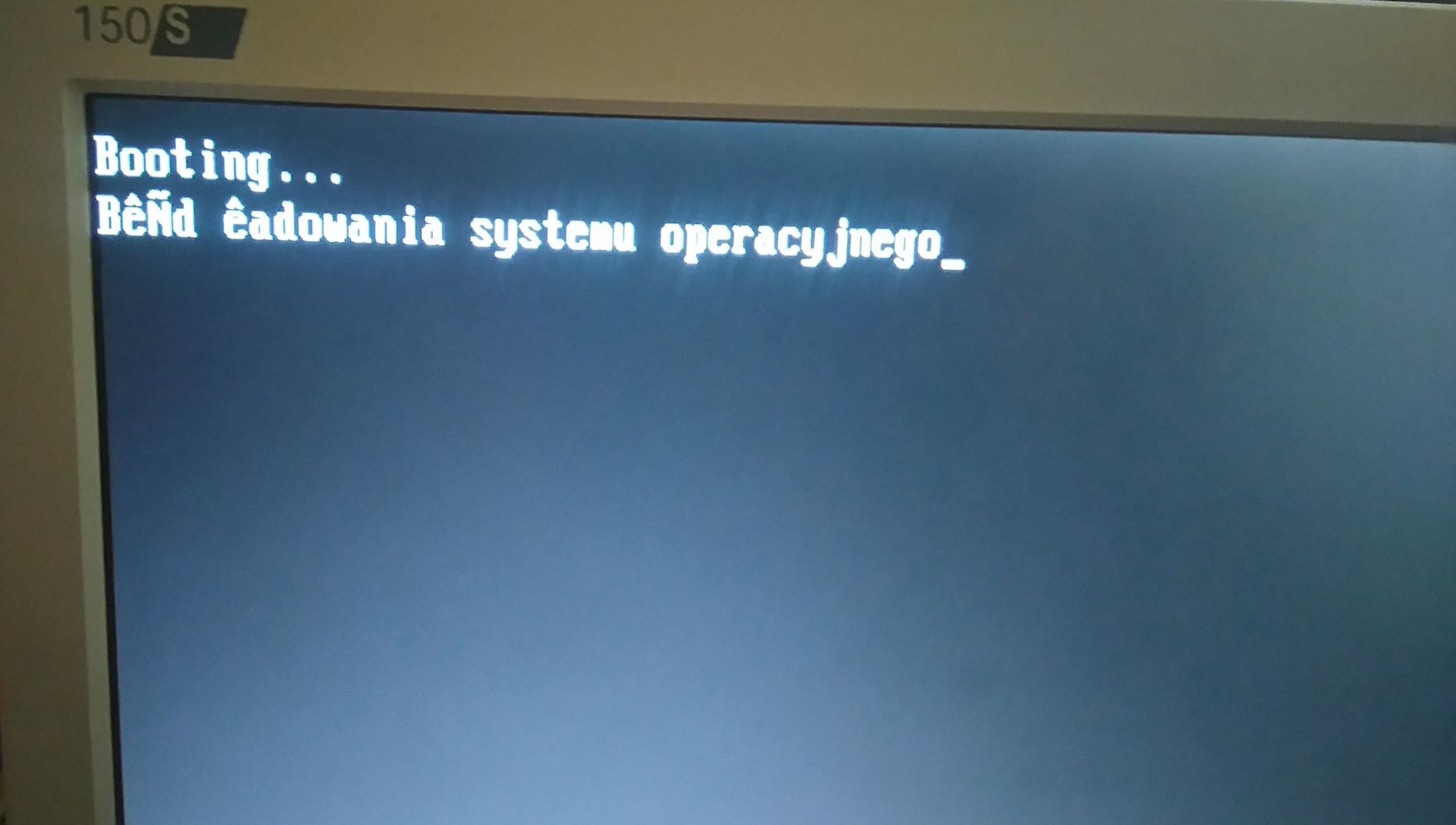
    Hello, yes. It turned out that the computer was SP2. I downloaded SP3 from another computer (from Good Programs :D ) and I moved to that. After installation it popped up that to initialize the computer must restart, I gave it ok turned off, turned on because an error occurred on ss
    Windows XP Home Edition: Internet Access Issue & System Activation Bluescreen Error
  • #11 17086615
    Kolobos
    IT specialist
    Posts: 85152
    Help: 17158
    Rate: 10418
    You have a working disk in this computer? Replace screen with CDI or Mhdd (under F8).
  • #12 17086627
    PanKoXeR
    Level 4  
    Posts: 57
    Rate: 9
    on the second disk the same problem (the first)
    I can't check it out. There is nothing like that in the bios, and on the f8 there is a boot menu. and immediately after the bios this error pops up
  • #13 17086656
    Kolobos
    IT specialist
    Posts: 85152
    Help: 17158
    Rate: 10418
    You press F8 on Mhdd, which you start from the bootable media.

    Also check the framework -> www.memtest.org
  • #14 17087364
    safbot1st
    Level 43  
    Posts: 21951
    Help: 2719
    Rate: 1583
    @PanKoXeR You really do it on the head:
    PanKoXeR wrote:
    on the second disk the same problem (the first)

    I have already written that systems are not transferred between computers.
    I asked in the second post what PC it is. I didn't get the answer, so I won't find out what the second-first and first (second) disk is ... ;)
    PanKoXeR wrote:
    I can't check it out. There is nothing like that in the bios, and on the f8 there is a boot menu. and immediately after the bios this error pops up

    You have the option of:
    1. do FreeDOS on a pen using this:
    http://www.programosy.pl/program,rufus.html
    2. copy the files from the package to the pen, which I attach, without COMMAND.COM overwriting.
    3. After booting the pen, type MHDD, ENTER in the prompt.
    4. select the disk and press F8. Enter the list that will pop up.
    Attachments:
    • MHDD_w_paczce_ale_nie_TXT.rar (308.66 KB) You must be logged in to download this attachment.

Topic summary

✨ The discussion revolves around issues faced after installing Windows XP Home Edition, specifically regarding internet access and a bluescreen error during system activation. The user initially encountered problems activating the system online despite having internet access through a browser. After attempting to transfer the installation to another computer, the same issues persisted, leading to a bluescreen error. Suggestions from other users included checking the system date in BIOS, ensuring Service Pack 3 (SP3) was installed, and using tools like MHDD for disk diagnostics. The user later confirmed that the system was running SP2 and successfully transferred SP3 from another computer, but continued to experience bluescreen errors upon reboot. Further troubleshooting steps were recommended, including using bootable media and checking hardware components.
Generated by the language model.

FAQ

TL;DR: Windows XP internet/activation hassles are normal now: it’s been over 11 years since support ended; “technical assistance for Windows XP is no longer available.” This FAQ helps XP Home users get basic connectivity, install SP3 offline, and troubleshoot BSODs. [Support for Windows XP ended]

Why it matters: It saves hours by prioritizing the few fixes that still work on an unsupported OS.

Quick Facts

  • XP support ended on 2014‑04‑08; online services and Windows Update for XP are retired. [Support for Windows XP ended]
  • SP3 is the practical baseline; it rolls up earlier fixes for stability and connectivity. [Windows XP Service Pack 3 (SP3)]
  • The SP3 offline installer is approx. 316 MB; plan a USB transfer. [Windows XP SP3 Network Installation Package]
  • IE8 on XP supports up to TLS 1.0; many modern HTTPS sites require TLS 1.2+. [Internet Explorer 8]
  • Don’t move an XP install between PCs; HAL/driver mismatches often trigger BSOD. [Elektroda, safbot1st, post #17085913]

How do I fix “no internet” on a fresh Windows XP Home install?

Install Service Pack 3 offline before going online. XP without integrated SPs is unstable for networking and web features. Use another PC or phone to download SP3, copy it to USB, then install. After that, add drivers and test again. “Installing XP without integrated SP is a waste of time.” [Elektroda, Kolobos, post #17086057]

Why can I ping websites but Internet Explorer errors or won’t open links on XP?

Your network stack works, but the browser can’t negotiate modern HTTPS. On XP, IE8 supports only SSL 2.0/3.0 and TLS 1.0. Many sites now require TLS 1.2+ and modern ciphers. Result: pings succeed, but HTTPS browsing fails. Install SP3 and an offline IE8 package if needed, but expect limits. [Internet Explorer 8]

How can I activate Windows XP if online activation fails?

Use phone activation. Users report that calling Microsoft and entering the installation ID completes activation when online activation reports no internet. After activation, you can continue offline setup and driver installation. Keep the date/time correct to avoid activation prompts repeating. [Elektroda, PanKoXeR, post #17085902]

Does a wrong date/time break internet access or activation on XP?

Yes. Incorrect BIOS or system time can break certificate checks and cause activation or HTTPS failures. Set the correct date in the BIOS first, then in Windows. Reboot and test again. This simple step often resolves confusing “no internet” messages during activation. [Elektroda, safbot1st, post #17085913]

Windows Update doesn’t work on XP. How do I update safely?

Windows Update for XP is retired. Download Service Pack 3 on another machine and install via USB. That restores many core fixes and enhances stability. After SP3, avoid exposing XP online; add only what you must via offline packages. [Support for Windows XP ended]

What basic diagnostics should I share when asking for XP network help?

Run ipconfig /all and capture the full output. Note IP, gateway, DNS, and adapter status. Then ping a known IP and a domain to test DNS and connectivity. Share hardware model details. These basics separate driver issues from higher‑layer failures. [Elektroda, safbot1st, post #17085974]

After installing SP3, XP shows a boot error or BSOD. How do I check the disk?

Use MHDD from a bootable USB to assess the drive. How‑To:
  1. Create a FreeDOS USB with Rufus and copy MHDD files (don’t overwrite COMMAND.COM).
  2. Boot the USB, type MHDD, press Enter.
  3. Select the disk and press F8 to review SMART/error lists. “Select the disk and press F8. Enter the list that will pop up.” [Elektroda, safbot1st, post #17087364]

How do I test RAM on an XP‑era PC?

Run Memtest from a bootable USB or CD. Let it complete several passes to catch intermittent faults. Memory errors can cause SP3 install failures and post‑install BSODs. Replace failing modules before retrying the OS setup. [Elektroda, Kolobos, post #17086656]

Can I move or clone my XP installation to a different PC?

Avoid it. Hardware Abstraction Layer and driver differences cause crashes. Expect a blue screen on boot. As one expert puts it, “The system does not transfer with the disk between computers… you will have… BSOD on loading.” Use a clean install per system. [Elektroda, safbot1st, post #17085913]

Chrome won’t install on XP or says there’s no internet. What now?

Google ended Chrome support for XP in 2016. The online installer also requires working HTTPS. If you must, use an old offline installer, but it’s insecure. Prefer offline tools and keep the machine off the internet. [Support for Windows XP and Vista]

Which commands quickly confirm my XP network stack is okay?

Use ipconfig /all to confirm IP, gateway, and DNS leases. Then ping the gateway and an external IP to verify routing. Finally, ping a domain to test DNS. If these succeed but the browser fails, focus on TLS and certificates. [Elektroda, safbot1st, post #17085974]

Is blurring my IP/MAC in diagnostic screenshots necessary?

Usually no. Local IP and MAC reveal little in typical home setups and won’t help attackers meaningfully in isolation. Focus on sharing complete ipconfig /all and error details so helpers can diagnose faster. [Elektroda, Kolobos, post #17086057]

What’s the safest way to use XP in 2025?

Keep it offline or behind strict network isolation. Use it for legacy apps only. Without security patches, connecting XP to the internet exposes you to unpatched vulnerabilities. Transfer files via USB after scanning on a modern PC. [Support for Windows XP ended]

How large is the XP SP3 file, and how should I transfer it?

The SP3 network installer is about 316 MB. Copy it to a USB stick and run it locally on the XP PC. Expect a few minutes to transfer on USB 2.0 and longer on very old hardware. [Windows XP SP3 Network Installation Package]
Generated by the language model.
ADVERTISEMENT