


logo elektroda
logo elektroda
X
logo elektroda

[Solved] Xiaomi Mi A1: No LTE/4G Coverage issue, Allegro Purchase, Compare with Samsung J5 2015, B20-B7

darek2341 7527 19
Best answers

Why does my Xiaomi Mi A1 seem to have no LTE/4G coverage while my Samsung J5 2015 works normally on the same SIM, and could the seller have misrepresented the supported LTE bands?

4G and LTE are the same network, and on stock Android the Xiaomi may simply show “4G” instead of “LTE,” so the label alone does not prove a fault [#17140814][#17140754] Check the actual performance with a speedtest directly on both phones and, if possible, test the Xiaomi in another location instead of only at home [#17142711][#17147299] A network diagnostic app like Network Cell Info can also help show what cell and band the phone is really using from the same spot where it behaves poorly [#17147377] One reply also noted that the Mi A1 can sometimes have weaker reception depending on the phone/housing, but the later conclusion from the thread was that the problem was on the operator’s side, not the handset [#17140346][#17228841]
Generated by the language model.
ADVERTISEMENT
Treść została przetłumaczona polish » english Zobacz oryginalną wersję tematu
  • #1 17140232
    darek2341
    Level 8  
    Posts: 223
    Help: 1
    Rate: 39
    Hello, I bought a phone Xiaomi Mi A1, everything is good, except for LTE, 4g network, phone bought from allegro, I add my old samsung j5 2015 catch LTE without a problem, what could be a problem if the seller lied by saying that the phone has FDD LTE B20: 800 / B5: 850 / B8: 900 / B3: 1800 / B1: 2100 / B7: 2600
    Attachments:
    • Xiaomi Mi A1: No LTE/4G Coverage issue, Allegro Purchase, Compare with Samsung J5 2015, B20-B7 20150101_010155.jpg (830.35 KB) You must be logged in to download this attachment.
  • ADVERTISEMENT
  • #2 17140346
    BILGO
    Level 38  
    Posts: 4452
    Help: 393
    Rate: 723
    In general, the phone itself can have a worse range by itself. Often, the housings affect this. Other equipment. Try it at another location to check it you will have an answer.
  • #3 17140357
    darek2341
    Level 8  
    Posts: 223
    Help: 1
    Rate: 39
    But I have a second one next to me and I have a few
  • #4 17140376
    BILGO
    Level 38  
    Posts: 4452
    Help: 393
    Rate: 723
    darek2341 wrote:
    But I have a second one next to me and I have a few

    Same, identical phone model?
  • ADVERTISEMENT
  • #5 17140382
    darek2341
    Level 8  
    Posts: 223
    Help: 1
    Rate: 39
    Zara I am going to the BTS I have 1km check. At bts he showed only 4g full range, i.e. there is probably no LTE.
  • #6 17140754
    Ordine
    Level 25  
    Posts: 789
    Help: 75
    Rate: 160
    After all, 4g is LTE.
  • #7 17140783
    darek2341
    Level 8  
    Posts: 223
    Help: 1
    Rate: 39
    I do not know, I'm not on the subject, but why on the old j5 LTE shows me, and there is faster internet, and on xiaomi shows 4g and you have to wait for opening pages and buffering movies. On j5 there is no such problem, nothing starts silly.
  • #8 17140814
    Ordine
    Level 25  
    Posts: 789
    Help: 75
    Rate: 160
    darek2341 wrote:
    I do not know, I'm not on the subject, but why on the old j5 LTE shows me, and there is faster internet, and on xiaomi shows 4g and you have to wait for opening pages and buffering movies. On j5 there is no such problem, nothing starts silly.

    On the stock android is that instead of lte it displays 4g - no one knows why, but it is - somewhere in the settings it has changed. Make a speedtest on both you could.
  • ADVERTISEMENT
  • #9 17140881
    darek2341
    Level 8  
    Posts: 223
    Help: 1
    Rate: 39
    Xiaomi Mi A1: No LTE/4G Coverage issue, Allegro Purchase, Compare with Samsung J5 2015, B20-B7 Xiaomi Mi A1: No LTE/4G Coverage issue, Allegro Purchase, Compare with Samsung J5 2015, B20-B7
    1.Samsung J5
    2.Xiaomi
  • #10 17142711
    Ordine
    Level 25  
    Posts: 789
    Help: 75
    Rate: 160
    Take tests directly from the device by speedtest stitching.
  • ADVERTISEMENT
  • #11 17145538
    darek2341
    Level 8  
    Posts: 223
    Help: 1
    Rate: 39
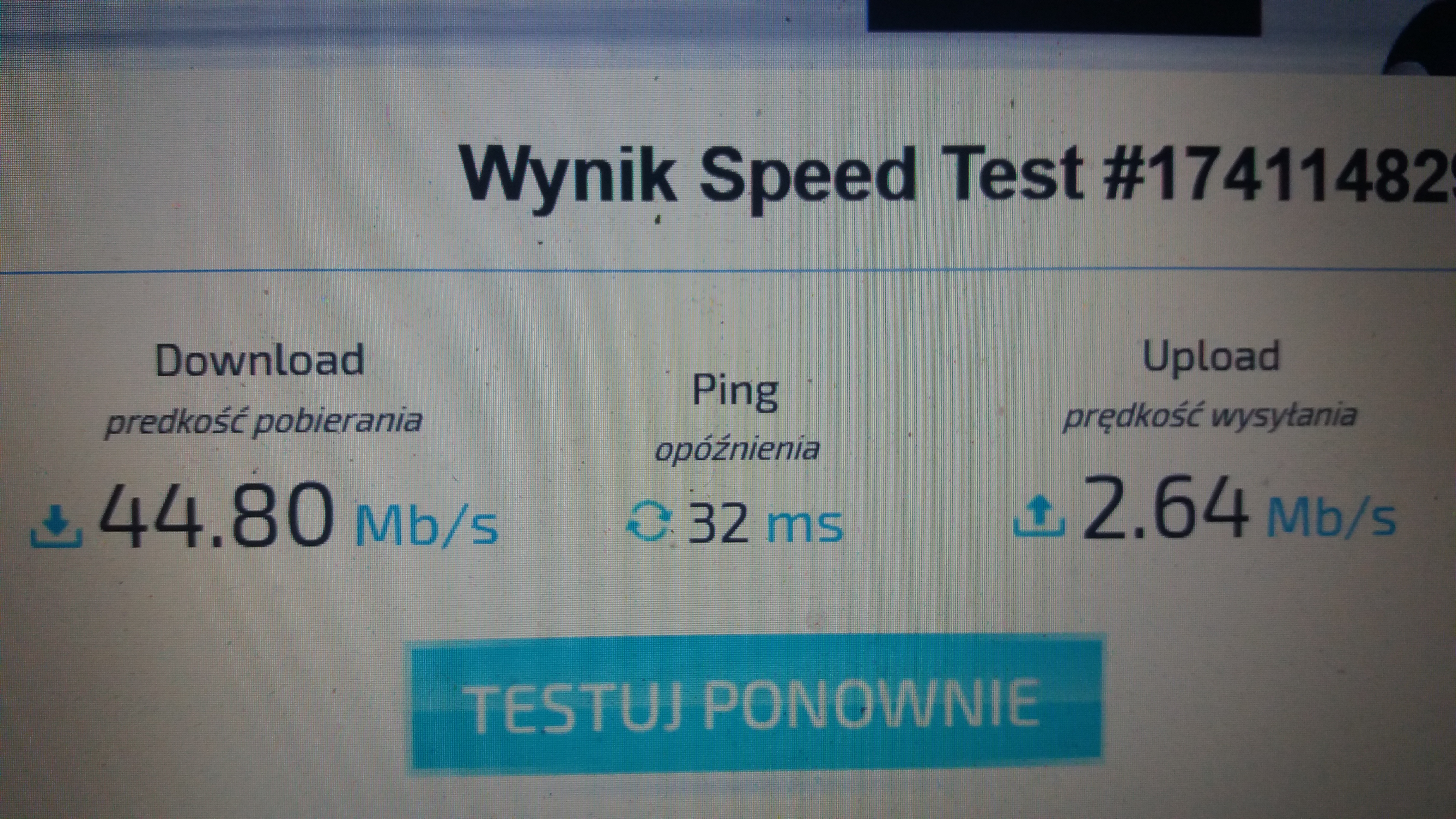
    1.Xiaomi.Here the case looks so great that speed is crazy, it jumps once so once so, and in j5 everything works steadily.
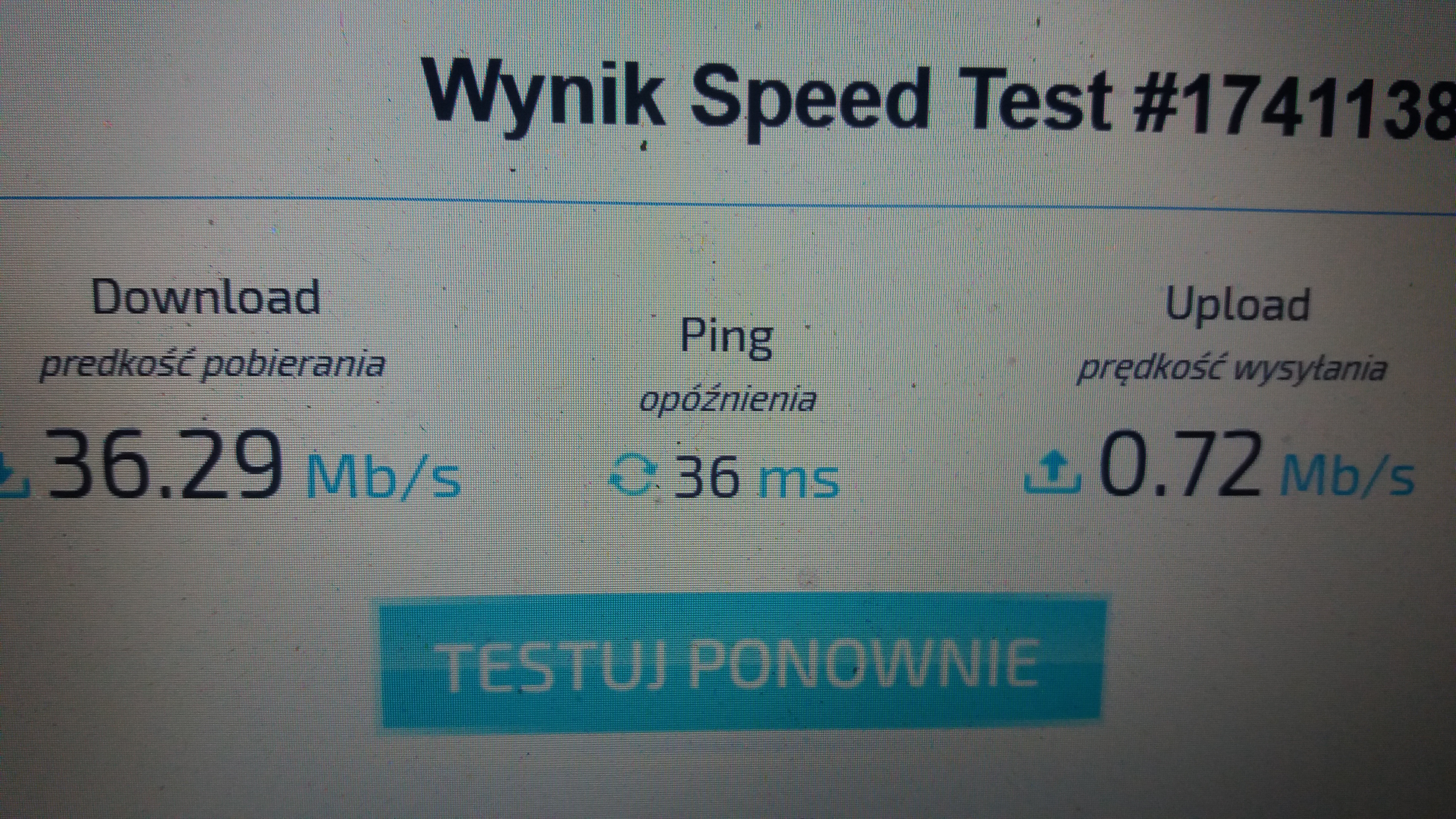
    2.Samsung J5
    Attachments:
    • Xiaomi Mi A1: No LTE/4G Coverage issue, Allegro Purchase, Compare with Samsung J5 2015, B20-B7 Xiaomi.jpg (2.28 MB) You must be logged in to download this attachment.
    • Xiaomi Mi A1: No LTE/4G Coverage issue, Allegro Purchase, Compare with Samsung J5 2015, B20-B7 Samsung J5.jpg (3.98 MB) You must be logged in to download this attachment.
  • #12 17145552
    Ordine
    Level 25  
    Posts: 789
    Help: 75
    Rate: 160
    what frequencies does xiaomi catch and what kind of j5?
  • #13 17145566
    darek2341
    Level 8  
    Posts: 223
    Help: 1
    Rate: 39
    Hello, the servers shows the same, all the time I'm sending 0. A download jumps from 15 to even 56, something is wrong.
  • #14 17147141
    Ordine
    Level 25  
    Posts: 789
    Help: 75
    Rate: 160
    darek2341 wrote:
    Hello, the servers shows the same, all the time I'm sending 0. A download jumps from 15 to even 56, something is wrong.

    15 and 56 what? kbps, mbps? I made a glass ball ...
  • #15 17147271
    darek2341
    Level 8  
    Posts: 223
    Help: 1
    Rate: 39
    Sorry, Mbps
  • #16 17147299
    Ordine
    Level 25  
    Posts: 789
    Help: 75
    Rate: 160
    He jumps on xiaomi, right? Did you check somewhere else than at home?
  • #17 17147321
    darek2341
    Level 8  
    Posts: 223
    Help: 1
    Rate: 39
    So I checked, the worst thing is with sending, downloading still in measure. And as I put the sim card into j5 it goes smoothly everywhere, and xiaomi once goes as far as it then starts to silt up.
  • #18 17147377
    makosuu
    Network and Internet specialist
    Posts: 2984
    Help: 369
    Rate: 369
    Show Network Cell Info from the same place where Xiaomi works so poorly.

    And I will repeat it again just in case 4G = LTE
  • #19 17150791
    darek2341
    Level 8  
    Posts: 223
    Help: 1
    Rate: 39
    I called the xiaomi service, and they told me that my phone was from Asia, or why should I have problems with lte?
  • #20 17228841
    darek2341
    Level 8  
    Posts: 223
    Help: 1
    Rate: 39
    Wines on the operator's side. Thank you to everyone. I greet you

Topic summary

✨ The discussion revolves around the Xiaomi Mi A1's inability to connect to LTE/4G networks, particularly after purchasing the device from Allegro. The user compares its performance with an older Samsung J5 (2015), which consistently connects to LTE without issues. Responses suggest that the Mi A1 may have a weaker signal range or compatibility issues, possibly due to it being an Asian model. Users recommend checking network settings, performing speed tests, and verifying the supported LTE bands of both devices. The conversation highlights the confusion between 4G and LTE terminology, with some users noting that the Mi A1 displays "4G" instead of "LTE" in certain conditions.
Generated by the language model.

FAQ

TL;DR: Mi A1 LTE acting up? One user saw downloads swing 15–56 and “sending 0” upload; we show quick tests, band checks, and when to call your operator. [Elektroda, darek2341, post #17145566]

Why it matters: This FAQ helps Xiaomi Mi A1 owners diagnose no LTE/4G, unstable speeds, or mismatched bands versus phones like Samsung J5, and decide when it’s the operator.

Quick Facts

Is “4G” on my Xiaomi Mi A1 actually LTE?

Yes. On this thread, an experienced user clarified “4G = LTE.” Android often shows the 4G label even on LTE. “4G = LTE.” [Elektroda, makosuu, post #17147377]

Why is my Mi A1 slower than my Samsung J5 in the same spot?

Phones differ in radio design and housings, which affects signal and throughput. Two handsets side‑by‑side can perform differently. Test in another location to compare fairly. Antenna placement and shielding often explain gaps. Run controlled tests before judging the device. [Elektroda, BILGO, post #17140346]

What quick tests should I run to confirm the problem?

Try this:
  1. Run the Speedtest app on the Mi A1, then on the J5, same server.
  2. Swap the same SIM between phones and retest.
  3. Repeat at another location and time. This isolates device, SIM, and location effects quickly. [Elektroda, Ordine, post #17142711]

Could my Allegro‑bought Mi A1 lack the LTE bands I need?

It depends on the exact market variant. In this case, Xiaomi service said the phone was an Asia‑market unit. Variants can differ. Verify your unit’s listed bands against your operator’s needs before purchase or troubleshooting. [Elektroda, darek2341, post #17150791]

Why do downloads swing 15–56 while upload shows 0?

That pattern points to a network issue more than the handset. The thread’s Mi A1 showed 15–56 down with 0 up. Edge case: 0 upload can stall messaging, backups, and video calls despite decent downloads. Retest and contact your operator with logs. [Elektroda, darek2341, post #17145566]

Is the fault here with the network or the phone?

In this thread, the resolution was operator‑side. After investigation, the user confirmed the network was at fault. Contact your carrier if tests show similar symptoms across locations. Provide timestamps and screenshots to speed fixes. [Elektroda, darek2341, post #17228841]

How can I see which LTE band or cell my phone is using?

Use a diagnostic app like Network Cell Info to display serving cell and LTE band. Capture readings where performance drops to correlate band changes and signal levels with speed results. “Show Network Cell Info from the same place.” [Elektroda, makosuu, post #17147377]

Should I worry if my phone shows “4G” instead of “LTE”?

No. On stock Android, the UI can display 4G while you are on LTE. It’s a cosmetic label. Validate with Speedtest or a field‑test app rather than the icon text. “Instead of LTE it displays 4G.” [Elektroda, Ordine, post #17140814]

Does being 1 km from a BTS guarantee fast LTE?

No. The user stood about 1 km from a BTS and saw full 4G bars, yet speed complaints persisted. Congestion, backhaul, or band differences can still limit throughput. Distance helps, but it isn’t a guarantee of speed. [Elektroda, darek2341, post #17140382]

What else should I try before returning the phone?

Perform clean tests, swap SIMs, and confirm APN settings. Test in multiple locations and times. If upload remains 0 or speeds stall, open a ticket with your operator. In this thread, the operator fixed the issue. Keep return as a last resort. [Elektroda, darek2341, post #17228841]

How do I compare fairly with another phone like Samsung J5?

Use the same SIM, same location, and the same Speedtest server. Run back‑to‑back tests and log results. Also try another location to remove local quirks. Differences in antennas and housings can skew results. [Elektroda, BILGO, post #17140346]

The seller listed B20/B7 support. How can I verify my unit?

Cross‑check your device’s LTE bands via its documentation or with a radio info app. Compare to the seller’s listing. In this thread, the seller listed B20/B7 among others. Keep screenshots for any warranty or return claim. [Elektroda, darek2341, post #17140232]

Why do I have full bars but slow browsing on the Mi A1?

Signal bars show radio strength, not network capacity. The user saw full 4G near a BTS yet experienced slow performance. Congestion or upstream faults can cause delays. Test upload and download to pinpoint the bottleneck. [Elektroda, darek2341, post #17140382]

Who is this FAQ for, and what problem does it solve?

It’s for Xiaomi Mi A1 owners who see no LTE/4G, unstable speeds, or mismatches versus phones like the Samsung J5. It explains quick diagnostics, band awareness, and when to escalate to your carrier. The thread ended with an operator‑side fix. [Elektroda, darek2341, post #17228841]
Generated by the language model.
ADVERTISEMENT