logo elektroda
logo elektroda
X
logo elektroda

[Solved] Redmi Note 8 Pro Mobile Internet Issues: SIM Card, Network Reset, Xiaomi Pocophone F1 Comparison

Kamulton 24363 15
ADVERTISEMENT
Treść została przetłumaczona polish » english Zobacz oryginalną wersję tematu
  • #1 18916556
    Kamulton
    Level 5  
    about buying xiaomi redmi note 8 pro and putting my sim card in it i don't have mobile internet. I have reset the network and set it in different ways but it's still the same. I have internet for about 30 minutes then it's on but I can't load the page and to fix it I have to reset my phone and then the situation repeats itself. In the last xiaomi Pocophone f1 there was no such problem
  • ADVERTISEMENT
  • #2 18916560
    sosarek

    Level 43  
    What card, do you also make calls when using the internet?
    For me, for example, when I use a hotspot, the internet disconnects when connected (on the main tab).
    Company Account:
    Z
    Pka, Poznań, 60-850
    Helpful post? Buy me a coffee.
  • ADVERTISEMENT
  • #3 18916597
    Kamulton
    Level 5  
    I use a nano SIM card from orange, I have it in the first slot, it was in the second one and there was the same problem, I don't use the internet during calls. When using the data, normal speed is shown and works, and after some time it drops to a minimum and the chapel. Network testing built into the system says everything is okay, and I can't open a single page or refresh apps like Facebook
  • #4 18916634
    sosarek

    Level 43  
    I have nano Orange and Play in Redmi 7A but it has never been so that it turns off after a while - do you have battery saving turned on?
    Company Account:
    Z
    Pka, Poznań, 60-850
    Helpful post? Buy me a coffee.
  • ADVERTISEMENT
  • #5 18916812
    Kamulton
    Level 5  
    I have it turned on but in pocophone f1 I also had it and the data worked normally. It's not so much that it turns off, but the pages just won't load. And it doesn't change until the phone is reset
  • #6 18917443
    fastlopez
    Level 14  
    @Kamulton change apn to Internet , username and password as well Internet (lowercase)
  • #7 18917993
    Kamulton
    Level 5  
    It's still the same
  • #8 18919453
    fastlopez
    Level 14  
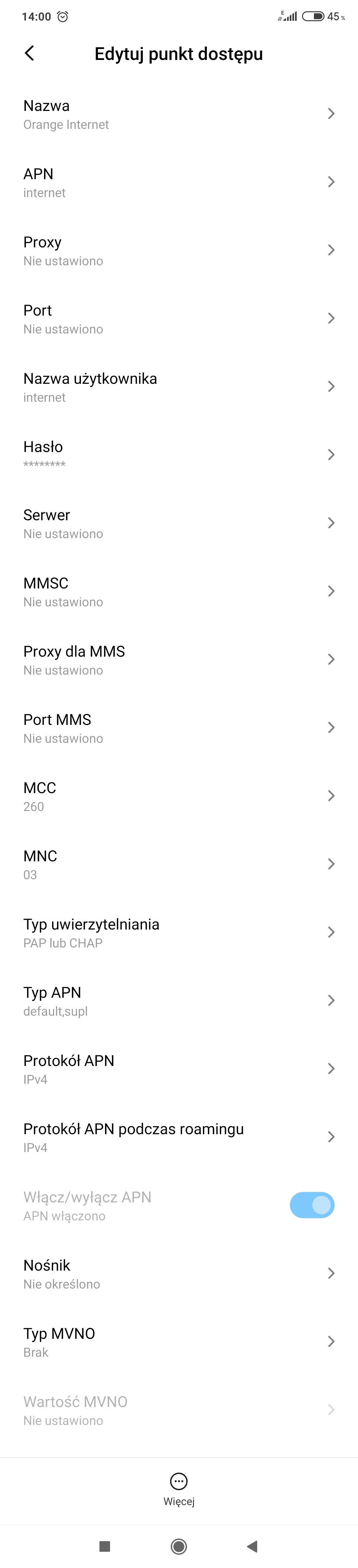
    @Kamulton Can you post screenshots of your internet setup?
  • #9 18922088
    Kamulton
    Level 5  
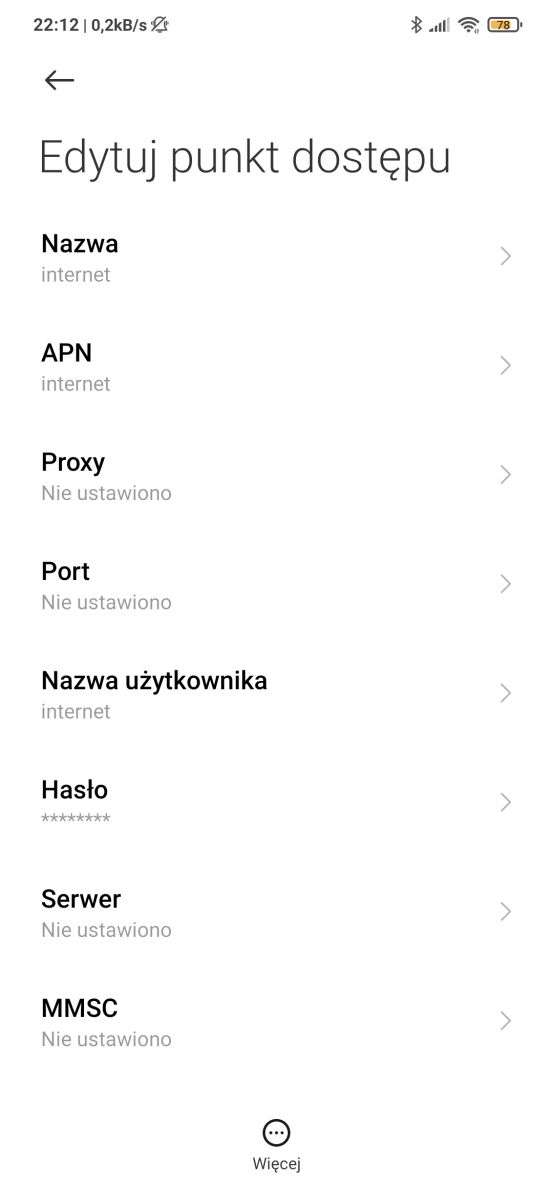
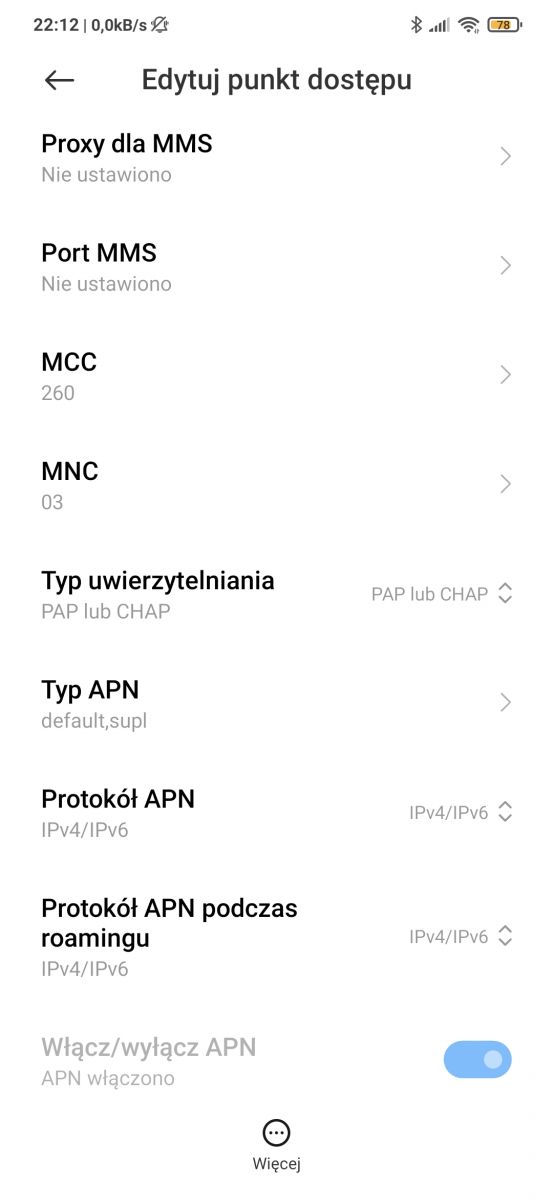
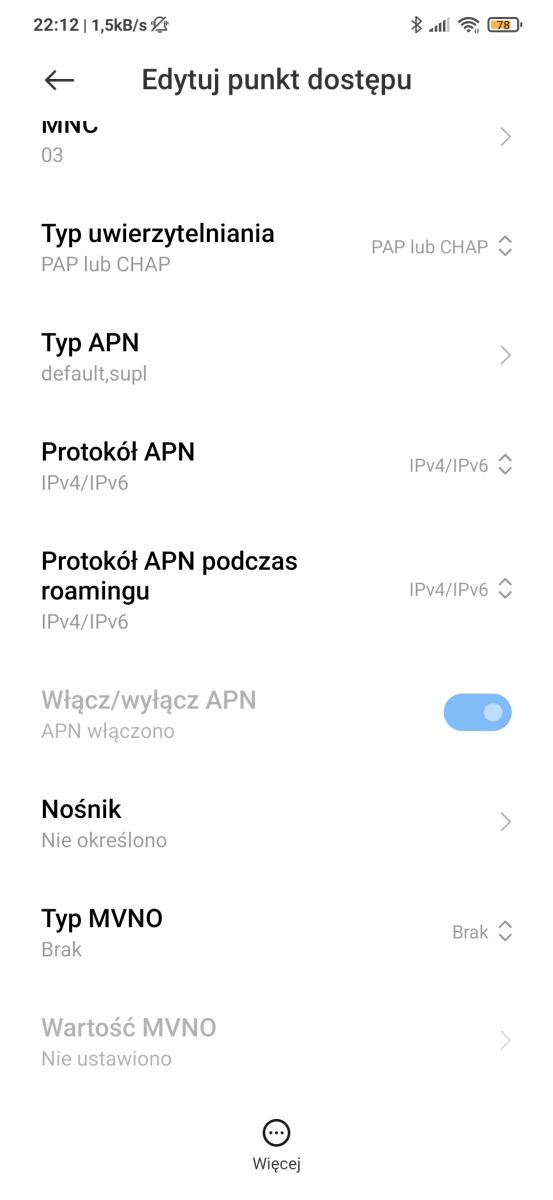
    Redmi Note 8 Pro Mobile Internet Issues: SIM Card, Network Reset, Xiaomi Pocophone F1 Comparison Redmi Note 8 Pro Mobile Internet Issues: SIM Card, Network Reset, Xiaomi Pocophone F1 Comparison Redmi Note 8 Pro Mobile Internet Issues: SIM Card, Network Reset, Xiaomi Pocophone F1 Comparison

    Remember that I set different settings, all that I found on the internet, currently I have these and still the same. These are basic.
  • #10 18922216
    fastlopez
    Level 14  
    Try the APN protocol as only ipv4 (no ipv6), after modification restart the phone and let me know what happened.
  • #11 18923964
    Kamulton
    Level 5  
    I tested it and still the same
  • #12 18925137
    Kamulton
    Level 5  
    fastlopez wrote:
    Try the APN protocol as only ipv4 (no ipv6), after modification restart the phone and let me know what happened.


    Any other suggestions?
  • #13 18925493
    fastlopez
    Level 14  
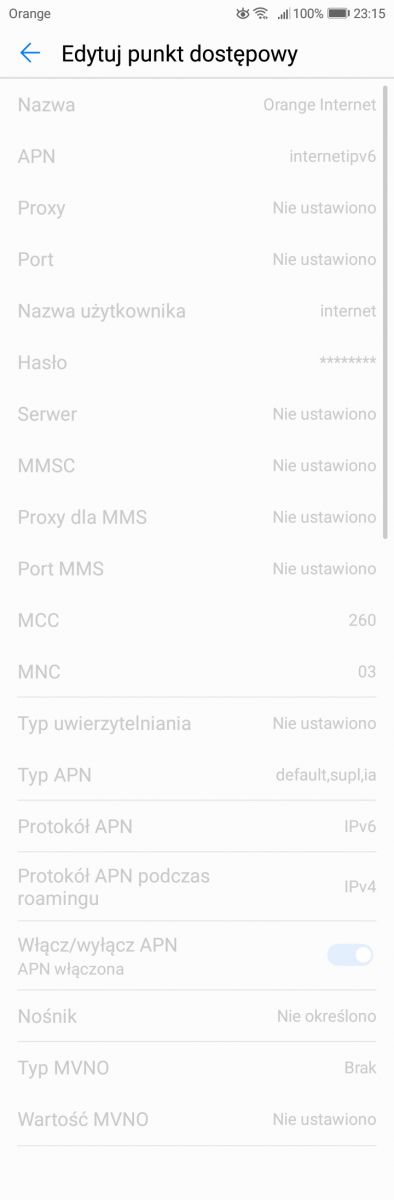
    this is how the configuration on huawei looks like

    Redmi Note 8 Pro Mobile Internet Issues: SIM Card, Network Reset, Xiaomi Pocophone F1 Comparison

    At the end of the week I will have a redmi 8t and I will post what it looks like there ...
  • #14 18934152
    fastlopez
    Level 14  
    This is how the configuration on redmi 8t looks like
    Redmi Note 8 Pro Mobile Internet Issues: SIM Card, Network Reset, Xiaomi Pocophone F1 Comparison
  • #15 19309462
    Kamulton
    Level 5  
    I just have an old sim card, I had to change the settings from LTE to 3g

    I close
  • ADVERTISEMENT
  • #16 19309463
    Kamulton
    Level 5  
    I just have an old sim card, I had to change the settings from LTE to 3g

    I close

    Added after 44 [seconds]:

    Due to the old sim card, I had to change LTE to 3G, probably the card does not cover LTE

Topic summary

✨ The discussion revolves around mobile internet connectivity issues experienced by a user of the Xiaomi Redmi Note 8 Pro. The user reports intermittent internet access, requiring frequent phone resets to restore connectivity. Despite trying various network settings, including APN configurations and switching SIM card slots, the problem persists. Comparisons are made to the Xiaomi Pocophone F1, which did not exhibit similar issues. Suggestions from other users include changing APN settings to IPv4, checking battery saving modes, and considering the age of the SIM card, which may not support LTE, prompting a switch to 3G settings.
Generated by the language model.

FAQ

TL;DR: On Redmi Note 8 Pro, data died after ~30 minutes; root cause was an old SIM lacking LTE—"I had to change the settings from LTE to 3G." Fix by replacing the SIM or temporarily forcing 3G; check APN and battery saver too. [Elektroda, Kamulton, post #19309462]

Why it matters: This helps Xiaomi users fix mobile data that works then stalls, especially with older Orange SIM cards.

Quick Facts

How do I fix Redmi Note 8 Pro mobile data that works, then stops?

Replace your SIM with an LTE-capable one, or temporarily force the phone to 3G. This resolved the dropout in the documented case. After switching to 3G, browsing worked reliably again. Long-term, a new SIM restores LTE and stability. [Elektroda, Kamulton, post #19309462]

What are the telltale symptoms of this issue?

Data shows as connected and fast, then after about 30 minutes pages stop loading. Apps fail to refresh and only a phone reboot restores access. Signal bars and network tests may still look normal. These symptoms point away from coverage and toward SIM or settings. [Elektroda, Kamulton, post #18916556]

How do I switch from LTE to 3G on MIUI (temporary workaround)?

  1. Settings > SIM cards & mobile networks > your SIM.
  2. Tap Preferred network type.
  3. Select 3G only, then test browsing. This mitigated the issue when the SIM did not support LTE. Replace the SIM to return to LTE later. [Elektroda, Kamulton, post #19309462]

What Orange APN settings should I try on Xiaomi?

Set APN to "internet" and use "internet" for both username and password, all lowercase. Save and select the profile as active. Reboot after changes. This is a common Orange profile baseline before further diagnostics. [Elektroda, fastlopez, post #18917443]

Should I force IPv4-only on the APN?

It’s a useful tweak to rule out IPv6 issues. "Try the APN protocol as only ipv4 (no ipv6), after modification restart the phone." Apply it, then test browsing and apps. If unchanged, continue with SIM or network-mode checks. [Elektroda, fastlopez, post #18922216]

IPv4-only didn’t help—what next?

If forcing IPv4 doesn’t change anything after a reboot, proceed to network-mode changes or SIM replacement. In this case, IPv4-only left the problem unchanged until 3G was selected. That points to the SIM’s LTE support as the root cause. [Elektroda, Kamulton, post #18923964]

Do SIM slots (1 vs 2) affect this problem?

Switching between SIM slot 1 and 2 did not resolve the dropouts here. The issue reproduced in both slots, which shifts focus to APN, network mode, or SIM capability. Slot changes alone are not a fix. [Elektroda, Kamulton, post #18916597]

Can battery saver be the reason my data stops?

Battery saver was enabled, yet the same data-stall behavior persisted. That suggests battery saver was not the cause in this case. Focus instead on APN, IPv4-only testing, and network mode or SIM replacement. [Elektroda, Kamulton, post #18916812]

Why did Pocophone F1 work fine, but Note 8 Pro didn’t?

The prior Pocophone F1 showed no such issue, while Note 8 Pro stalled with the same carrier. The differentiator proved to be an older SIM’s LTE support. Forcing 3G fixed it on Note 8 Pro, indicating the SIM, not the phone, was at fault. [Elektroda, Kamulton, post #19309462]

My hotspot use disconnects data—related to this?

One user noted data disconnects when hotspot is active. Hotspot behavior can differ from regular browsing and may trigger separate network policies. Test with hotspot off while you troubleshoot APN and network mode first. [Elektroda, sosarek, post #18916560]

When should I replace the SIM instead of changing settings?

Replace the SIM if forcing 3G restores stability or if the SIM predates LTE service. An old card lacking LTE support caused the stalls here. A new LTE-capable SIM lets you return to LTE without dropouts. [Elektroda, Kamulton, post #19309463]

Will using 3G hurt performance or future-proofing?

Yes. 3G offers lower speeds and is being refarmed in many markets. Treat 3G as a temporary workaround while you obtain an LTE-capable SIM. "Use 3G only while you sort the SIM," is sound guidance. [GSMA, 2023]
Generated by the language model.
ADVERTISEMENT