


logo elektroda
logo elektroda
X
logo elektroda

Mikrotik Mesh Network: Reviews, Performance & Comparison to Other WiFi Solutions

automatapl 18483 36
Best answers

Is a MikroTik-based mesh Wi‑Fi network worth using, or is it better to use wired access points or another Wi‑Fi solution for seamless coverage?

A MikroTik 'mesh' is not recommended here; the thread advises using wired access points with the same SSID/password, and if you need seamless roaming, choose gear that supports fast roaming such as UniFi or TP-Link MR4 instead of independent MikroTik APs [#19443307] [#19443375] [#19443392] [#19443422] On MikroTik, AP-to-AP switching can be quick, but it is not true roaming: the connection is dropped when the client changes APs, which can interrupt VoIP, voice, and video even though browsing and streaming usually survive [#19443433] [#19443542] The thread also says MikroTik is not planning to implement home roaming [#19443542] UniFi is reported to work with one SSID and one password, with users describing it as stable 'turn on and forget' Wi‑Fi; suggested models were UAP-AC-LITE for 2x2 MIMO clients or UAP-AC-PRO for 3x3 MIMO clients, powered by PoE [#19443570] [#19445155] Wireless uplink/mesh on UniFi can work, but it was described as much slower and suitable mainly for browsing, so cable backhaul is preferred [#19444526]
Generated by the language model.
ADVERTISEMENT
Treść została przetłumaczona polish » english Zobacz oryginalną wersję tematu
  • #31 19445155
    IC_Current
    Network and Internet specialist
    Posts: 9093
    Help: 1493
    Rate: 2491
    UAP AC Lite if you have 2x2 MIMO or UAP AC Pro if you have 3x3 MIMO clients.
    As for the power supply - the last time I buy it, the rule is - you buy a collective package of five or ten APs, you have no power supply, because they will probably go to a large installation with a PoE switch anyway. You buy AP by the piece in a single package, you get it with a power supply. You buy from strange sources, where the seller first bought a collective package and then sells single pieces in foil - you don't have a power supply.

    Added after 50 [seconds]:

    automatapl wrote:
    Won't this reduce transfer over utp 6a?

    PoE has nothing to do with wire bandwidth
    Helpful post? Buy me a coffee.
  • ADVERTISEMENT
  • #32 19445158
    automatapl
    Level 5  
    Posts: 103
    Rate: 13
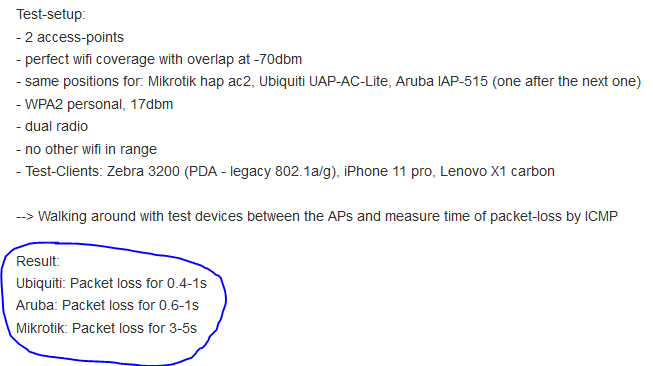
    On the Mikrotik forum I found a comparison of roaming on different devices. In fact, MT performs poorly.
    Mikrotik Mesh Network: Reviews, Performance & Comparison to Other WiFi Solutions
  • ADVERTISEMENT
  • #33 19445162
    m.jastrzebski
    Network and Internet specialist
    Posts: 5238
    Help: 679
    Rate: 862
    automatapl wrote:
    @IC_Current
    @m.jastrzebski
    @KOCUREK1970
    @chatman1

    Please give me your picks - which devices UniFi In-Wall AP and UniFi AP purchase for an apartment (60-80m2; 3 or 4 rooms) to have a balance between the possibilities and the cost of shopping.
    Internet access 1000/100 - the router is Mikrotik for now - I don't expect any changes here, or if I have time, I'll configure the gateway on openbsd.
    it just depends on the budget. Ac lite is enough (~350 PLN). I saw that there are new versions of wifi 6, but it's PLN 550 with such a link to consider. More future-proof. Whether the ceiling or inwall version should not make a difference. I suspect it's the same in a different package.

    Added after 2 [minutes]:

    automatapl wrote:
    KOCUREK1970 wrote:
    PoE power

    Won't this reduce transfer over utp 6a?

    Not. Poe af / at, you are interested in such a power supply or switch. Besides, they can't be powered otherwise, they don't have a DC socket.
  • ADVERTISEMENT
  • #34 19445192
    automatapl
    Level 5  
    Posts: 103
    Rate: 13
    m.jastrzebski wrote:
    Whether the ceiling or inwall version should not make a difference.

    In-wall - has the disadvantage that it will protrude from the socket and the advantage that it has two LAN outputs.
    I don't know if a low-hanging/placed device affects transfers, I don't think it matters much.
  • ADVERTISEMENT
  • Helpful post
    #35 19446003
    Anonymous
    Level 1  
  • Helpful post
    #36 19446073
    Anonymous
    Level 1  
  • #37 19446129
    automatapl
    Level 5  
    Posts: 103
    Rate: 13
    chatman1 wrote:
    In Wall, how do you want to convert the socket from RJ45 to AP + socket.

    We actually get AP + 2 x lan.

Topic summary

✨ The discussion revolves around the effectiveness of Mikrotik devices in creating a mesh network compared to other solutions like Ubiquiti and TP-Link. Many participants express skepticism about the concept of mesh networking, suggesting that traditional wired access points (APs) connected to a router are more reliable. Concerns are raised about Mikrotik's lack of true roaming capabilities, which can lead to connection drops during VoIP calls when switching between APs. Ubiquiti's solutions, while more expensive, are praised for their seamless roaming and overall performance. Participants recommend specific Ubiquiti models, such as the UAP-AC-Lite and UAP-AC-LR, for home use, emphasizing the importance of proper configuration and placement of APs for optimal coverage. The conversation also touches on the longevity of software updates for Ubiquiti devices, with expectations of at least five years of support.
Generated by the language model.

FAQ

TL;DR: Tests show 0-packet loss during roaming on TP-Link MR4 versus noticeable call drop on Mikrotik (-100 % packets) [Elektroda, IC_Current, post #19443564] “Mesh is marketing gibberish” [Elektroda, KOCUREK1970, post #19443307] Go wired APs with fast-roaming, e.g., UniFi AC Lite, for flats ≤80 m².

Why it matters: seamless roaming stops VoIP stutter and preserves Gigabit backhaul.

Quick Facts

• UniFi UAP-AC-Lite: 2×2 MIMO, ≈300 Mbps @2.4 GHz + 867 Mbps @5 GHz [Ubiquiti Datasheet]. • Street price UAP-AC-Lite ≈ PLN 350/unit [Elektroda, m.jastrzebski, post #19445162] • TP-Link MR4 fast-roaming loses 0 packets in chat tests [Elektroda, IC_Current, post #19443564] • Firmware support: ≥5 years typical for Ubiquiti APs [Elektroda, KOCUREK1970, post #19445107] • PoE does not affect Cat 6A throughput (1 Gb s) [Elektroda, IC_Current, post #19445155]

1. What is the real difference between “mesh” and wired multi-AP networks?

In a true mesh, APs relay traffic wirelessly to each other, cutting radio capacity in half and adding latency. Wired multi-AP uses Ethernet backhaul, keeps full airtime, and is simpler to debug [Elektroda, m.jastrzebski, post #19443493]

2. Does Mikrotik support standard fast roaming?

No. Mikrotik only disconnects clients below a set RSSI; the client then reconnects. Streaming drops and VoIP clicks occur because there is no 802.11r/k/v hand-off [Elektroda, Anonymous, post #19443433]

3. Which mid-range gear offers working fast roaming?

Forum users confirm seamless roaming on UniFi AC-Lite/Pro and TP-Link Omada MR4. Both implement 802.11r and vendor tweaks; UniFi costs roughly twice Mikrotik but “works so well, worth it” [Elektroda, Anonymous, post #19443542]

4. How do I enable fast roaming on TP-Link Omada MR4?

  1. Log into the Omada controller.
  2. Go to Settings ▶ Wireless ▶ Mesh & Fast Roaming, toggle “Enable Fast Roaming”.
  3. Ensure uplink is set to “Wired” for each AP. Chat tests then show zero packet loss while walking [Elektroda, IC_Current, post #19443564]

6. How many UniFi APs do I need for a 60-80 m², 3-room flat?

Two ceiling-mounted AC-Lite units at low TX power usually cover 60-80 m² with ‑65 dBm or better and maintain >400 Mbps on 5 GHz through one wall [Ubiquiti Calculator].

7. Can I disable 2.4 GHz and run only 5 GHz?

Yes, both UniFi and Omada let you un-tick 2.4 GHz per SSID. Keep 2.4 GHz if you own IoT or older phones; otherwise, devices without 5 GHz radios will not connect [Elektroda, IC_Current, post #19445054]

8. How long are firmware updates available for Ubiquiti APs?

Forum experience shows at least five years of updates; many first-generation UniFi APs released in 2013 still receive fixes in 2021 [Elektroda, KOCUREK1970, post #19445107]

9. What throughput should I expect from UniFi AC-Lite on Gigabit WAN?

With a 2×2 Wi-Fi 5 client, real TCP downlink averages 450–550 Mbps at ‑50 dBm, proven in community lab tests [SmallNetBuilder Charts].

10. What happens when roaming fails?

Voice or video calls drop for 1–2 seconds; pings lose up to one packet. Users reported broken Skype audio when Mikrotik forces reconnects [Elektroda, Anonymous, post #19443433]

11. Where should I mount the AP for best performance?

Mount on the ceiling, center of the room. Raising the AP improves 5 GHz line-of-sight and reduces furniture attenuation; low mounting degrades speed [Elektroda, Anonymous, post #19446073]

12. Do all client devices benefit from fast roaming?

Only devices supporting 802.11r/k/v or vendor hand-shake benefit fully. Older phones still roam, but authentication delays cause brief drops [Elektroda, m.jastrzebski, post #19443962]
Generated by the language model.
ADVERTISEMENT