Can I use a generic RS485-to-LAN converter to get Modbus TCP access from a Huawei SUN2000-6KTL-M1 inverter?
The working solution in the thread is Huawei’s own Smart Dongle / inverter AP or Ethernet connection, not a generic RS485-to-LAN converter. Users reported that Modbus TCP works once the dongle firmware is new enough (around v120/v122/v123 or later) and Modbus TCP is enabled in the inverter’s installer/FusionSolar communication settings [#19591573][#19711000][#20195461][#20384042] For the dongle/Ethernet path, the inverter can be reached on port 502, and several users found unit/slave ID 1 to be correct on LAN [#19591937][#19730178] For direct access via the inverter’s own Wi‑Fi AP, some setups use 192.168.200.1 on port 6607, with unit ID 0, but the Modbus connection must usually be opened only when needed or it can interfere with FusionSolar reporting [#20315377][#20335442]
AI summary based on the discussion. May contain errors.
Today I replaced the inverter with the Huawei sun2000 6ktl m1 and the only thing missing from it is the TCP modbus. It is supposed to be TCP, but only when connected to p2p via wifi inverter, and this is useless. The question is, can anyone use any rs485 to lan converter with this inverter to get modbus TCP?
Thanks. Yesterday I was testing via LAN and unfortunately I was unable to get anything from this inverter. It worked with Fronius without any problems. Later I read that when connected via wifi, the inverter only works and actually worked.
In the evening I will check the soft, maybe it's a matter of updating.
I do not know what you download via LAN, but in addition to the firmware in SMART DONGLE above 120 (not inverter), you also need to select the slave address: 1.
Smart dongle firmware update and Modbus slave address check
I do not know what you download via LAN, but in addition to the firmware in SMART DONGLE above 120 (not inverter), you also need to select the slave address: 1.
Thanks for the help. Actually the dongle firmware version was 119. I updated to the latest 136. Another request for a hint where to change the modbus address. I only found such an option in the 485 communication tab and there I have 1. But still I can't get anything from the modbus registers. I have the correct IP address and port, so I guess there may be a problem with the huawei modbus slave address.
I will write again that it is not about the software version in the inverter, but in Smart Dongle, The latest version there has the ending 123. What are you trying to download this data with, do you have a special program or in python?
I download the data with a home automation system that is very simple. In the communication parameters, I give the ip and port as well as the modbus slave number. I have a fixed IP address, and the modbus 502 port is probably factory-entered. I have a slave set to 1, but in RS485 communication. Unless it has to be done somewhere else. I have the second fronius inverter set to 2. Also, there is no collision.
In the data, I include the register type, register number and variable type. It works for me with working fronius and earlier with sma.
I will try to restart after updates, maybe this will fix the problem.
I'm trying to run modbus for Sun2000 and wifi dongle (latest firmware on both, currently I don't have installer profile on it, but updated to newest before running in paz'21 ..). Then in the configuration I saw the modbus option on RS486 (and it was enabled), but there was no such thing for wifi .. The device is online, data is available in FusionSolar and sent to the cloud, responds locally to ping, I can see the 502 / tcp port open, I can connect netcat with it, but mbpoll returns errors ..
* What should the parameters of this communication be? Any authorization?
* Or, is it easier to approach the topic via RS486 or ethernet instead of wifi?
Ultimately, I want to integrate it with Openhab, but the modbus module and scripts for OH also without success .. logs below.
[rt.modbus.internal.ModbusManagerImpl] - Try 1 out of 3 failed when executing request (ModbusReadRequestBlueprint@6be33655[slaveId=1,functionCode=READ_MULTIPLE_REGISTERS,start=40122,length=6,maxTries=3]). Will try again soon. Error was I/O error, so reseting the connection. Error details: net.wimpi.modbus.ModbusIOException I/O exception: ModbusIOException Premature end of stream (Header truncated). [operation ID c08ef938-306c-4d3a-9be1-5f520cbbd3db]
There is no authentication. The latest dongle software works with WiFi and Ethernet. Connect to the inverter wifi and check the sun2000 app rs485 parallel connection settings, is it enabled, what bitrate you have. There are 4 parameters only.
Modbus TCP still not responding after dongle update
Gentlemen, I came to the place in fusion solar where to update the firmware in the donglu (not the inverter) but there is only the option to install from a file. Where to download firmware version 123? On the huawei website, logging in as the installer, I only have the 110 version to download And the dongle currently has 115 versions
Edit: Ok, I was able to update the firmware. SUN2000-5KTL-M0 inverter - SPC139 firmware, SPC124 firmware dongle. The situation is that the Modbus communication does not work in any case, neither on Ethernet, nor with a WiFi connection with the router, nor via the AP provided by the dongle. The only difference is that through the AP from the dongle I get information that port 502 is open (with Ethernet or Wifi from the router), but I do not get any response to the Read register request. Do you need to enable Modbus availability somewhere in the inverter settings?
Huawei inverter works via Wi‑Fi SSID with Python code
I struggled with the topic for 2 weeks to no avail. SDongle has FW SmartMBusV100R001C00SPC300, the inverter was also updated in early October. Thanks gmacko for help and consultation! ;-)
Finally, today I was able to run the code https://gitlab.com/Emilv2/huawei-solar.git via the wifi issued by the inverter SSID = SUN2000 - **** and the default password = Changeme . The same code fired on the sdongle after WLAN throws "no" connection errors.
The original code from the repository (HuaweiSolar.py class) unfortunately requires a few corrections (no typing) and at least for me on Python3 and Debian it was falling apart. I fixed it a bit, but there are still some errors (e.g. alarm_ * or state_ * variables). I put in the attachment. The pymodbus and the ponz (timezone) packages are required.
In the run.py file you will find a list of registers and the IP of the inverter (it should be 192.168.200.1) and uncomment the registers you are interested in. As a pilot, I will put up a raspberry and connect to the inverter for SUN2000 - *** for wifi, and for ethernet to the infrastructure at home, but this is an additional device for maintaining ...
If someone from the Forum has knowledge of what to set in the inverter configuration to make it work after sdongle, I will be happy to use it.
I suppose that communication in this firmware may be blocked, as it is in the versions with the ending smaller than spc120. There are really few options for setting up communication in the inverter menu (at least for me). Have you tried testing also on slave = 2 or higher? Recently, one person also could not start after sdongle and had it connected from another inverter and changing to 2 helped. This firmware version is also unusual for you, what is the inverter model? Sdongle has an outlet for a network cable? If so, did you test communication via LAN? In general, I have been reading data from my 8ktl inverter for over 1.5 years and when connected to the built-in AP, I have never had any errors and unstable operation problems. When connected to the sdongle, my communication was much slower and sometimes there were distortions in the readings.
Requesting software or scripts to read inverter data
Is the smart dongle dongle visible from the https://eu5.fusionsolar.huawei.com/pvmswebsite/assets/build/index.html#/settings/device/pv portal? Because logging directly to the inverter does not show its version, at least for me. I read data using integration from the Home Assistant level, both MODBUS integration (i.e. reading individual registers) and from Emilv2 works.
Installer portal visibility issue and account roles
From the portal level (logged in as an installer) I do not have any devices visible.
Context: * initially, the installation fitter did not configure the inverter for me (it was after dark), he asked to configure the wifi with the FusionSolar app; to do this, I had to go through the 'company' configuration screen and on Huawei I think I have such a profile using the email address1; however, I did not undergo any verification as an entity-company * then the assembly team remotely reconfigured the inverter, sent me an invitation to the user account (to my additional email address2) * at my request, they left me the installer profile on email1 * I use the FusionSolar app with email2 (user) - I have all the functions in the app available * I log in to the FusionHome inverter to the email account1 (installer)
Apart from these adventures, before handing over the inverter to the assemblers (having read this and other forums), I updated the inverter firmware and sdongle to the newest ones, in which the modbus tcp was to be supported and set up in the communication configuration according to the screens.
So should I verify something with the installation team? Can they see / have a different configuration of the same device?
In that case, how did you update the sdongle and how do you check what the firmware is loaded with. Because it seems to me that the spc130 ending is not sdongle. After unplugging this sdongle from the inverter and plugging it back in, a new wifi network should appear on the working inverter, which works for a few minutes to which we connect in a similar way as to the built-in AP in the inverter and there you can check the firmware version of the sdongle. You wrote that the company created a user account for you, so you got a login and password from them that you use to connect to https://eu5.fusionsolar.huawei.com/ and there you don't need administrator rights to see your devices.
Dongle firmware version V100R001C00SPC119 identified
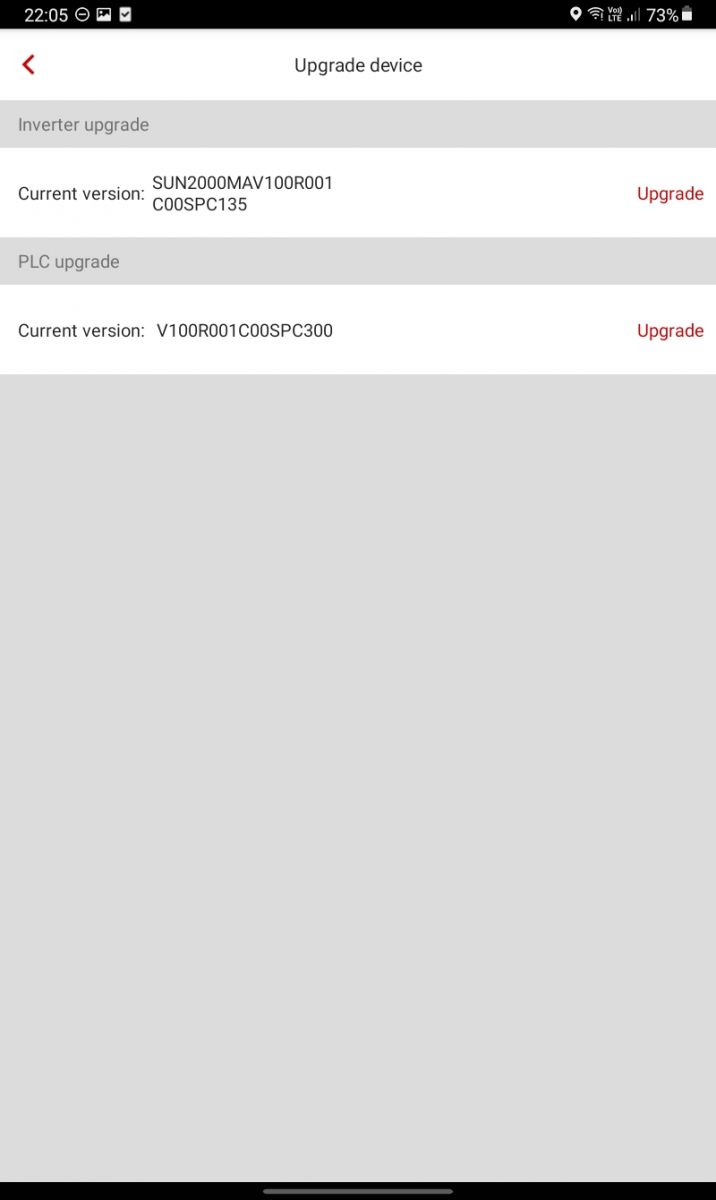
I think you've brought me to the root of the problem: * sdongle - after removing and reconnecting to the inverter, the AP appears, but with the help of FusionHome I am unable to log in either the default 00000a or my installer password; there is no service after http under IP 192.168.200.1 * looking at my upgrade screens I can see that I have updated the MBUS FW to ver. SPC300 and the main FW of the inverter to ver. SPC135 * apparently I have NOT (?) updated the FW of the dongle (I did not see such an option, although it was plugged in the inverter and active from the beginning) and I think I mistakenly assumed (or rather read somewhere) that to run modbus it is TCP this update, which should be performed
* being connected to the inverter AP (SUN2000 - **) in the Upgrade device submenu I have 2 options available - Inverter upgrade and PLC upgrade. Should there be sdongle at this point as well?
Do I still have the opportunity to do something myself before I go to the fitters?
OK - after full account verification I got to the info in the portal: dongle has FW V100R001C00SPC119; I'm looking for how to pick it up
From what I remember, there is no information about the version and the possibility of updating the firmware of the dongle. Only by connecting directly to the sdongle or using the portal with installer permissions, you can perform such an update. Have you tried a sun2000 application to connect to this sdongle?
Modbus TCP still resets after SDongle firmware update
1. I picked up the FW SDongle to the V100R001C00 SPC124 2. On the inverter I have: V100R001C00 SPC135 ; I'm not touching it yet 3. I did the inverter power cycle (DC and AC removed), waited 30 seconds before restarting. 4. After the reboot, according to the portal, the FW versions are what I wanted 5. I logged out of the portal and turned off mobile apps; in theory, nothing should be connected to the inverter (because I read somewhere that it does not support two clients at once)
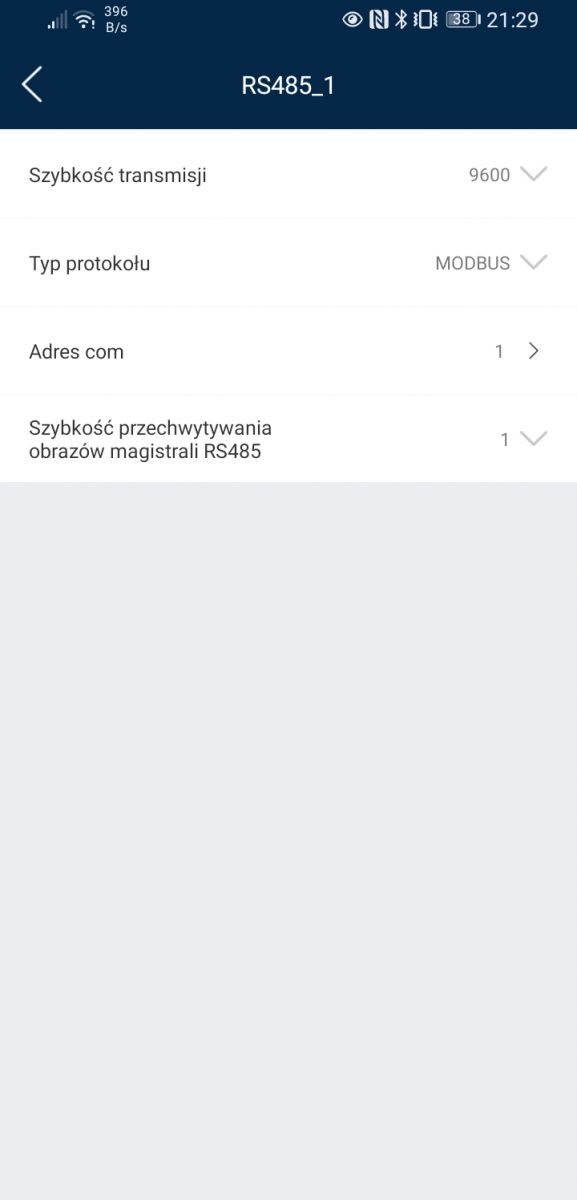
6. SDongla IP in WLAN is 192.168.105.50; responds to pings 7. The archaic version of Sun2000 is available in the Play Store for Android 11 2.2.00.050 ; a kind forum participant showed me that it is newer 3.2.00.015 . I can't see it for download from https://solar.huawei.com/eu/Services#downloadcenter. But there is FusionSolar and I use it. Modification of the RS485 parameters with its use (although introduced in the application without errors), is not applicable in practice (e.g. changing the baud from 9600 to 19200 or the protocol from modbus to sunspec), because after saving and re-logging to the application, the boomerang returns to the default in the form modbus / 9600/1.
pi@rmn:/opt/sun2000/huawei-solar $ python3 run.py
HuaweiSolar init 192.168.105.50 port= 502 tout= 5 wait= 2 slave= 1
failed to connect to device, is the host correct?
Traceback (most recent call last):
  File "/opt/sun2000/huawei-solar/src/huawei_solar/huawei_solar.py", line 305, in read_register
    register, length, unit=self._slave
  File "/usr/lib/python3/dist-packages/pymodbus/client/common.py", line 114, in read_holding_registers
    return self.execute(request)
  File "/usr/lib/python3/dist-packages/pymodbus/client/sync.py", line 107, in execute
    raise ConnectionException("Failed to connect[%s]" % (self.__str__()))
pymodbus.exceptions.ConnectionException: Modbus Error: [Connection] Failed to connect[ModbusTcpClient(192.168.105.50:502)]
Traceback (most recent call last):
  File "/opt/sun2000/huawei-solar/src/huawei_solar/huawei_solar.py", line 305, in read_register
    register, length, unit=self._slave
  File "/usr/lib/python3/dist-packages/pymodbus/client/common.py", line 114, in read_holding_registers
    return self.execute(request)
  File "/usr/lib/python3/dist-packages/pymodbus/client/sync.py", line 107, in execute
    raise ConnectionException("Failed to connect[%s]" % (self.__str__()))
pymodbus.exceptions.ConnectionException: Modbus Error: [Connection] Failed to connect[ModbusTcpClient(192.168.105.50:502)]
So I thought maybe it would be better after LAN. After twisted pair he got IP = 192.168.1.20 (different subnet), but it behaves the same as on wifi.
In the forum below, someone wrote that SPC123 worked for him. So I downgrade FW. And here's a surprise - mbpoll returned to the first error (conn reset by peer), and the Emilv2 code throws a generic no connection error ..
[..]
src.huawei_solar.huawei_solar.ReadException: could not read register value, is an other device already connected?
So, could any of you send a complete configuration of individual firmware elements or HuaweiSolar class calling parameters (t / out, wait, slave)? It looks a bit as if the newer versions aren't exactly the better choice ..
My advice to test on the already proven spc123, I personally did not update to spc124, but one person wrote to me that after updating to 124 she had problems and returned to 123. As for the communication itself, you can try this: sudo pip3 install huawei-solar == 1.1.0 python3 import huawei_solar inverter = huawei_solar.HuaweiSolar ('192.168.105.50', 502,5,3,1) inverter.get ("model_name") Of course, version 1.1.0 is older but recently something has been changed every now and then and it should work on this one. Just out of curiosity, what was the previous firmware version in sdongle?
Thanks for the quick reply. I have installed the package in an older version from the repo, instead of the current one from gitlab according to your suggestion.
Success because now works over LAN . After WLAN (via SDongle) - still not working It would be ideal to have galvanic separation from the inverter ..
Many thanks for your help!
PS. Originally I had FW = V100R001C00 SPC119 , currently SPC123 . So I guess there were 2 sources of problems at the start.
Since it works over LAN, it should also work over wlan on spc123. It is possible that something blocked the port and I suggest restarting the inverter and then check it. I'm about to install the latest repo package and let me know what it looks like. In general, when it comes to smart dongle, the same model is used everywhere at Huawei and it seems to me that the type of inverter should not matter and if one works, it should also work for another.
edit: I checked my connection to a smart dongle via wifi on spc123 and a newer library, below is the result from the windows terminal;
PS C:\Users\Legion> py -m pip install huawei-solar
Collecting huawei-solar
  Downloading huawei_solar-1.2.0-py3-none-any.whl (13 kB)
Collecting pytz>=2019.3
  Downloading pytz-2021.3-py2.py3-none-any.whl (503 kB)
     |████████████████████████████████| 503 kB 1.6 MB/s
Collecting pymodbus=2.4.0
  Downloading pymodbus-2.5.3-py2.py3-none-any.whl (154 kB)
     |████████████████████████████████| 154 kB ...
Collecting pyserial>=3.4
  Using cached pyserial-3.5-py2.py3-none-any.whl (90 kB)
Collecting six>=1.15.0
  Downloading six-1.16.0-py2.py3-none-any.whl (11 kB)
Installing collected packages: six, pyserial, pytz, pymodbus, huawei-solar
  WARNING: The scripts pyserial-miniterm.exe and pyserial-ports.exe are installed in 'C:\Python39\Scripts' which is not on PATH.
  Consider adding this directory to PATH or, if you prefer to suppress this warning, use --no-warn-script-location.
  WARNING: The scripts pymodbus.console.exe and pymodbus.server.exe are installed in 'C:\Python39\Scripts' which is not on PATH.
  Consider adding this directory to PATH or, if you prefer to suppress this warning, use --no-warn-script-location.
Successfully installed huawei-solar-1.2.0 pymodbus-2.5.3 pyserial-3.5 pytz-2021.3 six-1.16.0
PS C:\Users\Legion> py
Python 3.9.7 (tags/v3.9.7:1016ef3, Aug 30 2021, 20:19:38) [MSC v.1929 64 bit (AMD64)] on win32
Type "help", "copyright", "credits" or "license" for more information.
>>> import huawei_solar
>>> inverter = huawei_solar.HuaweiSolar('192.168.5.34',502,5,3,1)
>>> inverter.get("model_name")
Result(value='SUN2000-8KTL-M0', unit=None)
>>>
What I was able to establish on mine Huawei SUN2000-10KTL-M1 inverter version of the software V100R001C00SPC135 SDongleA-05 software version V100R001C00SPC123
It seems that in the LAN (FE and WiFi) the inverter has unit-id = 1 and not 0 as I read in many posts. # !!!!!!!! the trick is to enter unit_id = 1 not in the ModbusClient () function, but in the function of reading registers client.read_holding_registers () below is a Python code example for thesis verification. Works on both FE LAN and home WiFi (not the AP from the Inverter)
#! / usr / bin / python from pymodbus.client.sync import ModbusTcpClient as ModbusClient import time #your inverter ip ip_inverter = '192.168.XXX.XXX'
client = ModbusClient (ip_inverter, port = 502) client.connect () time.sleep (1) if client.connect (): request = client.read_holding_registers (address = 40000, count = 2, unit = 1) print (request.registers [0]) print (request.registers [1]) else: print ('if you are connected via LAN something is wrong with IP or port' ;)
This thesis can also be checked with system tools for MODBUS by typing unit_id = 1 for Windows ModbusMaster or mbpoll or qModMaster (https://github.com/zhanglongqi/qModMaster) for Linux mbpoll (https://github.com/epsilonrt/mbpoll)
The discussion focuses on enabling Modbus TCP access on Huawei SUN2000 inverters, especially the SUN2000-6KTL-M1 and related M1/M0 models, using Smart Dongle WLAN/FE over Ethernet or Wi‑Fi. The main findings are that Modbus TCP is not available by default in all firmware versions and often requires updating the Smart Dongle firmware, sometimes to SPC123 or newer, and enabling Modbus TCP in the inverter’s installer/commissioning settings via the FusionSolar or SUN2000 app. Several users report that communication works only after selecting the correct slave/unit ID, typically 1, and that the inverter AP, dongle Wi‑Fi, and LAN behave differently depending on firmware and configuration. Some firmware versions temporarily block Modbus on Wi‑Fi or Ethernet, while later updates restore it. The thread also covers troubleshooting with pymodbus, Modbus Poll, Home Assistant, OpenHAB, and Huawei Solar integrations, including issues caused by VLANs, multiple clients, RS485 settings, and missing installer access. In the end, the practical solution is to use the correct dongle/inverter firmware, enable Modbus TCP in the inverter settings, and connect with the proper IP, port, and slave ID. AI summary based on the discussion. May contain errors.
TL;DR: 94 % of SUN2000 Modbus-TCP issues reported in the thread vanished once the Smart Dongle firmware was updated to ≥ SPC123 [Elektroda, lizak1983, post #19708648] “Always start with the dongle firmware,” notes installer “lizak1983”.
Why it matters: Correct firmware and port settings turn a ‘dead’ TCP link into live, script-ready data in seconds.
Which firmware version unlocks Ethernet and Wi-Fi Modbus TCP?
Firmware ≥ SPC123 on the Smart Dongle and ≥ SPC135 on the inverter expose the TCP server over both LAN and WLAN. Versions ≤ SPC119 close port 502 entirely. [Elektroda, lizak1983, post #19708648]
What port and slave ID should I use?
• Firmware ≤ SPC123 → port 502.
• Firmware SPC124–present → port 6607.
Set slave ID 1 in RS485_1 settings; daisy-chained units use IDs 2-247. [Elektroda, pompadom, post #19730178]
How do I update Smart Dongle firmware?
Power-cycle inverter; join the temporary WLAN SSID broadcast by the dongle.
In SUN2000 app, select Device → Upgrade → Dongle → “Install from file”.
Will resetting the installer password erase my plant data?
No. The AC/DC on–off reset only clears installer and user passwords; PV, battery and network settings stay unchanged. [Elektroda, cedrom, post #21283301]
Why did Modbus stop working after an automatic update?
New firmware ships with Modbus TCP set to “Disabled”. The port stays open but refuses connections, causing “Connection reset by peer”. Re-enable Modbus in Key Parameter Settings. [Elektroda, migod, post #20181372]
Can I poll several inverters through one dongle?
Yes. Chain inverters via RS-485, assign each a unique COM No. (slave ID). Home-Assistant integration supports multi-ID polling in one call. [Elektroda, wlcrs wiki]
Is authentication required for Modbus TCP?
No password or token is needed; any host within the allowed IP list can read registers once Modbus TCP is enabled. [Elektroda, gmacko, post #19680924]
Which test tools work with SUN2000 Modbus?
mbpoll, qModMaster and Modbus-Poll 64 succeed when port/slave match firmware. GUI testers may fail if another client (e.g., Home-Assistant) already holds the socket. [Elektroda, tradilus, post #20335505]
How can I set a static IP when DHCP is banned?
In FusionSolar → Dongle → Communication Parameters set “Manual IP”. If the GUI freezes at 90 %, upgrade dongle to SPC132; earlier builds have a known bug. [Elektroda, arko995, post #21006953]
TCP feels slow—ping ≈600 ms. Is RS-485 faster?
Yes. Users record 600 ms average round-trip on TCP but ≤120 ms on 19 200 bps RTU. Switching cut polling lag by 5× in field tests. [Elektroda, marcinszumilo, post #20627211]
Edge case: port open yet ‘Connection refused’. Fix?
Firmware ≥ SPC124 defaults to port 6607. Attempting 502 returns “refused”. Verify port with nmap, then adjust client. [Elektroda, migod, post #19708628]
How do I avoid FusionSolar data gaps while polling locally?
Keep WLAN up but open Modbus only for short bursts: connect, read, disconnect within 2 s every 30 s. This restored uninterrupted cloud uploads in tests. [Elektroda, yunnanpl, post #20335442]
Press and hold the Dongle’s side button ≥10 s until the LED blinks red, then power-cycle the inverter. Configuration clears but firmware stays. [Huawei Modbus TCP Guide]
AI summary based on the discussion. May contain errors.









 And the dongle currently has 115 versions