


logo elektroda
logo elektroda
X
logo elektroda

The xiaomi redmi9 phone resets, at the bottom of the screen it says efuse blow s

Sylwek123454 45285 11
ADVERTISEMENT
Treść została przetłumaczona polish » english Zobacz oryginalną wersję tematu
  • #1 19862238
    Sylwek123454
    Level 7  
    Posts: 14
    Rate: 1
    Hello, I have a problem with the phone, namely it resets continuously without being able to perform any action. It says at the bottom of the screen while you see the power up screen "efuse blow: successes". Maybe someone knows what's going on?
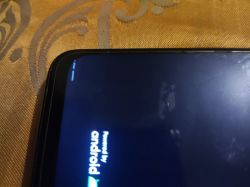
    The xiaomi redmi9 phone resets, at the bottom of the screen it says efuse blow s

    Added after 32 [minutes]:

    It turned on, but just turned off, and I still don't know why
  • ADVERTISEMENT
  • #2 19862369
    blahfff
    Level 41  
    Posts: 4929
    Help: 1030
    Rate: 1281
    This message is nothing unusual. The power button should be checked first. It can be short-circuited, making it active all the time and restarting the phone all the time.
  • ADVERTISEMENT
  • #3 19862376
    Sylwek123454
    Level 7  
    Posts: 14
    Rate: 1
    I clicked on the power button and it works for now, we'll see how long

    Added after 2 [minutes]:

    One more thing. At the same time, someone was logging into the Google account from an unknown device, possibly a coincidence. Just wanted to add
  • #4 20511722
    smaciek500
    Level 2  
    Posts: 3
    Rate: 11
    Hi, I have the same problem, the same phone, exactly the point is that it keeps resetting and you can't turn on fast boot and I don't know what caused it, can anyone help?
  • #5 20511737
    blahfff
    Level 41  
    Posts: 4929
    Help: 1030
    Rate: 1281
    Same suggestion as before. First thing to check is the power button.
  • #6 20511743
    smaciek500
    Level 2  
    Posts: 3
    Rate: 11
    Previously it was working because fastboot was running, but after installing TWRP it stopped.
  • ADVERTISEMENT
  • #7 20511751
    blahfff
    Level 41  
    Posts: 4929
    Help: 1030
    Rate: 1281
    It had to start with that. Re-upload all the soft, preferably with a box in bootrom mode, or at least restore the original recovery partition to rule out this problem.
  • ADVERTISEMENT
  • #8 20511768
    smaciek500
    Level 2  
    Posts: 3
    Rate: 11
    Okay, but it won't turn on recovery or fast, you won't even turn it off unless you disconnect the battery, so that's a big problem
  • #9 20512134
    blahfff
    Level 41  
    Posts: 4929
    Help: 1030
    Rate: 1281
    blahfff wrote:
    Re-upload the whole soft, preferably with a box in bootrom mode


    It was enough to read. If you don't know what it is, take it to the site.
  • #10 21230873
    MEMORiA_ACHROMOS
    Level 2  
    Posts: 2
    Rate: 1
    I just had this problem today, can anyone explain what it is? Should I be worried or not??
    I'm just kinda bothered by it appearing at the bottom left of the screen when I boot up my phone

    Added after 2 [minutes]:

    Nothing is really happening on my phone now it's not automatically restarting or anything, it's just there
  • #11 21231207
    blahfff
    Level 41  
    Posts: 4929
    Help: 1030
    Rate: 1281
    This is not a problem or an error. It's just that this model displays such a message at the bottom, that's all. This is normal.
  • #12 21231675
    MEMORiA_ACHROMOS
    Level 2  
    Posts: 2
    Rate: 1
    >>21231207 thanks!!

Topic summary

✨ The Xiaomi Redmi 9 phone is experiencing continuous resets, displaying the message "efuse blow: successes" during startup. Users suggest checking the power button for potential short-circuiting, which may cause the device to restart. Some users report similar issues, particularly after installing custom recovery software like TWRP, which may prevent access to recovery or fastboot modes. It is noted that the message displayed is not an error but a normal notification for this model. If problems persist, users are advised to seek professional repair services.
Generated by the language model.

FAQ

TL;DR: 1 boot message—"efuse blow: success"—is normal on Redmi 9; "This is normal." This FAQ explains what it means and what to do if reboots occur. For Redmi 9 owners seeing the message or boot loops. [Elektroda, blahfff, post #21231207]

Why it matters: It helps you separate a harmless boot note from real faults and choose the fastest safe fix.

Quick Facts

What does "efuse blow: success" mean on a Xiaomi Redmi 9?

It is a boot-time note shown by this model. It does not indicate a fault or error. “This is not a problem or an error.” You can keep using the phone if everything else works normally. [Elektroda, blahfff, post #21231207]

Should I worry if the message appears but the phone works fine?

No. The message is normal on Redmi 9 and not an error. If the phone operates normally, you do not need to act. Keep the software and data backed up as routine practice. [Elektroda, blahfff, post #21231207]

Why does my Redmi 9 keep restarting by itself?

A stuck or shorted power button can keep the device in a restart loop. Check that the power key isn’t held down or shorted. “The power button should be checked first.” If the button is faulty, repair or replacement is needed. [Elektroda, blahfff, post #19862369]

How do I check if the power button is causing the reboots?

Try this quick check.
  1. Remove any case and clean around the power key.
  2. Press and release the power key several times, ensuring it clicks and releases.
  3. Watch if the loop stops; if it returns, have the button inspected. “As advised: The power button should be checked first.” [Elektroda, blahfff, post #19862369]

Pressing the power button a few times stopped the restarts. Did that fix it?

It may have temporarily cleared the issue. One user pressed the power button and the phone worked “for now.” If reboots return, the key may still need service. Monitor the device and plan a repair if symptoms recur. [Elektroda, Sylwek123454, post #19862376]

I installed TWRP and now it bootloops. How can I recover?

Re-upload the full firmware. At minimum, restore the original recovery partition to rule out a recovery issue. If possible, flash in BootROM mode using a service box for reliability. This approach addresses recovery-related boot problems. [Elektroda, blahfff, post #20511751]

I can’t enter Fastboot or Recovery—what should I do next?

Flash the phone in BootROM mode with a professional service box. This bypasses normal boot stages and lets you reload software. If you don’t know how, take the phone to a service center. This is the recommended path. [Elektroda, blahfff, post #20512134]

I can’t power it off during the loop. Is battery disconnect the only way?

In a severe loop, the device may ignore power-off requests. One user had to disconnect the battery to stop it. Consider service flashing afterward to restore normal boot. Reconnecting without a software fix can restart the loop. [Elektroda, smaciek500, post #20511768]

Does the message mean my phone’s eFuse is damaged?

No. On this model, the bootloader simply displays that line during startup. It is not evidence of hardware damage. Treat it as informational unless other faults appear. [Elektroda, blahfff, post #21231207]

After installing TWRP, Fastboot stopped working. Is TWRP related?

Yes. One user reported Fastboot stopped immediately after installing TWRP. If your symptoms match, revert to stock recovery or full stock firmware. That isolates recovery as the cause. [Elektroda, smaciek500, post #20511743]

What are BootROM mode and a “box” in this context?

The responder recommended flashing in BootROM mode using a service “box.” This is a professional low-level flashing approach. It is used when normal modes fail. Ask a repair shop if you lack the tool. [Elektroda, blahfff, post #20512134]

I don’t know what BootROM or a box is—should I visit a repair shop?

Yes. The advisor stated: “If you don’t know what it is, take it to the site.” A service center can handle BootROM flashing safely. This avoids further damage. [Elektroda, blahfff, post #20512134]

Will the “efuse blow: success” line disappear after I fix other issues?

No. The line is a normal boot message for this model. It will continue to appear on startup. Focus on actual faults like boot loops, not the message itself. [Elektroda, blahfff, post #21231207]

Is a Google login alert connected to this boot message?

One user saw a Google-account login alert around the same time and suspected coincidence. Treat account alerts separately from phone boot notes. Address security notifications within your Google account. [Elektroda, Sylwek123454, post #19862376]
Generated by the language model.
ADVERTISEMENT