logo elektroda
logo elektroda
X
logo elektroda

Excel: Incorrect Weekend Markings in Feb 2023 Schedule - Days Off + Holidays in Color

opero 1014 5
ADVERTISEMENT
Treść została przetłumaczona polish » english Zobacz oryginalną wersję tematu
  • #1 20404572
    opero
    Level 11  
    Posts: 19
    Rate: 9
    Could someone tell me why weekends are not marked correctly in the attached schedule? In January 2023 it worked properly, and in February it no longer marks correctly.
    Attachments:
    • Grafik.xlsx (17.29 KB) You must be logged in to download this attachment.
  • ADVERTISEMENT
  • #2 20405093
    Maciej Gonet
    VBA, Excel specialist
    Posts: 2207
    Help: 821
    Rate: 478
    In the fifth line, you have dates, not just day numbers. The FW formula treated this fifth row as day numbers.
    Attachments:
    • Grafik.xlsx (17.55 KB) You must be logged in to download this attachment.
  • ADVERTISEMENT
  • #3 20405204
    opero
    Level 11  
    Posts: 19
    Rate: 9
    Thanks a lot.
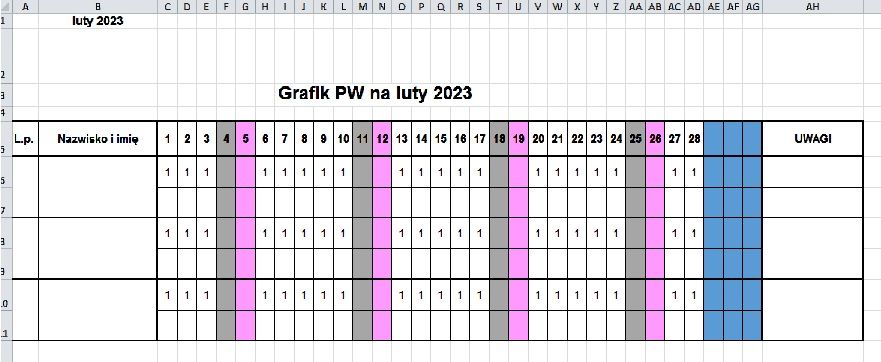
    And is there any other simple possibility, without auxiliary tables or scripts, to automatically enter in the schedule that if it is not a weekend or a holiday, then to enter 1 in the cell? As in the screen below.

    Excel: Incorrect Weekend Markings in Feb 2023 Schedule - Days Off + Holidays in Color
  • ADVERTISEMENT
  • #4 20405246
    Maciej Gonet
    VBA, Excel specialist
    Posts: 2207
    Help: 821
    Rate: 478
    Is this supposed to be a formula?
  • ADVERTISEMENT
  • #5 20405296
    opero
    Level 11  
    Posts: 19
    Rate: 9
    As it would be possible to do so.
  • Helpful post
    #6 20405353
    Maciej Gonet
    VBA, Excel specialist
    Posts: 2207
    Help: 821
    Rate: 478
    This would be a reversal of the formula used for conditional formatting:
    Code: Text
    Log in, to see the code
    .
    Attachments:
    • Grafik1.xlsx (18.46 KB) You must be logged in to download this attachment.
ADVERTISEMENT