FAQ 
TL;DR: If your Acer Aspire V5-121 on Windows 7 x64 shows 2 unknown network devices, “search by identifiers” is the fix: read each device’s hardware ID in Device Manager, then install the Wi‑Fi driver manually from that ID instead of guessing Broadcom or Atheros packages. This FAQ helps Aspire V5-121 owners restore Wi‑Fi, LAN, and missing post-reinstall drivers. [#20661722]
Why it matters: This model can ship with different wireless cards, so motherboard names and blind driver installs waste time and often fail.
| Item |
What the thread showed |
Best action |
| Wi‑Fi identification |
Broadcom and Atheros were both listed for the model |
Read the hardware ID first |
| Device Manager labels |
“Ethernet controller” and “Network controller” both appeared |
Check IDs for both devices |
| Driver method |
Setup file ran, but adapter still failed |
Install manually through Device Manager |
| Browser symptom |
Wi‑Fi connected, but pages failed only in Internet Explorer |
Test another browser first |
Key insight: On this laptop, the decisive step was not the Acer model name. It was the hardware ID of each unknown device, followed by manual driver installation from Device Manager.
Quick Facts
- The laptop was reinstalled with Windows 7 x64, and the box label mentioned WLAN Acer Nplify 802.11 b/g/n, which was not enough to identify the exact card vendor. [#20660508]
- Device Manager later showed 2 separate missing network devices: “ethernet controller” and “network controller.” That confirmed both LAN and Wi‑Fi drivers were absent after the clean install. [#20661584]
- The Wi‑Fi device was identified as Atheros AR5B125 Wireless Network Adapter after checking identifiers instead of guessing by model family. [#20661656]
- The suggested AMD graphics package for the integrated Radeon used Catalyst Software Suite 15.7.1 WHQL, 302 MB, released 7/29/2015 for Windows 7 x64. [#20664960]
- Missing drivers after the reinstall were not limited to networking; the thread also flagged USB 3.0, chipset, graphics, Fn-key hotkeys, and advanced touchpad features. [#20661919]
How can I identify the exact Wi‑Fi card model in an Acer Aspire V5-121 C72G32nkk when Windows 7 Device Manager does not show a proper name?
Use the unknown device’s hardware ID, not the laptop model name. In this case, Device Manager first showed only generic entries, then the Wi‑Fi card was identified as
Atheros AR5B125 Wireless Network Adapter after the identifiers were checked. If you only see “Network controller,” open its properties and read the ID from the Details tab. That is the fastest reliable route on a Windows 7 x64 reinstall.
[#20661656]
What is a hardware ID in Device Manager, and how do I use it to find the right drivers for a network controller or Ethernet controller?
A hardware ID is the most reliable device fingerprint in Device Manager.
“Hardware ID” is a Device Manager identifier that matches a physical component by vendor and device code, letting you choose a driver for that exact controller even when Windows shows only a generic name.
- Open Device Manager.
- Open the unknown device’s properties and view Hardware IDs.
- Search or match the driver by that ID, then install it manually.
That was the method repeatedly recommended in the thread.
[#20661025]
Why doesn’t searching by the Acer motherboard model ZA10_BZ or board version oe2-A01 reliably tell me which WLAN card is installed?
Because the Wi‑Fi card is not tied to the motherboard name on this model. One reply stated clearly that the wireless card is
not soldered to the board and that
any Wi‑Fi card can be inserted into the connector. That means a board label like
ZA10_BZ or
oe2-A01 cannot confirm whether the installed WLAN card is Atheros or Broadcom. You must identify the actual card by Device Manager or physical inspection.
[#20661108]
What is the difference between an Ethernet controller and a network controller in Windows 7 Device Manager?
In this thread, “Ethernet controller” referred to the wired LAN device and “Network controller” referred to Wi‑Fi. One participant noted that this naming is
usually true, and another warned that Windows 7 can label devices oddly after a clean install. The safe rule is simple: treat the names as hints, then verify both devices by hardware ID before installing drivers. That matters when
2 unknown network devices appear at once.
[#20661597]
How do I manually install Atheros AR5B125 Wi‑Fi drivers from Device Manager instead of running the setup file directly?
Update the unknown Wi‑Fi device from Device Manager and point Windows to the unpacked driver folder. The thread’s working advice was to
unpack the package, choose
Update, and then browse to the extracted directory instead of relying on the installer alone.
- Unzip the driver package.
- In Device Manager, right-click the Wi‑Fi device and choose Update.
- Browse to the unzipped folder and install manually.
That method resolved the Atheros side of the network setup.
[#20661654]
Why might a Wi‑Fi driver setup run successfully on Windows 7 x64 but still leave the adapter unusable until I install it through Device Manager?
Because the setup program can finish without binding the driver to the exact unknown device. The poster had already installed what turned out to be the same Atheros model “blind,” but it did not help until the driver was matched through Device Manager. Manual installation forces Windows 7 x64 to apply the driver to that specific controller entry instead of only copying files. That is a common failure point when the device still appears as “Network controller.”
[#20661722]
Which drivers are typically missing after a clean Windows 7 installation on an Acer Aspire V5-121, besides Wi‑Fi and LAN?
Expect more than Wi‑Fi and LAN to be missing. The thread explicitly flagged
USB 3.0,
chipset, graphics, Fn-key hotkeys, and advanced touchpad functions such as finger scrolling. It also noted that if Device Manager shows
Standard VGA instead of
AMD, the graphics driver is still wrong or incomplete. On this laptop, a clean Windows 7 install left several platform-level devices without working vendor drivers.
[#20661919]
Why would Wi‑Fi connect to the router on an Acer laptop but websites still not open in Internet Explorer while Opera works?
Because the network stack can work while the browser fails. In the thread, Wi‑Fi already connected to the router, but pages still would not open until the user tested
Opera and found that the issue was the
outdated default Explorer, not the wireless link itself. That means successful association to the router does not prove Internet Explorer is usable on an old Windows 7 setup. Browser age was the blocker here, not the Atheros adapter.
[#20662990]
How do I check in BIOS whether the Wi‑Fi card is disabled on an Acer Aspire V5-121?
Enter BIOS with
F2 and check whether wireless is disabled there. The thread did not provide the exact Acer submenu path, but it explicitly told the user to verify that the card was
not disabled in the BIOS before assuming a driver-only problem. Use BIOS only as a yes-or-no check. If Windows still shows no wireless device afterward, return to Device Manager and inspect hardware IDs or the physical card.
[#20661048]
What should I inspect physically inside an Acer Aspire V5-121 if Windows 7 does not detect any wireless card at all?
Check whether the Wi‑Fi card is physically present and seated in its slot. One reply advised opening the
large bottom flap held by screws, then removing it and photographing what is underneath. That matters when Device Manager shows no wireless hardware at all, because an absent or loose card produces no useful identifier. On a used or inherited laptop, physical verification can save hours of wrong driver installs.
[#20661161]
Atheros vs Broadcom WLAN in the Acer Aspire V5-121 — which one is actually installed and how can I tell before downloading drivers?
This thread’s machine used
Atheros, not Broadcom. The exact card was identified as
Atheros AR5B125 Wireless Network Adapter after the IDs were checked, even though the model family had listings for both vendors. So do not download both packages at random. Read the hardware ID of the unknown wireless device first, then choose the driver that matches that identifier. That avoids false installs and wasted time on the wrong vendor branch.
[#20661656]
Why does the AMD Radeon HD 7290 in an Acer Aspire V5-121 show Error 43 after driver installation on Windows 7?
Error 43 here pointed to either a bad driver match, a faulty system state, or failing graphics hardware. After the correct family was identified as
HD7290, the helper stated that if proper drivers on a working system still trigger
Error 43, it may indicate a
hardware problem with the card. The thread tested several packages, including AMD and Acer options, yet the warning stayed yellow. That makes this more serious than a simple missing-driver case.
[#20665397]
How can I fix a grayed-out screen resolution setting in Windows 7 when the laptop only shows Standard VGA Graphics Adapter?
Install the correct AMD graphics driver for the integrated Radeon, not just the generic VGA driver. In the thread, the helper said that for
AMD C-70 with integrated Radeon HD7290, the user should try
Catalyst Software Suite 15.7.1 WHQL for
Windows 7 x64. Standard VGA can show a picture, but it may leave resolution controls disabled and the screen cut off. If the AMD driver still ends with Error 43, the problem is no longer just missing software.
[#20664960]
What is CrystalDiskInfo used for, and how can it help when Windows keeps asking to scan the disk at startup?
CrystalDiskInfo checks drive health, so it helps separate disk failure from file-system problems.
“CrystalDiskInfo is a disk-health utility that reads storage status and SMART-like condition data, helping you tell whether repeated startup scan prompts come from a failing drive or from corruption elsewhere in the file system.” In the thread, it was used after repeated startup scan messages, and the conclusion was that
the disk looks OK. That shifted attention away from outright drive failure.
[#20665446]
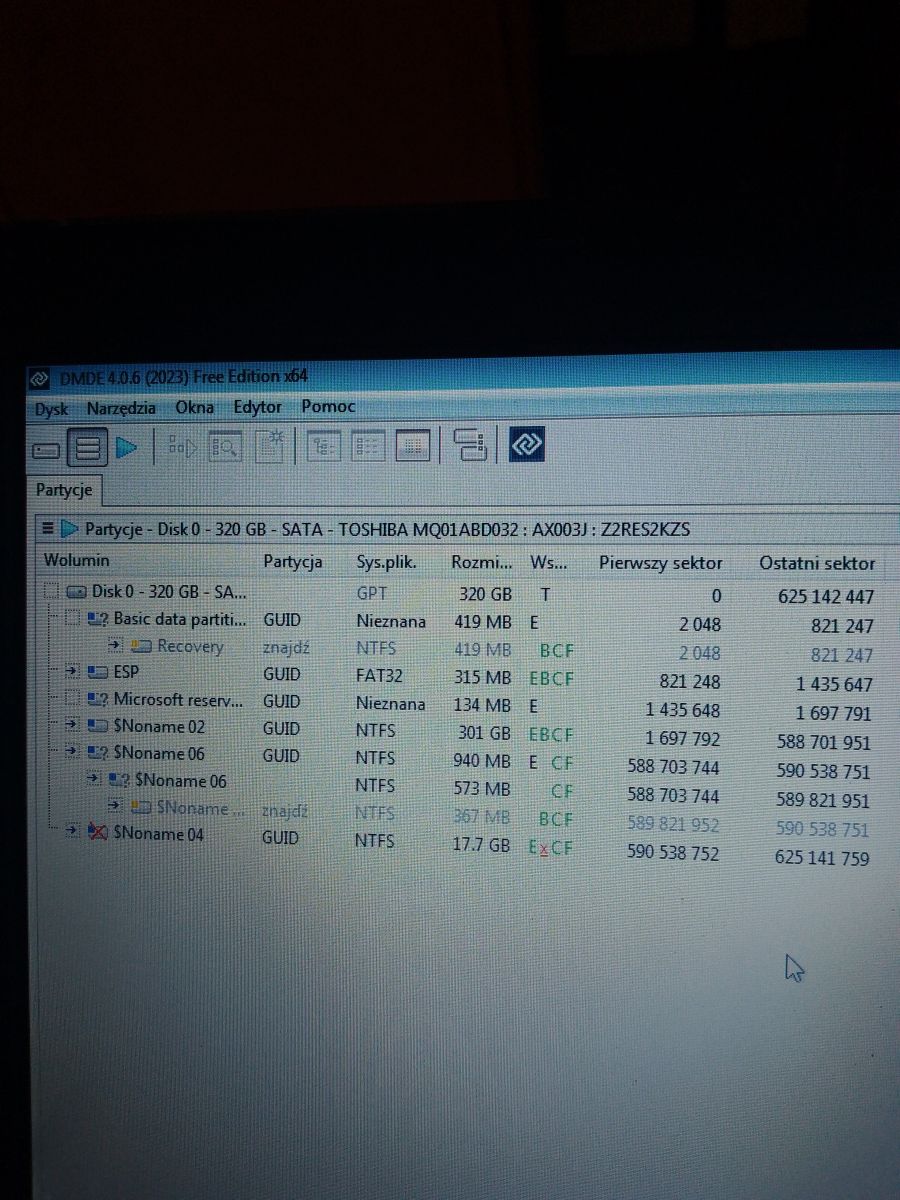
How do DMDE and a partition table screenshot help diagnose repeated disk-check messages or hidden partition problems after reinstalling Windows?
They show whether a hidden partition is damaged. The helper asked for the
first partition table view, not a full scan, because the repeated startup check likely came from
one invisible partition, possibly the recovery partition. A partition table screenshot quickly reveals the layout and which entry may be broken after a reinstall. That is faster and more targeted than rescanning the entire disk when Windows keeps asking to check it at boot.
[#20665494]
AI summary based on the discussion. May contain errors.