logo elektroda
logo elektroda
X
logo elektroda

Nju fibre optic (orange) 300 Mbps with FunBox 3.0 router with Wi-Fi - or Netia fibre optic ?

czarny_alibaba 18420 30
Best answers

Should I choose nju fibre optic from Orange with the FunBox 3.0 router, or is Netia fibre a better choice for a 300 Mb/s line?

Choose Orange/nju if you want the more stable and predictable option; one reply specifically recommends Orange, and another says Orange fibre works stably and predictably [#20797833][#20797870] If you need more control over your network, ask for an ONT terminal during installation so you can use your own router instead of being tied to the FunBox [#20797491][#20797916][#20797870] The FunBox 3.0 is described as decent for basic use and one user reports nearly three years of trouble-free operation, although it is an older device with mixed opinions [#20797870][#20797284][#20797276] Netia may also offer ONT/bridge options, but one reply warns that its support is poor and that you may get whatever hardware is in stock [#20798076][#20798085]
Generated by the language model.
ADVERTISEMENT
Treść została przetłumaczona polish » english Zobacz oryginalną wersję tematu
  • #1 20796927
    czarny_alibaba
    Level 17  
    Posts: 863
    Help: 5
    Rate: 151
    Hi
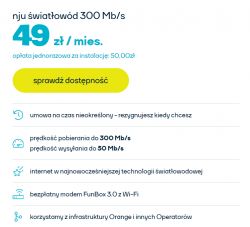
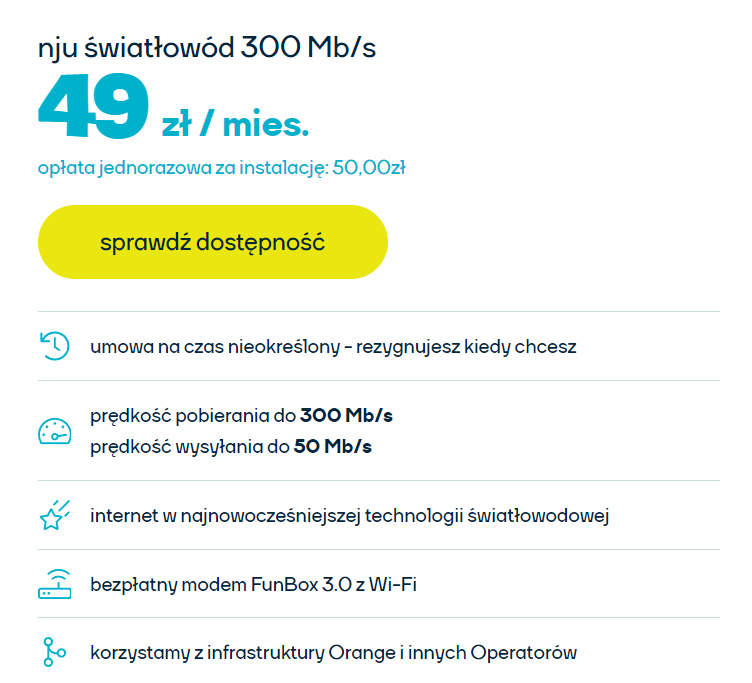
    I am considering the offer : nju fibre optic (orange) .
    Included is a modem,FunBox 3.0 with Wi-Fi
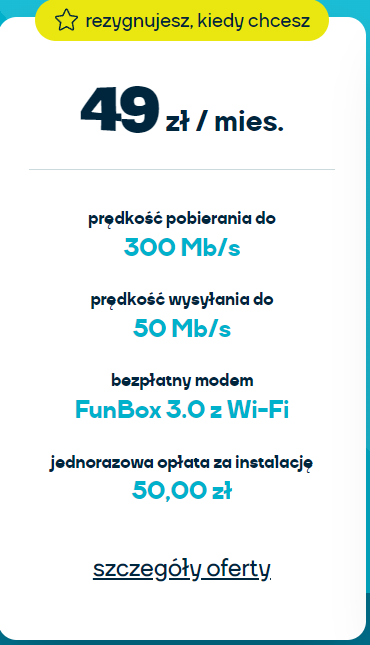
    download speed up to
    300 Mb/s
    upload speed up to
    50 Mb/s
    free modem
    FunBox 3.0 with Wi-Fi
    one-time installation fee
    PLN 50.00
    thereafter monthly fee of PLN 49

    Is anyone using this?
    ___________________________

    Maybe it is better to invest in fibre from Netia ?
    300 Mb/s at 50PLN fee per month.


    I would appreciate any feedback.
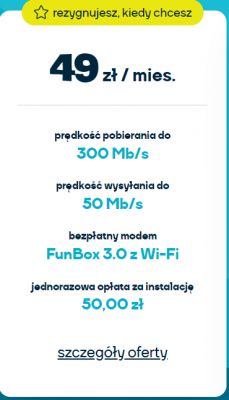
    Graphic showing a fiber optic internet offer from nju with a monthly price of 49 PLN. .
    nju Internet offer with a price of 49 zł per month. .
  • ADVERTISEMENT
  • #2 20797130
    freebsd
    Level 42  
    Posts: 6791
    Help: 766
    Rate: 2028
    I would choose Orange - the company I work for. also uses their connectivity and services. I rate them very well. Unfortunately, their optical fibre does not reach my flat.
  • #3 20797276
    czarny_alibaba
    Level 17  
    Posts: 863
    Help: 5
    Rate: 151
    nju fibre (orange) has a FunBox 3.0 modem with Wi-Fi on offer
    This modem "FunBox 3.0 with Wi-Fi" has already been on the market for several years and there are various negative opinions about this equipment?
    the FunBox 3.0 modem can be hung on the wall?

    It is a pity that there is no FunBox 6.0 fibre optic in the nju offer
  • #4 20797284
    Pan.Kropa
    Level 35  
    Posts: 4025
    Help: 249
    Rate: 1147
    czarny_alibaba wrote:
    This modem "FunBox 3.0 with Wi-Fi" has already been on the market for several years and there are various negative opinions about this equipment?
    I have been using for almost three years and have no complaints. Basically there is nothing to complain about, everything works as it should.
    czarny_alibaba wrote:
    the FunBox 3.0 modem can be hung vertically on the wall?
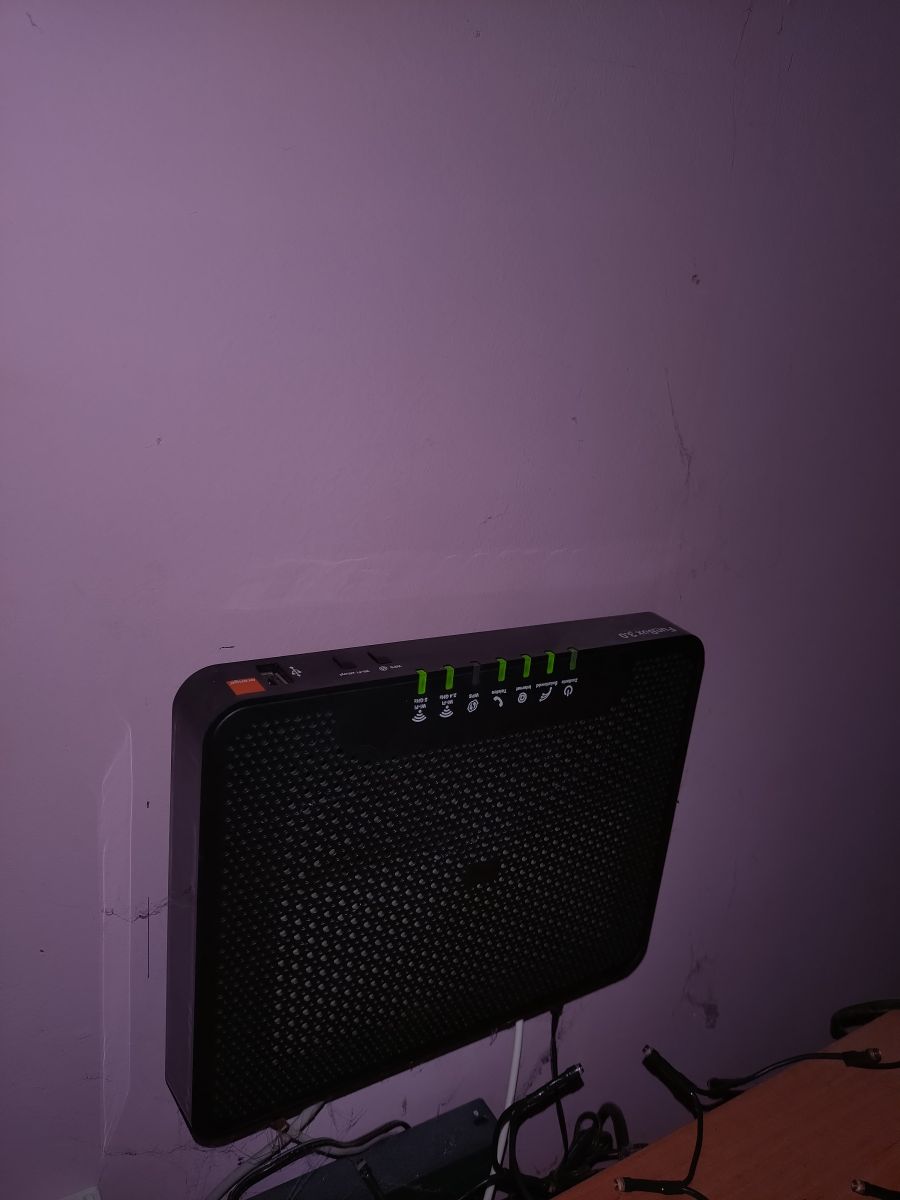
    I have it hung on the wall, only that horizontally. I don't want to look, but vertically I don't think it's very possible to hang it. FunBox 3.0 router mounted on a wall. It subtitles upside down. But that's the best way, the wires go down then.
  • #5 20797297
    czarny_alibaba
    Level 17  
    Posts: 863
    Help: 5
    Rate: 151
    Pan.Kropa wrote:
    I have it hanging on the wall, only it's horizontal. I don't want to look, but vertically I don't think it's very possible to hang it. FunBox 3.0 router mounted on a wall. The lettering upside down. But that's best, the wires go down then.


    Thanks for the pic
    I meant whether it is possible to hang the FunBox 3.0 on the wall.
    In the rear part of the housing are there any brackets so that the FunBox 3.0 can be mounted?
  • #6 20797299
    Pan.Kropa
    Level 35  
    Posts: 4025
    Help: 249
    Rate: 1147
    czarny_alibaba wrote:
    I was wondering if he could hang it on the wall
    As you can see, he can.

    Added after 2 [minutes]:

    czarny_alibaba wrote:
    In the rear part of the case are there any brackets, that it is possible to mount the FunBox 3.0 in this way ?
    There are what I do not know how to call castings for the heads of screws. I screwed the screws into the wall, and hung the modem on them.
  • #7 20797301
    czarny_alibaba
    Level 17  
    Posts: 863
    Help: 5
    Rate: 151
    How does the "FunBox 3.0 with Wi-Fi" modem work for you ?
    does it not hang - does it work stably ?

    I am considering the offer : Nju fibre optic (orange) 300 Mb/s with FunBox 3.0 router with Wi-Fi

    cancel when you want
    contract for an unlimited period !
    you cancel the service whenever you want, no extra charge

    https://nju.pl/swiatlowod
  • ADVERTISEMENT
  • #8 20797491
    KOCUREK1970
    Network and Internet specialist
    Posts: 35443
    Help: 3835
    Rate: 5431
    @blackalibaba
    You will wait a long time for a response :D .
    In addition, it may be different for everyone, it works differently.
    So asking others is irrational.

    If I were setting up a net/fibre, for me this would be the most relevant:
    - do I have access to the ONT/terminal/modem/router configuration of the operator,
    - whether I can plug in my router,
    - whether I have a public dynamic/permanent IP there,
    - what interconnection points the operator has with other operators,
    - what kind of ping in online games,
    - etc., etc...
  • #9 20797565
    czarny_alibaba
    Level 17  
    Posts: 863
    Help: 5
    Rate: 151
    Netia cable with HUAWEI EchoLife HG8245Q2
    Contract for 2 years , 50zł /m
    300 Mb/s
    __________________________

    nju fibre optic (orange)
    FunBox 3.0 with Wi-Fi
    300 Mb/s - PLN 49/m
    Contract for an unlimited period of time -
    you can cancel the service whenever you want without additional charges

    Please give me your opinions on what you recommend?
  • ADVERTISEMENT
  • #10 20797833
    IC_Current
    Network and Internet specialist
    Posts: 9138
    Help: 1499
    Rate: 2509
    Orange. It works stably and predictably. I don't know anyone who has had a problem with their fibre. Lots of interconnection points with other operators and content providers directly in Poland. Only sometimes players complain about "such and such routing", but players complain with every operator, because one plays on servers somewhere there and the other somewhere else.
    It is important to make an agreement with the ONT terminal technician. You have to ask when making an appointment and then remind them in the morning when they call before you leave. Your own terminal means you have the freedom to choose your own equipment and independence from Funbox. E.g. you have your own VPN, any DDNS providers, or multiple APs with fastroaming if you would need it.
    Helpful post? Buy me a coffee.
  • #11 20797856
    czarny_alibaba
    Level 17  
    Posts: 863
    Help: 5
    Rate: 151
    IC_Current wrote:
    .
    It is important to make arrangements with your ONT terminal technician. You need to ask when making an appointment and then remind them in the morning when they call before you leave. Your own terminal means freedom to choose your own equipment and independence from Funbox. E.g. you have your own VPN, any DDNS providers, or multiple APs with fastroaming if you would need.


    Do you recommend buying your Router , instead of the FunBox 3.0 with Wi-Fi ?
  • #12 20797870
    IC_Current
    Network and Internet specialist
    Posts: 9138
    Help: 1499
    Rate: 2509
    czarny_alibaba wrote:
    Do you recommend buying your Router , instead of the FunBox 3.0 with Wi-Fi ?
    .
    As a rule, no. The FB3 and FB6 are decent devices for basic use, and the FB6 has a great radio for that. But having an ONT terminal, should you for some reason need equipment that offers features not available in equipment from your operator then you have freedom of choice. If you don't need your own router , then you connect the fibre to the FB and set it to "Internal fibre modem" and the terminal to the cabinet. If you need your own router, then you install a terminal and you are home.
    Helpful post? Buy me a coffee.
  • ADVERTISEMENT
  • #13 20797888
    czarny_alibaba
    Level 17  
    Posts: 863
    Help: 5
    Rate: 151
    IC_Current wrote:
    . But having an ONT terminal, should you for some reason need equipment that offers features not available in the equipment from the operator then you have freedom of choice. If you don't need your own router , then you connect the fibre to the FB and set it to "Internal fibre modem" and the terminal to the cabinet. If you need your own router , then you install a terminal and you are home.


    Placing an order for nju fibre optic (orange) - 300 Mb/s - 49zł/m
    FunBox 3.0
    , report that I need an ONT terminal from them .
    Even if I don't need my Router at the moment the Terminal may come in handy for the future?
  • #14 20797916
    IC_Current
    Network and Internet specialist
    Posts: 9138
    Help: 1499
    Rate: 2509
    Exactly so. Only when ordering will they say "we are unable to enter such a request". You have to tell the technician about the terminal - once when making the appointment and a second time in the morning when confirming it, so they don't forget to take it to the car.
    Helpful post? Buy me a coffee.
  • #15 20797927
    Pan.Kropa
    Level 35  
    Posts: 4025
    Help: 249
    Rate: 1147
    To me it's strange that they don't want to give ONT. Such a terminal is cheaper than a router. So it should be the other way around, they give a terminal by force and you should be begging for a router.
  • #16 20797947
    IC_Current
    Network and Internet specialist
    Posts: 9138
    Help: 1499
    Rate: 2509
    Pan.Kropa wrote:
    For me it's strange that they don't want to give ONT. Such a terminal is cheaper than a router. So it should be the other way around, they give a terminal by force and you should beg for a router.
    .
    Not strange at all. They have remote diagnostics on their equipment, and the helpline chumps can sometimes tell you something about the equipment too. Especially if the customer is not so well-informed, the hotline will give them some basic information such as "what colour LEDc". On their own equipment, no non-networker will understand VLANs, for example, and if they buy equipment without VLANs on the WAN, they will call the operator and make problems, and in the end write bad reviews wherever they can. In addition, IPTV and telephony are already beyond the grasp of someone who is not professionally involved in networks. Of course, almost every customer is "frugal", so they'll buy the cheapest crap and again make problems for the operator and complain on forums that they only have X instead of Y bandwidth, but won't admit that the crap they bought doesn't do NAT, because they gave 120 PLN for the router, so it must be decent equipment.
    And one more reason - for a funbox in the "main" Orange you pay a 5 PLN fee. If you have an ONT terminal and know the EU law, you can return the Funbox claiming net neutrality and choice of terminal equipment and get rid of the surcharge. If you don't have an ONT, or don't know the law, you pay extra.

    edit.
    One more reason. With Funbox there is DS-Lite by default and hundreds of thousands or millions of IPv4 addresses saved by that. This is already a huge money maker for the operator. Such a configuration is not supported by almost any off-the-shelf hardware with default firmware.
    Helpful post? Buy me a coffee.
  • #17 20797959
    Pan.Kropa
    Level 35  
    Posts: 4025
    Help: 249
    Rate: 1147
    Aha, I understand. I will just disagree with the funbox fee. I don't pay anything for it.
  • #18 20797976
    IC_Current
    Network and Internet specialist
    Posts: 9138
    Help: 1499
    Rate: 2509
    Pan.Kropa wrote:
    I will only disagree with the funbox fee. I do not pay anything for it.
    .
    Because in the old contracts it was free. For about a year and a half there has been a surcharge.
    I myself gave it back after signing the contract and starting the service and I made quite a fuss about it for them, because, for example, their billing system was not prepared for such a solution. I waited three weeks after the due date for an invoice until they figured out how to account for it. Then there were two more corrective invoices, because first they reimbursed for the funbox from the day the service was launched, then they charged for the first month in full, and then they corrected it again and reimbursed the money according to the day the fb was returned to the showroom. In their "My Orange" system they still haven't embraced the possibility of a refund and it still displays that I am leasing the FB, but I have written confirmation of the refund and confirmation from the complaints department that it is their systems that are malfunctioning in my case.
    Helpful post? Buy me a coffee.
  • #19 20798033
    czarny_alibaba
    Level 17  
    Posts: 863
    Help: 5
    Rate: 151
    Today a promotion in Netia for existing subscribers on renewal of the Contract entered .
    Netia światłowód : Huawei HG8245Q Router ONT Combo
    600 Mb/s at a price of 1zł per month for 12 months >>> then a charge of 49.90zł for the next 12 months = Contract for 24 months!
    The total comes out:
    600 Mb/s for 25zł/m = Contract for 24 months! .

    in Netia it is possible to get an ONT terminal

    https://www.pomagam.net/sterowniki/rozne/huawei-hg8245q-router-ont-combo/
    ______________
    What is the difference between these two ?
    Huawei HG8245Q 2 is an ONT terminal and Huawei HG8245Q
  • #20 20798076
    IC_Current
    Network and Internet specialist
    Posts: 9138
    Help: 1499
    Rate: 2509
    czarny_alibaba wrote:
    In Netia is it possible to get an ONT terminal ?
    .
    Apparently it is possible, alternatively you can switch their router into bridge mode. However, when I've called them (and Plus) in the past, the level of incompetence of the service was so pathetic that I was quickly cured of any desire to enter into any relationship with them. For example, the first support line didn't know what a public address was or anything about an ONT or bridge terminal. They switched to the "technical" department for fibre and there they were even bigger morons. When asked about ONT/ bridge the total moron "from the technical department" didn't know what it was. When I asked him to ask someone who knew, he insisted that he knew everything and that he was the most important in this department and would not ask anyone. When I asked what devices, with what functions, are offered to the customer, this fool could say absolutely nothing - his only answer and mantra "what we have in stock". Then there was still a questionnaire as to whether I was still interested in the offer. I wrote back that after talking to the 'technicians' absolutely not. A lady called me back and assured me that the bridge and ONT were available and the public address for an extra tenner, but I would never sign a contract with a company with such incompetent staff. if something happens, I'll be fighting with them later. At Toothless, Netia is starting to level down to his other businesses.
    Helpful post? Buy me a coffee.
  • #21 20798081
    czarny_alibaba
    Level 17  
    Posts: 863
    Help: 5
    Rate: 151
    to be deleted
  • #22 20798085
    IC_Current
    Network and Internet specialist
    Posts: 9138
    Help: 1499
    Rate: 2509
    czarny_alibaba wrote:
    What is the best router on Netia?
    .
    You'll get whatever one they have in stock. Zero discussion on the topic. :-) .
    Helpful post? Buy me a coffee.
  • #23 20798089
    czarny_alibaba
    Level 17  
    Posts: 863
    Help: 5
    Rate: 151
    Now available in Netia
    Huawei HG8245Q2 Router ONT Combo

    This offer is worth considering:
    600 Mbps at 1zł/month x 12 months >>> then 49.90zł/month x 12 months = Contract for 24 months!
    In total it comes out:
    600 Mb/s for 25zł/m = Contract for 24 months!
  • #25 20800163
    czarny_alibaba
    Level 17  
    Posts: 863
    Help: 5
    Rate: 151
    KOCUREK1970 wrote:
    .
    You will wait a long time for a response :D .
    Additionally, it may be different for everyone, it works differently.
    .


    What settings in Router Huawei HG8245Q2 should be disabled or changed ?
  • #26 20800602
    KOCUREK1970
    Network and Internet specialist
    Posts: 35443
    Help: 3835
    Rate: 5431
    czarny_alibaba wrote:
    What settings in Router Huawei HG8245Q2 should be disabled or changed ?
    .
    None and don't tinker with anything there!
    Each op has its own settings, tinker and you'll be without net in no time.
    czarny_alibaba wrote:
    IPv6 in Synology = disable ? - as of today, it's more problems than benefits ?
    .
    What are you writing about again?

    No offence, but you write so chaotically, jumping around that you can't make sense of anything you ask.
  • #28 20800647
    KOCUREK1970
    Network and Internet specialist
    Posts: 35443
    Help: 3835
    Rate: 5431
    @blackalibaba
    This referred to Synology's own router!

    And switch off at the operator, always worthwhile too.
  • #29 21608383
    czarny_alibaba
    Level 17  
    Posts: 863
    Help: 5
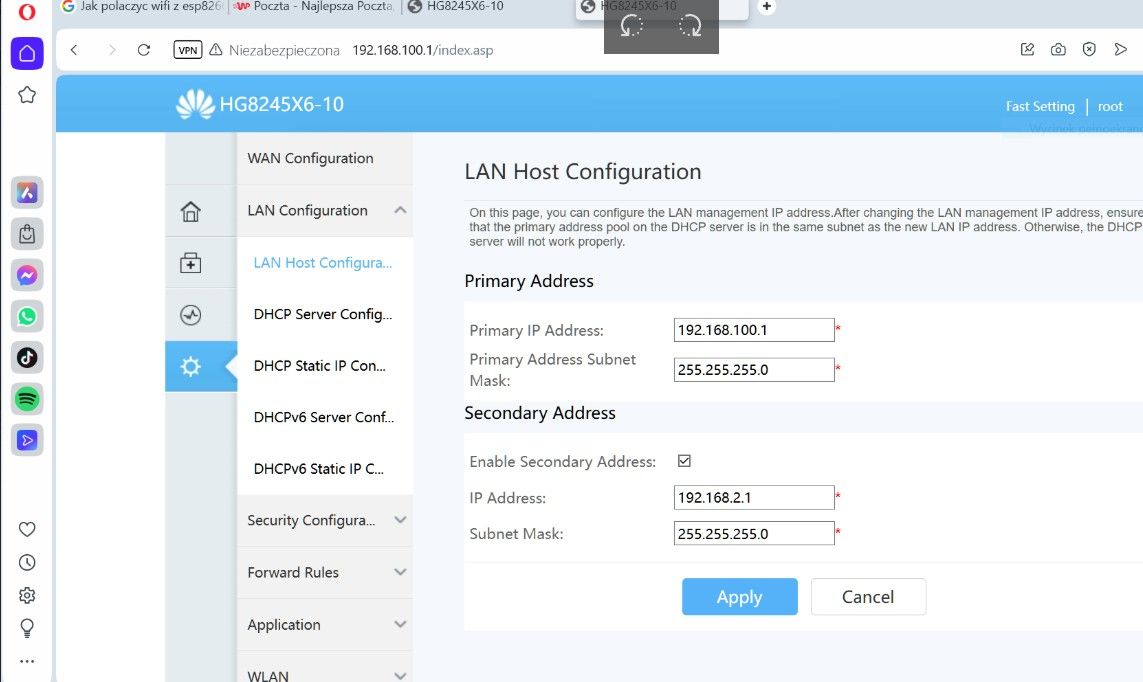
    Rate: 151
    Router Huawei optixstar hg8245x6-10 with WiFi 6
    How do I change the name of the LAN ?
    In the Router options under, LAN Configuration I do not see the possibility to change the LAN SSID Name ?

    I noticed that the LAN network name is assigned to the 2.4GHz WiFi network name?


    Nju fibre optic (orange) 300 Mbps with FunBox 3.0 router with Wi-Fi - or Netia fibre optic ? .
  • #30 21608617
    Anonymous
    Level 1  

Topic summary

✨ The discussion revolves around the comparison between Nju fibre optic (Orange) and Netia fibre optic services. Users express their experiences with Nju's offering, which includes a FunBox 3.0 modem with Wi-Fi, providing download speeds of 300 Mbps for a monthly fee of PLN 49, and a one-time installation fee of PLN 50. Some users report satisfaction with the stability and performance of the FunBox 3.0, while others raise concerns about its age and functionality. The option of using a personal router instead of the FunBox is debated, with suggestions to request an ONT terminal for future flexibility. In contrast, Netia offers a promotion for 600 Mbps at a lower initial cost, but with a two-year contract. Users weigh the pros and cons of both services, considering factors like contract flexibility, equipment quality, and customer support experiences.
Generated by the language model.

FAQ

TL;DR: Przy 300 Mb/s za 49 zł/mies. częściej polecano nju/Orange niż Netię, a najważniejsza rada brzmiała: „załatw ONT u technika”. Ten FAQ jest dla osób wybierających domowy światłowód i chcących uniknąć problemów z routerem operatora, własnym sprzętem i montażem FunBoxa 3.0. [#20797916]

Dlaczego to ważne: W tym wątku cena obu ofert jest zbliżona, ale o wygodzie na co dzień bardziej decydują stabilność, dostęp do ONT i możliwość użycia własnego routera niż samo 300 Mb/s.

Cecha nju / Orange Netia
Prędkość z wątku 300 Mb/s / 50 Mb/s 300 Mb/s lub 600 Mb/s
Cena miesięczna 49 zł 50 zł lub 1 zł przez 12 mies., potem 49,90 zł
Umowa na czas nieokreślony zwykle 24 miesiące
Sprzęt z wątku FunBox 3.0 z Wi‑Fi Huawei HG8245Q2 ONT combo
Elastyczność można wypowiedzieć bez dopłat promocja wiąże na 24 mies.

Kluczowy wniosek: Jeśli chcesz po prostu stabilnego internetu, Orange/nju zebrał w wątku lepsze opinie. Jeśli planujesz własny router, VPN, DDNS lub rozbudowane Wi‑Fi, kluczowe jest uzyskanie terminala ONT podczas instalacji.

Quick Facts

  • nju/Orange w omawianej ofercie dawał do 300 Mb/s pobierania, 50 Mb/s wysyłania, 49 zł miesięcznie i 50 zł jednorazowej instalacji. [#20796927]
  • Netia była opisana w dwóch wariantach: 300 Mb/s za 50 zł/mies. albo 600 Mb/s za 1 zł przez 12 miesięcy i 49,90 zł przez kolejne 12 miesięcy. [#20798033]
  • FunBox 3.0 można powiesić na ścianie; użytkownik opisał montaż na śrubach w poziomie, z przewodami skierowanymi w dół. [#20797299]
  • W Orange prośbę o ONT trzeba zwykle zgłosić technikowi przy umawianiu wizyty i ponownie rano w dniu montażu, bo zamówienie nie zawsze przyjmuje taki wpis. [#20797916]
  • Wątek podkreślał cztery praktyczne kryteria wyboru łącza: publiczny IP, obsługę VLAN, możliwość podpięcia własnego routera oraz routing i punkty styku z innymi operatorami. [#20797491]

Nju światłowód od Orange z FunBox 3.0 czy Netia 300 Mb/s — co lepiej wybrać do stabilnego internetu domowego?

Do stabilnego internetu domowego częściej polecano nju/Orange. W wątku Orange dostał kilka pozytywnych opinii za przewidywalne działanie, a Netia była chwalona głównie ceną. Przy niemal tej samej opłacie, 49 zł w nju i 50 zł w Netii, przewagą nju była umowa na czas nieokreślony i możliwość rezygnacji bez dodatkowych opłat. Jeśli priorytetem jest spokój i mniej kombinowania, Orange wypadał lepiej niż Netia 300 Mb/s. [#20797833]

Jak w praktyce działa FunBox 3.0 z Wi‑Fi przy łączu 300 Mb/s i czy użytkownicy narzekają na stabilność?

FunBox 3.0 w tym wątku działał stabilnie i bez zgłoszonych zawieszeń. Użytkownik używający go prawie 3 lata napisał, że „nie ma na co narzekać” i że sprzęt działa tak, jak powinien. Inny uczestnik dodał, że FB3 i FB6 są przyzwoite do podstawowych zastosowań, a FB6 ma bardzo dobre radio. W praktyce oznacza to, że przy łączu 300 Mb/s FunBox 3.0 wystarcza do zwykłego domu, jeśli nie potrzebujesz zaawansowanych funkcji sieciowych. [#20797284]

W jaki sposób zamontować FunBox 3.0 na ścianie i jakie uchwyty lub otwory montażowe ma z tyłu obudowy?

FunBox 3.0 da się powiesić na ścianie na śrubach. Z tyłu obudowy są elementy montażowe pod łby śrub, opisane w wątku jako odlewy lub zaczepy, na których zawiesza się urządzenie. Jeden użytkownik zamontował go poziomo, bo wtedy przewody schodzą w dół, a pionowy montaż uznał za mniej praktyczny. Jeśli chcesz prosty montaż bez półki, ten router ma do tego fizyczne punkty zaczepu. [#20797299]

Jak załatwić u Orange lub nju montaż terminala ONT zamiast samego FunBoxa podczas instalacji światłowodu?

Trzeba to załatwić bezpośrednio z technikiem, nie tylko na etapie zamówienia. 1. Przy składaniu zamówienia zgłoś, że chcesz terminal ONT. 2. Przy umawianiu wizyty powiedz to ponownie. 3. Rano w dniu montażu przypomnij technikowi, żeby zabrał ONT do samochodu. W wątku podano, że system zamówień potrafi nie przyjmować takiej adnotacji, więc samo zgłoszenie na infolinii nie wystarcza. [#20797916]

Co to jest terminal ONT i dlaczego warto go mieć przy światłowodzie Orange lub Netii?

Terminal ONT warto mieć, bo daje swobodę wyboru własnego routera i uniezależnia sieć domową od FunBoxa lub routera operatora. „ONT” to terminal światłowodowy, który kończy łącze optyczne i zamienia je na Ethernet, dzięki czemu możesz podłączyć własny router, zachowując większą kontrolę nad VPN, DDNS, Wi‑Fi i konfiguracją sieci. W wątku wskazano też konkretne korzyści: łatwiejsze użycie własnych AP, fast roamingu i własnych usług sieciowych. [#20797833]

Kiedy własny router ma sens przy światłowodzie Orange, a kiedy wystarczy FunBox 3.0 lub FunBox 6.0?

Własny router ma sens wtedy, gdy potrzebujesz funkcji, których nie daje sprzęt operatora. W wątku wymieniono VPN, własnych dostawców DDNS, kilka punktów AP i fast roaming. Jeśli używasz internetu standardowo, FunBox 3.0 lub 6.0 wystarcza, a FB6 oceniono nawet jako bardzo dobry radiowo. Najprostsza zasada jest taka: do zwykłego domu zostaw FunBoxa, ale przy bardziej rozbudowanej sieci poproś o ONT i podłącz własny router. [#20797870]

Na czym polega bridge mode w routerach operatora i jak pomaga przy podłączeniu własnego routera?

Bridge mode upraszcza podłączenie własnego routera, bo ogranicza rolę sprzętu operatora do przekazania łącza dalej. „Bridge mode” to tryb pracy routera operatora, który działa jak most sieciowy i przekazuje połączenie do innego routera, zamiast samodzielnie wykonywać pełny routing, NAT i obsługę całej sieci domowej. W wątku podano, że w Netii alternatywą dla ONT może być właśnie bridge, jeśli chcesz użyć własnego sprzętu bez pełnej zależności od routera operatora. [#20798076]

Co to jest DS-Lite w Orange i jak wpływa na IPv4, publiczny adres IP oraz zgodność z własnym sprzętem?

DS-Lite w Orange może utrudnić użycie własnego sprzętu i pełnej kontroli nad IPv4. „DS-Lite” to mechanizm dostępu internetowego, który ogranicza zużycie publicznych adresów IPv4 przez operatora, a ruch IPv4 przenosi przez infrastrukturę IPv6, co zmienia sposób działania części routerów i usług. W wątku padło, że taka konfiguracja jest domyślna przy FunBoxie i że prawie żaden gotowy router z domyślnym firmware nie obsługuje jej poprawnie. To ważny wyjątek dla osób planujących własny router. [#20797947]

Jakie rzeczy warto sprawdzić przed podpisaniem umowy na światłowód, takie jak publiczny IP, VLAN, routing i punkty styku z innymi operatorami?

Przed podpisaniem umowy sprawdź nie tylko cenę, ale też cztery techniczne warunki. Po pierwsze, zapytaj o publiczny adres IP, dynamiczny lub stały. Po drugie, upewnij się, czy możesz podłączyć własny router i czy obsługuje on wymagany VLAN na WAN. Po trzecie, zapytaj o routing i pingi do gier. Po czwarte, sprawdź punkty styku operatora z innymi sieciami. W wątku wskazano właśnie te elementy jako bardziej praktyczne niż same deklarowane 300 Mb/s. [#20797491]

Ile naprawdę kosztuje oferta Netia 600 Mb/s za 1 zł przez 12 miesięcy, a potem 49,90 zł, w przeliczeniu na cały 24-miesięczny kontrakt?

Ta oferta daje średnio około 25,45 zł miesięcznie przez 24 miesiące. Liczenie z wątku wygląda tak: 12 × 1 zł = 12 zł, a 12 × 49,90 zł = 598,80 zł. Razem wychodzi 610,80 zł za cały kontrakt 24-miesięczny. Po podzieleniu przez 24 miesiące dostajesz około 25,45 zł miesięcznie, co autor wątku zaokrąglił do 25 zł/mies. To bardzo atrakcyjna cena, ale wiąże na pełne 24 miesiące. [#20798033]

Czym różni się Huawei HG8245Q2 od Huawei HG8245Q i który model Netia daje jako ONT combo?

W tym wątku nie podano technicznej różnicy między HG8245Q2 a HG8245Q. Jedyna konkretna informacja jest taka, że w danym momencie Netia oferowała model Huawei HG8245Q2 jako „Router ONT Combo”. Jeśli chcesz porównania portów, Wi‑Fi lub firmware obu wersji, ten materiał go nie zawiera. Na podstawie samej dyskusji można bezpiecznie stwierdzić tylko, że HG8245Q2 był wskazany jako aktualnie wydawany przez Netię sprzęt combo. [#20798089]

Jakie ustawienia w Huawei HG8245Q2 warto zmienić po instalacji, a których lepiej nie ruszać, żeby nie stracić internetu?

Najbezpieczniej niczego nie zmieniać w ustawieniach operatora po instalacji. W wątku padła jednoznaczna rada, żeby nie grzebać w konfiguracji HG8245Q2, bo każdy operator ma własne ustawienia i po zmianach można szybko zostać bez internetu. To dotyczy szczególnie parametrów połączenia WAN i innych opcji dostępowych. Jeśli potrzebujesz innych funkcji, lepszą drogą jest ONT lub bridge oraz własny router, a nie ręczna zmiana parametrów operatora. [#20800602]

Dlaczego operatorzy wolą wydawać własne routery zamiast samych terminali ONT i co to zmienia dla diagnostyki oraz pomocy technicznej?

Operatorzy wolą własne routery, bo łatwiej je zdalnie diagnozować i prościej wspierać przez infolinię. W wątku wskazano trzy powody: zdalną diagnostykę, prostsze instrukcje dla klientów typu „jaki kolor ma dioda” oraz mniejsze ryzyko problemów z VLAN, IPTV i telefonią na prywatnym sprzęcie. Dodano też aspekt biznesowy: przy FunBoxie Orange domyślnie używa DS-Lite, co oszczędza adresy IPv4. Dla klienta oznacza to mniej swobody, ale zwykle prostszy kontakt z pomocą techniczną. [#20797947]

Jak zmienić nazwę sieci Wi‑Fi w Huawei OptiXstar HG8245X6-10 i czym różni się SSID od nazwy LAN?

Nazwę Wi‑Fi zmieniasz przez ustawienia SSID, a nie przez konfigurację LAN. W odpowiedzi wyjaśniono, że SSID dotyczy wyłącznie sieci bezprzewodowej, czyli nazwy widocznej na telefonie lub laptopie. LAN to sieć kablowa i zwykle nie wymaga własnej nazwy w domowym sprzęcie SOHO. Jeśli widzisz wspólną nazwę przy 2,4 GHz, to odnosi się ona do Wi‑Fi, a nie do fizycznej sieci LAN. [#21608617]

Dlaczego Windows pokazuje inną nazwę sieci niż SSID Wi‑Fi i gdzie zmienia się identyfikator sieci lokalnej?

Windows może pokazywać inną nazwę, bo to nie zawsze jest SSID Wi‑Fi. W wątku rozróżniono trzy identyfikatory: SSID punktu dostępowego, lokalną domenę LAN oraz nazwę nadawaną przez Windows dla wygody użytkownika. To właśnie ten trzeci identyfikator bywa inny niż nazwa Wi‑Fi. Podano też, że w Windows 7 była do tego opcja graficzna, a obecnie taki identyfikator można zmieniać w rejestrze systemu. [#21609076]
Generated by the language model.
ADVERTISEMENT