logo elektroda
logo elektroda
X
logo elektroda

Telefunken TLEDDS-43FHDB LED TV Stuck on Logo: Repair and Troubleshooting Guide

moalosilepere 1020 6
ADVERTISEMENT
  • #1 21691873
    moalosilepere
    Level 1  
    Posts: 1
    How to repair smart Telefunken LED TV, model: tledds-43fhdb, if it is stuck on logo
  • ADVERTISEMENT
  • #2 21810958
    asenikonomov301
    Level 8  
    Posts: 23
    Can you share the board and panel numbers so we can try to search for compatible software?
  • ADVERTISEMENT
  • #3 21923198
    HyperBacnetDrain
    Level 2  
    Posts: 2
    >>21810958 Hi there, this was all I could find: Model: TLEDD-43FHDB Serial number: 004810X-100079
    Not sure if you can assist but I need to find compatible firmware.
  • #4 21923202
    billobirillo
    Level 33  
    Posts: 1110
    Help: 333
    Rate: 768
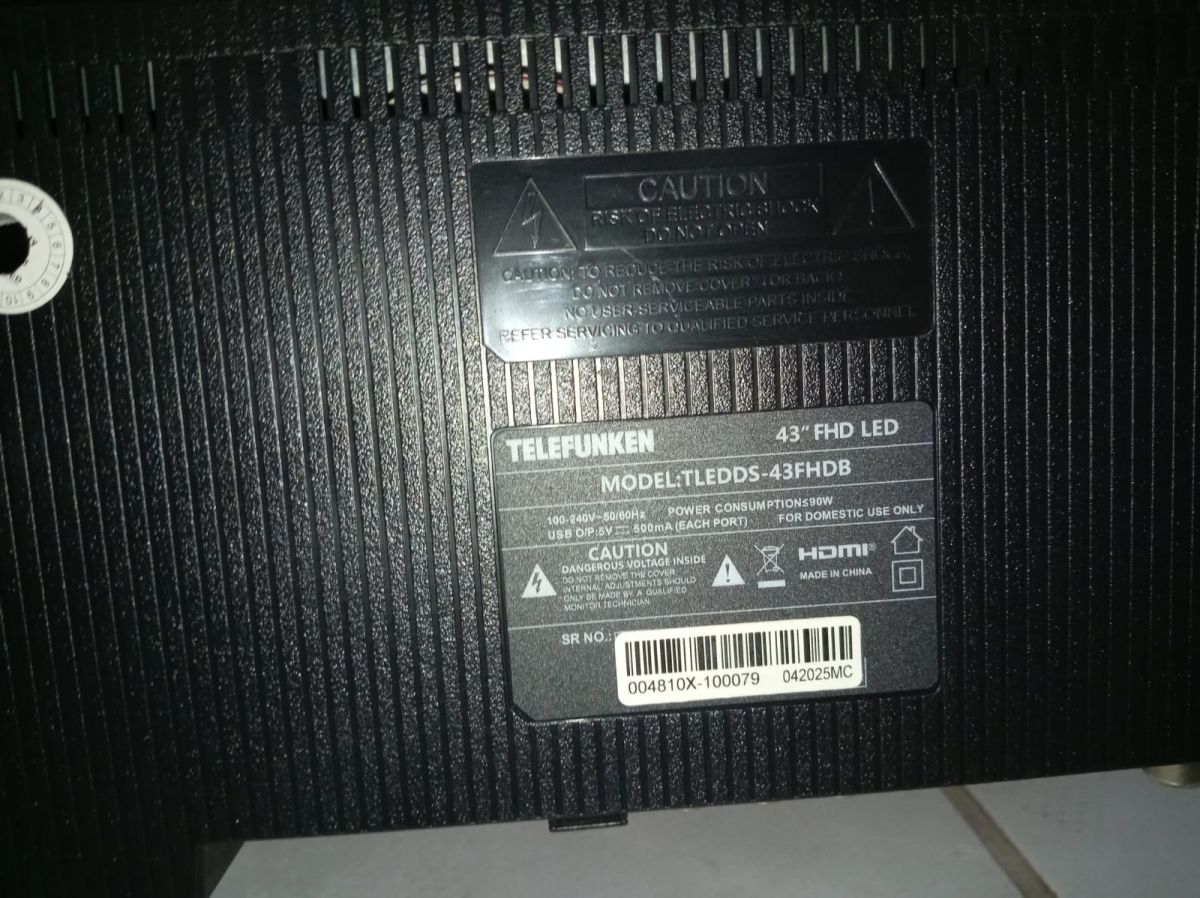
    post a photo of the sticker on the back of the tv
    if it's not a Vestel (I suppose), you have to open the tv and post a photo of the mainboard code and a photo of the panel code
  • ADVERTISEMENT
  • #5 21923206
    HyperBacnetDrain
    Level 2  
    Posts: 2
    >>21923202
    Back label on a Telefunken 43 FHD LED TV with model, power specs, warnings, and barcode
  • ADVERTISEMENT
  • #6 21923214
    billobirillo
    Level 33  
    Posts: 1110
    Help: 333
    Rate: 768
    as I supposed, it's not a Vestel
  • #7 21923322
    lisek
    Service technician RTV
    Posts: 39844
    Help: 6332
    Rate: 6843
    Some "thing" from the MSD3463-xxxx series

    or
    Link
    TV Model: CEL-43FHDB-16/1
    Screen Number: VES430UNDS-2D-N11
    Part Number (SKU): 23364424 FOR CELCUS CEL-43FHDB-16/1
    Main: 17MB97

    As mentioned, unscrew the back panel and check the label on the circuit board.

Topic summary

✨ The Telefunken TLEDDS-43FHDB LED TV experiencing a boot issue where it remains stuck on the logo screen typically indicates firmware corruption or hardware malfunction. Troubleshooting steps include performing a hard reset by unplugging the TV for several minutes, followed by a power cycle. If the problem persists, accessing the service menu to initiate a factory reset or firmware reinstallation via USB may resolve software-related faults. In cases where the TV fails to progress beyond the logo despite resets, the issue may stem from faulty mainboard components such as the flash memory or power supply circuits, requiring professional diagnostics and potential board replacement. Users are advised to verify firmware compatibility and ensure stable power supply during recovery attempts.
Generated by the language model.
ADVERTISEMENT