logo elektroda
logo elektroda
X
logo elektroda

Telefunken XU58AN660S USB Recovery Firmware for Vestel 17MB185 VES580QNZT-N2 Panel

Mixey 963 6
ADVERTISEMENT
  • Request for 17MB185 USB recovery firmware or eMMC dump

    #1 21858187
    Mixey
    Level 1  
    Posts: 1
    Hello.

    I need firmware for a **Telefunken XU58AN660S** TV.

    Mainboard: **Vestel 17MB185**
    Panel: **VES580QNZT-N2-Z02**
    Profile ID: **23827827**
    Serial number: **9067992300206**

    Problem:
    The TV does not turn on. Only the **red standby LED is on**.
    Power supply is OK.

    I am looking for:

    • **USB recovery firmware** for 17MB185
    or
    • **full eMMC dump**

    If anyone has firmware compatible with **VES580QNZT-N2 panel**, please share.

    Photo of the board label is attached.

    Thank you.
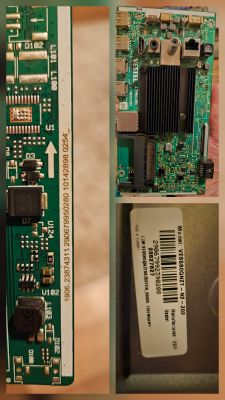
    Collage of PCB close-ups and a label for model VES5800NZT
  • ADVERTISEMENT
  • #2 21858294
    sergiy141
    Level 17  
    Posts: 210
    Help: 26
    Rate: 70
    In most cases, with such symptoms, the EMMC KLM8G1GETF-B041 memory is damaged. Upload a snapshot of such a case, then update via USB.

    Added after 4 [minutes]:

    When flashing from USB, rename the file MDS_upgrade_image_no_tvcertificate.pkg to upgrade_image_no_tvcertificate.pkg
  • ADVERTISEMENT
  • #3 21858837
    rob1
    Level 25  
    Posts: 1133
    Help: 68
    Rate: 140
    And will everything work after this operation????
  • ADVERTISEMENT
  • #4 21924142
    mind111
    Level 2  
    Posts: 2
    >>21858294
    Which of the recommended USB update steps should I follow?
    Press the OK button or the down arrow?
  • #5 21924161
    yokoono51
    Level 29  
    Posts: 815
    Help: 172
    Rate: 316
    mind111 wrote:
    >>21858294
    Which of the USB update steps is recommended?
    Press the OK button or the down arrow?

    Neither one nor the other. Copy the software onto the USB stick, plug the stick into the USB port, then plug the TV into the mains socket.
  • ADVERTISEMENT
  • #6 21924167
    Jacekj
    Level 25  
    Posts: 941
    Help: 31
    Rate: 66
    The TV won’t switch on. I’d check the power supply and the processor.
    Best regards
  • Standby light on, no button response or picture

    #7 21924270
    mind111
    Level 2  
    Posts: 2
    >>21924161 >>21924161
    I’ve tried that and all the other options provided here:
    https://tavsiyeforumu.com/konu/vestel-yazilim-yukleme-anlatim.2744/
    No changes.

    The power board voltages look fine. The service manual I have is for a different revision, but the motherboard voltages look fine too.
    When I plug the TV into the socket, only the red standby light is on. The red light on the optical connection is on, and the motherboard’s CPU is warming up (I can feel it on the heat sink).
    There is no response to the remote control buttons or the physical buttons on the TV itself. The screen is black.

Topic summary

LABEL_AI_GENERATED
Discussion about a Telefunken XU58AN660S TV with Vestel 17MB185 mainboard and VES580QNZT-N2-Z02 panel that stays in standby with only the red LED on and no response to buttons or remote. The power supply voltages appear normal, the CPU warms up, and the issue is suspected to be corrupted or damaged eMMC memory, specifically KLM8G1GETF-B041. Participants discuss USB recovery firmware for the 17MB185 board, full eMMC dump availability, and the Vestel USB update procedure, including renaming the package file to upgrade_image_no_tvcertificate.pkg. Attempts with the recommended USB flashing methods did not change the symptom.
AI summary based on the discussion. May contain errors.
ADVERTISEMENT