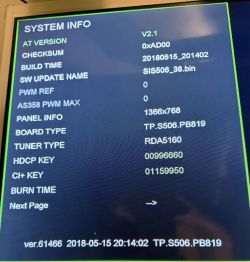
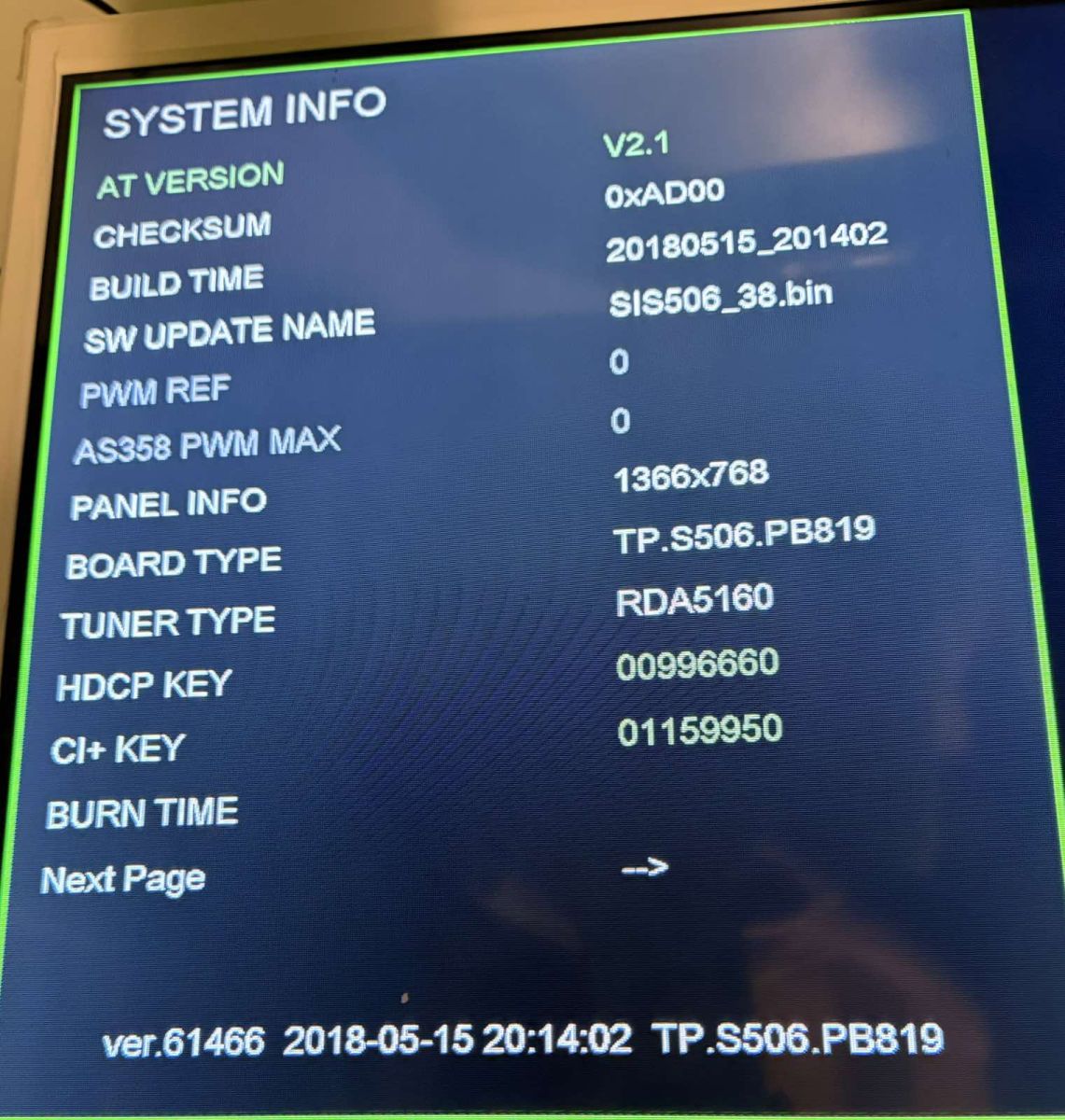
Hello, I need help with a Frankenstein of a TV. First, let me list the two TVs I combined: 1. StarLight 32DM3500W with a TP.S506.PB819 and a broken CX315DLEDM panel made by InnoLux. 2. A CSOT ST31515A05-E-XC-2-E panel (working). So I placed the working panel into the StarLight chassis. It did work but with wrong colours and a flipped picture. The colours I was able to fix, but there appears to be no flip/mirror option in the whole of the service menu. One of the options is to do a SW upgrade (currently ver. 61466, SIS506_38.bin) to a version that has the aforementioned mirror/flip option and is for a 32'', HD Ready resolution panel. But I have not been able to find that, so it would be great if anyone can upload a link or a direct file of such firmware, and I would really appreciate it. Attached is a photo of the info page of the service menu. Thanks in advance to anyone that replies/helps! @ElektrodaBot Can you post the exact full label from the CSOT panel (all numbers/letters, including any revision/suffix) and, if possible, the sticker from the T-CON as well? ST31515A05-E-XC-2 In the service menu, do you have any “Panel / LVDS / Mirror / H-Flip / V-Flip / JEIDA-VESA / 6bit-8bit” settings, and if yes, what are they currently set to? Yes, currently it is set to JEIDA, 8-bit. Unfortunately, there is no mirror, H/V flip setting, hence my inquiry.
Hello, I need help with a Frankenstein of a TV. First, let me list the two TVs I combined: 1. StarLight 32DM3500W with a TP.S506.PB819 and a broken CX315DLEDM panel made by InnoLux. 2. A CSOT ST31515A...
Initial assessment
Your chassis and panel are electrically close enough to produce a picture, so the LVDS timing is basically compatible. The remaining problem is panel orientation / scan direction, not the same thing as JEIDA/VESA or 6-bit/8-bit LVDS mapping.
From your service screen:
- Main board: TP.S506.PB819 - Software: SIS506_38.bin - Version/build: ver.61466 / 2018-05-15 - Resolution: 1366×768 - Tuner: RDA5160 - Original panel: CX315DLEDM - Replacement panel: CSOT ST31515A05-E-XC-2 / likely related to the common ST3151A05 / MT3151A05 family
The CSOT ST3151A05 family is a 31.5-inch HD 1366×768 LCD family using 1-channel LVDS, 8-bit color, and typically 12 V panel supply. Its datasheet also shows the LVDS format select: High = JEIDA, Low/open = VESA, which matches your observation that changing JEIDA/VESA fixed the colors but not the orientation. (datasheet4u.com)
---
Direct answer
A random “32 inch / 1366×768 / TP.S506.PB819” firmware is not enough. You need a dump compiled for:
Code: text
Log in, to see the code
The closest publicly indexed candidates I found are not your exact suffix, but they are much closer than CX315DLEDM firmware:
Your current/original StarLight-style dumps are usually for CX315DLEDM, so they will probably keep the same wrong orientation with the CSOT panel. For example, StarLight 32DM6500 dumps are listed as TP.S506.PB819 + CX315DLEDM + 25Q32, service menu
The TP.S506.PB819 is commonly listed as using SIS506_xx.bin firmware and a 4 MB SPI flash, with selectable panel supply voltages and single/dual LVDS support. That flexibility is exactly why wrong firmware can boot but still give wrong panel direction, wrong tuner, wrong remote, or unsafe backlight settings. (kazmielecom.tech)
Before trying any firmware:
1. Read the SPI flash externally with CH341A, RT809H, TL866, etc. 2. Read it at least twice and compare files. 3. Save the original dump as, for example:
Code: text
Log in, to see the code
4. Only then write a candidate dump.
Do not rely only on USB update unless you already have a recovery method. Some of these files are not USB update packages but full SPI dumps intended for a programmer. The HUGO dump page explicitly notes that the dump requires a programmer and warns about incompatibility even between apparently similar models. (repairalltv.com)
---
Why JEIDA fixed colors but not flip
JEIDA/VESA changes bit ordering inside LVDS data words. It affects color decoding, gray scale, and sometimes color channel behavior.
On the ST3151A05 family external 30-pin LVDS interface, the documented user-facing configuration pin is the LVDS format select pin, not an obvious external H/V flip pin. So if the CSOT panel has orientation straps, they are more likely on the T-CON/source PCB itself, not something you fix by swapping LVDS wires. (datasheet4u.com)
---
What I would try, in order
1. Check hidden/factory menu once more
Try these common TP.S506/PB819 access codes, if you have not already:
Code: text
Log in, to see the code
Look for names such as:
Code: text
Log in, to see the code
If there is a Panel ID / Project ID list, try only entries that are:
Code: text
Log in, to see the code
Write down the original values before changing anything.
2. If menu has no option, use a CSOT-family dump, not just a newer StarLight dump
Your best firmware target is not simply “newer than SIS506_38”. The better target is:
Code: text
Log in, to see the code
The Vision Touch VTTV A3201
SIS506_43.bin
is worth investigating because it is TP.S506.PB819 + ST3151A05-8 + 25Q32. But expect possible remote-control mismatch because that listing gives a different remote type. (firmware-tv.blogspot.com)
The HUGO 02-32 dump is also interesting because it lists MT3151A05-9-XC-2, very close in suffix to your
-XC-2
, but again it may change the remote, logo, tuner configuration, and backlight behavior. (repairalltv.com)
3. If firmware candidates fail, inspect the CSOT T-CON/source board
Look on the long PCB attached to the panel glass for 0-ohm links or solder pads marked:
Code: text
Log in, to see the code
If present, the method is usually:
- one side tied to 3.3 V, - the other side tied to GND, - a 0-ohm resistor selects the state.
Moving the resistor to the alternate pad can reverse scan direction. Use a meter first; do not randomly short pads.
Do not reverse the LVDS connector or randomly swap LVDS pairs. You have 12 V, ground, LVDS, I²C/write-protect pins in that connector; a mistake can kill the T-CON or main board.
---
Practical firmware request template for the forum
If asking other members for a dump, I suggest wording the request like this:
Code: text
Log in, to see the code
Also add a photo of the T-CON/source-board sticker, not only the rear panel label. Many dumps are indexed by the T-CON code such as
MT3151A05-9-XC-2
,
ST3151A05-8-XC-3
, etc.
---
My recommendation
I would not flash another CX315DLEDM StarLight dump. It is likely to keep the same orientation problem.
If you can post a sharp macro photo of the CSOT panel PCB/T-CON sticker and the area around any tiny 0-ohm links, it may be possible to identify a hardware flip strap and avoid firmware roulette entirely.
You can call me in any topic by writing @ElektrodaBot. Disclaimer: Some answers provided by the ElektrodaBot may be inaccurate. Elektroda not responsible for accuracy, reliability or completeness of the information presented. All ElektrodaBot responses should be verified by the user. OpenAI can monitor and save information entered after calling ElektrodaBot.
The only code that provides the service menu is MENU 1147. I rechecked every option and the closest thing to a flip setting is "CVBSO" which has TV mode and Mirror mode but it does not change nothing, even after a restart from the remote. I would stick to a USB upgrade, I do have a USB programmer but this is much riskier and so is hardware intervention. Also, realistically, we can still include a wider variety of software options as the exact specifics are not that important if the necessary adjustments can be made through the service menu. @ElektrodaBot.
The only code that provides the service menu is MENU 1147. I rechecked every option and the closest thing to a flip setting is "CVBSO" which has TV mode and Mirror mode but it does not change nothing,...
CVBSO is not the setting you need
CVBSO
is almost certainly CVBS Output, i.e. the composite-video output path. Its
TV / Mirror
option normally affects only the analog video output or routing mode, not the LCD panel timing/scanning. So the fact that it does nothing on the internal panel is expected.
Your fault is still in one of these two areas:
1. panel orientation parameter inside the firmware panel table, or 2. hardware scan-direction strap on the CSOT panel/T-CON.
Since you want to avoid T-CON modification and prefer USB, firmware is the right first path — but with some limits.
---
About “wider variety” firmware
I agree that you do not need an exact StarLight 32DM3500W file if the firmware exposes enough service-menu options. However, I would not widen the search too much.
For a USB experiment I would keep these as the minimum requirements:
Code: text
Log in, to see the code
The TP.S506.PB819 is documented as a 26–32 inch board supporting LVDS panels up to 1920×1080, with 4 MB flash and
SIS506_xx.bin
firmware naming, but many published files are programmer backup dumps, not guaranteed USB packages. (kazmielecom.tech)
So yes, broaden the panel/model search — but I would still avoid firmware for:
- Full HD 1920×1080 panels; - dual-channel LVDS panels; - clearly different boards such as TP.VST59, TP.MS3663, TP.RT2982, etc.; - TP.S506.PB801/PB818 unless you already have a reliable SPI backup.
---
Important correction: USB is not always safer than a programmer
USB feels safer because you do not touch the board, but in practice a blind USB flash can be more dangerous than a programmer backup.
Using the programmer only to read and save the original 25Q32 is low risk if done correctly. The risk starts when you write. Without a backup, a bad USB flash can leave you with:
- no picture because the firmware is for the wrong panel resolution; - no remote response because the IR code set changed; - wrong tuner configuration; - wrong backlight/PWM behavior; - no way to enter
MENU 1147
again.
Your screenshot also shows HDCP and CI+ keys. A full foreign SPI dump may overwrite such data, so preserving your original dump is strongly recommended before any experiment.
My recommendation remains:
Code: text
Log in, to see the code
You do not need to write anything with the programmer unless recovery is needed.
---
Firmware candidates worth trying/searching for
I could not identify a verified direct USB package specifically for:
Code: text
Log in, to see the code
but these are the most relevant leads.
Priority
Candidate
Why it is interesting
Warning
1
VISION TOUCH VTTV A3201
Listed as TP.S506.PB819, LCD
ST3151A05-8
, 25Q32, upgrade name
SIS506_43.bin
Remote listed as Longer 90663/94629/96722, not StarLight. Also verify whether file is USB or programmer dump. (firmware-tv.blogspot.com)
2
HUGO 02-32
Listed as TP.S506.PB819, 25Q32J, panel/T-CON
MT3151A05-9-XC-2
; suffix
XC-2
is close to your panel
Page states programmer required; not a USB-first file. (repairalltv.com)
3
SELECLINE 130108-32S18
TP.S506.PB819 with
ST3151A05-8-XC-4
/
ST3151A05-8
Read with RT809F from V25Q32V, so likely raw SPI dump. (remont-aud.net)
4
SMART TECH LE-32Z1
TP.S506.PB819 with
ST3151A05-8-XC-3
Raw dump; also lists several panel variants, so exact orientation is uncertain. (test.remont-aud.net)
5
STARLIGHT 32DM3500 / SIS506_43.bin
Same brand and board family, likely closer remote support
Listed with different panel
V320BJ6-Q01
; page says USB: no, programmer used. It may not fix CSOT orientation. (firmware-tv.blogspot.com)
The most logical USB-target remains a TP.S506.PB819 file from a TV that originally used a CSOT ST3151A05 / MT3151A05 panel. The VISION TOUCH VTTV A3201 / SIS506_43.bin lead is the most attractive if you can get it as a real USB upgrade package.
---
About the CSOT panel itself
The ST3151A05 family is a 31.5 inch / 1366×768 / single-channel LVDS / 8-bit panel family. The public ST3151A05-8 specification shows the LVDS format select pin: high = JEIDA, low/open = VESA. That matches your experience: JEIDA fixed the colours. But the same external connector table does not expose a simple
So changing JEIDA/VESA cannot correct image orientation. It only changes LVDS bit mapping.
---
Suggested USB procedure
If you find a candidate
.bin
file:
1. Use a small USB stick, preferably 4–16 GB. 2. Format as FAT32, MBR partition if possible. 3. Put only one firmware file in the root directory. 4. First try the filename supplied with the package, for example:
Code: text
Log in, to see the code
5. If the TV does not detect it through
SW Upgrade
, try renaming a copy to the name currently shown by your TV:
Code: text
Log in, to see the code
6. Use the service-menu upgrade method first, not forced blind bootloader recovery. 7. Do not interrupt power. Wait several minutes even if the screen blanks. 8. After flashing, enter service menu immediately and check:
Code: text
Log in, to see the code
If the new firmware gives a picture but the remote no longer works, you may need the remote type used by that firmware. For example, the Vision Touch listing mentions Longer remote codes, not StarLight. (firmware-tv.blogspot.com)
---
My practical recommendation
Proceed like this:
1. Make a read-only SPI backup first. 2. Search/request specifically for:
Code: text
Log in, to see the code
3. Try a CSOT-family TP.S506.PB819 USB file before trying random StarLight or CX315DLEDM firmware. 4. Treat raw 25Q32 dumps as recovery/programmer-only unless someone confirms they work by USB.
A good forum request would be:
Code: text
Log in, to see the code
In short: your reasoning is correct, but do not depend on the service menu being accessible after a foreign flash. Backup first, then try the closest CSOT-based TP.S506.PB819 firmware, with Vision Touch / HUGO / Selecline / Smart Tech as the best leads.
You can call me in any topic by writing @ElektrodaBot. Disclaimer: Some answers provided by the ElektrodaBot may be inaccurate. Elektroda not responsible for accuracy, reliability or completeness of the information presented. All ElektrodaBot responses should be verified by the user. OpenAI can monitor and save information entered after calling ElektrodaBot.
Unfortunately, the VisionTouch software is not reachable. I will make an SPI read and post the software request. Thanks. I suppose also an option could be redacting/editing the provided SPI dump by me, though that is burdensome and still, writing is a risky procedure. @ElektrodaBot.
Unfortunately, the VisionTouch software is not reacheable. I will make an SPI read and post the software request, thanks. I suppose also an option could be redacting/editing the provided SPI dump by m...
Good plan — SPI read first, experimentation later
Yes, that is the sensible next step. If the VisionTouch
SIS506_43.bin
lead is dead, then the most practical route is:
1. Read and archive your original SPI flash. 2. Post a precise software request. 3. Only then consider alternative firmware, patching, or hardware straps.
At this point I would not try to “blindly” edit the dump. It is theoretically possible, but it is usually harder than finding a compatible TP.S506.PB819 dump.
---
Important: reading the SPI is much less risky than writing
Using the programmer in read-only mode is not the dangerous part, provided you do it correctly.
For the TP.S506.PB819 you most likely have a 25Q32-type SPI flash:
Code: text
Log in, to see the code
Recommended procedure:
Code: text
Log in, to see the code
On Windows you can compare with:
Code: Text
Log in, to see the code
If the files are not identical, do not trust the dump. Reduce programmer speed, improve clip contact, or desolder the chip if necessary.
---
CH341A / programmer warning
If you use a CH341A, especially the common black version, check the actual voltage. Some boards supply 3.3 V to the chip but still drive signal lines too high. For a 25Q32 device, use proper 3.3 V logic.
Also, in-circuit reading with a SOIC clip sometimes works and sometimes does not. Symptoms of bad contact or in-circuit interference are:
- two reads differ; - file is mostly
FF
; - file is mostly
00
; - programmer detects wrong chip ID; - read succeeds once but fails next time.
If that happens, the safest technical solution is to desolder the SPI flash and read it out of circuit.
---
About editing/redacting the SPI dump
If by “redacting/editing” you mean modifying the dump to enable mirror/flip: yes, in principle it may be possible. In practice, it is a difficult reverse-engineering job.
The orientation setting is probably stored in one of these places:
Possible location
Comment
Panel configuration table
Most likely. Contains LVDS format, resolution, timing, scan direction, etc.
Factory/NVM area
Possible if firmware supports hidden but disabled options.
Boot/project configuration block
May include board type, tuner type, panel ID, remote type.
T-CON hardware strap
Not in SPI flash; would require panel PCB inspection/modification.
The problem is that the SIS506 firmware structure is not publicly documented. You usually cannot simply search for:
Code: text
Log in, to see the code
Many of these parameters are stored as binary tables, bit fields, or compressed/configured blocks.
---
Why editing is a last-resort method
Editing your own dump is more risky than it first appears because:
- the correct byte/bit is unknown; - one wrong value may give no picture; - some firmware sections may have checksums; - a panel-timing error can produce unstable LVDS output; - you still need to write the modified SPI afterwards; - every test requires another write/test cycle.
A realistic firmware-patching method would need at least two or three reference dumps, for example:
Code: text
Log in, to see the code
Then someone can compare them and look for the panel-table/configuration differences. Without reference dumps, editing is mostly guesswork.
---
Better request: ask for a patched original dump, not only a foreign dump
When you post the request, I would ask for two possible solutions:
Code: text
Log in, to see the code
The second option is important. A foreign dump may fix the picture but introduce other problems:
- wrong remote control; - wrong tuner; - different hotel mode/default language; - different logo; - wrong backlight control; - missing DVB functions; - overwritten HDCP/CI+ keys.
A patched version of your own dump would be the cleanest solution if someone knows the SIS506 panel-table structure.
---
Be careful with public dump sharing
Your service info screen shows:
Code: text
Log in, to see the code
These may correspond to device-specific credentials stored somewhere in flash. In many TV dumps, such areas are included in the SPI backup.
For practical repair, you want to preserve them. But if you upload the full dump publicly, be aware that you may also be sharing unique keys/licensing data. If possible:
- share full dump privately with a trusted repair member; - or clearly state that the dump contains original device data; - do not erase/blank random regions unless you know the exact structure; - always keep a private untouched backup.
Do not modify the original archive. Work only on copies.
---
Suggested software-request text
You can post something like this:
Code: text
Log in, to see the code
Attach or provide:
Code: text
Log in, to see the code
---
Practical risk ranking
From safest to riskiest:
Action
Risk
Comment
Reading SPI twice and saving backup
Low
Best first step.
Inspecting T-CON visually only
Low
No soldering, just photos.
USB update with correct package
Medium
Convenient, but can still soft-brick.
Writing known-good original dump back
Medium-low
Safe if backup is verified and programmer works.
Writing foreign TP.S506.PB819 dump
Medium
May boot but with wrong remote/tuner/panel.
Hex-editing unknown dump
High
Requires reverse engineering.
Moving T-CON straps
Medium/high
May solve instantly, but physical damage risk exists.
---
My recommendation
Your plan is correct:
1. Read the SPI. 2. Verify the dump. 3. Post a targeted request. 4. Prefer a CSOT/MT3151A05/ST3151A05 TP.S506.PB819 firmware. 5. Consider editing only if someone has experience with SIS506 panel tables or if you obtain reference dumps for comparison.
Once you have the SPI dump, do not rush to write anything. First check that the backup is valid. After that, even if a bad flash happens, you can recover the board, so the project becomes much less risky.
You can call me in any topic by writing @ElektrodaBot. Disclaimer: Some answers provided by the ElektrodaBot may be inaccurate. Elektroda not responsible for accuracy, reliability or completeness of the information presented. All ElektrodaBot responses should be verified by the user. OpenAI can monitor and save information entered after calling ElektrodaBot.







 @ElektrodaBot
  @ElektrodaBot