logo elektroda
logo elektroda
X
logo elektroda

Hitachi 50HAK5350 17MB170E - bootloop after failed update, full recovery firmware?

SavageVandal 627 15
Best answers

How can I recover a Hitachi 50HAK5350 17MB170E TV stuck in a bootloop after a failed update, and is there a compatible full recovery firmware?

The thread does not provide a confirmed full recovery firmware for this Hitachi 50HAK5350, but one reply points to a latest firmware file from Gaborxx that may work after registration; however, you should first verify the difference between MB170 and 170E because flashing the wrong firmware could brick the mainboard [#21927569][#21928674] Before reflashing, another suggestion was to try a reset or service mode procedure [#21926515] The only concrete hardware note added was that the set uses a V500QNDT-2D-N41 panel, while the questioned firmware mentioned VES500QNDH-N2-N45, so compatibility is uncertain [#21928104]
AI summary based on the discussion. May contain errors.
ADVERTISEMENT
  • Bootloop after failed update needs recovery firmware

    #1 21926248
    SavageVandal
    Level 6  
    Posts: 8
    Hello. I need a full recovery firmware for my Hitachi 50HAK5350 TV 17MB170E VES500QNDT-2D-N41. Can anybody help me?
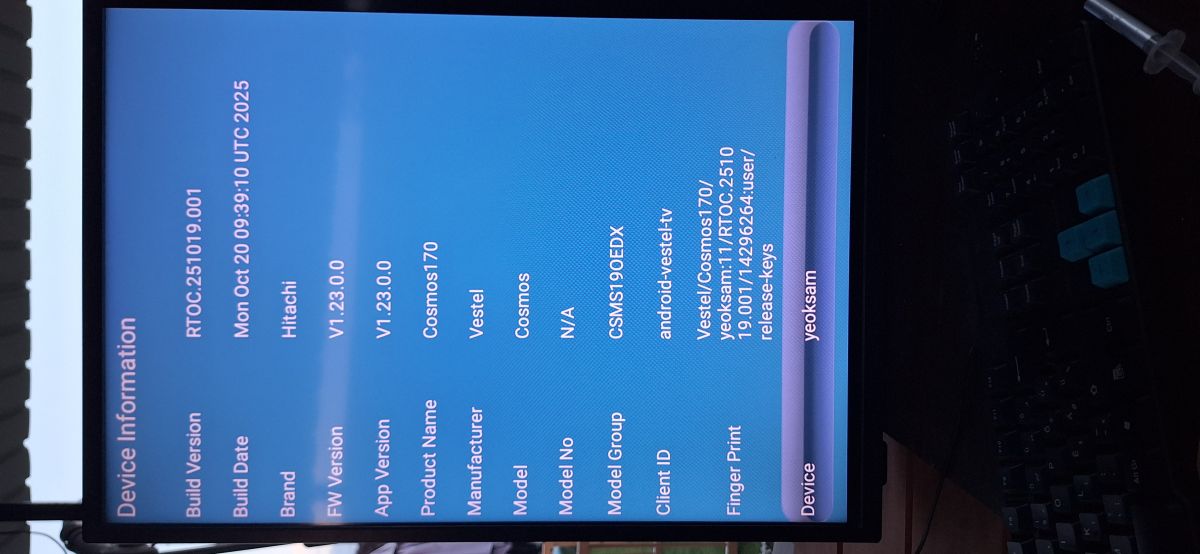
    “Device Information” screen showing device details: Hitachi, Cosmos, Android TV, and version numbers

    What is the problem with the TV now — stuck on logo, bootloop, no standby, black screen, or failed update?
    Bootloop and I think this is for a failed update. Recovery mode not helped.
    Can you provide the full label information from the back cover/mainboard, including serial number, chassis/version, and current software version if available?
    HITACHI
    50HAK5350
    220-240V - 50Hz 135₩
    10131899 2107100150
    I
    - SN: 8667973 100150

    Hitachi No: V21G01057
  • ADVERTISEMENT
  • #2 21926506
    SavageVandal
    Level 6  
    Posts: 8
    Noboby can help me?
  • ADVERTISEMENT
  • ADVERTISEMENT
  • #4 21927063
    SavageVandal
    Level 6  
    Posts: 8
    I try it several times, but the TV turns off and on at random times. That's why I try to make a force firmware update because it is my last chance before I change the main board. If anyone has got the correct firmware, please send me the link.
  • #5 21927559
    remot
    Level 33  
    Posts: 2450
    Help: 278
    Rate: 220
    Try asking the user :arrow: lisek via private message.

    Perhaps he will be able to help you.
  • #6 21927569
    lisek
    Service technician RTV
    Posts: 39934
    Help: 6340
    Rate: 6862
    I don’t know what the difference is between the MB170 and the 170E (SM attached), but
    - after registering at Link , delete the batches
    - apparently this latest one (from Gaborxx) works
  • #7 21927745
    billobirillo
    Level 33  
    Posts: 1130
    Help: 336
    Rate: 787
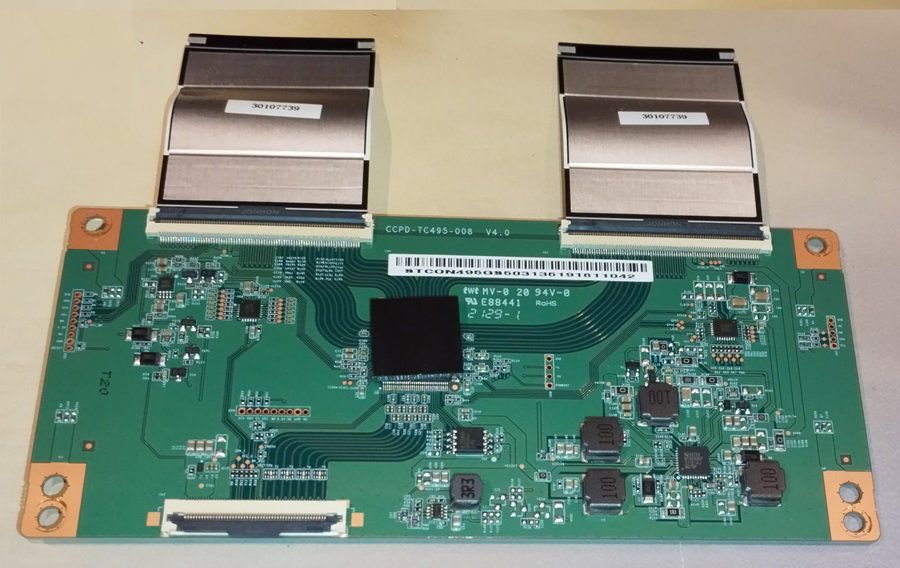
    can you post a photo of the tcon module?
  • #8 21927864
    lisek
    Service technician RTV
    Posts: 39934
    Help: 6340
    Rate: 6862
    It used to be available on (eBay)
    HITACHI 50HAK5350
    MPN: CCPD-TC495-008 V4.0 T-CON

    Hitachi 50HAK5350 17MB170E - bootloop after failed update, full recovery firmware?

    * and the T‑CON Board V500DK1‑CKS1 Hitachi 50HAK5350
  • #9 21928104
    SavageVandal
    Level 6  
    Posts: 8
    I have got this firmware but will the remote controller work too? The firmware is for Daewoo TV and mine is Hitachi. VES500QNDT-2D-N41 is my TV screen main and the firmware has got VES500QNDH-N2-N45. Is this compatible?
  • Warning that wrong firmware may brick the motherboard

    #10 21928674
    rob1
    Level 25  
    Posts: 1129
    Help: 68
    Rate: 140
    "I don’t know what the difference is between the MB170 and the 170E"
    Well, for a start, they might have different processors, and flashing the wrong firmware could ‘brick’ the motherboard
    "That’s why I’m trying to force a firmware update."
    How do you plan to do that???
    "I’ve got the firmware, but will the remote control work as well?"
    "Install it and you’ll find out what works – and what doesn’t."
  • #11 21928754
    SavageVandal
    Level 6  
    Posts: 8
    Hello. I’ve updated the firmware and so far everything is working, including the remote control.
  • ADVERTISEMENT
  • #12 21928775
    lisek
    Service technician RTV
    Posts: 39934
    Help: 6340
    Rate: 6862
    SM Vstel MB170
    - MST95NTGW8J CPU

    Vestel MB170E
    - same CPU
    Attachments:
    • Vestel 17MB170E_SERVICE_MANUAL .pdf (9.84 MB) You must be logged in to download this attachment.
    • vestel_17mb170-idtv_sm.pdf (3.6 MB) You must be logged in to download this attachment.
  • #13 21928806
    SavageVandal
    Level 6  
    Posts: 8
    Now the only question is how to change the boot logo, because this firmware is for Daewoo and mine is a Hitachi. Does anyone have any idea how to change it?
  • #14 21928925
    rob1
    Level 25  
    Posts: 1129
    Help: 68
    Rate: 140
    Yes, there’s an idea to change the logo,
    working with data in memory
    According to the service manual, the 17MB185 has one type of processor, but the reality is quite different...
  • #15 21928996
    SavageVandal
    Level 6  
    Posts: 8
    Hello. But how can I do that, as I can’t root it to change the boot logo?
  • Vestel MB170E board and panel identifiers

    #16 21929286
    lisek
    Service technician RTV
    Posts: 39934
    Help: 6340
    Rate: 6862
    Quote:
    According to the service manual, the 17MB185 has one type of processor, but the reality is quite different...


    This thread is about the Vestel MB170 and MB170E.

    P.S.
    You might find something here (after registering) for your motherboard and display panel Link

    eMMC module (KLM8G1GETF-B041) DAEWOO D55DH55UQNS ,(Main Board): 17MB170E
    CPU/MCU: MSD95NTGW8J-4-00HK
    matrix: VES550QNZL-P2-Z01
    under Link
    on the same motherboard
    DAEWOO D55DM55UQPNS
    Panel Number ( : LC550EQQ SMA4
    * T-con (pins on the matrix) on the PCB :( 6870S-2707D /6870S-2706D)
    * 18 55UHD_SPCB LC550EQC (SP) (A1)

Topic summary

✨ The discussion concerns a Hitachi 50HAK5350 TV with Vestel 17MB170E mainboard and VES500QNDT-2D-N41 panel that is stuck in a bootloop after a suspected failed firmware update. Recovery mode did not solve the issue, so a full recovery firmware was requested. Suggestions included trying service mode/reset procedures, contacting another forum member for firmware help, and checking related MB170/MB170E firmware sources. A firmware from a Daewoo set was eventually flashed successfully; the TV booted and the remote control worked. After recovery, the remaining issue was how to change the boot logo back from Daewoo to Hitachi, but no direct root-based method was available in the thread.
AI summary based on the discussion. May contain errors.
ADVERTISEMENT