



logo elektroda
logo elektroda
X
logo elektroda

How to open Sonoff B1P camera to access flash chip and unbrick Thingino firmware?

cijoml 57 1
ADVERTISEMENT
  • #1 21939980
    cijoml
    Level 9  
    Posts: 81
    Rate: 3
    Hello,

    I got bricked Sonoff B1P camera from my friend. This device work with Thingino.com firmware and there is unbrick procedure. However I cannot find out howto open this camera to access the flash chip.

    Does anybody find out how to open this camera? There is no video on the Internet and I cannot find any screws or lines to split plastic.

    Thank you
  • ADVERTISEMENT
  • Front access and reset procedure for Sonoff CAM-B1P

    #2 21940109
    gradek83
    Level 43  
    Posts: 9106
    Help: 929
    Rate: 2100
    Probably from the front. There’s an LED backlight cover and a frame there. Try getting inside via that route. It may be glued or held in place by clips. If it’s glued, heat it with a hairdryer and try removing the frame from the front.
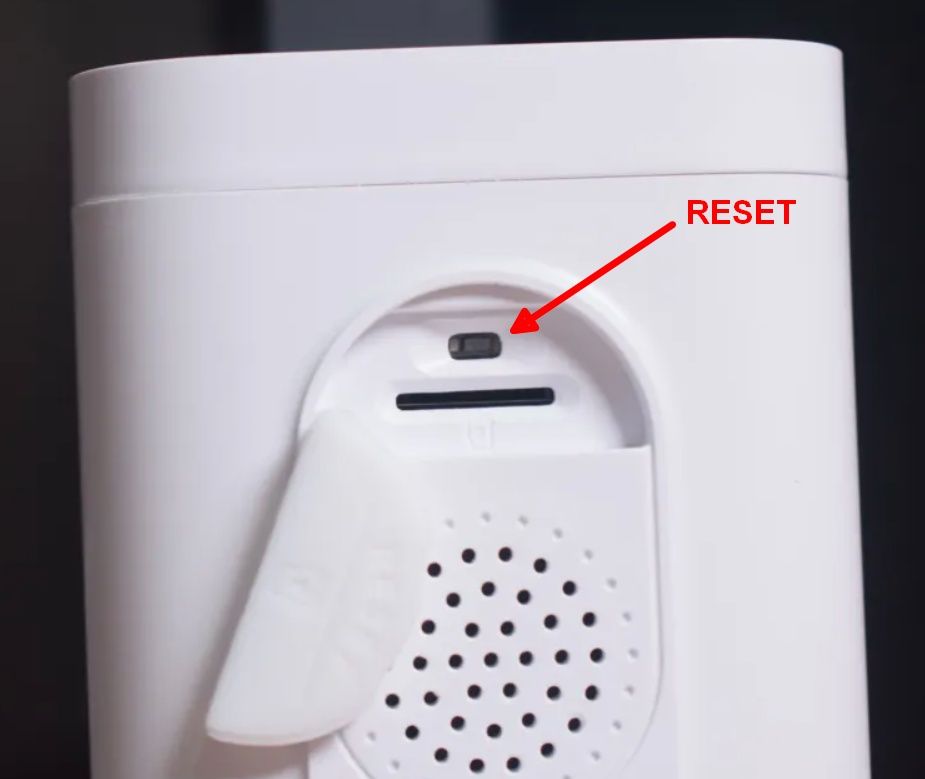
    The camera has a RESET button near the SIM card – perhaps try resetting the camera to its factory settings. Provided it isn’t linked to the previous owner’s account.

    Close-up of a camera housing with a RESET button marked by a red arrow and label


    Procedure
    Spoiler:
    To reset the Sonoff CAM-B1P outdoor camera, press and hold the reset button for 5 seconds. The device will play the voice prompt “Reset success”, and the LED will start flashing in pairing mode. Then remove it from the eWeLink app to fully restore the factory settings.
ADVERTISEMENT