logo elektroda
logo elektroda
X
logo elektroda

Network access with IoT devices (OpenBeken/Tasmota/itd) and Home Assistant from outside - TailScale

p.kaczmarek2  4 1365 Cool? (+4)
📢 Listen (AI):

TL;DR

  • Tailscale connects an external computer to a remote LAN so IoT devices like ESP8266, ESP32, BK7231, routers, cameras, and printers stay reachable without a public IP or port forwarding.
  • The key trick is enabling Tailscale subnet routing on an intermediary computer, advertising the target network with tailscale up --reset --advertise-routes=192.168.1.0/24.
  • In the example, a 192.168.0.1/24 LAN reaches a 192.168.1.1/24 target LAN by normal IP, such as 192.168.1.123, in browsers and programs.
  • TCP and HTTP communication work both ways, and PuTTY can be used to verify access across the local device, intermediary computer, and target-LAN device.
  • The subnet-router checkbox is disabled by default, and the machines should be rebooted after installation because some services may fail without it.
Generated by the language model.
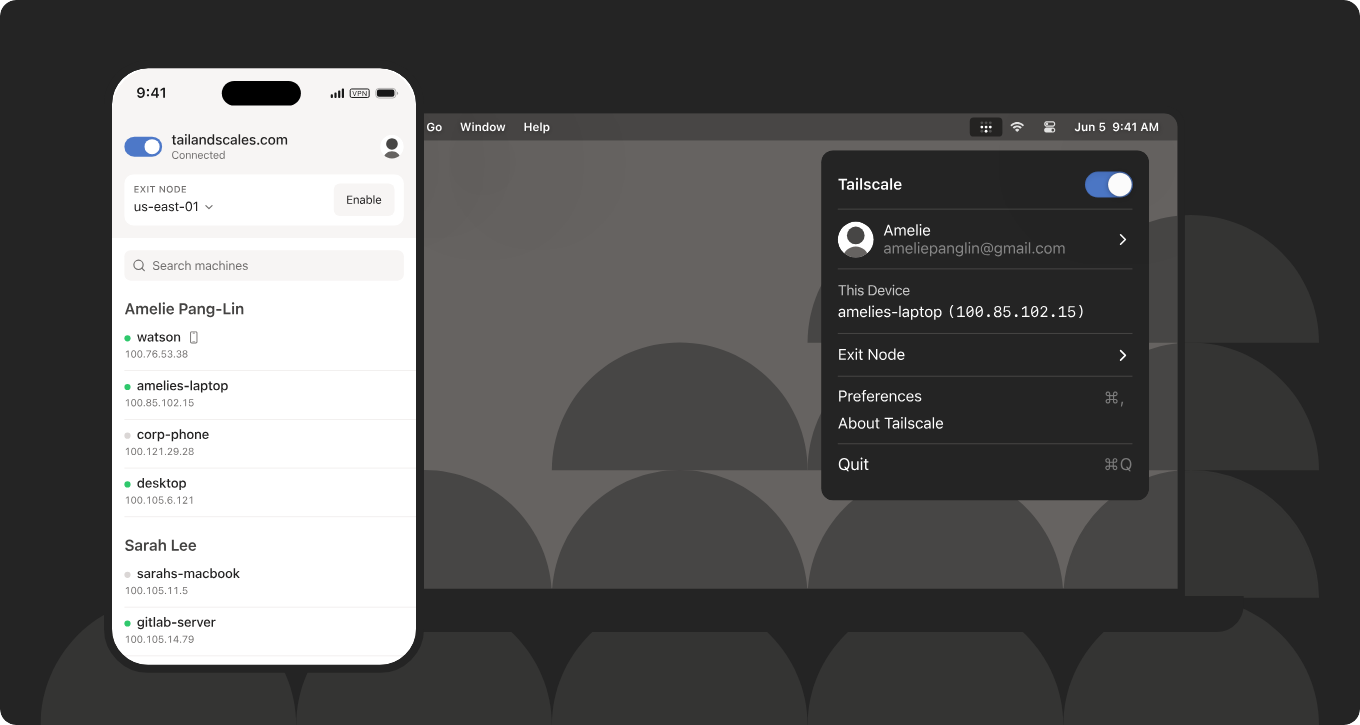
Tailscale UIs on smartphone and computer with device list and exit node options visible
Today I'm going to present an interesting free solution to connect externally to our local network - for example IoT devices. You won't need a public IP here - everything will work even if we are behind NAT and don't have port forwarding. What's more, there will only be two devices to configure, namely our active computer, and an intermediary computer providing an outlet to the target LAN. In this way, we will get access to all devices on this network - including IoT hardware based on ESP8266, ESP32 or thereabouts BK7231.

We start the adventure by downloading Tailscale to both machines, administrator rights are needed. It is also important to reboot the system - I've already fallen for this once, because seemingly access to HTTP worked, but with other services there was a problem.
https://tailscale.com/
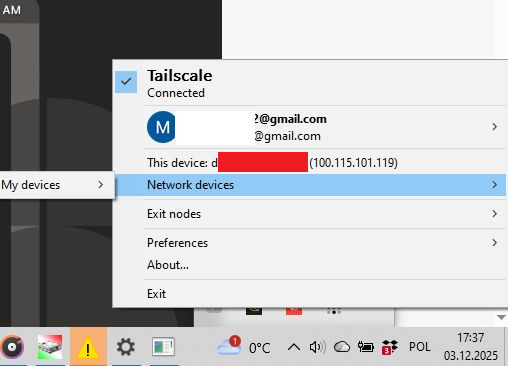
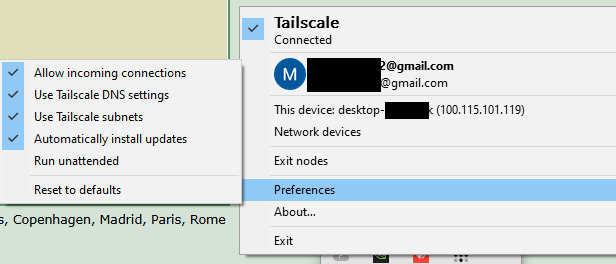
It is best to log into Tailscale via your Google account. Once installed, the service will be hidden as an icon in the toolbar:
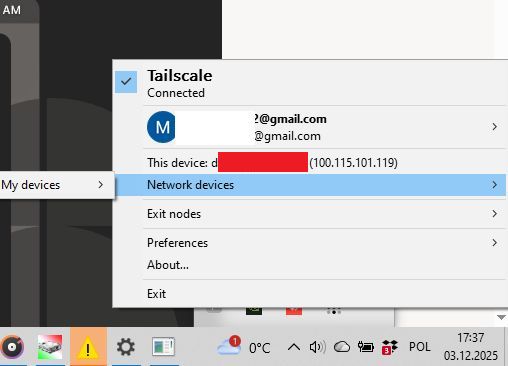
Tailscale app menu showing device connection and IP address 100.115.101.119
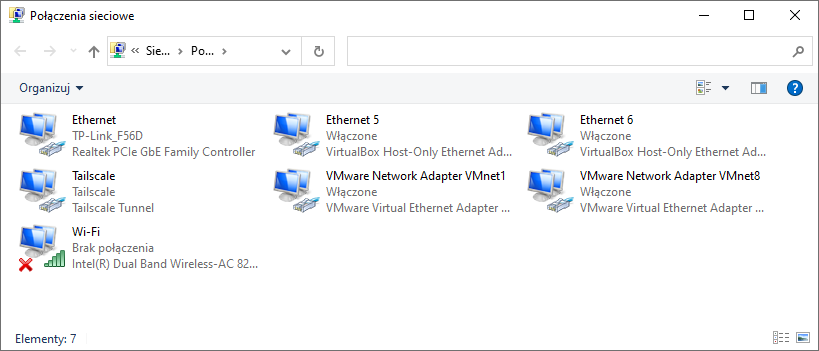
It also sees the new IP of our device. Similarly, the installation should add the Tailscale virtual network card for us:
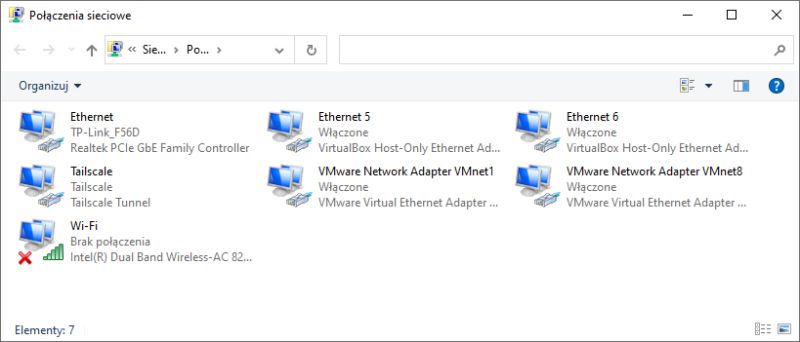
Network Connections window showing Tailscale Tunnel and various network adapters
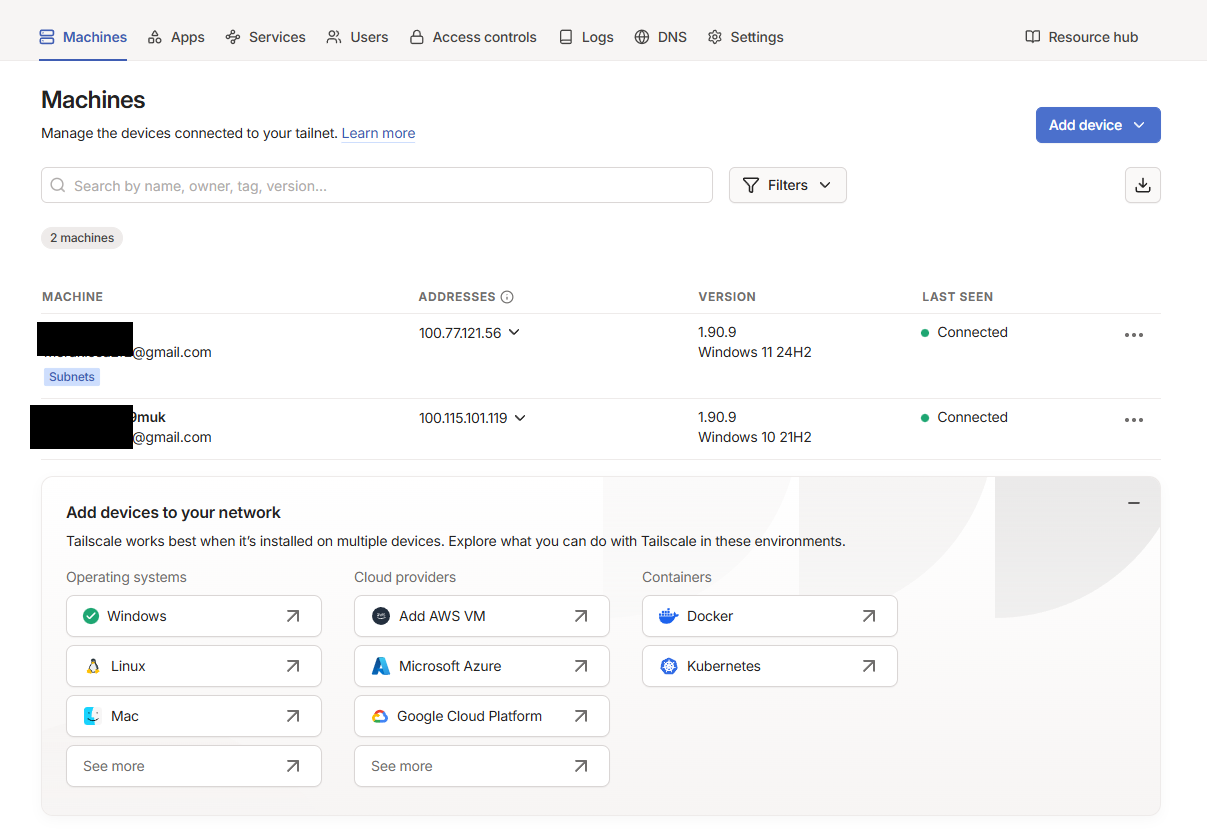
The full extent of our virtual network is easiest to check on the Tailscale website:
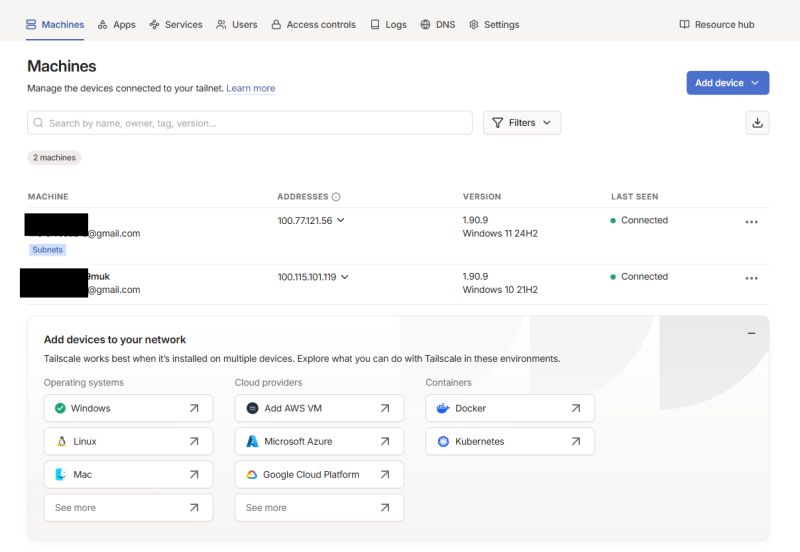
Tailscale panel showing two connected devices with IP addresses and OS versions.
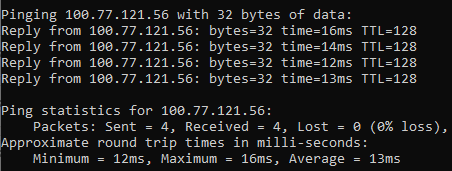
This is sufficient for the devices to see each other:
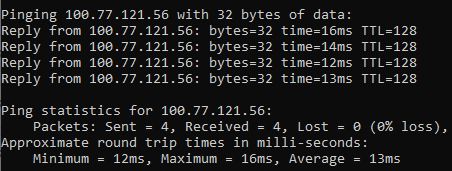
Ping result to IP 100.77.121.56 with minimum latency of 12 ms
But this will not give us access to the entire LAN of the target computer. You need to do more than that - you need to enable the so-called Subnet Router (subnet routing). This will allow other devices on the Tailscale network to see the entire LAN behind this computer - i.e. ESP8266, ESP32, router, cameras, printers etc.
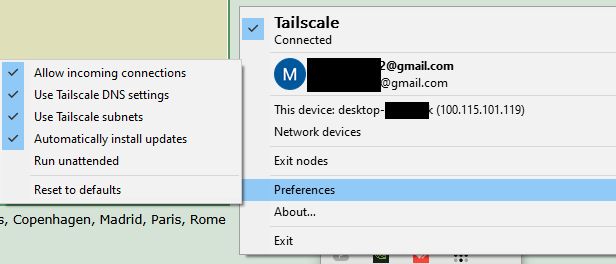
Screenshot of Tailscale settings with options menu expanded
You can also use the command: tailscale up --reset --advertise-routes=192.168.1.0/24
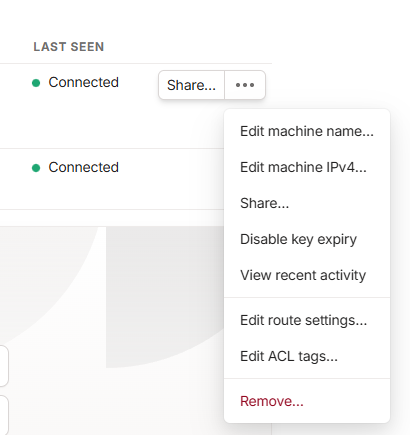
Then on the intermediary computer go into the routing settings:
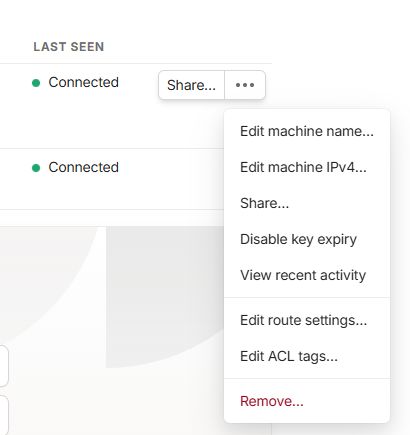
Screenshot of Tailscale panel showing machine options menu
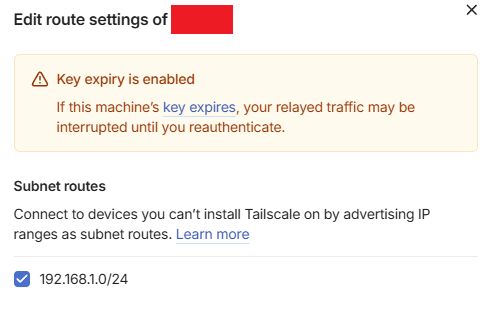
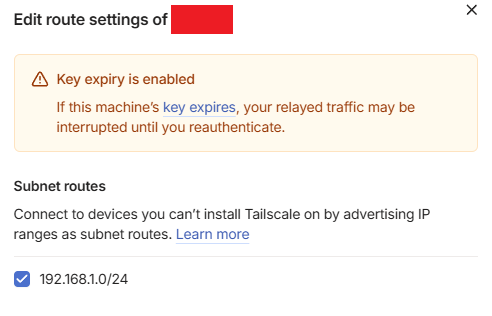
There we enable the subnet-router:
Tailscale routing settings window with selected 192.168.1.0/24 subnet route
By default this checkbox is disabled!
From now on we can access the devices from the target network via their normal IP.
In summary, in this configuration I have:
- my LAN 192.168.0.1/24
- the target LAN 192.168.1.1/24
and being on my machine on my LAN, I can access the device from the target LAN by its normal IP, e.g. IP 192.168.1.123 works, both in the browser and in programs. I can make TCP or HTTP connections normally and communication works both ways.
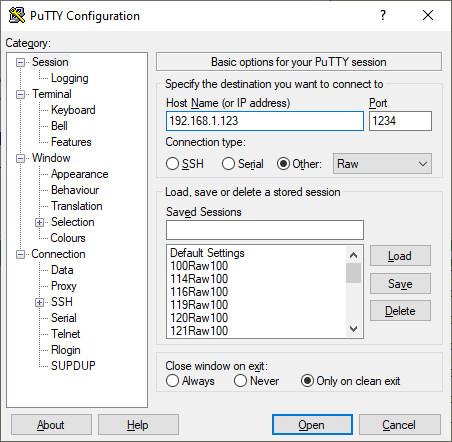
If in doubt, this can be tested at least in PuTTY:
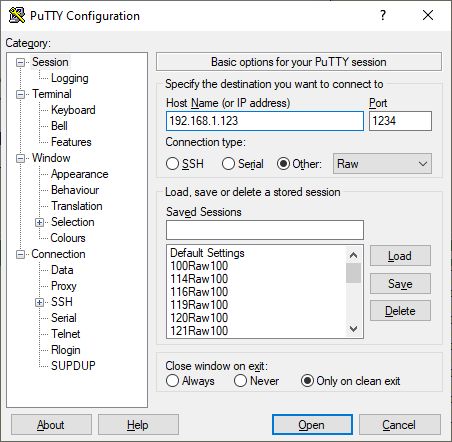
PuTTY configuration window with IP address 192.168.1.123 and port 1234 entered.
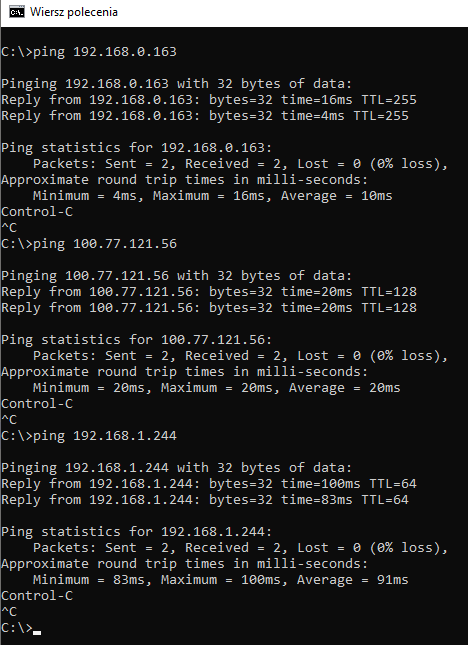
The screenshot shows the final test for three levels of communication - device on my LAN, target computer, device on the target LAN:
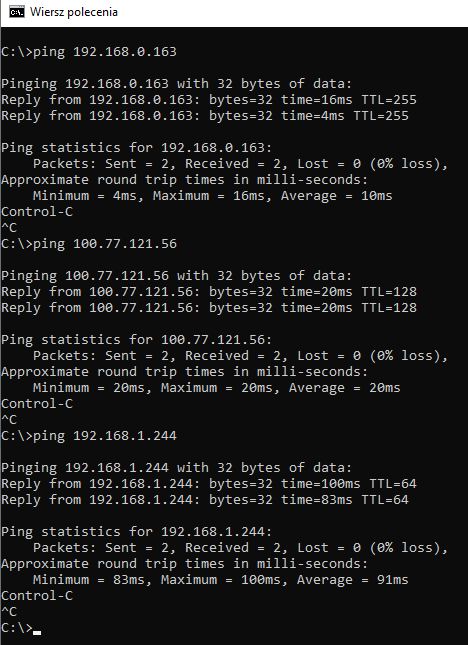
Command Prompt screenshot showing ping results for three different IP addresses
This is a very convenient solution - and certainly more accessible than public IP and port forwarding.
Do you use this type of tunneling, and if so, for what? Which VPNs do you recommend? Feel free to discuss.
PS: It is also worth mentioning what an Exit Node is. An Exit Node is a device that can act as an exit for all Internet traffic to other devices. While a Subnet Router only provides access to the selected local network behind the intermediary computer, an Exit Node takes over all traffic - both to the LAN and out to the Internet.8daabababe08

About Author
p.kaczmarek2
p.kaczmarek2 wrote 14416 posts with rating 12371 , helped 650 times. Been with us since 2014 year.

Comments

Nargo 07 Dec 2025 14:10

Looks interesting. From what I've quickly read it can be put on OpenWRT, so 24/7 remote access. I'll have to test it out. At the moment I'm using ZeroTier One for HA. [Read more]

Camis 07 Dec 2025 15:51

I would recommend NetBird more, however, because it is fully open-source. And also the coordinating server itself is in the official version, where with Tailscale we have an unofficial server. So everything... [Read more]

tesla97 08 Dec 2025 08:27

In my opinion, IPv6 is the best solution anyway. Access is always there. No NAT. No internal routing. Unfortunately, but not many providers offer IPv6. Even worse is that the other side also has to be... [Read more]

metalMANiu 11 Dec 2025 00:29

With this TailScale, can I "force" my ttgo t-call module (development board with SIM card) to send data from anywhere in the country to the influxDB set up at my home (IP variable, non-public)? [Read more]

FAQ

TL;DR: Two devices to configure, zero public IPs needed; "more accessible than public IP and port forwarding." Use Tailscale Subnet Router to reach Home Assistant and ESPs from anywhere. [Elektroda, p.kaczmarek2, post #21773549]

Why it matters:** It solves "how do I access my IoT and Home Assistant remotely behind NAT/CGNAT" without port forwarding or exposing services.

Quick Facts

How do I access Home Assistant and IoT devices from outside without port forwarding?

Install Tailscale on your computer and an intermediary computer on the target LAN. Log in, then enable Tailscale Subnet Router on the intermediary to advertise the target subnet. You can now reach devices, including Home Assistant, via their normal LAN IPs from anywhere. This avoids public IPs and router changes. The author calls it a “very convenient solution.” [Elektroda, p.kaczmarek2, post #21773549]

What is Tailscale Subnet Router and why use it?

Subnet Router lets a Tailscale node expose an entire LAN (for example, 192.168.1.0/24) to your Tailnet peers. Unlike direct device-to-device, it gives you access to every host behind that node, such as ESP8266/ESP32/BK7231 devices, cameras, or printers. It’s ideal when only one machine on the remote site can run Tailscale. [Elektroda, p.kaczmarek2, post #21773549]

What’s the difference between Subnet Router and Exit Node?

Subnet Router shares only selected local subnets to your Tailnet. Exit Node routes all your device’s traffic through the chosen node, including Internet-bound traffic. Use Subnet Router for targeted LAN access. Use Exit Node when you need a single egress for everything. [Elektroda, p.kaczmarek2, post #21773549]

Step-by-step: How do I enable a Tailscale Subnet Router?

  1. Install Tailscale on the intermediary computer and sign in.
  2. Run: tailscale up --reset --advertise-routes=192.168.1.0/24.
  3. In Tailscale admin, approve the advertised routes (enable subnet router) on that device.
    After approval, remote peers can reach the whole LAN by normal IP. [Elektroda, p.kaczmarek2, post #21773549]

Do I need a public IP, static DNS, or port forwarding for this setup?

No. The approach works behind NAT and CGNAT and does not require public IPs, static DNS, or router port forwarding. Install Tailscale on two machines, approve the route, and use the LAN IPs directly. This keeps your router untouched and reduces exposure. [Elektroda, p.kaczmarek2, post #21773549]

Will it work with OpenBeken, Tasmota, and similar ESP devices?

Yes. The guide demonstrates reaching IoT hardware on ESP8266, ESP32, and BK7231. Firmware such as OpenBeken or Tasmota exposes services on LAN IPs. Once the subnet is advertised, you can browse, use TCP clients, or query HTTP endpoints on those IPs remotely. [Elektroda, p.kaczmarek2, post #21773549]

How do I reach devices by their normal LAN IP from outside?

After enabling the Subnet Router and approving routes, simply use the device’s usual IP, such as 192.168.1.123. Open it in your browser or connect via TCP clients. Communication works both ways over the Tailnet, treating remote hosts like local ones. [Elektroda, p.kaczmarek2, post #21773549]

How can I test connectivity quickly (HTTP/TCP)?

Use a simple TCP client like PuTTY. Test three levels: a device on your LAN, the intermediary host, and a device on the remote LAN. The screenshots show all three working. This confirms routing and service reachability over the Tailnet. [Elektroda, p.kaczmarek2, post #21773549]

I can open HTTP but other services fail—what’s the fix?

Reboot after installing Tailscale. The author noted HTTP seemed fine, yet other services failed until a system reboot. Reinstall with admin rights if needed, then reboot and retest. This edge case often clears lingering driver or virtual NIC initialization issues. [Elektroda, p.kaczmarek2, post #21773549]

Is this bidirectional, and can I use normal tools and apps?

Yes. Once routes are approved, traffic is bidirectional. You can make HTTP and TCP connections normally with browsers, Home Assistant, SSH clients, and diagnostic tools. The setup behaves like a secure site-to-site overlay without touching router NAT rules. [Elektroda, p.kaczmarek2, post #21773549]

How many networks and devices were demonstrated working?

The example uses two subnets: local 192.168.0.0/24 and target 192.168.1.0/24. The test confirmed three communication levels: local device, intermediary computer, and remote LAN device. That validates end-to-end routing for typical IoT and management traffic. [Elektroda, p.kaczmarek2, post #21773549]

When should I choose Exit Node instead of Subnet Router?

Choose Exit Node when you need all traffic to egress from the remote site, such as for policy or geolocation reasons. Choose Subnet Router when you only need to reach specific LAN devices while keeping your Internet breakout local. [Elektroda, p.kaczmarek2, post #21773549]

What are OpenBeken and Tasmota in this context?

They are popular firmwares used on low-cost Wi‑Fi IoT chips like ESP8266, ESP32, and BK7231. Devices running these stacks expose HTTP or TCP services on their LAN IPs, which become reachable once the Subnet Router advertises the target subnet. [Elektroda, p.kaczmarek2, post #21773549]

Any tips for first-time setup to avoid surprises?

Install with admin rights, sign in (Google works), confirm the Tailscale virtual NIC appears, and reboot. Advertise the correct CIDR. Finally, approve the route in the Tailscale admin panel; the checkbox is off by default. “It’s a very convenient solution.” [Elektroda, p.kaczmarek2, post #21773549]
Generated by the language model.
%}