logo elektroda
logo elektroda
X
logo elektroda
Dostępna jest polska wersja

Czy wolisz polską wersję strony elektroda?

Nie, dziękuję Przekieruj mnie tam

Choosing the Right Coaxial Cable for Internet Connection: Speed & Outdoor Usage - sebaele22 Inquiry

sebaele22 50728 35
Best answers

Can I move my cable modem to another room with a 40 m coaxial cable, and does the cable type affect internet speed or signal quality?

Yes—the cable mainly affects attenuation and signal quality, so use a proper 75-ohm SAT antenna coaxial cable with good F connectors; a 40 m run can work, but the modem’s signal levels are what really matter [#6207187][#6210020] If you only move the modem and connect one computer, a typical SAT cable is enough, with F plugs and a barrel for joins [#6207187] Check the modem at 192.168.100.1 and look at Receive Power Level, Transmit/Upstream, and Downstream values; around -15 dB receive was said to be acceptable, while -19 dB was already too low for extending the line further [#6210020] The return channel should stay below about 58 dB; up to 60 dB may still work, but it is considered an extreme level to avoid [#6252063] Later, a Receive Power Level around +6 dBmV was considered OK, and if the values stay in range you should not worry [#6249867][#6863063] If the readings worsen after replacing the cable, the cause may be the new cable’s electrical parameters, bad plugs, or a network/frequency change rather than the coax itself [#6860207]
Generated by the language model.
ADVERTISEMENT
Treść została przetłumaczona polish » english Zobacz oryginalną wersję tematu
  • #1 6206932
    sebaele22
    Level 30  
    Hello, I would like to drag the internet to another room in the apartment. I can't do it at home so I have to let the cable go outside. Does the type of coaxial cable affect the speed of the internet or something else, if so, which one to choose?

    Regards sebaele22
  • ADVERTISEMENT
  • #2 6206996
    shadow125
    Level 21  
    First, it's probably not coaxial :)
    Apply "shielded twisted FTP cable" and shield to ground.
    The cost of 1 m is about 1.50.
  • #3 6207074
    kasprzyk
    Electrician specialist
    Write what internet provider you have, draw a diagram, lengths, equipment.
    kisses
  • #4 6207107
    sebaele22
    Level 30  
    Of course the coaxial cable, my ISP is "Vectra" cable TV.
  • #5 6207187
    kasprzyk
    Electrician specialist
    If you are moving the modem to a new place (without dividing it into an additional computer), you can use a typical SAT antenna cable - about PLN 1.5 / meter. You have not written what episode, you can pull up to 100m depending on the signal. (use F plugs and barrel for connections)

    kisses
  • #6 6207211
    sebaele22
    Level 30  
    So I want to move the modem to another place and only connect one computer, and the distance is about 40m. Will there be some interference on the ordinary antenna cable?
  • #7 6208243
    kasprzyk
    Electrician specialist
    Check the readings on the modem - go to the page: 192.168.100.1
    If you earn the cable well, wind up the F's, connect and the modem parameters will be in reserve - it will be ok.

    Kisses
  • ADVERTISEMENT
  • #8 6209641
    sebaele22
    Level 30  
    I went to this page: 192.168.100.1 and what next? Sory but I would like an explanation.
  • #9 6209949
    kasprzyk
    Electrician specialist
    What are your levels

    Power level
    Recieve Level,

    see upstream, downstream parameters
  • #10 6209993
    sebaele22
    Level 30  
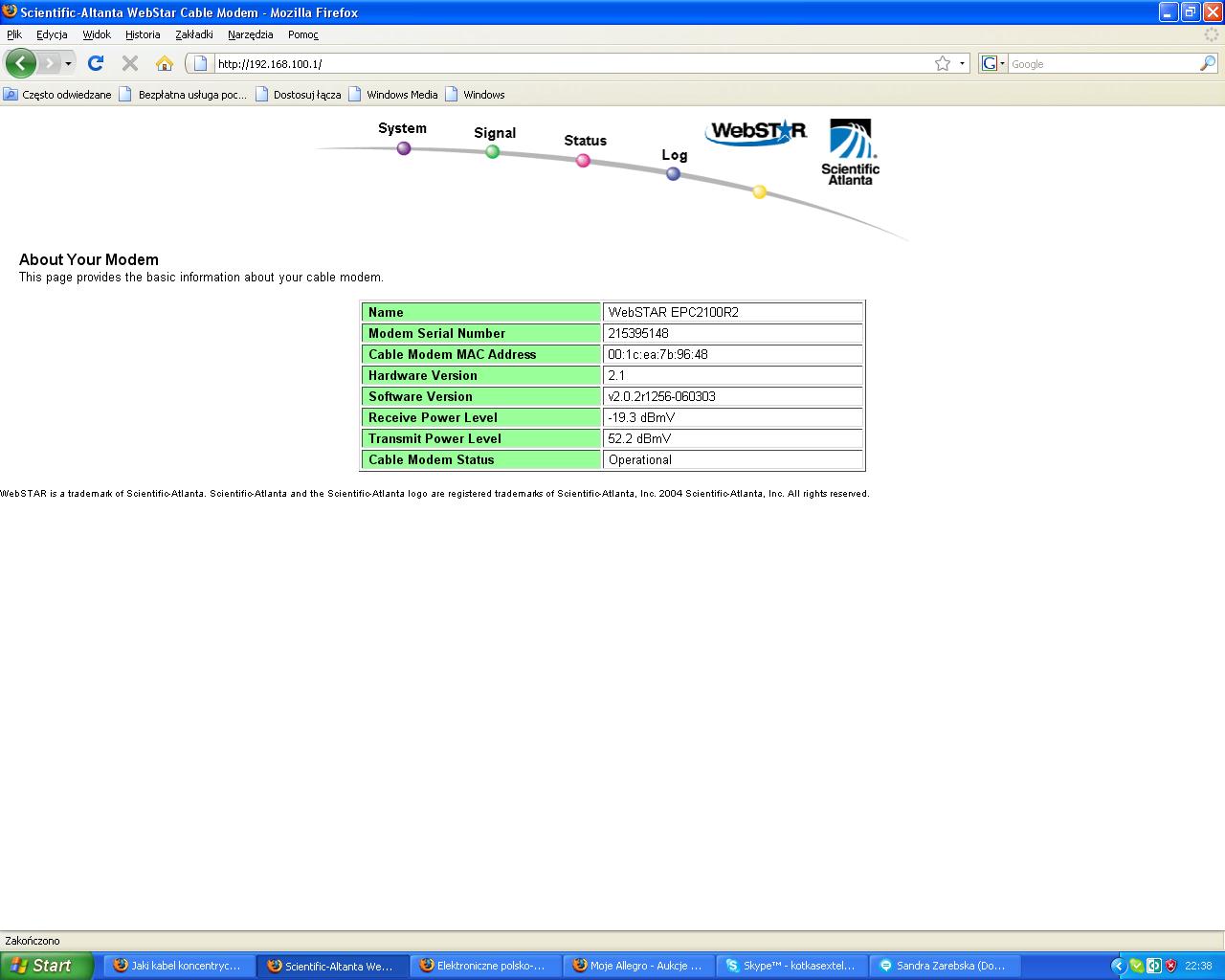
    It is like this with me:

    Choosing the Right Coaxial Cable for Internet Connection: Speed & Outdoor Usage - sebaele22 Inquiry

    If wrong, how should it be and where are these upstream and downstream parameters?
  • #11 6210020
    kasprzyk
    Electrician specialist
    You cannot move this modem at these levels. 40m of cable + connectors - you already have too little of the longstream.
    Report that you have problems with the internet to your operator, that your incoming signal is at -19 - and -15dB is acceptable.

    Kisses
  • #12 6210057
    sebaele22
    Level 30  
    What should the parameters of the incoming signal be and what does Receive Power Level and Transmit Power Level mean?

    What should the parameters be?
  • #13 6248989
    sebaele22
    Level 30  
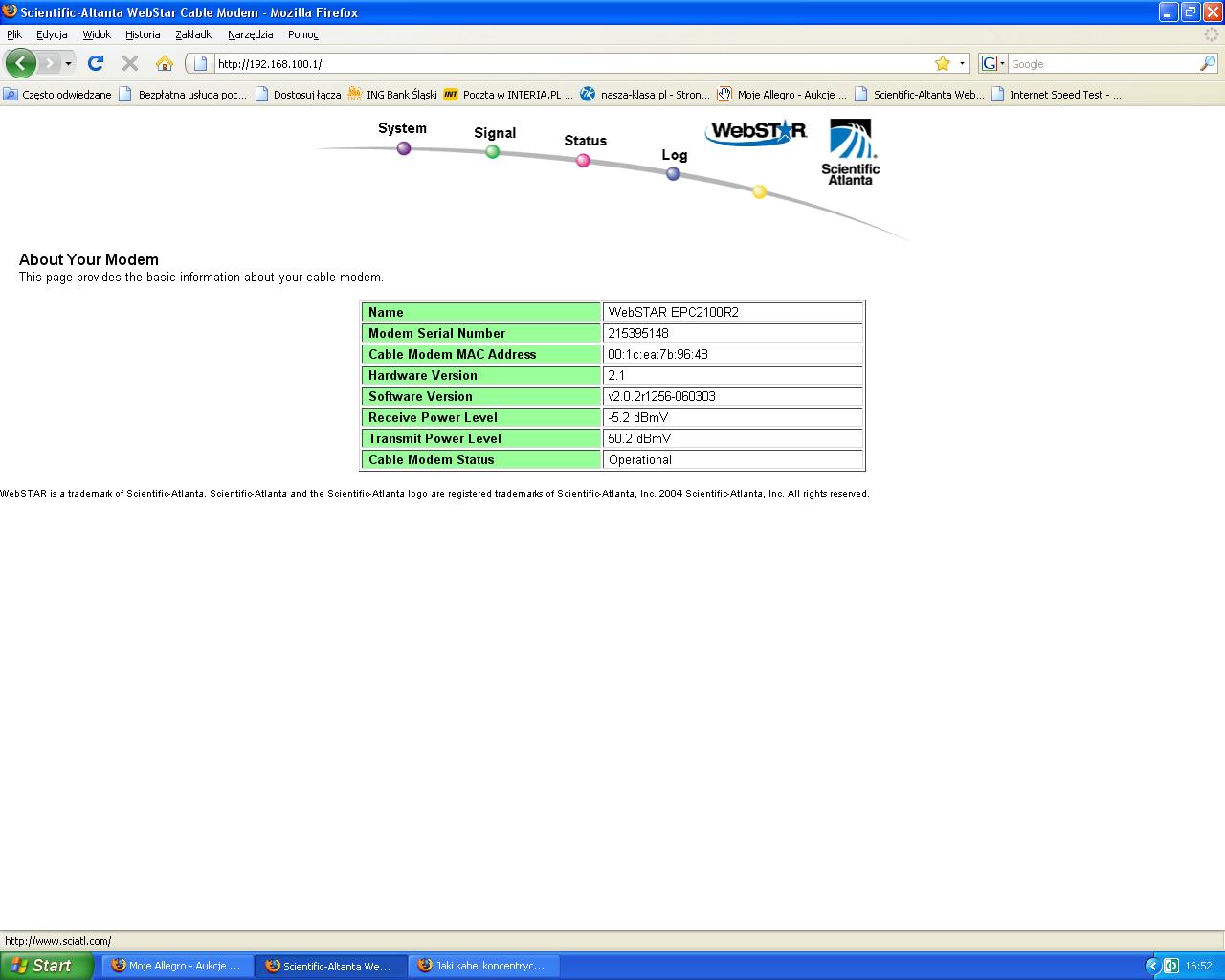
    Hello, I connected everything again and got a signal like this:

    Choosing the Right Coaxial Cable for Internet Connection: Speed & Outdoor Usage - sebaele22 Inquiry

    Sometimes Receive Power Level changes to 6 dBmV, are the parameters correct?
  • Helpful post
    #14 6249867
    kasprzyk
    Electrician specialist
    Hello

    It's ok, when Receive jumps by a few decibels, something may be damaged, it's good for you.
    kisses
  • ADVERTISEMENT
  • #15 6249980
    sebaele22
    Level 30  
    Thanks, and what should be the biggest Receive signal and is there any possibility to increase it?
  • #16 6250242
    kasprzyk
    Electrician specialist
    A maximum of +15 dB is recommended. The signal can be increased by the operator (on the amplifiers, or by reducing the attenuation to you) or by using an amplifier in the apartment - but it's better not to do this just consult the operator - you can "mess" with the TV or the Internet.

    kisses
  • #17 6250544
    sebaele22
    Level 30  
    And what do you mean to use an amplifier in the apartment?
  • #18 6251056
    kasprzyk
    Electrician specialist
    It has to be an amplifier with a return path, we only use building ones, e.g. AMIGO M 865 P30.
    You will amplify the forward signal, but you are still limited by the upstream - that is, the return channel you have at 50dB - but exactly what do you need it for, is it an extension of the antenna cable?
  • #19 6251085
    Anonymous
    Anonymous  
  • #20 6251112
    kasprzyk
    Electrician specialist
    hubertp wrote:
    Sorry for offtop.
    But is it possible to check something like this in the Motorola SB5101 modem?


    Try to go to the modem page 192.168.100.1
  • #21 6251135
    Anonymous
    Anonymous  
  • #22 6251149
    sebaele22
    Level 30  
    Does this signal have any influence on the link speed? If so, I'd like to make it stronger! And is the feedback channel at a good level?
  • #23 6252063
    kasprzyk
    Electrician specialist
    sebaele22 wrote:
    Does this signal have any influence on the link speed? If so, I'd like to make it stronger! And is the feedback channel at a good level?


    At the moment everything is fine, you will not feel any difference until -15 (the SNR parameter is also important - but you will not read it on this page, unless you have other tabs available) return channel max recommended 58dB (in practice it works even up to 60 dB - but such an extreme level is avoided)

    Kisses
  • #24 6252147
    Anonymous
    Anonymous  
  • #25 6252183
    kasprzyk
    Electrician specialist
    hubertp wrote:
    Is it possible to check it with me?


    as you wrote, it is probably blocked, only available to the operator.
    try restarting the modem, a moment before logging in, some information may appear.

    kisses
  • ADVERTISEMENT
  • #26 6252433
    sebaele22
    Level 30  
    I do not have any tabs available, it means that my return and feedback signal is good, do not worry about anything?
  • #27 6252739
    Anonymous
    Anonymous  
  • #28 6860115
    sebaele22
    Level 30  
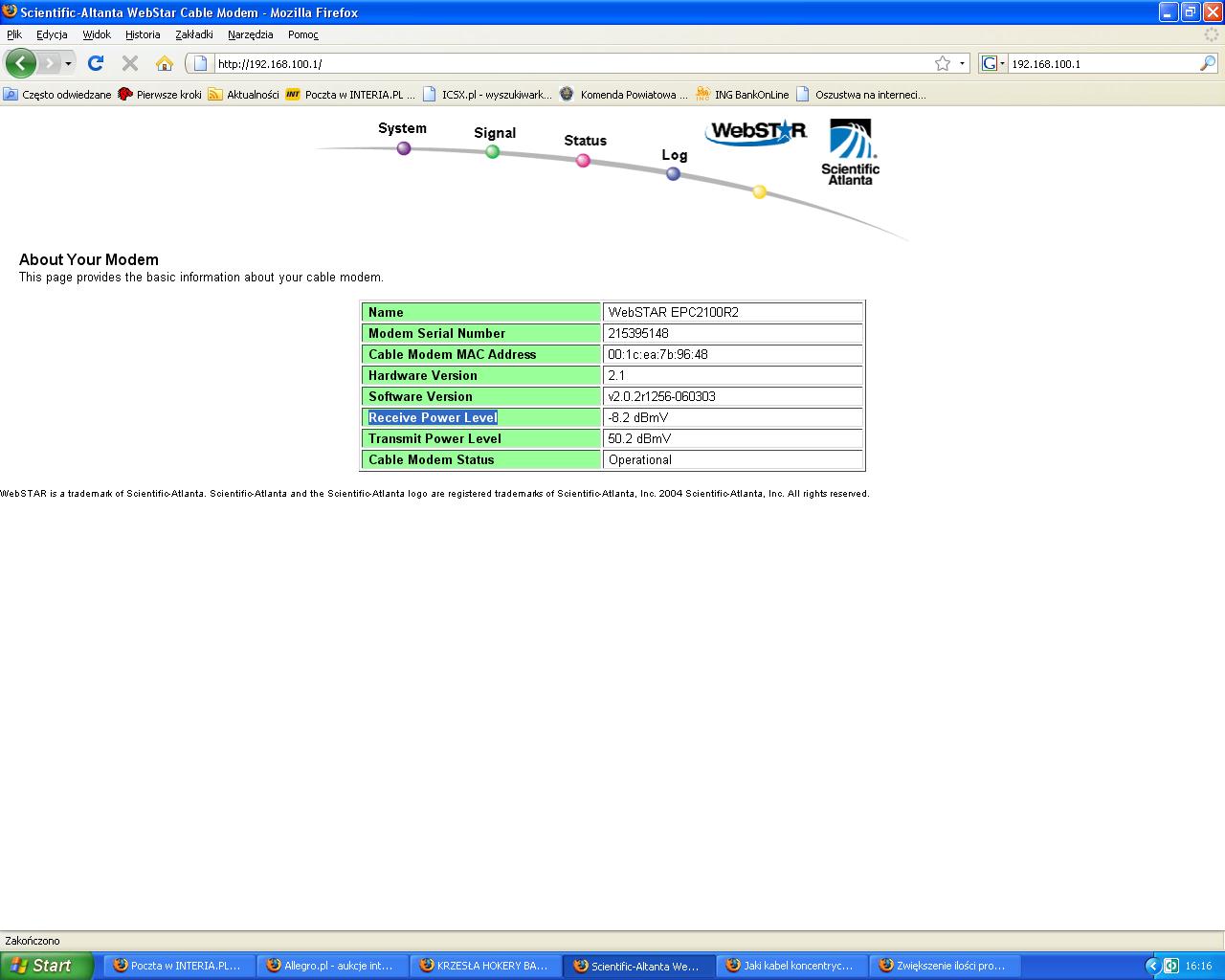
    Hello again, some time ago I replaced the coaxial cables from the Internet and the Receive Power Level signal deteriorated:


    Choosing the Right Coaxial Cable for Internet Connection: Speed & Outdoor Usage - sebaele22 Inquiry

    What could it be to blame!
  • #29 6860158
    kasprzyk
    Electrician specialist
    how many have you had before
  • #30 6860165
    sebaele22
    Level 30  
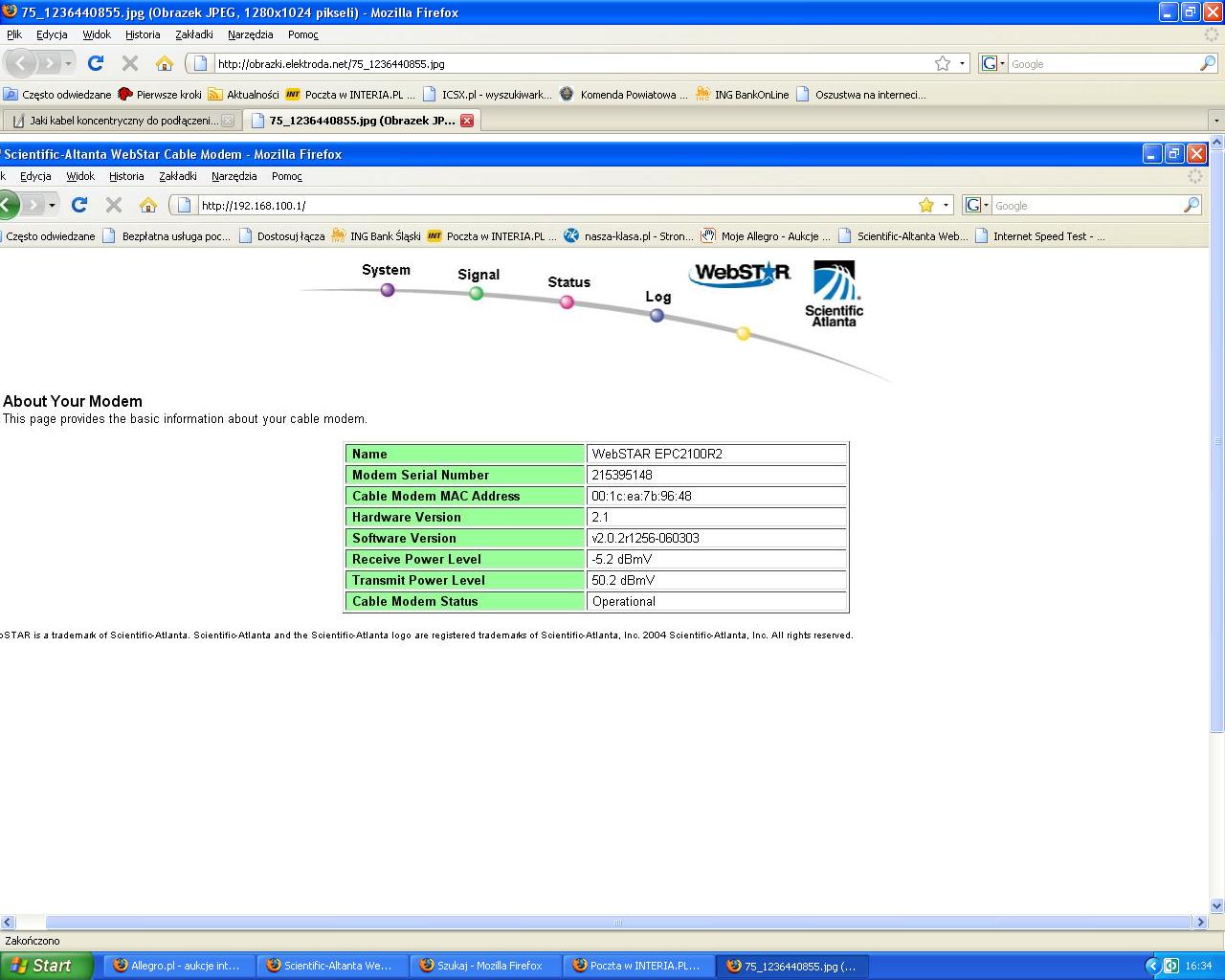
    Before replacing the cable, I had this:

    Choosing the Right Coaxial Cable for Internet Connection: Speed & Outdoor Usage - sebaele22 Inquiry

    I would like to add that I replaced the coaxial cables with a copper wire inside, and earlier I had a steel wire (whitewashed copper).

Topic summary

✨ The discussion revolves around the selection of coaxial cables for extending internet connections outdoors. The user seeks advice on whether the type of coaxial cable impacts internet speed and which cable to choose for a 40m distance. Responses suggest using standard SAT antenna cables, with recommendations for connectors and potential signal loss over long distances. Users discuss the importance of checking modem parameters, such as Receive Power Level and upstream/downstream metrics, to ensure optimal performance. The conversation also touches on the use of amplifiers to boost signal strength and the implications of different cable materials on signal quality.
Generated by the language model.

FAQ

TL;DR: Up to 100 m of RG-6 satellite-grade coax keeps full DOCSIS speed; “use a typical SAT antenna cable” [Elektroda, kasprzyk, post #6207187] Check modem levels (-15 to +15 dBmV) before relocating.

Why it matters: The right cable and signal level prevent random disconnects when you move a cable-TV internet modem outdoors.

Quick Facts

• RG-6 Cu-core coax price: ~PLN 1.5 per m [Elektroda, shadow125, post #6206996] • Safe modem downstream: ‑15 to +15 dBmV [CableLabs, 2021]. • Upstream should stay < 58 dBmV for stability [Elektroda, kasprzyk, post #6252063] • Shielded twisted-pair (FTP) works for Ethernet, not cable-TV internet [Elektroda, shadow125, post #6206996] • Outdoor run length limit: ≈100 m before amp needed [Elektroda, kasprzyk, post #6207187]

What kind of cable should I use to move a Vectra cable-modem to another room?

Use RG-6 or other satellite-grade 75 Ω coax with a solid copper center to minimize loss. F-type connectors and weatherproof boots ensure a tight RF seal [Elektroda, kasprzyk, post #6207187]

Does the coax type affect my internet speed?

Speed stays unchanged if receive power remains between ‑15 and +15 dBmV. Poor cable raises attenuation, pushing levels below ‑15 dBmV and causing dropouts, not slower nominal speed [CableLabs, 2021; Elektroda, kasprzyk, #6210020].

How far can I run the coax without an amplifier?

With good RG-6 you can run about 100 m before downstream power usually falls >3 dB and risks going below spec [Elektroda, kasprzyk, post #6207187] Edge-case: thin RG-59 may halve that distance.

Will shielded twisted pair (FTP) work for this application?

No. FTP is for Ethernet. Vectra uses RF over 75 Ω coax; twisted pair will not carry the DOCSIS signal [Elektroda, shadow125, post #6206996]

What Receive Power Level should I aim for?

Target 0 dBmV; the acceptable window is ‑15 to +15 dBmV. Values below ‑15 dBmV double packet loss odds [CableLabs, 2021].

My Receive jumps by 6 dB—cause for concern?

Small swings (±6 dB) are normal and often temperature-related. Continuous swings >10 dB hint at damaged splitters or moisture-filled cable [Elektroda, kasprzyk, post #6249867]

Can I boost the signal myself with a home amplifier?

You need a return-path amplifier such as AMIGO M 865 P30. It lifts downstream but upstream may still max out at 58 dBmV, so consult the ISP first [Elektroda, kasprzyk, post #6251056]

Do coax Tees or splitters degrade internet levels?

Yes. Each 2-way splitter adds about 3.5 dB loss. A faulty splitter was blamed when Receive dropped from 3 dBmV to ‑7 dBmV after cable changes [Elektroda, sebaele22, post #6860165]

Will better copper-core coax always improve my signal?

Usually, but if connectors are poorly crimped or water-logged, signal may still worsen—as seen when copper replacement led to a 10 dB drop [Elektroda, 6860165]

Does signal level change my download speed tier?

Speed profile comes from DOCSIS provisioning. Signal out of spec causes retries or modem reboots, not a different tier [Elektroda, kasprzyk, post #6252063]

What’s the risk if upstream power exceeds 58 dBmV?

The modem may fail to reach the CMTS, leading to intermittent upload or total offline status; manufacturers flag >61 dBmV as critical [Arris, 2020].
Generated by the language model.
ADVERTISEMENT