logo elektroda
logo elektroda
X
logo elektroda

Exploring the Impact of Cable Types on Internet Quality: Router to Box Connections

krzychu3113 25125 28
Best answers

Does the type of cable between a router and an ADSL box affect internet speed or quality, and what cable should be used?

Yes — for ADSL, the cable can affect synchronization and stability, especially if it is a flat or otherwise poor-quality lead; a dozen or so meters of flat extension can reduce sync by a few megabits [#12660353] The recommended choice in the thread is a proper twisted-pair cable such as YTKSY or UTP5, and if the current cable is flat, replace it with UTP and use one pair (for example blue) [#12659823] [#12662129] When wiring it yourself, the RJ11 plug should be crimped to the middle pins (3 and 4) using that used pair [#12662129] However, simply changing the cable will not magically make the connection faster if the real limit is the DSL line or provider side; the thread advises checking router statistics and diagnosing the actual cause first [#12660746] [#12660768] If the goal is more throughput, the operator’s line profile/speed tier may be the real factor [#12664218]
Generated by the language model.
ADVERTISEMENT
Treść została przetłumaczona polish » english Zobacz oryginalną wersję tematu
  • #1 12659768
    krzychu3113
    Level 9  
    Posts: 12
    Rate: 8
    Hello, I would like to know if the type of cable affects the quality of the Internet?
    I mean mainly the one that connects the router and the box (I do not have a landline). If so, what's the best?
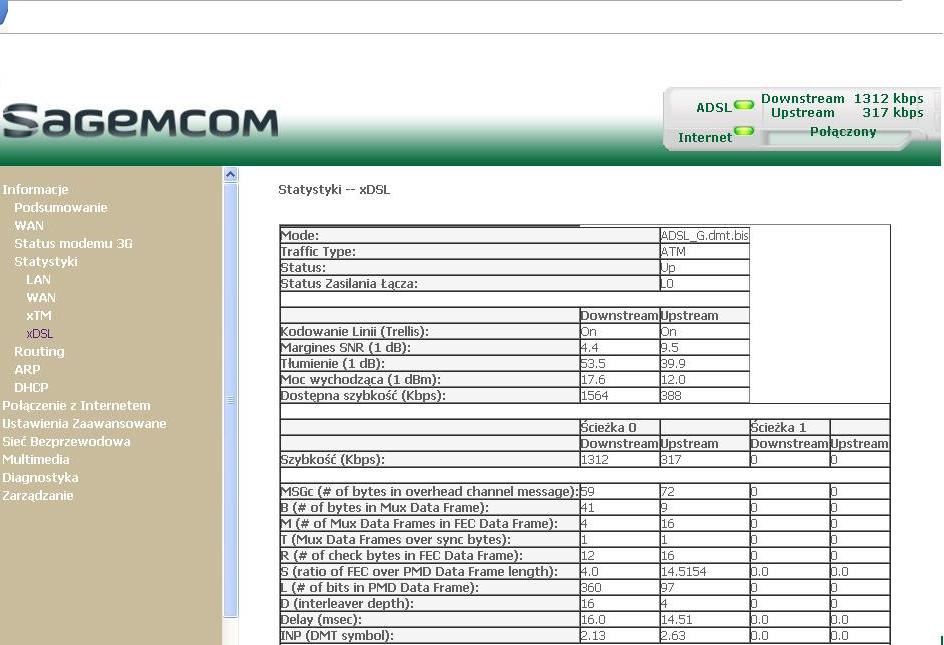
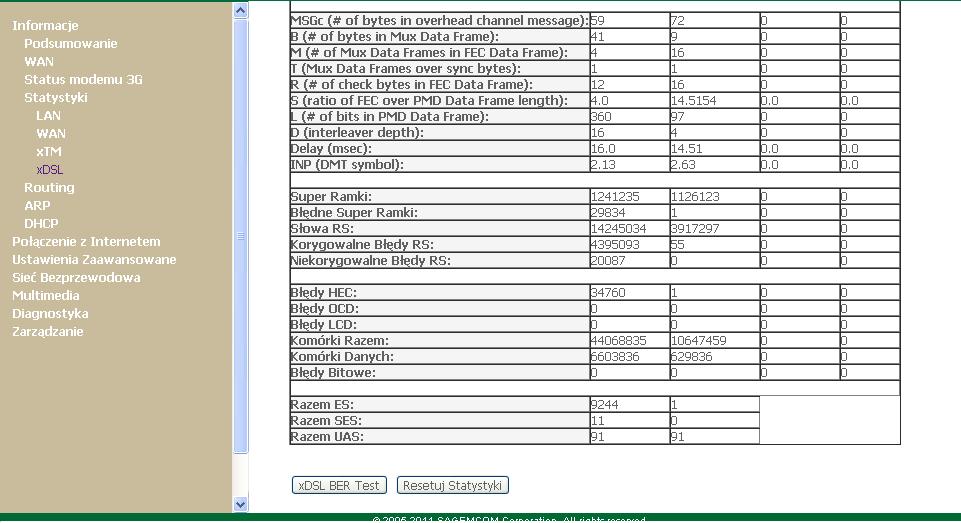
  • ADVERTISEMENT
  • #2 12659823
    Heinzek
    Network and Internet specialist
    Posts: 3732
    Help: 554
    Rate: 493
    The cable matters. For ADSL it should be YTKSY or UTP5 cable.
  • #3 12659846
    krzychu3113
    Level 9  
    Posts: 12
    Rate: 8
    So if I replaced this cable, I would have faster internet? Because I have internet from neostrada with a speed of up to 10 Mb / s, and I have a speed of 1.3 Mb / s.
    And I would like to know how much such a cable costs.
  • #4 12659914
    farjat
    Level 22  
    Posts: 517
    Help: 28
    Rate: 48
    krzychu3113 wrote:
    So if I replaced this cable, I would have faster internet?

    Not.
    krzychu3113 wrote:
    Because I have internet from neostrada with a speed of up to 10 Mb / s, and I have a speed of 1.3 Mb / s

    Correctly.
    krzychu3113 wrote:
    And I would like to know how much such a cable costs.

    You have the Internet, as you can see .... look for it. Or maybe you will leave the house and take a walk in the appropriate stores?
  • #5 12659921
    jestemnajleprzy
    Level 16  
    Posts: 193
    Help: 15
    krzychu3113 wrote:
    And I would like to know how much such a cable costs.


    Uncle google doesn't bite :D :D
  • #6 12660037
    matek451
    Level 43  
    Posts: 31052
    Help: 4314
    Rate: 5708
    Good advice, don't take any cables. Neostrada is not about connecting a light bulb, although it also requires minimal knowledge and skills.
    Helpful post? Buy me a coffee.
  • #7 12660198
    krzychu3113
    Level 9  
    Posts: 12
    Rate: 8
    Can anything be done to make the internet faster? And what affects speed?
    Because my friend who lives next to me has the same internet and has faster speeds. As far as I remember, it's 4Mb / s.
  • #8 12660287
    Anonymous
    Level 1  
  • ADVERTISEMENT
  • #9 12660307
    krzychu3113
    Level 9  
    Posts: 12
    Rate: 8
    My download speed varies at its best 170 kbps, and so I am at 80-120 kbps at this time.
  • #10 12660333
    jestemnajleprzy
    Level 16  
    Posts: 193
    Help: 15
    Download it and see what speed you reach. -----> http://noc.gts.pl/100mb.gts


    krzychu3113 wrote:
    And what can be done to make the internet faster? ? And what affects speed?


    Antivirus (if you have avast, turn it off and see), firewall

    You can also use download managers, I recommend Download Accelerator Plus (it is available in your native language
  • ADVERTISEMENT
  • #11 12660353
    puszak
    Level 28  
    Posts: 1387
    Help: 92
    Rate: 114
    farjat wrote:
    krzychu3113 wrote:
    So if I replaced this cable, I would have faster internet?

    Not

    If we are talking about ADSL internet:
    From my several years of experience it appears that a dozen or so meters of "flat extender" can lower the synchronization by a few megabits. It is always a good idea to replace the cable with a correct, shielded one. Especially when we are surrounded by disturbances on all sides, which is rather inevitable nowadays.
  • #12 12660363
    VooVoo
    Level 34  
    Posts: 2177
    Help: 215
    Rate: 266
    krzychu3113 wrote:
    So if I replaced this cable, I would have faster internet? Because I have internet from neostrada with a speed of up to 10 Mb / s, and I have a speed of 1.3 Mb / s.
    And I would like to know how much such a cable costs.
    Do you think that if you change the 5 mb cable, the quality will improve along the entire cable route, from the rack in the switchboard to your telephone socket?
  • ADVERTISEMENT
  • #13 12660408
    Anonymous
    Level 1  
  • #14 12660440
    krzychu3113
    Level 9  
    Posts: 12
    Rate: 8
    puszak wrote:

    If we are talking about ADSL internet:
    From my several years of experience it appears that a dozen or so meters of "flat extender" can lower the synchronization by a few megabits. It is always a good idea to replace the cable with a correct, shielded one. Especially when we are surrounded by disturbances on all sides, which is rather inevitable nowadays.


    Well, I have ADSL internet and I use a regular cable (10 meters), is it best to replace them with those previously mentioned by my colleague YTKSY or UTP5?

    I am using the Sagem F @ st 2704 router.
  • #15 12660563
    matek451
    Level 43  
    Posts: 31052
    Help: 4314
    Rate: 5708
    Boy, and you yours, they tell you that the fire is burning and you are pushing your hands. Come on with this cable, do not bother in the installation because you will definitely improve yourself.
    Helpful post? Buy me a coffee.
  • #16 12660607
    krzychu3113
    Level 9  
    Posts: 12
    Rate: 8
    matek451 wrote:
    Boy, and you yours, they tell you that the fire is burning and you are pushing your hands. Come on with this cable, do not bother in the installation because you will definitely improve yourself.


    Then there is any other option to improve the download speed?
  • #17 12660746
    Anonymous
    Level 1  
  • #18 12660768
    andk1eltd
    Level 37  
    Posts: 2831
    Help: 395
    Rate: 372
    Yes. Move closer to the headquarters: black:
    You can improve the critical element that gives you hope for at least 10% profit. Otherwise, it is like changing the speaker cables to gold-plated wires for better sound quality.
    We don't know anything about your link. 1.3Mbps can be on both 6km of good link and 500m of bad link. In the first case, you can only sympathize with - in the second, there is room for maneuvering, but not blind.
    Any measurements, statistics from the router?
  • #19 12661567
    krzychu3113
    Level 9  
    Posts: 12
    Rate: 8
    Which specific statistics would you be interested in?
    I am throwing something from xDSL:
    Exploring the Impact of Cable Types on Internet Quality: Router to Box Connections
    Exploring the Impact of Cable Types on Internet Quality: Router to Box Connections
  • #20 12662129
    Heinzek
    Network and Internet specialist
    Posts: 3732
    Help: 554
    Rate: 493
    krzychu3113 wrote:
    Well, I have ADSL internet and I use a regular cable (10 meters), is it best to replace them with those previously mentioned by my colleague YTKSY or UTP5?


    If it is a flat cable, then it is not suitable.
    Purchase a UTP cable (such as for LAN), arrange it from the can to the router. Use one pair, e.g. blue. in the box, connect to the wires that are currently used, and at the other end directly make the RJ11 terminal by inserting the used pair into the middle pins (pins 3 and 4).
  • #21 12662612
    PICIA
    Level 33  
    Posts: 2301
    Help: 185
    Rate: 248
    rather, I would not agree with the previous speaker ... from what I read - distance from CA - nothing else
    give me on PW - data neo and I will tell where the problem is - I am at work today until 20:00
  • #23 12662755
    PICIA
    Level 33  
    Posts: 2301
    Help: 185
    Rate: 248
    matek451 wrote:
    I can already see those RJ11 earned without tools, massacre. And then zero net and cry.

    I wouldn't be sure about it :)
    Have you ever opened something without a screwdriver? You don't need a crimper to earn tips :)
  • #24 12662774
    matek451
    Level 43  
    Posts: 31052
    Help: 4314
    Rate: 5708
    Life has taught me that most of the people who started using RJ11, RJ45 to save money would later buy ready-made cables. Although this does not rule out exceptions. It takes some knowledge and skills. I hope it works, but whether it will improve the speed, you doubt it yourself.
    Helpful post? Buy me a coffee.
  • #25 12662786
    PICIA
    Level 33  
    Posts: 2301
    Help: 185
    Rate: 248
    when it comes to the transfer - what does the rj 11 connection have to do with it? ano nothing - either there is net or there is no net, but you need to know how the crimper works
  • #26 12664079
    andk1eltd
    Level 37  
    Posts: 2831
    Help: 395
    Rate: 372
    PICIA wrote:
    when it comes to the transfer - what does the rj 11 connection have to do with it? ano nothing - either there is net or it is not

    Oh, if it were that simple :( . Wrong RJ-socket for the wire used, badly clamped - the internet works, with errors, but it works. Thousands of correctable FECs cause "empty runs" - the link retransmits the packets and a useful transfer is what gets correctly received.
  • #27 12664218
    CHACA
    Level 43  
    Posts: 9660
    Help: 875
    Rate: 457
    If you want to have a bigger transfer, buy a higher speed from your operator.
  • #28 13374646
    zett1
    Level 15  
    Posts: 182
    Help: 3
    Rate: 47
    This topic is not new, but I can see quite controversial "answers" here. The funniest thing is that you have to finish 2 faculties to earn a twisted pair with plugs. One is cable, the other is plug-in, confirmed by the state examination ;) . And yet the rj crimping machine costs 12 zlotys today, there are video guides on how to correctly select, machine and crimp. To the point- a few days ago, a colleague from work said that he had called an orange specialist home. It has neo up to 10 Mb, and it has not reached more than 7. So he invited the said specialist. A person skilled in the art has replaced the existing single-pair ytksy twisted pair with some new type of twisted pair. From what I understand- another way of twisting the veins or something. It was about several meters - from the box next to the fence to the router in the building. And ... my friend now has a stable 12 Mb. I wonder if anyone can write something more about the new twisted pair technology? As far as my friend remembers - a word like: pumping (!?) or similar, came from the mouth of a professional.
  • #29 13377700
    puszak
    Level 28  
    Posts: 1387
    Help: 92
    Rate: 114
    As far as I know, a more twisted cable is less susceptible to interference and probably the old YTKSY was screenless, and the new one? Maybe a professional even grounded the screen :D . This full synchronization may drop even further, and the improvement may only be deceptive after resetting the machine that determines the stable speed. Time will tell.
    Pumping? In my region, bakers, builders, etc. work in this industry. I am a mechanic myself :D and such various strange terms are used / invented and disseminated by them, in other regions this slang already differed in part. I haven't met pumping myself and I have no idea what it means. As for crimping RJ, it is a simple matter, but sometimes it will not tighten properly and there may be circuses, as well as there is no transition, it is worse when there is poor contact.


Topic summary

✨ The discussion centers on the impact of cable types on internet quality, specifically the connection between the router and the box for ADSL internet. Participants emphasize that the type of cable, such as YTKSY or UTP5, can significantly affect internet speed and stability. Users share experiences of slow speeds and suggest that replacing flat cables with shielded twisted pair cables can improve performance. The importance of proper installation and diagnostics is highlighted, with recommendations for measuring connection speed accurately. Some users mention that distance from the service provider's central office can also influence speed. Overall, the conversation underscores the need for quality cabling and proper setup to optimize internet performance.
Generated by the language model.

FAQ

TL;DR: Swapping a 10 m flat cord for shielded CAT5e typically recovers up to 3 Mb/s ADSL bandwidth [Elektroda, puszak, post #12660353]; “The cable matters.” [Elektroda, Heinzek, post #12659823] Why it matters: The right cable can fix slow lines without monthly fees.

Quick Facts

  • Flat phone leads can shave 1–3 Mb/s from ADSL sync over 10 m [Elektroda, puszak, post #12660353]
  • Twisted-pair YTKSY or UTP Cat 5e costs approx. €0.25 / m (“Retail Cable Price List 2023”)
  • Basic RJ11/RJ45 crimper: €3–€12 [Amazon 2023]
  • ITU-T G.992.5 recommends <43 dB downstream attenuation for 10 Mb/s ADSL2+ [ITU-T G.992.5]
  • Every 1 dB noise-margin drop can cut rate by ~250 kb/s [Broadband Forum 2022]

### 1. Does the cable between router and socket impact ADSL speed?

Yes. Untwisted, unshielded cords act as antennas, raising noise and lowering sync. Users reported “a few megabits” loss on a long flat lead [Elektroda, puszak, post #12660353] Twisted, shielded pairs maintain impedance and reject interference, sustaining full line rate [Elektroda, Heinzek, post #12659823]

### 2. Will replacing the cable always make my internet faster?

Not always. If the bottleneck is distance to the DSLAM or central office, new cable helps little [Elektroda, andk1eltd, post #12660768] Expect gains only when in-home wiring causes high errors. Field tests show 0–30 % improvement range [Broadband Forum 2022].

### 3. Which cable should I install between the junction box and router?

Use one solid-copper twisted pair: YTKSY 2×0.5 mm or Cat 5e/6 UTP. Terminate the chosen pair on pins 3-4 of RJ11 [Elektroda, Heinzek, post #12662129] Shielded variants add extra protection in noisy flats.

### 4. How much does quality DSL cable cost?

Retail prices hover around €0.25 per metre for Cat 5e and €0.18 for YTKSY (“Retail Cable Price List 2023”). A 10 m run therefore costs under €3. Connectors plus a low-end crimper add €3–€12 [Amazon 2023].

### 5. What’s the correct way to measure my real speed?

Bypass Wi-Fi, plug in Ethernet, and download several large files (≥100 MB each) simultaneously from known fast mirrors [Elektroda, Anonymous, post #12660287] Divide total bits by time. Avoid single-thread speed-test websites; they exaggerate congestion effects.

### 6. Besides cabling, what factors throttle ADSL?

Key factors: loop length (>5 km), line attenuation (>43 dB), low SNR margin (<6 dB), central-office profile caps, and electromagnetic noise from other appliances [ITU-T G.992.5]. Software firewalls and antivirus scanning can further cut throughput by 5-15 % [Elektroda, jestemnajleprzy, post #12660333]

### 7. Can a badly crimped RJ11 really slow things down?

Yes. “Thousands of correctable FECs” appear when contacts are loose, forcing retransmissions and wasting bandwidth [Elektroda, andk1eltd, post #12664079] Edge-case: link stays up but user sees 50 % speed drop.

### 8. How do I replace a flat lead with Cat 5e?

  1. Measure required length, add 10 cm slack.
  2. Punch one Cat 5e pair onto the junction-box screws, matching existing colours.
  3. Crimp RJ11 with that same pair on pins 3-4, test sync. [Elektroda, Heinzek, post #12662129]

### 9. Which router statistics help diagnose slow ADSL?

Record downstream/upstream rate, attenuation, SNR margin, and FEC/CRC error counters from the xDSL status page [Elektroda, krzychu3113, post #12661567] Compare against ITU targets: SNR >6 dB, attenuation <43 dB for 10 Mb/s [ITU-T G.992.5].

### 10. My speed is far below the package; what can I do?

  1. Prove low sync with router stats. 2. Replace in-home wiring as above. 3. If speed stays low, log a fault with the ISP so they can lift profile caps or move you to a nearer port [Elektroda, Anonymous, post #12660746]

### 11. Do antivirus and firewalls affect download rates?

Yes. Thread tests show Avast scanning cut transfer from 170 kB/s to 120 kB/s on a 1.3 Mb/s line [Elektroda, jestemnajleprzy, post #12660333] Pause scanning during large downloads.

### 12. At what distance is 10 Mb/s unrealistic on copper?

General field data indicates lines longer than 5.5 km rarely hold 10 Mb/s; beyond 6 km speeds can sink below 2 Mb/s [Broadband Forum 2022]. “Move closer to the headquarters” was the forum’s blunt advice [Elektroda, andk1eltd, post #12660768]
Generated by the language model.
ADVERTISEMENT