logo elektroda
logo elektroda
X
logo elektroda

Why Do Others Hear My Music on Ventrilo Through My Headphones? How to Fix Audio Leak?

k3dzi0r69 86030 14
Best answers

How can I stop other people on Ventrilo from hearing my music through my headphones?

Other people are hearing your music because your microphone/audio settings are sending playback sound back into the voice chat, so disable microphone monitoring and make sure Ventrilo uses the microphone as the input source. In the playback options, mute the microphone; in the recording options, select the microphone instead of “wave” so only mic voice is transmitted [#7856155][#7858632] If your sound card driver has them, enable noise suppression and acoustic echo cancellation [#7856112] Another reported fix was to open the microphone tab and turn on multi-stream playback, which solved the same problem for another user [#10660643] If needed, lower the microphone volume to minimum using the arrows/buttons on the right [#8264311][#8265019]
Generated by the language model.
ADVERTISEMENT
Treść została przetłumaczona polish » english Zobacz oryginalną wersję tematu
  • #1 7856082
    k3dzi0r69
    Level 10  
    Posts: 44
    Rate: 18
    For a long time, I have so-called umlaut.
    I don't know what's going on because when I talk on the Ventrillo and listen to music, other people who are with me say that they hear my music from the headphones.

    Why is this happening?
    How to fix it?
    Is it the messenger's fault?


    Best regards.
  • ADVERTISEMENT
  • Helpful post
    #2 7856112
    lekto
    Level 35  
    Posts: 2716
    Help: 294
    Rate: 299
    In the sound card drivers, select noise suppression and acoustic echo cancellation.
  • ADVERTISEMENT
  • #3 7856155
    Wojtek(KeFir)
    Level 42  
    Posts: 7605
    Help: 678
    Rate: 560
    And above all, turn off the microphone monitoring and switch the input to the microphone. The echo comes from the fact that you can hear what you say into the microphone in your headphones. It shouldn't be. To do this, mute the microphone in the playback options. the second, in the recording options, you set the input instead of "wave" to the microphone. This will cause that only the voice from the microphone will be sent to the communicator, not all sounds made by the computer.
  • #4 7856168
    k3dzi0r69
    Level 10  
    Posts: 44
    Rate: 18
    lekto wrote:
    In the sound card drivers, select noise suppression and acoustic echo cancellation.


    Still the same.

    Now I will try what my colleague wrote above.


    Oh, but how to do what @U.P. wrote.


    Microphone muted. Still the same


    =============================
    -------------------------------------------------- -
    =============================

    I have no idea how to turn off the microphone monitoring.
  • #5 7858195
    k3dzi0r69
    Level 10  
    Posts: 44
    Rate: 18
    Hymm? Because I see no one comes here anymore.
  • ADVERTISEMENT
  • #6 7858632
    Joker.
    Level 31  
    Posts: 1576
    Help: 140
    Rate: 130
    You muted the microphone and then ...? Wojtek (KeFir) wrote what to set in the recording options.
    Simply put: in the playback options, mute the microphone, and in the recording options, select the microphone.
  • #7 7858789
    robertow99
    Level 12  
    Posts: 98
    Rate: 14
    a technical defect of the headphones is also possible,
    somewhere on the headphones, the wires of the microphone cable and the headphones are in contact, which causes an echo ...
    For me it is so, so I do not use micro headphones;]
  • #8 8264246
    k3dzi0r69
    Level 10  
    Posts: 44
    Rate: 18
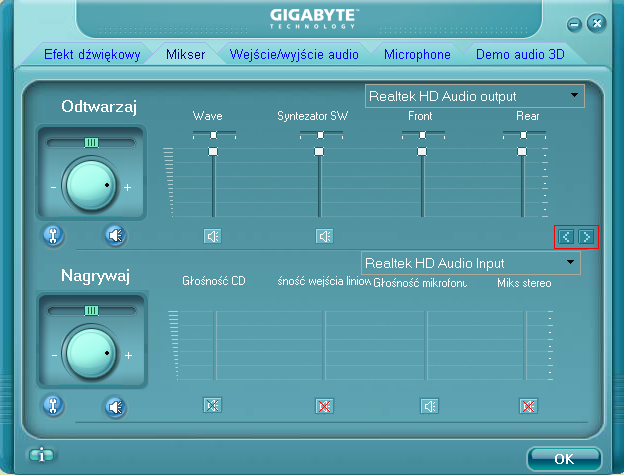
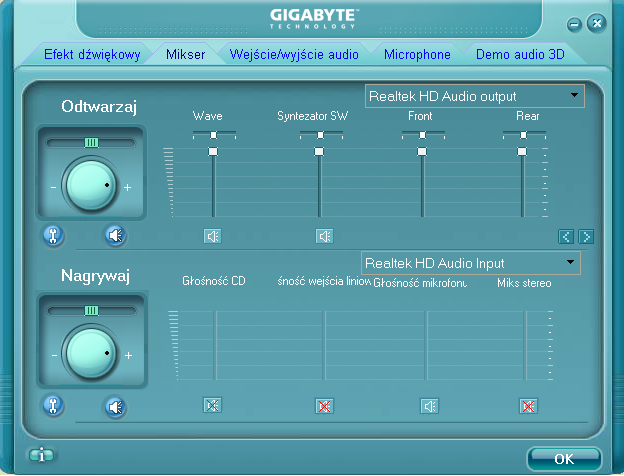
    Refreshing, the problem is not solved ...

    Why Do Others Hear My Music on Ventrilo Through My Headphones? How to Fix Audio Leak?

    These are my bowl settings!

    Help.

    Best regards.
  • ADVERTISEMENT
  • Helpful post
    #9 8264311
    lekto
    Level 35  
    Posts: 2716
    Help: 294
    Rate: 299
    With these arrows on the right you are looking for the microphone and set it to the minimum.
  • #10 8264435
    k3dzi0r69
    Level 10  
    Posts: 44
    Rate: 18
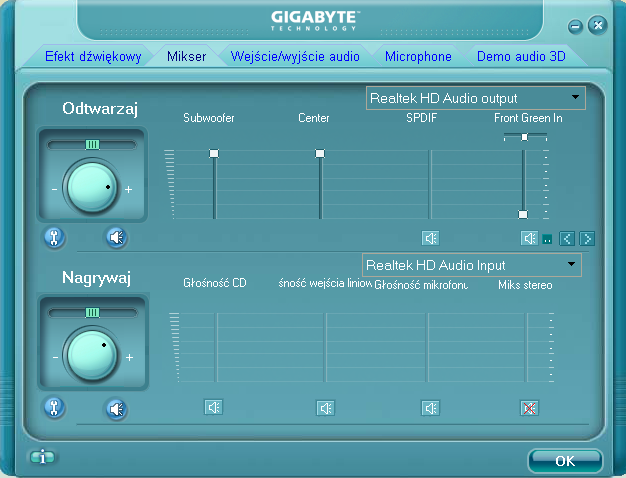
    Regarding this:
    Why Do Others Hear My Music on Ventrilo Through My Headphones? How to Fix Audio Leak?

    then when I click this arrow it pops up:
    Why Do Others Hear My Music on Ventrilo Through My Headphones? How to Fix Audio Leak?

    Best regards.
  • Helpful post
    #11 8265019
    lekto
    Level 35  
    Posts: 2716
    Help: 294
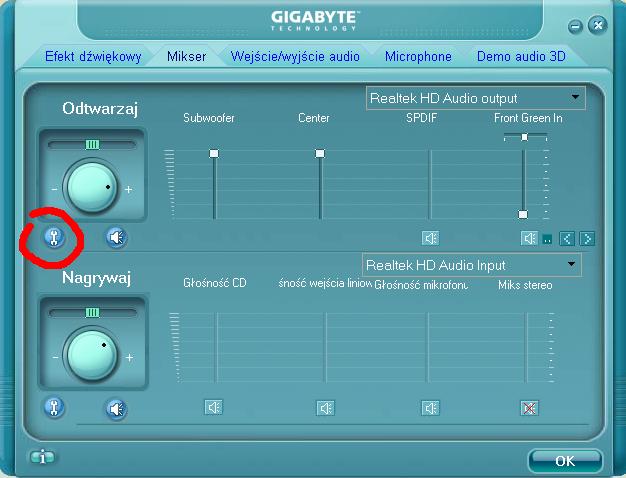
    Rate: 299
    Why Do Others Hear My Music on Ventrilo Through My Headphones? How to Fix Audio Leak?
    and highlight the microphone volume in the list and search again with these buttons on the right.
  • #12 8270220
    k3dzi0r69
    Level 10  
    Posts: 44
    Rate: 18
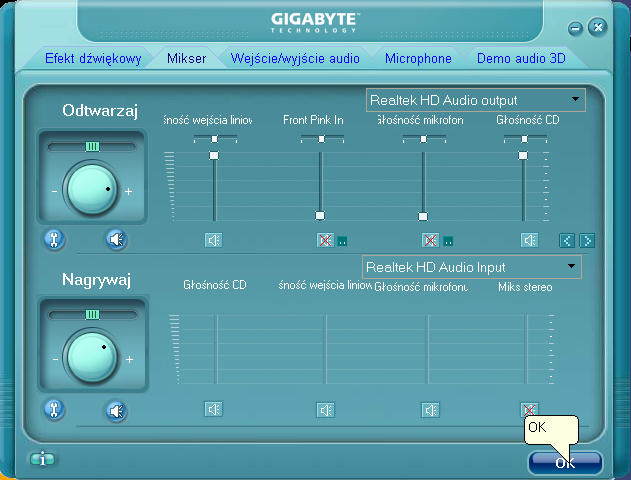
    Hello.

    I did just that, I have at least the same problem as it can be. Here is another screen as it looks like:
    Why Do Others Hear My Music on Ventrilo Through My Headphones? How to Fix Audio Leak?

    I'm waiting for help.
  • #13 8303352
    k3dzi0r69
    Level 10  
    Posts: 44
    Rate: 18
    HELP! +
  • #14 10660643
    Kryoku
    Level 9  
    Posts: 5
    Rate: 10
    I have specially registered to write.
    I also had this problem for a long time, you enter the microphone tab and turn on multi-stream playback.

    This should fix the problem. :D

    // maybe this guy who started this topic is dead or something (after all, he waited for an answer for 2 years) but it can always be useful to others who are looking for an answer (like recently I (and I did not find it))
  • #15 10661446
    k3dzi0r69
    Level 10  
    Posts: 44
    Rate: 18
    This "dude" is alive.

    It helped. :)

Topic summary

✨ The discussion revolves around a user experiencing audio bleed-through in their headphones while using Ventrilo, where others can hear music playing through the user's headphones. Suggested solutions include enabling noise suppression and acoustic echo cancellation in sound card drivers, muting microphone monitoring, and ensuring the microphone input is set correctly to avoid sending all computer sounds. Some users also mention the possibility of a technical defect in the headphones themselves, where microphone and headphone wires may be in contact, causing echo issues. A later suggestion includes enabling multi-stream playback in the microphone settings, which resolved the issue for one user.
Generated by the language model.
ADVERTISEMENT