Hello
I'm trying to install a USB-COM adapter
Model U232 P9. XP SP3.
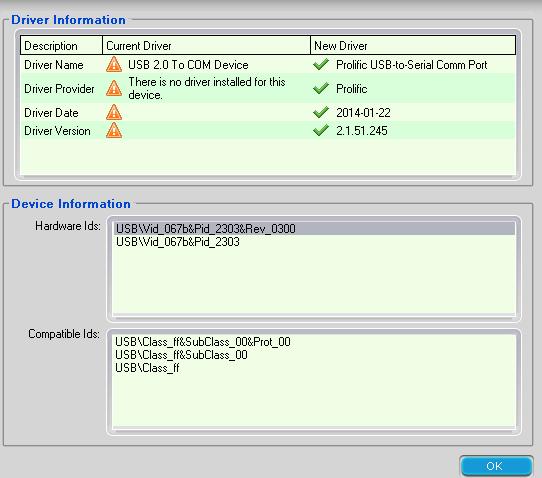
I downloaded the drivers from the manufacturer. The hardware manager did not see it.
I looked for drivers for the system on which this adapter is made.
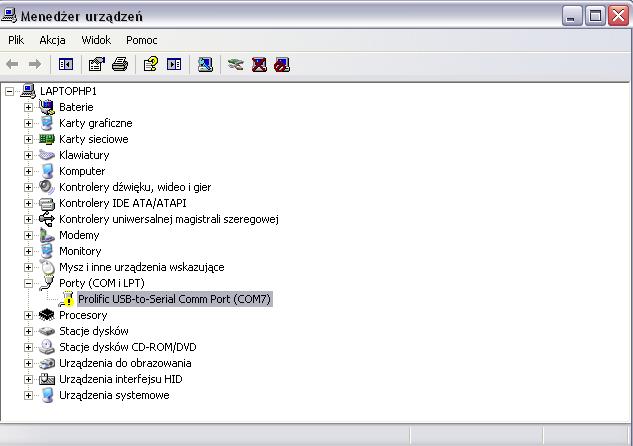
Detected as COM7 and on the second USB port it detects as COM8
Unfortunately, I have a problem in the device manager all the time (Code 10) (attachment)
I uninstalled the drivers, reinstalled and nothing.
The problem occurs on every USB port.
Device ID:
USB \ VID_067B & PID_2303 \ 5 & 387C6155 & 0 & 1
Can you advise me on this topic?
greetings
I'm trying to install a USB-COM adapter
Model U232 P9. XP SP3.
I downloaded the drivers from the manufacturer. The hardware manager did not see it.
I looked for drivers for the system on which this adapter is made.
Detected as COM7 and on the second USB port it detects as COM8
Unfortunately, I have a problem in the device manager all the time (Code 10) (attachment)
I uninstalled the drivers, reinstalled and nothing.
The problem occurs on every USB port.
Device ID:
USB \ VID_067B & PID_2303 \ 5 & 387C6155 & 0 & 1
Can you advise me on this topic?
greetings
Attachments:
-
 DriveNavi.JPG
(39.05 KB)
You must be logged in to download this attachment.
DriveNavi.JPG
(39.05 KB)
You must be logged in to download this attachment.
-
 kod10.JPG
(30.24 KB)
You must be logged in to download this attachment.
kod10.JPG
(30.24 KB)
You must be logged in to download this attachment.
-
 USB-COM.JPG
(37.58 KB)
You must be logged in to download this attachment.
USB-COM.JPG
(37.58 KB)
You must be logged in to download this attachment.