
logo elektroda
logo elektroda
X
logo elektroda

ESP8266 - How to send temperature data from one module to another via UDP?

krzysiekwfd 6216 33
ADVERTISEMENT
Treść została przetłumaczona polish » english Zobacz oryginalną wersję tematu
  • #1 16492897
    krzysiekwfd
    Level 11  
    Good day I have 2 modules esp 01 in which one has a server on port 80 with temperature display, on the 2nd module I also have a temperature measurement and I would like to make so that on the first module on the web page displayed by this module there are also temperature measurements from the 2nd module and therefore I would like someone to tell me how to do this using UDP or somehow else? please send me some examples of what to use??I would be very grateful for your help :)
  • ADVERTISEMENT
  • #2 16492987
    lewd
    Level 14  
    I infer that there is a web server running on port 80. In my opinion, the easiest way is to modify the html on one so that it displays the page from the other in an iframe.
  • #3 16493037
    krzysiekwfd
    Level 11  
    yes exactly, but how do I send this data to the server ??
  • #4 16493226
    lewd
    Level 14  
    You don't need to, the browser itself will receive data from both - such a page within a page. Show what code is currently responsible for displaying the temperature.
  • #5 16493239
    krzysiekwfd
    Level 11  
    Code: C / C++
    Log in, to see the code
    .

    it looks like the value from the thermometer is assigned to celsius and this is already displayed on the page :)
  • #7 16493341
    krzysiekwfd
    Level 11  
    only that I have a problem with setting the IP address of the second module permanently, I use the commands
    Code: C / C++
    Log in, to see the code


    and
    Code: C / C++
    Log in, to see the code
    .
    before
    Code: C / C++
    Log in, to see the code
    .

    but still arduino error pops up
    Quote:
    no matching function for call to 'ESP8266WiFiClass::config(IPAddress&)'
  • ADVERTISEMENT
  • #8 16493478
    lewd
    Level 14  
    According to this thread , in addition to the ip you should define the gateway and mask as further Wifi.config parameters.
  • ADVERTISEMENT
  • #9 16493713
    krzysiekwfd
    Level 11  
    Well, I think something is wrong because I have written this sample program but esp is not connecting to the network at all now
    Code: C / C++
    Log in, to see the code
  • ADVERTISEMENT
  • #10 16493762
    lewd
    Level 14  
    Perhaps because you have the gateway and ip in a completely different class, you should change one of the addresses so that they both have the same number in the 3rd place or change the mask to 255.255.0.0.
  • #11 16493886
    krzysiekwfd
    Level 11  
    I have now tried on these
    Code: C / C++
    Log in, to see the code
    .

    and still the server does not start, only after unchecking them everything works fine
  • #12 16494715
    lewd
    Level 14  
    Strange maybe see if there is a newer version of the library. Alternatively try a different approach.
    In the router's dhcp settings there is often an option to define a fixed ip for hosts in lan. This should solve the problem.
  • #13 16496134
    krzysiekwfd
    Level 11  
    Unfortunately I do not have access to the router, but it seems to me that the problem with setting a permanent ip is due to a bug in the software and not to a fault of the router
  • #14 16498691
    krzbor
    Level 29  
    I don't really know from your description what works and what doesn't. If you block the static IP, how do you connect to the ESP, i.e. how do you know its address? The safest thing to do on the router is to disable a certain range of IP addresses from DHCP and set a static IP from that address - there will be no collisions. As for the 2 temperatures from one http server - I would connect from one ESP to the other and send it the temperature. Since there is already a web server on one of the ESPs, it is best to do this via a GET - that is, a request for a page with a parameter that is the temperature - such data should be sent periodically or when there is a major change in temperature. The web server on this ESP will remember this temperature and when asked for the page it will show both (its own temperature and the one downloaded earlier). You can also create 2 web servers. When the query reaches the first one this one will give its own temperature and in addition it will take the temperature from the second one and send it as well.
  • #15 16499283
    krzysiekwfd
    Level 11  
    krzbor wrote:
    I don't really know from your description what works and what doesn't.

    the web server does not work if i want to set a static ip on esp
    krzbor wrote:
    if you block the static IP, how do you connect to the ESP, i.e. how do you know its address?

    mobile hotspot with windows 10 there it shows addresses of devices connected to the network
    krzbor wrote:
    the best way to do this is via GET - that is, requesting a page with a parameter like temperature -
    .
    could you give some examples? if you can
  • #16 16499805
    krzbor
    Level 29  
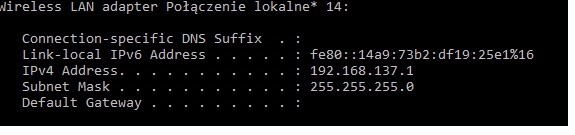
    The links I gave Here . However, if it's a hotspot then you've got a problem - the layouts won't find each other if they have a changed IP. Of course, you can try to locate through broadcasts, but that's another matter. One other point - if you connect to the hotspot from your computer what IP do you have (ipconfig command)?
  • #17 16499819
    krzysiekwfd
    Level 11  
    krzbor wrote:
    the chips will not be found if they have changed IP
    .
    I understand that they will not be found, but I am surprised that even though I have a well written program, the server after correct programming does not want to start

    and here a screen shot of ipconfig
    ESP8266 - How to send temperature data from one module to another via UDP?
  • #18 16499833
    krzbor
    Level 29  
    If your subnet is 192.168.137.x then why are you configuring:

    IPAddress ip(192, 168, 0, 50);
    IPAddress gateway(192, 168, 0, 1);
    IPAddress subnet(255, 255, 255, 0)

    so in the 192.168.0.x subnet?
  • #19 16499868
    lewd
    Level 14  
    You should also bear in mind that since you do not have access to the router's configuration, there may be conflicts in the network when you assign the address manually.
  • #20 16499934
    krzysiekwfd
    Level 11  
    krzbor wrote:
    If your subnet is 192.168.137.x then why are you configuring:
    .
    actually i didn't pay attention to it i thought it doesn't matter i'll change it right away and try to program it again

    now i tried on these
    Code: C / C++
    Log in, to see the code


    and still server on port 80 does not start
  • #21 16499963
    krzbor
    Level 29  
    How do you know it is not taking off? How are you referring to it? Is the computer you are asking from on the 192.168.137.x network ?
  • #22 16499968
    krzysiekwfd
    Level 11  
    krzbor wrote:
    How do you know it's not taking off?
    I don't know.
    because it doesn't connect to the network at all and in addition I have also programmed the serial to inform me about the loss of the server and the connection to the network and nothing is displayed then
  • #23 16500036
    krzbor
    Level 29  
    Read the last post from Link The author says that sometimes you need to specify 4 parameters (the 4th is DNS and you can repeat the gateway address for now). Another case he describes is swapping the order of WiFi.config() and WiFi.begin(). By the way - if you have an IP with DHCP, what IP does it assign you?
  • #24 16500064
    krzysiekwfd
    Level 11  
    problem solved, but after setting the ip in the range 192.168.137. xx everything starts to work the server is now left for me to assign a permanent IP address to the second module and read the temperature
  • #25 16500098
    krzbor
    Level 29  
    And what did you change? In a previous post you wrote that you set the address from 192.168.137. x and it didn't work. Here's another thing - DHCP will assign consecutive addresses within that subnet. If these are consecutive numbers (which is usually the case), it's a good idea to set the fixed IP with a high number, e.g. 192.168.137.240. This reduces the risk of conflict.
  • #26 16500130
    krzysiekwfd
    Level 11  
    krzbor wrote:
    And what did you change?
    .
    well actually i uploaded the program to the ESP again and everything started to work only i just wrote a higher number
  • #27 16502173
    krzysiekwfd
    Level 11  
    krzbor wrote:
    GET - that is, a request for a page with a parameter which is the temperature - such data should be sent periodically or in case of a major temperature change.

    going back to your answer I just need to add the lines to page 2 of esp
    Code: C / C++
    Log in, to see the code
    .


    I don't know if I wrote it right, but I mean that it has to get this celsius value from the address 192.168.137.52
  • #28 16503319
    krzbor
    Level 29  
    Why such a complicated way? This looks like a POST preparation. Obviously "Content-Length" can't be a temperature, no double end of line, etc.
    For a GET send, all you need to do is put the request together and then send it:

    client.print(String("GET ") + url + " HTTP/1.0" +
    "Host: " + host + "■" +.
    "Connection: close");
    It is worth reading up on the internet.
    You can also do it differently - as someone suggested in this thread.

    The first server sends its temp and an iframe with the address of the second server in response. The browser, after downloading this page, will try to retrieve the contents of the iframe, and so invoke the second ESP. This is easy insofar as there is no need to communicate between modules.
  • #29 16503352
    krzysiekwfd
    Level 11  
    krzbor wrote:
    For GET dispatch, all you need to do is put together a request and then send it:
    .
    so the sending itself should look like this ????
    Code: C / C++
    Log in, to see the code
    .

    as host I have the server address assigned
  • #30 16503408
    krzbor
    Level 29  
    You still have to specify the url - the address of the page with the parameter. I just sent it to the server with php:
    String url = "/data.php";
    url += "?value=";
    url += read;

Topic summary

The discussion addresses how to transmit temperature data between two ESP8266 ESP-01 modules, with one running a web server on port 80 displaying its own temperature and the goal to also show temperature from the second module on the same webpage. Initial suggestions include embedding the second module's webpage via an iframe in the first module's HTML, avoiding direct UDP communication. Challenges arise in assigning static IP addresses to the modules, especially when using a Windows 10 mobile hotspot as the network, which complicates fixed IP configuration due to subnet mismatches and lack of router access. Solutions involve correctly setting static IPs within the hotspot's subnet range (e.g., 192.168.137.x), specifying gateway, subnet mask, and DNS parameters in WiFi.config(), and ensuring the order of WiFi configuration and connection calls is correct. For inter-module communication, a recommended approach is to have the second ESP send its temperature to the first via HTTP GET requests with parameters, which the first ESP stores and displays alongside its own data. The first ESP's web server then serves a combined page with both temperature readings. Code examples illustrate HTTP GET request formatting, proper URL parameter passing, and HTML iframe embedding. The discussion also highlights common pitfalls such as incorrect IP subnet settings, improper HTTP request formatting (e.g., misuse of Content-Length), and network conflicts when static IPs are assigned without router control. Ultimately, the solution favors HTTP GET communication between ESP modules over UDP for simplicity and reliability in this context.
Summary generated by the language model.
ADVERTISEMENT