
logo elektroda
logo elektroda
X
logo elektroda

[WIP] Nordstar AC TN-X NORX-10CHSD/ZA31 - OpenBeken TCL driver

notupus 951 17
Best answers

How can I get this Nordstar/TCL AC working properly in OpenBeken, including the correct serial baud, UART logging, and a usable driver for Home Assistant?

Use 9600 baud for this unit; 115200 does not work here, which is why the existing TCL driver only behaves partly correctly [#21917542][#21917547] The larger issue is that this AC seems to use an A5-framed, CRC16-protected TuyaOS/GFW-derived MCU bridge protocol rather than the classic OBK TCL protocol, so the current TCL driver is not a full match [#21917673] The suggested next step is to sniff the MCU UART directly in parallel, or use a Pico on the hardware UARTs, to capture the real RX/TX traffic instead of guessing from the current driver [#21917646][#21917637] A parser/CRC tool was then posted and the main properties were decoded, including power (0x0001), target temperature (0x0002), mode (0x0012), fan speed (0x0005), swing, beep, display, eco, and other status bytes [#21917673][#21917762] With that mapping, a dedicated OpenBeken driver can be built and then exposed cleanly to Home Assistant [#21917762]
AI summary based on the discussion. May contain errors.
ADVERTISEMENT
  • TCWBRCU1 module backed up and flashed with OpenBeken

    #1 21917404
    notupus
    Level 4  
    Posts: 9
    Rate: 1
    Hello!
    I just got an AC installed 2 days ago and found it very similar to the Della Minisplit (see https://www.elektroda.com/rtvforum/topic4119999.html ). The app was some smarthome TCL thing powered by tuya so it matched even further what was documented on that forum post. It seems like this model is available in some places in the Balcans and Iberia including Greece.
    Pictures make it seem very similar inside too.

    Here is a Greek Marketplace where you can find retailers that sell this Unit.
    https://www.bestprice.gr/item/2163894640/nord...tu-a-plus-plus-plus-a-plus-plus-me-wi-fi.html

    Specs
    Performance

    Nominal Capacity: 10,000 BTU

    Cooling Capacity: 10,165 BTU

    Heating Capacity: 10,711 BTU

    Coverage Area (Approximate): 25 sq.m.

    Energy Efficiency

    Energy Class (Cooling): A

    Energy Class (Heating): A

    SEER (Seasonal Energy Efficiency Ratio): 6.3

    SCOP (Seasonal Coefficient of Performance): 5.1 W/W

    Annual Power Consumption

    Cooling: 283 kWh/year

    Heating: 1,400 kWh/year

    Dimensions (Width x Height x Depth)

    Indoor Unit: 910 mm x 294 mm x 206 mm

    Outdoor Unit: 853 mm x 602 mm x 349 mm

    Noise Levels

    Indoor Unit: 19 dB (Quiet operation)

    Outdoor Unit: 50 dB

    General Features

    Technology: Inverter

    Refrigerant: Eco-friendly R32

    Connectivity: Wi-Fi Ready

    Air Quality: Built-in Ionizer and Air Purifying Filters

    Modes: Includes Dehumidification mode

    Color: White

    It has a TCWBRCU1 WiFi Module inside which I backed up the firmware for(not sure if this applies to all modules but my module was able to enter bootloader mode shorting rx and A0 together) and for me it is currently running openbeken (Built on Jun 7 2026 14:50:01 version 1.18.291).
    I followed the guide from https://www.elektroda.com/rtvforum/topic4125928.html

    However I am stuck figuring out how to configure this. Specifically I cant do it from the webui and I needed to make a autostart script and I have startDriver TCL in it.
    The current driver seems to turn on the ac but isnt able to set temperature or read it? I also have not figured out how to connect it to home assistant. When setting temperature it seems to do a double beep and turn off.

    So I need to figure out how to read serial from the driver RX on openbeken and how to correctly load in the device drivers. Then once all signalling issues have been fixed a guide along with documentation can be written for this adding one more AC to the device compatability of openbeken.

    Any help would be appreciated!
  • ADVERTISEMENT
  • Requesting firmware backup and TCL driver verification

    #2 21917526
    p.kaczmarek2
    Moderator Smart Home
    Posts: 14747
    Help: 659
    Rate: 12846
    Welcome to forum, sorry for the delay.

    Can you share 2 MB firmware backup?

    What do you mean by "can't do it from webui"? How do you know it's supported by TCL driver? Can you make some screenshots from your configuration?

    notupus wrote:
    The current driver seems to turn on the ac but isnt able to set temperature or read it?

    Can you double check? It could indicate that wrong mode is set or protocol is slightly different....

    @divadiow do you think you'd be able to flash his backup to dev board and check? It's just a suggestion, don't worry if it's too problematic, we could try different approach.
    Helpful post? Buy me a coffee.
  • ADVERTISEMENT
  • Need GitHub Actions setup for OpenBeken driver build

    #4 21917534
    notupus
    Level 4  
    Posts: 9
    Rate: 1
    Attached are all the files I got.
    What I can't do from the webui is press the copy device settings and make it do something

    [WIP] Nordstar AC TN-X NORX-10CHSD/ZA31 - OpenBeken TCL driver

    I remember reading that I need to do something with GitHub Actions, but I haven't figured out what I would need to configure in the files of the repository in that case.

    I think the TCL driver works because setting ACMode 1, it goes into cooling mode at 16 C( mentioning this in case it is relevant since I haven't figured out what is the default value it sends to the AC. If it does send something) At least based on my understanding, I found this reverse engineering of the TCL protocol and the 0x03 command seems the same since power and buzzer and display work correctly (based on the documentation at https://github.com/adaasch/AC-hack whiles yes this isn't openbeken it still somewhat seem to be the same thing), so my idea that the TCL driver could work is that it works partially.

    What seems different is that Tuya seems to have had exposed 0.5 C target temperature steps. I haven't still figured out what my AC reports back since I don't see any raw serial messages in the logs.

    The only configuration I was able to make is my home SSID and the autoexec.bat as follows

    [WIP] Nordstar AC TN-X NORX-10CHSD/ZA31 - OpenBeken TCL driver
  • Baud rate mismatch between TCL driver and dump

    #5 21917542
    divadiow
    Level 38  
    Posts: 5198
    Help: 446
    Rate: 913
    we can already see a difference. the tcl driver is fixed at 9600 baud but your dump is expecting 115200

    Code: Text
    Log in, to see the code


    Code: JSON
    Log in, to see the code
  • ACmode works at 9600 but not 115200

    #6 21917547
    notupus
    Level 4  
    Posts: 9
    Rate: 1
    That I also noticed and I wanted to change the baud in the driver to test it out but before that ACmode 1 turns the ac to cooling mode at 16C so maybe the controller has autobaud in rx? It's quite confusing to me right now since it shouldn't work but it works to some extent. But thanks for reminding me since when I parsed the 2MB file and when I did the tests there was a bit of time in between so I forgot that this was a discrepancy.

    Is there a way to dump incoming serial to logs and set baud from commands? Ignoring the TCL driver for now until I figure out how to compile with custom baud and some debug output?

    Added after 1 [hours] 14 [minutes]:

    At 115200 baud ACmode does not work but it does in 9600.
  • ADVERTISEMENT
  • A5-framed CRC16 protocol, not classic TuyaMCU

    #7 21917581
    divadiow
    Level 38  
    Posts: 5198
    Help: 446
    Rate: 913
    GPT/Ghidra says:
    TuyaOS/GFW-derived internal MCU bridge protocol
    A5-framed, CRC16-protected, DP/identifier-oriented
    not classic TuyaMCU
    not OBK TCL BB protocol

    Added after 35 [minutes]:

    matching pk
    nn2ooaacswz6uyi0
    /schema
    e1k5wioo
    /dpIDs for the dump posted above
    https://github.com/make-all/tuya-local/issues/3695

    Added after 2 [minutes]:

    https://github.com/search?q=nn2ooaacswz6uyi0&type=code

    Added after 6 [minutes]:

    divadiow wrote:
    A5-framed, CRC16-protected


    have you seen this type with any of your AC sniffing @DeDaMrAz ?
  • #8 21917637
    notupus
    Level 4  
    Posts: 9
    Rate: 1
    So I was wrong, so I flashed the 2 MB file again, and I have Tuya control again. Now I also soldered to the RX and TX pins to a RPi Pico to its HW UARTs and flashed the tty ACM firmware, and I will proceed to capture all the commands I can using some sort of structure.
  • UART sniffing on the chip side for protocol capture

    #9 21917646
    DeDaMrAz
    Level 23  
    Posts: 620
    Help: 34
    Rate: 130
    divadiow wrote:
    divadiow wrote:
    A5-framed, CRC16-protected


    That look like RS485 or a modbus of some kind. Have seen similar thing Ariston, where evey packet is SUM256 CRC'ed so that is expectable on these devices.

    notupus wrote:
    Is there a way to dump incoming serial to logs and set baud from commands?


    Well yes but it is slightly complicated as there should be a response that onboard MCU wants - my approach is to paralel sniff UART on the chip (not the RS485 after the converter) and so far it has proven to work, problem with that is I have started from 0 and that takes time... I can and probably should share my sniffer for such projects - meaning UART and RS232 communication.
  • Different protocol discovered for the Tuya AC dongle

    #10 21917673
    notupus
    Level 4  
    Posts: 9
    Rate: 1
    So this seems to be an entirely different protocol that has the same ui in tuya, in the spoiler a sample of it. it seems to communicate with the dongle even with no commands.
    Spoiler:
    
    [1780937111.975] | AC (ACM0)          | 66   | a5010121970000420b660c0c00010100020000064000030000099c000500000c00000d00000e0800110800120100df0000c900001700001e0102270000003d014800
    [1780937112.175] | Dongle (ACM1)      | 12   | a50101230098000c8e1f800c
    [1780937112.176] | AC (ACM0)          | 90   | a50101219800005ab4b40c0c002200002501002700002d00003500003800005c00000a2800391202030708090b15171f21222427282a2b3031005e00006000000b54006400000000006500000000007200000000007301007406
    [1780937112.376] | Dongle (ACM1)      | 12   | a50101230099000c244e800c
    [1780937112.376] | AC (ACM0)          | 48   | a50101219900003074920c0c00950000000000150000a40000bd0000000000be0000000000bf0000000000c000000000
    [1780937112.476] | Dongle (ACM1)      | 15   | a50101214100000f39bf0a0a000100
    [1780937112.577] | AC (ACM0)          | 12   | a50101230041000c7147800a
    [1780937112.777] | Dongle (ACM1)      | 12   | a5010123009a000cca9c800c
    [1780937112.778] | AC (ACM0)          | 18   | a50101219a000012ab9e0c0c000100003800
    [1780937112.977] | Dongle (ACM1)      | 12   | a5010123009b000c60cd800c
    [1780937112.978] | AC (ACM0)          | 23   | a50101219b000017be190c0c00fa00073b3b3b3b3b3b3b
    [1780937113.178] | Dongle (ACM1)      | 12   | a5010123009c000c0719800c
    [1780937113.179] | AC (ACM0)          | 23   | a50101219c000017a3f20c0c00fb00073b3b3b3b3b3b3b
    [1780937113.379] | Dongle (ACM1)      | 12   | a5010123009d000cad48800c
    [1780937113.379] | AC (ACM0)          | 68   | a50101219d00004411b90c0c014700022001022100000640022200000c1c022300013b022400022500007b00008401008c0000004600a00000d10000d40000d50000d600
    [1780937113.579] | Dongle (ACM1)      | 12   | a5010123009e000c439a800c
    [1780937113.579] | AC (ACM0)          | 18   | a50101219e000012d0110c0c00d700000000
    [1780937167.306] | AC (ACM0)          | 12   | a50100210000000cbf782626
    [1780937167.506] | Dongle (ACM1)      | 17   | a501002300000011b9f380106a26f1ce03
    [1780937167.507] | AC (ACM0)          | 12   | a50100210000000c46de1010
    [1780937167.707] | Dongle (ACM1)      | 18   | a501002300000012b4f6800c0264ffffffce
    [1780937167.707] | AC (ACM0)          | 12   | a50100210000000cd37d0c0c
    [1780937171.217] | AC (ACM0)          | 18   | a50101219f00001270c30c0c0003000009b0
    [1780937171.314] | Dongle (ACM1)      | 12   | a5010123009f000ce9cb800c
    [1780937172.218] | AC (ACM0)          | 18   | a5010121a00000121df90c0c005c00000a28
    [1780937172.316] | Dongle (ACM1)      | 12   | a501012300a0000c80dc800c
    [1780937189.148] | AC (ACM0)          | 18   | a5010121a1000012d33c0c0c006000000af0
    [1780937189.148] | Dongle (ACM1)      | 12   | a501012300a1000c2a8d800c
    

    I am going to go though every temperature and every mode to try and see how this works. What is very odd is that TCL driver got display and buzzer working aswell as ac mode.

    Added after 42 [minutes]:

    Someone got the binary and is kicking me off the ac in tuya, anyway I got most of the properties Dongle to AC mapped
    Packet Structure Overview:

    Header: A5 01 01 (Sync & Direction)

    Source: 21 (Dongle to AC) or 23 (AC to Dongle)

    Sequence: 1 Byte (increments per packet)

    Padding: 00 00

    Length: 1 Byte (Total packet length)

    CRC/Checksum: 2 Bytes

    Payload Start Marker: 0A 0A (Dongle) or 0C 0C (AC)

    Payload: Consecutive key-value pairs (Property ID + Value)

    Decoded Property Matrix:
    Property ID Name Length Values (Hex to Meaning)
    00 01 Power 1 byte 00: Off, 01: On
    00 02 Target Temp 4 bytes Celsius * 100 (e.g., 00 00 0A 28 = 26.0°C)
    00 03 Current Temp 4 bytes Celsius * 100 (Read Only)
    00 05 Fan Speed 2 bytes 0000: Auto, 0100: Lowest, 0200: Low, 0300: Mid-Low, 0400: Mid, 0500: Mid-High, 0600: High, 0700: Turbo
    00 0E Horiz. Swing 1 byte 01: Auto, 02: Left, 03: Middle, 04: Right, 09: Fix Left, 0A: Fix Mid-Left, 0B: Fix Mid, 0C: Fix Mid-Right, 0D: Fix Right
    00 11 Vertical Swing 1 byte 01: Auto, 02: Up, 03: Down, 09: Fix Above, 0A: Fix Mid-High, 0B: Fix Mid, 0C: Fix Mid-Low, 0D: Fix Down
    00 12 Mode 2 bytes 0000: Auto, 0100: Cool, 0200: Dry, 0300: Fan, 0400: Heat
    00 15 Health 1 byte 00: Off, 01: On
    00 1E Display Light 1 byte 00: Off, 01: On
    00 22 Sleep Mode 1 byte 00: Off, 01: Standard, 02: Aged, 03: Child
    00 25 Beep/Buzzer 1 byte 00: Off, 01: On
    00 2D Generator 1 byte 00: Off, 01: Level 1, 02: Level 2, 03: Level 3
    00 73 Mute 1 byte 00: Off, 01: On
    00 DF Eco Mode 1 byte 00: Off, 01: On
    00 0C V. Motor Status 1 byte 00: Stopped, 01: Moving (Read Only)
    00 0D H. Motor Status 1 byte 00: Stopped, 01: Moving (Read Only)
    Now I have to map AC to dongle using the IR remote and that should have all the statuses right?

    Added after 9 [minutes]:

    >>21917673 This works both for RX from AC and for TX to AC
  • ADVERTISEMENT
  • #11 21917709
    divadiow
    Level 38  
    Posts: 5198
    Help: 446
    Rate: 913
    notupus wrote:
    Someone got the binary and is kicking me off the ac in tuya, anyway I got most of the properties Dongle to AC mapped


    it was meee! :)

    I've stopped.
  • Unknown AC properties may be power metering

    #12 21917711
    notupus
    Level 4  
    Posts: 9
    Rate: 1
    >>21917673 >>21917709 Did you figure out anything interesting? I have found so far everything but
    ------------------------------------------------------------
    1780941418.982 | AC (ACM0) | [Raw: 0064000002c6]
    - [?] UNKNOWN PROPERTY (0x64). Remaining Payload: 000002c6

    1780941423.189 | AC (ACM0) | [Raw: 00c00000000c]
    - [?] UNKNOWN PROPERTY (0xc0). Remaining Payload: 0000000c
    I think this might be power metering, but I have to validate it.
  • Tuya schema maps DP117 to outdoor fan speed

    #13 21917716
    divadiow
    Level 38  
    Posts: 5198
    Help: 446
    Rate: 913
    hmm. it's been quite a bit of loose chat with ChatGPT, mostly making a Python script that will do the pid/mcu version dance and ack some stuff then send a reset for it to get into pairing mode.

    for those bits you posted it says:

    Code: Text
    Log in, to see the code


    Added after 1 [minutes]:

    schema from Tuya, tidied JSON + english translations

    Code: JSON
    Log in, to see the code


    Added after 14 [minutes]:

    I have a kind of thing_data_cfg mapping zip, but of course it might be wrong. Shall I post it anyway?
  • #14 21917750
    notupus
    Level 4  
    Posts: 9
    Rate: 1
    >>21917716 If you have the mapping, please post it. Maybe I figure out something more. Currently I have maybe cracked CRC and I currently want to validate the entire start, stop and all the packets I get.
  • #15 21917751
    divadiow
    Level 38  
    Posts: 5198
    Help: 446
    Rate: 913
    >>21917750
    Attachments:
    • thing_data_cfg_e1k5wioo.zip (8.5 KB) You must be logged in to download this attachment.
  • Tuya parser and CRC data fully decoded

    #16 21917762
    notupus
    Level 4  
    Posts: 9
    Rate: 1
    >>21917751
    Here is the parser and CRC and whatever I have found, along with a bit of data (including startup from power off, IR control, Tuya control, and a reset (pressing display multiple times) and then reprovisioning in Tuya.
    https://github.com/Notupus/tuya_capture/

    Added after 16 [minutes]:

    https://github.com/Notupus/tuya_capture[postid:7b92c8239d]21917762[/postid:7b92c8239d]
    I think this is fully decoded!
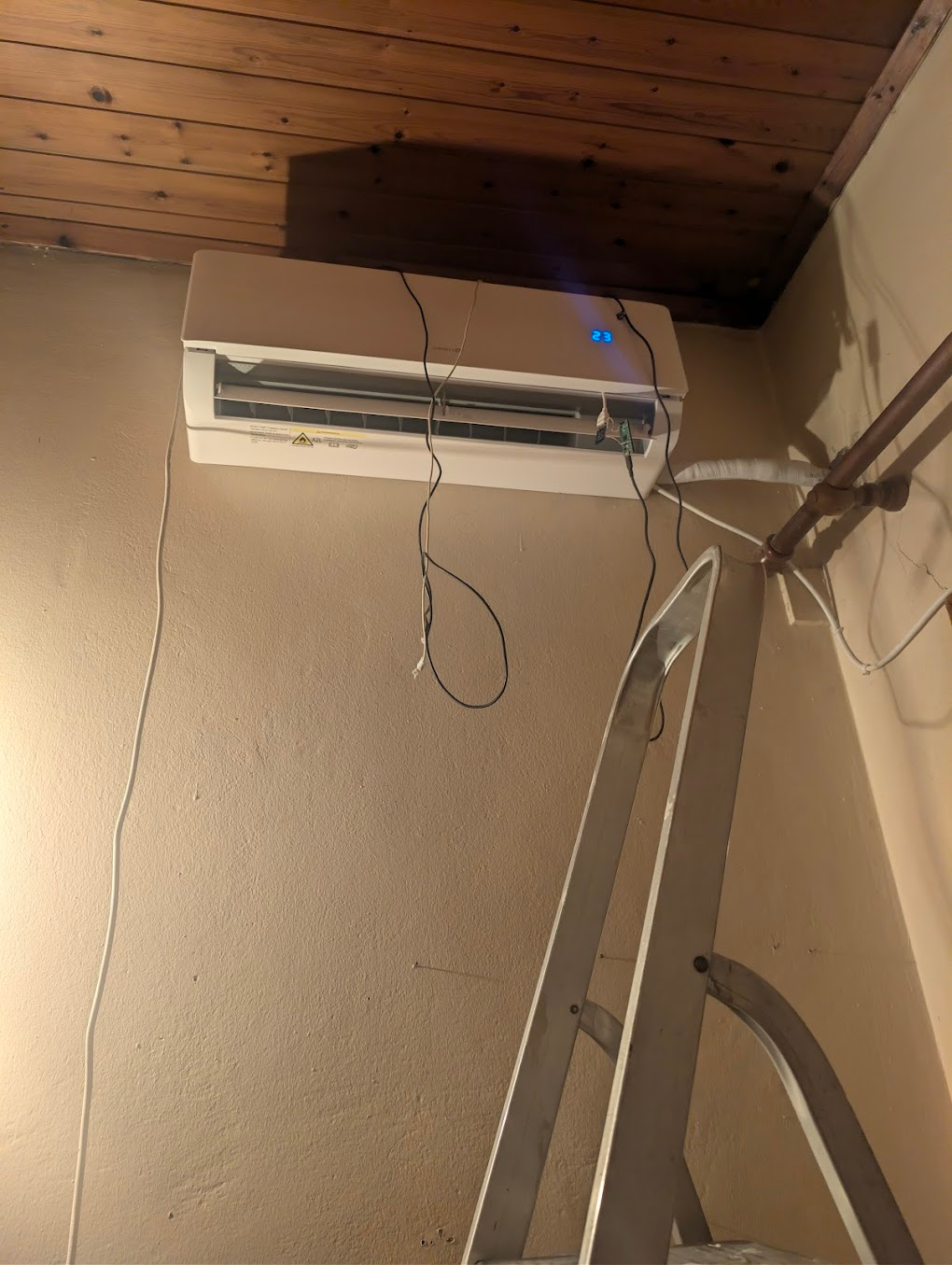
    Now a driver will have to be made based on this parser and the data, and we can have one more device freed from Tuya. Anyway, I am flashing OpenBeken again since everything but the timers have not been captured (but again, who wants AC timers?), also I can't sleep with this mess above my head.

    Wall-mounted air conditioner showing “23”, with hanging wires and a ladder leaning against the wall.
  • Parser still mislabels fan and mode enums

    #17 21917778
    divadiow
    Level 38  
    Posts: 5198
    Help: 446
    Rate: 913
    nice work. I fed your findings into RoboGod and it has some pushback.

    It feels pretty lame me just pasting bits back to you like some dumb messenger, but here goes anyway:

    Code: Text
    Log in, to see the code


    :)
  • Mute uses 00 73 and eco uses 00 13

    #18 21917801
    notupus
    Level 4  
    Posts: 9
    Rate: 1
    >>21917778
    So mute is confirmed 0073 using the dumps from before.
    Eco is 0013 too.
    And 000c 000d is just AC responses to the horizontal / vertical motor moving (even though my unit does not have a horizontal motor).
    Quotes from Gemini
    "In your first step (Packet 9F), when you activated Mute, the dongle didn't just send a fan speed. It sent two commands at the same time:
    Gemini

    00 05 00 00 (Set Fan to Auto)

    00 73 01 (Set Mute Toggle to ON)

    As soon as you manually changed the fan to "Strong" in the next step (Packet A0), the dongle sent 00 73 00 (Mute Toggle OFF) alongside the new fan speed of 07 00. This proves that Mute is an independent toggle (00 73) that likely overrides or locks the fan behavior while active."

    The static table for the fan speed and mode was right, and I was able to fix the thing that it told me about stripping duplicated etc. In any case, I have updated the GitHub with it and included my Gemini chat that reversed and made the parser, then I improved it on my own to make it include what it should.


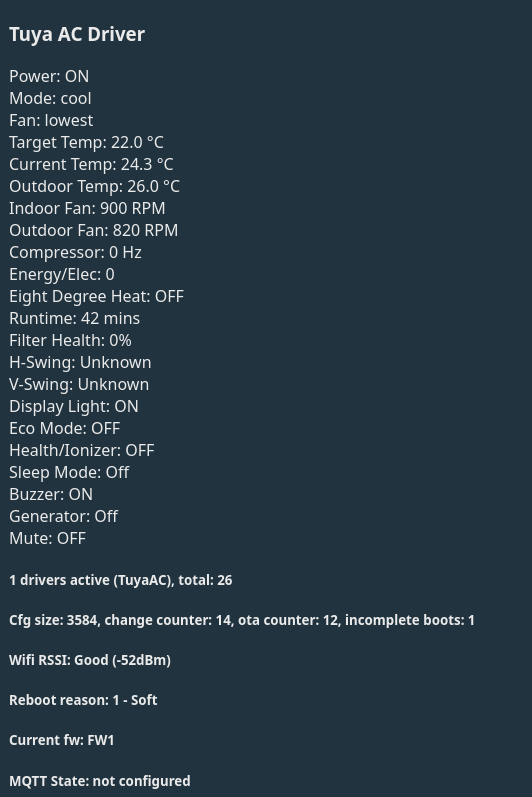
    Now a driver for this is possible since we have the startup and we can just send keepalives apparently to get all the info we want, then all the config options seem available so making an interface for this is possible. Given that most fields are the same as the Della unit, this means they can have similar endpoints and we can add a few more for the frequency fan rpm stuff because why not.
    Anyway, I have no idea how to start writing a OpenBeken driver, so this will be fun.

    Added after 2 [hours] 57 [minutes]:


    “Tuya AC Driver” screen listing air conditioner settings, readings, and system status
    Not bad for first day

Topic summary

✨ Discussion about reverse engineering a Nordstar inverter AC with TCL/Tuya Wi‑Fi control and adapting it for OpenBeken. The initial assumption was that the unit might use the existing TCL driver, but firmware backup analysis and serial sniffing showed the protocol differs: the device uses a TuyaOS/GFW-derived internal MCU bridge protocol with A5 framing, CRC16 protection, and DP/identifier-based payloads, not the classic OBK TCL BB protocol. Baud rate testing showed the AC responds at 9600 baud, while 115200 does not work. The conversation then focused on capturing UART traffic, decoding packet structure, mapping properties such as power, mode, fan speed, mute, eco, and motor responses, and validating CRC and schema-driven parsing. A parser and capture repository were produced, and the protocol was considered largely decoded, with a driver still needed for full OpenBeken support.
AI summary based on the discussion. May contain errors.

FAQ

TL;DR: With a 2 MB backup and one day of UART sniffing, the key finding was: "not OBK TCL BB protocol". This FAQ helps OpenBeken users with TCWBRCU1-based ACs move from partial TCL-driver control to a custom A5/CRC16 Tuya bridge driver for reliable temperature, mode, and Home Assistant support. [#21917581]

Why it matters: It shows why a Nordstar TN-X can beep, power on, and still reject temperature commands until the real serial protocol is decoded.

Approach What already works What fails Best use now
OpenBeken TCL driver Power, buzzer, display, some mode actions Temperature read/set, correct state sync Quick experiment only
Custom Tuya bridge driver Can use decoded properties, keepalives, full state model Needs new driver work Correct long-term path
Stock Tuya firmware Full app control restored after reflashing Closed cloud path Reference for sniffing

Key insight: The hard blocker is not Home Assistant or OpenBeken setup. The blocker is that this AC speaks a different A5-framed, CRC16-protected bridge protocol, so the fixed TCL serial driver cannot model it correctly. [#21917673]

Quick Facts

  • The unit discussed is a Nordstar TN-X NORX-10CHSD/ZA31 rated at 10,000 BTU nominal, 10,165 BTU cooling, 10,711 BTU heating, with about 25 m² coverage. [#21917404]
  • Reported efficiency figures are SEER 6.3, SCOP 5.1 W/W, and annual consumption of 283 kWh/year cooling and 1,400 kWh/year heating. [#21917404]
  • The indoor unit is listed at 910 × 294 × 206 mm and 19 dB, while the outdoor unit is 853 × 602 × 349 mm and 50 dB. [#21917404]
  • The Wi-Fi daughterboard is a TCWBRCU1 module, and the OpenBeken build mentioned was 1.18.291 built on June 7, 2026 14:50:01. [#21917404]
  • The firmware dump exposed a serial setting of 115200 baud, but practical testing showed the AC still reacted to the TCL driver only at 9600 baud. [#21917547]

How can I dump incoming UART serial to OpenBeken logs and change the baud rate from commands while debugging a TCWBRCU1 AC module?

You cannot solve this cleanly from the stock TCL driver alone; the thread moved to external sniffing instead. The practical method was: 1. reflash the original 2 MB firmware, 2. solder to RX and TX, 3. capture both directions with a Raspberry Pi Pico running USB-serial bridge firmware. Direct UART dumping inside OpenBeken was described as possible but "slightly complicated" because the onboard MCU expects valid responses while traffic is live. [#21917646]

Why does the OpenBeken TCL driver partly control the Nordstar TN-X NORX-10CHSD/ZA31 but fail to set or read temperature correctly?

It partly works because some actions overlap, but the protocol is not the OpenBeken TCL BB protocol. Power, buzzer, display, and some mode behavior matched enough to trigger the AC, yet temperature setpoints caused a double beep and power-off behavior. The captured traffic later showed an A5-framed bridge with typed properties, including target temperature as a 4-byte Celsius×100 value, which the fixed TCL driver was not modeling correctly. [#21917673]

What is the TCWBRCU1 Wi-Fi module, and which air conditioners is it commonly found in?

"TCWBRCU1" is a Wi-Fi module that bridges a Tuya-powered AC app to the air conditioner's internal serial protocol, using a separate plug-in board inside the unit. In this thread it appeared inside the Nordstar TN-X NORX-10CHSD/ZA31, and participants also linked it to other Tuya-based ACs, including a Della Minisplit and another recently posted TCWBRCU1 AC. [#21917532]

How do I back up and restore the 2 MB firmware from a TCWBRCU1 module before flashing OpenBeken?

Back up the full 2 MB image before flashing, then reflash that same image if you need stock Tuya control again. The thread confirms both directions worked: the module entered bootloader mode by shorting RX and A0 together on that board, and reflashing the saved 2 MB file restored Tuya operation. That backup became essential for later UART sniffing and protocol validation. [#21917637]

What is the A5-framed, CRC16-protected Tuya MCU bridge protocol, and how is it different from classic TuyaMCU or the OpenBeken TCL BB protocol?

It is a custom Tuya internal bridge protocol that wraps property updates in A5-framed packets with CRC16 protection and DP-style identifiers. One participant summarized it as "A5-framed, CRC16-protected, DP/identifier-oriented, not classic TuyaMCU, not OBK TCL BB protocol." That matters because a classic TuyaMCU parser or the TCL BB driver expects a different frame model, field layout, and command semantics. [#21917581]

TCL driver vs a custom Tuya bridge driver for this Nordstar AC: which approach makes more sense after sniffing the UART traffic?

A custom Tuya bridge driver makes more sense. The thread reached that conclusion after captures showed the real protocol, decoded properties, keepalives, and startup exchanges. The TCL driver was useful only as a clue because it could toggle power and some UI functions. Once the parser exposed target temperature, mode, swing, sleep, and telemetry fields, the better path became a new driver built around the captured bridge traffic. [#21917801]

How do I sniff the RX and TX lines between the AC mainboard and the Tuya dongle with an RP2040 or Raspberry Pi Pico?

Use the Pico as a passive serial tap, not as the device that speaks for the AC. The thread workflow was: 1. restore stock firmware, 2. solder wires to the dongle RX and TX pins, 3. connect them to the Pico hardware UARTs and run tty ACM firmware to capture both AC→dongle and dongle→AC traffic. This let the user record startup, IR remote actions, Tuya actions, reset, and reprovisioning packets. [#21917637]

What packet structure does the Nordstar or TCL Tuya AC protocol use, including headers, sequence numbers, payload markers, and CRC?

The decoded packets use an A5 header, a direction byte, a source byte, a sequence counter, padding, a length field, a CRC, and a payload marker. The posted structure was: header A5 01 01, source 21 for dongle→AC or 23 for AC→dongle, a 1-byte sequence, 00 00 padding, packet length, CRC/checksum, then 0A 0A or 0C 0C before key-value payload items. That framing repeated in live captures and keepalives. [#21917673]

Which property IDs have already been mapped for the Nordstar TN-X AC, such as power, target temperature, mode, fan speed, swing, sleep, and eco?

Several core IDs are already mapped. Confirmed examples include 0x0001 power, 0x0002 target temperature as Celsius×100, 0x0003 current temperature, 0x0005 fan speed, 0x0012 mode, 0x0022 sleep, 0x001E display light, 0x0025 buzzer, and 0x0013 eco. The thread also mapped horizontal and vertical swing fields, health mode, generator mode, and mute on 0x0073. [#21917801]

Why would a firmware dump report 115200 baud while the air conditioner still responds when the OpenBeken TCL driver runs at 9600 baud?

Because the dumped Tuya environment and the live AC control path were not behaving like one simple fixed-baud TCL link. The firmware log explicitly showed read baud rate 115200, yet live testing found ACmode worked at 9600 and stopped working at 115200. The thread treated this as a real discrepancy and moved to sniffing rather than assuming the dump's baud entry matched the actual command path used by the partly working TCL driver. [#21917547]

How can I connect an OpenBeken-flashed Nordstar or TCL-based air conditioner to Home Assistant once the serial protocol is understood?

You need a driver that exposes the decoded AC properties as stable entities first. The user could not reach Home Assistant integration while the TCL driver still failed on temperature and state reads. After the parser decoded startup, keepalives, and the main control fields, the next step became building an OpenBeken driver with endpoints similar to the Della unit, then mapping those channels into Home Assistant. [#21917801]

What does 'copy device settings' do in the OpenBeken web UI, and why might it not work on this TCWBRCU1-based AC?

In this case, it did nothing useful because the needed device logic was not yet available in the running build. The user said the button could be pressed but "make it do something" never happened, and they suspected repository or GitHub Actions changes were required. The thread never showed a successful Web UI import, because the real blocker was missing support for this AC's non-TCL serial protocol rather than a simple settings-copy issue. [#21917534]

Which unknown properties like 0x0064 and 0x00C0 were found in the AC-to-dongle traffic, and what do they likely represent?

The thread's best mapping linked 0x0064 to value 710, likely outdoor fan speed in rpm, and 0x00C0 to value 12, likely outdoor compressor target or run frequency. One participant explicitly argued these were not power-metering fields. Instead, they matched Tuya schema items for external fan speed and compressor target frequency. That interpretation fit better than energy reporting. [#21917716]

What is thing_data_cfg in a Tuya firmware dump, and how can it help decode DP IDs, value types, and schema mappings?

"thing_data_cfg" is a Tuya configuration map inside the firmware that links internal property IDs to external DP-style schema fields, data types, and lengths. In this thread it helped resolve whether fields were bool, enum, or 4-byte value types, and it improved parser alignment. It also helped match IDs such as fan, mode, energy, outdoor fan speed, and compressor-related telemetry to Tuya schema names. [#21917716]

After reversing the Tuya protocol with captures and a parser, what are the main steps to turn those findings into a working OpenBeken driver?

Build the driver around the captured bridge protocol, not the TCL driver. A practical path is: 1. implement A5 framing, sequence handling, markers, and CRC, 2. add startup, keepalive, ACK, and property parsing for mapped IDs, 3. expose stable endpoints for power, mode, temperature, fan, swing, and telemetry. The thread ended with a working parser, startup captures, and enough mapped fields to begin driver work, while timers remained uncaptured. [#21917762]
AI summary based on the discussion. May contain errors.
ADVERTISEMENT