logo elektroda
logo elektroda
X
logo elektroda

Connecting External Monitor to Laptop: Affordable USB Graphics Card Options for Clear Display

alberthus 28743 10
Best answers LABEL_AI_GENERATED

How can I connect an external monitor to an older laptop through a normal USB port without a blurry picture, using a cheap solution?

You generally cannot get a clear monitor connection from an ordinary USB port with a USB graphics card on an older laptop; the replies say plain USB is too weak for this and such adapters may only show a static image or poor results [#16504985][#16505525][#16505730] Only USB-C with Thunderbolt was suggested as a case where this kind of solution might have a chance [#16504985] If your laptop has another real video output, use that instead; one reply suggests that if HDMI is available next to D-Sub, a D-Sub adapter is the cheap fix, around PLN 10 [#16505507] Wireless display was mentioned as an option only if image delay is acceptable [#16505525][#16505665]
AI summary based on the discussion. May contain errors.
ADVERTISEMENT
Treść została przetłumaczona polish » english Zobacz oryginalną wersję tematu
  • #1 16504916
    alberthus
    Level 16  
    Posts: 305
    Help: 1
    Rate: 16
    Hello

    I need to connect an external monitor to my laptop via USB.

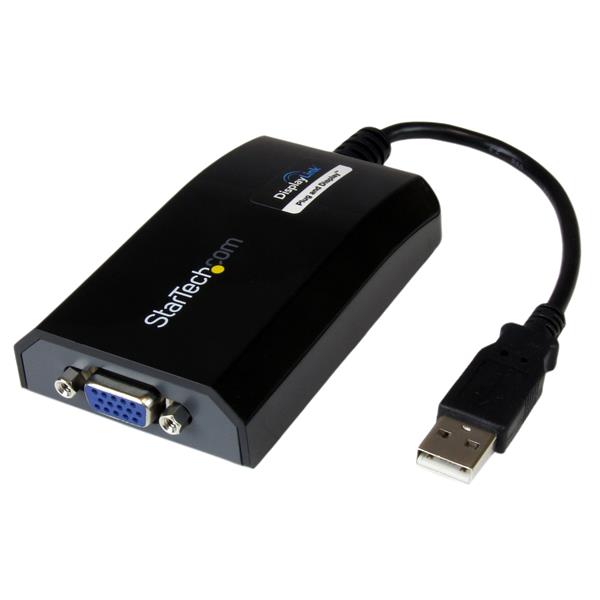
    I know that the grommet will not work and I need a USB graphics card.

    I am asking for some suggestions? Something not expensive but it would not blur the picture.

    I have a busy PS D-Sub on my laptop.
  • ADVERTISEMENT
  • #2 16504985
    Anonymous
    Anonymous  
  • ADVERTISEMENT
  • #3 16504995
    Anonymous
    Level 1  
  • ADVERTISEMENT
  • #4 16505495
    alberthus
    Level 16  
    Posts: 305
    Help: 1
    Rate: 16
    Old Asus A52 laptop. He has an ordinary usb.

    You can do it with ordinary USB by connecting a graphics card that has a d-sub on the other side. I saw such solutions in the offices just wonder how (they were not usb c).

    I already have a monitor on the video connector. I need another one. Standard monitor under d-sub.
  • #5 16505507
    Anonymous
    Level 1  
  • USB graphics adapters are too limited for monitors

    #6 16505525
    Anonymous
    Anonymous  
  • USB-to-HDMI works only with MHL-capable mobile devices

    #7 16505542
    Anonymous
    Level 1  
  • #8 16505552
    Anonymous
    Anonymous  
  • #9 16505665
    Anonymous
    Level 1  
  • #10 16505725
    alberthus
    Level 16  
    Posts: 305
    Help: 1
    Rate: 16
    That's what I mean.

    Will it work?

    Connecting External Monitor to Laptop: Affordable USB Graphics Card Options for Clear Display
  • ADVERTISEMENT
  • #11 16505730
    Anonymous
    Level 1  

Topic summary

LABEL_AI_GENERATED
The discussion revolves around connecting an external monitor to an old Asus A52 laptop using a USB graphics card, as the user has a busy D-Sub port. Participants highlight the limitations of USB graphics cards, noting that they may only display static images and are not suitable for dynamic content. Suggestions include checking for HDMI ports and using adapters, as well as exploring wireless transmission options like Miracast. The feasibility of using a specific USB-to-D-Sub graphics card is questioned, with warnings about potential performance issues.
AI summary based on the discussion. May contain errors.
ADVERTISEMENT