FAQ
TL;DR: Windows 7 L2TP/IPsec setup here surfaced 1 PSK requirement; “did you enter the PSK key?” was the turning point. [Elektroda, bogiebog, post #16645951]
Why it matters: This FAQ helps fix Error 766/789 and explains how to reach a remote NVR/DVR over a work VPN from Windows 7.
- Windows 7 client was configured for L2TP/IPsec as per instructions. [Elektroda, sadek_ns, post #16645943]
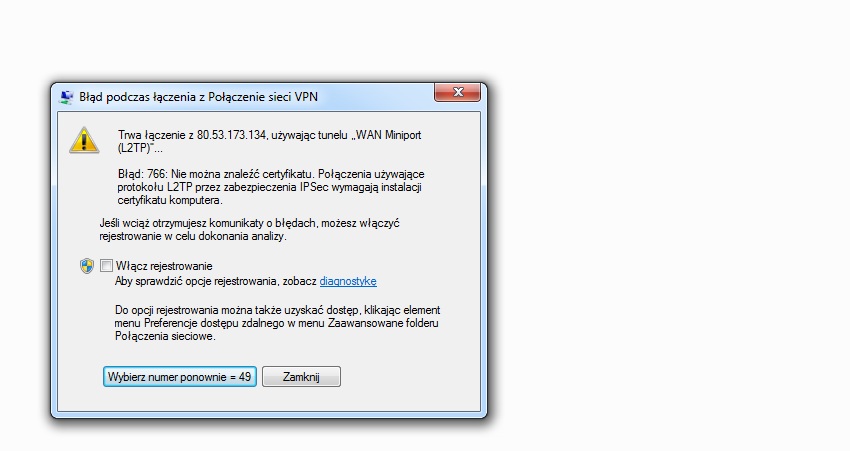
- Error 766 appeared first (Windows reported missing certificate). [Elektroda, sadek_ns, post #16645244]
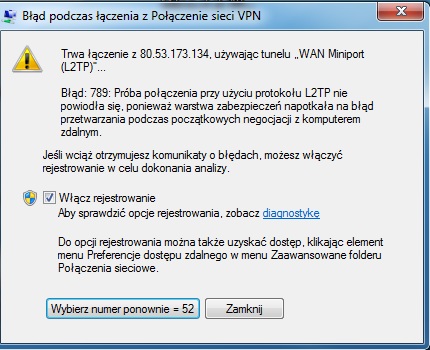
- Entering a pre‑shared key (PSK) then triggered Error 789. [Elektroda, sadek_ns, post #16645987]
- Router in use: Huawei B315s on mobile internet; firewall toggling didn’t help. [Elektroda, sadek_ns, post #16646097]
- Expert noted “Sometimes the router is the cause” and suggested checking VPN Passthrough. [Elektroda, jprzedworski, post #16646609]
Quick Facts
- Access data provided included: server IP, username/password, PSK, and recorder’s internal IP (4 items). [Elektroda, sadek_ns, post #16645244]
- L2TP/IPsec was explicitly selected in Windows 7’s VPN settings. [Elektroda, sadek_ns, post #16645943]
- Switching authentication methods and disabling firewalls did not resolve Error 789. [Elektroda, sadek_ns, post #16653487]
- Router model lacks obvious VPN settings; Passthrough support uncertain per expert note. [Elektroda, jprzedworski, post #16646609]
- Goal: connect via VPN, then view the camera recorder over HTTP/WWW. [Elektroda, sadek_ns, post #16670475]
How do I fix Windows 7 L2TP Error 766 (no certificate) when using a PSK?
Set the VPN type to L2TP/IPsec with a pre‑shared key instead of certificate-based IPsec. In Windows 7, open the VPN’s Properties > Security tab, choose L2TP/IPsec, click Advanced, and select “Use pre‑shared key for authentication.” This aligns with the thread’s turn from certificate to PSK. [Elektroda, sadek_ns, post #16645987]
Why did Error 789 appear after I entered the PSK?
Error 789 followed after switching to L2TP/IPsec with a PSK, indicating the handshake still failed. In the thread, entering the PSK moved the error from 766 to 789, pointing to remaining IPsec or network traversal issues that need router or server-side checks. [Elektroda, sadek_ns, post #16645987]
Could my router be blocking the VPN tunnel?
Yes. The expert warned the router can be the cause and suggested verifying “VPN Passthrough.” Some consumer LTE routers handle IPsec inconsistently. If Passthrough isn’t present or reliable, L2TP/IPsec can fail even with correct credentials. “Sometimes the router is the cause.” [Elektroda, jprzedworski, post #16646609]
Does Huawei B315s support VPN Passthrough for L2TP/IPsec?
In this case, the user couldn’t find any VPN configuration on the B315s, and Passthrough support remained unclear. That uncertainty aligns with the expert’s note that some hardware may work without an obvious setting, while others may not. [Elektroda, sadek_ns, post #16653487]
What information must my administrator provide to connect?
You need at least four items: the VPN server’s IP, your username and password, the IPsec pre‑shared key, and the internal IP of the recorder you plan to reach after connecting. The thread lists all four explicitly. [Elektroda, sadek_ns, post #16645244]
Should I connect to a work PC or the router/VPN server?
Connect the VPN to the network’s VPN endpoint (often a router or VPN server), not a random PC, unless your admin says the PC hosts the VPN. After the tunnel comes up, you can access the internal recorder over HTTP. [Elektroda, sadek_ns, post #16670475]
What is L2TP/IPsec in simple terms?
It’s a two‑part VPN method: L2TP provides the tunnel and IPsec secures it. In this thread, the manual required choosing L2TP in Windows 7 and pairing it with a pre‑shared key for IPsec authentication. [Elektroda, sadek_ns, post #16645943]
Can I use OpenVPN instead of Windows’ built‑in L2TP/IPsec?
The user asked about OpenVPN, but the provided manual targeted Windows 7 L2TP/IPsec. If the admin supports OpenVPN, it can avoid router IPsec quirks, but you must confirm the server side first. [Elektroda, sadek_ns, post #16645244]
How do I reach the camera recorder after the VPN connects?
Once the VPN is connected to the office network, open the recorder’s internal IP in a browser over HTTP/WWW. That was the user’s stated objective after establishing the tunnel. [Elektroda, sadek_ns, post #16670475]
What quick steps should I follow to retest a clean L2TP/IPsec setup on Windows 7?
- In VPN Properties > Security, set Type to L2TP/IPsec and click Advanced to enter the PSK.
- Keep your provided username/password in the connection’s credentials.
- Connect and note the exact error code for next troubleshooting.
“Did you enter the PSK key?” [Elektroda, bogiebog, post #16645951]
Will disabling my firewall help diagnose the issue?
Temporarily disabling the Windows firewall was suggested for testing, but it did not resolve Error 789 here. This points back to router handling or server-side configuration rather than host firewall alone. Re‑enable the firewall after testing. [Elektroda, sadek_ns, post #16646097]
What else should I ask my administrator?
Confirm the exact VPN server type, required authentication (PSK vs. certificates), and whether the server expects L2TP/IPsec. Ask if alternative auth methods are allowed, as suggested during troubleshooting in the thread. [Elektroda, jaroslawk, post #16648126]
What’s an edge case that can still break a correct setup?
Mobile‑network routers can pass normal web traffic but mishandle IPsec, causing L2TP/IPsec to fail even with the right PSK and credentials. The expert raised router VPN Passthrough concerns as a potential blocker. [Elektroda, jprzedworski, post #16646609]
What concrete details from this case help me benchmark my setup?
Count four provided inputs (server IP, username/password, PSK, recorder IP) and two Windows errors (766→789). If your facts match but you still fail, focus on router or server-side settings next. [Elektroda, sadek_ns, post #16645244]