FAQ
TL;DR: On this ADATA SP900 case, 1 secondary drive showed failures; experts noted “SMART parameters are normal.” HDDScan’s Soft ECC flag reflected a tool interpretation, not a failing SSD. Prioritize the failing HDD first. [Elektroda, dt1, post #16831142]
Why it matters: It helps users decide whether to trust SMART, which drive to fix first, and how to monitor risk.
- SMART on the SP900 was assessed as normal; attention shifted to the other disk with errors. [Elektroda, dt1, post #16831142]
- Reallocated sectors can’t be repaired; monitor RAW attributes 05 and C5 for increases. [Elektroda, dt1, post #16832157]
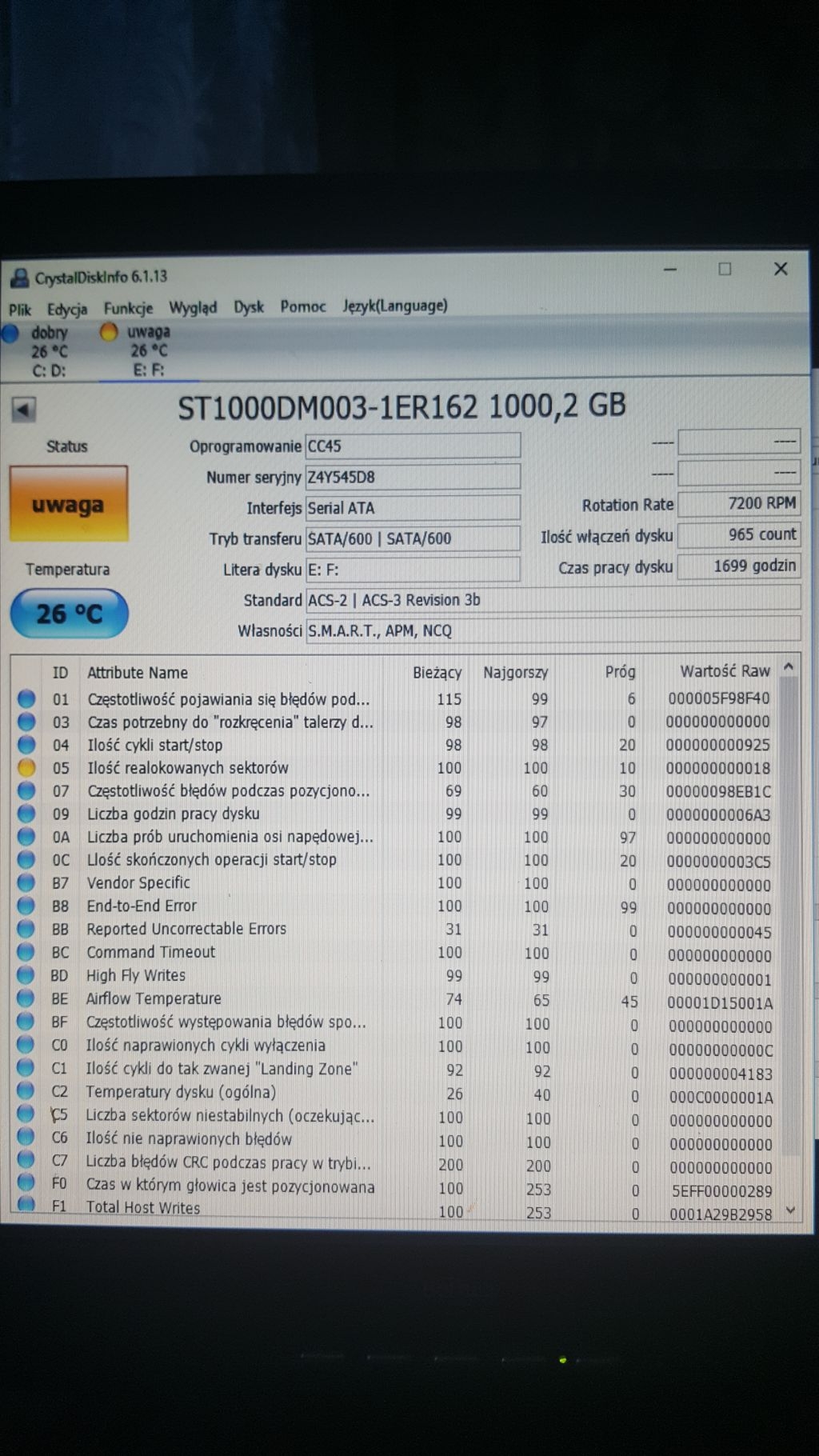
- The OP reported 13 reallocated sectors on the problem disk. [Elektroda, lufa9999, post #16832170]
- OEM-marked SSD wasn’t covered by retail warranty; proceed but keep backups. [Elektroda, dt1, post #16832218]
- A failed drive connected in parallel can destabilize the system; disconnect or repair it. [Elektroda, safbot1st, post #16831479]
Quick Facts
- SMART on the SP900 was assessed as normal; attention shifted to the other disk with errors. [Elektroda, dt1, post #16831142]
- Reallocated sectors can’t be repaired; monitor RAW attributes 05 and C5 for increases. [Elektroda, dt1, post #16832157]
- The OP reported 13 reallocated sectors on the problem disk. [Elektroda, lufa9999, post #16832170]
- OEM-marked SSD wasn’t covered by retail warranty; proceed but keep backups. [Elektroda, dt1, post #16832218]
- A failed drive connected in parallel can destabilize the system; disconnect or repair it. [Elektroda, safbot1st, post #16831479]
Which tool should I trust if HDDScan shows “Soft ECC Correction Rate” but CrystalDiskInfo doesn’t?
Trust the overall SMART assessment rather than a single vendor-independent flag. In this case, SMART looked normal. The expert highlight was to focus on the actually failing second drive instead. Different utilities parse attributes differently, which can surface non-critical flags. Address the known failing disk first, then continue routine SMART monitoring on the SSD. “SMART parameters are normal.” [Elektroda, dt1, post #16831142]
What does “Soft ECC Correction Rate” mean in practice?
It indicates error-correction activity reported by the controller and interpreted by the tool. A flag alone doesn’t prove an SSD fault if the full SMART set is healthy. In this thread, the SSD’s SMART was deemed normal, and the real risk was a separate failing drive. Treat ECC flags as informational unless other SMART attributes deteriorate. [Elektroda, dt1, post #16831142]
Can reallocated sectors be repaired?
No. Reallocated sectors are mapped out and no longer used. You can continue using the disk if the count is low and stable. Monitor health and watch for increases in RAW 05 and C5. “Such sectors cannot be repaired.” Keep backups and reassess if values rise. [Elektroda, dt1, post #16832157]
How many reallocated sectors did the OP report?
The OP reported 13 reallocated sectors at that moment. Use this as a baseline and keep tracking the count over time. Rising numbers signal deterioration and require swift data protection steps. Stable numbers with clean SMART otherwise can be acceptable short-term. [Elektroda, lufa9999, post #16832170]
Which drive should I fix first when two are connected?
Fix or disconnect the failing drive first. The expert pointed to the second drive (E, F) as the problem device, while the SSD’s SMART looked normal. Prioritizing the known-bad disk prevents system instability and data loss during diagnostics. [Elektroda, dt1, post #16831142]
Can a bad secondary drive cause OS slowdowns or crashes?
Yes. A failed or failing drive running in parallel can cause system issues, from freezes to boot delays. Disconnect it during troubleshooting or replace it after backup. This reduces cascading errors that mimic broader system faults. [Elektroda, safbot1st, post #16831479]
Is the ADATA SP900 in this thread under warranty?
No. It was identified as an OEM unit, not covered by standard retail warranty. You can use it, but monitor SMART closely and keep backups of important data. OEM labeling affects RMA paths and support options. [Elektroda, dt1, post #16832218]
Are ADATA SP900/SandForce-based SSDs reliable?
One participant warned that SandForce-based drives were the most failure-prone and suggested not storing critical data on them. Treat this as a cautionary opinion and ensure robust backups if you continue using such hardware. “The most failing.” [Elektroda, michal_aniol, post #16831290]
What immediate actions protect my data right now?
Back up important files, then monitor SMART for changes, especially attributes 05 and C5. If counts rise, migrate data off the drive. Keep the failing disk disconnected until you finish backup and diagnostics. This reduces the risk of read failures mid-transfer. [Elektroda, dt1, post #16832218]
Is the SSD currently readable despite the flags?
Yes. Based on the posted SMART, every sector on the disk should be readable at that time. Continue routine checks and watch for attribute drift. If new errors appear, plan a proactive replacement window. [Elektroda, dt1, post #16832218]
What are SMART attributes 05 and C5 in plain terms?
05 tracks reallocated sector count; C5 tracks current pending sectors. Rising values indicate the drive is remapping or struggling to read sectors. If either increases, back up and prepare to retire the disk. Stable values suggest acceptable short-term use with monitoring. [Elektroda, dt1, post #16832157]
How do I cross-check results with ADATA’s own tools?
- Download and install ADATA’s official SSD utility from the vendor’s software page.
- Run a SMART report and note key attributes (05, C5) as a baseline.
- Compare with third‑party tools; trust consistent trends over single flags. [Elektroda, adamjk, post #16831135]
CrystalDiskInfo says Good, but another tool flags ECC—what’s the risk?
If full SMART is normal, risk is low short-term. Use the discrepancy as a prompt to validate with a vendor tool and to set monitoring thresholds. Focus remediation on any drive that shows clear SMART failures. Document attribute baselines for trend tracking. [Elektroda, dt1, post #16831142]
What’s the safe way to keep using a disk with a few reallocations?
Keep verified backups, monitor 05 and C5, and watch for increases. Plan replacement if numbers rise or new errors appear. Continued use is acceptable short-term if SMART stays stable and there are no pending sectors. “You can use it, but watch SMART.” [Elektroda, dt1, post #16832157]
Does this thread suggest the SSD was the main culprit?
No. Experts concluded the SSD’s SMART looked normal and pointed to the second drive as problematic. Troubleshooting focused on isolating or replacing that failing device first. This aligns with minimizing system risk. [Elektroda, dt1, post #16831142]