logo elektroda
logo elektroda
X
logo elektroda
Dostępna jest polska wersja

Czy wolisz polską wersję strony elektroda?

Nie, dziękuję Przekieruj mnie tam

[Solved] S.M.A.R.T. - HDTune Crash in BE Airflow Temp & CrystalDiskInfo Comparison: Is Data Okay?

lriuqs 16173 13
ADVERTISEMENT
Treść została przetłumaczona polish » english Zobacz oryginalną wersję tematu
  • #1 17401905
    lriuqs
    Level 3  
    Hi,

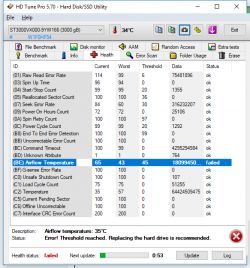
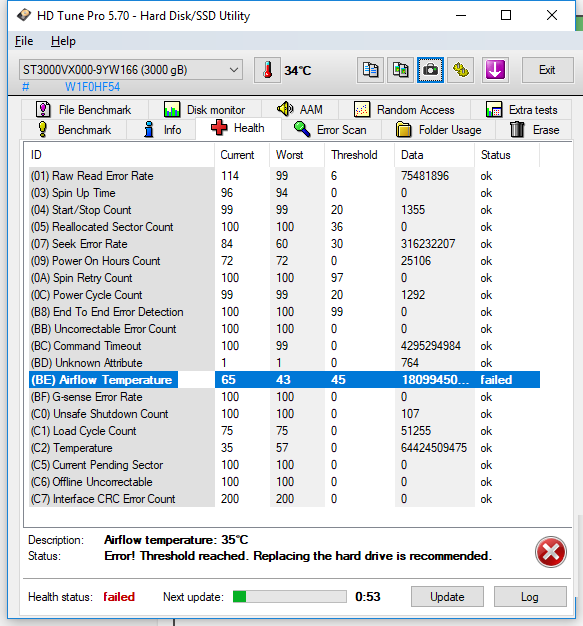
    please explain why HDTune crashes SMART error in BE - Airflow Temperature
    S.M.A.R.T. - HDTune Crash in BE Airflow Temp & CrystalDiskInfo Comparison: Is Data Okay?

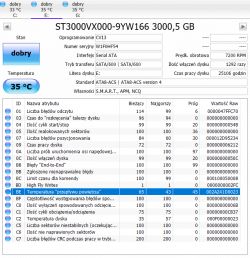
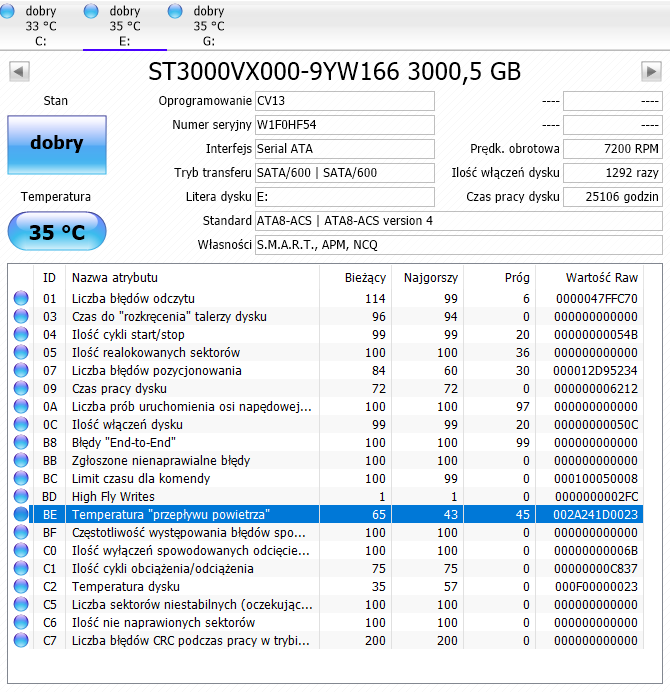
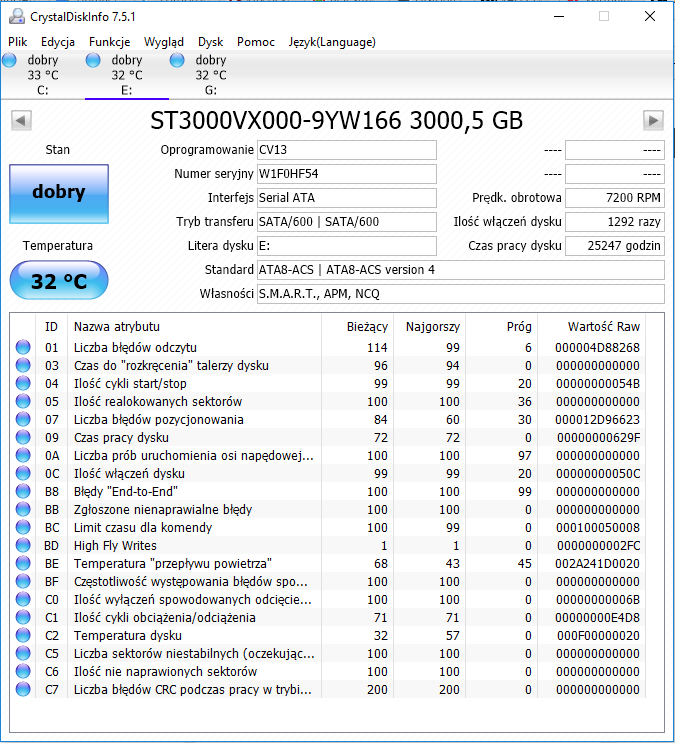
    By. CrystalDiskInfo is ok.
    S.M.A.R.T. - HDTune Crash in BE Airflow Temp & CrystalDiskInfo Comparison: Is Data Okay?

    Should I be concerned about this notification from SMART HDTune?

    Generally, is the data from SMART ok? The patient will live?

    best regards
  • ADVERTISEMENT
  • Helpful post
    #2 17401915
    Anonymous
    Level 1  
  • ADVERTISEMENT
  • Helpful post
    #3 17401948
    bartekjasecki
    Level 17  
    35 degrees, you can cool your cola on it. And the air flow meter is probably not yet installed in the disks.
  • #4 17401951
    Robert B
    Level 43  
    I never believed in this haunted HDT.
    The most reliable of this are:
    www.hdsentinel.com
  • #5 17401955
    lriuqs
    Level 3  
    So what, the disk will reach a temperature of 57 degrees C at some point? (100 - 43 with worst = 57) Therefore, this error was crashed here?

    It is a bit strange because I do not scratch the disk.
    And other information from SMART is ok?
  • #6 17401960
    bartekjasecki
    Level 17  
    You cannot say that you are not torturing the disk. The system does it. There are articles on how to read a smart disk available on google. Take advantage.
  • ADVERTISEMENT
  • Helpful post
    #7 17402560
    enhanced
    Level 43  
    The worst item is the LImit time for the command - it's got stuck there already.

    What's he loose or something wrong with him?
  • ADVERTISEMENT
  • Helpful post
    #8 17402992
    RADU23
    VIP Meritorious for electroda.pl
    lriuqs wrote:
    And other information from SMART is ok?

    Very high parameter (BD) =>
    Quote:
    Technology that monitors how the head is saved. If the head during recording goes beyond the normal working range above the surface of the platter, the operation is interrupted and the recording is repeated in the safe area.


    Besides, SMART does not communicate anything disturbing.
  • Helpful post
    #9 17402995
    dt1
    Admin of Computers group
    lriuqs wrote:
    please explain why HDTune crashes SMART error in BE - Airflow Temperature

    The threshold value was set by the manufacturer to 45, which corresponds to a temperature of 65 degrees Celsius. These values work by subtracting the temperature data from the number 100. So 100-45 = 55. The higher the temperature, the lower the value of this parameter will be, which results from this simple formula.

    The worst value recorded by the drive in the past is 43 (i.e. it has reached a temperature of 100-43 = 57 degrees). As the allowable temperature (55 degrees) has been exceeded, HDTune displays the FAILED flag next to this parameter.

    The current value of 65 corresponds to a temperature of 35 degrees.

    This parameter is informative and does not affect the condition of the disk, it is definitely not worth replacing, as suggested in HDT, but if the disk regularly reaches temperatures above 45 degrees, it is worth paying attention to it and providing it with better cooling, because high temperatures do not affect the condition of such devices well.

    The drive has a fairly high value of high fly writes, possibly due to high-temperature operation for some time. it is worth checking in some time whether the RAW value of this parameter (i.e. 764 or 02FC, depending on the display system) does not increase.
  • #10 17404007
    lriuqs
    Level 3  
    enhanced wrote:
    The worst item is the LImit time for the command - it's got stuck there already.

    What's he loose or something wrong with him?


    The disk was purchased in July 2012. Since then it has been a system disk, a data disk in a PC, and now works in a home NAS since December.
    The disc was always tightened.

    dt1 wrote:
    This parameter is informative and does not affect the condition of the disk, it is definitely not worth replacing, as suggested in HDT, but if the disk regularly reaches temperatures above 45 degrees, it is worth paying attention to it and providing it with better cooling, because high temperatures do not affect the condition of such devices well.

    It must have happened last week, but I don't know when: /
  • #11 17404850
    dt1
    Admin of Computers group
    Upload the next screenshot from Crystal Disk Info in a few days, you will be able to judge if any of the essential parameters are deteriorating.
  • #12 17413245
    lriuqs
    Level 3  
    Hi,

    I attach a screen

    S.M.A.R.T. - HDTune Crash in BE Airflow Temp & CrystalDiskInfo Comparison: Is Data Okay?
  • #13 17413345
    dt1
    Admin of Computers group
    Nothing changes for the worse.
  • #14 17413394
    lriuqs
    Level 3  
    Ok, thank you all for your help.

Topic summary

✨ The discussion revolves around a user's concern regarding HDTune crashing due to a SMART error related to Airflow Temperature, while CrystalDiskInfo reports normal conditions. Participants reassure the user that the drive is likely not in danger, with temperatures around 35 degrees Celsius being acceptable. They note that HDTune may misinterpret the SMART data, particularly regarding temperature thresholds set by manufacturers. The conversation highlights the importance of monitoring drive temperatures and suggests that consistent high temperatures could warrant better cooling solutions. Users recommend checking SMART parameters over time to assess the drive's health.
Generated by the language model.

FAQ

TL;DR: HDTune flags BE because worst temperature hit 57°C; current is 35°C. "This parameter is informative and does not affect the condition of the disk." Improve cooling if temps exceed 45°C; no immediate replacement needed. [Elektroda, dt1, post #17402995]

Why it matters: For PC and NAS users comparing HDTune and CrystalDiskInfo, this explains BE alerts, what’s safe, and how to monitor.

Quick Facts

Why is HDTune flagging S.M.A.R.T. BE (Airflow Temperature) as FAILED while CrystalDiskInfo is OK?

BE uses normalized values where 100−°C is stored. The manufacturer set threshold is 45, i.e., 55°C allowed. Your worst was 43 (57°C), so HDTune shows FAILED historically. “As the allowable temperature (55 degrees) has been exceeded, HDTune displays the FAILED flag.” [Elektroda, dt1, post #17402995]

Should I replace the drive or worry right now?

No. BE is an informational attribute. It does not affect health by itself. “This parameter is informative and does not affect the condition of the disk.” Keep temps under control and monitor SMART periodically. [Elektroda, dt1, post #17402995]

What does S.M.A.R.T. BE actually measure—is there an airflow sensor?

It’s not a separate airflow sensor. BE is another encoding of drive temperature using 100−°C normalization. Vendors set the threshold. It can trigger a historical FAIL if the peak exceeded the limit. [Elektroda, dt1, post #17402995]

How hot did this drive get, and what is it now?

Worst normalized 43 equals 57°C peak. Current normalized 65 equals 35°C. Stay below a normalized 45 (55°C) to avoid further BE FAIL flags and reduce thermal stress. [Elektroda, dt1, post #17402995]

What is S.M.A.R.T. BD (High Fly Writes), in plain terms?

It tracks events where the write head rides higher than its normal range. The firmware aborts and retries the write in a safe zone to protect data integrity. [Elektroda, RADU23, post #17402992]

My BD RAW is 764 (0x02FC). What should I do?

That’s a fairly high count. It can reflect past high-temperature operation. Monitor whether the RAW value increases over time. If it rises quickly, improve cooling and back up immediately. [Elektroda, dt1, post #17402995]

How do I monitor S.M.A.R.T. trends in CrystalDiskInfo over a few days?

  1. Open CrystalDiskInfo and note current BE and BD values.
  2. Run your normal workload or NAS usage for several days.
  3. Reopen CrystalDiskInfo and compare values/screenshots for any deterioration. [Elektroda, dt1, post #17404850]

Which tool should I trust more: HDTune, CrystalDiskInfo, or Hard Disk Sentinel?

Use more than one view. CrystalDiskInfo reads raw and normalized data clearly. Hard Disk Sentinel is recommended for deeper analysis and reliability reporting in this discussion. [Elektroda, Robert B, post #17401951]

Does Windows or my NAS “torture” the disk even when I’m not using it?

Yes. The operating system performs background reads and writes, including updates, logging, and indexing. So the disk sees activity even when you’re idle. [Elektroda, bartekjasecki, post #17401960]

Someone mentioned “Limit time for the command”—is that a problem on this drive?

No current concern was observed here. A later follow-up showed no worsening of essential parameters. Continue to monitor, but no immediate action is required. [Elektroda, dt1, post #17413345]

What should I do if temperatures exceed 45°C again?

Improve case or NAS airflow, clean dust filters, and ensure direct cooling over the drive. “High temperatures do not affect the condition of such devices well.” Aim to keep the drive under the set limit. [Elektroda, dt1, post #17402995]

Is my data OK right now?

Based on the follow-up CrystalDiskInfo screenshot, nothing changed for the worse. Keep regular backups and re-check SMART after normal use. [Elektroda, dt1, post #17413345]
Generated by the language model.
ADVERTISEMENT