


logo elektroda
logo elektroda
X
logo elektroda

Alternative Firmware for TP-LINK TD-W8960N v6 as AP Client: DD-WRT, Huawei B315, TL-WA750RE

Sztandar18 8847 18
Best answers

Can I install alternative firmware on a TP-Link TD-W8960N v6 or TL-WA750RE to use it with a Huawei B315 as an AP client?

The TD-W8960N v6 is unlikely to have usable alternative firmware, because it is a Broadcom-based device and the thread says you will rather not find DD-WRT/OpenWRT for it [#16922415][#16922448] For the TL-WA750RE v1, there is a Gargoyle/OpenWRT-based factory image available, with installation instructions, and it can be configured as a client AP/bridge [#16922444][#16922569] Gargoyle on this device has a web interface in Polish [#16922569] If you are connecting the unit to the Huawei B315 with a LAN cable, that is actually a normal access point setup, so the stock TP-Link firmware is enough [#16923374] If you do flash Gargoyle, the thread points to original firmware images for returning to stock, but without the bootloader [#16922698]
Generated by the language model.
ADVERTISEMENT
Treść została przetłumaczona polish » english Zobacz oryginalną wersję tematu
  • #1 16922317
    Sztandar18
    Level 26  
    Posts: 852
    Help: 75
    Rate: 104
    Hello.

    I would like to upload some alternative firmware to tp-link w8960n. I have this router in v6 version.
    I am not interested in the ADSL modem that is in it.

    I want to use it as an AP Client, I want to connect it with a LAN cable to Huaweia B315 to extend the range of the wifi network.

    Is anyone in the subject, e.g. dd-wrt or other firmware for this tp-link?
    It's nice if I got a link to fw and instructions on how to install them.

    PS

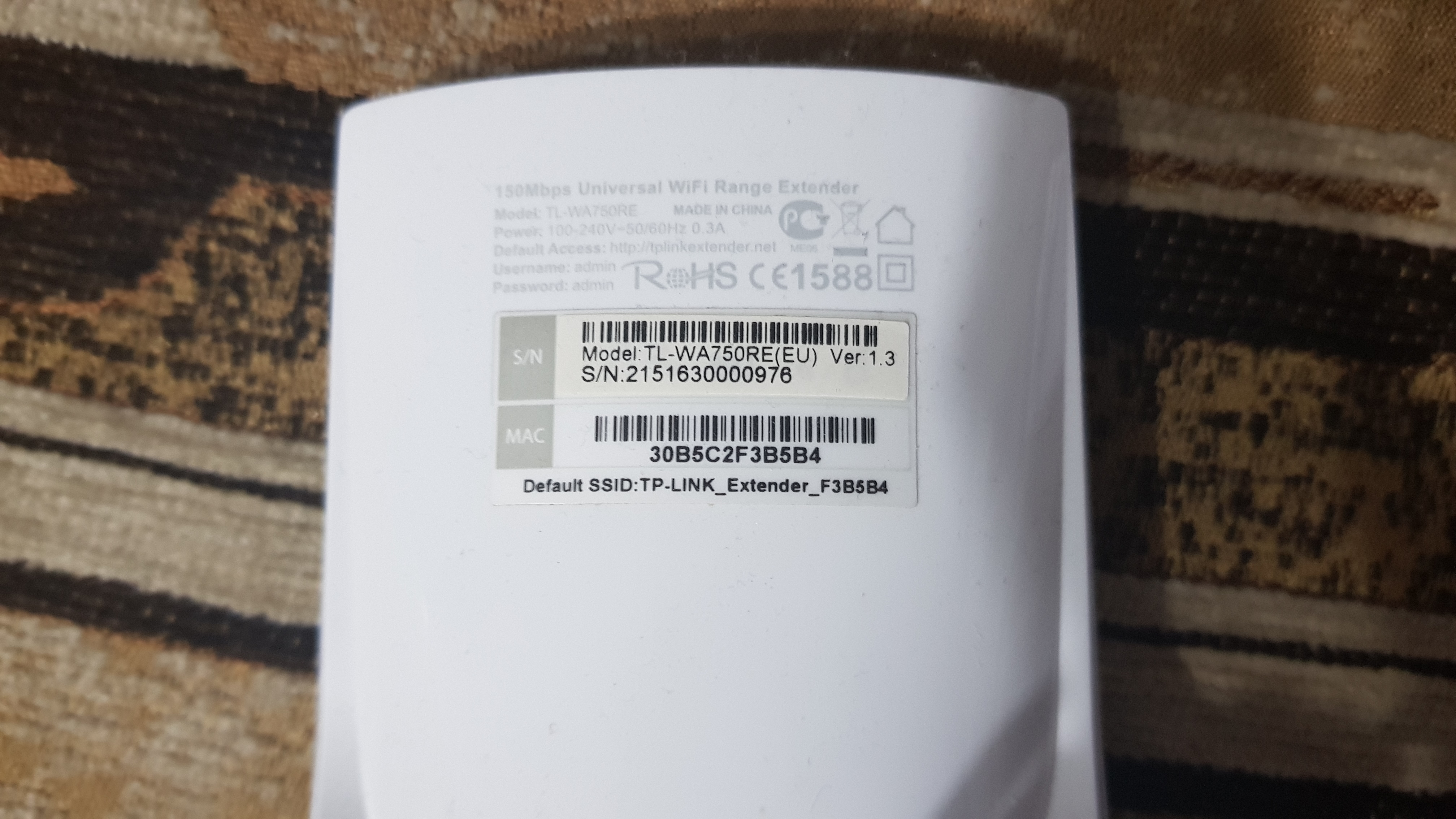
    If this is not possible, does anyone have experience with an alternative firmware for TL-WA750RE? This is a range extender with a LAN port, can this port be used to act as an AP Client?
  • ADVERTISEMENT
  • #2 16922415
    jimasek
    VIP Meritorious for electroda.pl
    Posts: 35287
    Help: 3783
    Rate: 2671
    Rather, you won't find anything on Broadcom to W8960N.
    For WA750RE, look for a Gargoyle or DD-WRT hardware version.
  • ADVERTISEMENT
  • #3 16922444
    matek451
    Level 43  
    Posts: 31052
    Help: 4314
    Rate: 5708
    There is Gargoyle for WA-750 v1 http://dl.eko.one.pl/gargoyle-pl/attitude_adj...2.2-ar71xx-tl-wa750re-v1-squashfs-factory.bin so you will do it Client AP. Everything about the Gargoyle installation http://eko.one.pl/?p=openwrt-gargoylepl and the link to configure the wireless bridge https://forumsieciowe.pl/index.php?/topic/41-tryb-most-bezirelessowywireless-bridge -i-forward% C5% BAnikrepeater-na-gargoyle-en / With AP Clenta you do not turn on the Relay then you only have access via LAN or AP Client.
    Helpful post? Buy me a coffee.
  • ADVERTISEMENT
  • ADVERTISEMENT
  • #5 16922448
    Karaczan
    Level 42  
    Posts: 6683
    Help: 865
    Rate: 1101
    OpenWRT is on it:
    link

    However, it is pure OpenWRT, a version without GUI, and generally "raj_se_sam".
    Interesting fact for poker players, rather difficult to use for "blacksmith".
    Act works.
    But don't know Linux and OpenWRT!

    TD-W8960N is a Broadcom platform! It has nothing to do with routers based on Atheros processors !!!
  • #6 16922451
    jimasek
    VIP Meritorious for electroda.pl
    Posts: 35287
    Help: 3783
    Rate: 2671
    Take into account that OpenWRT does not need to have a graphical interface but only to be managed by the console.
    Do you have WA750REv there .... ????
  • #7 16922464
    Karaczan
    Level 42  
    Posts: 6683
    Help: 865
    Rate: 1101
    For WA750RE, colleague Cezary compiles firmware:
    firmware
  • #8 16922474
    Sztandar18
    Level 26  
    Posts: 852
    Help: 75
    Rate: 104
    I have this version
    Alternative Firmware for TP-LINK TD-W8960N v6 as AP Client: DD-WRT, Huawei B315, TL-WA750RE

    I would prefer a web interface, but if it is not nice to configure it as an AP Client through putty, but for that I would need some information on how to do it.
  • #10 16922501
    Karaczan
    Level 42  
    Posts: 6683
    Help: 865
    Rate: 1101
    Because it has a very small flash (4MB) you do not install to it neither the MC (derivative of Norton Commander, for jumping through directories), nor the Nano editor.
    Skipping through directories with linux commands, and the Vi editor.

    If you want to have fun, read about them, especially about Vi. Because it is not easy to use (at least for me) ...
  • #13 16922604
    Karaczan
    Level 42  
    Posts: 6683
    Help: 865
    Rate: 1101
    Since Obsy / Cezary created Gargoyle for this device, there is no point in combining anything else!
    Download, upload and enjoy.
  • #14 16922610
    jimasek
    VIP Meritorious for electroda.pl
    Posts: 35287
    Help: 3783
    Rate: 2671
    Karaczan wrote:
    Since Obsy / Cezary created Gargoyle for this device, there is no point in combining anything else!
    Download, upload and enjoy.

    It remains only to confirm and act buddy @ Sztandar18 , we are waiting for positive information from you.
  • #15 16922678
    Sztandar18
    Level 26  
    Posts: 852
    Help: 75
    Rate: 104
    Ok, but before uploading, how to return to the original firmware?
    Just update from gargoyle?
  • #18 16923374
    makosuu
    Network and Internet specialist
    Posts: 2984
    Help: 369
    Rate: 369
    Sztandar18 wrote:
    I want to use it as an AP Client, I want to connect it with a LAN cable to Huaweia B315 to extend the range of the wifi network.

    This sentence puzzles me. AP Client connects to other APs via wifi and gives Internet access to LAN ports. And you want to connect it with a router cable so it should be a normal AP. And for ordinary AP you will have enough firmware from TP-Link. So where do you see the problem?
  • #19 16924649
    Sztandar18
    Level 26  
    Posts: 852
    Help: 75
    Rate: 104
    Problem solved, I was reluctant to combine with gargoyle, I bought AP.

Topic summary

✨ The discussion revolves around the use of alternative firmware for the TP-LINK TD-W8960N v6 router, specifically for configuring it as an AP Client to extend the Wi-Fi range when connected to a Huawei B315 via LAN. Users noted that the TD-W8960N is based on a Broadcom platform, making it incompatible with certain firmware options like DD-WRT. Instead, they suggested using Gargoyle or OpenWRT for the TL-WA750RE, which can function as an AP Client. Links to firmware downloads and installation instructions were provided, emphasizing the need for a web interface for easier configuration. The conversation concluded with one user opting to purchase an AP instead of modifying the existing router.
Generated by the language model.

FAQ

TL;DR: The WA750RE v1 works well with Gargoyle; its "very small flash (4MB)" limits extras, but AP Client is doable. Experts note: "very small flash (4MB)." [Elektroda, Karaczan, post #16922501]

Why it matters: This FAQ helps TP-Link owners decide firmware and modes to extend Wi‑Fi using Huawei B315 or similar gear.

Quick Facts

Can I install DD‑WRT on TP‑LINK TD‑W8960N v6?

Unlikely. Contributors report you won’t find DD‑WRT or similar for the W8960N v6. Its Broadcom platform limits third‑party support compared with Atheros‑based models. Use stock firmware or consider different hardware if you need open firmware features. [Elektroda, jimasek, post #16922415]

Does OpenWRT run on TD‑W8960N v6, and will I get a web interface?

Yes, but it’s a bare OpenWRT build without a GUI on this model. Expect console management only. One expert warns it’s tough if you don’t know Linux or OpenWRT. Consider other devices if you need a simple web UI. [Elektroda, Karaczan, post #16922448]

What’s the simplest way to make a TL‑WA750RE v1 work as an AP Client?

Flash Gargoyle for WA750RE v1, then set Wireless Bridge/AP Client. Do not enable Relay in this mode. You’ll get connectivity over the LAN port or as AP Client only. This setup is confirmed by contributors with a direct firmware link. [Elektroda, matek451, post #16922444]

Is there a Gargoyle build with a web interface for WA750RE v1?

Yes. The community recommends Obsy/Cezary’s Gargoyle 1.6.2.2 for WA750RE v1. It installs via the device’s update page and provides a full web interface, including a Polish UI. Download and flash as an update from the provided link. [Elektroda, jimasek, post #16922569]

How do I install Gargoyle on the TL‑WA750RE v1 (3‑step)?

  1. Download the WA750RE v1 Gargoyle factory image.
  2. In the stock UI, choose Firmware Upgrade and select the image.
  3. Reboot, then configure AP Client or bridge as needed. “Install Gargoyle instead of OFW” was the guidance shared. [Elektroda, matek451, post #16922483]

How do I revert from Gargoyle back to the original TP‑Link firmware?

Flash the vendor image without bootloader using Gargoyle’s upgrade page. The forum links an “orig” directory with suitable files. This restores the stock UI if you need it later. Ensure you pick the exact hardware version match before flashing. [Elektroda, jimasek, post #16922698]

Do I need AP Client or AP mode when using a Huawei B315?

Use AP mode if you connect the extender to the B315 by Ethernet. AP Client is for linking wirelessly to another AP and then serving LAN ports. That clarification solved confusion in the thread. [Elektroda, makosuu, post #16923374]

Why do some firmware builds lack editors like Nano or tools like MC?

The WA750RE v1 has only 4MB flash, which prevents installing larger packages. You’ll use built‑in tools, like the vi editor, to manage files and configs. “Very small flash (4MB)” was the warning. [Elektroda, Karaczan, post #16922501]

Is the TD‑W8960N v6 compatible with Atheros‑focused guides or builds?

No. “TD‑W8960N is a Broadcom platform! It has nothing to do with routers based on Atheros processors.” Mixing guides can brick devices. Follow Broadcom‑specific instructions only. [Elektroda, Karaczan, post #16922448]

Will AP Client mode also repeat Wi‑Fi for wireless clients?

Not by default. In AP Client mode, do not enable Relay if you only need LAN access or a bridge. Enabling the wrong repeater option can block expected Wi‑Fi coverage. This edge case was called out explicitly. [Elektroda, matek451, post #16922444]

Which exact Gargoyle file should I pick for WA750RE v1?

Use the WA750RE v1 factory image named gargoyle‑1.6.2.2‑ar71xx‑tl‑wa750re‑v1‑squashfs‑factory.bin. The version detail matches the shared link. Verify hardware revision on your sticker before flashing. [Elektroda, matek451, post #16922444]

Is a GUI mandatory, or can I configure via SSH only?

On TD‑W8960N, the shared OpenWRT build is console‑only, so plan for SSH/CLI. On WA750RE v1 with Gargoyle, you get a full web GUI. Choose hardware and firmware based on your comfort level. [Elektroda, Karaczan, post #16922448]

Where can I find trusted community builds for WA750RE?

Use Cezary/Obsy’s firmware directory referenced in the thread. Contributors point to that index for WA750RE images. Stick to files matching your exact hardware version to avoid flashing issues. [Elektroda, Karaczan, post #16922464]

What was the final outcome for the original poster?

They avoided firmware flashing and bought a dedicated access point instead. That path can be quicker when time matters or compatibility is uncertain. It’s a valid alternative to custom firmware. [Elektroda, Sztandar18, post #16924649]
Generated by the language model.
ADVERTISEMENT