


logo elektroda
logo elektroda
X
logo elektroda

The Internet works poorly despite the fact that it is optical fiber

sebawaw98 12771 14
ADVERTISEMENT
Treść została przetłumaczona polish » english Zobacz oryginalną wersję tematu
  • #1 16936485
    sebawaw98
    Level 7  
    Posts: 19
    Rate: 1
    I have a new fiber-optic internet with a capacity of:
    Download: 500Mbps
    Sending: 50Mbps

    The main router is Huawei HG8245 (There is no bandwidth control option on it, but QoS is enabled)

    What is connected to the main router?
    TP-LINK Gigabit switch and for it:
    2 computers (Mum + Dad)
    The TP-LINK Archer D2 router and under it:
    1 Cisco switch up to 100Mbps and for it:
    2 TP-LINK routers working as AP + 30 people using WiFi

    I am connected to Archer D2 and although I have the bandwidth limitation turned on, the internet is still muddy.

    Tell me what to change in the settings.
    Attachments:
    • The Internet works poorly despite the fact that it is optical fiber Sceen 5.jpg (111.62 KB) You must be logged in to download this attachment.
    • The Internet works poorly despite the fact that it is optical fiber Sceen 3.jpg (109.07 KB) You must be logged in to download this attachment.
    • The Internet works poorly despite the fact that it is optical fiber Sceen 4.jpg (94.99 KB) You must be logged in to download this attachment.
    • The Internet works poorly despite the fact that it is optical fiber Sceen 2.jpg (92.15 KB) You must be logged in to download this attachment.
  • ADVERTISEMENT
  • #2 16936532
    dedito
    Level 39  
    Posts: 4770
    Help: 527
    Rate: 593
    Connect to the main router.
    Perform the measurement with some speed test.
    Disconnect all other devices that may influence the measurement result.
  • ADVERTISEMENT
  • #3 16936559
    sebawaw98
    Level 7  
    Posts: 19
    Rate: 1
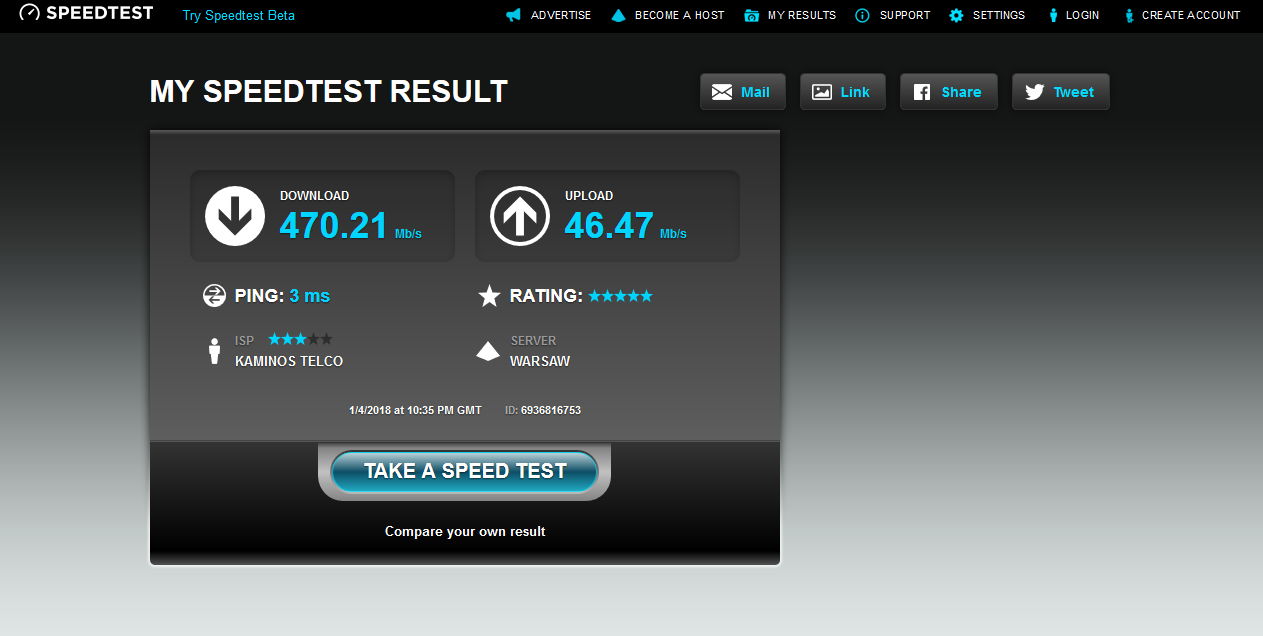
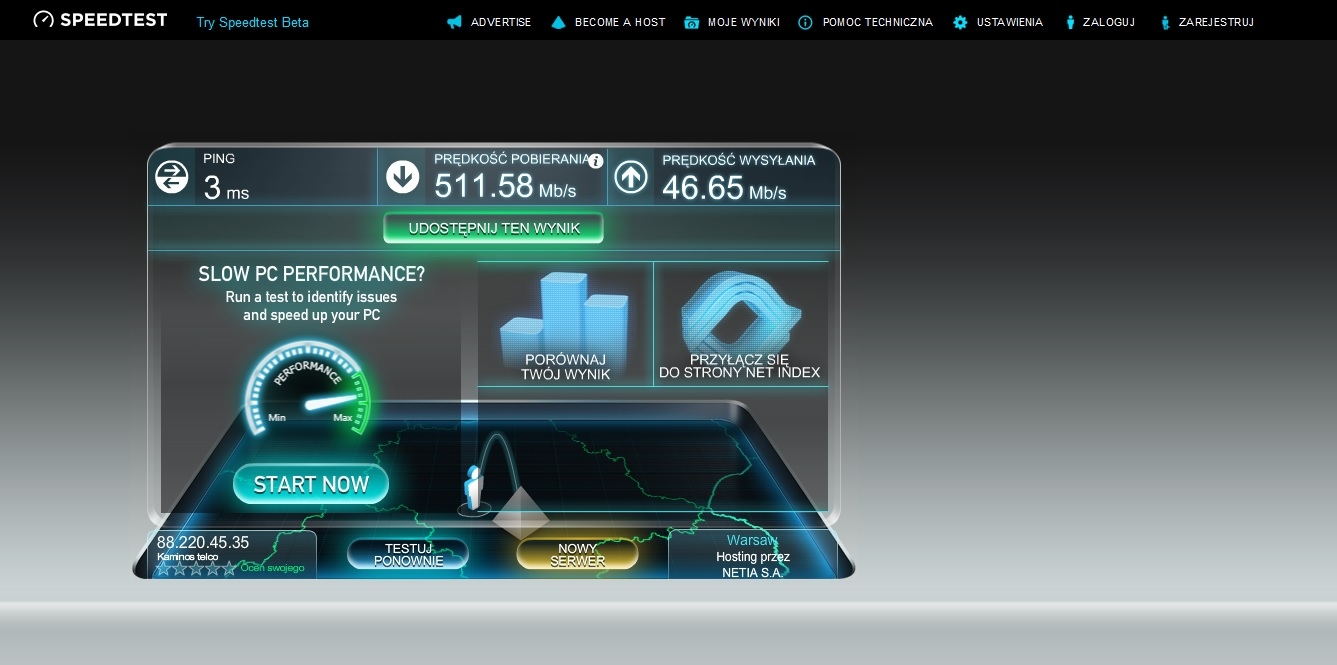
    I checked and it turns out that everything is fine (Speeds match).
  • ADVERTISEMENT
  • #4 16936646
    dedito
    Level 39  
    Posts: 4770
    Help: 527
    Rate: 593
    sebawaw98 wrote:
    I checked and it turns out that everything is fine (Speeds match).
    Please present the results.
    The next step would be to present the results from the next router.
  • #5 16936789
    sebawaw98
    Level 7  
    Posts: 19
    Rate: 1
    The Internet works poorly despite the fact that it is optical fiber
  • #6 16936800
    sebawaw98
    Level 7  
    Posts: 19
    Rate: 1
    The Internet works poorly despite the fact that it is optical fiber


    Added after 10 [minutes]:

    But now, when I disconnected these 35 people from the Internet, the Internet has suddenly started to work well.
  • #7 16936828
    dedito
    Level 39  
    Posts: 4770
    Help: 527
    Rate: 593
    As you can see, the bandwidth is adequate to what the provider offers on both routers.
  • #8 16936832
    sebawaw98
    Level 7  
    Posts: 19
    Rate: 1
    Yes, everything is correct, but I don't like how everyone uses the internet and the internet crashes.
  • #9 16937060
    Nagus
    Level 27  
    Posts: 757
    Help: 99
    Rate: 97
    I mean, are you connected to Archer with a cable and mula, even though Speedtest shows full 500Mbps?
  • #10 16937202
    dedito
    Level 39  
    Posts: 4770
    Help: 527
    Rate: 593
    sebawaw98 wrote:
    Yes, everything is correct, but I don't like how everyone uses the internet and the internet crashes.

    Correctly configured QOS should remedy.
    Analyze who (IP addresses) and what is charging (services).
    Then it will be possible to choose a solution.
  • ADVERTISEMENT
  • #11 16937255
    sebawaw98
    Level 7  
    Posts: 19
    Rate: 1
    When I'm hooked up to Archer, it's great, but when the tenants come, you can't use the Internet normally. There is no QoS option in the router, only bandwidth control.
    Added after 1 [minutes]:
    dedito wrote:
    Analyze who (IP addresses) and what is charging (services).
    Then it will be possible to choose a solution.

    How can I do this? If you want, I can make screenshots for you, maybe it will help you.
    Added after 10 [minutes]:
    Nagus wrote:
    I mean, are you connected to Archer with a cable and mula, even though Speedtest shows full 500Mbps?


    I am connected to the Archer with a cable. Not if, there are no tenants connected, the internet is not muddy, but my point is that when they come in and connect and start using WiFi, I cannot watch streams on YT in FullHD. Plus my parents complain that their net is not good. Despite the fact that I did limit the speed to the tenants, it still doesn't help me.
  • #12 16937313
    dedito
    Level 39  
    Posts: 4770
    Help: 527
    Rate: 593
    sebawaw98 wrote:
    There is no QoS option in the router, only bandwidth control.

    sebawaw98 wrote:
    (There is no bandwidth control option on it, but QoS is enabled)

    Make up your mind what's in there.
    Another thing is that QOS is just bandwidth control.

    The control is best done on the primary (edge) router.
    This huawei hg8245 has a lot of control and band monitoring capabilities.
    You would have to delve into the manual. Perhaps it can even be clicked on from the web interface. If not, then from the terminal.

    sebawaw98 wrote:
    The TP-LINK Archer D2 router and under it:
    1 Cisco switch up to 100Mbps and for it:
    2 TP-LINK routers working as AP + 30 people using WiFi

    If these subsequent routers work as APs, turning on QOS on them does not make sense because bandwidth control works on the WAN / LAN line.
    They can be switched to router mode, but in my opinion it is too complicated the network layout. Alternatively, one may consider whether, for these 30 people, it can create a separate network and limit it.

    What model is the Cisco switch?
  • #13 16941846
    KOCUREK1970
    Network and Internet specialist
    Posts: 35131
    Help: 3786
    Rate: 5326
    sebawaw98 wrote:
    30 people using WiFi

    Now we multiply it only x 10 Mb and it turns out that 30 people ate 300 Mb of bandwidth.
    And these 10 Mb is about 1.2 MB of real transfer.
    Otherwise:
    sebawaw98 wrote:
    Cisco switch up to 100Mbps

    100 Mb switch on a 500 Mb net?
  • #14 16942212
    sebawaw98
    Level 7  
    Posts: 19
    Rate: 1
    I am connected directly to the Archer D2 and not to the Cisco switch, I did it to limit them.
    Attachments:
    • The Internet works poorly despite the fact that it is optical fiber Teraz.png (411.84 KB) You must be logged in to download this attachment.
    • The Internet works poorly despite the fact that it is optical fiber Moja mapa sieci.png (563.52 KB) You must be logged in to download this attachment.
  • #15 16942356
    dedito
    Level 39  
    Posts: 4770
    Help: 527
    Rate: 593
    Complete this drawing with types.

Topic summary

✨ The discussion revolves around issues with a fiber-optic internet connection, specifically a Huawei HG8245 router providing 500Mbps download and 50Mbps upload speeds. The user experiences poor internet performance when multiple devices are connected, despite having QoS enabled. Initial tests showed adequate speeds when fewer devices were connected, indicating that bandwidth limitations are not effectively managing the load from 30 WiFi users. Suggestions include connecting directly to the main router for testing, analyzing bandwidth usage, and potentially configuring QoS on the primary router. The user confirmed that disconnecting tenants improved performance, highlighting the need for better bandwidth management strategies.
Generated by the language model.

FAQ

TL;DR: On a shared 500/50 Mbps fiber, ~30 users can consume ~300 Mb; “100 Mb switch on a 500 Mb net?” highlights a bottleneck. [Elektroda, KOCUREK1970, post #16941846]

Why it matters: This FAQ helps landlords and admins fix slow fiber when many tenants share Wi‑Fi and mixed-speed gear.

Quick Facts

Why is my fiber internet slow when many people use Wi‑Fi?

Shared bandwidth gets saturated. With ~30 users, aggregate demand can hit ~300 Mb, leaving little headroom for video or gaming. Any 100 Mb segment will also choke flows regardless of the 500 Mb plan. Replace 100 Mb gear and control tenant traffic to stabilize performance. [Elektroda, KOCUREK1970, post #16941846]

How do I test if the ISP or my LAN is the problem?

Connect a single device to the main router, disconnect other devices, then run a speed test. If speeds match your plan here but drop when the rest reconnect, the LAN and client load cause the slowdown, not the ISP. [Elektroda, dedito, post #16936532]

What should I configure first to fix buffering and lag?

Configure QoS or bandwidth control on the edge device (Huawei HG8245). It offers monitoring and control features suited to shape tenant traffic before it enters your LAN. “The control is best done on the primary router.” [Elektroda, dedito, post #16937313]

Is QoS the same as bandwidth control?

In this context, yes. The responder notes, “QOS is just bandwidth control.” Use it to cap or prioritize traffic classes or client groups so essential services remain smooth. Apply it where WAN/LAN traffic crosses, not on bridged APs. [Elektroda, dedito, post #16937313]

Does a 100 Mb Cisco switch hurt a 500 Mb fiber setup?

Yes. Any traffic traversing that 100 Mb segment is limited to 100 Mb. That creates a bottleneck for tenants behind it, regardless of the upstream 500 Mb capacity. Replace it with a gigabit switch to remove the cap. [Elektroda, KOCUREK1970, post #16941846]

How can I confirm tenants are the cause?

Observe performance with tenants disconnected. In the thread, disconnecting about 35 users restored normal speeds immediately. That shows shared client demand, not the ISP, caused the slowdown. [Elektroda, sebawaw98, post #16936800]

Where should I place QoS—on APs or the main router?

Place QoS at the WAN/LAN edge. Enabling QoS on access points running as pure APs is ineffective, because control happens where routing occurs. Configure policies on the Huawei HG8245 instead. [Elektroda, dedito, post #16937313]

What is an access point (AP) in this setup?

Here, routers used as APs just bridge Wi‑Fi to LAN without routing. QoS on such APs won’t shape traffic; shaping works across the WAN/LAN boundary on a router. Keep APs simple; do control on the edge. [Elektroda, dedito, post #16937313]

Can bandwidth limits on the Archer D2 alone fix streaming issues?

Not reliably. The owner limited tenant speeds on the Archer D2 yet still couldn’t stream Full HD when tenants joined. Control must be enforced at the edge to be effective across the whole network. [Elektroda, sebawaw98, post #16937255]

How do I analyze who or what is hogging bandwidth?

Start by listing active IPs and services on the edge router. The advice was to analyze which IPs and services are charging the link before choosing a solution. Then apply targeted limits or priorities. [Elektroda, dedito, post #16937202]

Will moving my PC off the 100 Mb switch help?

Yes. The owner connected directly to the Archer D2, bypassing the 100 Mb Cisco to limit tenants. That separation keeps your device on a faster path and avoids tenant bottlenecks. [Elektroda, sebawaw98, post #16942212]

What’s a quick 3-step method to diagnose LAN congestion?

  1. Connect a single device to the main router and disconnect others.
  2. Run a speed test and record results.
  3. Reconnect segments incrementally to find when speeds degrade. [Elektroda, dedito, post #16936532]

How should I segment tenant Wi‑Fi?

Create a separate tenant network behind its own router or VLAN and apply limits at the edge. The advisor suggested a separate network for the 30 users plus appropriate control for simpler management. [Elektroda, dedito, post #16937313]

Why can Speedtest look fine yet browsing feels sluggish?

With only your device connected, tests match the plan. When tenants connect, contention and a 100 Mb segment can add latency and reduce throughput for streaming and pages. Prioritize and remove 100 Mb caps. [Elektroda, dedito, post #16936828]

What information helps others help me faster?

Provide a detailed network diagram with device types and modes. An expert asked to complete the drawing with types to pinpoint misconfigurations and bottlenecks. [Elektroda, dedito, post #16942356]

Edge case: Will QoS on APs ever work?

If an AP routes traffic, QoS might apply. But in this thread the devices act as APs, so QoS there won’t shape WAN/LAN flows. Configure the edge instead. [Elektroda, dedito, post #16937313]
Generated by the language model.
ADVERTISEMENT