

logo elektroda
logo elektroda
X
logo elektroda

TL;DR

  • Questions how much internet bandwidth is actually enough for everyday home use, and whether 300 Mb/s, 600 Mb/s, or even 1 Gb/s plans really make sense.
  • Notes that movies, VOD, FHD, and 4K already work on low-end connections, so the real limit may be simultaneous users rather than peak speed.
  • Highlights the shift from hundreds of Kb/s to single Mb/s and 30-100 Mb/s links, plus upload capacities around 2-20 Mb/s, then asks what fixed-line and mobile speed people expect.
Generated by the language model.
ADVERTISEMENT
Treść została przetłumaczona polish » english Zobacz oryginalną wersję tematu
📢 Listen (AI):
  • What "internet speed" is enough?
    I remember the times when the bandwidth from the Internet provider was a key issue when choosing an offer. Initially hundreds of Kb / s, then single Mb / s, up to a quick jump to tens of Mb / s, then hundreds of Mb / s to 1 Gb / s. In the 30-100Mb / s throughput period, the client's choice of the offer was also determined by the internet data sending capacity, which oscillated between 2-20Mb / s. In business, more expensive links tempted with symmetrical upload / download parameters, as well as the declared reliability and response time.

    In times where you can easily have a 50Mb / s connection, what real bandwidth do you need for everyday use of internet resources at home?

    Do the lines proposed by suppliers, e.g. 300Mb / s, 600Mb / s, and even 1Gb / s, make sense?

    Of course, the higher the bandwidth, the faster you will download or send something, but are such amounts of data transferred at home?

    Movies, VOD, FHD and 4K cope with low-end connections.

    Maybe sharing a link between many people at home requires a lot of bandwidth, but are they all active at the same time?

    What bandwidth do you expect on a home fixed line connection, and what bandwidth for mobile access?

    Cool? Ranking DIY

    About Author
    And!
    Admin of Design group
    Offline 
    And! wrote 9056 posts with rating 783, helped 175 times. Been with us since 2002 year.
  • ADVERTISEMENT
  • #2 17979110
    Anonymous
    Level 1  
  • #3 17979122
    szymon122
    Level 38  
    In my opinion, in the times of streaming media, 100Mbps for a family home is the basis. At least that's how it is in my case. Netflix on two TV sets + online games on the computer effectively "clog up" my 20Mb / s.
    Streaming game servers will be launched at any moment (rendering in the cloud, a tiny computer with poor parameters is enough to receive the stream of the "ready" game). This way of playing requires 25 Mb / s for one fhd station.
  • #4 17979133
    andrzejek23
    Level 19  
    For me, the actual net speed is ~ 30Mbps (in words: thirty megabits per second). It is easy enough for my and my wife's current needs (browsing, e-mail) and for Netflix 4K. I don't expect more. Speed as needed.
  • #5 17979169
    SP5IT
    VIP Meritorious for electroda.pl
    And! wrote:
    Do the lines proposed by suppliers, e.g. 300Mb / s, 600Mb / s, and even 1Gb / s, make sense?
    When they start to give symmetrical, it is possible.
    M.
  • #6 17979282
    dondu
    VIP Meritorious for electroda.pl
    I have 300/300 for fiber and for free the same for LAN as the second link.
    There is no chance of using it at home :)
  • #7 17979298
    Galareta
    Level 23  
    I have 1Gbps Dow and 500 up, I only power the router in the attic, media converter, etc. - so it's 100/100 for computers - it's enough.
  • #8 17979334
    pawelr98
    Level 39  
    In Bydgoszcz, I have 7-8Mbit / s, which is definitely not enough.
    Downloading larger data packages is a chore.
    It is better not to talk about sending in the vicinity of 60-70KB / s (~ 500Kbit / s).

    I can't normally send a larger (several MB) attachment to the e-mail because I am overloaded with time. I need outlook.
    It used to be 120KB / s (1Mbit / s) and around 10Mbit / s, but the lightning hit and it stayed like that after the repair.

    In Gdańsk, 600Mbit / s previously 150Mbit / s for the same rate.
    The factory laptop card was only able to handle 5.5MB / s (44Mbit / s), then I added a newer standard to USB (Lenovo in this model has a lock for factory mPCIE replacement) and I can easily reach the USB 2.0 limitation, i.e. 20MB / s ( 160Mbit / s).
    Wired network only 100Mbit / s so it is more profitable to use Wi-Fi.

    Such speed is definitely useful when you need to roll several dozen / several hundred GB in one evening.
    The record is 1.5TB in two days on a 150Mbit / s link and a 1Gbit / s cable connection.
    I was limited by the speed of the seeds on the torrent anyway (yes, it was one torrent).

    But overall I was sitting on this limited 44Mbit / s for quite a while and it worked decently.
    I would also consider the 50Mbit / s area comfortable.
  • #9 17979404
    E8600
    Level 41  
    Probably there will be those who will not even have 2-4 Gb / s, claiming that they use the link to the full.
    40-50 Mb / s is enough for me, it is important that the connection is stable and not too many packets are lost.

    A lot of people are so addicted to numbers. that he is taking up faster and faster internet and the network card in the PC is a bottleneck or the router is misconfigured. Some people have a 1 Gb / s connection connected with a 4-core 100 Mb / s Ethernet cable. :D
  • ADVERTISEMENT
  • #10 17979409
    Anonymous
    Level 1  
  • #11 17979445
    forest1600
    Level 20  
    I have 600/30 distributed on TV, PC, laptop, 2 phones, on TV and PC netflix is flying non-stop. I download something more than once and then such a connection is useful, because you do not have to wait long and netflix does not start to "lag"

    What "internet speed" is enough?
  • #12 17979731
    lechoo
    Level 39  
    I have an FTTH 300/30 link with public IP from a local provider. I chose this option due to the upload speed, which is useful for NAS and CCTV recorders. The lower available option was 100/10, where 10Mbps upload is a bit of a misery by today's standards ...

    What "internet speed" is enough?
  • #13 17979845
    PPK
    Level 30  
    120 Mb / s + upload 30Mb / s (surcharge). Computer + workstation + tablet + Netflix + channel to the company (online rendering) ..... touches. But since the perspective is 4k (online processing / Netflix), I'm switching to FTTH 1Gb / 250Mb. The company pays extra. 120 Mb would be enough for a house party.
    ps I do not actively use WiFi (pro-health) - sometimes on tablets and smartphones.

    ps I started on 1200/2400 baud on a switched phone line. Then 9600, 16800, 19200, 56k. Then 1Mb / s but on DSL .... I remember TPSA 0202122 number for commutated until today.
  • #14 17979911
    lysy1980
    Level 33  
    I have a guaranteed 60/60 from a local provider with a fixed public IP, it's enough for me, basically 90% of me use the network at home, my wife something from the phone and sometimes a laptop, children from time to time cartoons on YT. I also basically care about the layout because of the NAS - I have a lot of files I need on the disk, sometimes I have a SAT stream to another place from the tuner, where I have no way to watch TV. Optical fiber is only in my plans, so I have to wait some time.
  • ADVERTISEMENT
  • #15 17979925
    bravo37
    Level 6  
    In my opinion, an ordinary home user does not need more than 200Mb / s because most websites / services on the Internet are configured to significantly limit the maximum upload / download speed (due to server bandwidth), so you can rarely use the potential of a very fast connection. It is also worth considering that most people use WiFi instead of an ethernet cable, which means they have higher latency and lower speeds.

    What "internet speed" is enough?
  • ADVERTISEMENT
  • #17 17979944
    E8600
    Level 41  
    bravo37 wrote:
    most people use WiFi instead of an ethernet cable, which results in higher latency and lower speeds.

    There is a dog buried here. Even though synthetic tests can show a decent result even with Wifi connections, packets are not lost so colorfully under load and there are significant delays.
    For example, my local internet provider, for people who decided to buy a Wifi modem package (for a small additional monthly fee, it doubled the speed. For example, for PLN 40 you have 50 Mb / s on a coaxial cable or for PLN 48 you have 100 Mb / s with a Wifi antenna installed on the building .
    I am not equipped with internet faster on paper, but not very stable, so I stayed with the cable.
  • #18 17980113
    MrKillereq
    Level 8  
    I have 100/100 fiber optic at home and I can say that it is enough and it is hard for me to clog the entire internet :D
  • #19 17980187
    Inkwizycja
    Level 30  
    Each according to the needs: 512kB Aero2. :D
  • #20 17980222
    sanfran
    Network and Internet specialist
    In a Scottish village the rump does not break off - 40 / 10MBps. I could buy a package up to 64, but 40 is guaranteed (now 36), so a fifth is not worth it.
    That's all for now, because the village is fresh from Digital Scotland stock, so I don't expect any new investments any time soon.
    Is it enough? 4K from Netflix goes on the cable calmly, but several Gigabit installations for XBOX have to be put on at night, because it lasts.
    Fiber optic infrastructure for telecommunications cabinets, and "last mile" (i.e. with me about 300m) on the telephone cable.
  • #21 17980251
    Millaka
    Level 24  
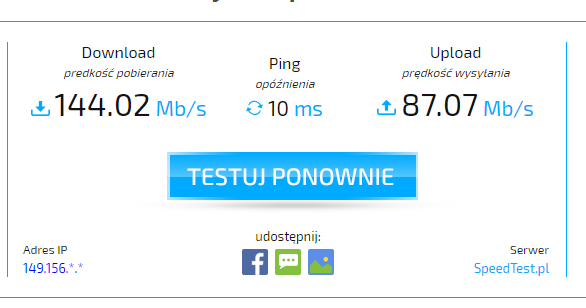
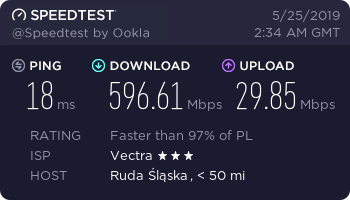
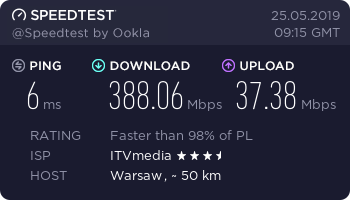
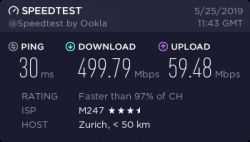
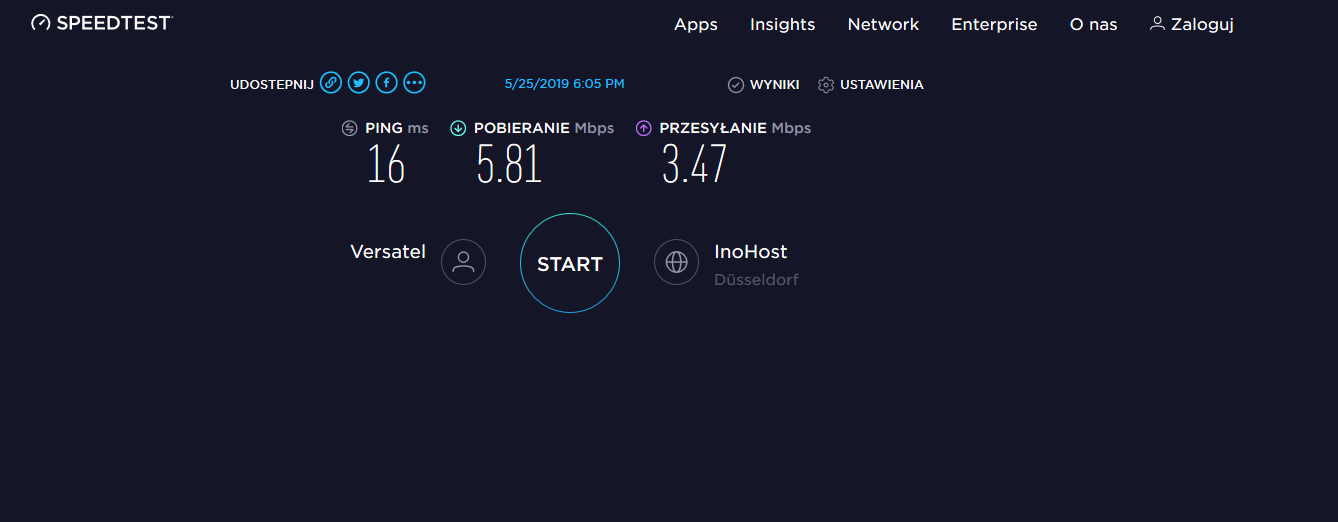
    And I do not understand something, looking at photos from your "speed tests" I made one myself and I became "jealous".
    When in your "hundreds" are shown, in my case only units and something decimal.
    I will only add that I have internet TV and during the test there were two TV sets, two PCs and "countless" number of smartphones in the household.
    How can this be understood?

    What "internet speed" is enough?
  • #23 17980298
    Anonymous
    Level 1  
  • #24 17980317
    Anonymous
    Level 1  
  • #25 17980338
    bravo37
    Level 6  
    Kraniec_Internetów wrote:
    And just about access to the Internet. Have you heard about Elon Musk's new venture? It intends to send 12 thousand satellites into orbit that will make the Internet available to everyone at a speed of 1Gbps (everyone). The first 60 satellites flew on Wednesday, I have no idea how oz intends to launch the remaining 11,940 satellites in a year and a half. Of course, he had already obtained the permit.
    Do you think that if he succeeds, even within, say, five years, he can monopolize the internet supply market?


    Okay, I think it will be satellite internet? It seems to me that this type of internet has limitations when it comes to uploading, you need a special 'transmitter' for the upload speed to be decent. Besides, I wouldn't take it seriously because Elon Musk has problems with such a down-to-earth thing as making the cars ordered on time, so I wouldn't be so sure if he could handle something that big. But an admirable initiative, I am waiting for results.
  • #26 17980350
    Anonymous
    Level 1  
  • #27 17980358
    And!
    Admin of Design group
    Satellite Internet was based on GEO satellites (high ping, high powers and long distances),
    if there are to be so many satellites, they will probably be LEO (as in Iridium), but what frequencies, what antennas, what modulations?
  • #28 17980396
    Grzegorz_madera
    Level 38  
    I started with 1 Mb / s, now I have 10 Mb / s. Or rather up to 10 Mb / s, because in reality it is 7-8 Mb / s download and about 1 Mb / s upload. And that is more than enough.
  • #29 17980529
    E8600
    Level 41  
    Hehe. I started with 512 kb / s and, in retrospect, I can say that with such "dizzying" speed, websites without encryption and a lot of ads were loading much faster than I currently have 50 Mb / s.
  • #30 17981100
    Paweł1355
    Level 19  
    I started with 65 kb / s, for some time I had 250 Mb / s, now i have 20 mb / s and somehow it's enough for me
📢 Listen (AI):

Topic summary

✨ The discussion revolves around the question of what internet speed is sufficient for typical home use. Participants share their experiences with various bandwidths, highlighting that speeds of 100 Mbps are generally considered the minimum for households with multiple users engaging in activities like streaming and online gaming. Many users report that speeds between 30 Mbps and 600 Mbps are adequate for their needs, depending on the number of devices and the type of activities performed. The importance of symmetrical upload and download speeds is also noted, especially for tasks like cloud storage and video conferencing. Some users express skepticism about the necessity of extremely high speeds, suggesting that many consumers do not fully utilize the potential of their connections. The conversation also touches on the evolution of internet speeds over the years and the impact of Wi-Fi limitations on actual performance.
Generated by the language model.

FAQ

TL;DR: 25 Mbps per 4 K Netflix stream is the official requirement [Netflix Help], yet “speed as needed” notes andrzejek23 [Elektroda, 17979133]; Poland’s median home download is 113 Mbps (Ookla 2023). Most homes run smoothly on 50–300 Mbps with at least 10 Mbps upload.

Why it matters: Choosing the right tier avoids overpaying while keeping every device responsive.

Quick Facts

• 25 Mbps – Netflix Ultra-HD minimum per stream [Netflix Help]. • 10–15 Mbps – typical 1080 p cloud-gaming requirement [NVIDIA 2022]. • 113 Mbps / 24 Mbps – Poland median fixed down/up (May 2023) [Ookla 2023]. • ≈100 Mbps – real single-device Wi-Fi 5 throughput one room away [SmallNetBuilder 2021]. • PLN 60 ≈ monthly cost of 300/30 Mbps fibre tier [Elektroda, lechoo, post #17979731]

How much bandwidth is enough for basic browsing and e-mail?

Light tasks peak under 2 Mbps; even a 10 Mbps ADSL line keeps pages snappy [Elektroda, Grzegorz_madera, post #17980396] Add a safety margin: 20 Mbps covers updates and two phones syncing simultaneously.

Is 50 Mbps sufficient for one or two 4 K streams and casual gaming?

Yes. A single 4 K Netflix stream needs 25 Mbps, leaving 25 Mbps spare for a game download or video call [Netflix Help; Elektrode, szymon122, #17979122]. Many posters with 30–50 Mbps report stutter-free 4 K playback [Elektroda, andrzejek23, post #17979133]

When should I upgrade to a 300 Mbps or faster plan?

Consider upgrading if you 1) run three or more simultaneous 4 K streams, 2) move 100 GB+ files often, or 3) back up terabytes to cloud storage overnight. Users sharing fibre with five devices saw congestion disappear after moving from 100 to 300 Mbps [Elektroda, Sas_AS, post #17981305]

Why does upload speed matter at home?

Uploads affect cloud backups, CCTV, live streaming and large e-mail attachments. lechoo chose 300/30 Mbps over 100/10 Mbps because 10 Mbps “is misery” for NAS and cameras [Elektroda, 17979731] Aim for at least 10 Mbps up; power users may want ≥50 Mbps.

What bandwidth do cloud-gaming services require?

GeForce NOW lists 15 Mbps for 1080 p and 25 Mbps for 1440 p [NVIDIA 2022]. Forum estimates match: 25 Mbps per full-HD stream [Elektroda, szymon122, post #17979122] Keep latency below 40 ms for responsive play.

How many devices can comfortably share a 100 Mbps connection?

Rough rule: divide usable speed by 25 Mbps per HD/4 K stream or 5 Mbps per light user. Thus, 100 Mbps supports one 4 K TV plus four browsers. Families on 100/30 rarely see slowdowns unless someone uploads large files [Elektroda, kaczakat, post #17979934]

Does Wi-Fi limit my real internet speed?

Often. bravo37 measured only 5.5 MB/s (≈44 Mbps) over an older laptop radio despite a 600 Mbps line [Elektroda, 17979334] Wi-Fi 5 averages ~100 Mbps at one-room range [SmallNetBuilder 2021]. Use wired Gigabit or Wi-Fi 6 to exploit gigabit tariffs.

What latency should gamers look for?

In shooters, ping under 30 ms feels snappy; 50 ms is already “a bit too much” [Elektroda, Anonymous, post #17979409] Fibre links usually stay below 20 ms, while LTE can spike above 100 ms during congestion.

Are symmetrical fibre plans worth paying extra?

If you run VPNs, upload RAW photos, or host a server, yes. SP5IT says high-download offers make sense "when they start to give symmetrical" speeds [Elektroda, 17979169] For pure streaming, asymmetric 300/30 Mbps is more cost-efficient.

What can I do if I’m stuck with under 10 Mbps?

1) Schedule big downloads overnight like sanfran with a 40/10 line [Elektroda, 17980222] 2) Lower Netflix to 720 p (needs 3 Mbps). 3) Bond two LTE or DSL lines where available. 4) Lobby local ISP; pawelr98 doubled speed after hardware fixes [Elektroda, post #17979334]

How do I measure my real bandwidth accurately?

  1. Disconnect or pause all other devices.
  2. Run a wired Speedtest to the nearest server (beta.speedtest.net was suggested) [Elektroda, pidar, post #17980283]
  3. Repeat three times at peak and off-peak; record the lowest result for planning.

Why can LTE feel fast in tests yet slow in everyday use?

LTE schedulers prioritise bulk traffic; heavy downloads can starve web requests. error105 saw 150 Mbps downloads yet webpages froze until the transfer finished [Elektroda, 17984348] This edge case shows bandwidth alone doesn’t guarantee responsiveness.

Will satellite constellations like Starlink replace fibre?

Low-Earth-Orbit systems promise ~1 Gbps per user and sub-40 ms latency, but need dish hardware and clear sky. Forum users doubt mass adoption until costs drop and upload proves adequate [Elektroda, bravo37 & And!, #17980338 #17980358]. Fibre remains faster and immune to weather.

How long will a big download take on my current link?

Rough guide: divide file size (GB) by speed (Mbps) × 0.12. Example: 80 GB ÷ 110 Mbps × 0.12 ≈ 1.8 hours; mirroring Tomek_Krecik’s 2-hour real-world figure [Elektroda, 17991589]
Generated by the language model.
ADVERTISEMENT