logo elektroda
logo elektroda
X
logo elektroda

Compatibility of 3.5 Inch SATA 2/3 Drive with USB Adapter Cable and Additional Power Supply

bicik4096 11256 18
Best answers

Can I connect a 3.5-inch SATA hard drive to a USB-to-SATA adapter made for 2.5-inch drives, and will it work if I add external power?

Yes, the SATA plug fits and SATA versions 1 through 3 are compatible, so the data connector itself should work [#15874208][#16970296] A 3.5-inch drive will not run from USB power alone; it needs external +12 V and ground [#16970296][#16970725] 3.3 V is not used in 3.5-inch drives, so it is enough to supply +12 V and GND [#16970631][#16970653]
Generated by the language model.
ADVERTISEMENT
Treść została przetłumaczona polish » english Zobacz oryginalną wersję tematu
  • #1 15873158
    bicik4096
    Level 4  
    Posts: 726
    Rate: 7
    Hello

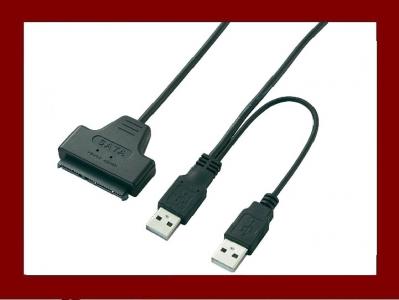
    There is a cable in the attachment.

    The question is, will I connect a 3.5 inch SATA 2/3 drive to this cable?
    Theoretically, having an additional power supply on the hub, it should go on.
    But does this plug fit, the wide one? Seemingly it's one and the same
    however, I prefer to ask.
    Attachments:
    • Compatibility of 3.5 Inch SATA 2/3 Drive with USB Adapter Cable and Additional Power Supply 5992456118.jpeg (12.98 KB) You must be logged in to download this attachment.
  • ADVERTISEMENT
  • #2 15873345
    ryszard1955
    Level 20  
    Posts: 257
    Help: 34
    Rate: 22
    I have been using this cable for a long time and I can always connect a spare USB drive. Of course, this wide plug has to fit into the slots on the drive.
  • #3 15873830
    bicik4096
    Level 4  
    Posts: 726
    Rate: 7
    ryszard1955 wrote:
    I have been using this cable for a long time and I can always connect a spare USB drive. Of course, this wide plug has to fit into the slots on the drive.


    Must match or does it really fit? :) Can you connect a 3.5-inch drive to such an adapter, will it start correctly? I want to buy more of them in one go, so I want to be sure.
  • #4 15873842
    ryszard1955
    Level 20  
    Posts: 257
    Help: 34
    Rate: 22
    Of course, if it's for a 3.5 inch drive then it must match.
  • #5 15874150
    bicik4096
    Level 4  
    Posts: 726
    Rate: 7
    ryszard1955 wrote:
    Of course, if it's for a 3.5 inch drive then it must match.


    ADAPTER CABLE USB HDD 7 + 15 pin 2.5 "SATA - will the 3.5 drive be fine?
    17 Aug 2016 00:05

    - this is the question with which I start the thread.
  • ADVERTISEMENT
  • #7 15874238
    Freddy
    Level 43  
    Posts: 19997
    Help: 1394
    Rate: 2815
    jackraymund wrote:
    SATA is compatible on any version, from 1 to 3.
    Yes, but only down.
  • #8 16970296
    dell44
    Level 16  
    Posts: 338
    Help: 13
    Rate: 30
    :D The plug fits but the 3.5 "drive will not move, it needs additional 12v and 3.3v
  • #9 16970309
    dell44
    Level 16  
    Posts: 338
    Help: 13
    Rate: 30
    Hello.
    I wanted to advise you if I was doing well. I want to connect a 3.5 "disk to this sata / usb adapter and give the missing molex voltage from the computer power supply as in the photo, but I am afraid if I am doing it correctly and I will not burn the usb in the laptop.
    Attachments:
    • Compatibility of 3.5 Inch SATA 2/3 Drive with USB Adapter Cable and Additional Power Supply 20180117_175239.jpg (129.16 KB) You must be logged in to download this attachment.
    • Compatibility of 3.5 Inch SATA 2/3 Drive with USB Adapter Cable and Additional Power Supply 1.jpg (62.6 KB) You must be logged in to download this attachment.
  • ADVERTISEMENT
  • #10 16970375
    icosie
    Level 34  
    Posts: 1908
    Help: 298
    Rate: 239
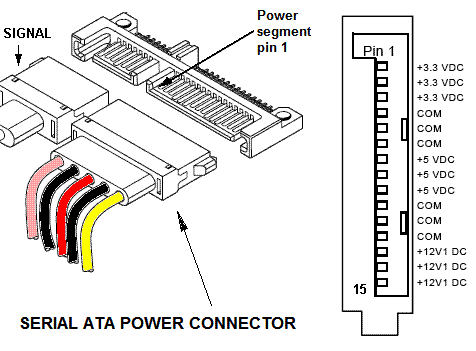
    +12 only on the three right pins, the next one is on GND and delayed start support

    link
  • #11 16970621
    dell44
    Level 16  
    Posts: 338
    Help: 13
    Rate: 30
    Thank you for your help, is this connection enough without + 3.3v
    Attachments:
    • Compatibility of 3.5 Inch SATA 2/3 Drive with USB Adapter Cable and Additional Power Supply 20180117_175239.jpg (126.79 KB) You must be logged in to download this attachment.
  • #12 16970631
    Freddy
    Level 43  
    Posts: 19997
    Help: 1394
    Rate: 2815
    Of course it's enough. 3.3V voltage is not used in 3.5 "drives
  • #13 16970634
    bicik4096
    Level 4  
    Posts: 726
    Rate: 7
    dell44 wrote:
    Thank you for your help, is this connection enough without + 3.3v


    Hello, when you connect, please take a picture and tell me if everything works.
  • ADVERTISEMENT
  • #14 16970653
    Freddy
    Level 43  
    Posts: 19997
    Help: 1394
    Rate: 2815
    It works for sure, I have been using this connection for over a year and it only uses 12V to power a 3.5 "SATA drive.
  • #15 16970718
    dell44
    Level 16  
    Posts: 338
    Help: 13
    Rate: 30
    Something wrong, I connected in turn -12v as in the photo and the disk does not move, can these three masses together give?
    Attachments:
    • Compatibility of 3.5 Inch SATA 2/3 Drive with USB Adapter Cable and Additional Power Supply 20180118_134755.jpg (109.48 KB) You must be logged in to download this attachment.
  • #16 16970725
    Freddy
    Level 43  
    Posts: 19997
    Help: 1394
    Rate: 2815
    You are to connect the ground (GND) and + 12V
  • #17 16970734
    dell44
    Level 16  
    Posts: 338
    Help: 13
    Rate: 30
    Where to give this mass GND best and whether + 5v from usb must be started because I do not risk it yet :D
  • #18 16970844
    Freddy
    Level 43  
    Posts: 19997
    Help: 1394
    Rate: 2815
    Compatibility of 3.5 Inch SATA 2/3 Drive with USB Adapter Cable and Additional Power Supply
  • #19 16978649
    dell44
    Level 16  
    Posts: 338
    Help: 13
    Rate: 30
    For me, the drive starts with + 5V, and I do not connect to the USB in my laptop because I have the + 5V from the molex of the computer power supply, so I do not know if the USB in my laptop will not burn?

    Added after 17 [hours] 45 [minutes]:

    I gave all the voltage more or less like in the photo from the computer's power supply, the drive is detected by the phone, but can I connect to the laptop where + 5v also comes out. will not burn the laptop usb?
    Attachments:
    • Compatibility of 3.5 Inch SATA 2/3 Drive with USB Adapter Cable and Additional Power Supply 20180118_134755_1462951.jpg (110.51 KB) You must be logged in to download this attachment.

Topic summary

✨ The discussion revolves around the compatibility of a 3.5-inch SATA 2/3 drive with a USB adapter cable that includes an additional power supply. Users confirm that the wide plug of the adapter should fit the SATA drive, and the SATA interface is compatible across versions 1 to 3. However, it is emphasized that a 3.5-inch drive requires a 12V power supply to operate, as it cannot run solely on the 5V provided by USB. Some users share their experiences connecting the drive using a molex power supply, ensuring proper connections to ground (GND) and +12V. Concerns about potential damage to USB ports on laptops when connecting the drive are also raised, with users advising caution and sharing successful connection methods.
Generated by the language model.

FAQ

TL;DR: A 3.5-inch SATA HDD can work over a USB–SATA cable, but it needs external power; “+12 only on the three right pins.” Include +12 V and GND, not 3.3 V. [Elektroda, icosie, post #16970375]

Why it matters: This prevents non‑spinning drives and protects your USB port from wiring mistakes for quick data recovery.

This FAQ is for DIY users asking how to connect 3.5-inch SATA 2/3 HDDs using USB adapters and separate power supplies.

Quick Facts

Will a 3.5-inch SATA 2/3 drive work with a simple USB–SATA cable?

Yes, if you add external power. Use the USB–SATA cable for data and supply +12 V and GND to the drive’s SATA power connector. Without +12 V, a 3.5-inch HDD will not spin up. “I have been using this connection for over a year,” notes one user. [Elektroda, Freddy, post #16970653]

Does a 2.5-inch “7+15 pin” USB–SATA adapter physically fit a 3.5-inch HDD?

Yes. The wide SATA plug is the same style and fits both 2.5-inch and 3.5-inch SATA drives. Just remember that 3.5-inch models still need separate power. “This wide plug has to fit into the slots on the drive.” [Elektroda, ryszard1955, post #15873345]

Do I need a separate power supply for a 3.5-inch SATA drive over USB?

Yes. Provide +12 V and GND to the SATA power connector. USB’s 5 V is not enough to spin 3.5-inch drives. Users report reliable operation when powering only the +12 V rail externally while the USB cable handles data. [Elektroda, Freddy, post #16970653]

Is 3.3 V required for 3.5-inch SATA HDDs?

No. “3.3 V voltage is not used in 3.5" drives.” You only need +12 V (and GND) for spindle and electronics. This simplifies wiring when using a bench PSU or a PC power supply. [Elektroda, Freddy, post #16970631]

Which SATA power pins carry +12 V and ground?

+12 V is on the three rightmost pins of the SATA power block when viewed from the plug end. The next pin is GND/delayed start support. Quote: “+12 only on the three right pins.” Triple‑check orientation before applying power. [Elektroda, icosie, post #16970375]

What happens if I wire −12 V or skip ground by mistake?

The drive won’t spin and you risk damage. One user saw no spin after incorrect wiring. The correction was simple: connect GND and +12 V only. “You are to connect the ground (GND) and +12 V.” [Elektroda, Freddy, post #16970725]

Are SATA I, II, and III devices compatible with each other?

Yes, with downward compatibility. A SATA III drive negotiates down to SATA II or I speeds on older hosts, but not up. Quote: “Yes, but only down.” Plan for reduced throughput when mixing generations. [Elektroda, Freddy, post #15874238]

Is it safe to feed 5 V from a PSU while also plugging the USB cable into a laptop?

Use caution. One user powered +5 V from Molex and hesitated to connect USB, worrying about backfeeding the laptop port. The thread does not confirm safety. Avoid connecting until you isolate the USB 5 V line or use a data‑only cable. [Elektroda, dell44, post #16978649]

How do I power a 3.5-inch HDD with a USB–SATA adapter (3 steps)?

  1. Connect the USB–SATA cable to the drive’s data+power shell for data.
  2. From a PSU, wire +12 V to the three rightmost SATA power pins and connect GND to ground pins.
  3. Verify polarity and pin alignment; then apply power and plug in USB. [Elektroda, icosie, post #16970375]

Will this setup work with a phone via OTG?

It can enumerate if the drive has proper external power. A user reported the phone detected the drive once +12 V/5 V power was provided externally. File access then depends on the phone’s OTG and filesystem support. [Elektroda, dell44, post #16978649]

Can I use the same USB–SATA cable for 2.5-inch drives?

Yes. The 7+15 SATA connector fits both sizes. The forum user confirms the wide plug fits and works across drives. For 2.5-inch HDD/SSD, power needs differ by model, but the connector is identical. [Elektroda, ryszard1955, post #15873345]

What does “7+15 pin” mean on the adapter listing?

It describes standard SATA connectors: 7 pins for data plus 15 pins for power in one shell. The thread starter referenced a “USB HDD 7 + 15 pin 2.5" SATA” cable while asking about 3.5-inch use. [Elektroda, bicik4096, post #15874150]

Can I power the drive from a PC PSU’s Molex connector?

Yes, many users do. One participant proposed feeding the missing voltages from a computer PSU Molex while using a SATA–USB bridge for data. Ensure you deliver +12 V and GND on the correct SATA power pins. [Elektroda, dell44, post #16970309]

Why didn’t my drive spin after I connected power?

Check for wiring errors. A user initially used the wrong voltage and saw no spin. The fix: connect only +12 V and GND to the SATA power pins, then try again. This resolved the issue. [Elektroda, Freddy, post #16970725]
Generated by the language model.
ADVERTISEMENT