


logo elektroda
logo elektroda
X
logo elektroda

HDCP HDMI Error with Vectra Decoder HMC3021 and Samsung TV: Seeking Adapter Cable

stasiekjunior 40332 9
Best answers LABEL_AI_GENERATED

Can I use an adapter cable to avoid the HDCP error when connecting a Vectra decoder or PS3 to a Samsung LE32B350 via HDMI?

No, there is no adapter cable that will bypass this HDCP problem on this TV; the LE32B350 only supports an older HDCP version, and the decoder likely requires a newer one, so the practical options are buying a newer TV or using the regular EURO/SCART connection [#16987889] The model itself is listed as HDCP-capable, so the issue is not simply that the TV lacks HDCP support [#16986331] Trying other HDMI cables, different HDMI sockets, and restoring the TV to factory settings did not help [#16986369] [#16986434] [#16987098]
AI summary based on the discussion. May contain errors.
ADVERTISEMENT
Treść została przetłumaczona polish » english Zobacz oryginalną wersję tematu
  • #1 16986245
    stasiekjunior
    Level 10  
    Posts: 52
    Rate: 41
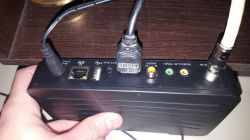
    Hello. Today I was a fitter and installed TV Vectre with a basic decoder. The problem is that when connecting via HDMI tv shows HDCP error. Previously, I had a problem with the console, PS3 where there was also a display problem. Is there an adapter cable to avoid this? I'm not interested in buying a new TV. In the picture of the set-top box, I have VGA, COMPONENT and both HDMI on the TV. HDCP HDMI Error with Vectra Decoder HMC3021 and Samsung TV: Seeking Adapter Cable
  • ADVERTISEMENT
  • #2 16986282
    Anonymous
    Anonymous  
  • #3 16986299
    stasiekjunior
    Level 10  
    Posts: 52
    Rate: 41
    I'm sorry, I did not add: le32b350
  • ADVERTISEMENT
  • #5 16986369
    stasiekjunior
    Level 10  
    Posts: 52
    Rate: 41
    Yes checked on 3 cables. Earlier I do not know how much it can help the PS3 worked without any problem for some time does not work anymore, on another TV is ok. The HMDI laptop works without a problem
  • ADVERTISEMENT
  • #6 16986386
    Pedros050
    Level 43  
    Posts: 17914
    Help: 2471
    Rate: 3926
    An HD ready 720p TV set but should it have an image from this decoder as well as the console itself detects the resolution of the TV? You hooked up to one and two HDMI sockets and nothing?
  • #7 16986399
    stasiekjunior
    Level 10  
    Posts: 52
    Rate: 41
    So I checked everything if possible, the console through reset should display the image in a lower resolution, despite it does not display anything. One decoder shows a blue background, the other at the fitter just showed an HDCP error. As I wrote above, the laptop works ok on 2 HDMI sockets.
  • ADVERTISEMENT
  • #8 16986434
    Pedros050
    Level 43  
    Posts: 17914
    Help: 2471
    Rate: 3926
    And try to restore this TV to the factory settings and after this operation, connect this HDMI cable?
  • #9 16987098
    stasiekjunior
    Level 10  
    Posts: 52
    Rate: 41
    Unfortunately, none of these brings the desired effect.
  • #10 16987889
    KOCUREK1970
    Network and Internet specialist
    Posts: 35667
    Help: 3860
    Rate: 5488
    stasiekjunior wrote:
    Unfortunately, none of these brings the desired effect.

    Well, there will be no solution here - except for buying a new tv or switching to a regular EURO.
    TV supports the old version of HDCP protection (protocol) and you can not change anything, because this hardware conditioning and the decoder probably has a newer version.

Topic summary

LABEL_AI_GENERATED
The discussion revolves around an HDCP error encountered when connecting a Vectra HMC3021 decoder to a Samsung LE32B350 TV via HDMI. The user has tried multiple HDMI cables and confirmed that other devices, such as a laptop, work without issues on the TV's HDMI ports. Suggestions include checking the TV's settings, restoring factory settings, and considering the compatibility of HDCP versions between the older TV and the newer decoder. Ultimately, it is suggested that the only solutions may involve purchasing a new TV or using alternative connection methods like EURO connectors, as the TV supports an older HDCP version that may not be compatible with the decoder.
AI summary based on the discussion. May contain errors.
ADVERTISEMENT