FAQ
TL;DR: Goodram CX300 firmware is updated via Linux only—“We currently do not have a Windows version for this model.” One OS supported (Linux). Use the Reinitial_SBFM711_V1 tool. Back up first. [Elektroda, hynio82, post #17036103]
Why it matters: This FAQ helps CX300 owners fix MCP79 SATA issues and safely run the Linux-only updater.

Quick Facts
- Linux-only updater supplied by Goodram support; no Windows build for CX300. [Elektroda, hynio82, post #17036103]
- Update process erases all data; perform a full backup before flashing. [Elektroda, hynio82, post #17036103]
- Target fix: Nvidia MCP79 bridge handling of SATA devices with CX300. [Elektroda, hynio82, post #17024603]
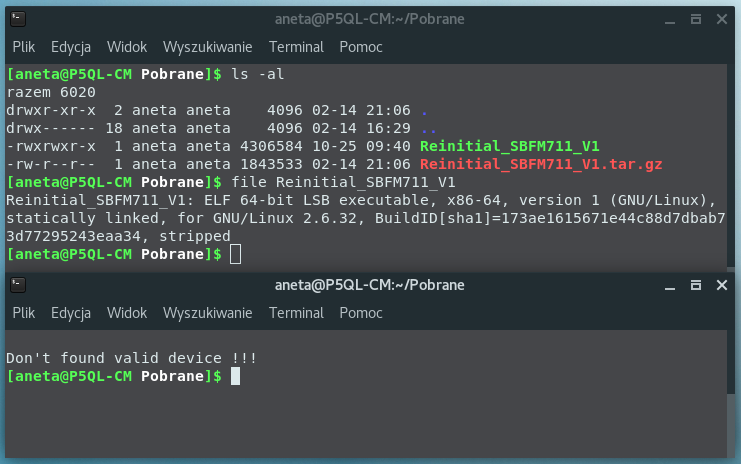
- Updater file observed: Reinitial_SBFM711_V1, size ~4,306,584 bytes. [Elektroda, adamjk, post #17037609]
- Community note: one user suggested factory/JTAG flashing for some cases. [Elektroda, max-bit, post #17021603]
What software updates the Goodram CX300 firmware?
Users received a Linux archive containing an executable named Reinitial_SBFM711_V1 for flashing the CX300. [Elektroda, adamjk, post #17037609]
Is there a Windows firmware tool for the CX300?
No. Goodram support stated, “We currently do not have a Windows version for this model,” and provided only a Linux build. [Elektroda, hynio82, post #17036103]
Will the CX300 firmware update wipe my data?
Yes. The vendor warned the update deletes all data on the drive. Back up before you proceed. [Elektroda, hynio82, post #17036103]
Why would I need this update on certain laptops or desktops?
It addresses SATA handling problems with systems using the Nvidia MCP79 bridge, improving CX300 compatibility. [Elektroda, hynio82, post #17024603]
How do I run the Linux updater for CX300? (3-step How-To)
- Boot a Linux Live USB and ensure the CX300 is connected.
- Extract the archive and locate Reinitial_SBFM711_V1.
- Run the executable and follow on-screen instructions to reinitialize firmware.
[Elektroda, adamjk, post #17037609]
Does the tool work on modern 64‑bit Linux distros like Manjaro?
Yes. A user launched it on 64‑bit Manjaro Budgie and shared a screenshot of successful execution. [Elektroda, WojtasJD, post #17037900]
What problem symptoms point to the MCP79 issue the update targets?
SATA devices may be handled incorrectly under the MCP79 bridge, causing recognition or stability issues with the CX300. [Elektroda, hynio82, post #17024603]
Where can I get the CX300 firmware if it’s not on the website?
Request it from Goodram support; users received the Linux package by email when the site lacked a download. [Elektroda, hynio82, post #17016416]
What’s inside the package Goodram sent for Linux?
Reports show the archive contains an executable named Reinitial_SBFM711_V1 (~4.3 MB) intended to reinitialize the drive. [Elektroda, adamjk, post #17037609]
Can I use Goodram’s SMART tool instead of the Linux updater?
One user mentioned a SMART utility, but the vendor directed CX300 owners to the Linux updater for firmware changes. [Elektroda, hynio82, post #17036103]
Is factory-only (JTAG) flashing required for CX300 firmware?
A community member suggested factory JTAG flashing, but others used the Linux executable shared by support. [Elektroda, max-bit, post #17021603]
How can I verify the controller/firmware before flashing?
You can check with Phison SATA Toolbox to view controller and firmware details for the CX300. [Elektroda, pidar, post #17038094]
What if the manufacturer doesn’t send instructions?
Ask Goodram for official flashing steps. Community members recommended requesting detailed guidance from support. [Elektroda, mbo, post #17016500]
Can I share the firmware on forums to get help?
Yes, a member suggested posting the file and describing the exact CX300 firmware to be updated for guidance. [Elektroda, melanchel, post #17018450]
Any usage tips before I run the tool?
Back up everything, connect the CX300 directly over SATA, and run the Linux executable as instructed by support. “Back up first.” [Elektroda, hynio82, post #17036103]
What does the on-screen usage look like when the tool starts?
Screenshots show command-line usage output when launching the Linux updater, confirming it’s a CLI utility. [Elektroda, sylweksylwina, post #17037684]