logo elektroda
logo elektroda
X
logo elektroda
Dostępna jest polska wersja

Czy wolisz polską wersję strony elektroda?

Nie, dziękuję Przekieruj mnie tam

Using Auraton 2005 Temperature Controller: Setup Tips for Dual Function Stove & Weekly Modes

pytlowany1 47904 13
ADVERTISEMENT
Treść została przetłumaczona polish » english Zobacz oryginalną wersję tematu
  • #1 17411780
    pytlowany1
    Level 15  
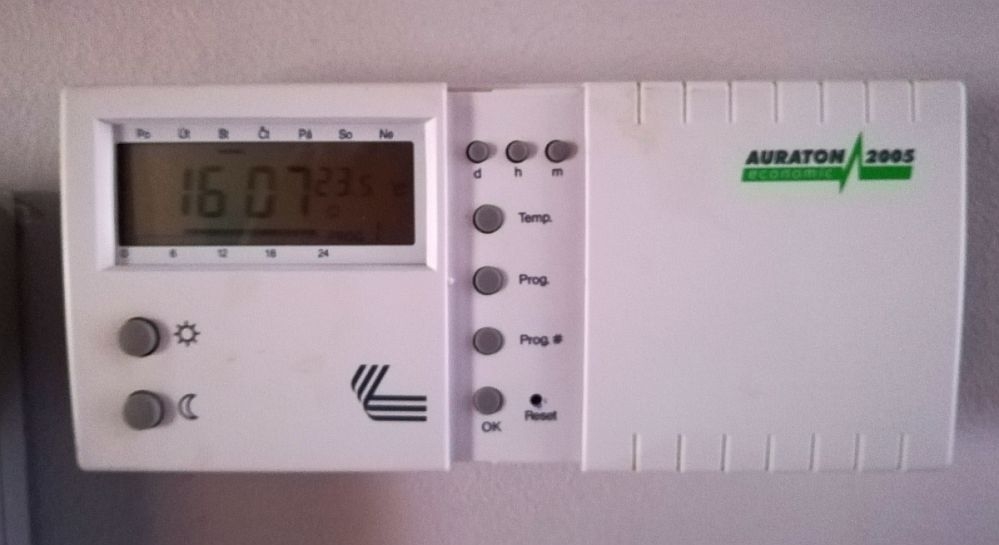
    Hello, I have a regulator in the apartment connected to the stove with a dual function.
    Please help me set the regulator so that you do not have to spin it all the time.
    I will give points for help. Thanks and best regards

    1.How to set (edit) the lower and upper temperature?
    my interval is 19st to 21st degree
    2. How to set the whole week (from Mon to Fri) I want to heat from 6.30 to 23.00
    On Saturday and Sunday from 7.30 to 23.00
    I work at night at home from 23.00 to 3.00 (19st to 20st) or as a hand warmer, so that it is not as warm as in the daytime, i.e. more economical.
    4.How to turn off the heating for the time of departure, say 3.4 hours?

    Using Auraton 2005 Temperature Controller: Setup Tips for Dual Function Stove & Weekly Modes
  • ADVERTISEMENT
  • #2 17411946
    bro2004
    Level 30  
    Download the user manual for auraton 2005 and everything is written there. Available in googles.
  • ADVERTISEMENT
  • #3 17411982
    pytlowany1
    Level 15  
    I know this but I do not have time to read, but maybe someone will help.
  • #4 17411998
    stasiek70
    Level 13  
    Need help reading? If you do not have time to read the instructions, then you may forget to use the regulator.
  • #5 17412022
    pytlowany1
    Level 15  
    It's best that someone who uses it, you do not have to sacrifice and read ;-)
  • ADVERTISEMENT
  • Helpful post
    #6 17412594
    goldzik15
    Level 16  
    To write how to set it, write this manual. You can not do it "shortcuts"

    Instruction From page 11
  • #7 17434734
    pytlowany1
    Level 15  
    I'm slowly digesting Auraton.
    The stove is switched only to hot water. The controller sometimes has a circle symbol which, according to the instructions, shows the operation of the furnace. It can be like that? that the regulator switches off the stove at 22st temperature in the house.
  • #8 17434782
    ls_77
    Level 38  
    As colleagues wrote above - see the instructions. Whether you read here or in the instructions will come out on the same.

    And what boiler?
  • ADVERTISEMENT
  • #9 17434823
    pytlowany1
    Level 15  
    As for the settings, I do not ask anymore. I mean, the circle is sometimes included, although I have not yet started the heating season. Does this mean that someone has set a minimum of 22stages at home?
    Boiler Beretta Ciao II
  • #10 17434965
    goldzik15
    Level 16  
    If a circle appears, it means that the kittens are to heat. As you have turned off the CO function on the boiler, you did not heat the central one. Has the room temperature dropped? It may have sharp airing the room and it turned on.
  • #11 17434973
    pytlowany1
    Level 15  
    It was not very well ventilated. In the morning and sometimes in the evening, but it will soon shine.
    The temperature the regulator then displays is 22st.
    I'm just asking if, for example, the regulator will not be damaged, how it will be switched on and the stove will be turned off.
    I do not have to heat radiators yet.
  • #12 17435048
    ls_77
    Level 38  
    Nothing will break.
    When the air temperature in the room drops, the contact in the thermostat will switch.
    Since you have summer mode set on the boiler, it will not turn the boiler on.
  • #13 17473190
    pytlowany1
    Level 15  
    I have recently started using the regulator. I do not change programs. I'm going on Program 1.
    Daytime temperature set at 21st and night at 19.5.
    I still have a question. I'm not talking about extending the program, e.g. as soon as the night mode is on, I turn on the sun and then shows the hand icon and warms up.
    But the fact that, for example, during the day is cold in the apartment (but the temp set has not yet dropped) and I want to heat once with about an hour, eg. 23st, manually, so that I turn off the stove and go back to program 1.
    Now I do it so that I set the comfort temperature at 23st. But it is uncomfortable because then change back to 21 you have to click through the sun until all temperatures are up to 21. Please help.
  • #14 18205265
    darkoslaw1
    Level 1  
    Because that's how it works and it's OK.

Topic summary

✨ The discussion revolves around setting up the Auraton 2005 temperature controller for a dual-function stove in an apartment. The user seeks assistance in configuring the device to maintain a temperature range of 19°C to 21°C, scheduling heating from Monday to Friday between 6:30 AM and 11:00 PM, and from 7:30 AM to 11:00 PM on weekends. Additionally, they want to manage a lower temperature setting during night hours and inquire about temporarily turning off heating for a few hours. Responses emphasize the importance of consulting the user manual for detailed instructions, with some users sharing their experiences and settings. The conversation also touches on the functionality of the controller, including its operation indicators and the implications of setting temperatures.
Generated by the language model.

FAQ

TL;DR: Set Auraton 2005 day/night setpoints and weekly timers; a 7–10°F setback can save up to 10% yearly, and “you can save as much as 10% a year” with scheduled setbacks. This FAQ covers icons, summer‑mode safety, and quick programming. [DOE, 2023]

Why it matters: This helps Auraton 2005 owners quickly program comfort vs. economy temperatures, decode icons, and avoid boiler missteps.

Quick Facts

  • Weekly scheduling with Comfort/Night setpoints and a manual override (“hand” icon) is supported on Auraton 2005. [AURATON 2005 RTH Instruction]
  • Circle icon = heating request from the thermostat’s relay (call for heat). [Elektroda, goldzik15, post #17434965]
  • In boiler summer mode (DHW‑only), CH calls won’t start heating; “Nothing will break.” [Elektroda, ls_77, post #17435048]
  • Setbacks of 7–10°F for 8 hours can cut annual heating energy by up to ~10%. [DOE, 2023]

How do I set the Day (comfort) and Night (economy) temperatures to 21°C and 19°C?

Use the Sun and Moon setpoints.
  1. Press Sun and set 21°C with the arrows.
  2. Press Moon and set 19°C.
  3. Ensure Auto/schedule mode is active so programs use these values. These two temperatures drive all scheduled periods. You can still use the hand icon for manual override when needed. [AURATON 2005 RTH Instruction]

How do I program Mon–Fri 06:30–23:00 and Sat–Sun 07:30–23:00 heating?

Create Comfort blocks for those windows.
  1. Enter Program mode and select Mon–Fri.
  2. Set Comfort from 06:30 to 23:00; the rest stays Night.
  3. Select Sat–Sun and set Comfort from 07:30 to 23:00. Save and return to Auto. The controller will use your Comfort/Night setpoints for those periods. [AURATON 2005 RTH Instruction]

How should I schedule a cooler 23:00–03:00 period while I work at night?

Insert a Night block in that window.
  1. In Program mode, select the relevant days.
  2. Add a Night segment from 23:00 to 03:00.
  3. Keep your Night setpoint lower (e.g., 19°C) for economy. After 03:00, the thermostat returns to your next Comfort period. [AURATON 2005 RTH Instruction]

What’s the fastest way to turn heating off for 3–4 hours when I leave?

Use a temporary manual change.
  1. Activate manual override (hand icon) and set a low temperature.
  2. Alternatively, select OFF/antifrost mode if available on your model.
  3. Cancel on return or let the next scheduled event resume Auto. This avoids editing your weekly program. [AURATON 2005 RTH Instruction]

What does the circle icon on Auraton 2005 mean?

The circle indicates a heating request. The thermostat has closed its relay to call for heat. You may see it after airing or whenever room temperature dips near the setpoint. If your boiler’s CH is disabled, radiators will not heat despite the icon. [Elektroda, goldzik15, post #17434965]

Will anything break if it calls for heat while the boiler is set to DHW‑only?

No. The thermostat may request heat, but with CH disabled the boiler will ignore the call. “Nothing will break.” The circle icon can still appear because the thermostat simply shows demand. [Elektroda, ls_77, post #17435048]

Can I boost to 23°C for about an hour, then return to Program 1 automatically?

Auraton 2005 holds manual override until the next scheduled change. It does not offer a timed one‑hour boost. Add a one‑hour Comfort block or adjust the next event, then restore your standard schedule. “Because that’s how it works and it’s OK.” [Elektroda, darkoslaw1, post #18205265]

Does Auraton 2005 control hot water on a dual‑function boiler (e.g., Beretta Ciao II)?

No. Auraton 2005 acts as a room thermostat for central heating. Domestic hot water is managed by the boiler itself. In summer (DHW‑only) mode, CH calls are ignored, so radiators stay off even if the thermostat requests heat. [Elektroda, ls_77, post #17435048]

Why does the controller show 22°C yet still display the circle?

It uses hysteresis, so a heat request can appear near the setpoint, especially after strong airing. The circle only indicates a call. If your boiler’s CH is off, nothing heats despite the icon. Restore normal operation by enabling CH on the boiler. [Elektroda, goldzik15, post #17434965]

How do I cancel the manual override (hand icon) and return to automatic schedule?

Press the Auto/Schedule key to exit manual override, or wait for the next programmed period. The hand icon disappears when automatic control resumes. This prevents accidental long manual holds. [AURATON 2005 RTH Instruction]

Is using day/night setbacks actually worth it?

Yes. Setting back 7–10°F for eight hours can save up to 10% annually on heating. Use Comfort around 21°C when home and Night around 19°C when away or sleeping. Align your schedule with occupancy for best savings and comfort. [DOE, 2023]

How do I revert to the built‑in Program 1 defaults?

Select Program 1 as the active weekly schedule in Program mode, confirm, and return to Auto. Program 1 restores the factory time blocks that use your current Comfort/Night temperatures. This is a quick way to get back to a known baseline. [AURATON 2005 RTH Instruction]
Generated by the language model.
ADVERTISEMENT