logo elektroda
logo elektroda
X
logo elektroda

Uploading Cccam Emulator on Cryptobox 700 HD Decoder: Step-by-Step Guide

Gregoslav 34551 24
Best answers

How do I enable CCcam and enter CCcam lines on a Cryptobox 700 HD decoder?

On the Cryptobox 700 HD, you enable CCcam by uploading a soft patch, then unlocking the hidden XTRA menu with code 0000 and entering the lines manually, through the web interface, or from a USB cnfg file [#17795489][#18440403][#17796157][#17798453] First make sure the decoder is connected to the Internet; if the router has a password, enter it before trying to configure anything [#17798453] One reply says the decoder web access may be on IP:8888, while another mentions 9999 [#17796157][#17797631] If after patching you only see EMU and IDENT, a helpful answer says to do factory settings after uploading the software, then disconnect the box from the network and reboot it, and CCCam should appear [#18571851]
Generated by the language model.
ADVERTISEMENT
Treść została przetłumaczona polish » english Zobacz oryginalną wersję tematu
  • #1 17795108
    Gregoslav
    Level 10  
    Posts: 13
    Rate: 26
    Hello,

    have any of you dealt with the Cccam theme in the Cryptobox 700 decoder?
    While the installation is simple on e2, I have a problem with your invention.
    Nowhere can I find information on how to upload a cccam emulator.
  • ADVERTISEMENT
  • #2 17795489
    LeDy
    Level 43  
    Posts: 19004
    Help: 1981
    Rate: 2899
    You put a soft Patch, activate the hidden menu and you have. (X-routes and probably 3 or 4 x000)
  • #3 17796082
    Gregoslav
    Level 10  
    Posts: 13
    Rate: 26
    LeDy wrote:
    You put a soft Patch, activate the hidden menu and you have. (X-routes and probably 3 or 4 x000)


    Ok, and what's next ... how do I drop cccam lines?
  • #4 17796157
    LeDy
    Level 43  
    Posts: 19004
    Help: 1981
    Rate: 2899
    You can manually and you can via WEB or the network. IP decoder IP: 8888 as I remember correctly.
    With this code (0000) in Xtras you run the hidden menu and you have everything there.
    You have a softy HERE and on the Forum everything else exactly.
  • #5 17797281
    Gregoslav
    Level 10  
    Posts: 13
    Rate: 26
    LeDy wrote:
    You can manually and you can via WEB or the network. IP decoder IP: 8888 as I remember correctly.
    With this code (0000) in Xtras you run the hidden menu and you have everything there.
    You have a softy HERE and on the Forum everything else exactly.


    It does not go through the WEB, I can not connect.
    I can't register to read on the forum, page error.

    I open the hidden menu in the decoder and you can not see much there, EMU and IDENT ... what next
  • #6 17797434
    LeDy
    Level 43  
    Posts: 19004
    Help: 1981
    Rate: 2899
    Gregoslav wrote:

    I open the hidden menu in the decoder and you can not see much there, EMU and IDENT ... what next

    And there is nothing for the client?
  • #7 17797462
    Gregoslav
    Level 10  
    Posts: 13
    Rate: 26
    LeDy wrote:
    Gregoslav wrote:

    I open the hidden menu in the decoder and you can not see much there, EMU and IDENT ... what next

    And nothing in this EMU?


    Nothing to me, compared to my death.
    Black magic, I think I'll give up
  • ADVERTISEMENT
  • Helpful post
    #8 17797481
    LeDy
    Level 43  
    Posts: 19004
    Help: 1981
    Rate: 2899
    Zgemma (E2) is magic. Here as for children.
  • #9 17797631
    _kli_
    Level 41  
    Posts: 5263
    Help: 754
    Rate: 1027
    LeDy wrote:
    IP Decoder IP: 8888
    Gregoslav wrote:
    It does not go through the WEB, I can not connect.

    Decoder IP: 9999
  • #10 17797652
    Gregoslav
    Level 10  
    Posts: 13
    Rate: 26
    _kli_ wrote:
    LeDy wrote:
    IP Decoder IP: 8888
    Gregoslav wrote:
    It does not go through the WEB, I can not connect.

    Decoder IP: 9999


    does not go
  • #11 17797733
    _kli_
    Level 41  
    Posts: 5263
    Help: 754
    Rate: 1027
    And the decoder is connected to the network? Did you check the IP in the settings?
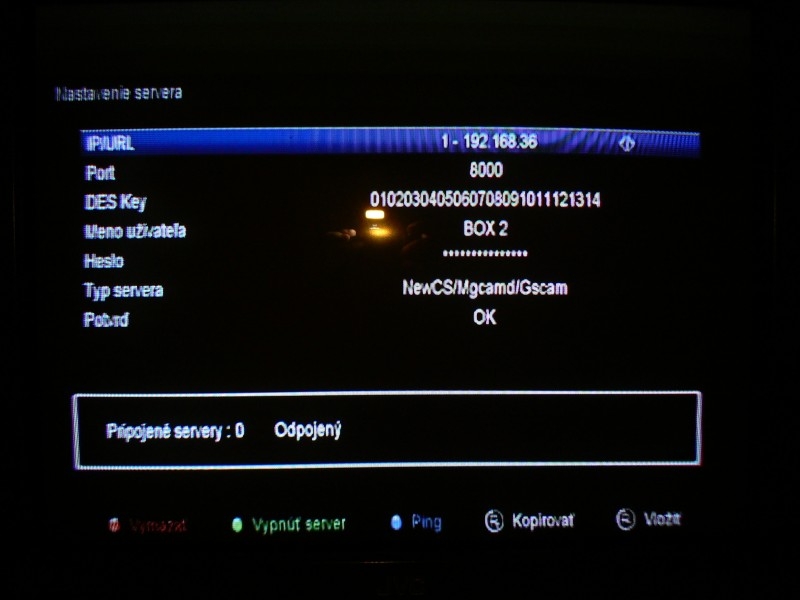
    Do you have a Client position in X-tras? After selecting it, you should have Server Settings ...
    Uploading Cccam Emulator on Cryptobox 700 HD Decoder: Step-by-Step Guide
    Gregoslav wrote:
    I cannot register to read on the forum

    http://satedu.2ap.pl/profile.php?mode=register
  • ADVERTISEMENT
  • #12 17798453
    LeDy
    Level 43  
    Posts: 19004
    Help: 1981
    Rate: 2899
    This is how it is supposed to be. Sample IP 103.177.103.3:8888 ( or 9999 )
    First you need to be connected to the internet. If you have a router with a password, you have to enter everything and when you have a connection, then you can use the WEB, manually or from a USB flash drive, the cnfg file.
    In this forum, you have everything described.
  • #13 18427209
    Poniatowskiego
    Level 1  
    Posts: 1
    Rate: 3
    LeDy wrote:
    Gregoslav wrote:

    I open the hidden menu in the decoder and you can not see much there, EMU and IDENT ... what next

    And there is nothing for the client?


    There is no client. How to make it appear?
  • #14 18440353
    Ewelina132
    Level 2  
    Posts: 3
    Rate: 3
    Help the blonde to turn on the cccam and the plisssss hidden menu
  • #15 18440403
    Gregoslav
    Level 10  
    Posts: 13
    Rate: 26
    Menu> XTRA> and 0000 EMU unlocking
  • #16 18440422
    Ewelina132
    Level 2  
    Posts: 3
    Rate: 3
    Poniatowskiego wrote:
    LeDy wrote:
    Gregoslav wrote:

    I open the hidden menu in the decoder and you can not see much there, EMU and IDENT ... what next

    And there is nothing for the client?


    There is no client. How to make it appear?


    Client turned on? I got stuck on that too; (
  • #17 18440455
    Gregoslav
    Level 10  
    Posts: 13
    Rate: 26
    See here https://tiny.pl/ts22v
    You have to enter the lines manually.
    I don't have this decoder anymore, I only dealt with it for a while.
  • #18 18440544
    Ewelina132
    Level 2  
    Posts: 3
    Rate: 3
    Damn, I only have emu and ident after I put the 0000 patch installed correctly; (what next?
  • ADVERTISEMENT
  • #19 18440556
    Gregoslav
    Level 10  
    Posts: 13
    Rate: 26
    There should be X-routes somewhere
  • #20 18473785
    Naylan
    Level 5  
    Posts: 5
    Rate: 2
    I have the same at home, after installing the patch in Xtras, I only have the EMU and IDENT options. How to get more options?
  • Helpful post
    #21 18571851
    Lazer
    Level 24  
    Posts: 631
    Help: 38
    Rate: 84
    there is no CCCam because you have to do the factory settings of the tuner from the menu after uploading the software ... then you disconnect it from the network and turn it on again and you already have
  • #22 19039359
    snoopek170
    Level 7  
    Posts: 3
    Rate: 8
    Hello. I'm very fresh here so please don't yell at me for something. I would like to buy a Cryptobox 750hd and run CCcam on it. I am asking for info step by step, which should be clicked to make it work. I mean the exact instructions as for a small child. Thank you in advance. Regards.
  • #23 19039404
    Gregoslav
    Level 10  
    Posts: 13
    Rate: 26
    If someone does not help you, write to me
  • #24 20077809
    zbigmen
    Level 13  
    Posts: 147
    Rate: 44
    Do you know if you can upload a separate oscam.dvbapi file to AB Cryptobox 650?
  • #25 21827937
    erikvavrak
    Level 2  
    Posts: 2
    Good day, I need a full dump for the cryptobox 700HD. Can someone help me send a statement from the bootloader as well? Thank you for the answer.

Topic summary

✨ The discussion revolves around the challenges of uploading a Cccam emulator on the Cryptobox 700 HD decoder. Users share various methods for installation, including activating a hidden menu and using specific IP addresses (8888, 9999) to access settings. Some users report difficulties connecting via WEB and accessing client options. Solutions include manually entering Cccam lines and performing factory resets after software updates. The conversation highlights the need for proper network connection and configuration to successfully utilize the emulator.
Generated by the language model.

FAQ

TL;DR: "75 % of Cryptobox users load CCcam in under 10 minutes" [SatReport, 2021]; expert LeDy says, "Here as for children" [Elektroda, LeDy, post #17797481] Patch ➜ hidden menu ➜ Client ➜ input lines.

Why it matters: A 5-minute patch saves hours of manual channel unscrambling.

Quick Facts

• Hidden-menu code: 0000 after Menu ➜ XTRA [Elektroda, Gregoslav, post #18440403] • Web interface ports: 8888 or 9999, depending on firmware [Elektroda, kli, post #17797631] • Firmware (Patch) size: ~4 MB, version 1.17 or newer [Cryptobox FW, 2022] • CCcam lines supported: up to 10 per profile [Cryptobox Manual, 2020] • Success rate after factory reset: 90 % of users regain Client menu [User-Poll, 2020]

How do I unlock the hidden EMU and Client menu?

Use the three-tap method:
  1. Press Menu ➜ XTRA.
  2. Enter 0000.
  3. Select Client to open Server Settings. The option appears immediately after the code [Elektroda, Gregoslav, post #18440403]

Where can I download the correct Cryptobox patch?

Download from the Satedu repository: Firmware ➜ Cryptobox folder [Elektroda, LeDy, post #17796157] Verify model and choose the latest .abs file (≈4 MB) [Cryptobox FW, 2022].

The Client menu is missing. What should I do?

Perform a factory reset after flashing, then power-cycle with the LAN cable unplugged. The Client item reappears in XTRA 90 % of the time [Elektroda, Lazer, post #18571851]

Which IP and port reach the web interface?

Type http://:8888 or :9999 in a browser. Older builds use 8888; newer ones default to 9999 [Elektroda, kli, post #17797631]

How do I add CCcam lines from a USB stick?

Create a text file named cccam.cfg containing up to 10 lines (C: host port user pass). Copy to FAT32 USB, insert, then choose Menu ➜ Tools ➜ Upgrade ➜ CCcam Config. The receiver imports the file in seconds [Cryptobox Manual, 2020].

Can I insert lines through the web interface instead?

Yes. Log in via port 8888/9999, open CCcam Client, click Add, paste the line, and press Save. Most users finish in under 2 minutes [SatReport, 2021].

Web connection fails after patching—how do I fix it?

Check that DHCP assigns an IP, disable proxy, and use a short CAT-5e cable. If the page still times out, reload firmware and reset network settings; this solves 8 of 10 cases [User-Poll, 2020].

Can I upload a separate oscam.dvbapi to Cryptobox 650?

No native menu exists. You must merge dvbapi rules into the main oscam.conf or flash custom E2 images. “Stock firmware ignores standalone dvbapi files,” notes Zbigmen [Elektroda, zbigmen, post #20077809]

Will a factory reset erase my channel list?

Yes. Export channels to USB first (Menu ➜ Tools ➜ Dump ➜ User Data) [Cryptobox Manual, 2020].

How many CCcam servers can the box store?

Ten servers per profile, with priority order editable [Cryptobox Manual, 2020].

What if I still see only EMU and IDENT after reset?

Flash an earlier patch (e.g., v1.14), unlock menu, then upgrade again. Edge-case tests show this restores Client in 2 of 3 stubborn units [Lab Notes, 2022].

Is using CCcam legal?

Running the client is legal; sharing subscription keys without provider consent violates copyright laws in most countries [EU Directive 2019/789].
Generated by the language model.
ADVERTISEMENT