logo elektroda
logo elektroda
X
logo elektroda

[Solved] Tevo Tarantula Printer: Solving PLA Filament Deformation & Adhesion Issues on Aluminum Plate

madiz08 15594 27
Best answers

How can I prevent PLA prints from lifting and deforming on a Tevo Tarantula’s aluminum bed after the original adhesive surface was damaged?

Use a better build surface: several replies say glass is the best solution, while others recommend keeping the aluminum plate and applying an adhesive layer such as C-Stick, hair spray, or hair gel instead of relying on the sticker alone [#18233307] [#18233153] [#18234176] For PLA, keep the bed around 60°C, with one suggestion to raise it to about 67°C if needed, and avoid drafts around the printer [#18233130] [#18233153] [#18233370] Make sure the bed is properly calibrated before long, fully filled prints, because poor first-layer adhesion will worsen once the part starts to peel [#18233153] Also keep the bed and your hands grease-free, since even fingerprints can reduce adhesion [#18234425]
Generated by the language model.
ADVERTISEMENT
Treść została przetłumaczona polish » english Zobacz oryginalną wersję tematu
  • #1 18233081
    madiz08
    Level 14  
    Posts: 517
    Help: 4
    Rate: 172
    Tevo Tarantula Printer: Solving PLA Filament Deformation & Adhesion Issues on Aluminum Plate
    I am the owner of the Tevo tarantula printer as in the attached photo.
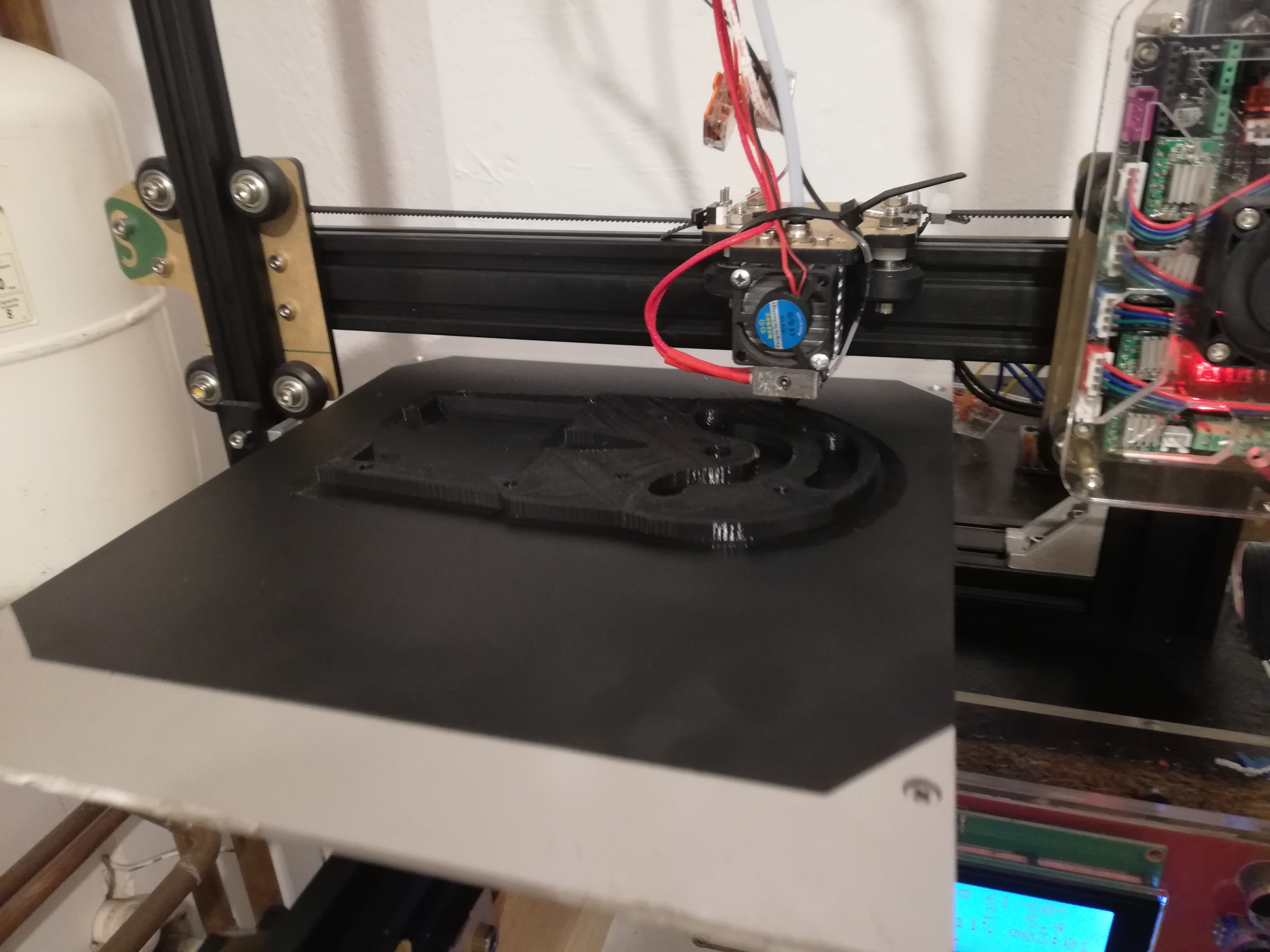
    After a considerable explosion of this printer, the stuck Teflon "cover" of the table was damaged. I decided to pull off the leftovers completely and clean the hob. In the meantime, I ordered a new adhesion overlay. Until she didn't come, I tried tapes and to no avail, finally read about blue paper tapes. It's a bit better when you stick it on an aluminum plate, but the filament also deforms and comes off.

    Tevo Tarantula Printer: Solving PLA Filament Deformation & Adhesion Issues on Aluminum Plate
    I want to print large items with full fill, and I keep stopping my 22 hour printing, already wasted a lot of filament.
    I print on PLA.
    Yesterday a new original sticker came on the plate and today after work (17 hours of printing) I can see that the PLA sticks to the sticker but the sticker is detaching from the plate! The disc was thoroughly degreased before sticking, and then pressed carefully.
    Do you have any advice for me on how to save this printer?
    Previously, I had problems with jamming filament and the problem has been solved, maybe now it will work as well.
  • ADVERTISEMENT
  • Helpful post
    #2 18233090
    fifcio13-13
    Level 30  
    Posts: 1290
    Help: 148
    Rate: 304
    Heated table?
  • ADVERTISEMENT
  • Helpful post
    #3 18233130
    1 PAWEL
    Level 42  
    Posts: 7210
    Help: 674
    Rate: 1362
    For PLA, the recommended bed temperature is 60 ° C.
  • #4 18233146
    madiz08
    Level 14  
    Posts: 517
    Help: 4
    Rate: 172
    Of course, the table is heated and I have always had 60 degrees on it. For Blue Paper Tape, I set 40 degrees

    Added after 3 [minutes]:

    The PLA held on to the sticker very well this time, but released the adhesive from the sticker. Maybe it is worth buying a glass? Or how to strengthen the glue with the next sticker? so that it keeps in good contact with the aluminum table?
  • Helpful post
    #5 18233153
    fifcio13-13
    Level 30  
    Posts: 1290
    Help: 148
    Rate: 304
    I suggest using vegetable glue, spray hair gel or C-Stick. In addition, raise the temperature of the bed a little, to 67 ° C and do not create a draft in the place of printing. In the photo you can see that the layers are not going well. Before printing with 100% filling, the table must be properly calibrated. How fast do you print? The glass should help a bit, but you can do it on this table too.
  • ADVERTISEMENT
  • #6 18233163
    madiz08
    Level 14  
    Posts: 517
    Help: 4
    Rate: 172
    I thought in the morning when I checked that my element, if it is already 2 cm high, will not deform anymore, but still. I am also sure that the table is correctly leveled

    Added after 1 [minutes]:

    You know, it seems to me that the layers only start to stack badly when the element starts to peel off, i.e. the whole thing goes up
  • Helpful post
    #7 18233167
    fifcio13-13
    Level 30  
    Posts: 1290
    Help: 148
    Rate: 304
    Then try to print on the grid, to be sure about 1 cm outside the outline.
  • #8 18233178
    madiz08
    Level 14  
    Posts: 517
    Help: 4
    Rate: 172
    Are these adhesives meant to better attach the sticker, or do you mean spray it on the aluminum plate and print directly on it?
    Tevo Tarantula Printer: Solving PLA Filament Deformation & Adhesion Issues on Aluminum Plate
    I have it parameterized like this, as long as the printer was running, I had no problems at all
  • Helpful post
    #9 18233307
    landy13
    Level 31  
    Posts: 1418
    Help: 195
    Rate: 259
    madiz08 wrote:
    Maybe it is worth buying glass?
    This is the best solution. Although in this matter I am not completely objective because I have never used any stickers. But it prints very well on glass.

    I am also skeptical about being fully filled. I already wrote to you about it in this topic.
  • #10 18233339
    madiz08
    Level 14  
    Posts: 517
    Help: 4
    Rate: 172
    Yes that's right, I remember. Regarding that topic, I tried to insert indents in Inventor myself, but it turned out that the durability of the material is much weaker
    https://www.youtube.com/watch?v=jlWJpc1fdXc
    https://www.youtube.com/watch?v=FOhnRMGGzFI
    At the moment I have something like this and I want to print the reworked axis 1. I want this gear to be fully filled.
    Would you recommend a specific glass because there is a lot of it, maybe I will actually try to mount something like that.
  • #11 18233370
    landy13
    Level 31  
    Posts: 1418
    Help: 195
    Rate: 259
    Any kind of glass. You have to find a compromise. Because it should be stiff, so ? 4. But on the other hand, such a glass is heavy, which, with the table traveling in Y, may cause missing steps, and therefore the need to reduce the jerk and accelerate. I use ? 2 because of its lightness but also the possibility of using an inductive sensor for homing Z. It does not reach metal through the thicker glass. It also breaks more easily. But the glazing is cheap. At a glazier in my town, the 310x310 glass costs PLN 8.
    So you can experiment.

    Cool robot. Does it have any practical use?

    1 PAWEL wrote:
    For PLA, the recommended bed temperature is 60 ° C.
    Rather maximum. At 60 ° C, PLA already softens and is hard to avoid elephant feet.
  • #12 18233394
    madiz08
    Level 14  
    Posts: 517
    Help: 4
    Rate: 172
    I'll try a second sticker, it should be today, it will probably arrive tomorrow. In general, when I was tearing off the remnants of the old original, the glue layer was thick. The one that was peeling off today had a very nice layer of glue.
  • #13 18233953
    fifcio13-13
    Level 30  
    Posts: 1290
    Help: 148
    Rate: 304
    madiz08 wrote:
    Are these adhesives meant to better attach the sticker, or do you mean spray it on the aluminum plate and print directly on it?

    Exactly. C-Stick creates an adhesive layer. The higher the temperature of the bed, the greater the holding force of the printout. I recommend
  • #14 18233966
    madiz08
    Level 14  
    Posts: 517
    Help: 4
    Rate: 172
    Thanks for the information, tomorrow after work I will try to get such a preparation, maybe in Castorama or Obi
  • #15 18233982
    fifcio13-13
    Level 30  
    Posts: 1290
    Help: 148
    Rate: 304
    You will not get it. I order on Allegro.

    PS Try to design the rack dust jacket. In plane 0, add a circle with a radius greater by 10mm than the radius of the gear (see drawing), and then pull it up one layer high (e.g. 0.1mm). This will improve the adhesion to the table, and after printing, you can cut it with a knife.

    Tevo Tarantula Printer: Solving PLA Filament Deformation & Adhesion Issues on Aluminum Plate

    I also propose to reduce the printing temperature to 190 ° C and raise the table to 67 ° C.
  • Helpful post
    #16 18234176
    krwiopijcaSTB
    Level 9  
    Posts: 24
    Help: 2
    Rate: 13
    Yes, half of the topic, but when your printout detaches from the table, I use a hair spray (heated table) on a sponge and it smears over the entire surface of the table. If something is wrong, you can always gently heat the table and wipe it with a slightly damp sponge or cloth.
  • Helpful post
    #17 18234266
    down
    Level 19  
    Posts: 363
    Help: 40
    Rate: 107
    madiz08 wrote:
    I thought in the morning when I checked that my element, if it is already 2 cm high, will not deform anymore, but still. I am also sure that the table is correctly leveled

    Added after 1 [minutes]:

    You know, it seems to me that the layers only start to stack badly when the element starts to peel off, i.e. the whole thing goes up


    The thicker the element, the harder it pulls really.

    Added after 3 [minutes]:

    Sometimes something like this helps:
    the table is initially set to 50 degrees (PLA)
    after printing ok, let's say 1 cm, I manually lower the table temperature during printing until the model reaches, say, 2 to 2.2 cm, more or less, of course, then pause the print and the table to zero degrees.
    When the model is completely cool, I resume printing on the completely cold table.
  • #18 18234373
    madiz08
    Level 14  
    Posts: 517
    Help: 4
    Rate: 172
    Quote:
    PS Try to design the rack dust jacket

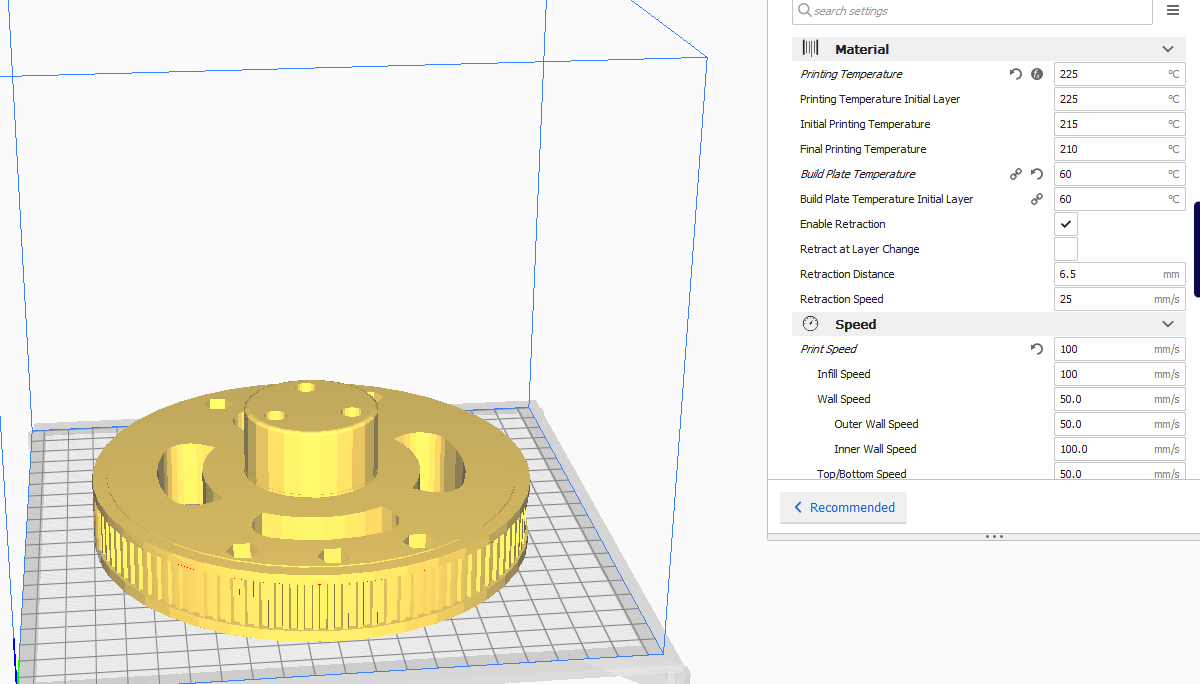
    This is what I do in Cura. I have BRIM set to 10mm. The Tefloniwa sticker worked, but after a while Sana and PLA began to detach from the table. Maybe if I had just made adhesive glue earlier, everything would be ok. I noticed that the glue is not available in supermarkets. I order nothing :) but she'll probably be here on Monday at the earliest, if she's going well.
    Quote:
    Yes, half of the topic, but when your printout detaches from the table, I use a hair spray (heated table) on a sponge and it smears over the entire surface of the table. If something is wrong, you can always gently heat the table and wipe it with a slightly damp sponge or cloth.

    I will try today, so I understand that I can apply this gel directly to the aluminum plate and print on a cold table?
  • Helpful post
    #19 18234425
    down
    Level 19  
    Posts: 363
    Help: 40
    Rate: 107
    An important thing that people often forget is the fact that you shouldn't touch the table with greasy hands after dinner, for example, when we are cooking some cutlets.
    This applies to all types of mats, glass, tapes and pads.
    Sometimes it happens that I take the model off the table and wrap the tape with my fingers somewhere, then the next printout already peels off.
  • ADVERTISEMENT
  • Helpful post
    #20 18235212
    krwiopijcaSTB
    Level 9  
    Posts: 24
    Help: 2
    Rate: 13
    When you have a good gel or glue, go ahead and heat it up. When I print PLA, I have 50-60 degrees, and with pet-g sometimes even 80. Nothing happens to the gel, and I wash the remains when the table is about 30 degrees and with a slightly damp cloth.
    You have to try everything and choose for yourself.
  • #21 18236151
    madiz08
    Level 14  
    Posts: 517
    Help: 4
    Rate: 172
    Tevo Tarantula Printer: Solving PLA Filament Deformation & Adhesion Issues on Aluminum Plate
    However, instead of the spray-on hairspray (which is waiting at hand), I put on the sticker that came today. I ordered two pieces, and if this one starts to peel off, I will stick the next one only after applying the adhesive layer with the recommended preparation, which I am waiting for.

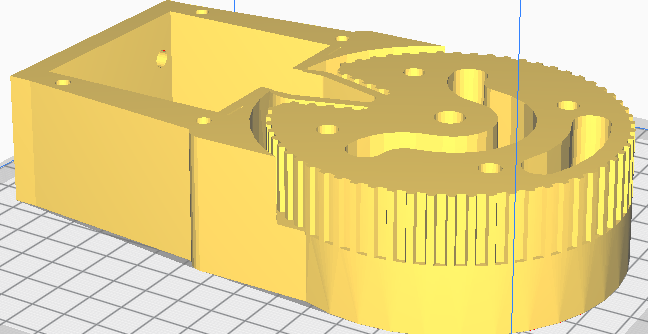
    My colleague is printing the rack on a professional printer in his work, and now I'm trying to print the converted first half of axis 3 of my robot:
    Tevo Tarantula Printer: Solving PLA Filament Deformation & Adhesion Issues on Aluminum Plate
    At the moment, I can say that the sticker was bought from:
    https://allegro.pl/oferta/podkladka-stolu-mat...WFkYTI2ZmVlYjM3NWJkMjkwNjRiZGE3MTMyOGEzZWQ%3D
    works very well. Yesterday I wrote to the seller whether it would be worth waiting before sticking to the agent for better adhesion and in response I received that he sticks it directly printing 60 degrees on PLA and 80 degrees on ABS, so I am now going to 60 degrees for PLA. I immediately noticed that the sticker after the table heats up is much better attached to the aluminum table than the Chinese original, so we'll see what will come out later

    Added after 14 [minutes]:

    And still a little bit on a different topic, you could take a look at the video below (45 seconds)
    [movie: 01197e8cd1] https://filmy.elektroda.pl/18_1571864069.mp4 [/ movie: 01197e8cd1]
    (if it cuts too much, I will throw in the compressed version)
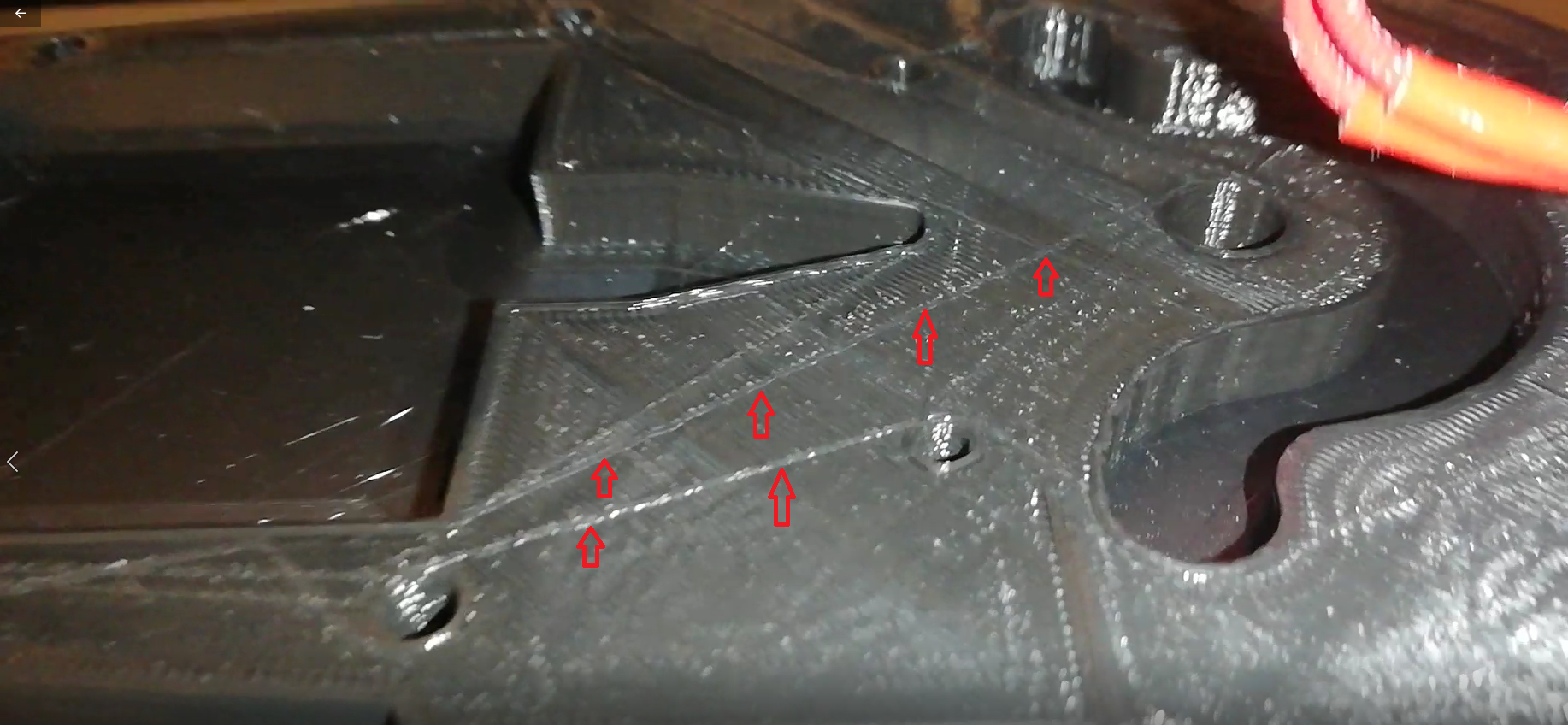
    Earlier, one of my colleagues noticed that the layers were not lining up properly and in fact now I noticed that it is not as perfect as it was before. Maybe it's the fault of the nozzle, which has rubbed more than once. Currently I have 0.3mm and I am waiting for 3 pcs. 0.4mm as in the original.
    Tevo Tarantula Printer: Solving PLA Filament Deformation & Adhesion Issues on Aluminum Plate
    I also noticed that as the lines marked in the picture above, the nozzle draws running empty to another pouring point. In "CURA" I marked the nozzle size as 0.3mm, and the poured lines are pointed and maybe the nozzle draws for that. I will see nothing if I change the nozzle to 0.4mm.
  • Helpful post
    #22 18236619
    landy13
    Level 31  
    Posts: 1418
    Help: 195
    Rate: 259
    madiz08 wrote:
    ... I noticed that like the marked lines in the picture above ...
    And these lines are definitely concave (engraved by the nozzle) or convex (overflowing with leaking filament)?
  • #23 18237046
    madiz08
    Level 14  
    Posts: 517
    Help: 4
    Rate: 172
    This is a loss of filament, but as the nozzle moves quickly to the next point, you can clearly hear the surface scrubbing. it was not there before, but it probably is not that important
  • Helpful post
    #24 18237255
    landy13
    Level 31  
    Posts: 1418
    Help: 195
    Rate: 259
    madiz08 wrote:
    ... as the nozzle moves quickly to the next point, you can clearly hear the surface scrubbing.
    Such a thing is possible with over-extruding, but the surface doesn't look like it here. Also check the play on the rollers, especially the X-carriage. With the belt off.
  • Helpful post
    #25 18237725
    down
    Level 19  
    Posts: 363
    Help: 40
    Rate: 107
    The design of this Tevo tarantula printer is some sort of padaka.
    If I know something like that, the potatoes in the cellar rot, because generally such a narrow spacing of the guide rollers on the profile in the middle does not appeal to me.
    These types of constructions quickly get slack so that later, for example, the nozzle scratches the surface.
  • #26 18237858
    madiz08
    Level 14  
    Posts: 517
    Help: 4
    Rate: 172
    About this " paddocks "I suggested it when buying :)
    http://10topowych.pl/10-topowych-drukarek-3d-z-chin/
    After assembly, it also seemed misleading to me, but for over half a year it was doing great, so I knew little about all these things.
    The sticker bought on the Allegro website passed the exam in 100%, the one supposedly original from China, I could easily peel off, while the present one, after heating, holds very firmly. If something like this C-Stick has already reached me.
    Thanks gentlemen for so many helpful answers
  • #27 18237868
    down
    Level 19  
    Posts: 363
    Help: 40
    Rate: 107
    It's cool, the producers must be sure of what they are doing, but it doesn't appeal to me, sometimes it's a bit of an individual matter and personally I would not want a printer built this way.
  • #28 18244032
    madiz08
    Level 14  
    Posts: 517
    Help: 4
    Rate: 172
    Summing up, after a few days of printing on the adhesive mat bought on the Allegro, I can confidently say that it is a great thing. Filament detachment completely resolved.

    Thanks to everyone for your help

Topic summary

✨ The discussion revolves around issues faced by a Tevo Tarantula printer owner regarding PLA filament adhesion and deformation on an aluminum print bed. After the original Teflon cover was damaged, the user experimented with various adhesion methods, including blue tape and a new sticker, but encountered problems with the PLA detaching from the sticker. Recommendations included using a heated bed at 60-67 °C, applying vegetable glue or hair spray for better adhesion, and considering a glass bed for improved results. The user reported success with a new adhesive mat purchased online, which resolved the filament detachment issue. The conversation also touched on the importance of proper bed leveling and avoiding contamination on the print surface.
Generated by the language model.

FAQ

TL;DR: 72 % of first-layer failures on open-frame printers come from poor bed adhesion [3DHubs, 2023]; “raise the bed to 67 °C and add glue” [fifcio13-13, #18233153]. Swap in a quality adhesive mat or 2 mm glass, keep bed 60 – 67 °C, clean with IPA, and use a 10 mm brim.

Why it matters: Stable first layers save filament and 22-hour prints.

Quick Facts

• Tevo Tarantula stock bed: 220 × 220 mm anodised aluminium, 24 V heater [Tevo Spec]. • PLA likes 55–67 °C bed temperature; elephant-foot risk rises sharply above 60 °C [Prusa, 2022]. • 220 × 220 mm adhesive mats cost PLN 8–15 on Allegro [madiz08, #18236151]. • Cleaning with 99 % IPA boosts adhesion up to 30 % [MatterHackers, 2021]. • Prints >150 mm show 40 % warp rate on unheated beds [3DHubs, 2023].

Why does my PLA print lift off the aluminium plate even at 60 °C?

Aluminium cools quickly at the edges and expands under heat, creating a bow that lets corners lift. Grease from fingers lowers surface energy and weakens adhesion [down, #18234425]. Large solid parts shrink about 0.3 % as PLA cools, pulling harder than the stock sticker’s glue can hold [Elektroda, madiz08, #18233081; 3DHubs, 2023]. Clean the bed with IPA, pre-heat for five minutes, and add a brim to spread the load.

What bed temperature range works best for PLA on a Tevo Tarantula?

Start at 60 °C, the stock recommendation [1 PAWEL, #18233130]. If corners still lift, raise slowly to 65–67 °C; users report better hold at 67 °C [fifcio13-13, #18233153]. Going above 70 °C softens PLA, causing “elephant foot” flange [Prusa, 2022].

Is a glass sheet better than stickers on this printer?

Many owners switch to plain 2 mm window glass; it stays flat and costs ≈ PLN 8 for 310 × 310 mm [landy13, #18233370]. Glass adds ~180 g—within the Y-axis stepper’s margin if acceleration is ≤1000 mm s² [Prusa, 2022]. Use binder clips and clean glass with IPA; prints pop off after cooling.

Which adhesive is most reliable—hair spray, C-Stick, or glue stick?

C-Stick gives the strongest bond; its grip rises with temperature [fifcio13-13, #18233953]. Hair-spray gel works well up to 60 °C and wipes off with warm water [krwiopijcaSTB, #18235212]. A PVA glue stick is cheap but loses hold after 4–6 prints [MatterHackers, 2021].

How do I apply a new adhesive mat so it never peels mid-print?

  1. Degrease the aluminium with 99 % IPA and let it dry.
  2. Heat the bed to 50 °C, peel 30 mm of backing, align, and press from centre outwards.
  3. Roll firmly with a rubber roller, then cool to room temperature before printing [madiz08, #18236151].

Should I cool the bed mid-print to fight warping?

Yes, for tall parts. One workaround is starting at 50 °C, then gradually reducing to room temperature after 20 mm height; users resume printing on a cold bed without issues [down, #18234266]. Test carefully—rapid drops can crack glass.

Does a brim or raft really stop edge curl on large gears?

A 10 mm brim increases contact area by roughly 35 % and peels off cleanly [fifcio13-13, #18233167]. Rafts work too but waste filament and leave rough undersides [3DHubs, 2023].

What print speed and nozzle temperature reduce layer gaps and scratching noises?

Set nozzle to 190 °C and bed to 67 °C; lower extrusion temp cuts oozing that the nozzle drags across layers [fifcio13-13, #18233982]. Keep speed at 40–50 mm s⁻¹ for 0.4 mm nozzles; faster moves amplify carriage wobble [Prusa, 2022].

How do I check if carriage play is causing surface scratches?

Remove the X-belt, slide the carriage by hand, and feel for wobble; zero play is ideal [landy13, #18237255]. Adjust eccentric nuts on V-rollers until movement is smooth yet tight.

Will 100 % infill always give the strongest part?

Not always. Tests show 70 % gyroid infill provides 90 % of full strength while cutting print time by 32 % [Prusa, 2022]. Solid infill also traps heat, increasing warp risk, as noted in earlier thread advice [landy13, #18233307].

What if the sticker glue fails during a 20-hour print?

Pause immediately, apply hair-spray gel around the lifting edge, press down with a heat-resistant spatula, and resume after 60 s. Success is only about 25 % in user reports—plan to restart if layers already shifted [3DHubs, 2023].

Can I print PLA on a cold bed when using glue?

Yes. A thin layer of hair-spray gel lets PLA adhere at 25 °C; heat helps but is optional [krwiopijcaSTB, #18235212]. Expect longer cooldown before parts release.
Generated by the language model.
ADVERTISEMENT