logo elektroda
logo elektroda
X
logo elektroda

Orange Sim Card Not Working in T-Mobile's Huawei B525s 23a Router

bartasg 18942 8
ADVERTISEMENT
Treść została przetłumaczona polish » english Zobacz oryginalną wersję tematu
  • #1 18558554
    bartasg
    Level 9  
    Posts: 30
    Rate: 26
    Hello and welcome,

    First of all, I'd like to say that I apologize in advance if I got off topic.


    I have Mobile Internet from Orange with an Alcatel router. Unfortunately, after nearly 3 years, it refused to obey and does not load, so the Internet does not work. I borrowed a Huawei B525s 23a router with the T-Mobile logo from a friend. I put in my Orange card and nothing, red LED and no Wifi network visible.

    Can anyone help in these difficult times?
  • ADVERTISEMENT
  • #2 18558586
    matek451
    Level 43  
    Posts: 31144
    Help: 4334
    Rate: 5765
    And you entered the PIN on this B525, it's Orange, so the card with its verification, log in to B525 at 192.168.8.1 and enter the PIN. T-mobile uses the same base stations as Orange as part of NetWorks and the APN is the same, i.e. the internet.
    Helpful post? Buy me a coffee.
  • ADVERTISEMENT
  • #3 18558592
    sosarek

    Level 43  
    Posts: 83875
    Help: 9318
    Rate: 15492
    Which "diode"?
    Have you configured the APN?
    What do you have on the main page after logging into the router?
    WiFi network set different than yours - to be checked in the settings.
    Company Account:
    Z
    Pka, Poznań, 60-850
    Helpful post? Buy me a coffee.
  • #4 18558644
    pitron
    Level 24  
    Posts: 811
    Help: 51
    Rate: 99
    For this router I recommend firmware mod:
    link
  • #5 18558695
    bartasg
    Level 9  
    Posts: 30
    Rate: 26
    matek451 wrote:
    And you entered the PIN on this B525, it's Orange, so the card with its verification, log in to B525 at 192.168.8.1 and enter the PIN. T-mobile uses the same base stations as Orange as part of NetWorks and the APN is the same, i.e. the internet.


    I didn't include it because I can't find it anywhere. I can already see this network on my phone and computer, but when I enter the password on each device, I get the wrong password.

    sosarek wrote:
    Which "diode"?
    Have you configured the APN?
    What do you have on the main page after logging into the router?
    WiFi network set different than yours - to be checked in the settings.


    The second LED on the Huawei T-Mobile router 'like three arrows that form a circle'.
    I didn't configure anything, I don't know where to do it.
    As mentioned above, I can't log in to the network. I can't get to the place where you enter the PIN to the card.
  • ADVERTISEMENT
  • #6 18558699
    sosarek

    Level 43  
    Posts: 83875
    Help: 9318
    Rate: 15492
    Log in to the router after connecting it with a cable to the computer.
    Show the first page, then the wireless tabs.
    Company Account:
    Z
    Pka, Poznań, 60-850
    Helpful post? Buy me a coffee.
  • ADVERTISEMENT
  • #7 18558887
    bartasg
    Level 9  
    Posts: 30
    Rate: 26
    sosarek wrote:
    Log in to the router after connecting it with a cable to the computer.
    Show the first page, then the wireless tabs.


    It worked without using a cable and immediately after launching the browser, something like this:

    which password is it? Then the Orange card PIN, right?
    Attachments:
    • Orange Sim Card Not Working in T-Mobile's Huawei B525s 23a Router screen.jpg (120.5 KB) You must be logged in to download this attachment.
  • #8 18558896
    bartasg
    Level 9  
    Posts: 30
    Rate: 26
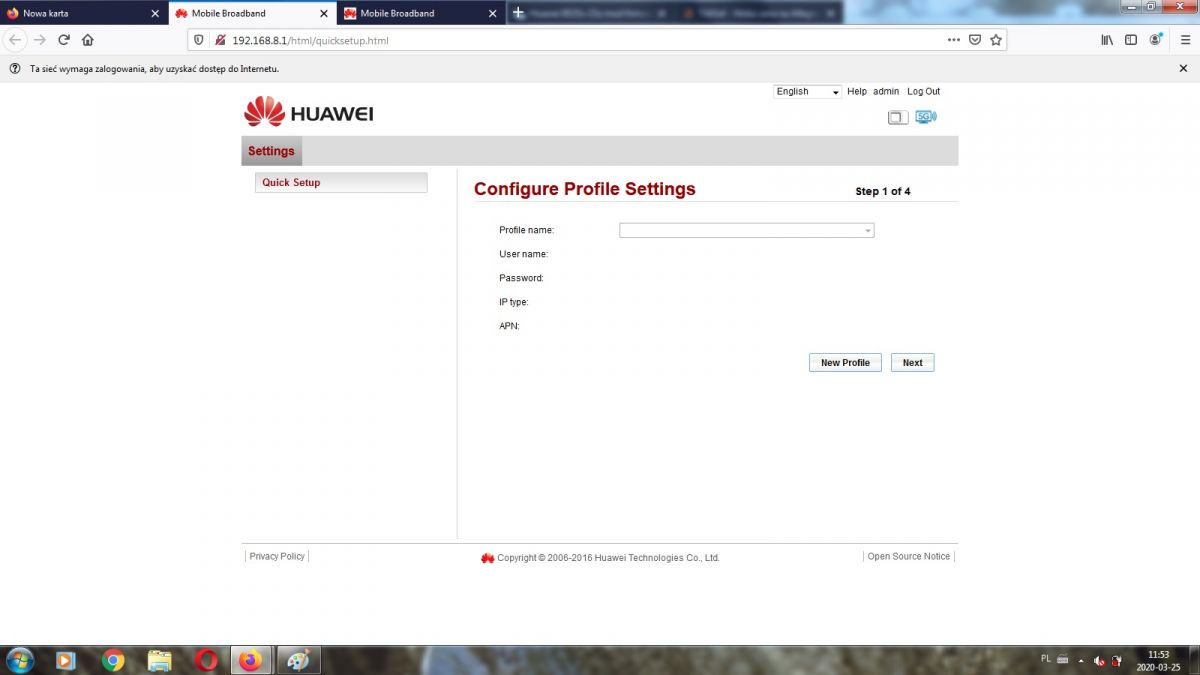
    Ok, I figured out the password. It was the router password. Now something like this:

    Orange Sim Card Not Working in T-Mobile's Huawei B525s 23a Router
  • #9 18559243
    matek451
    Level 43  
    Posts: 31144
    Help: 4334
    Rate: 5765
    Enter the name of the Orange profile, then leave it blank and in the APN field enter internet and confirm.
    Helpful post? Buy me a coffee.

Topic summary

✨ The discussion revolves around a user experiencing issues with an Orange SIM card not functioning in a borrowed T-Mobile branded Huawei B525s 23a router. After the user's Alcatel router failed, they attempted to use the Huawei router but encountered a red LED indicator and no visible Wi-Fi network. Responses suggest entering the SIM card PIN via the router's interface at 192.168.8.1, checking the APN settings, and ensuring the correct Wi-Fi password is used. The user eventually resolved the password issue and was guided to configure the APN settings correctly to establish a connection.
Generated by the language model.
ADVERTISEMENT