logo elektroda
logo elektroda
X
logo elektroda

Buying a computer mouse for a large hand (I know, funny topic)

sunrise84 7020 11
ADVERTISEMENT
Treść została przetłumaczona polish » english Zobacz oryginalną wersję tematu
  • #1 19108504
    sunrise84
    Level 42  
    Now I'm asking my friends for help.
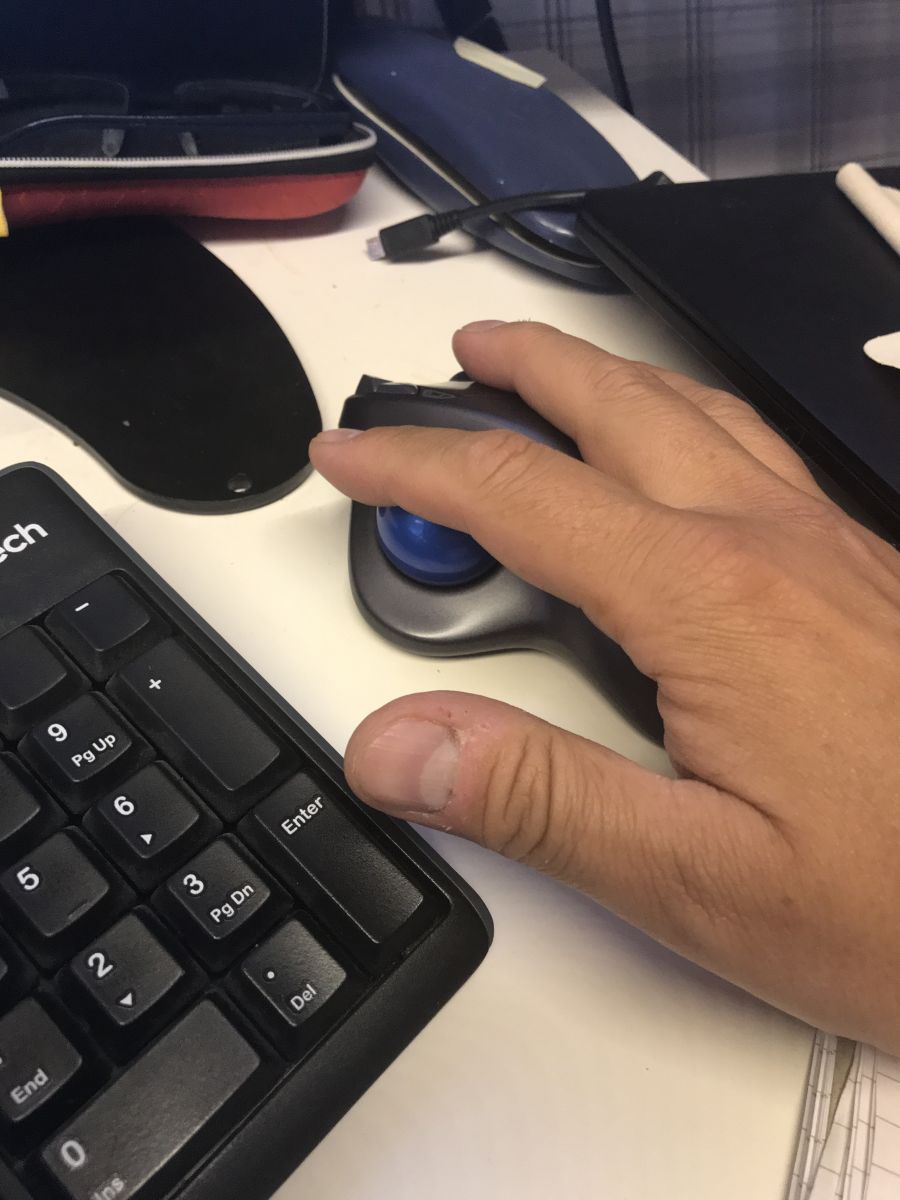
    I need to buy a new computer mouse because unfortunately the current one is too small for my "shovel" hand.

    The current mouse is a Logitech MX1000 Laser

    https://proline.pl/?p=LOG+931175-0914

    A new mouse doesn't have to be super equipped with buttons.
    Standard left, middle with roller, right.
    It can be wired.
    It's important that it's not some crap for PLN 80.
    I don't need a mouse for professional players, a laser sensor and medium-class sensitivity are enough.
    It's important to me that it's big, reasonably precise and you can feel it at hand.
    Browsing offers and the Internet, there are recommended gaming mice with a huge number of buttons that I don't use anyway.

    Attached are pictures of my current mouse and my "shovel".
    Attachments:
    • Buying a computer mouse for a large hand (I know, funny topic) 20201212_142130[1].jpg (4.47 MB) You must be logged in to download this attachment.
    • Buying a computer mouse for a large hand (I know, funny topic) 20201212_142115[1].jpg (4.14 MB) You must be logged in to download this attachment.
    • Buying a computer mouse for a large hand (I know, funny topic) 20201212_141850[1].jpg (1.21 MB) You must be logged in to download this attachment.
    • Buying a computer mouse for a large hand (I know, funny topic) 20201212_141825[1].jpg (1.19 MB) You must be logged in to download this attachment.
    • Buying a computer mouse for a large hand (I know, funny topic) 20201212_141818[1].jpg (1.34 MB) You must be logged in to download this attachment.
  • ADVERTISEMENT
  • #2 19108538
    sanfran
    Network and Internet specialist
    I had a problem because my paw was numb while working with the mouse and I invested in Logitech M570 equipment. It costs a bit, but it's worth it.
    And I probably wouldn't go back.
  • ADVERTISEMENT
  • #3 19108544
    vodiczka
    Level 43  
    Sorry for offtopic but I couldn't resist ;)
    Unlike you, I have small hands. I bought my first mouse when I was "before forty" and had trouble finding one that was small enough. The only one that fit my hand was the wireless Logitech for a "dizzying" amount of PLN 110 at the time.
    In the opinion of my colleagues, I overpaid, but I do not regret it. It works without problems until today.
  • #4 19108558
    sunrise84
    Level 42  
    sanfran wrote:
    I had a problem because my paw was numb while working with the mouse and I invested in Logitech M570 equipment. It costs a bit, but it's worth it.
    And I probably wouldn't go back.


    I'm having the same problem too.

    And I was also wondering about this mouse, because at least in the pictures it looks big.

    Only there is a trackball that I don't need.
    I prefer the classic solution.

    Added after 1 [minutes]:

    vodiczka wrote:
    Sorry for offtopic but I couldn't resist ;)
    Unlike you, I have small hands. I bought my first mouse when I was "before forty" and had trouble finding one that was small enough. The only one that fit my hand was the wireless Logitech for a "dizzying" amount of PLN 110 at the time.
    In the opinion of my colleagues, I overpaid, but I do not regret it. It works without problems until today.


    I also have such a small rodent with me Logitech M185, but it is an emergency mouse for the period when that rodent is charging in the station.

    Added after 5 [minutes]:

    It's not even about the budget anymore because I'm able to spend PLN 300 on a mouse.

    It's just supposed to be big.

    Added after 4 [minutes]:

    Once I had a wired Razer with weights inside, I lent it to a friend, the friend left with my rodent and that was it.
    But it lay quite well in the hand and was weighted down.
  • #5 19162676
    enhanced
    Level 43  
    Logitech G602 is probably the only one that comes to mind.
  • ADVERTISEMENT
  • #6 19162703
    sunrise84
    Level 42  
    Well, I'm just wondering.

    Genesis has a "punched" housing and it will be difficult to keep it clean.

    And the second thing, unfortunately, but I will have to test all the suggestions personally.

    And the shops are closing...
  • #8 19569167
    Dawid_Bittner
    Level 13  
    Hello, I also have big hands and am looking for a bigger mouse. So far I have used Logitech M500 and vertical Trust Verro. Recently, I accidentally used the inexpensive Logitech M190 and was surprised by the fit in my hands. Regards.
  • #9 19569213
    sanfran
    Network and Internet specialist
    I've been using the Trackball M520 for over a year now. The pain in the right hand has disappeared. I had inflammation of the nerves passing through the elbow joint. The elbow was soft and the lack of movement of the wrist made it possible to get rid of the pain.

    When my thumb gets tired, I spin the ball with my index finger.

    Buying a computer mouse for a large hand (I know, funny topic)
  • #10 19569269
    qrek1
    Level 38  
    sanfran wrote:
    trackball

    Seriously? Maybe it's nice that someone shares with the world that they have a disease, but not without reason the whole world uses mice.
    As for the size of the mouse, after the pictures, I have the same hands and the mouse is also small. I hold it in 3 fingers, my hand resting on the table and it's comfortable. When I had a bigger mouse, I held it a little differently, it was also ok.

    Moderated By sylweksylwina:

    3.1.9. Don't be ironic or mean to the other side of the discussion. Please respect dissent and other opinions on the forum.

  • ADVERTISEMENT
  • #11 19569547
    sunrise84
    Level 42  
    Thanks for refreshing the thread.
    So yes.
    At the beginning of June I bought the LOGITECH MX Master 3 mouse.
    Similar in size to the one I have used so far, but more comfortable to use because of the "support" of the thumb on the "wing" which is also the basis of this mouse, i.e. its housing.
    A great thing is the LENGTH of work on a single charge (probably once a month it charges it and it is used for 12 hours a day).
    Another BIG plus of this mouse is the scroll wheel.
    You can use it as standard, then it scrolls every 3 lines, or you can release the "brake" and it spins almost endlessly.
    It also works hybrid, i.e. it scrolls every 3 lines and after moving the wheel faster, it automatically unlocks the brake and the wheel spins until you stop it with your finger and the brake works again.
    I recommend it to people who often look for something and flip through a lot of pages in pdf, e.g.

    The second mouse is AORUS M3 which is on the cable, as for its precision and quality of the wheel and key clicks, it leaves much behind this Logitech. Only used with SIM RIG (aluminum frame for virtual races, soon I will post my "creation" in DIY) as a pointing device (which is what the mouse was made for).

    As for the trackball, I thought about it too, but the mouse must be universal for me.
    Both for gaming and internet browsing.
  • #12 19723000
    Dawid_Bittner
    Level 13  
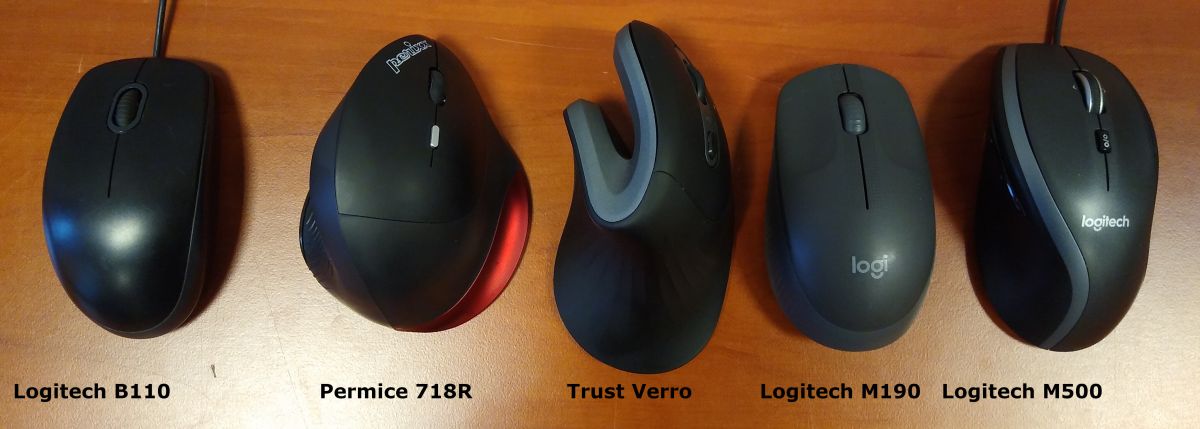
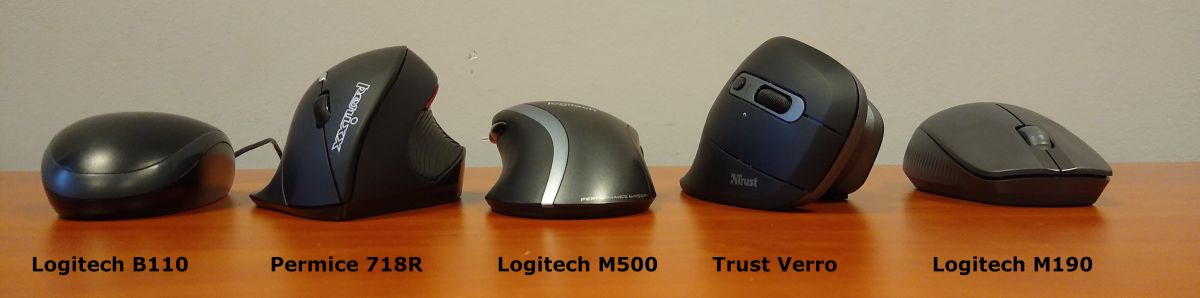
    Hello. I will add that I am currently also using the Permice 718R (there is also a left-handed version: 718L) from Perixx (price similar to Trust Verro) and this one is also comfortable, although it is shorter than Thrusta, but with it you can configure the actions of individual keys. The Permice is more convex, shorter and a bit lower than the Verro. In Verro the light is red, in Permica it is invisible. The angle of the hand is also different (in Verro it is more vertical). Regards.

    Below is a visual comparison of a few mice for large hands (maybe with the exception of the B110, forgive the sentiment).

    Buying a computer mouse for a large hand (I know, funny topic)
    Buying a computer mouse for a large hand (I know, funny topic)

Topic summary

✨ The discussion revolves around finding a suitable computer mouse for users with large hands. The original poster seeks recommendations for a mouse that is not overly complex, ideally with standard buttons and a comfortable grip. Several users share their experiences with various models, emphasizing the importance of size and comfort over additional features. Recommendations include the Logitech M570, Logitech G602, Razer DeathAdder V2, Logitech MX Master 3, and the Permice 718R. Users express a willingness to invest in a quality mouse, with some mentioning specific preferences for wired options and ergonomic designs. The conversation highlights the challenges of finding a mouse that fits larger hands comfortably while maintaining functionality.

FAQ

TL;DR: Big-hand buyers should prioritize larger shells and thumb support. One user reports approx. monthly recharges at 12 hours/day and says "the wheel spins almost endlessly." We highlight proven picks and sizing tips for comfort and precision. [Elektroda, sunrise84, post #19569547]

Why it matters: This FAQ helps people with large hands choose a comfortable, precise mouse without overspending or unnecessary buttons.

Quick Facts

Which productivity mouse suits large hands and long hours?

Logitech MX Master 3 fits large hands with a supportive thumb wing and a tall, full shell. It runs a long time between charges; one user recharges about monthly at 12 hours daily. The MagSpeed wheel handles fast or precise scrolling. “It spins almost endlessly.” [Elektroda, sunrise84, post #19569547]

Is the Razer DeathAdder V2 a good big-hand gaming pick?

Yes. Its ergonomic shell measures about 127 mm long, suiting larger hands and palm‑grip comfort. The classic right‑handed shape makes it a straightforward pick for big‑hand users. [“Razer DeathAdder V2 – Specs”]

Are trackballs better for wrist or elbow pain?

A trackball reduces wrist movement because your thumb or finger moves the ball, not your arm. One user reports their right‑hand pain disappeared after switching, citing elbow nerve issues. “The pain in the right hand has disappeared.” If you fatigue your thumb, you can roll with another finger. [Elektroda, sanfran, post #19569213]

What affordable full‑size option fits big hands without fuss?

Try Logitech M190. Despite the low price, a user with big hands found the shape surprisingly well‑fitting. It is a straightforward, full‑size wireless mouse without complicated features. This makes it a safe, inexpensive test of larger ergonomics. [Elektroda, Dawid_Bittner, post #19569167]

Are vertical mice worth considering for large hands?

Yes, if you want a handshake posture. Users compared Trust Verro and Perixx Perimice 718R/L. Perimice is shorter and more convex; Verro holds the hand at a more vertical angle. Programmable buttons on Perimice add flexibility. Light bleed is hidden on Perimice but red on Verro. [Elektroda, Dawid_Bittner, post #19723000]

Is Logitech G602 a large‑hand‑friendly wireless option?

Logitech G602 was suggested specifically for large‑hand comfort in this discussion. If available, handle it to confirm the fit for your grip. [Elektroda, enhanced, post #19162676]

Do I need many buttons if I just browse and work?

No. The original poster wanted only left, wheel‑click, and right buttons, prioritizing size and precision. You can skip MMO‑style arrays if you do not use them. Focus on shell size, support, and a reliable sensor instead. [Elektroda, sunrise84, post #19108504]

How important is mouse weight for large hands?

It is personal. Some large‑hand users prefer a weighted feel for control and grip security. One user liked a Razer with internal weights because it sat well in hand. If you overshoot with light mice, consider adjustable‑weight designs. [Elektroda, sunrise84, post #19108558]

Are honeycomb “punched” shells harder to keep clean?

Yes. Open, perforated housings can be harder to keep clean. One shopper avoided a honeycomb design for that reason. If hygiene matters, favor closed shells. [Elektroda, sunrise84, post #19162703]

How can I choose a big mouse online when stores are closed?

Use measurements and shape to guide your pick.
  1. Measure hand length and width on a ruler.
  2. Compare product dimensions; favor longer ergonomic shells for large hands.
  3. Match your grip style and consider thumb support. [“How to Choose a Gaming Mouse – Rtings”]

What scroll‑wheel features help heavy PDF or code scrolling?

A dual‑mode scroll wheel is great. On Logitech MX Master 3, you can switch between ratcheted and free‑spin modes. It also auto‑switches to free‑spin on fast flicks. One user says, “it spins almost endlessly,” making long documents easier. [Elektroda, sunrise84, post #19569547]

Is a mid‑range sensor enough if I am not a pro gamer?

Yes. If you work and browse, you do not need esports‑grade specs. The thread starter sought a medium‑class sensor and precision over extra buttons. Choose a reliable model over maximum DPI marketing. [Elektroda, sunrise84, post #19108504]

Can a small mouse still work if I change my grip?

Some users with large hands prefer a smaller mouse held with fingertips. One participant rests the hand on the table, holds with three fingers, and finds it comfortable. If a big mouse fatigues you, try a fingertip grip on a smaller shell. [Elektroda, qrek1, post #19569269]

Is a compact mouse okay as a temporary backup?

Yes. Keeping a small wireless mouse as an emergency backup works fine during charging or travel. One user uses a Logitech M185 for this purpose. It is convenient and avoids downtime. [Elektroda, sunrise84, post #19108558]
ADVERTISEMENT