logo elektroda
logo elektroda
X
logo elektroda

Huawei B818 Router: Band Aggregation Details for LTE 800, 1800, 2100 & 2600 Bands

grzegorzstr2020 16776 12
ADVERTISEMENT
Treść została przetłumaczona polish » english Zobacz oryginalną wersję tematu
  • #1 19125540
    grzegorzstr2020
    Level 3  
    Posts: 36
    Rate: 5
    Good morning ,

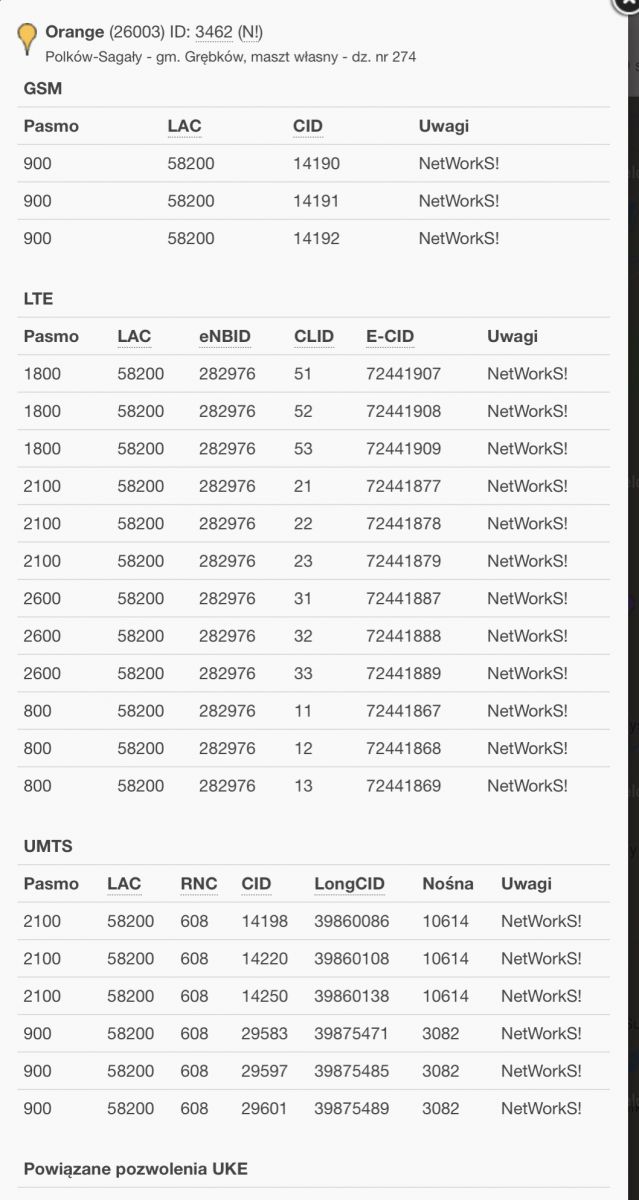
    I have a Huawei b818 router and I would like to know what specific bands it aggregates. On the manufacturer's website and on the Internet, I managed to find that it aggregates 4, but I do not know which ones. The router connects to the BTS on which I have the LTE 800, 1800, 2100 and 2600 bands.
  • ADVERTISEMENT
  • #4 19126661
    grzegorzstr2020
    Level 3  
    Posts: 36
    Rate: 5
    Orange Huawei B818 Router: Band Aggregation Details for LTE 800, 1800, 2100 & 2600 Bands

    So far, I can't decipher from the website given earlier what frequencies it aggregates, as if frequency codes are given and the frequency itself.
  • ADVERTISEMENT
  • #5 19126849
    m.jastrzebski
    Network and Internet specialist
    Posts: 5238
    Help: 679
    Rate: 862
    grzegorzstr2020 wrote:
    LTE 800, 1800, 2100 and 2600.

    The above frequencies are bands B20, B3, B1, B7
  • ADVERTISEMENT
  • #6 19127621
    grzegorzstr2020
    Level 3  
    Posts: 36
    Rate: 5
    Yes, I know that B7 is 2600 and so on, it's about what is given on the page above in the specification link in the first answer. I want to know what bands the router specifically aggregates and that information is not clear to me
  • Helpful post
    #7 19127805
    Anonymous
    Level 1  
  • #8 19129438
    grzegorzstr2020
    Level 3  
    Posts: 36
    Rate: 5
    I have one more question about the external antenna. I currently have an antenna https://all-ant.pl/antena-do-LTE-4g-3g-l4g-mimo-2x15dbi-konfigurator-mapa-zasiegu

    Would like to change to one of these

    https://telkob.pl/pl/p/Antena-ATP-15-MIMO-Pasmo-790-2690-MHz./67

    https://www.wisp.pl/p7574,qupanel-lte-mimo-4x4.html

    Does the exchange make sense? The current antenna and the one I am going to buy are directed towards btsa, the station is visible in a straight line about 3km. I have the best current results by disabling four-band aggregation and using an external antenna signal on 2600
  • #9 19129448
    matek451
    Level 43  
    Posts: 31052
    Help: 4314
    Rate: 5708
    The antenna is selected after testing individual LTE bands with B818 outdoors and shows screenshots from the Android / Windows application for band management and signal diagnostics on HiLink Huawei, and every evening speedtest. You have a broadband antenna, so for comparison, the tests of these bands with it set to this BTS.
    Helpful post? Buy me a coffee.
  • ADVERTISEMENT
  • #10 19129491
    Anonymous
    Level 1  
  • #11 19130203
    grzegorzstr2020
    Level 3  
    Posts: 36
    Rate: 5
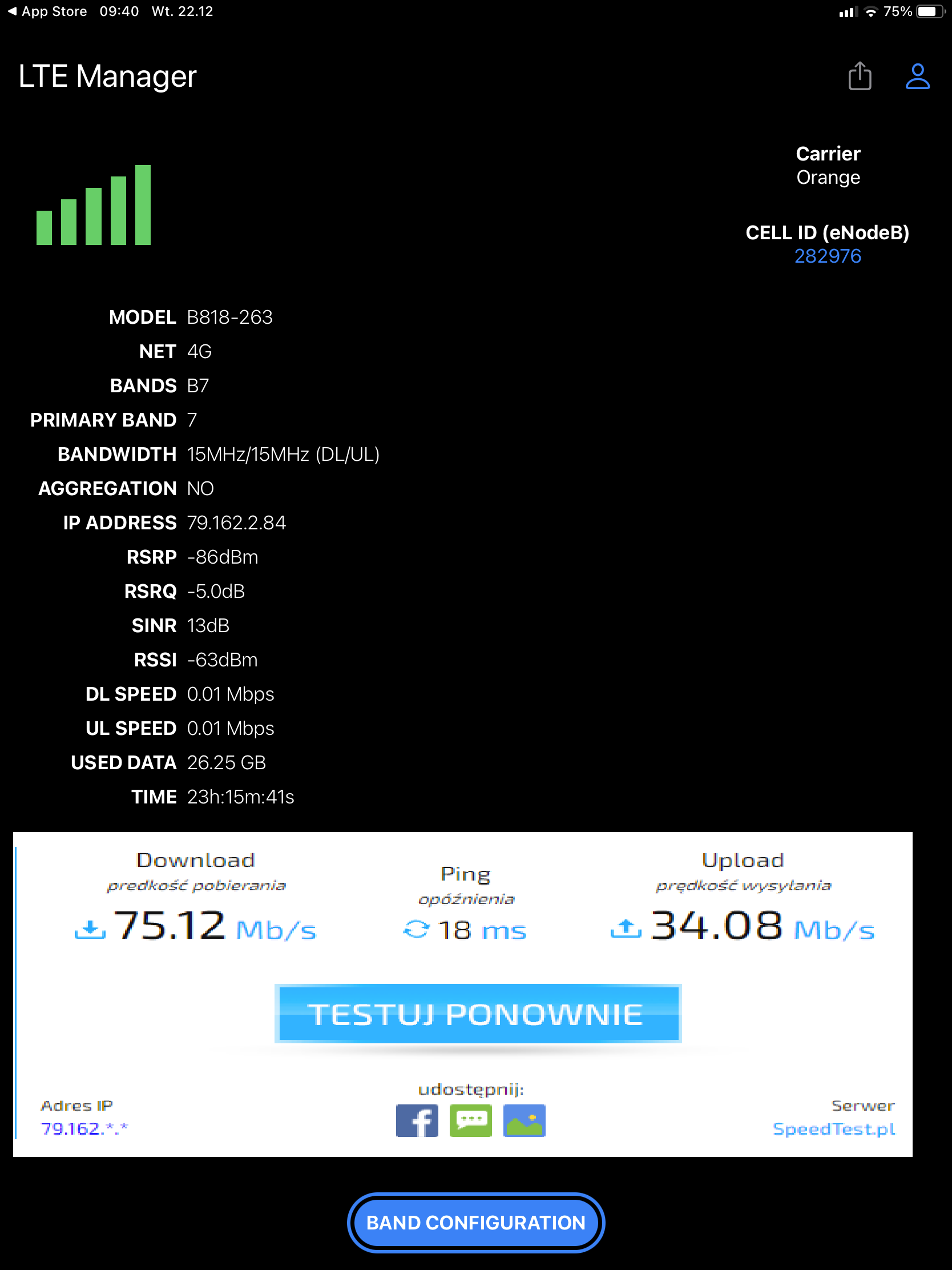
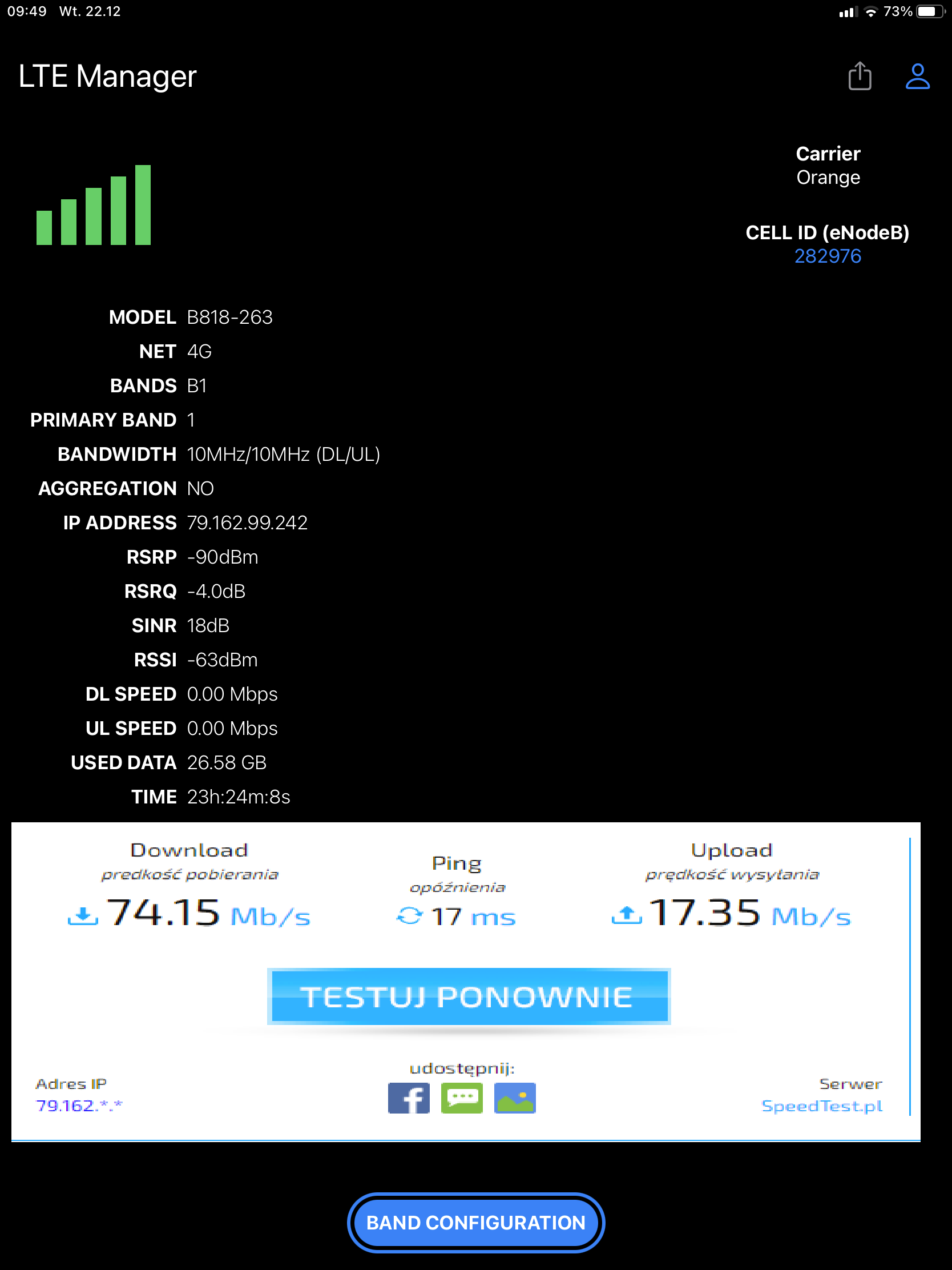
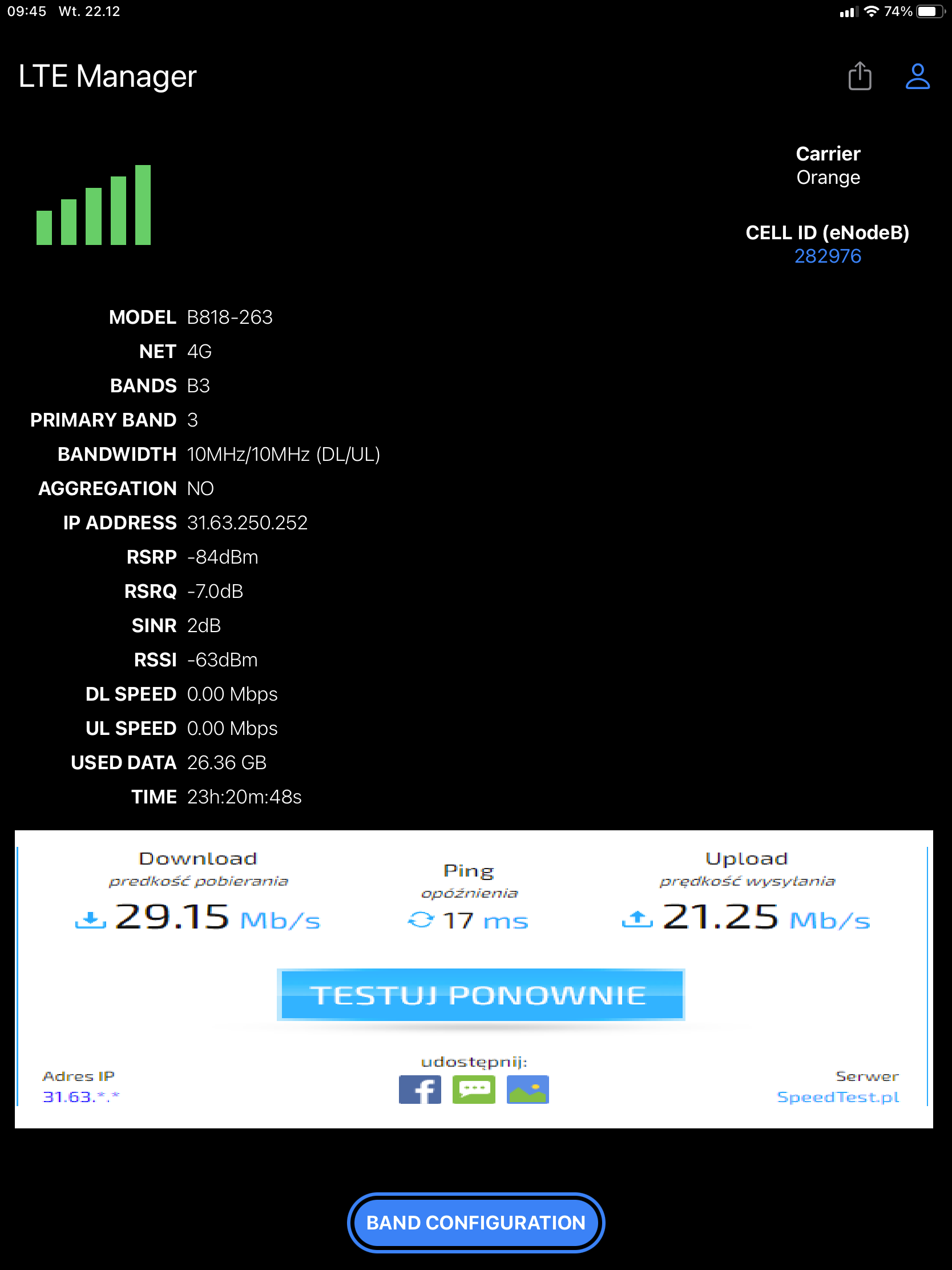
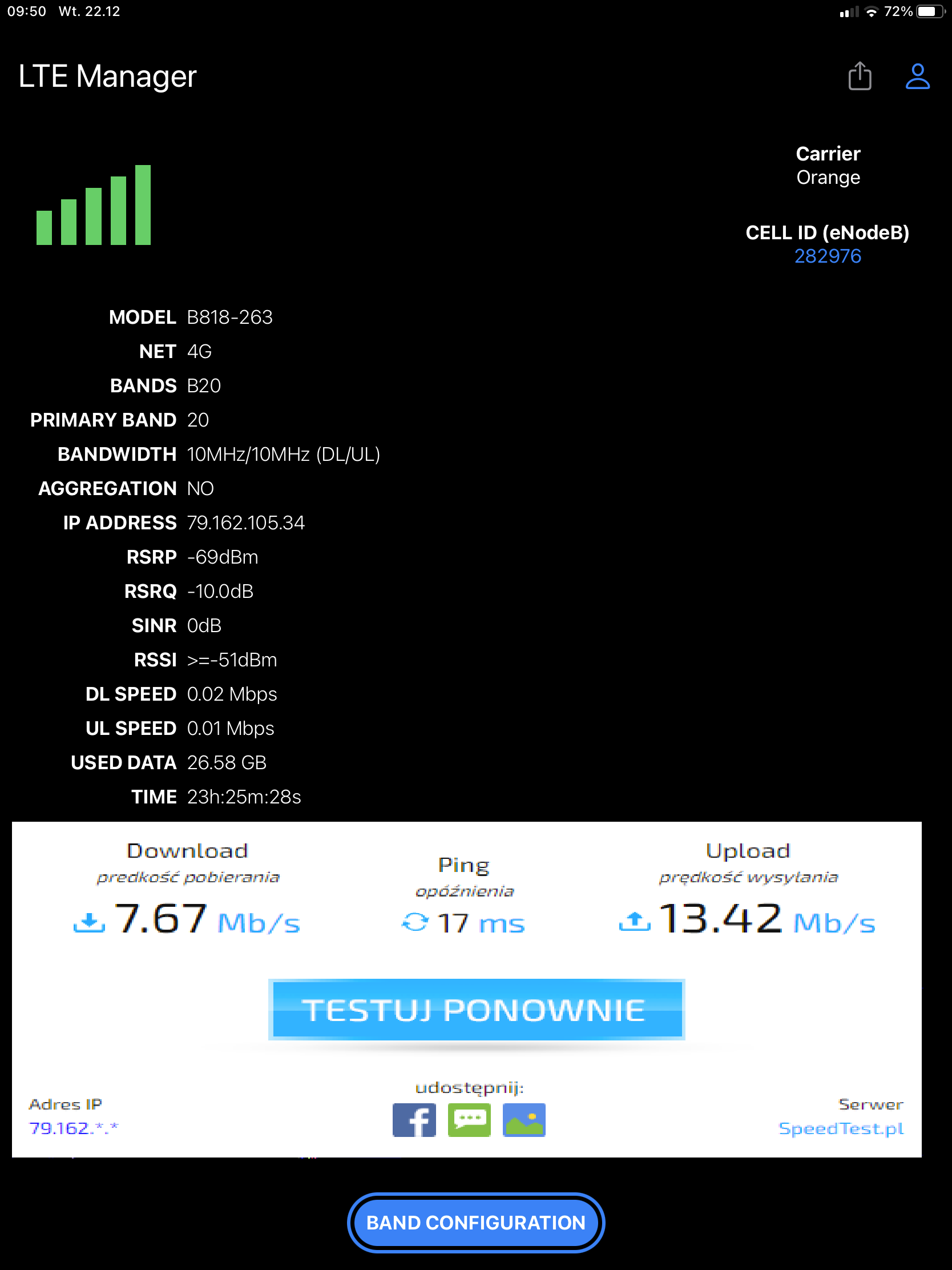
    Huawei B818 Router: Band Aggregation Details for LTE 800, 1800, 2100 & 2600 Bands Huawei B818 Router: Band Aggregation Details for LTE 800, 1800, 2100 & 2600 Bands Huawei B818 Router: Band Aggregation Details for LTE 800, 1800, 2100 & 2600 Bands Huawei B818 Router: Band Aggregation Details for LTE 800, 1800, 2100 & 2600 Bands

    Tests at different times come out practically the same, it is a signal only from external antennas, sometimes there are better results if I set one external and one internal antenna for the signal (both option) and additionally aggregation, but this is sporadic and the results are up to 70 mb, if you want to exceed this value is only one outer band
  • #12 19130248
    matek451
    Level 43  
    Posts: 31052
    Help: 4314
    Rate: 5708
    The signal parameters on all bands are correct, LTE2100 is practically unloaded, so check LTE2600 + 2100 aggregation and then LTE2600 + 2100 + 1800 and see if it turns on, what is the program from the screen, it has the ability to force bands on b818?
    Helpful post? Buy me a coffee.
  • #13 19130315
    grzegorzstr2020
    Level 3  
    Posts: 36
    Rate: 5
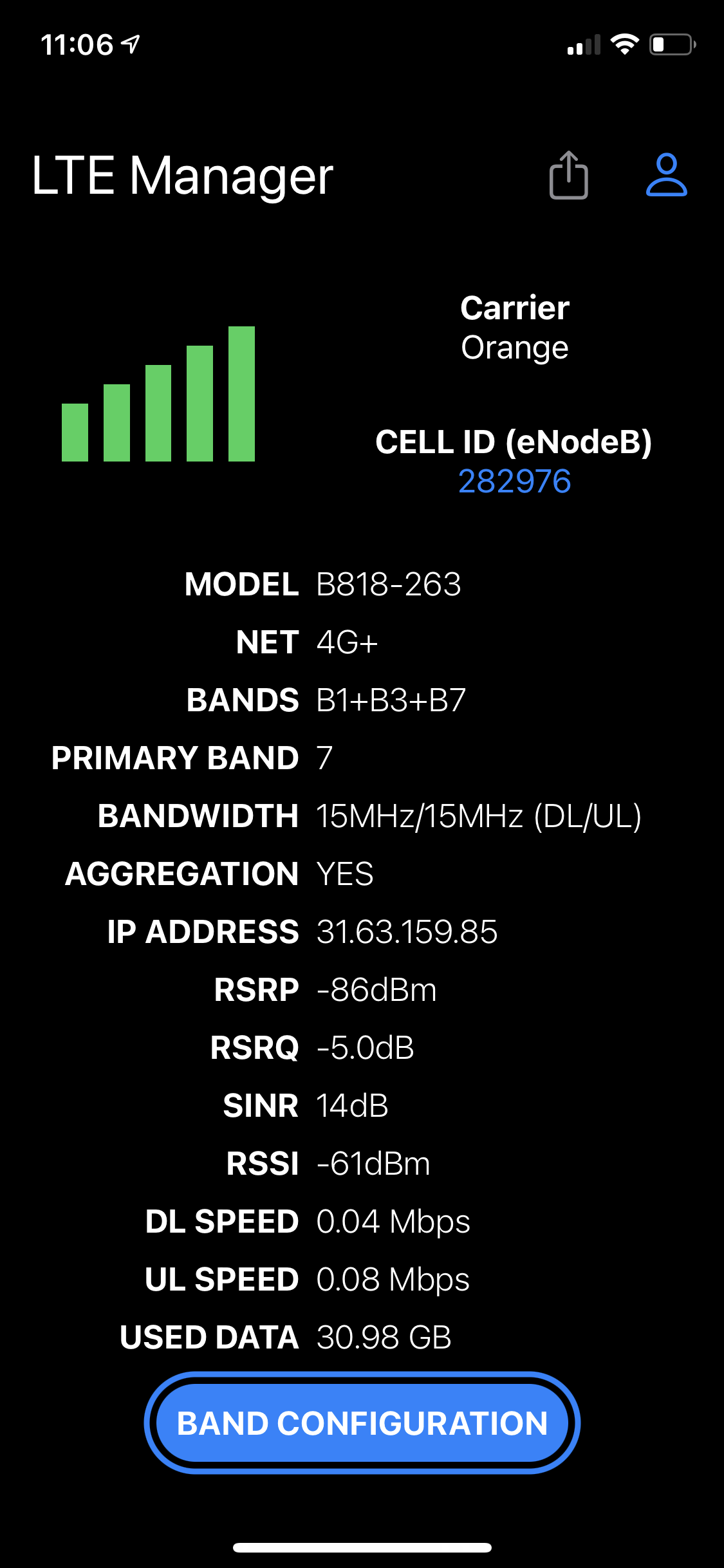
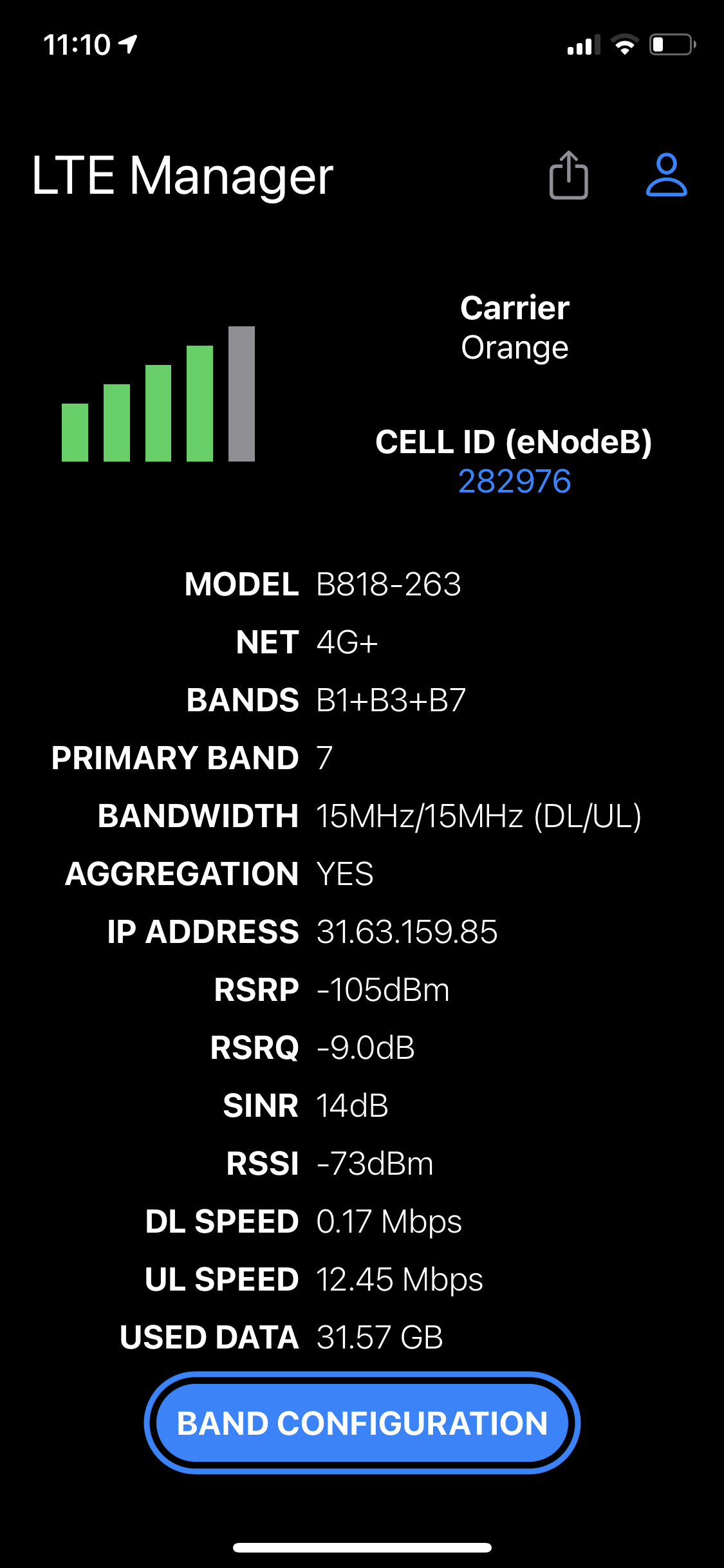
    Huawei B818 Router: Band Aggregation Details for LTE 800, 1800, 2100 & 2600 Bands Huawei B818 Router: Band Aggregation Details for LTE 800, 1800, 2100 & 2600 Bands

    This is the LTE manager program from the App Store because I have an iPhone, although I checked the correctness of the reading with Android and it is correct. The app has the ability to force four bands and it works well. One photo shows aggregations from an external antenna, only the internal one is expensive, the weaker signal, but despite the fact that the router shows aggregations, it probably only works on internal antennas?

Topic summary

✨ The discussion centers around the Huawei B818 router and its capability for carrier aggregation across various LTE bands. Users inquire about the specific bands the router aggregates, with responses indicating that it can aggregate up to five bands, specifically B20 (800 MHz), B3 (1800 MHz), B1 (2100 MHz), and B7 (2600 MHz). The conversation also touches on the performance of external antennas and the impact of band aggregation on signal strength and speed. Users share experiences with different antennas and suggest testing various band combinations to optimize performance.
Generated by the language model.

FAQ

TL;DR: Huawei B818 supports 5‑carrier downlink aggregation; "Not four, up to five on DL." Lock and test band mixes for your site. [Elektroda, Anonymous, post #19125626]

Why it matters: This helps B818 owners on 800/1800/2100/2600 MHz sites choose and verify the fastest carrier-aggregation setup for their location.

Quick Facts

  • LTE Cat 19 with up to 1.6 Gbps downlink, 5CA DL and 2CA UL supported. [Huawei B818-263 Datasheet]
  • Frequency mapping: 800 MHz=B20, 1800 MHz=B3, 2100 MHz=B1, 2600 MHz=B7. [Elektroda, m.jastrzebski, post #19126849]
  • CA notation: CA_1A-3A-7A-20A means inter‑band 4CA; 'C' denotes multiple carriers within one band. [Elektroda, Anonymous, post #19127805]
  • CA engages only if both device and network support a combo; unsupported mixes won’t activate. ["Carrier Aggregation explained"]
  • At ~3 km LoS, replacing a ~10 dBi MIMO pair with <10 dBi panels reduces gain; skip the swap. [Elektroda, Anonymous, post #19129491]

What LTE bands do 800/1800/2100/2600 map to on the B818?

They map to standard FDD LTE bands: 800 MHz is Band 20, 1800 MHz is Band 3, 2100 MHz is Band 1, and 2600 MHz is Band 7. This mapping helps when reading CA strings and locking specific bands for testing on your base station. [Elektroda, m.jastrzebski, post #19126849]

Does the Huawei B818 aggregate four bands or five?

Downlink supports up to five carriers. One expert noted, “Not four, up to five on DL.” You can still run 2–4CA, but 5CA is possible where the network advertises it. Check your operator’s deployed combos before testing. [Elektroda, Anonymous, post #19125626]

Which CA combinations across B1/B3/B7/B20 are supported on B818?

The datasheet lists supported inter‑band and intra‑band CA combos, up to 5CC downlink. Examples include mixes of bands 1/3/7/20 for European networks. Use the combo table to validate which groupings are device‑supported before trying to lock them. [Huawei B818-263 Datasheet]

How do I read CA strings like CA_1A-3A-7A-20A and the letters A/C?

CA_1A-3A-7A-20A means four aggregated carriers from bands 1, 3, 7, and 20. The letter A denotes one carrier per band aggregated together. The letter C indicates multiple carriers from the same band are aggregated (intra‑band). [Elektroda, Anonymous, post #19127805]

How do I force the B818 to use specific LTE bands?

Use a HiLink band‑management app on Android/Windows to select bands and test. 1. Place the B818 outdoors for baseline readings. 2. Lock a single band (e.g., B7), note RSRP/RSRQ/SINR, and run evening speed tests. 3. Add CA mixes (e.g., B7+B1, B7+B1+B3) and compare. [Elektroda, matek451, post #19129448]

Can I force bands from an iPhone with the B818?

Yes. A user reported using an App Store “LTE manager” to force up to four bands on the B818. Validate readings against an Android tool if possible. If mixed results appear, prefer repeatable tests and screenshots to confirm actual CA engagement. [Elektroda, grzegorzstr2020, post #19130315]

Which band mix should I try if LTE2100 looks lightly loaded?

Start with LTE2600+2100 aggregation. If that engages and improves throughput, try LTE2600+2100+1800. As one expert said, “LTE2100 is practically unloaded,” so pairing it with 2600 can lift speeds when available. Verify actual activation in your app. [Elektroda, matek451, post #19130248]

Why is single‑band LTE2600 sometimes faster than 4CA on my B818?

Your observation matches field reports: locking to B7 (2600) via external antennas outperformed 4‑band CA. Causes include congested secondary carriers or suboptimal CA engagement. Run controlled tests per band, then with selective CA, to confirm the winning setup. [Elektroda, grzegorzstr2020, post #19130203]

Should I replace my current ~10 dBi MIMO antenna with ATP‑15 or QUPANEL 4x4?

No. The proposed panels have gains well below ~10 dBi per element, so you would lose link budget. Keep your current higher‑gain MIMO pair and optimize aim toward the BTS for 2600 and your preferred CA mix. [Elektroda, Anonymous, post #19129491]

Why does the router show CA but speeds stay low with external antennas?

If only one external chain is connected, the router may still prefer internal chains. One user noted, “the router shows aggregations, but it probably only works on internal antennas.” Connect both external ports, match polarization, and retest CA activation. [Elektroda, grzegorzstr2020, post #19130315]

What peak speeds can I expect from the B818 with CA?

The platform supports LTE Cat 19 with up to 1.6 Gbps downlink under ideal radio and network conditions. Real‑world speeds depend on available CA combos, modulation, MIMO layers, and cell load. Use the datasheet’s combo table as your capability ceiling. [Huawei B818-263 Datasheet]

Why won’t a specific 3‑ or 4‑band combo engage even when I lock it?

CA works only when both the device and the network advertise the same combo. If the eNodeB lacks that combination, the phone sticks to the primary carrier. Try operator‑deployed mixes instead of arbitrary combinations. ["Carrier Aggregation explained"]

How should I document tests to pick the best antenna and CA setup?

Test each band individually outdoors, capture RSRP/RSRQ/SINR and evening speed tests. Then try targeted CA pairs or triplets and record results. Share screenshots from your band‑management app to compare performance and pick the stable winner. [Elektroda, matek451, post #19129448]

Does the B818 support uplink carrier aggregation?

Yes. The datasheet specifies uplink 2CA support. UL CA activates only if the network enables it and your current band mix allows it. Expect activation on select combinations, not universally. [Huawei B818-263 Datasheet]
Generated by the language model.
ADVERTISEMENT