logo elektroda
logo elektroda
X
logo elektroda
Dostępna jest polska wersja

Czy wolisz polską wersję strony elektroda?

Nie, dziękuję Przekieruj mnie tam

Choosing a router for T-Mobile's offer: ZTE MMC888, ZTE MC889, TP-Link NX510V or Huawei B818?

megaman11 25578 28
Best answers

Should I keep my Huawei B818 with the Cybertech antenna or switch to one of T-Mobile’s 5G routers, and will external antenna support matter for getting higher speed?

Choose the ZTE MC889 + T5400; in this thread it is the only option consistently recommended for your location, while the MC888 and NX510V were not considered a good fit for external-antenna use and real 5G performance [#20634237][#20634294][#21455062] If you are currently hitting the 90 Mb/s tariff cap, moving to an unlimited plan can raise speeds, but T-Mobile’s 5G was described as only a modest improvement unless you can use N78 [#20633930] The B818 test is still useful: check how it performs indoors without the external antenna, and compare LTE/5G signal parameters before deciding whether an upgrade is worth it [#20634237][#20633930] NX510V was later reported to have TS9 antenna connectors and to work with a Cybertech antenna, but it still ran slower than the Huawei B818 on the same antenna, so it does not look like the best upgrade path [#20952427]
Generated by the language model.
ADVERTISEMENT
Treść została przetłumaczona polish » english Zobacz oryginalną wersję tematu
  • #1 20633833
    megaman11
    Level 13  
    Posts: 311
    Help: 6
    Rate: 55
    Good morning, I have a few questions about the offer at T-Mobile Internet Home. I currently have an internet speed of 90 Mb/s, a Huawei B818 router and an external Cybertech antenna. My contract ends in about a month and I can upgrade to unlimited 5g speed and one of the routers listed

    1. ZTE MMC888 5G - unfortunately it does not have an external antenna output
    2. ZTE MC889 5G + T5400
    3. TP-Link NX510V 5G - I know the least about this router, can an external antenna be connected to it?

    Should I leave the B818 router with the Cybertech antenna and choose a 5G SIM card with unlimited speed? Will this actually increase internet speed if my current router does not support 5G?
  • ADVERTISEMENT
  • Helpful post
    #2 20633930
    m.jastrzebski
    Network and Internet specialist
    Posts: 5246
    Help: 679
    Rate: 864
    It is impossible to answer your question factually. Not enough data.
    To make a rational decision, you need to know what signal you currently have from the antenna, what signal you have when switching to the indoor antenna, what speeds you get during the day and in the evening. Knowing whether an antenna is needed, knowing what the signal is, what speeds (transmitter load level), you can make rational decisions. If you are not currently achieving a speed of 90mbit/s and it is due to the load on the transmitter and not a bad signal, then changing to an unlimited contract or 5G will not bring much. 5G is not a game changer for Tmobile at the moment, it works on 1 band shared with 4G. If it is available to you, it should be slightly faster, but it will be a bit faster, not 2x faster.
    If you often reach 90mbit, i.e. you are limited by the contract and not the signal quality or transmitter load, a new contract without a 90mbit limit should result in higher speeds. How much more you won`t know without testing. You can also test it on a prepaid plan. You don`t have to commit to a new contract. If it turns out that you reach 110mbit instead of 90mbit, it is worth considering increasing the new costs.
  • #3 20634023
    megaman11
    Level 13  
    Posts: 311
    Help: 6
    Rate: 55
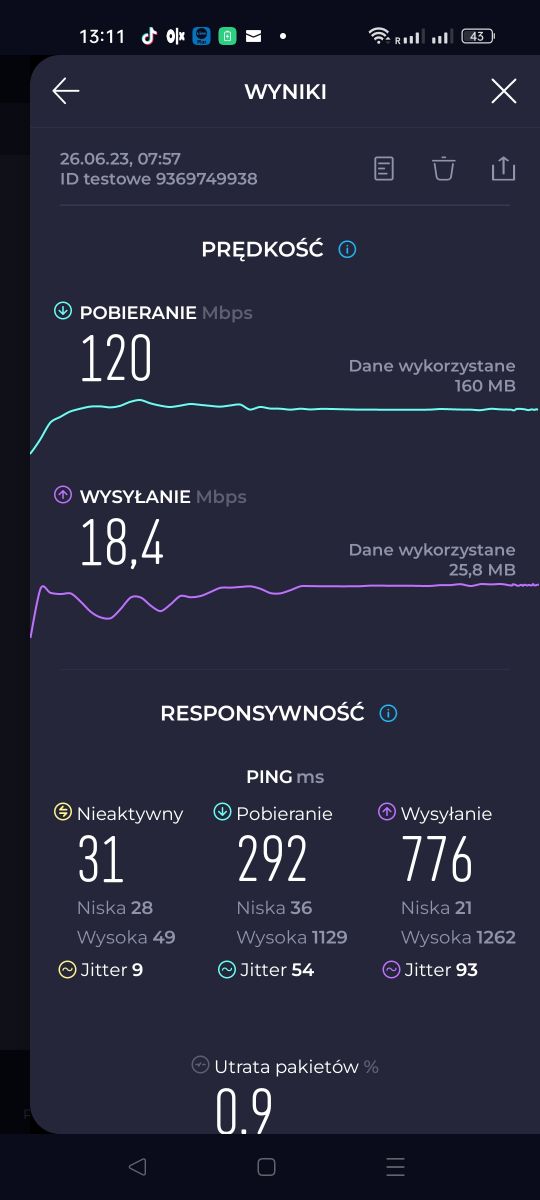
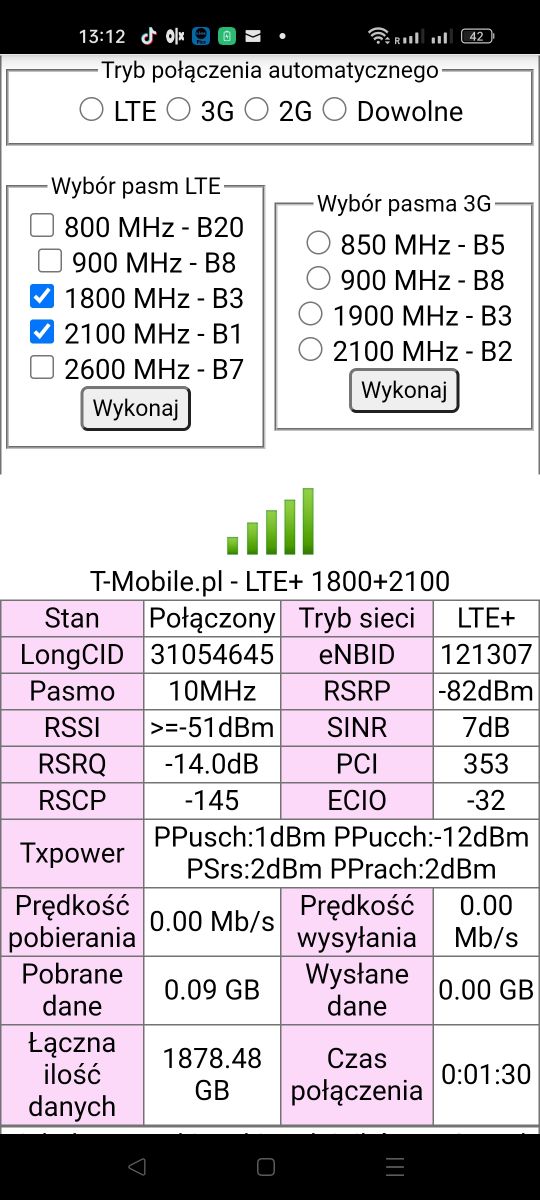
    Hello, this is more or less what it looks like for me Choosing a router for T-Mobile's offer: ZTE MMC888, ZTE MC889, TP-Link NX510V or Huawei B818? Choosing a router for T-Mobile's offer: ZTE MMC888, ZTE MC889, TP-Link NX510V or Huawei B818?
  • #4 20634031
    m.jastrzebski
    Network and Internet specialist
    Posts: 5246
    Help: 679
    Rate: 864
    So I assume you don`t have the 2600 band available there?
    And what SIM card are these speeds on? Because you talked about the 90mbit contract, here it is 120.


    The signal is such that I wouldn`t risk it without an external antenna. There you can probably change the antenna usage to internal in the configuration. And you will see how much it would go without external antennas, which will tell you whether you can think about a router without external antennas or give up.

    And what time is this speedtest from? Now in the middle of the day? How much goes in the evening, when the load generally increases.
  • #5 20634110
    megaman11
    Level 13  
    Posts: 311
    Help: 6
    Rate: 55

    The speed is almost always the same and I`m going with 90 Mb, that`s the contract I have :)
  • ADVERTISEMENT
  • Helpful post
    #6 20634237
    matek451
    Level 43  
    Posts: 31151
    Help: 4337
    Rate: 5769
    Przemyśl, so it`s not surprising that LTE2600 from Tatarska Góra, signal parameters are very weak. It`s with the Cybertech antenna, what kind of antenna is it, it`s strange that you don`t connect to the BTS on Lwowska 36 because it`s the closest NetWORKS BTS with LTE2600+2100+1800. But on the other hand, it`s a mobile mast so it may no longer be there. Overall, the infrastructure is poor, LTE2100+1800, including Fibris. 3rd sector, signal on LTE1800 correct, no LTE800 because it is borderline, but they added LTE900 instead of the canceled UMTS900. 5g2100 should already work on it in DSS with LTE2100. Replacing it with MC888 or NX510V 5G is a misunderstanding, both of them do not have external antenna connectors. Only CPE 5G MC889 will do the trick. For the test, check the LTE2100 itself without the external antenna on the B818 inside the house. On 5G2100 they will be similar.
    Helpful post? Buy me a coffee.
  • ADVERTISEMENT
  • #7 20634271
    megaman11
    Level 13  
    Posts: 311
    Help: 6
    Rate: 55
    Nx510v has an external antenna connector, I just saw it is TS9, the question is whether it will work with a cybertech antenna

    Added after 3 [minutes]:

    Mc889 in unlimited offer, how much could he get, as now I have about 120 from Fibris, would the difference be worth replacing everything!?
  • Helpful post
    #8 20634294
    matek451
    Level 43  
    Posts: 31151
    Help: 4337
    Rate: 5769
    On LTE2100+1800+800 from Fibris you have high speeds, I am afraid that for your conditions and location it is maximum, the lack of LTE2600 has its effect, and SINR does not allow work in QAM256. Replacing it only makes sense with MC889 under 5G2100. In fact, TP-Link has TS9 external antenna connectors, but I am afraid that they only work on N78/79. Overall, the price is unprofitable compared to MC889+T5400.
    Helpful post? Buy me a coffee.
  • #9 20634356
    megaman11
    Level 13  
    Posts: 311
    Help: 6
    Rate: 55
    And what would you actually do, replace everything with MC889, install it on the roof, or is it not worth the effort? Because the profit is e.g. 20mb
  • #10 20952157
    rtomkow1
    Level 1  
    Posts: 1

    To mothers451. You don't know, don't write nonsense. NX510V 5G has outputs for external antennas.
  • ADVERTISEMENT
  • #12 20952427
    megaman11
    Level 13  
    Posts: 311
    Help: 6
    Rate: 55
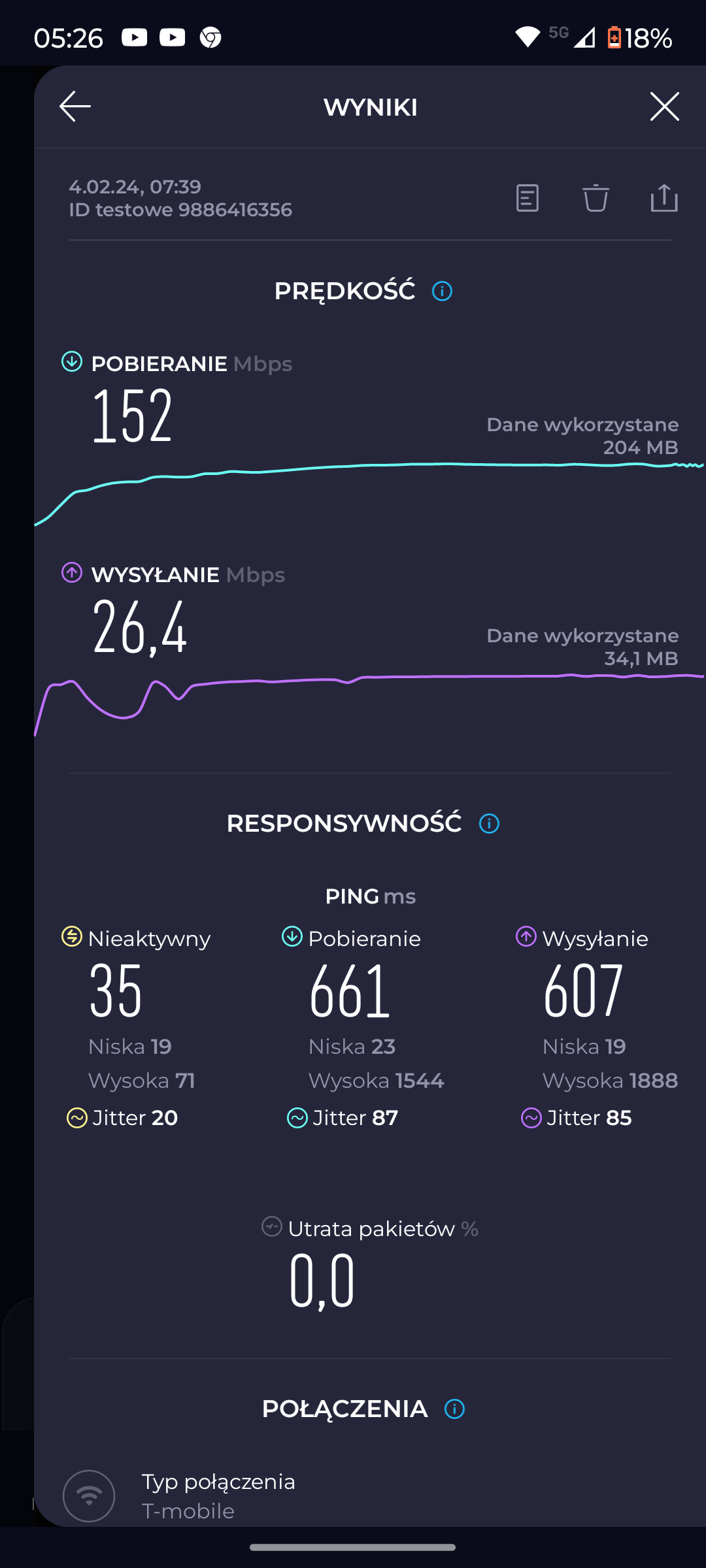
    Hello, I took the tp line for testing, it works with an external cybertech antenna, although it was slower than Huawei, on the same antenna I stayed with Huawei b818 when changing to unlimited internet from t mobile at night max 150mb/s during the day above 100mb/s Screenshot showing internet speed test results with T-Mobile.
  • #13 20952576
    matek451
    Level 43  
    Posts: 31151
    Help: 4337
    Rate: 5769
    But the question is still valid because the fact that TP-Link was slower than the B818 with the Cybertech antenna may prove that the connectors do not work on bands dedicated to LTE. Have you compared the signal parameters on the B818 with the antenna and on TP-Link with it? And it could also be 5G2100 from Fibris because this band operates on it and the results from it are usually weaker than in the aggregation of LTE bands.
    Helpful post? Buy me a coffee.
  • #14 21029326
    megaman11
    Level 13  
    Posts: 311
    Help: 6
    Rate: 55
    Is there no 5g for fibris transmitters now?
  • #16 21029438
    megaman11
    Level 13  
    Posts: 311
    Help: 6
    Rate: 55
    Friend, I currently have a Huawei B818 router and an external Cybertech antenna 1800mhz to 2100mhz, what is worth changing to get the maximum that can be extracted, unlimited 5g internet in Tmobile, I already have it, I will add that in hm manager changing the aggregation to 2600 is weak on t mobile 5g is 3300mhz to 3800mhz in hmm, the manager does not have such bands, please explain my questions
  • #17 21029482
    matek451
    Level 43  
    Posts: 31151
    Help: 4337
    Rate: 5769
    Launching N78 changed the situation completely, now you have 2 BTS -yz 5g3500 nearby, you will probably be able to use them even without an external antenna, because on NR3500 the base stations operate with power several times higher than on LTE. But to use this technology, you need equipment for 5G.Na5G N78, speeds of several hundred Mb/s and even more are normal, an unlimited subscription with access to 5G is required to achieve it.
    B818 is Huawei with 4G, band management min. using HManager, this application only works with HiLinks from Huawei and clones of this manufacturer. For 5G, there are stationary 5G routers from Huawei, but also an external access point from a clone company.
    But I don`t recommend them, the MC888 router from ZTE or the MC889 5G CPE have diagnostics and band selection in WebUI, there are also additional scripts, generally ZTE is more developed in 5G topics.
    T-Mobile`s offer included the MC889+T5400 set, as well as the MC888. You can also buy them on the open market. T-Mobile also offers CPE5G, an exotic device with WNC, and now even a router, it generally works well, but I don`t recommend it. There was also NX510 5G, but it`s probably not available now
    There are several reasonably priced 5G routers and 5G CPEs on the free market.
    Helpful post? Buy me a coffee.
  • #18 21029488
    megaman11
    Level 13  
    Posts: 311
    Help: 6
    Rate: 55
    And the miracle router P5 and the antenna I have, will it be ok or should I replace the antenna or buy an nx510 5g router because I had it but it didn`t work well but since 5g appeared it would probably work better right? I can also occasionally buy ZTE Mc 801a 5g, but would it work with my antenna?
  • #19 21029528
    matek451
    Level 43  
    Posts: 31151
    Help: 4337
    Rate: 5769
    You would need to test this 5G N78 on a 5G phone with support for this band at home and outside, a T-Mobile card with access to the tariff offering entry to the N78 and screenshots from NetMonster and speedtest. Based on this, further steps.
    Helpful post? Buy me a coffee.
  • #20 21029557
    megaman11
    Level 13  
    Posts: 311
    Help: 6
    Rate: 55
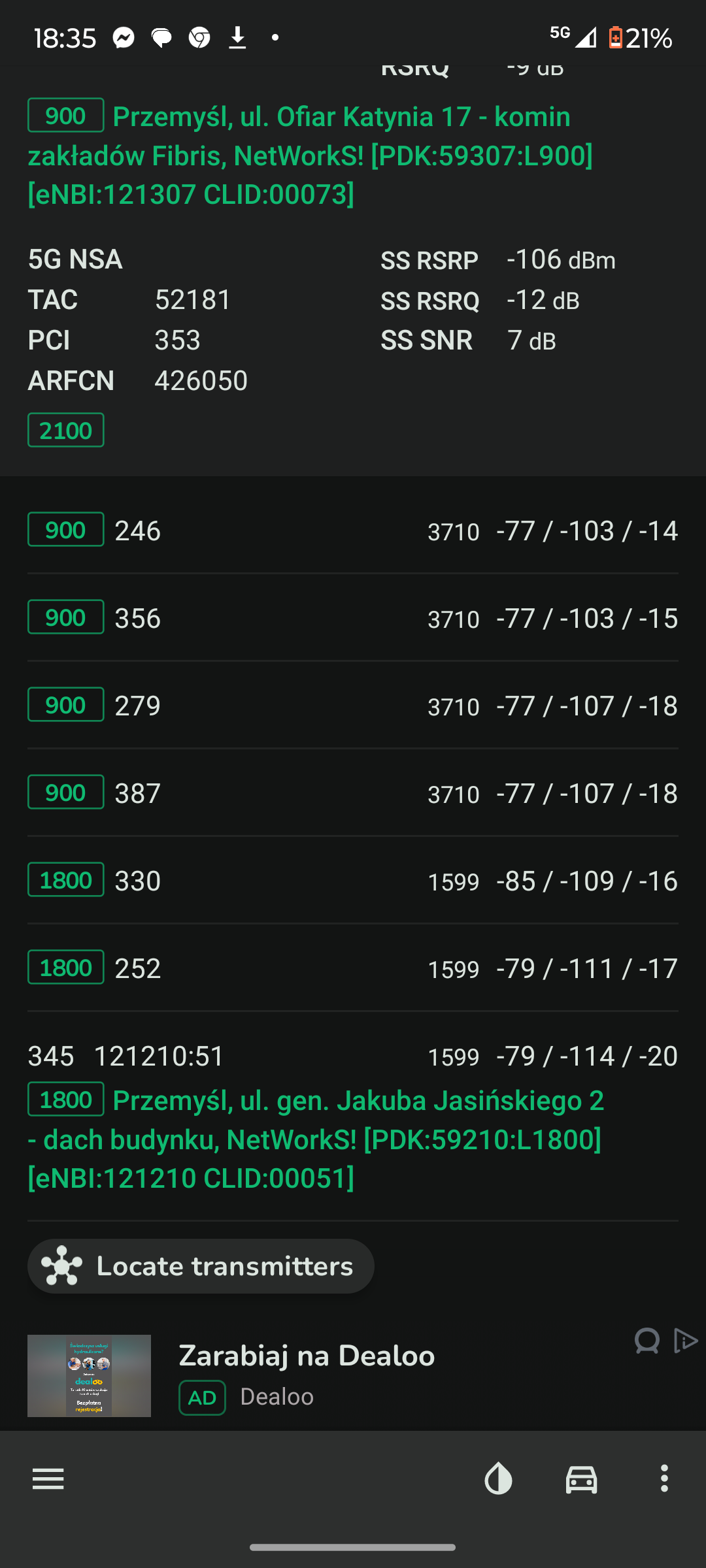
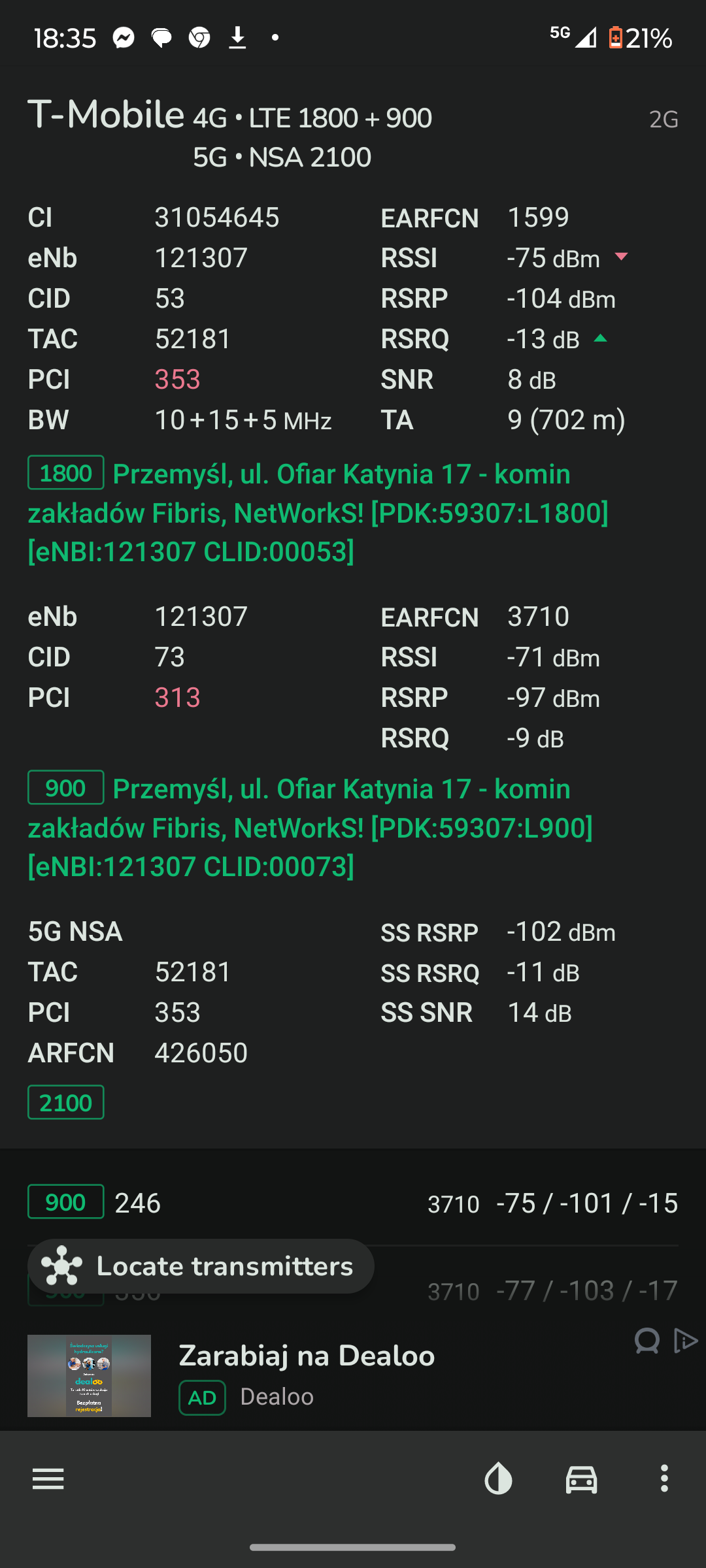
    Screenshot of an app displaying details of 5G and LTE network connections in Przemyśl. Screenshot of a mobile network signal analysis app.
  • #21 21029615
    matek451
    Level 43  
    Posts: 31151
    Help: 4337
    Rate: 5769
    This is pseudo 5G at 2100MHz from Fibris, the question is whether the card has access to 5G N78 or only to N1, because it is possible in T-Mobile, you would have to check in another location where there is access to another BTS with N78.
    Helpful post? Buy me a coffee.
  • #22 21029623
    megaman11
    Level 13  
    Posts: 311
    Help: 6
    Rate: 55
    I checked this morning and recently I drove up to the mast on the Fibris and under the Fibris I get about 800mb on the phone, so without an external antenna it`s probably not good. Will my antenna be enough or a completely new one? What is it about? At home, about 40mb on the phone
  • #23 21030268
    matek451
    Level 43  
    Posts: 31151
    Help: 4337
    Rate: 5769
    I would not go for a 5G router plus antenna solution, a much better solution is external 5G access points, the MC889 from ZTE as an ODU in a set with T3000 acting as an IDU, i.e. an internal router can be purchased for PLN 1,200, there are also several other 5G CPE models on the market.
    Helpful post? Buy me a coffee.
  • #24 21033186
    megaman11
    Level 13  
    Posts: 311
    Help: 6
    Rate: 55
    Thank you for the answers, I am considering these two HUAWEI 5G CPE Pro 2 routers or miracles. P5 looks nice on paper and I can have them at a good price, or is it better to spend more and go for 889 and t3000
  • #25 21035734
    matek451
    Level 43  
    Posts: 31151
    Help: 4337
    Rate: 5769
    With poor coverage on N78 inside the house, the MC889 external access point is a better solution. Mounting external antennas to P5 is pointless.
    Helpful post? Buy me a coffee.
  • #26 21035858
    megaman11
    Level 13  
    Posts: 311
    Help: 6
    Rate: 55
    And why could you explain to me more clearly why I already have a P5 with an external antenna, e.g. Cybertech Track, a bad idea?
  • #27 21455053
    megaman11
    Level 13  
    Posts: 311
    Help: 6
    Rate: 55
    Hello, as my contract is coming to an end which router is better for my location in T-Mobile wnc 5g or ZTE 889 5g +t5400 I would like to add that for some time now 5g has been available outside on my phone and I get about 650mb/s
  • Helpful post
    #28 21455062
    dontonico
    Level 24  
    Posts: 508
    Help: 64
    Rate: 121
    megaman11 wrote:
    Hello, as my contract is coming to an end which router would be better for my location on T-Mobile wnc 5g or ZTE 889 5g +t5400 I will add that for some time now 5g has been available outdoors on my phone I get about 650mb/s7d


    No matter what, the MC889 is the better option.
  • #29 21533829
    megaman11
    Level 13  
    Posts: 311
    Help: 6
    Rate: 55
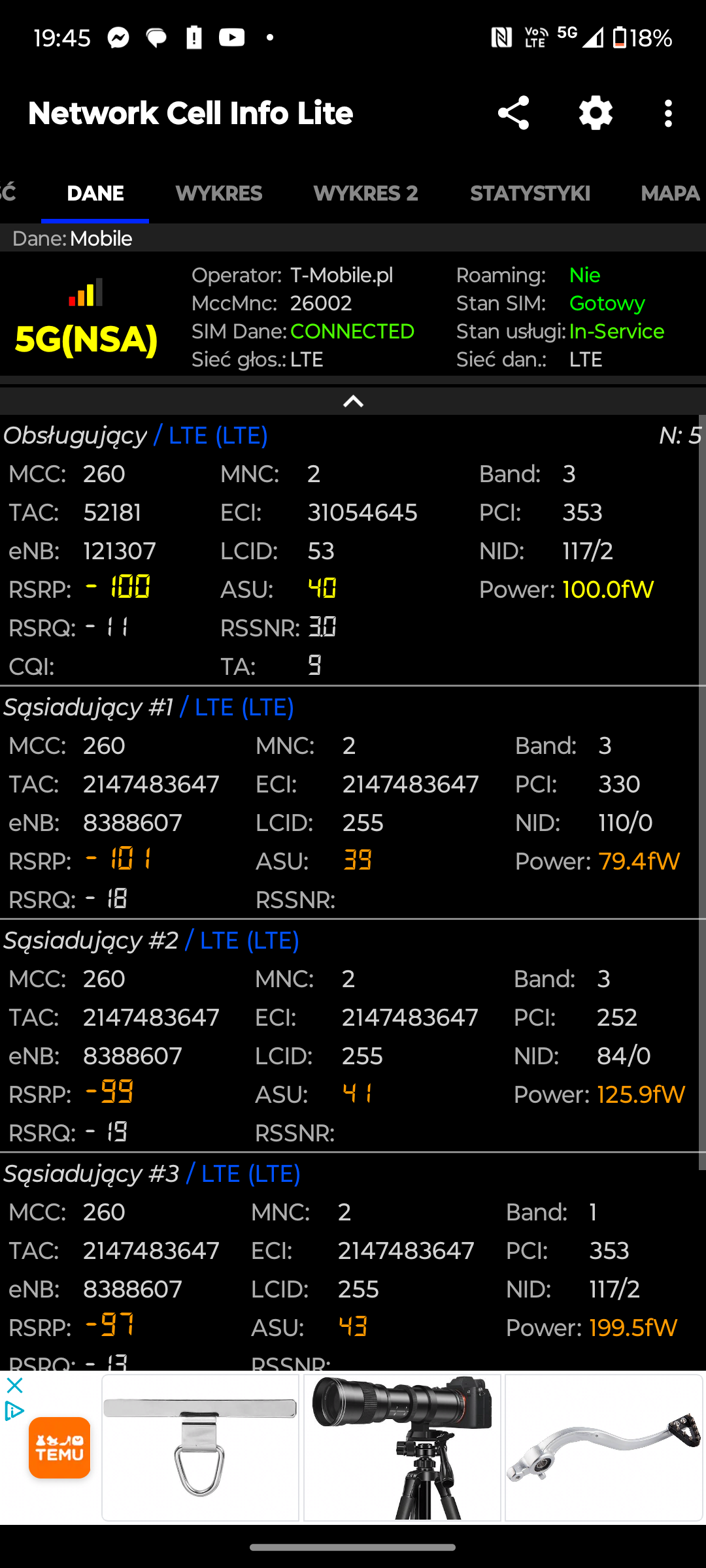
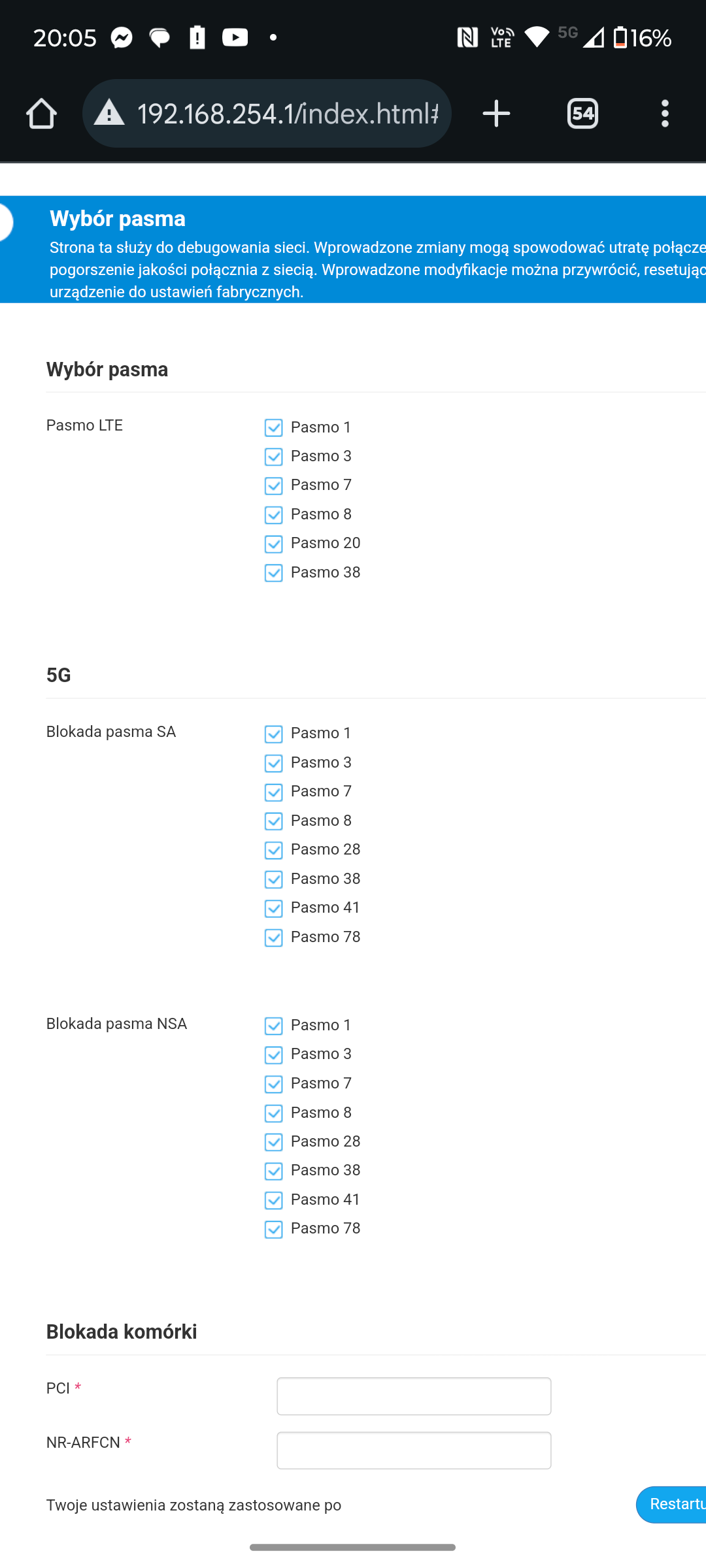
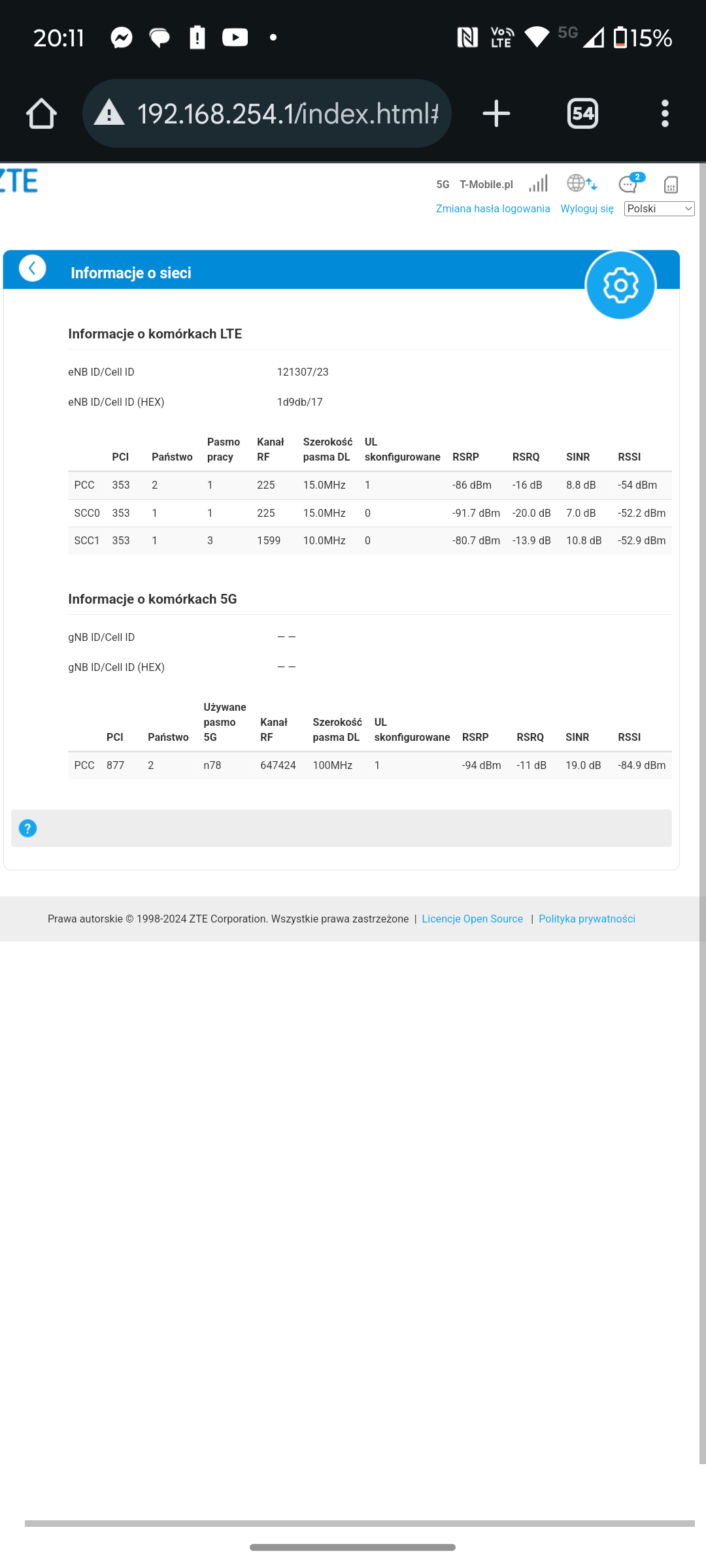
    Hello, I have chosen mc889 with an external antenna, unlimited speed, I have a few questions if it is better to connect to the transmitter from fibris or zana street and what bands to choose on the router when connecting to fibris, when I first start up the antenna on my chimney directed to fibris max 300mb download and checking on my phone also in T-Mobile it goes at 600mb what could be the problem

    Added after 1 [minute]:


    Screenshot of Network Cell Info Lite app showing LTE/5G signal details for T-Mobile, including signal strength data and advertisements at the bottom. .
    Router MC889 settings panel showing band selection for LTE and 5G with checkboxes and cell lock fields. .
    Screenshot of a ZTE router configuration page showing detailed LTE and 5G cell information. .

Topic summary

✨ The discussion focuses on choosing the optimal router for T-Mobile's unlimited 5G internet offer, comparing ZTE MMC888, ZTE MC889 with T5400, TP-Link NX510V, and Huawei B818. The current setup includes a Huawei B818 router with an external Cybertech antenna supporting 1800-2100 MHz bands and a 90 Mb/s contract. Key points highlight that 5G on T-Mobile currently operates mainly on band N78 (3500 MHz) and DSS on 2100 MHz, with limited LTE2600 availability affecting speeds. The ZTE MC889 with external antenna connectors is recommended over MMC888 and NX510V due to better 5G band support and diagnostics. The TP-Link NX510V has TS9 connectors but may not support all LTE bands effectively, resulting in slower speeds compared to Huawei B818 with the Cybertech antenna. External 5G CPEs like MC889 combined with an external antenna on the roof provide better performance in poor indoor 5G coverage areas than indoor routers like Huawei P5. Testing signal parameters, band aggregation, and antenna compatibility is crucial. The MC889 paired with T5400 or T3000 indoor units is considered the best solution for maximizing 5G speeds, especially where 5G N78 coverage is available. Users report achieving up to 650 Mb/s on 5G outdoors, but indoor speeds depend heavily on antenna setup and band support. The discussion also notes that upgrading to unlimited 5G plans only benefits if the current speed is contract-limited rather than signal-limited.
Generated by the language model.

FAQ

TL;DR: Jeśli na telefonie masz około 650 Mb/s na zewnątrz, a w domu sygnał mocno spada, to dla użytkowników T-Mobile w słabej lokalizacji najlepszym wyborem zwykle jest ZTE MC889 + T5400; jak napisał jeden z ekspertów, „MC889 to lepsza opcja”. Ten FAQ pomaga wybrać router, antenę i pasma bez zgadywania. [#21455062]

Dlaczego to ważne: W tym wątku kluczowa różnica nie dotyczy samego „5G”, lecz tego, czy sprzęt i antena potrafią realnie wykorzystać N78 3500 MHz w konkretnej lokalizacji.

Opcja Antena zewnętrzna Wniosek z wątku Najlepsze zastosowanie
ZTE MC889 + T5400 Tak, jednostka zewnętrzna Najczęściej polecany wybór Słaby sygnał w domu, lepszy na zewnątrz
ZTE MC888 Nie Słaby wybór przy potrzebie anteny Mocny sygnał wewnątrz
TP-Link NX510V Tak, TS9 Działał z Cybertechem, ale bywał wolniejszy od B818 Testy, niepewna zgodność anteny
Huawei B818 + Cybertech Tak Po zdjęciu limitu dawał ponad 100–150 Mb/s Gdy 4G działa stabilnie i 5G nie wnosi dużego zysku

Kluczowy wniosek: Najpierw sprawdź, czy masz dostęp do 5G N78 i jaki jest sygnał na zewnątrz domu. Dopiero potem wybieraj między routerem 5G wewnętrznym a zewnętrznym CPE.

Quick Facts

  • Po zmianie z planu 90 Mb/s na nielimitowany T-Mobile przy pozostaniu na Huawei B818 użytkownik raportował ponad 100 Mb/s w dzień i do 150 Mb/s w nocy. [#20952427]
  • Na telefonie przy maszcie pojawiało się około 800 Mb/s, a na zewnątrz domu około 650 Mb/s, co wskazuje na dużą różnicę między zasięgiem terenowym a domowym. [#21029623]
  • Starsza antena Cybertech opisana w wątku pracowała dla 1800–2100 MHz, więc nie jest anteną projektowaną pod 5G N78 3300–3800 MHz. [#21029438]
  • W jednym z testów TP-Link NX510V działał z zewnętrzną anteną Cybertech, ale był wolniejszy niż Huawei B818 na tej samej antenie i tym samym operatorze. [#20952427]

1. Który router jest najlepszym wyborem do T-Mobile Internet Domowy w słabej lokalizacji sygnałowej: ZTE MC889 + T5400, ZTE MC888, TP-Link NX510V czy Huawei B818 z anteną Cybertech?

Najlepszym wyborem z tego wątku jest ZTE MC889 + T5400. MC888 odpada, gdy potrzebujesz pracy na zewnątrz, a NX510V mimo gniazd TS9 w testach wypadł słabiej niż B818. Huawei B818 z Cybertechem ma sens tylko wtedy, gdy stabilne 4G daje już ponad 100 Mb/s i nie łapiesz użytecznego N78 w domu. Przy słabym sygnale wewnątrz i wyraźnie lepszym zasięgu na zewnątrz przewagę daje zewnętrzne CPE 5G montowane wysoko. [#21035734]

2. O ile szybszy może być nielimitowany internet 5G T-Mobile w porównaniu z planem ograniczonym do 90 Mb/s, gdy obecny Huawei B818 już osiąga około 90–120 Mb/s?

Może być tylko trochę szybszy albo kilka razy szybszy, zależnie od pasma. We wcześniejszej fazie wątku padła ocena, że 5G 2100 w T-Mobile nie daje skoku 2x, a po zdjęciu limitu z B818 użytkownik zobaczył zwykle ponad 100 Mb/s i do 150 Mb/s nocą. Dopiero późniejsze pojawienie się N78 zmieniło sytuację, bo na telefonie przy maszcie było około 800 Mb/s. Jeśli dziś korzystasz głównie z LTE lub DSS 2100, zysk może wynieść około 10–60 Mb/s. [#20952427]

3. Jakie testy sygnału i pomiary prędkości powinienem zebrać przed decyzją o wymianie Huawei B818 na router 5G?

Zbierz trzy grupy danych: sygnał, prędkość i identyfikację stacji. 1. Zmierz prędkość rano, w południe i wieczorem, bo obciążenie BTS zmienia wynik. 2. Porównaj B818 z anteną zewnętrzną i bez niej w tym samym miejscu. 3. Zapisz parametry pasm oraz identyfikator stacji z aplikacji i routera. To pozwala odróżnić limit 90 Mb/s od problemu z sygnałem lub przeciążeniem nadajnika. Bez tych danych nie da się wybrać sprzętu racjonalnie. [#20633930]

4. Dlaczego TP-Link NX510V może działać z zewnętrzną anteną Cybertech, a mimo to wypadać gorzej niż Huawei B818 na tym samym łączu T-Mobile?

Bo sama zgodność mechaniczna złącz TS9 nie gwarantuje pracy anteny na właściwych pasmach LTE lub 5G. W wątku padła obawa, że złącza w NX510V mogą nie dawać realnej korzyści na pasmach używanych przez LTE, więc router może być wolniejszy mimo podłączenia tej samej anteny. Drugi możliwy powód to przejście na 5G 2100, które bywa słabsze od agregacji kilku pasm LTE. Wynik „działa, ale wolniej” nie potwierdza więc poprawnego dopasowania radiowego. [#20952576]

5. Jak sprawdzić na Huawei B818, czy antena zewnętrzna naprawdę pomaga w porównaniu z antenami wewnętrznymi?

Sprawdź to przez bezpośrednie porównanie w tej samej lokalizacji i czasie. 1. W konfiguracji B818 przełącz użycie anteny na wewnętrzną. 2. Zrób speedtest oraz zapisz parametry sygnału dla LTE1800, LTE2100 i LTE2600. 3. Wróć do anteny zewnętrznej i powtórz pomiary. Jeśli prędkość, SINR lub stabilność spadają bez Cybertecha, antena pomaga realnie. Jeśli wyniki są podobne, możesz rozważyć router bez złącz lub zewnętrzne CPE 5G zamiast kolejnej anteny LTE. [#20634031]

6. Czym jest DSS 5G 2100 MHz i dlaczego niektórzy użytkownicy nazywają je pseudo 5G w porównaniu z 5G N78?

„DSS 5G 2100 MHz” jest techniką współdzielenia pasma, która uruchamia 5G na tym samym zakresie co LTE 2100, zamiast używać szerokiego, dedykowanego pasma 3500 MHz. Dlatego część użytkowników nazywa je „pseudo 5G”: wygląda jak 5G w telefonie, ale osiągi bywają bliższe dobremu LTE niż pełnemu N78. W tym wątku 5G 2100 opisano jako pasmo współdzielone z 4G, bez skoku 2x, podczas gdy N78 dawało na telefonie setki Mb/s. [#21029615]

7. Jaka jest różnica między zewnętrznym 5G CPE, takim jak ZTE MC889, a wewnętrznym routerem 5G, takim jak ZTE MC888 lub TP-Link NX510V?

Zewnętrzne CPE montujesz tam, gdzie sygnał jest najlepszy, a wewnętrzny router stoi w domu i walczy z tłumieniem ścian. „Zewnętrzne 5G CPE jest jednostką montowaną na zewnątrz, która odbiera sygnał radiowy przed wejściem do budynku, co zmniejsza straty i poprawia stabilność.” W tym wątku MC889 polecano właśnie dlatego, że N78 było wyraźnie lepsze na zewnątrz niż w środku. MC888 i NX510V mają sens głównie wtedy, gdy dom nie tłumi sygnału istotnie. [#21030268]

8. MC889 + T5400 kontra router WNC 5G — który zestaw jest lepszy dla T-Mobile w miejscu, gdzie telefon osiąga około 650 Mb/s na zewnątrz, ale dużo mniej w domu?

Lepszy będzie MC889 + T5400. Gdy telefon pokazuje około 650 Mb/s na zewnątrz, a w środku dużo mniej, problemem jest dostarczenie sygnału N78 do domu, nie sama karta SIM. W takim scenariuszu zewnętrzna jednostka ma przewagę nad typowym routerem wewnętrznym WNC 5G. Jeden z technicznych uczestników ujął to krótko: „MC889 to lepsza opcja.” To zdanie dobrze podsumowuje cały kierunek rekomendacji z końcówki wątku. [#21455062]

9. Jak mogę sprawdzić, czy moja karta SIM T-Mobile ma dostęp tylko do 5G N1/2100, czy także do szybszego 5G N78/3500?

Sprawdź kartę w miejscu, gdzie na pewno działa N78, i odczytaj pasmo z telefonu. 1. Włóż SIM do telefonu 5G obsługującego N78. 2. Podjedź pod BTS, o którym wiesz, że ma 5G 3500. 3. Odczytaj pasmo w NetMonsterze i porównaj wynik prędkości. Jeśli telefon widzi tylko N1/2100 mimo pobytu przy stacji N78, karta lub taryfa może nie mieć dostępu do szybszego 5G. Sam napis „5G” na ekranie nie rozstrzyga sprawy. [#21029528]

10. Dlaczego telefon pokazuje około 600–800 Mb/s przy maszcie, a domowy router na dachu osiąga tylko około 300 Mb/s?

Najczęściej winne są pasmo, ustawienie i antena. Telefon przy maszcie może wejść w mocne N78 i osiągnąć około 600–800 Mb/s, ale router na dachu może łączyć się z inną stacją, gorszym sektorem albo słabszą kombinacją pasm. W tym wątku użytkownik miał około 300 Mb/s na MC889, mimo że telefon na tej samej sieci dochodził do około 600 Mb/s. Stara antena 1800–2100 MHz też może ograniczać wynik, jeśli nie jest przeznaczona dla 3300–3800 MHz. [#21533829]

11. Które pasma powinienem wybrać na ZTE MC889 przy połączeniu z nadajnikiem T-Mobile, gdzie dostępne są LTE1800, LTE2100, LTE2600 i 5G N78?

Najpierw wymuś N78 jako pasmo główne, a LTE potraktuj jako warstwę pomocniczą. W tym wątku po uruchomieniu N78 uznano, że sytuacja zmieniła się całkowicie i to ono daje „kilkaset Mb/s i więcej”. LTE1800, LTE2100 i LTE2600 mają sens jako kotwica lub agregacja, ale nie powinny zastępować 5G 3500, jeśli sygnał N78 jest użyteczny. Jeśli po wymuszeniu N78 wynik spada, porównaj osobno sektory i stacje, bo problem może leżeć w kierunku anteny, nie w samym paśmie. [#21029482]

12. Jak używać HManagera, NetMonstera i diagnostyki routera do identyfikacji najlepszego BTS-a i kombinacji pasm dla domowego internetu T-Mobile?

Użyj każdego narzędzia do innego zadania. 1. W HManagerze na B818 testuj pojedyncze i agregowane pasma LTE, zwłaszcza 1800, 2100 i 2600. 2. W NetMonsterze na telefonie sprawdzaj, czy łapiesz N1 czy N78 oraz z jakiej stacji. 3. W diagnostyce ZTE porównuj sektory, prędkości i stabilność po ustawieniu anteny. HManager działa tylko z routerami Huawei typu HiLink i ich klonami, więc do 5G ZTE trzeba już używać wbudowanego WebUI i skryptów. [#21029482]

13. Jaki typ anteny zewnętrznej jest potrzebny do 5G N78 przy 3300–3800 MHz i dlaczego starsza antena Cybertech 1800–2100 MHz może być niewystarczająca?

Do N78 potrzebujesz anteny pracującej w zakresie około 3300–3800 MHz. Antena Cybertech opisana w wątku obsługuje 1800–2100 MHz, więc została dobrana pod LTE, nie pod 5G 3500. To oznacza, że może pomóc na LTE1800 lub LTE2100, ale nie jest właściwym narzędziem do maksymalnego wykorzystania N78. Jeśli telefon pod BTS-em pokazuje około 800 Mb/s, a w domu jest tylko około 40 Mb/s, stare pasmo anteny staje się jednym z pierwszych podejrzanych. [#21029623]

14. Dlaczego montaż anteny zewnętrznej do routera 5G takiego jak P5 jest uznawany za gorsze rozwiązanie niż użycie jednostki zewnętrznej, takiej jak MC889?

Bo lepiej przenieść cały modem 5G na zewnątrz niż ciągnąć słaby sygnał do routera stojącego w domu. Wątek kończy się jasną tezą, że przy słabym pokryciu N78 wewnątrz domu MC889 jako punkt zewnętrzny jest lepszy, a dokładanie anten do P5 nie ma sensu. „MC889 to zewnętrzne CPE, które odbiera 5G przed tłumieniem przez ściany, a P5 pozostaje routerem wewnętrznym zależnym od jakości sygnału w budynku.” To jest główna różnica praktyczna. [#21035734]

15. Jak sprawdzić, czy lepiej podłączyć router T-Mobile do nadajnika Fibris, czy do innej pobliskiej stacji, takiej jak Jasińskiego lub Żana?

Porównaj stacje w identycznym trybie testowym, nie na wyczucie. 1. Ustaw antenę kolejno na Fibris, Jasińskiego i Żana. 2. Dla każdej stacji wymuś ten sam zestaw pasm i wykonaj kilka testów o tych samych porach. 3. Zapisz identyfikator BTS, pasmo główne i wynik pobierania. Wątek pokazuje, że sama bliskość stacji nie wystarcza, bo liczą się sektor, dostępność N78 i realne obciążenie. Najlepsza stacja to ta, która daje najwyższy i najbardziej powtarzalny wynik, nie ta najbliższa na mapie. [#21533829]
Generated by the language model.
ADVERTISEMENT