
logo elektroda
logo elektroda
X
logo elektroda

Let's analyze and run a 48 LED module on shift registers with Arduino - HC164A

p.kaczmarek2 2160 1

TL;DR

  • A 48-LED module with six cascaded HC164A shift registers is driven from an Arduino using only clock and data lines.
  • The board uses a 74AHC14D as a buffer, and A2 stays permanently high so the code shifts bits through A1 and CLK only.
  • The module contains 6 registers × 8 outputs, giving 48 bits total.
  • The first 32-bit test blinked incorrectly because the LEDs are two-colour and the remaining bits wrapped; a 48-bit array fixed the sequencing.
  • The main limitation is ghosting, because the HC164A lacks output enable, unlike the 74HC595.
Generated by the language model.
ADVERTISEMENT
Treść została przetłumaczona polish » english Zobacz oryginalną wersję tematu
📢 Listen (AI):
  • Flashing LED board .
    How does the shift register work? How can shift registers be cascaded so that you can run 48 LEDs using just two lines - clock and data? Here I will try to demonstrate this using an example of a junk board, which I will also analyse first.

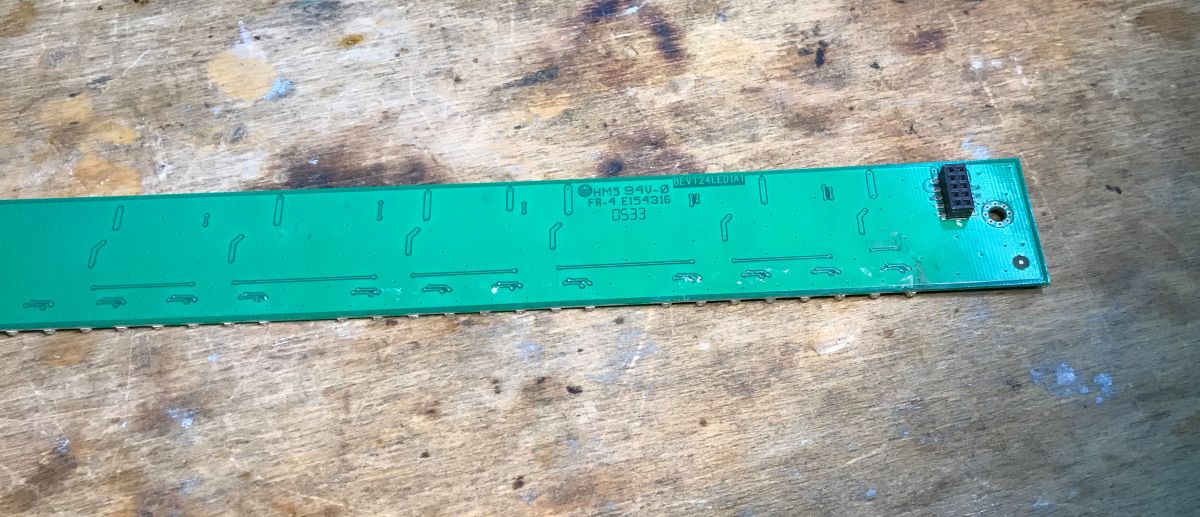
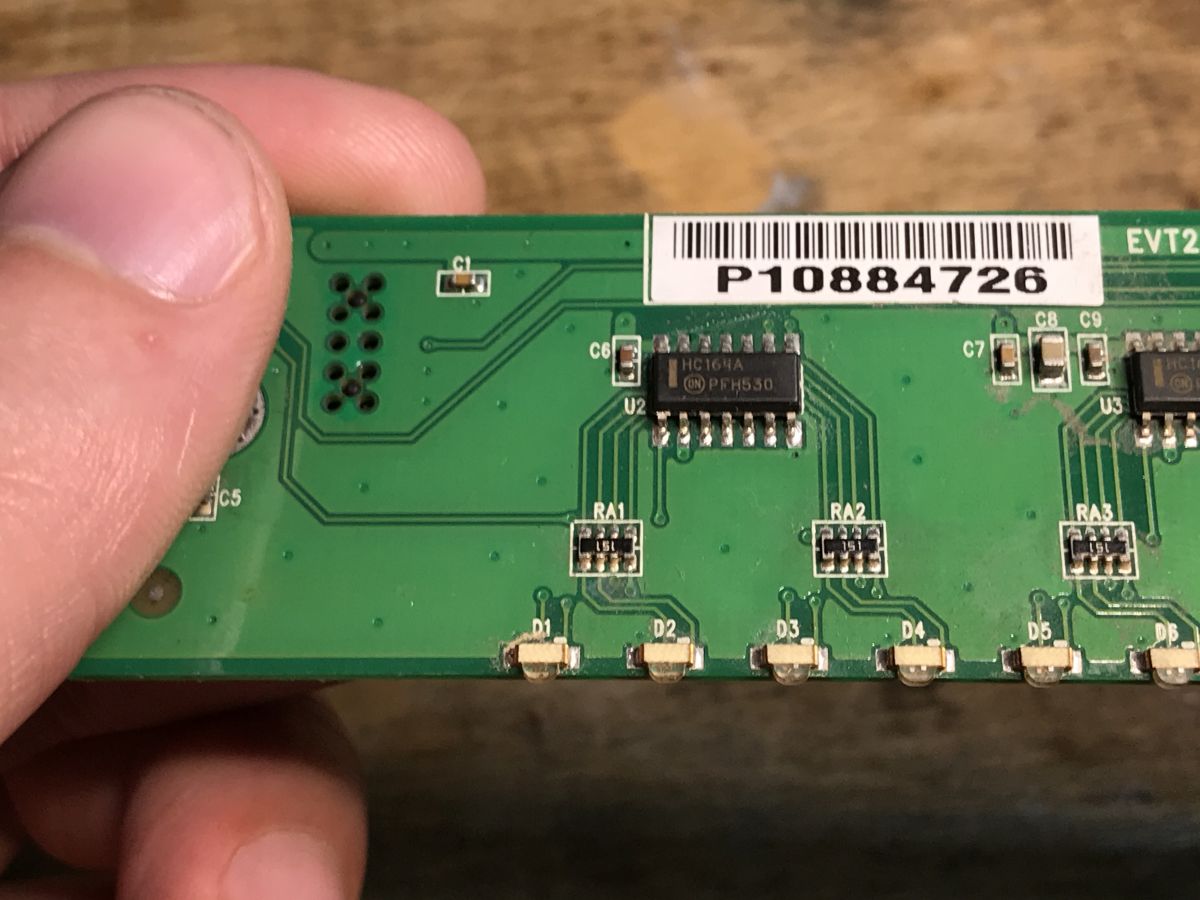
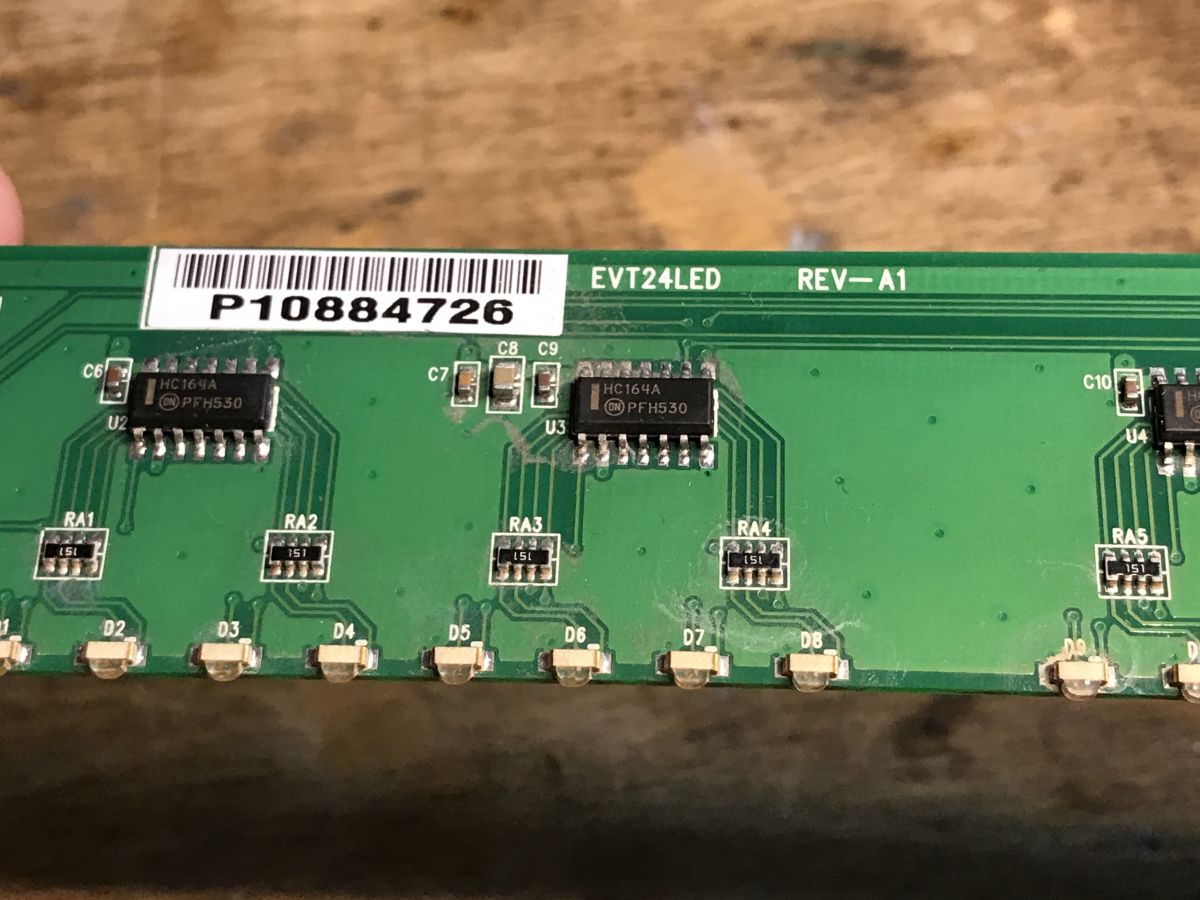
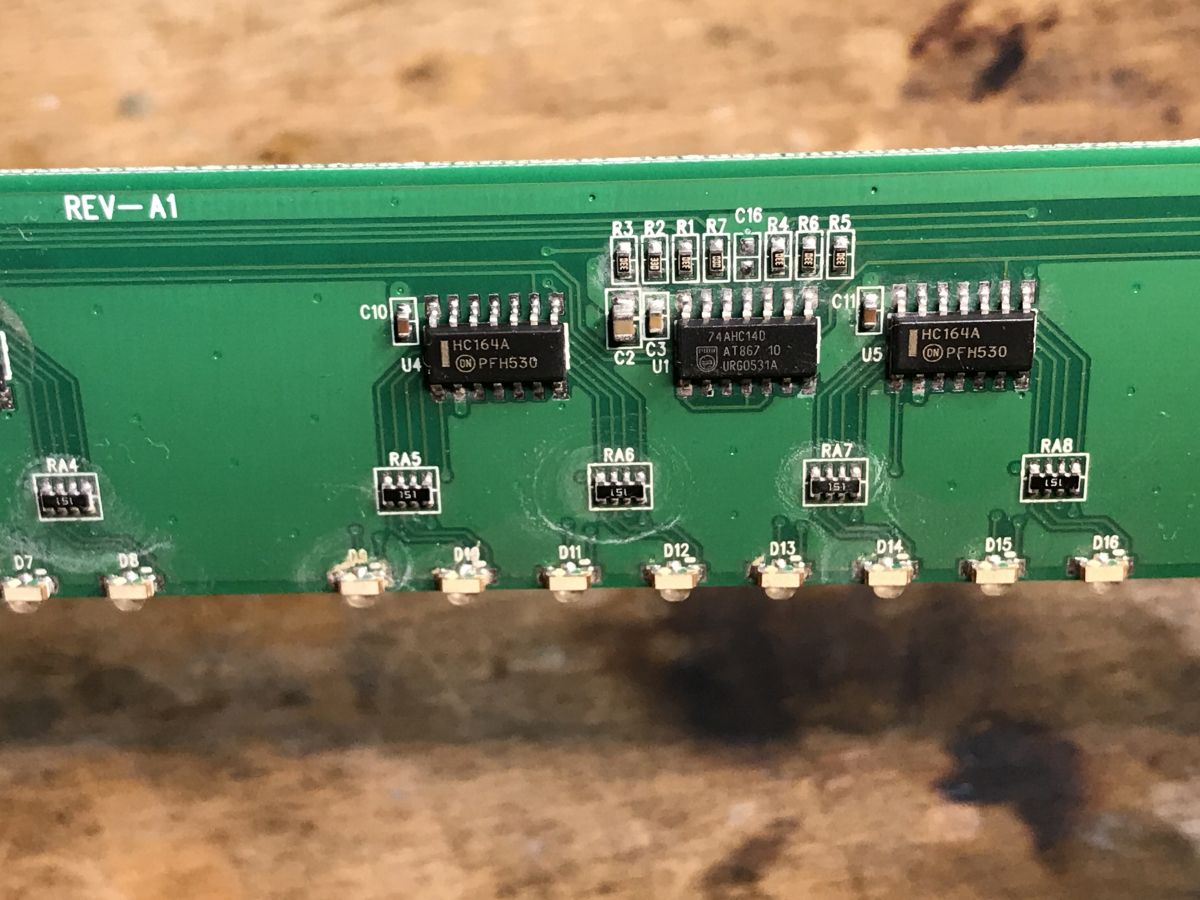
    The scouting begins. There are six HC164A chips on the board and one 74AHC14D:
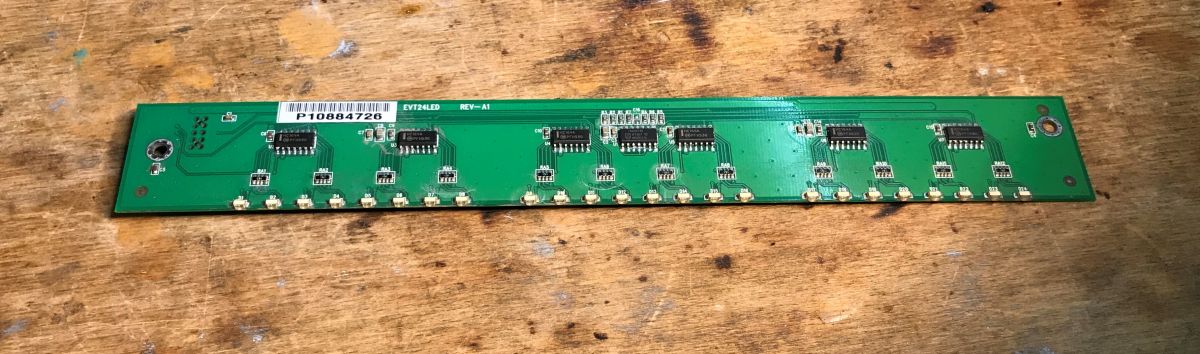
    Circuit board with integrated circuits and LEDs on a wooden surface. .
    Photo of a green printed circuit board bottom side with markings. .
    Close-up of a printed circuit board with HC164A integrated circuits. Close-up of a circuit board with HC164A chips and LEDs Printed circuit board with HC164A and 74AHC14D ICs and LEDs. .
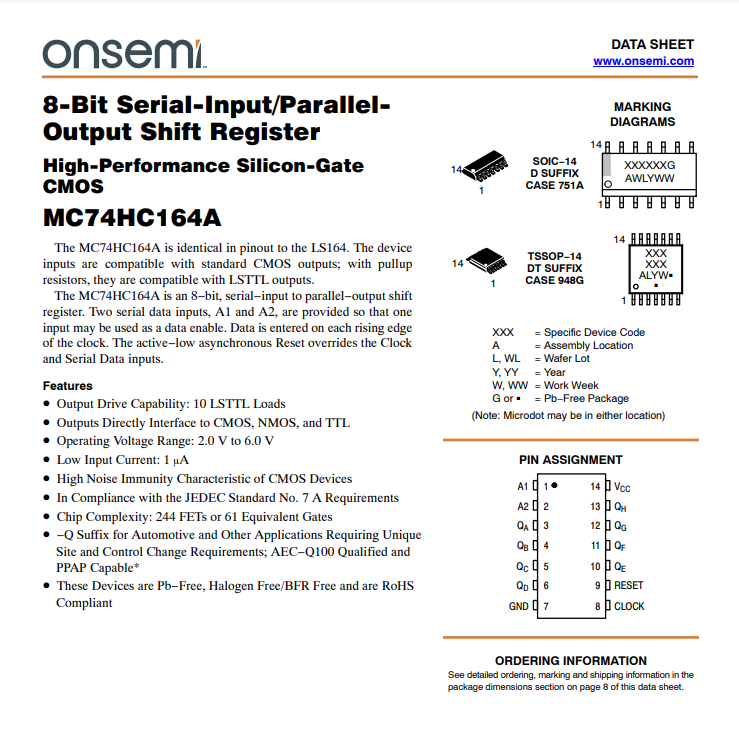
    Check the circuit notes, HC164A :
    MC74HC164A shift register datasheet .
    The first is a shift register. Input in series, outputs in parallel.
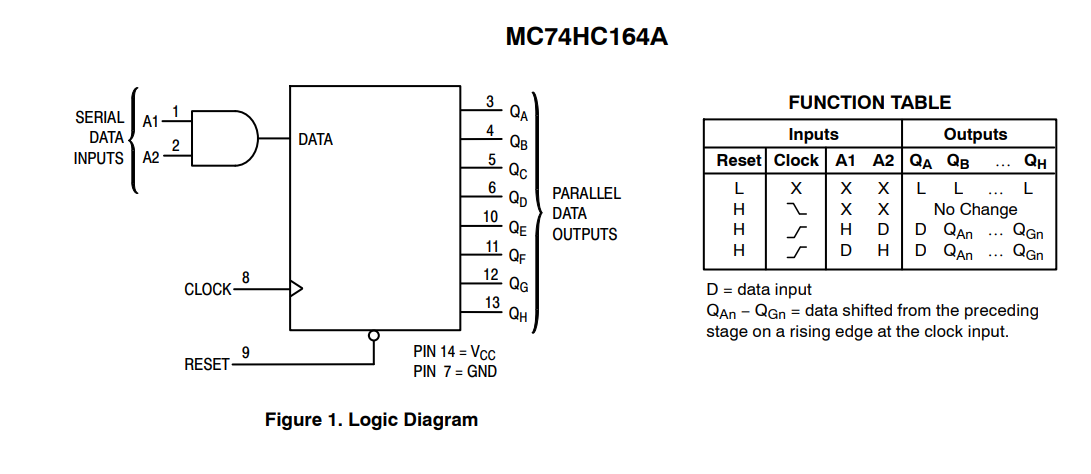
    Logic diagram of the MC74HC164A shift register. .
    This shift register has 8 outputs and only 3 inputs. By feeding the right signal to the inputs, we can set the outputs as we wish, so it essentially allows us to get more IO pins.
    The shift register remembers what we set it once.
    To set its outputs, we feed it a clock signal (CLK), the rising edge of the clock causes the remembered values in the register to move a place further. At this point, the next value is taken (to the first place), which is the result of the logical product of the inputs A1 and A2.
    In a simplified application, A2 can be set to high, in which case only A1 and the clock (CLK) are manipulated, and in this way data is written to the next register output pins.
    The clock simply executes successive cycles (we set it to low level, then to high level, etc.), and on A1 we put out at our discretion the value we want to write to the location (1 or 0).
    This will be a little clearer in the code.
    The second circuit is just the gates implementing the NOT function:
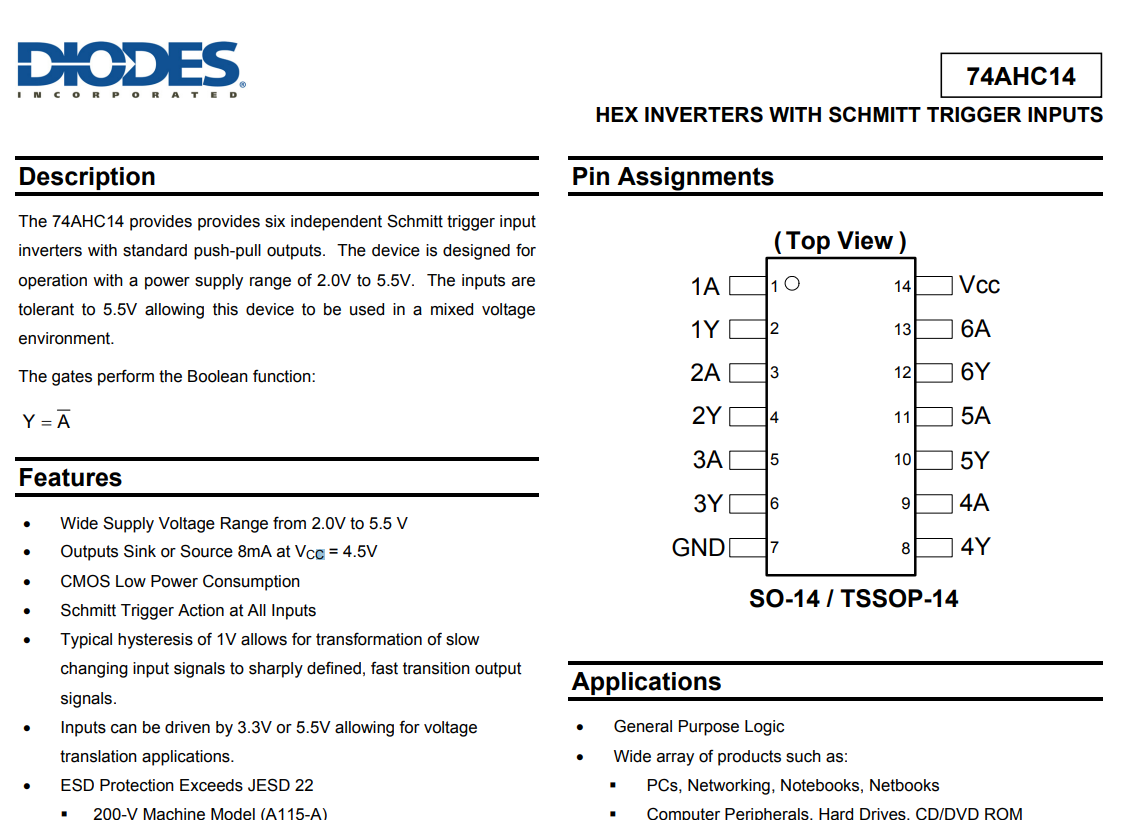
    Section of the 74AHC14 technical documentation with description and pin assignments. .
    There are several of these gates inside it, each outputting the opposite logical state to that on the input:
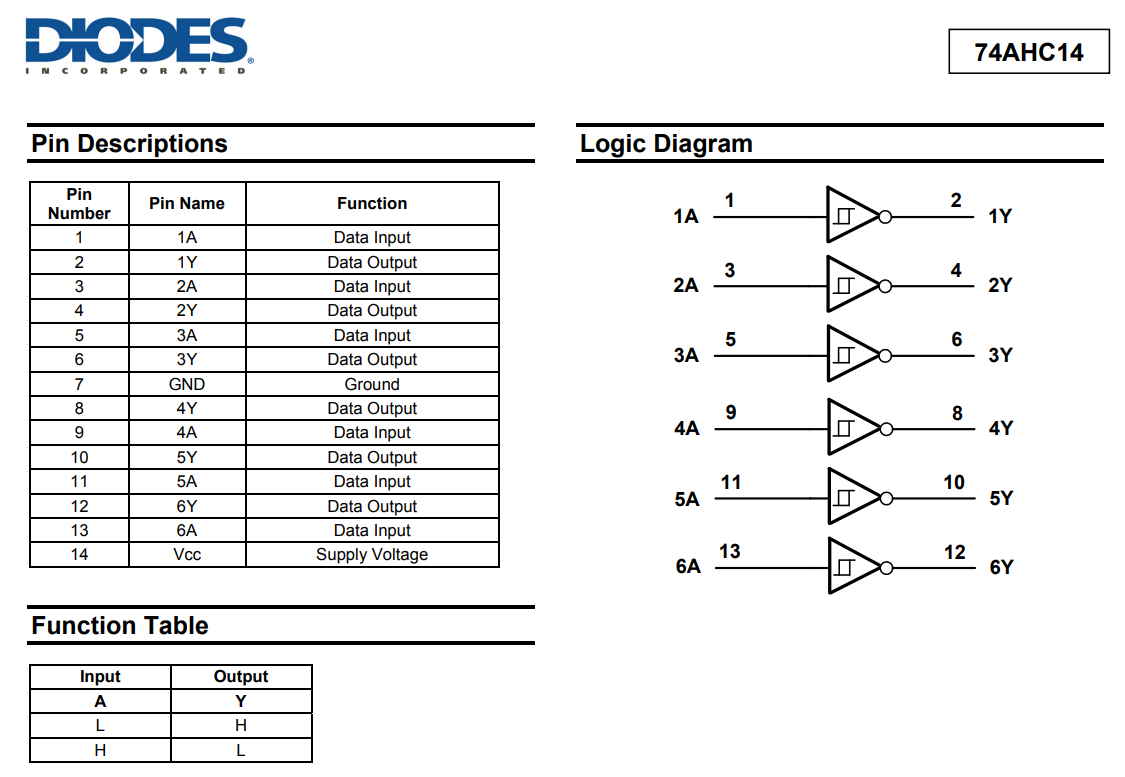
    Logical diagram and pin description of the 74AHC14 chip .
    Now the lead pins need to be examined.
    I have desoldered the connector:
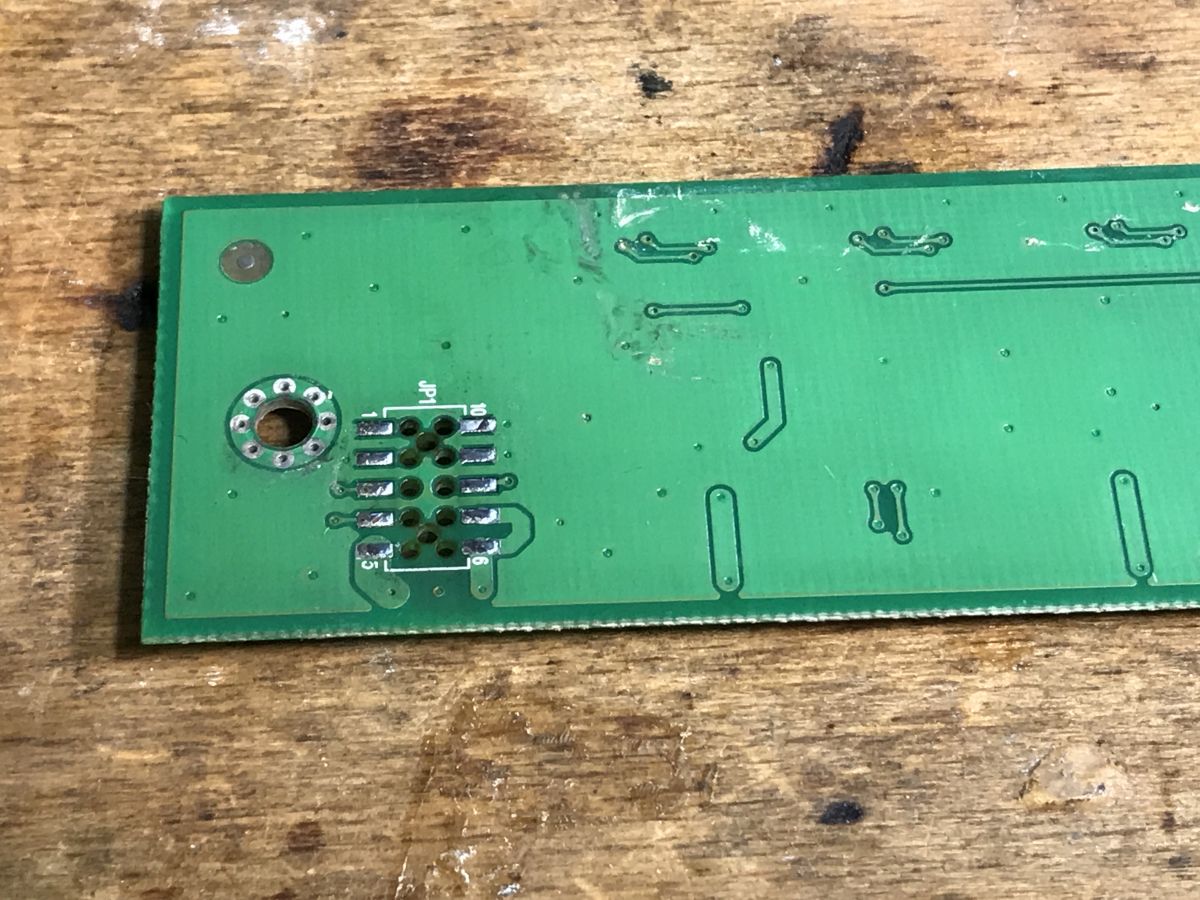
    Image of a circuit board from electronic waste, showing rows of pads and traces. .
    VDD and GND are the easiest to determine - we have the circuit leads after all. In addition, GND is usually a copper spout on the board, the power supply can often be such a spout too.
    We set the multimeter to the continuity test ("beeper") and examine where each pad leads, if by any chance it goes to one of the circuit pins marked VDD or GND in the datasheet.
    This leaves only 3 signals, the connection of which I have also examined with a multimeter, putting my observations in the photo:
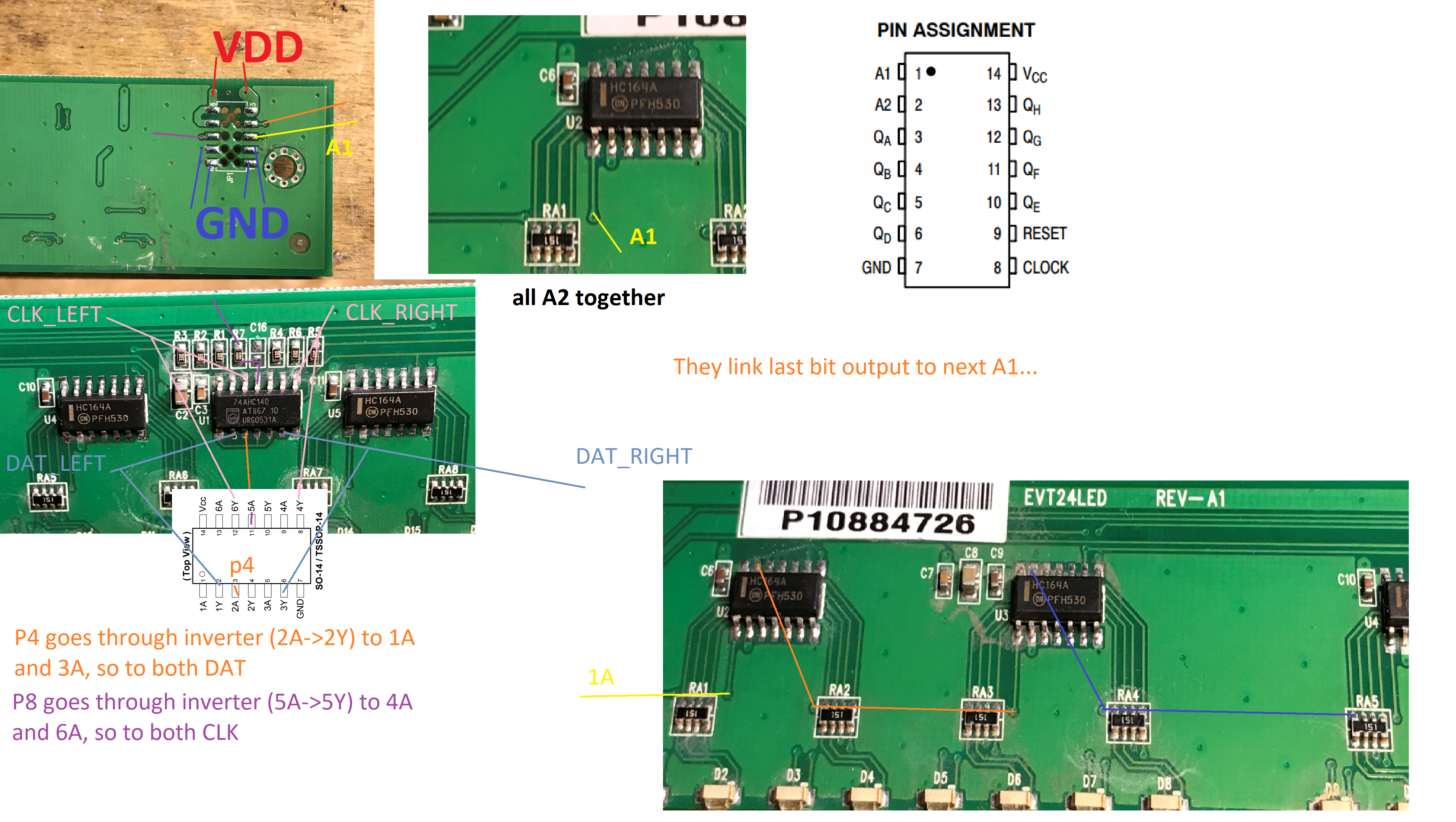
    Circuit board with HC164A and 74AHC14D integrated circuits .
    The conclusions are as follows, we have three signals here:
    - a common CLK - this leads to the 74AHC14D, which is in the role of a buffer, and then forks to the combined common clock inputs of the circuits on the right and left side
    - common A2 - like the clock, this leads to the 74AHC14D, which is in a buffer role, and then bifurcates
    - cascaded A1 - this leads to A1 of the first shift register
    Subsequent A1 pins are connected to the QH outputs of the previous shift registers, so that when we sequentially 'insert' bits then the last bit that is 'out' is not lost, it just goes to the next register.
    What we have here is essentially a done "one long shift register" built up from several regular registers.
    There is still the question of why the NOT gate - we could probably do without it too, I suspect it is only there as a buffer so that there is sufficient current capacity to drive the register inputs. Anyway, these signals go through it twice, so they are not negated afterwards (negation negates negation)..

    Startup [/size] .
    So we get the Arduino ready, solder the wires:
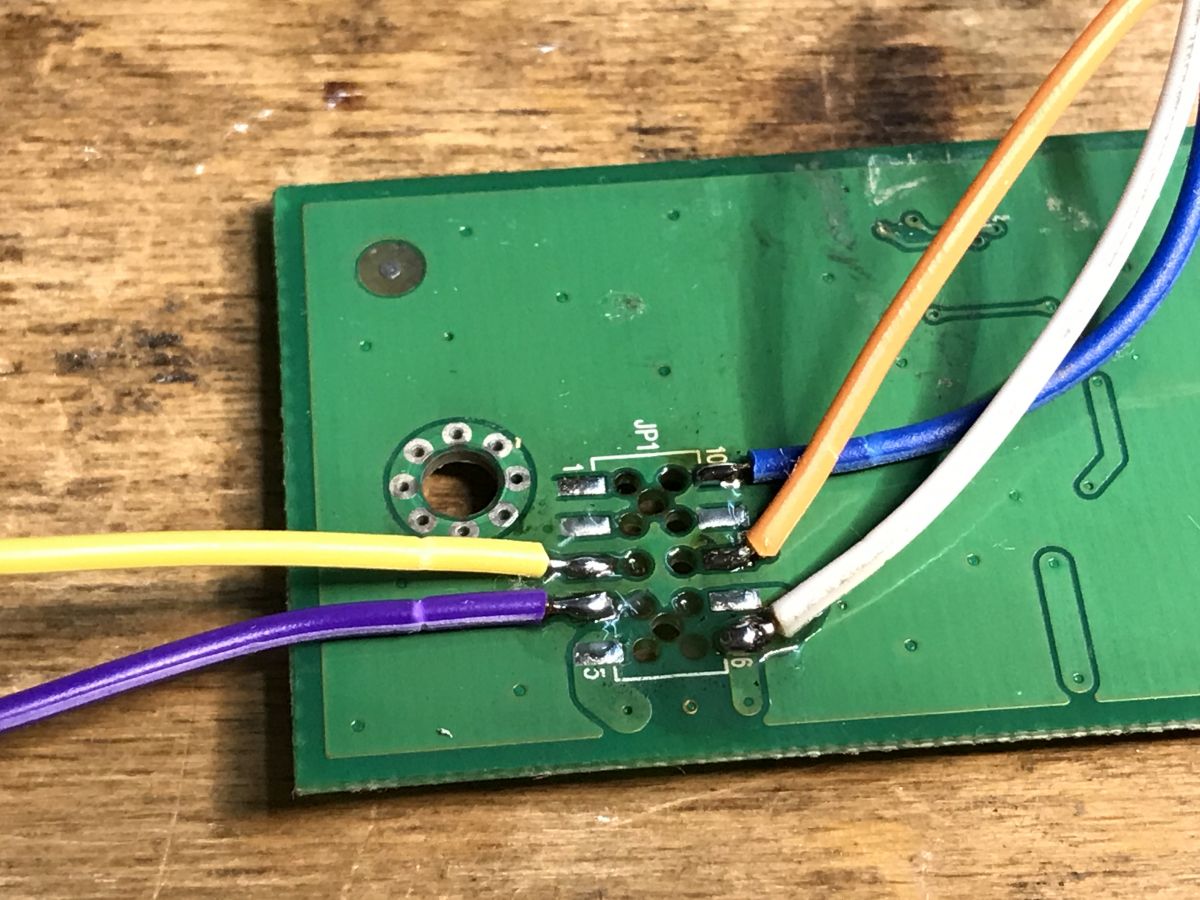
    Close-up of a printed circuit board with soldered colored wires .
    We take another look at the register's catalogue note to know what to send:
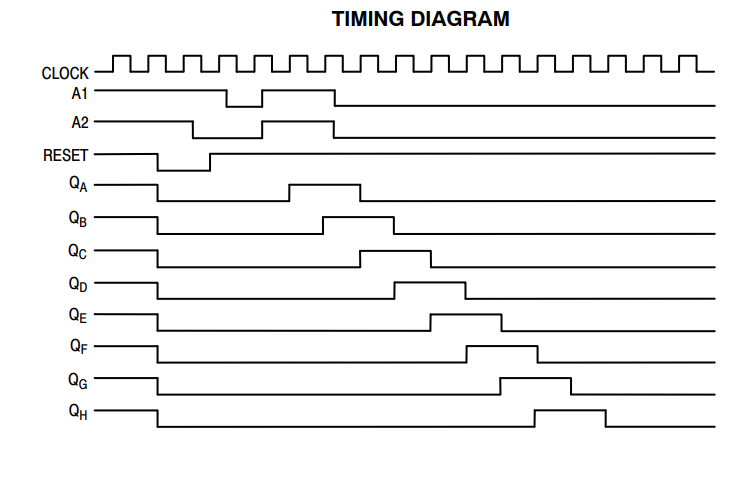
    Shift Register Timing Diagram .
    Let's make things simpler for ourselves - we'll set this additional common input permanently to a high state. We will only operate the clock and the data entry pin.
    We enter our pins in the code as we have connected them:
    Code: C / C++
    Log in, to see the code
    .
    We set them as digital outputs, ENA permanently on high state:
    Code: C / C++
    Log in, to see the code
    .
    And now the most important thing - sending data.
    Code: C / C++
    Log in, to see the code
    .
    For now, I'm sending a 32-bit number, in this case -1, which in bit representation is 0xFFFFFFFFFFFF, which is the lit bits themselves, and then I'm sending the lit bits themselves. I want something to blink.


    .
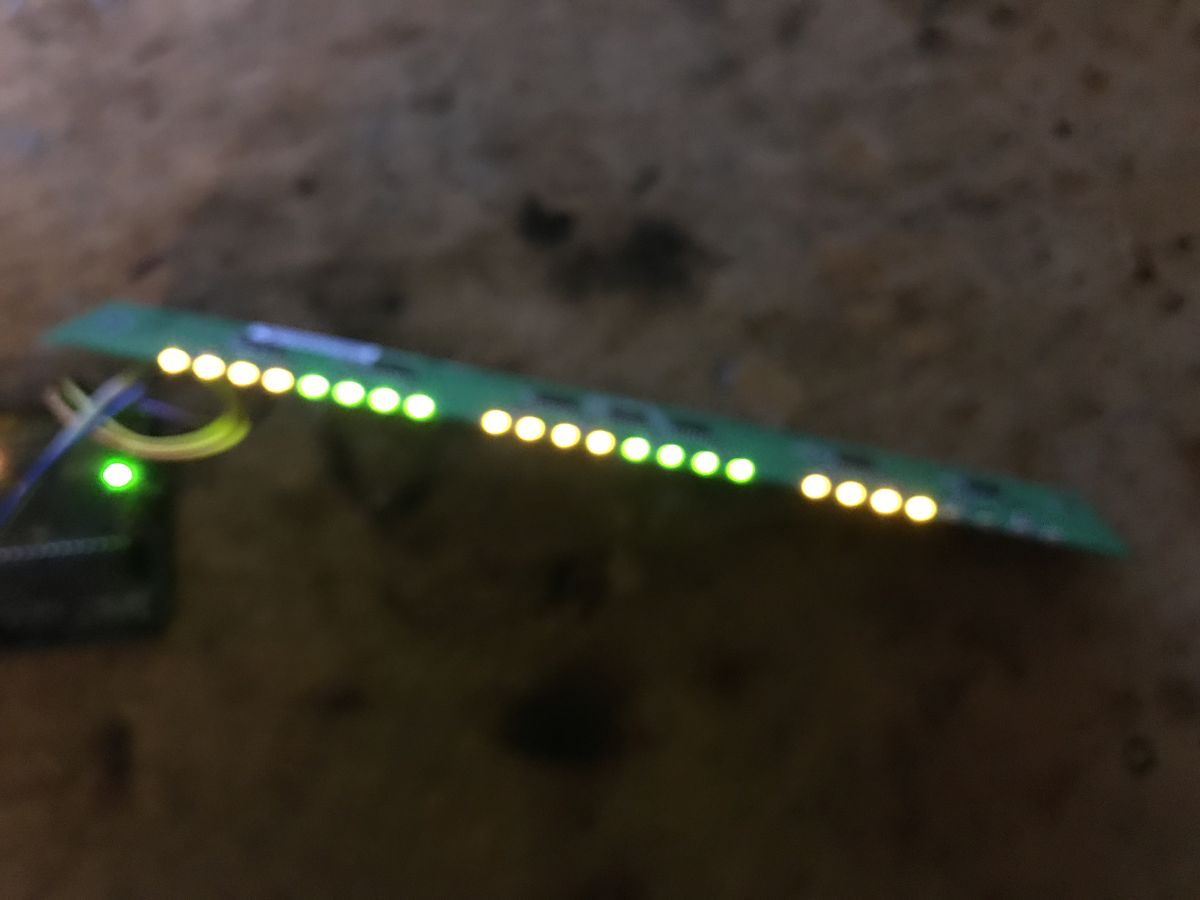
    Apparently something is working, but why alternate?
    And I already know, because, after all, those LEDs there are two colours.... so there's a total of 24*2 = 48 bits there, and I'm only sending 32 bits. Additionally, I don't reset anything, so basically I send bits [0,31] first, then [32, 47] and again [0, 15], and so it loops....
    I was too hasty in making that first attempt, but I already know what's wrong.

    This is now the second attempt. 48 bits is maybe 6 bytes, so I made an array. It was also a bit tempting to use a 64-bit type, but the array will come in handy for demonstration. Now I'm specifically sending 48 bits, so I reckon each new transaction will write a new separate queue of LED states.
    Code: C / C++
    Log in, to see the code
    .
    Still need to test this - one LED for now:
    Code: C / C++
    Log in, to see the code
    .
    Testing:


    .
    It works!

    Time for a more ambitious test. I have determined experimentally that the colours of the LEDs alternate....
    Code: C / C++
    Log in, to see the code
    .
    I now light the four LEDs in sequence according to their colour:


    .


    It is now left to add support for the individual LEDs.... The bits should be in sequence, you just need to add their setting. Remember this is an array:
    Code: C / C++
    Log in, to see the code
    .
    Demo code:
    Code: C / C++
    Log in, to see the code
    .
    Effect:


    .
    And that's it... now you can play around, display some device states, etc, because on the "knight rider" here I would not be tempted because of the "ghosting", about that shortly.

    Summary .
    It all worked, although I initially thought there would be 24 LEDs here rather than 48, only later did I realise that would be absurd.... We have 6 registers, 8 bits each, so it comes out to 48 bits in total.
    Other than that it went smoothly.
    The registers are connected in cascade but from a code point of view we don't even have to remember that, they automatically behave as one big register.
    I guess the only major problem here is that this particular register doesn't have an "output enable" switch to turn the outputs on/off, so when we "slip" bits into it, for a very short period of time the states are visible on the wrong LEDs. This spoils the effect of the animation and requires additional work to make it look good.
    An example of a shift register with such a function could be the 74HC595, in its case it is easier to avoid potential 'ghosting' of segments.
    Now the only question is, what to use this module for? Maybe some kind of indicator, but what about "ghosting"? .
    PS: This was no longer our first run-in with such a register, I was already running a 7-segment display based on it:
    Tuner 7-segment display, running from Arduino, sliding register .
    EDIT: There will probably be questions about the schematic, so I found something fitting on the web:
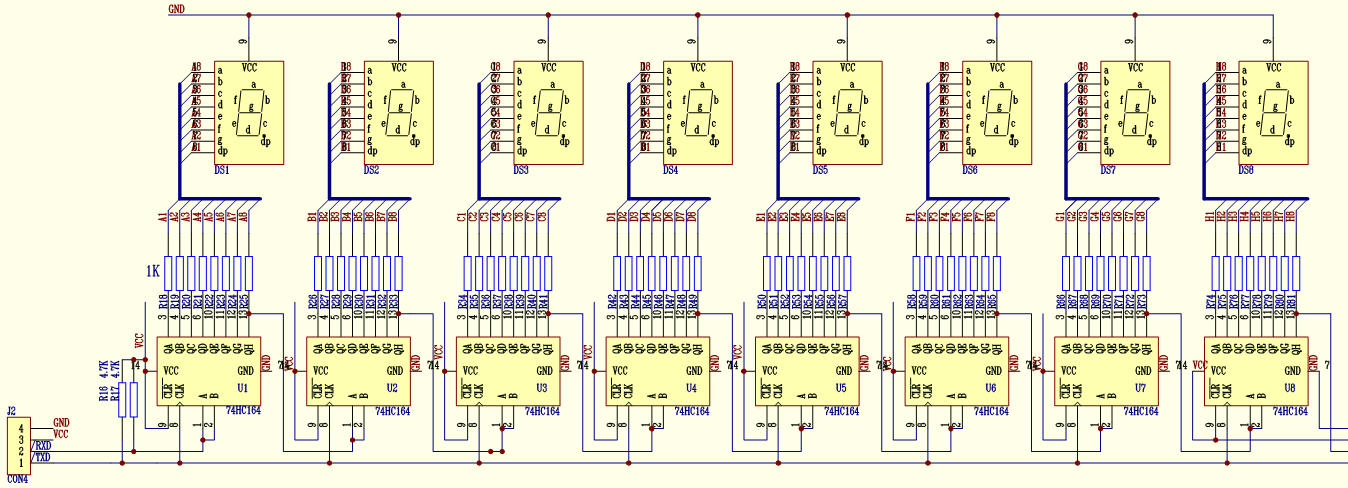
    Diagram of cascaded 74HC164 shift register connections. .
    Except that in my case all the "B's" are together and I feed a high state to them.
    Source: https://www.amobbs.com/thread-3278926-1-1.html

    Cool? Ranking DIY
    Helpful post? Buy me a coffee.

    About Author
    p.kaczmarek2
    Moderator Smart Home
    Offline 
    p.kaczmarek2 wrote 14408 posts with rating 12349, helped 650 times. Been with us since 2014 year.
  • ADVERTISEMENT
  • #2 21289265
    austin007
    Level 17  
    Posts: 758
    Help: 6
    Rate: 271
    There is an error in the diagram. The CA output is connected to the rail described as GND. It should be Vcc. I would realise the state latching and display only after loading the target states by just blanking by mounting a P-Mosfet/PNP key in the CA circuit. If the clock is fast enough, blanking will not be a nuisance. If it would be slower, one might be tempted to dim the PWM with this key , loading, brightening. With very fast clocking transients will not be noticed. It is definitely better to use a latch register or multiplex at the display and to relieve the processor use ready-made multiplexers. Such a led ruler is probably the first Christmas project according to the large-scale, commercial, pagan tradition. After All Saints' Day, Christmas decorations go up in hypermarkets.
📢 Listen (AI):

FAQ

TL;DR: With 6 HC164A chips driving 48 LEDs, “they automatically behave as one big register.” This FAQ is for Arduino users who want to identify an unknown LED board, wire it with only 2 active control lines, and reduce visible update errors on a cascaded shift-register display. [#21285721]

Why it matters: A salvaged LED module can become a usable Arduino display once you map its pins, send the full 48-bit frame, and manage HC164A update artifacts.

Option Outputs per chip Output latch Visible update artifacts Best use in this thread
HC164A 8 bits No Higher Simple indicators and basic tests
74HC595 8 bits Yes Lower Cleaner animations and segment control

Key insight: Six cascaded HC164A parts act like one 48-bit shift register, so the real challenge is not addressing LEDs but hiding the wrong states that appear while new bits are being shifted in.

Quick Facts

  • The board contains 6 HC164A shift registers and 1 74AHC14D, giving 48 output bits total from six 8-bit stages. [#21285721]
  • The module was driven from Arduino with pins ENA=2, DAT=3, and CLK=4; ENA stayed high while data and clock carried updates. [#21285721]
  • The first test failed because only 32 bits were transmitted to a 48-bit board, so old and new states wrapped through the chain. [#21285721]
  • The corrected implementation used a 6-byte array and sent exactly 48 bits per refresh, which fixed independent frame updates. [#21285721]
  • Test animations used 1000 ms delays for blink checks and 250 ms per step for single-LED walking tests, making timing artifacts easy to see. [#21285721]

How does the HC164A shift register work, and how can it control 48 LEDs from Arduino using only clock and data lines?

The HC164A shifts one bit in on each rising clock edge and presents eight stored bits on eight parallel outputs. In this module, Arduino keeps A2 high, drives A1 as data, and toggles CLK, so only two active lines are needed for control. Six 8-bit chips then expose 48 LED states after 48 clocked bits. That lets one Arduino sketch set a 48-LED board without using 48 GPIO pins. [#21285721]

What is a cascaded shift register, and how do six HC164A chips behave like one long 48-bit register?

A cascaded shift register links the last output of one register to the serial input of the next, creating one longer chain. Here, each later A1 input is fed from the previous chip’s QH output, so shifted-out bits are not lost. Six HC164A devices at 8 bits each behave like one 48-bit register. From code, you just send 48 bits in order and the chain fills itself automatically. [#21285721]

How do I identify the VDD, GND, CLK, A1, and A2 pins on an unknown LED module using a multimeter continuity test?

Use continuity mode to trace each connector pad to known IC pins. 1. Find VDD and GND first by following pads to the power pins in the datasheet and to large copper areas. 2. Trace the remaining pads to HC164A and 74AHC14D pins. 3. Confirm which line goes to the first A1, which is common A2, and which is the shared clock path. In this board, CLK and A2 pass through the 74AHC14D, while A1 enters the first shift register. [#21285721]

Why did the first Arduino test blink the LEDs incorrectly when only 32 bits were sent to a 48-bit LED board?

It blinked incorrectly because the board needs 48 bits, but the first test sent only 32 bits. The chain therefore kept mixing old and new data, so bits effectively wrapped through positions 0–31, then 32–47, then 0–15 on later updates. The board also has two LED colors, making the error easier to notice. Sending less than the full frame on a long chain always leaves stale states behind. [#21285721]

What is the correct way to send 48 bits from Arduino to a 6-chip HC164A LED module?

Send a full 48-bit frame every update, typically as a 6-byte array. The working code stores LED states in byte data[6], shifts each byte out with 8 clock pulses, and transmits all 6 bytes in sequence. That guarantees each refresh overwrites the whole 48-bit chain. In the thread, this replaced the earlier 32-bit test and immediately fixed the frame alignment problem. [#21285721]

Why are the LED colors alternating on this 48-LED module, and how does that affect the bit order in code?

The LED colors alternate because the board is effectively arranged as 24 positions with two colors each, totaling 48 controllable bits. That means adjacent bits can drive different colors, not neighboring LEDs of one color. In code, bit order matters because a pattern like 10101010 can light one color sequence, while 01010101 lights the other. You must test the physical mapping and then assign bit indices to match the actual color order. [#21285721]

How can I write Arduino code to address a single LED on a 48-bit HC164A chain using a byte array and bit indexing?

Use a 6-byte buffer and map each LED to one bit by byte index and bit index. The thread’s code clears the array with memset, then computes byteIndex = idx / 8 and bitIndex = idx % 8, and sets or clears that bit. "Ghosting" is display artifact that shows temporary wrong LED states during updates, because outputs change while new bits are still shifting through the chain. With 48 outputs, this indexed approach lets you light exactly one LED before calling transmit(). [#21285721]

What is ghosting in LED shift-register displays, and why is it more noticeable with the HC164A?

Ghosting is the brief display of wrong LED states while new data is being shifted into the register. It is more noticeable with the HC164A because this chip has no output-enable or storage latch in the described use, so outputs update as bits move through the chain. On a 48-bit display, those intermediate states can appear as short flashes during animations. The thread specifically warns that this spoils effects like a “knight rider” pattern. [#21285721]

HC164A vs 74HC595: which shift register is better for Arduino LED control and avoiding ghosting?

The 74HC595 is better when you want cleaner LED updates and less visible ghosting. The thread notes that the HC164A lacks an output-enable style blanking approach in this board and exposes shifting transients directly. By contrast, the 74HC595 is cited as easier for avoiding segment ghosting because it provides a latch-style update path. If your goal is smooth animation, the 74HC595 is the stronger choice here. [#21285721]

Why is a 74AHC14D used on this LED board, and is it acting as a buffer, inverter, or both?

It is acting mainly as a buffer in this board, even though the chip itself contains inverter gates. The traced wiring shows the common CLK and common A2 lines going through the 74AHC14D twice before reaching the HC164A inputs. Two inversions restore the original logic level, so the net effect is non-inverted buffering with stronger drive to multiple register inputs. The thread explicitly suspects current-capacity support as the reason. [#21285721]

What causes visible wrong LED states while shifting data into an HC164A, and how can I reduce that effect in hardware or software?

Visible wrong states appear because each clock pulse changes the live outputs before the full 48-bit frame is loaded. On this board, there is no separate latched display stage, so the LEDs reveal intermediate data. Reduce the effect by clocking faster, updating the whole frame in one burst, simplifying animations, or adding blanking hardware on the common anode path. If transients remain visible, switch to a latch-based register design. [#21285721]

How would adding a P-MOSFET or PNP transistor to the common anode line help with blanking and state latching during updates?

Adding a P-MOSFET or PNP transistor to the common anode line lets you blank the LEDs while shifting data, then turn them back on after loading completes. That hides the intermediate states that cause ghosting. A reply suggests blanking, loading the target states, and then displaying them, noting that with a fast clock the blanking interval will not be annoying. The same switch could also support dimming by PWM if needed. [#21289265]

What is a latch register, and how is it different from a plain shift register like the 74HC164A?

A latch register stores shifted data separately and updates the outputs only when a second control event transfers the new state to the display. "A latch register is a digital storage stage that holds shifted data, separates loading from output display, and prevents intermediate bit transitions from appearing on the LEDs." A plain HC164A-style chain shows new bits as they arrive, which is why the thread recommends latch-based parts for cleaner visuals. [#21285721]

Which Arduino timing, clock speed, and update strategy work best for smooth animations on a 48-LED HC164A module without obvious transients?

Use the fastest stable clocking you can, send all 48 bits in one burst, and avoid long visible pauses during loading. The thread’s demo used 1000 ms delays for basic blink checks and 250 ms per step for a walking LED test, which makes transients easy to spot. For smoother animation, reduce delay time, keep the update routine tight, and blank the display during refresh if hardware allows. Fast clocking makes the temporary wrong states less noticeable. [#21289265]

What practical projects can I build with a 48-LED two-color HC164A module, and which applications tolerate ghosting best?

Build indicators, state panels, simple status displays, or decorative light bars that do not require perfectly clean transitions. The thread explicitly suggests showing device states and questions using it as an indicator, while cautioning against animations where ghosting is obvious. Two-color sequencing also suits alert or progress patterns across 48 bits. Static or slow-changing displays tolerate HC164A behavior best, while polished animation benefits from blanking or a different register family. [#21285721]
Generated by the language model.
ADVERTISEMENT