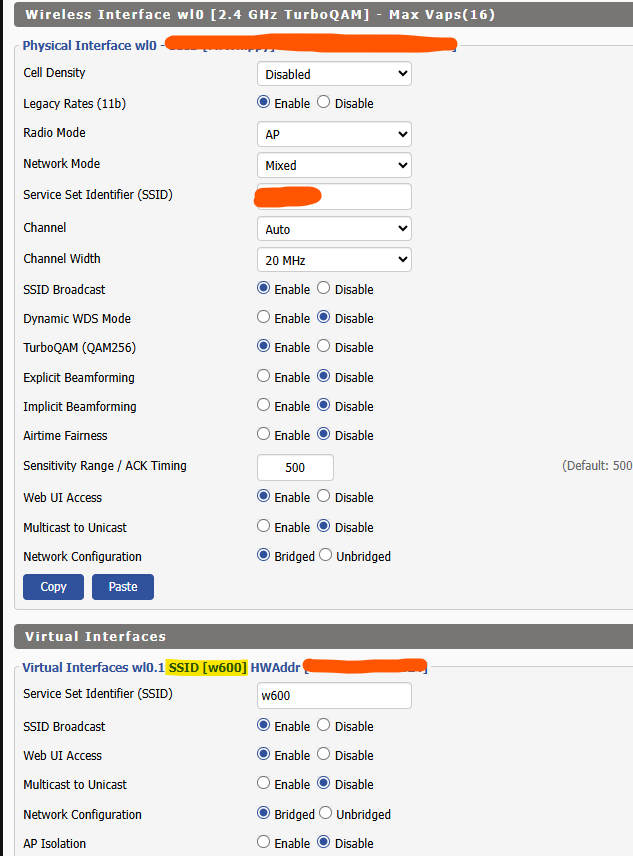
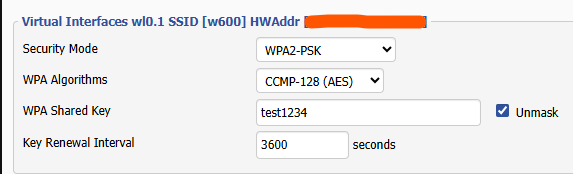
I have this same chip (https://www.elektroda.com/rtvforum/topic3866123-1050.html#20319760) and power plug (TW-02 W600). Got OpenBeken flashed via "Upgrade Tools" (I got it later with the OpenBeken Flasher GUI), and both with my main Wi-Fi and my phone hotspot as "open", I can't get it to connect.
I think it did once because the router (OpenWrt) showed the DHCP allocation, but it was neither reachable nor did it appear on the Wi-Fi connected devices.
Logs with phone hotspot (* is what I've changed, it wasn't zeros. Anything else as it was):
Info:MAIN:Main_OnWiFiStatusChange - WIFI_STA_AUTH_FAILED - 3
Network info:
sta:rssi=30, SSID=****, BSSID=00:00:00:00:00:00, channel=31, encr=WPA2_PSK_CCMP
IP=0.0.0.0, GW=0.0.0.0, MASK=0.0.0.0, MAC=28:6d:cd:**:**:**, DNS=0.0.0.0
Info:MAIN:Time 50, idle 0/s, free 59808, MQTT 0(0), bWifi 0, secondsWithNoPing -1, socks 2/8
Info:MAIN:Time 51, idle 0/s, free 59808, MQTT 0(0), bWifi 0, secondsWithNoPing -1, socks 2/8
Info:MAIN:Time 52, idle 0/s, free 59808, MQTT 0(0), bWifi 0, secondsWithNoPing -1, socks 2/8
Info:MAIN:Time 53, idle 0/s, free 59808, MQTT 0(0), bWifi 0, secondsWithNoPing -1, socks 2/8
Logs with main Wi-Fi:
Network info:
sta:rssi=30, SSID=******, BSSID=00:00:00:00:00:00, channel=31, encr=WPA2_PSK_CCMP
IP=0.0.0.0, GW=0.0.0.0, MASK=0.0.0.0, MAC=28:6d:cd:**:**:**, DNS=0.0.0.0
Info:MAIN:Time 20, idle 0/s, free 59808, MQTT 0(0), bWifi 0, secondsWithNoPing -1, socks 2/8
Info:MAIN:Time 21, idle 0/s, free 59808, MQTT 0(0), bWifi 0, secondsWithNoPing -1, socks 2/8
Info:MAIN:Time 22, idle 0/s, free 59808, MQTT 0(0), bWifi 0, secondsWithNoPing -1, socks 2/8
Info:MAIN:Time 23, idle 0/s, free 59808, MQTT 0(0), bWifi 0, secondsWithNoPing -1, socks 2/8
Info:MAIN:Time 24, idle 0/s, free 59808, MQTT 0(0), bWifi 0, secondsWithNoPing -1, socks 2/8
Info:MAIN:Main_OnWiFiStatusChange - WIFI_STA_AUTH_FAILED - 3
Safe boot and its own AP work. Tried with both settings via the web UI and with the flasher GUI set to write obk config.
AI: Can you share the exact WiFi security settings you're using on both your main router and phone hotspot (e.g., WPA2, WPA3, mixed mode, password complexity, any special characters)?
WPA2_PSK_CCMP, one with password and one without. Special characters "!"
AI: Which exact version of OpenBeken firmware did you flash, and was it a standard release or a custom build?
Standard release, OpenW600_1.18.225
I think it did once because the router (OpenWrt) showed the DHCP allocation, but it was neither reachable nor did it appear on the Wi-Fi connected devices.
Logs with phone hotspot (* is what I've changed, it wasn't zeros. Anything else as it was):
Info:MAIN:Main_OnWiFiStatusChange - WIFI_STA_AUTH_FAILED - 3
Network info:
sta:rssi=30, SSID=****, BSSID=00:00:00:00:00:00, channel=31, encr=WPA2_PSK_CCMP
IP=0.0.0.0, GW=0.0.0.0, MASK=0.0.0.0, MAC=28:6d:cd:**:**:**, DNS=0.0.0.0
Info:MAIN:Time 50, idle 0/s, free 59808, MQTT 0(0), bWifi 0, secondsWithNoPing -1, socks 2/8
Info:MAIN:Time 51, idle 0/s, free 59808, MQTT 0(0), bWifi 0, secondsWithNoPing -1, socks 2/8
Info:MAIN:Time 52, idle 0/s, free 59808, MQTT 0(0), bWifi 0, secondsWithNoPing -1, socks 2/8
Info:MAIN:Time 53, idle 0/s, free 59808, MQTT 0(0), bWifi 0, secondsWithNoPing -1, socks 2/8
Logs with main Wi-Fi:
Network info:
sta:rssi=30, SSID=******, BSSID=00:00:00:00:00:00, channel=31, encr=WPA2_PSK_CCMP
IP=0.0.0.0, GW=0.0.0.0, MASK=0.0.0.0, MAC=28:6d:cd:**:**:**, DNS=0.0.0.0
Info:MAIN:Time 20, idle 0/s, free 59808, MQTT 0(0), bWifi 0, secondsWithNoPing -1, socks 2/8
Info:MAIN:Time 21, idle 0/s, free 59808, MQTT 0(0), bWifi 0, secondsWithNoPing -1, socks 2/8
Info:MAIN:Time 22, idle 0/s, free 59808, MQTT 0(0), bWifi 0, secondsWithNoPing -1, socks 2/8
Info:MAIN:Time 23, idle 0/s, free 59808, MQTT 0(0), bWifi 0, secondsWithNoPing -1, socks 2/8
Info:MAIN:Time 24, idle 0/s, free 59808, MQTT 0(0), bWifi 0, secondsWithNoPing -1, socks 2/8
Info:MAIN:Main_OnWiFiStatusChange - WIFI_STA_AUTH_FAILED - 3
Safe boot and its own AP work. Tried with both settings via the web UI and with the flasher GUI set to write obk config.
AI: Can you share the exact WiFi security settings you're using on both your main router and phone hotspot (e.g., WPA2, WPA3, mixed mode, password complexity, any special characters)?
WPA2_PSK_CCMP, one with password and one without. Special characters "!"
AI: Which exact version of OpenBeken firmware did you flash, and was it a standard release or a custom build?
Standard release, OpenW600_1.18.225