Hello,
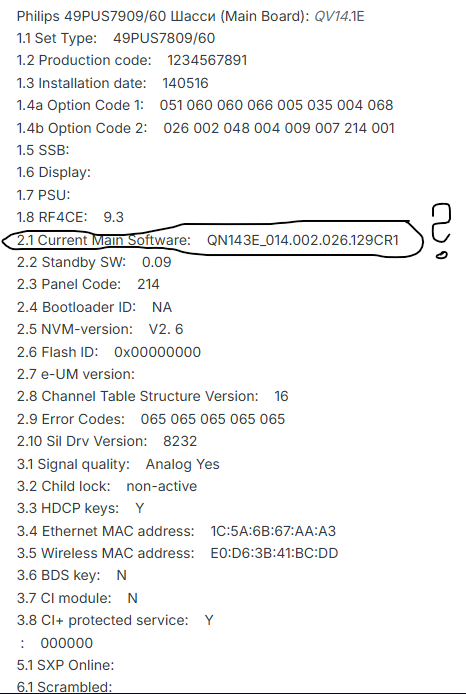
My television is no longer booting - 49pus7909_12 QV14.1E_LA chassis LCD.
I connected it using a UART board and was able to retrieve the console logs.
I tried booting from a FAT-formatted USB drive with autorun_AND1E_000.010.170.000.upg placed in the root folder, and then with WipeDataTool.upg, but it seems that the USB files cannot be executed.
I am attaching the logs from a normal (failing) boot and a boot while pressing the joystick down (recovery mode).
During a normal start, the TV only shows the Philips logo.
In recovery mode, the screen stays pink/violet.
Thank you very much for any ideas or help.
Best regards,
Benjamin
AI: Could you please provide details about the USB drive you are using (brand, capacity, exact formatting method), and confirm whether the TV shows any sign of detecting the USB (such as LED activity or messages in the UART logs) when it is inserted?
It's an 8 GB USB key, formatted as FAT. When I plug the USB in I see those messages at the console:
[ 25.989857] sd 0:0:0:0: [sda] No Caching mode page found
[ 25.995394] sd 0:0:0:0: [sda] Assuming drive cache: write through
[ 26.005477] sd 0:0:0:0: [sda] No Caching mode page found
[ 26.011073] sd 0:0:0:0: [sda] Assuming drive cache: write through
[ 26.022242] sd 0:0:0:0: [sda] No Caching mode page found
[ 26.027792] sd 0:0:0:0: [sda] Assuming drive cache: write through
AI: During the boot process (both normal and recovery modes), do you notice any blinking LEDs, error codes on the screen, or sounds from the TV that might help identify the stage at which it fails?
No, the only thing I see is what's explained in the post.
My television is no longer booting - 49pus7909_12 QV14.1E_LA chassis LCD.
I connected it using a UART board and was able to retrieve the console logs.
I tried booting from a FAT-formatted USB drive with autorun_AND1E_000.010.170.000.upg placed in the root folder, and then with WipeDataTool.upg, but it seems that the USB files cannot be executed.
I am attaching the logs from a normal (failing) boot and a boot while pressing the joystick down (recovery mode).
During a normal start, the TV only shows the Philips logo.
In recovery mode, the screen stays pink/violet.
Thank you very much for any ideas or help.
Best regards,
Benjamin
AI: Could you please provide details about the USB drive you are using (brand, capacity, exact formatting method), and confirm whether the TV shows any sign of detecting the USB (such as LED activity or messages in the UART logs) when it is inserted?
It's an 8 GB USB key, formatted as FAT. When I plug the USB in I see those messages at the console:
[ 25.989857] sd 0:0:0:0: [sda] No Caching mode page found
[ 25.995394] sd 0:0:0:0: [sda] Assuming drive cache: write through
[ 26.005477] sd 0:0:0:0: [sda] No Caching mode page found
[ 26.011073] sd 0:0:0:0: [sda] Assuming drive cache: write through
[ 26.022242] sd 0:0:0:0: [sda] No Caching mode page found
[ 26.027792] sd 0:0:0:0: [sda] Assuming drive cache: write through
AI: During the boot process (both normal and recovery modes), do you notice any blinking LEDs, error codes on the screen, or sounds from the TV that might help identify the stage at which it fails?
No, the only thing I see is what's explained in the post.