logo elektroda
logo elektroda
X
logo elektroda

[BK7231N / CB3S] TH11 Temperature and humidity sensor (IP65/WiFi)

tplewa 1296 7
ADVERTISEMENT
Treść została przetłumaczona polish » english Zobacz oryginalną wersję tematu
📢 Listen (AI):
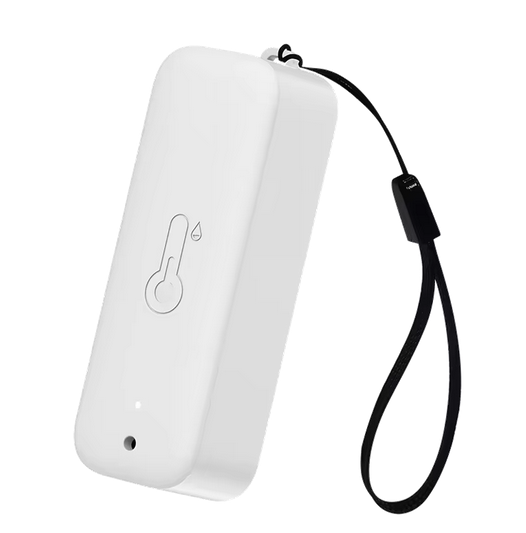
  • White temperature and humidity sensor with strap and thermometer icon

    This is another WiFi temperature sensor that works with the Tuya/Smart Life system as standard. It is an IP65-rated version for outdoor placement. The sensor is powered by two AAA batteries and is based on the CB3S module and the TuyaMCU microcontroller - here, as usual, the sensor was purchased to convert to OpenBK, i.e. to work with Home Assistant bypassing the Tuya cloud.

    What we get in the box

    Here, without much surprise, a short instruction manual, the sensor itself + pendant and the mounting tape and magnetic tape.
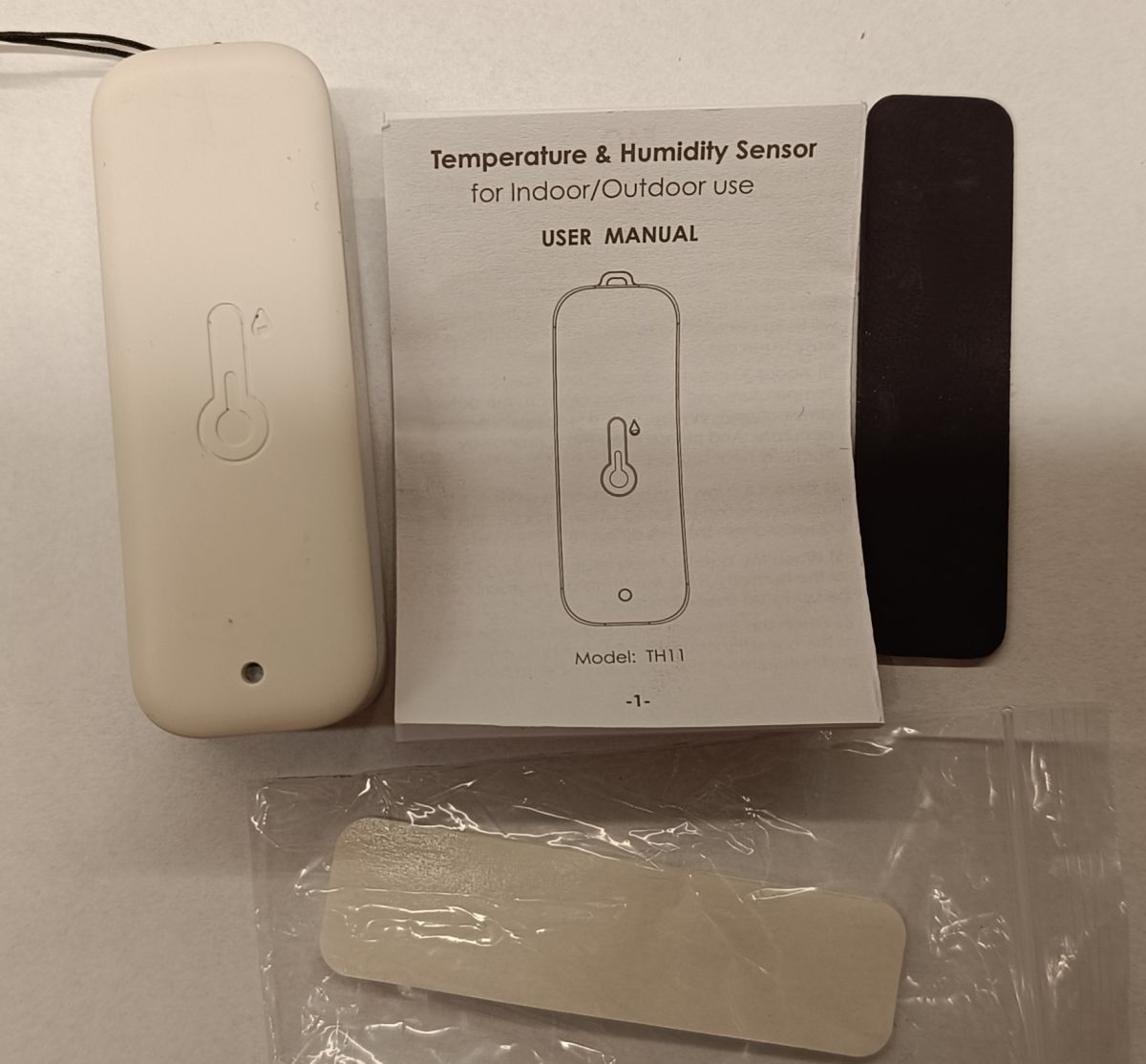
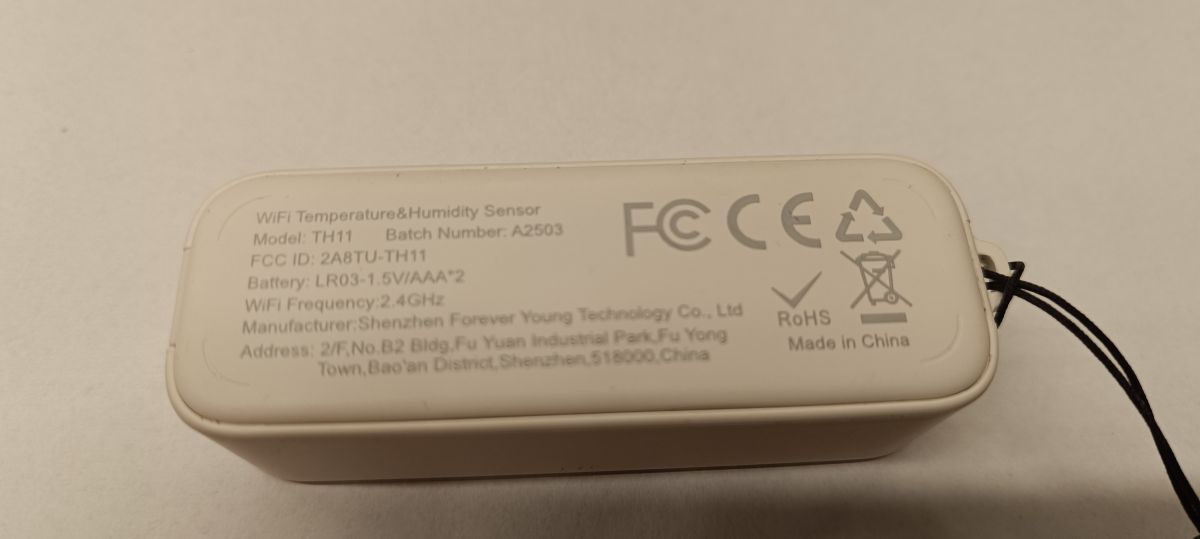
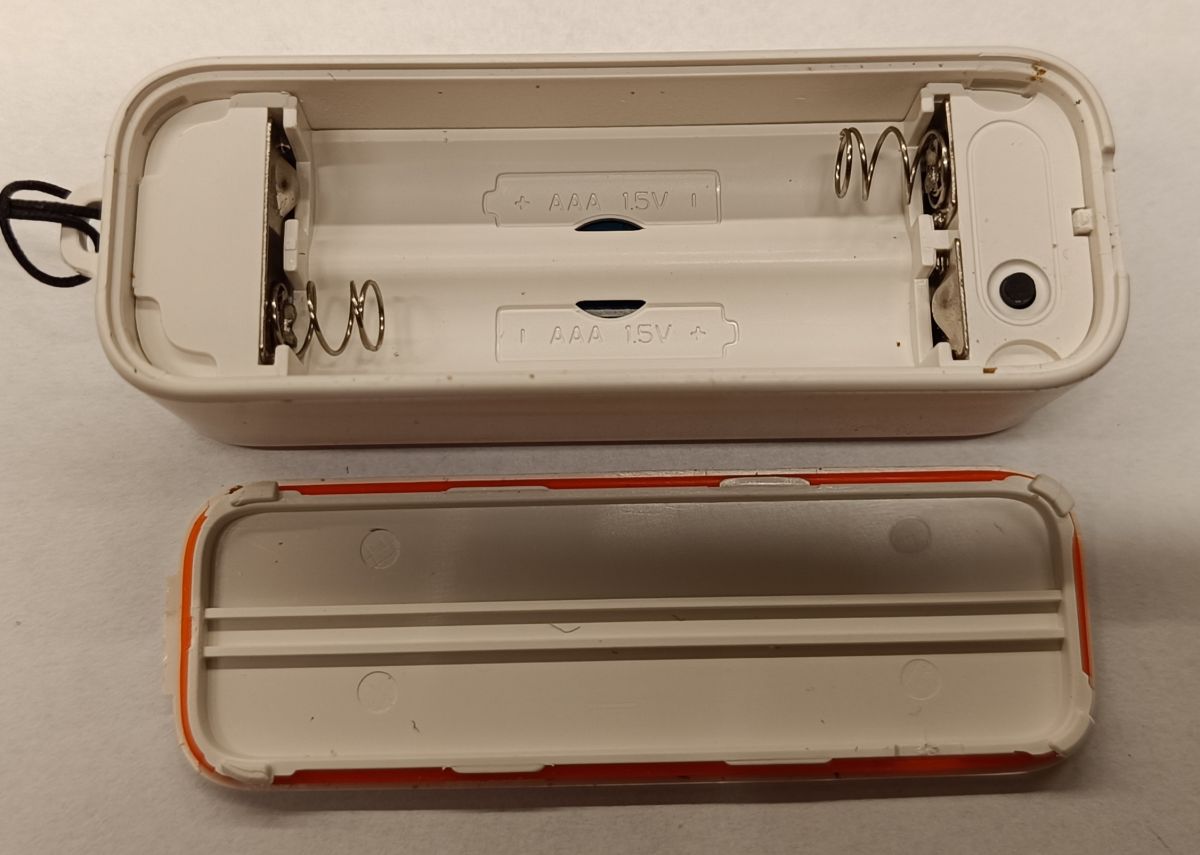
    TH11 temperature and humidity sensor with manual and mounting accessories Close-up of the back of a TH11 temperature and humidity sensor with technical details Opened housing of a sensor showing dual AAA battery slots

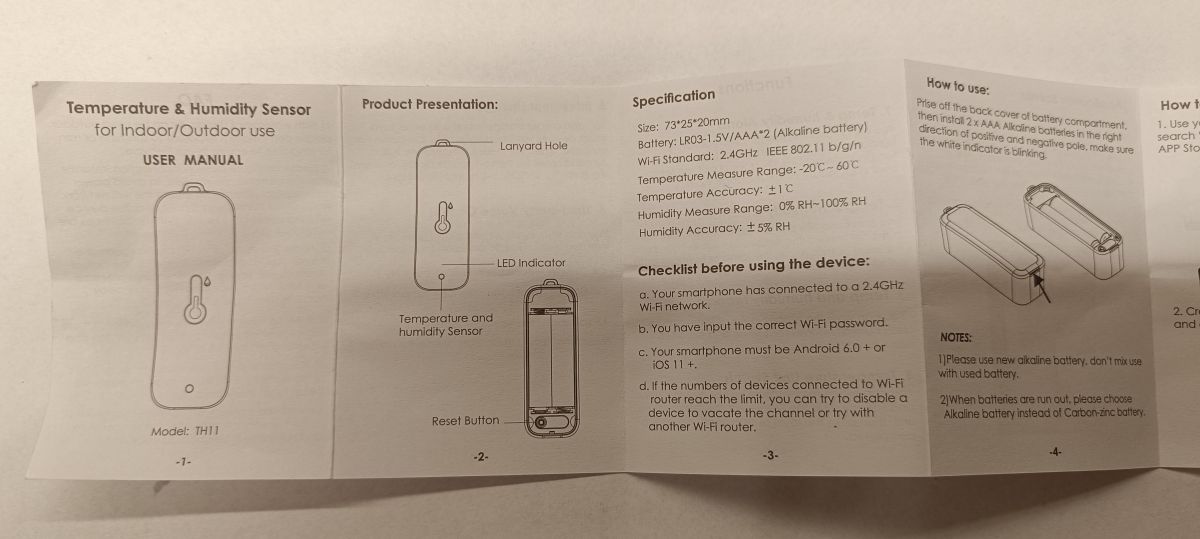
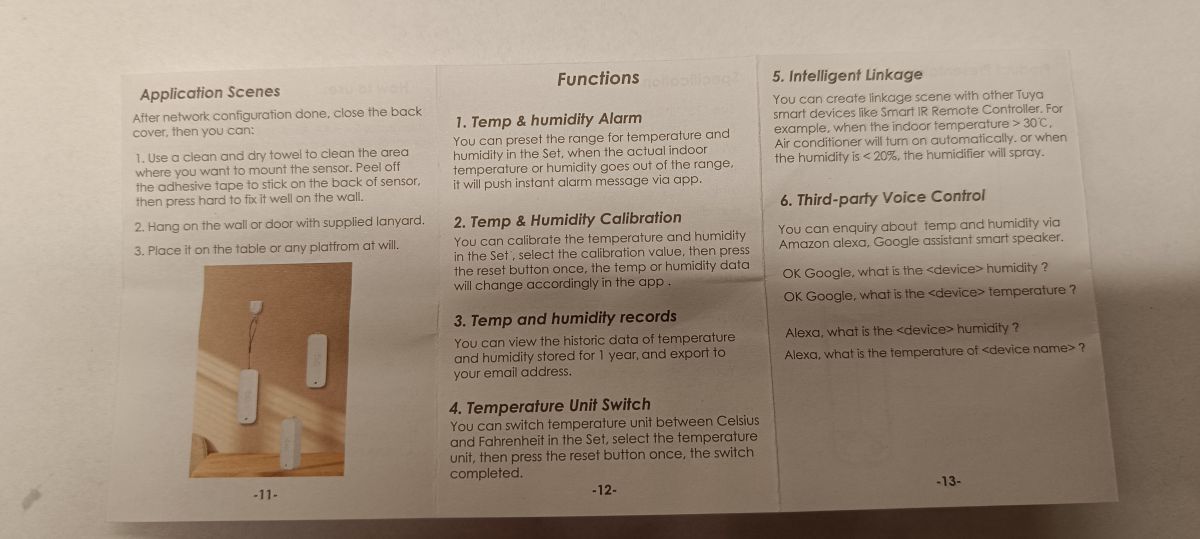
    User manual for TH11 temperature and humidity sensor, showing specifications and instructions Tuya temperature and humidity sensor manual with installation and feature guide


    Interior sensor

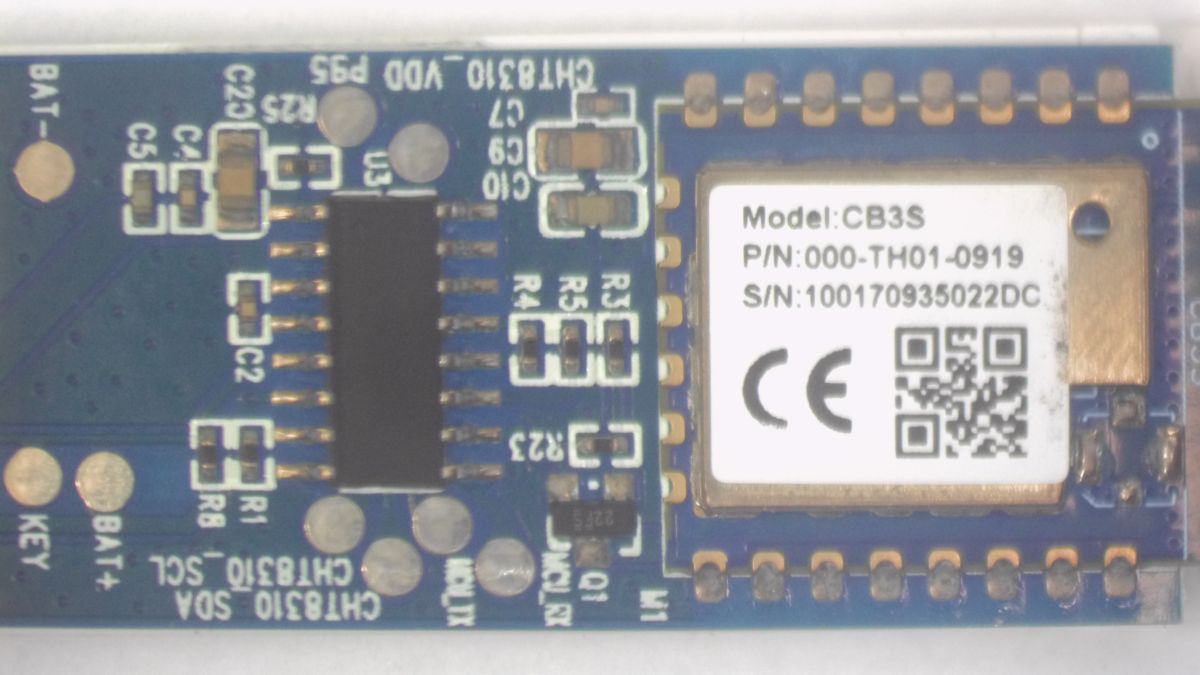
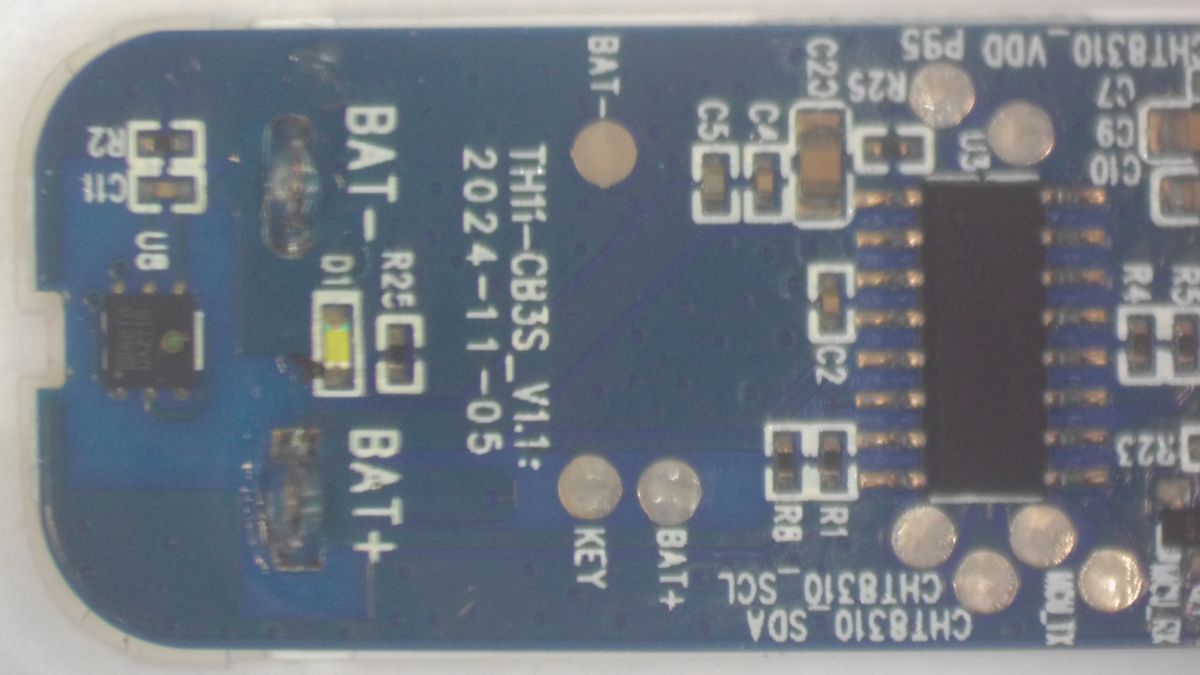
    Here, as expected, there is not much :) That is, what was mentioned the module CB3S with BK7231N chip, TuyaMCU that is an unknown microcontroller, transistor Q1 controlled by TuyaMCU chip (U3) whose task is to cut the ground from the CB3S module. As a temperature/humidity sensor, a chip Sensylink CHT8310 communicating with TuyaMCU via I2C bus was used. Plus one button, an LED and some RC passive components....
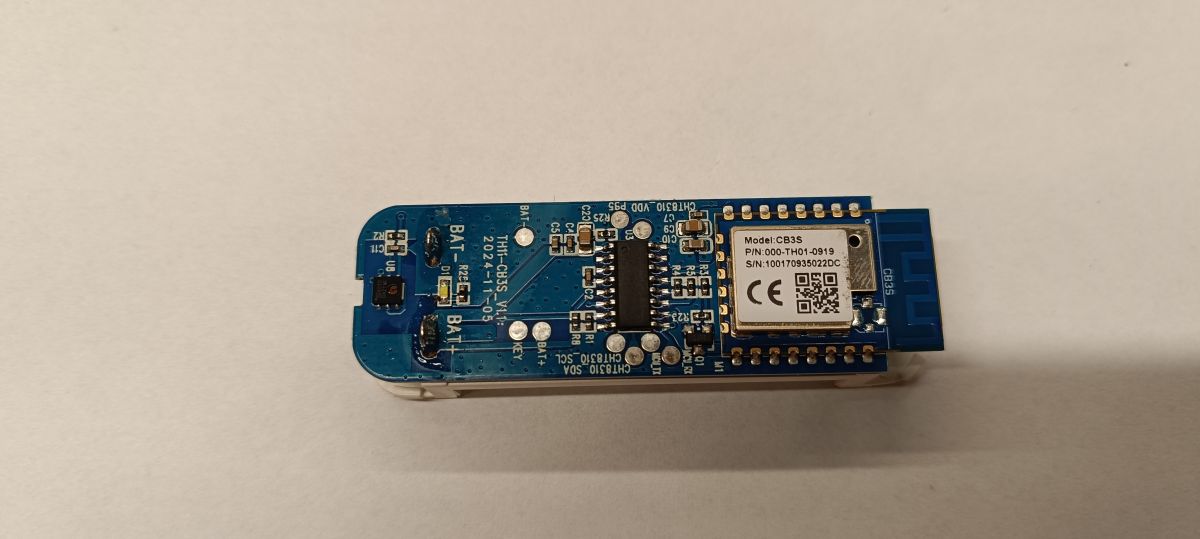
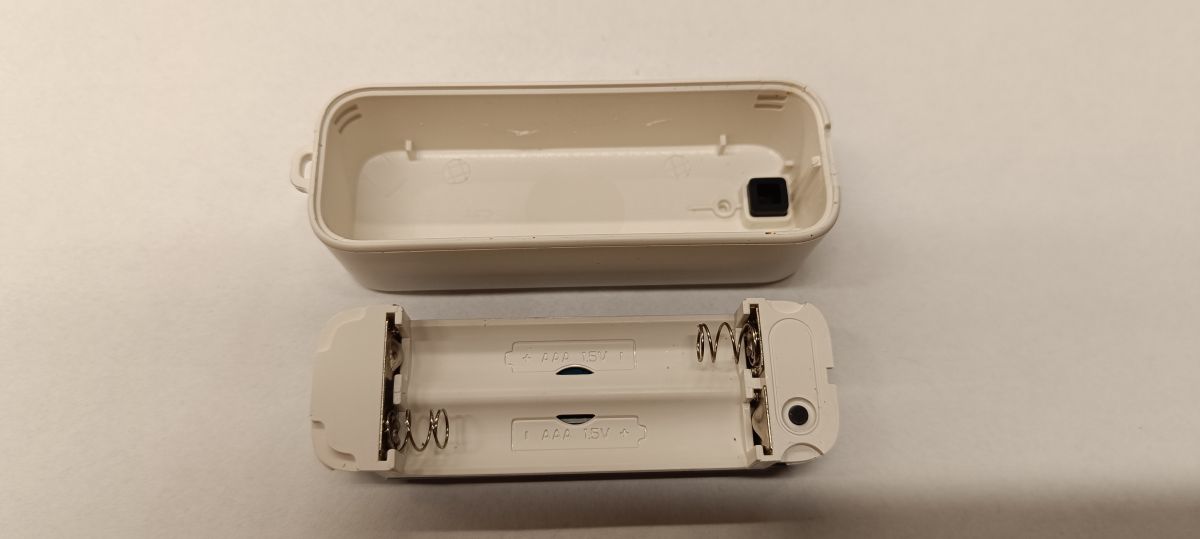
    PCB view with CB3S WiFi module and temperature sensor components WiFi temperature sensor casing opened, showing compartment for two AAA batteries

    TuyaMCU connection to CB3S module

    TuyaMCU (U3)
    TuyaMCU (U3) CB3S (M1)
    GPIO (Pin 7) RST (Pin 1)
    UART TX (Pin 9) RXD1 (Pin 15)
    UART RX (Pin 10) TXD1 (Pin 16)


    In order to upload OpenBK, all I had to do was lift/disconnect the RX and TX legs of the TuyaMCU and power the CB3S module directly....


    Image in the Tuya app and data from the Tuya Developer Platform service

    Basically, like most temperature/humidity sensors there is not much in the app i.e. data visualisation and simple settings.
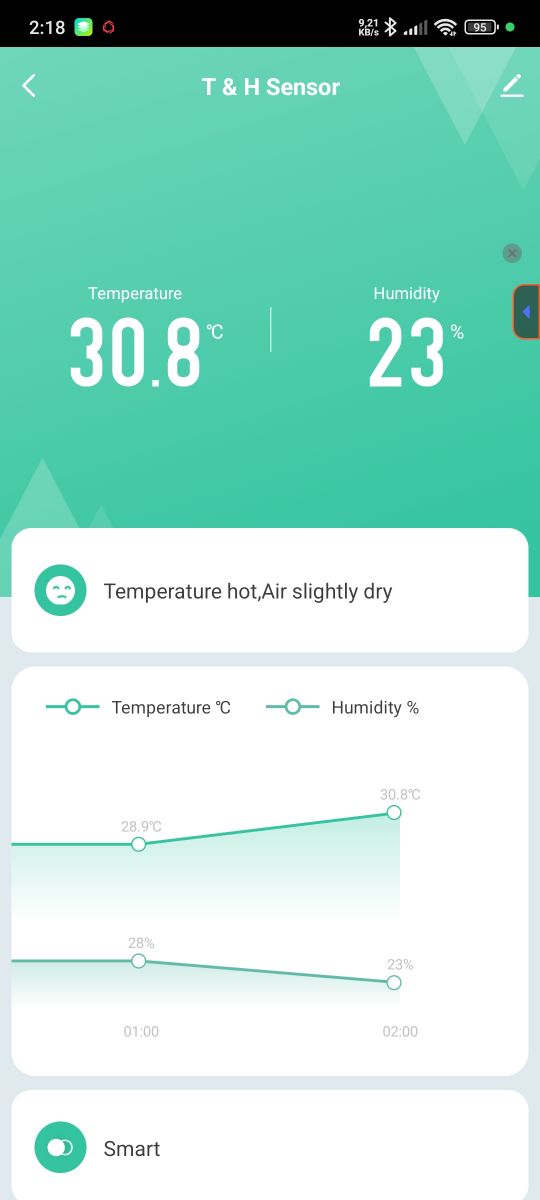
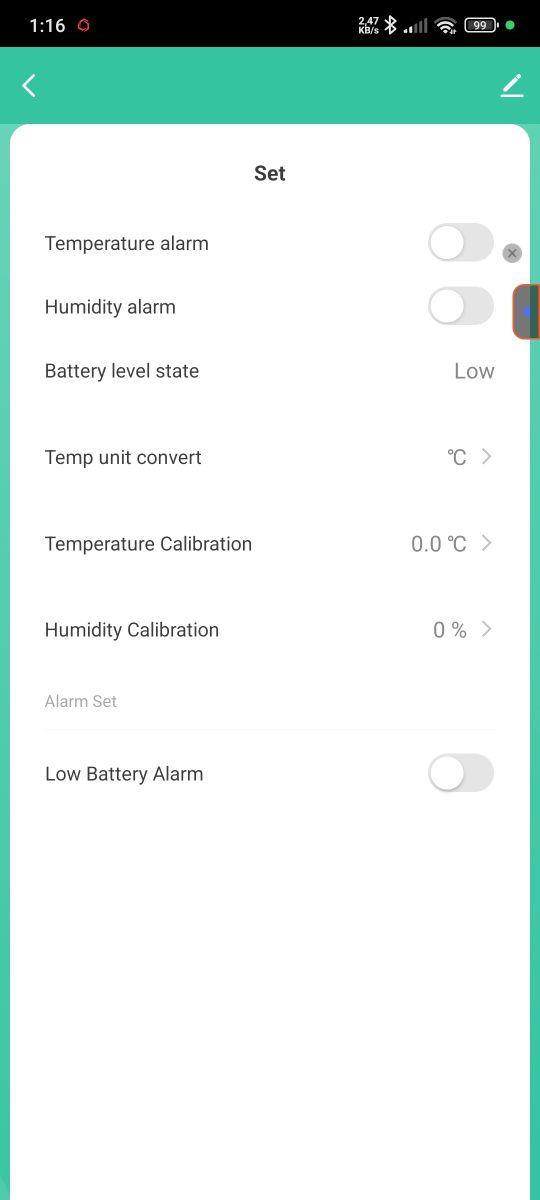
    Tuya app screen showing 30.8°C temperature and 23% humidity readings Sensor settings screen in Tuya app with alarm and calibration options

    Data from the Tuya Developer Platform looks as follows.
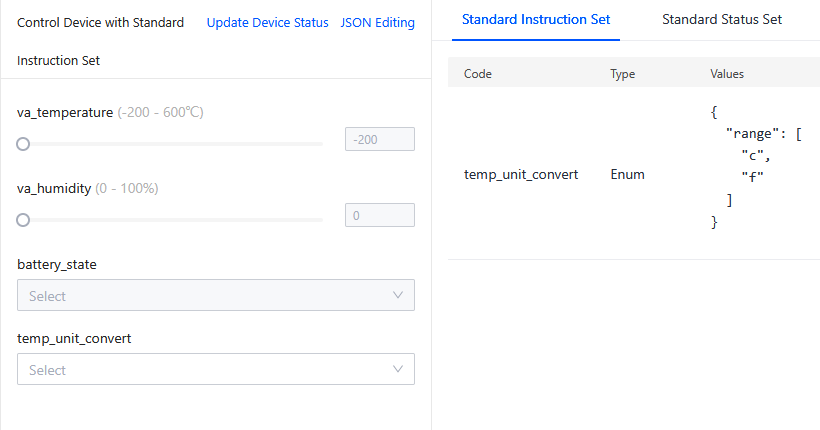
    Screenshot of Tuya Developer Platform interface displaying sensor data

    Standard Instruction Set
    
    temp_unit_convert	Enum	
    
    {
      "range": [
        "c",
        "f"
      ]
    }
    
    Standard Instruction Set
    
    temp_unit_convert	Enum	
    
    {
      "range": [
        "c",
        "f"
      ]
    }


    Standard Status Set
    
    va_temperature	Integer	
    
    {
      "unit": "℃",
      "min": -200,
      "max": 600,
      "scale": 1,
      "step": 1
    }
    
    va_humidity	Integer	
    
    {
      "unit": "%",
      "min": 0,
      "max": 100,
      "scale": 0,
      "step": 1
    }
    
    battery_state	Enum	
    
    {
      "range": [
        "low",
        "middle",
        "high"
      ]
    }
    
    temp_unit_convert	Enum	
    
    {
      "range": [
        "c",
        "f"
      ]
    }
    
    Standard Status Set
    
    va_temperature	Integer	
    
    {
      "unit": "℃",
      "min": -200,
      "max": 600,
      "scale": 1,
      "step": 1
    }
    
    va_humidity	Integer	
    
    {
      "unit": "%",
      "min": 0,
      "max": 100,
      "scale": 0,
      "step": 1
    }
    
    battery_state	Enum	
    
    {
      "range": [
        "low",
        "middle",
        "high"
      ]
    }
    
    temp_unit_convert	Enum	
    
    {
      "range": [
        "c",
        "f"
      ]
    }


    Additional JSON extracted from original firmware
    Code: JSON
    Log in, to see the code


    Logs of TuyaMCU communication with CB3S module

    Sensor added to Tuya cloud
    
    Sent by WiFi module:
    55 AA	00	01		00 00		00	
    HEADER	VER=00	Product		LEN		CHK	
    
    Received by WiFi module:
    55 AA	00	01		00 24	7B2270223A226A33666A616A66327830617073716770222C2276223A22312E302E30227D	A3	
    HEADER	VER=00	Product		LEN	{"p":"j3fjajf2x0apsqgp","v":"1.0.0"}	CHK	
    
    [inContentAd]
    
    Received by WiFi module:
    55 AA	00	02		00 00		01	
    HEADER	VER=00	McuConf		LEN		CHK	
    
    Sent by WiFi module:
    55 AA	00	02		00 01	04	06	
    HEADER	VER=00	McuConf		LEN	04	CHK	
    
    Received by WiFi module:
    55 AA	00	10		00 04	03091718	4E	
    HEADER	VER=00	ObtainDPcache		LEN			CHK	
    
    Received by WiFi module:
    55 AA	00	0B		00 00		0A	
    HEADER	VER=00	Unk		LEN		CHK	
    
    Sent by WiFi module:
    55 AA	00	10		00 02	0100	12	
    HEADER	VER=00	ObtainDPcache		LEN			CHK	
    
    Sent by WiFi module:
    55 AA	00	0B		00 02	013C	49	
    HEADER	VER=00	Unk		LEN	013C	CHK	
    
    Received by WiFi module:
    55 AA	00	05		00 15	090400010017020004000000001802000400000000	62	
    HEADER	VER=00	Unk		LEN	dpId=9 Enum V=0,dpId=23 Val V=0,dpId=24 Val V=0		CHK	
    
    Sent by WiFi module:
    55 AA	00	05		00 01	00	05	
    HEADER	VER=00	Unk		LEN			CHK	
    
    Received by WiFi module:
    55 AA	00	05		00 15	010200040000013402020004000000170304000102	7E	
    HEADER	VER=00	Unk		LEN	dpId=1 Val V=308,dpId=2 Val V=23,dpId=3 Enum V=2		CHK	
    
    Sent by WiFi module:
    55 AA	00	05		00 01	00	05	
    HEADER	VER=00	Unk		LEN			CHK	


    Sensor not connected to the Tuya cloud
    
    Received by WiFi module:
    55 AA	00	01		00 24	7B2270223A226A33666A616A66327830617073716770222C2276223A22312E302E30227D	A3	
    HEADER	VER=00	Product		LEN	{"p":"j3fjajf2x0apsqgp","v":"1.0.0"}	CHK	
    
    Sent by WiFi module:
    55 AA	00	01		00 00		00	
    HEADER	VER=00	Product		LEN		CHK	
    
    Sent by WiFi module:
    55 AA	00	02		00 01	03	05	
    HEADER	VER=00	McuConf		LEN	03	CHK	
    
    Received by WiFi module:
    55 AA	00	02		00 00		01	
    HEADER	VER=00	McuConf		LEN		CHK	


    OpenBK configuration

    Here looking in the logs there is not much ;)

    Set flags: 2 10 19 37 51

    autoexec.bat
    
    startDriver TuyaMCU
    startDriver tmSensor
    
    setChannelType 1 temperature_div10
    linkTuyaMCUOutputToChannel 1 val 1
    
    setChannelType 2 Humidity
    linkTuyaMCUOutputToChannel 2 val 2
    
    setChannelLabel 3 Battery
    setChannelType 3 ReadOnlyLowMidHigh
    linkTuyaMCUOutputToChannel 3 val 3


    Log of TuyaMCU communication with CB3S module with OpenBK firmware
    
    Sent by WiFi module:
    55 AA	00	01		00 00		00	
    HEADER	VER=00	Product		LEN		CHK	
    
    Received by WiFi module:
    55 AA	00	01		00 24	7B2270223A226A33666A616A66327830617073716770222C2276223A22312E302E30227D	A3	
    HEADER	VER=00	Product		LEN	{"p":"j3fjajf2x0apsqgp","v":"1.0.0"}	CHK	
    
    Received by WiFi module:
    55 AA	00	02		00 00		01	
    HEADER	VER=00	McuConf		LEN		CHK	
    
    Sent by WiFi module:
    55 AA	00	02		00 01	03	05	
    HEADER	VER=00	McuConf		LEN	03	CHK	
    
    Received by WiFi module:
    55 AA	00	02		00 00		01	
    HEADER	VER=00	McuConf		LEN		CHK	
    
    Sent by WiFi module:
    55 AA	00	02		00 01	04	06	
    HEADER	VER=00	McuConf		LEN	04	CHK	
    
    Received by WiFi module:
    55 AA	00	10		00 04	03091718	4E	
    HEADER	VER=00	ObtainDPcache		LEN			CHK	
    
    Sent by WiFi module:
    55 AA	00	10		00 02	0100	12	
    HEADER	VER=00	ObtainDPcache		LEN			CHK	
    
    Received by WiFi module:
    55 AA	00	0B		00 00		0A	
    HEADER	VER=00	Unk		LEN		CHK	
    
    Sent by WiFi module:
    55 AA	00	0B		00 02	0150	5D	
    HEADER	VER=00	Unk		LEN	0150	CHK	
    
    Received by WiFi module:
    55 AA	00	05		00 15	090400010017020004000000001802000400000000	62	
    HEADER	VER=00	Unk		LEN	dpId=9 Enum V=0,dpId=23 Val V=0,dpId=24 Val V=0		CHK	
    
    Sent by WiFi module:
    55 AA	00	05		00 01	00	05	
    HEADER	VER=00	Unk		LEN			CHK	
    
    Received by WiFi module:
    55 AA	00	05		00 15	010200040000012D02020004000000190304000102	79	
    HEADER	VER=00	Unk		LEN	dpId=1 Val V=301,dpId=2 Val V=25,dpId=3 Enum V=2		CHK	
    
    Sent by WiFi module:
    55 AA	00	05		00 01	00	05	
    HEADER	VER=00	Unk		LEN			CHK	


    Well, that's pretty much it - you can still future-proof the handling of id 9, 23, 24 - i.e. the sensor settings....


    Additional moisture protection

    Theoretically the sensor is IP65 rated but after uploading the firmware I decided to additionally protect the electronics with a silicone coating (MG Chemicals 422C)
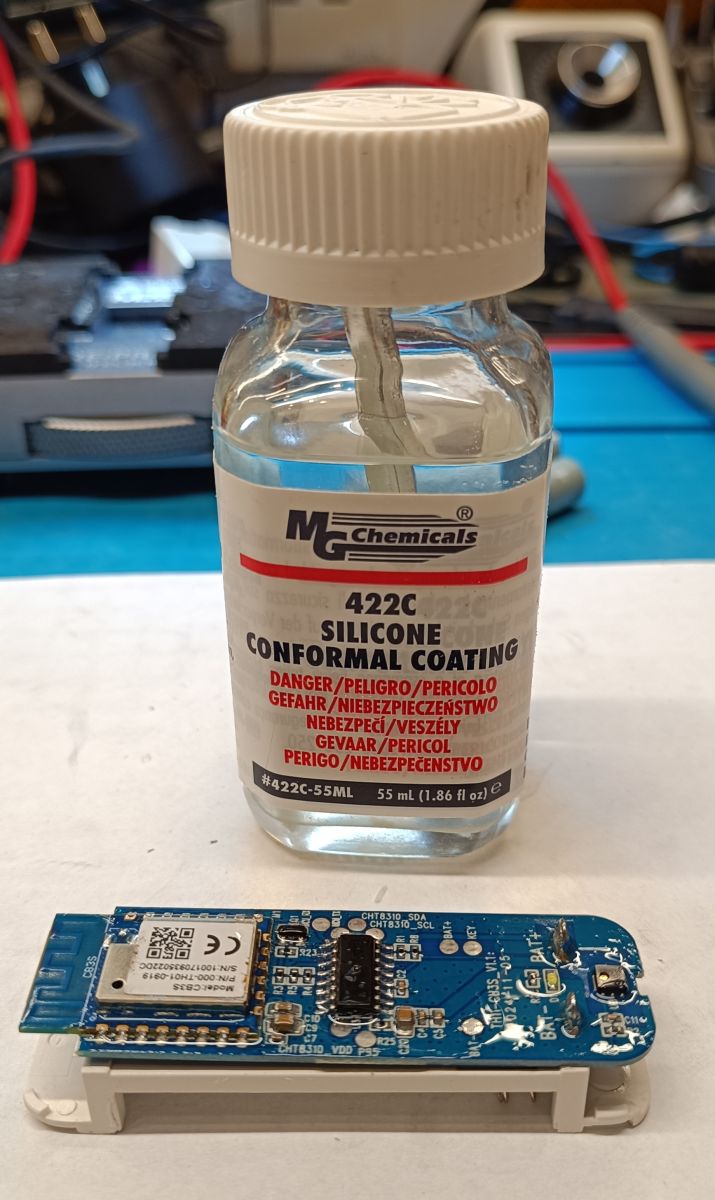
    MG Chemicals silicone coating bottle and sensor PCB with electronics

    Here, care must be taken that the preparation does not get into the "window" in the temperature/humidity sensor. Likewise, I do not recommend coating the antenna circuit on the CB3S module with silicone....

    Cool? Ranking DIY
    About Author
    tplewa
    Level 39  
    Offline 
    tplewa wrote 6715 posts with rating 974, helped 222 times. Live in city Warszawa. Been with us since 2003 year.
  • ADVERTISEMENT
  • #2 21819998
    p.kaczmarek2
    Moderator Smart Home
    You hit on a slightly better model, not everyone has the settings (ObtainDPcache). From what I remember, we presented with @DeDaMrAz their setting here:
    [CB3S/BK7231N] Temperature/humidity sensor with TuyaMCU - Schematic, reverse engineering
    You can try if it works for you.


    Although I would still prefer to convert to a version without TuyaMCU - there is DeepSleep in the obk.

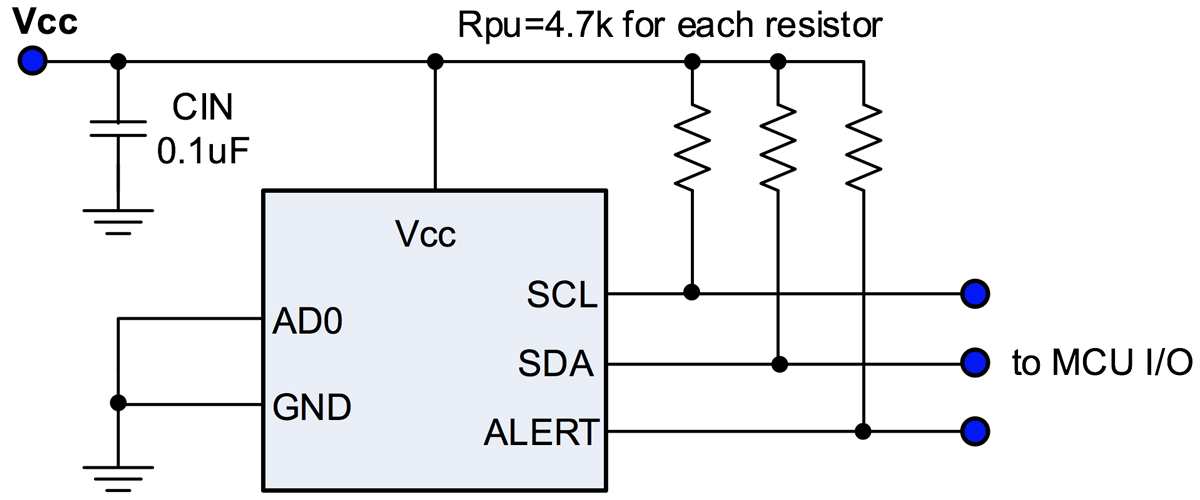
    Does your sensor report every fixed interval or when something changes? CHT has an alert function.
    I²C sensor connection diagram with ALERT line and 4.7kΩ pull-up resistors
    Helpful post? Buy me a coffee.
  • ADVERTISEMENT
  • #3 21820206
    tplewa
    Level 39  
    @p.kaczmarek2 Yes this functionality depends on the functionality of the IoT device and I guess all temperature sensors have this (they have some kind of setting whether correction or otherwise). In the case of the door opening sensor, there is actually rather nothing to configure there.

    I actually fell down in a previous topic about sensors with a display i.e. (TH08 and TH08C) on a similar command i.e. 0x90 )Get cached D) and had to do a somewhat primitive and not the best working workaround. I have no idea why when startDriver tmSensor is enabled this command is not supported. When it was disabled OpenBK from what I remember responded to it.
    I actually described this in post #8 - Final OpenBK firmware settings of that topic. Maybe it would be possible to improve this so that I don't do such a carnage as I did in autoexec.bat he he I looked a bit quickly in the TuyaMCU driver code on github if it could be improved quickly but here as well I would have to sit longer to understand how the data flow in the software is....

    As for the use of OBK on the other hand, I will think about that in the future. At the moment I'm still too thin in these blocks - ot I've only been playing with it for a few days.

    As regards the use of ObtainDPcache, I do not know how to integrate it into the HA so that parameters can be set there....

    Here, the aforementioned microwave presence sensor is probably going to be quite a workaround. Unfortunately it is only supported by Tuya (it doesn't work with any HA add-on be it Tuya, Tuya Local, Local Tuya).... Likewise I looked in Debug on the Tuya Developer Platform and there is no data there i.e. no Standard Instruction Set and no Standard Status Set.... ...So it will probably be quite an exercise to get better acquainted with OBK what to do :)

    However, going back to the topic of using OBK, I haven't checked this, but I suspect that the TuyaMCU chip polls the sensor more frequently and updates the data if the temperature changes by a certain set range. At first glance, you can see that it does not send data every certain time, but more in the moment when the temperature changes.by a certain threshold.The question is how the power consumption will look like in the case of BK systems - I have not looked at the documentation and I do not know what kind of saving modes they have - here it would be best to do such a query of the temperature/humidity sensor via I2C without waking up the WiFi etc.

    When I get to grips with the burrs I have to convert - I'll probably order something inexpensive for such an experiment i.e. sprucing up the TuyaMCU and firing up the functionality on the OBK....
  • ADVERTISEMENT
  • #4 21820252
    p.kaczmarek2
    Moderator Smart Home
    tplewa wrote:

    I actually fell down in a previous topic about sensors with a display i.e. (TH08 and TH08C) on a similar command i.e. 0x90 )Get cached D) and had to do a somewhat primitive and not the best working workaround. I have no idea why when startDriver tmSensor is enabled this command is not supported. When it was disabled OpenBK from what I remember responded to it.
    I actually described this in post #8 - Final OpenBK firmware settings of that topic. Maybe it would be possible to improve this so that I don't do such a carnage as I did in autoexec.bat he he I looked a bit in the TuyaMCU driver code on github to see if it could be improved quickly but here as well I would have to sit longer to understand how the data flow is in the software...

    Thanks for your interest. I'd be happy to help figure it out, but I have quite limited time (huge number of projects - you can see for yourself on the forum), so it has to be done cleverly. On Windows and through testing.
    Automatic testing of OpenBeken on Windows and on target platforms
    Could you give me a 1:1 breakdown (in one block) of what the OBK should send first, what the MCU responds to? In hex. I'll put that into hardcoded tests on Windows and try to get OBK to behave according to those expectations. These tests are already on GitHub, and will make sure that future versions work as expected.

    tplewa wrote:

    However, returning to the topic of OBK use, I have not checked this, but I suspect that the TuyaMCU system is polling the sensor more frequently and if the temperature changes by a certain set range, it updates the data. At first glance you can see that it doesn't send data every certain time, but more in the moment when the temperature changes.by a certain threshold.The question is how the power consumption will look like in the case of BK chips - I haven't looked through the documentation and I don't know what kind of power saving modes they have - here it would be best to do such a temperature/humidity sensor query via I2C without waking up WiFi etc.

    The CHT8310 can be programmed to pin alert to wake up the MCU (or WiFI module) when a certain change occurs. There is no need to do polling (manual polling).
    Helpful post? Buy me a coffee.
  • #5 21820891
    tplewa
    Level 39  
    @p.kaczmarek2 Well with this timing I think it's always the case. Likewise with me, just as many hobby and commercial projects.... hard to reconcile it all he he


    p.kaczmarek2 wrote:

    Could you give me a 1:1 breakdown (in one block) of what the OBK should send first, which corresponds to the MCU? In hex. I'll put that into hardcoded tests on Windows and try to get OBK to behave according to those expectations. These tests are already on GitHub, and will make sure that future versions work as expected.


    As far as I can see this is a command that works similarly to the DPCache you described.

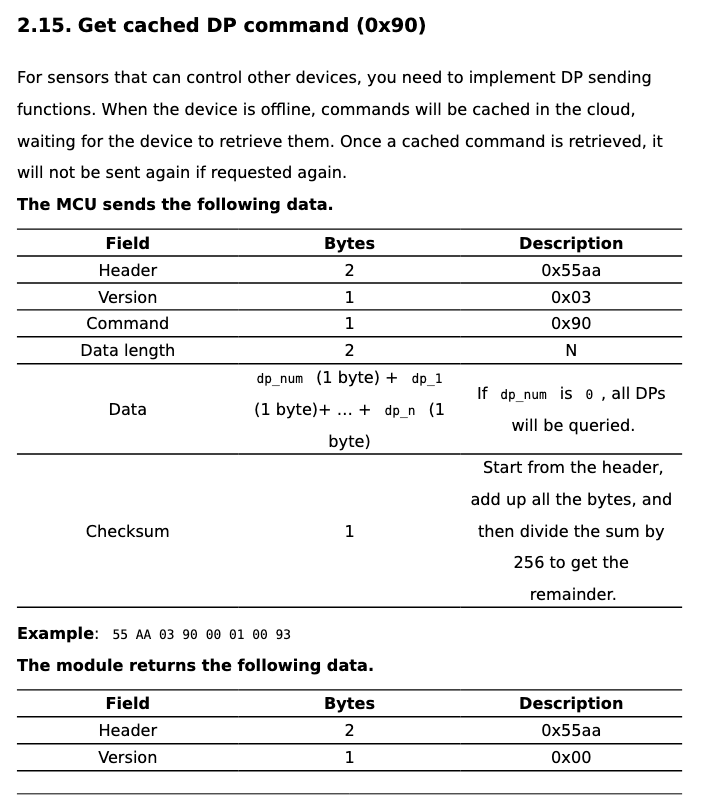
    TuyaMCU sends the command 0x90 (Get cached DP):
    55 AA 03 90 00 04 03 09 17 18 D1

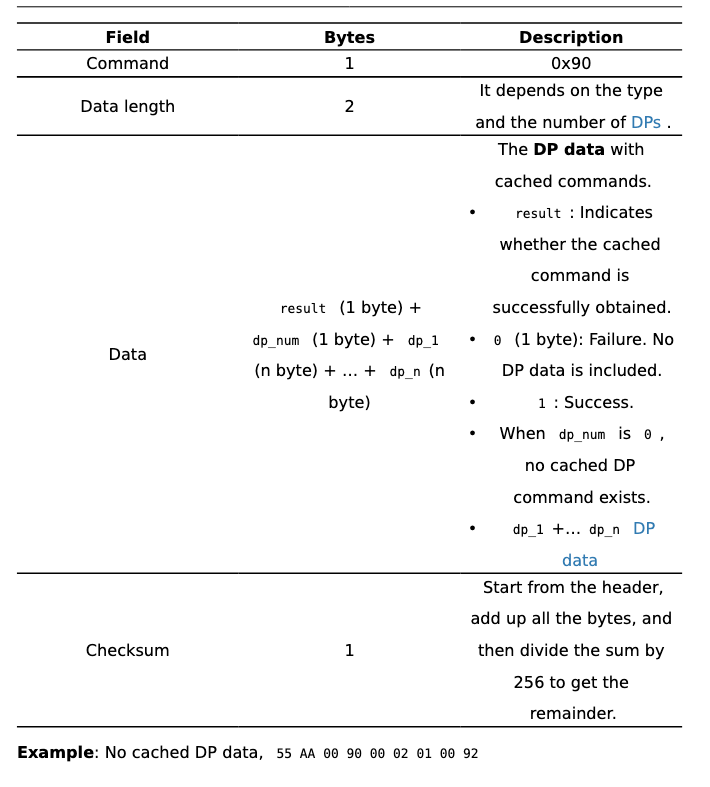
    OBK when no data is available responds:
    55 AA 00 90 00 02 01 00 92

    Description from documentation:

    Table of Tuya MCU command 0x90 Get cached DP from documentation.
    Data format table for TuyaMCU 0x90 command with example byte sequence

    For the moment, I made a primitive workaround in autoexec....

    
    delay_s 1
    
    uartSendHex 55AA00900002010092


    ...but it's not the best approach because there's no guarantee that I'll get the answer right if there's any major delay in response.

    p.kaczmarek2 wrote:

    The CHT8310 can be programmed to pin alert to wake up the MCU (or WiFI module) when a certain change occurs. There is no need to do polling (manual polling).


    All in all, it can be done either way - hmm looks like a good idea to practice this.

    Looking at it this way, Pin3 of the CHT8310 (ALERT) is not routed out, but it should be possible to solder the kynar etc. On the other hand it's only one of many connections to make anyway :)


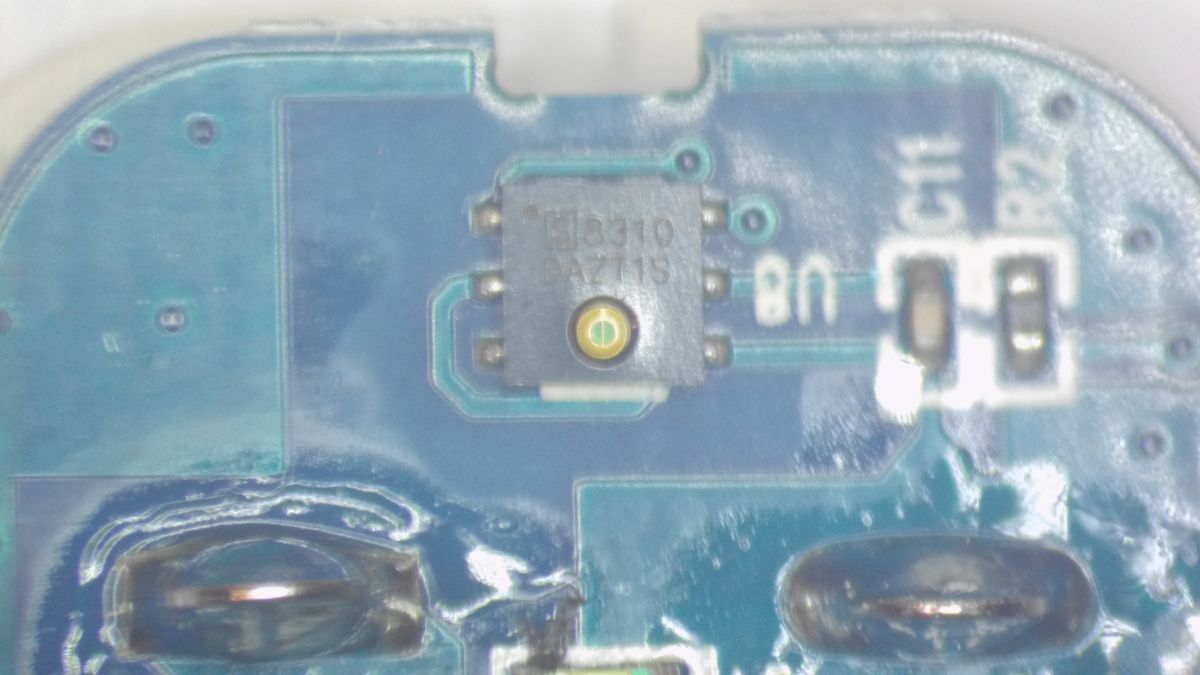
    Microscopic close-up of CH8310 chip on a blue PCB


    I have another sensor with the usual one not IP65 - I'll see maybe I'll dedicate it to such an experiment. I've put this IP65 out of the window and it's being tested - well, to bad the temperatures are now positive.... ...and I wanted to check how long the batteries would last in sub-zero temperatures...

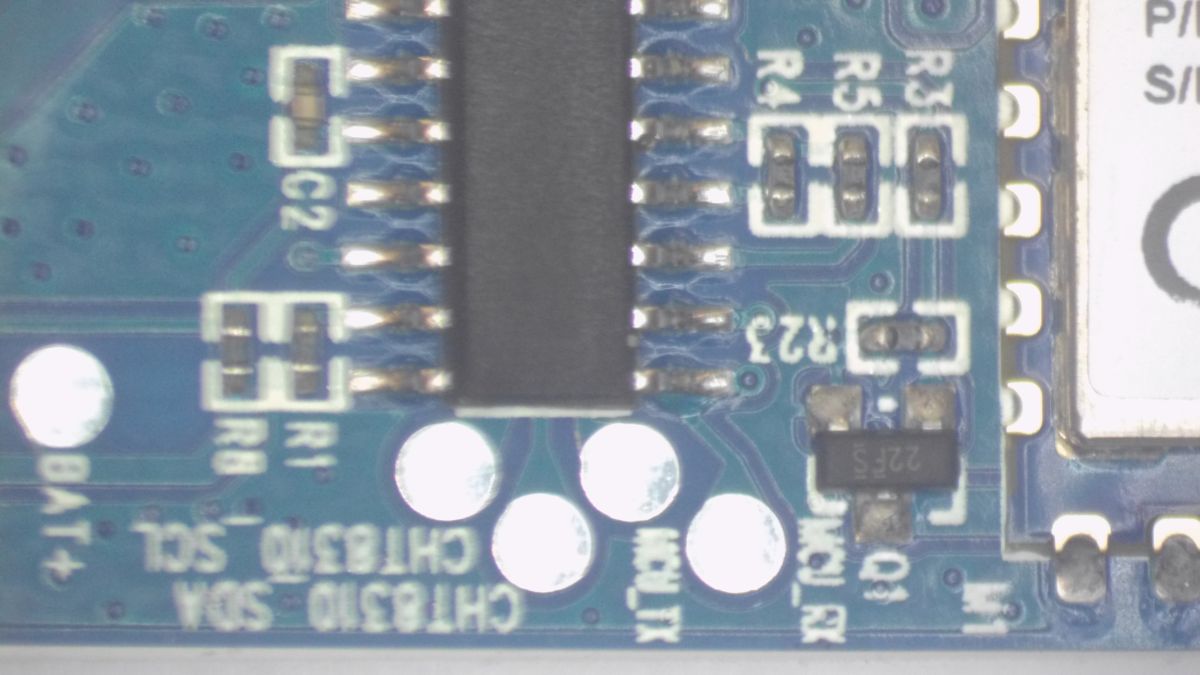
    By the way, as I've already ripped the card from the microscope camera, I'm pasting some pics of the TH11 sensor PCB.

    I didn't paste before because the quality of my microscope camera leaves a lot to be desired, so I let it go

    Close-up of PCB with CHT8310 marking and SMD components Close-up of TH11 sensor PCB with CB3S Wi-Fi module and CHT8310 chip Close-up of TH11-CB3S_V1.1 sensor PCB with electronic components and labeled test points
  • ADVERTISEMENT
  • #6 21820895
    ACCel
    Level 22  
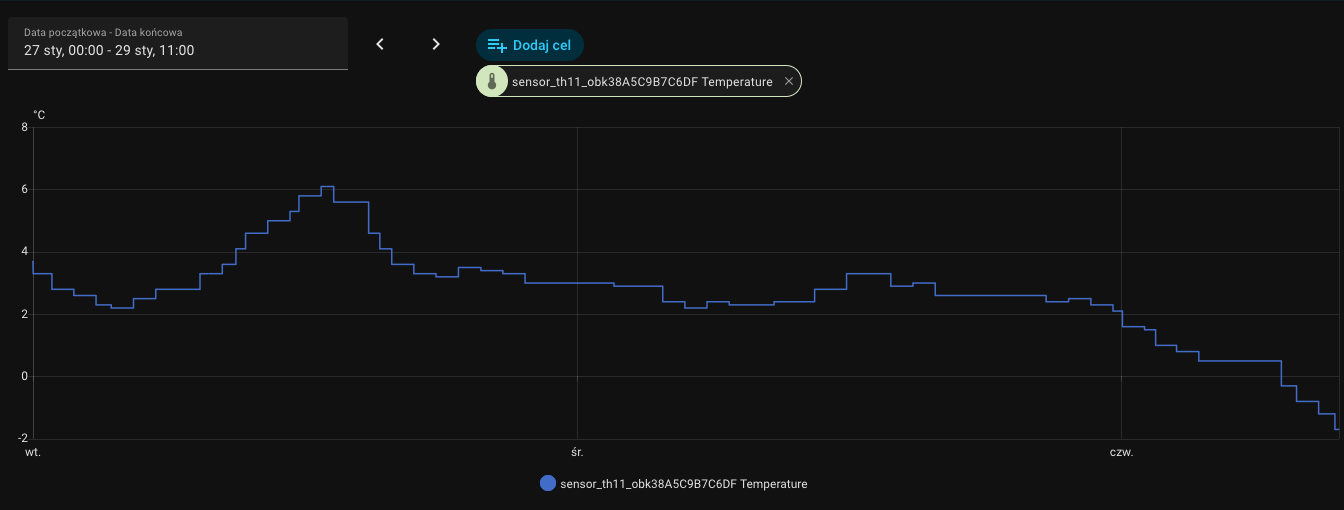
    The most important thing about these sensors is whether they report negative temperatures, many do not. I don't know if this is a limitation of Tuya or the electronics.
  • #7 21822982
    tplewa
    Level 39  
    ACCel wrote:
    The most important thing about these sensors is whether they report negative temperatures, many do not. I don't know if this is a limitation of Tuya or the electronics.


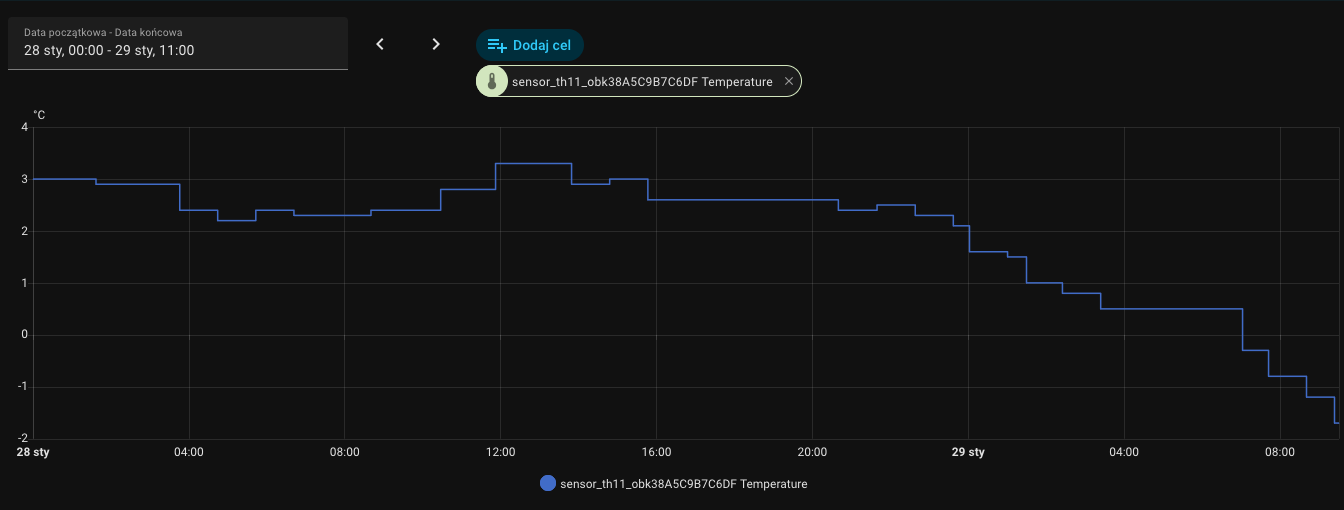
    Good I can answer. This one at least finally showed a negative temperature ;)

    Temperature graph from Tuya sensor showing values dropping below zero

    Temperature chart from sensor showing drop below zero degrees Celsius

    However, as far as the limitations are concerned, I see that all these sensors, at least from what is written on the Tuya api website, are limited to -20C even though, for example, the sensor used here, according to the data, allows measurements down to -40C....

    Although, as I mentioned, I am more interested in the life of the cells in such a sensor at negative temperatures - that is, rather such which the batteries or accumulators do not like very much :) Especially that WiFi is a bit power hungry and here, as has been said many times, e.g. sensors with ZigBee should be better suited for such purposes.

    Although as I mentioned with me it's more a game of curiosity than a desire to build a smart home - so I use what I happen to have which is WiFi....
  • #8 21828771
    puchalak
    Level 18  
    Unfortunately wifi based battery sensors don't make sense. I have (more had, as I don't use it anymore) probably exactly this one and the battery life is about 14 days. Poor. I also noticed its strange reluctance when going below zero - the sensor showed zero for a long time, only after quite a long time minus, and even so I think it overestimates negative temperatures a bit. Without a constant power supply, it's worth opting for zigbee, or some working on another system though perhaps identical to zigbee, but not on the tuya platform, such as x-sense.
📢 Listen (AI):
ADVERTISEMENT