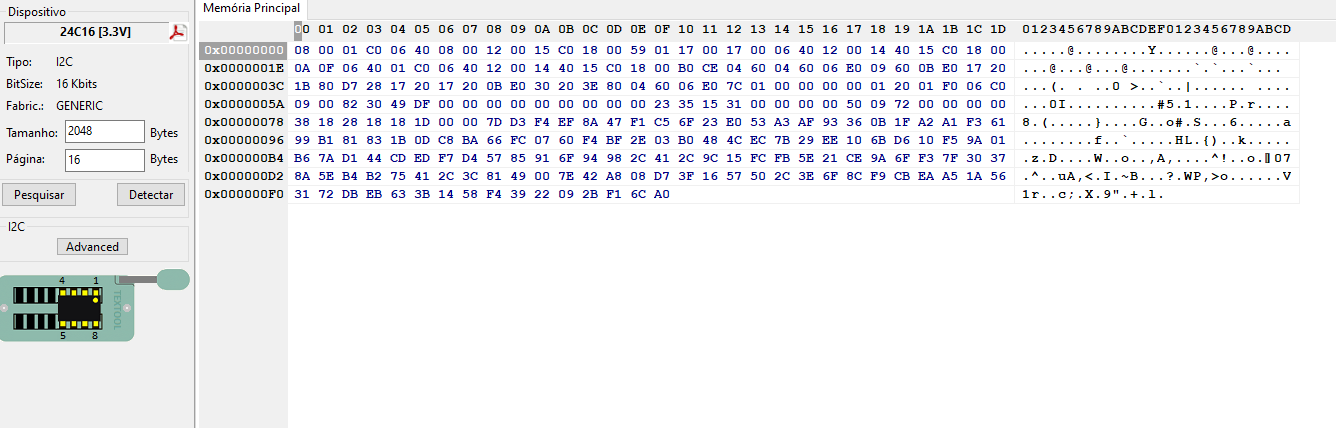
andyrs wrote: Because I'm starting to work with this kind of device, I really need to know how to read the file in the EEPROM, so this way I can do it myself instead of asking and bothering people all the time when I need it.
The code was supposed to protect the radio from unauthorised use after theft. In reality, coded radios caused more problems for their legitimate users. Initially, the security features were quite simple, because the processors involved in verifying the code had major limitations. The storage of the code pattern in memory could be explicit, but more often more or less sophisticated encryption was used - e.g. in Grundig radios on memories. To make access to the code more difficult, memories were also used (e.g. in Ford radios) that could not be read by normal programmers. Then came processors with internal EEPROMs - TMS370, Motorola 68HC05 or 68HC11 and others later. The Motorola's could be additionally protected against communication attempts - they could not be read or - worse - when a communication attempt was made, the contents of the internal memory were erased and you had a really big problem. Later radios or especially navigations have even stronger protections.
There is a relatively large amount of information about encrypted radios on our Forum. Users upload files - they get information about the code. There is also a database of files from various radios. Some contain information about the code addresses. You can find all sorts of calculators on the Internet for free - codes from files or serial number. Here, however, you have to be very careful about security - many of these files are fake or even nasty viruses capable of damaging data on your computer.
There are also paid programs, e.g. Martech, which even in the cheapest version do a lot of older radios.
andyrs wrote: I see in the file you sent me the number 10 74 16 11
This is exactly how the code is written in many Philips radios. You can experiment - see how the error counter changes, change the code, even turn it off. You can also see how the radio behaves with differently cleared (FF) memory addresses. Please note that there is more to the memory contents than just code and radio stations. Often there are unique settings stored during e.g. radio tuning. The biggest mistake is to replace the original file with one found on the Internet with a known code. You may not notice any deterioration in performance or functionality with many older radios, but you can really cause yourself a big problem and incur unnecessary costs.