





Home file server - a toddler, lots of USB drives and a printed enclosure
TL;DR 
- A desktop home file server uses a Raspberry Pi 4, an 8-drive printed enclosure, and a USB3 hub with selective drive power.
- The case adds passive heatsink cooling for the Pi and supports portable USB drives, with static disk naming in Ubuntu Server, Samba, and fstab.
- Printing the enclosure on an Ender 3 took about 3 days nonstop and used 1/4 roll of cheap PLA.
- It runs 4TB drives quietly, keeps the Pi at about 65C under 100% antivirus load, and delivers about 100Mbps with mechanical disks.
- Limitations include cramped Pi space, a 3A PSU struggling beyond 4 drives, no RAID mirroring, and a likely need for PET-G and thicker walls.
AI summary based on the discussion. May contain errors.
Today, a simple design - a 'desktop' server with the capacity to accommodate 8 drives.
Everyone wants a file server that is small, cheap, capacious, expandable and powerful. As it is in life, it is difficult to combine all these features.... But let's try an intermediate proposal that meets some of these characteristics.
Some time ago, the Raspberry 4 single-board nanocomputer appeared. The previous model was good for control or simple algorithms, but the amount of memory did not knock it down. Here there is up to 4GB RAM, 1Gbps network support, powerful USB3(x2) and all for acceptable money. The software (I'm using Ubuntu server) accepts USB3 Hub and USB3 drives, so the only thing missing is a case.... But what do we have a printer for? I designed a simple enclosure for the 'Pi' (with a passive enclosure in the form of a heatsink), 8 drives and a USB3 Hub with selective power on for the drives.
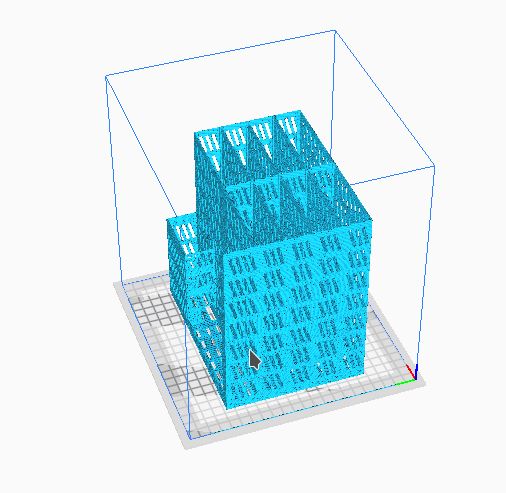
Printing was carried out on an Ender3 printer. Printing time - approximately 3 days non-stop.
The project was intended to be 'economical' - hence no raft and support and lots of holes. To speed up the print I also switched off the 'rip' and filament withdrawal (a few hours extra).
The print requires a lot of post-processing (a lot of 'threads' are left and the windows have to be corrected) but there is no objection to not saving time and then there is less post-processing.... Something for something...
The print used 1/4 roll of filament (cheapest PLA Plastspaw).
Settings - 205C head, 63C table (first layers 65). Obviously the print was the least precise.
I did not clean the disk chambers during assembly ('threads' provide good cushioning and are thin enough that there is no risk of overheating. The chambers accommodate any of the USB portable drives - including the tall 4TB ones. I currently have 4 4T drives running and I can hardly hear the drives at all (well... you can hear the heads moving a bit).
The biggest problem is with the 'Raspberry'. The chamber is very cramped. I decided to remove the inner wall, but it seems that after cleaning the chamber more carefully it would fit at least to the touch.
I expected the 'Pi' to overheat during operation. Fortunately, even under heavy load (antivirus checking disks - 100% ) the external temperature did not exceed 65C which I consider to be an acceptable value. The temperature under no load was around 40C.
If we're on the 'Pi' - don't skimp on the amount of memory. Buy the 4GB version. Especially if you want to have additional services on it besides SAMBA (GIT, HTTP server, Jellyfin, DNS server). On mine (2GB) a stupid antivirus (ClamAV) can consume all the memory. If we're only thinking of a file server without any 'tricks' or antivirus, then 2G is more than enough - unless we want much bigger disks.
If I had to repeat the 'production' of the case, I would probably opt for a different material (PET-G) and thicken the walls a bit in some places (currently it is 1mm). Eventually the top and back wall will also be needed but.... there is a bit of a problem with the 'raspberry' starting up with the disks on (and it's probably not a power supply issue). For me, the problem is not annoying enough to fight it but access to the sockets is necessary.... Fortunately reboots are rare. Another issue is that it's standing in my workshop where it doesn't have to be beautiful but there can't be a pile of drives loose
The whole thing works reliably and meets all (realistic) expectations.... The transfer rate (measured) is 100Mbps (for mechanical disks). The media server works without jamming. There is no mirroring or RAID5 but if one has such needs then no problem
As for configuration - plain Ubuntu on Raspberry Pi + Debian/Ubuntu archive packages (plus SNAP). The disks must be named. In fstab we enter static mapping to the names (there is no guarantee of disk 'letter' allocation). In the Samba configuration we define the allocations. I, for example, have an additional partition with SD shared independently of the HDD in addition to the HDD. It's worth configuring 'spare' directories and shares - for example, so that you can add a new drive 'for a while' without revolution. Then you can do a 'mount' and you can already see its contents.
One additional note - power supply and hub - I have a 3A power supply and unfortunately but adding more than 4 drives causes me problems precisely with powering the drives.... You can cope either by selectively turning the drives on, or by plugging the others into the raspberry (but I wouldn't advise above 2 - not saying there are only 2 USB3 and 2 USB2 sockets).
I attach the zipped STL and GCODE files (under Ender 3 pro).
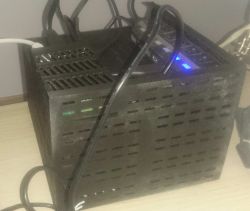
Everyone wants a file server that is small, cheap, capacious, expandable and powerful. As it is in life, it is difficult to combine all these features.... But let's try an intermediate proposal that meets some of these characteristics.
Some time ago, the Raspberry 4 single-board nanocomputer appeared. The previous model was good for control or simple algorithms, but the amount of memory did not knock it down. Here there is up to 4GB RAM, 1Gbps network support, powerful USB3(x2) and all for acceptable money. The software (I'm using Ubuntu server) accepts USB3 Hub and USB3 drives, so the only thing missing is a case.... But what do we have a printer for? I designed a simple enclosure for the 'Pi' (with a passive enclosure in the form of a heatsink), 8 drives and a USB3 Hub with selective power on for the drives.
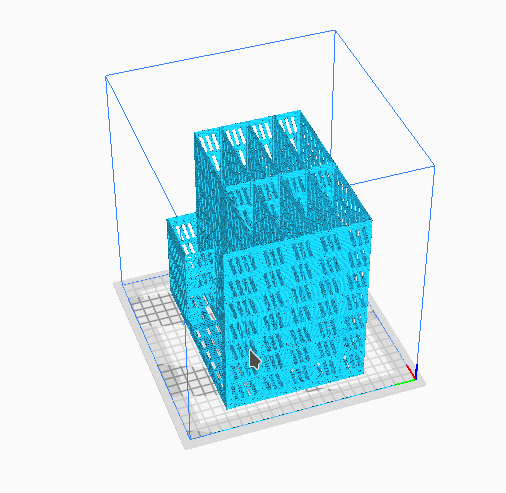
Printing was carried out on an Ender3 printer. Printing time - approximately 3 days non-stop.
The project was intended to be 'economical' - hence no raft and support and lots of holes. To speed up the print I also switched off the 'rip' and filament withdrawal (a few hours extra).
The print requires a lot of post-processing (a lot of 'threads' are left and the windows have to be corrected) but there is no objection to not saving time and then there is less post-processing.... Something for something...
The print used 1/4 roll of filament (cheapest PLA Plastspaw).
Settings - 205C head, 63C table (first layers 65). Obviously the print was the least precise.
I did not clean the disk chambers during assembly ('threads' provide good cushioning and are thin enough that there is no risk of overheating. The chambers accommodate any of the USB portable drives - including the tall 4TB ones. I currently have 4 4T drives running and I can hardly hear the drives at all (well... you can hear the heads moving a bit).
The biggest problem is with the 'Raspberry'. The chamber is very cramped. I decided to remove the inner wall, but it seems that after cleaning the chamber more carefully it would fit at least to the touch.
I expected the 'Pi' to overheat during operation. Fortunately, even under heavy load (antivirus checking disks - 100% ) the external temperature did not exceed 65C which I consider to be an acceptable value. The temperature under no load was around 40C.
If we're on the 'Pi' - don't skimp on the amount of memory. Buy the 4GB version. Especially if you want to have additional services on it besides SAMBA (GIT, HTTP server, Jellyfin, DNS server). On mine (2GB) a stupid antivirus (ClamAV) can consume all the memory. If we're only thinking of a file server without any 'tricks' or antivirus, then 2G is more than enough - unless we want much bigger disks.
If I had to repeat the 'production' of the case, I would probably opt for a different material (PET-G) and thicken the walls a bit in some places (currently it is 1mm). Eventually the top and back wall will also be needed but.... there is a bit of a problem with the 'raspberry' starting up with the disks on (and it's probably not a power supply issue). For me, the problem is not annoying enough to fight it but access to the sockets is necessary.... Fortunately reboots are rare. Another issue is that it's standing in my workshop where it doesn't have to be beautiful but there can't be a pile of drives loose
The whole thing works reliably and meets all (realistic) expectations.... The transfer rate (measured) is 100Mbps (for mechanical disks). The media server works without jamming. There is no mirroring or RAID5 but if one has such needs then no problem
As for configuration - plain Ubuntu on Raspberry Pi + Debian/Ubuntu archive packages (plus SNAP). The disks must be named. In fstab we enter static mapping to the names (there is no guarantee of disk 'letter' allocation). In the Samba configuration we define the allocations. I, for example, have an additional partition with SD shared independently of the HDD in addition to the HDD. It's worth configuring 'spare' directories and shares - for example, so that you can add a new drive 'for a while' without revolution. Then you can do a 'mount' and you can already see its contents.
One additional note - power supply and hub - I have a 3A power supply and unfortunately but adding more than 4 drives causes me problems precisely with powering the drives.... You can cope either by selectively turning the drives on, or by plugging the others into the raspberry (but I wouldn't advise above 2 - not saying there are only 2 USB3 and 2 USB2 sockets).
I attach the zipped STL and GCODE files (under Ender 3 pro).


w_d wrote 54 posts with
rating 14 , helped 2 times.
Live in city Polska.
Been with us since 2003 year.
Comments
Good Morning Great project, I am also just building a home file server on my tiny and I have one question, did you connect usb hard drives to the rpi or maybe SATA drives via an adapter? If the latter,... [Read more]
It would be useful to include a photo of the final product. [Read more]
In my case, powering the drives from outside the raspberry usb port helped. It's a known problem, Disks have too much instantaneous current draw at startup. [Read more]
i use USB drives for 'historical' reasons. Previously I have attached Iomega and Emtec to servers but they just angered me with their slowness and unstable operation Potentially one SATA drive I might... [Read more]
You can rewire the wire connecting the raspberry to the USB HUB, cut off the +5V wire. Leave only +D and -D ground. [Read more]
Funny thing. In my Cura 60mm/s, 0.2mm layer and it shows some 44h. And tell me how did you save a few hours on retraction alone? Very interesting case. [Read more]
Not really... there can be problems.... And it is not only the Hub that is the problem - also the Malinka firmware.... Added after 14 [minutes]: I didn't move the speed. I have changed... [Read more]
Which features does the 'raspberry' fulfil as a file server that a PC on a mini itx board with Xpenology installed does not do better and probably even cheaper? [Read more]
I once made a server on a raspberry pi zero wifi with a flash drive instead of a disk. All I had to do was boot the raspberry without the flash drive and everything crashed 😠. I think such games... [Read more]
You are absolutely right only.... - i checked the operation with 1 disk disconnected. Everything gets up - just see an empty share. The only problem at the moment is the emergence from the disabled state... [Read more]
I finished playing with the Raspberry about 3 years ago. Admittedly, these computers have their advantages, but I wouldn't use it as a server. At my house we have several desktops, laptops, mobile phones... [Read more]
Hello, I too am in the process of making a home NAS server on a raspberry. I have version 4 with 4GB RAM, it is also available with 8GB but 4 is completely sufficient. Ultimately I want to run 12 SATA... [Read more]
Still PiHole is worth installing :) [Read more]
All in all, you're right. Why do anything. And you're right that you need to use proven components for 'mission critical' stuff. And you know... for work I use IBM x-series in small configurations (4xXeon... [Read more]
Hello I see the Chinese equivalent of a 7 port HUB. I would advise against using this thing if you want to keep any important things connected to it. I've had 3 of these and all three broke in half... [Read more]
I'd try to do this on a raspberry compute module, throw in a SATA controller on PCI-E and use it as a NAS. Interesting idea, as a simple DIY pretty cool. Cheap, easy, and in projects like this keeping... [Read more]
This hub is reporting as a single device. What was the nature of the damage? And what caused it in the attached devices? There are no high voltages there (other than 5V) and so the theory is that at most... [Read more]
A new compute module 4 came out that year. Based on the RPi 4, with 1Gb LAN on PCI-E and without the USB3.0 controller, which gives the possibility to use the PCI-E line that the RPi 4 B uses the USB 3... [Read more]
@VaM VampirE All nice, but price-wise the CM4 + expansion board + SATA controller will come out 2x as much as the first better mini-itx board with 4xSATA on board.... [Read more]